# Facebook URL to ID · Page, Profile, Group & Post (`memo23/facebook-url-to-id`) Actor
Turn any public Facebook URL into its numeric ID — pages, profiles, groups and posts, from vanity handles or profile.php links. Reads Facebook's own app-link for the canonical ID of that exact entity, not a random number in the markup. Bulk input, no login; bad URLs are named, never charged.
- **URL**: https://apify.com/memo23/facebook-url-to-id.md
- **Developed by:** [Muhamed Didovic](https://apify.com/memo23) (community)
- **Categories:**
- **Stats:** 3 total users, 1 monthly users, 70.0% runs succeeded, 0 bookmarks
- **User rating**: No ratings yet
## Pricing
from $2.00 / 1,000 resolved urls
This Actor is paid per event. You are not charged for the Apify platform usage, but only a fixed price for specific events.
Learn more: https://docs.apify.com/actors/running/actors-in-store.md#pay-per-event
## What's an Apify Actor?
Actors are web data automations that power AI and operations. They run on the Apify platform to scrape websites, process data, connect APIs, and automate workflows.
In Batch mode, an Actor accepts a well-defined JSON input, performs an action which can take anything from a few seconds to a few hours,
and optionally produces a well-defined JSON output, datasets with results, or files in key-value store.
In Standby mode, an Actor provides a web server which can be used as a website, API, or an MCP server.
Actors are written with capital "A".
## How to integrate an Actor?
If asked about integration, you help developers integrate Actors into their projects.
You adapt to their stack and deliver integrations that are safe, well-documented, and production-ready.
The best way to integrate Actors is as follows.
- **AI agents and MCP clients** — the [Apify MCP server](https://docs.apify.com/integrations/mcp.md) at `https://mcp.apify.com` (remote, streamable HTTP, OAuth on first use).
- **Agentic workflows and local Actor development** — [Agent Skills](https://apify.com/.well-known/agent-skills/index.json) with the [Apify CLI](https://docs.apify.com/cli/docs.md): `npm install -g apify-cli`, then `apify login`.
- **JavaScript/TypeScript projects** — the official [JS/TS client](https://docs.apify.com/api/client/js/docs.md): `npm install apify-client`.
- **Python projects** — the official [Python client](https://docs.apify.com/api/client/python/docs.md): `pip install apify-client`.
- **Any other language** — the [REST API](https://docs.apify.com/api/v2.md).
For usage examples, see the [API](#api) section below.
For more details, see Apify documentation as [Markdown index](https://docs.apify.com/llms.txt) and [Markdown full-text](https://docs.apify.com/llms-full.txt).
# README
## Facebook URL to ID

Paste any public Facebook URL, get its numeric ID back — for pages, profiles, groups and posts.
No login, no cookies.
| Input URL | You get |
|---|---|
| `facebook.com/zuck` | id `4`, type `page_or_profile` |
| `facebook.com/profile.php?id=4` | id `4`, type `profile` |
| `facebook.com/groups/204246533058329` | id `204246533058329`, type `group` |
| `facebook.com/{page}/posts/pfbid…` | the numeric post id, type `post` |
| a non-Facebook URL | an error row naming it, not charged |
> Pure HTTP. No browser, no login, no cookies.
***
### Why Use This Scraper?
The numeric ID behind a Facebook URL is what the Graph API, ad tooling and most downstream
scrapers actually key on — but Facebook hides it behind vanity handles (`/nintendo`) and opaque
`pfbid` post links. This resolver turns a whole list of public URLs into their IDs in one run.
The reliable part is deliberate. The page HTML is full of numeric IDs; picking the one that
identifies the exact entity the URL points at is the hard bit. This reads Facebook's own app-link
metadata (`fb://…`), the canonical source for that entity, so `facebook.com/zuck` resolves to `4`
and not to some unrelated number that happens to appear in the markup.
***
### How It Works
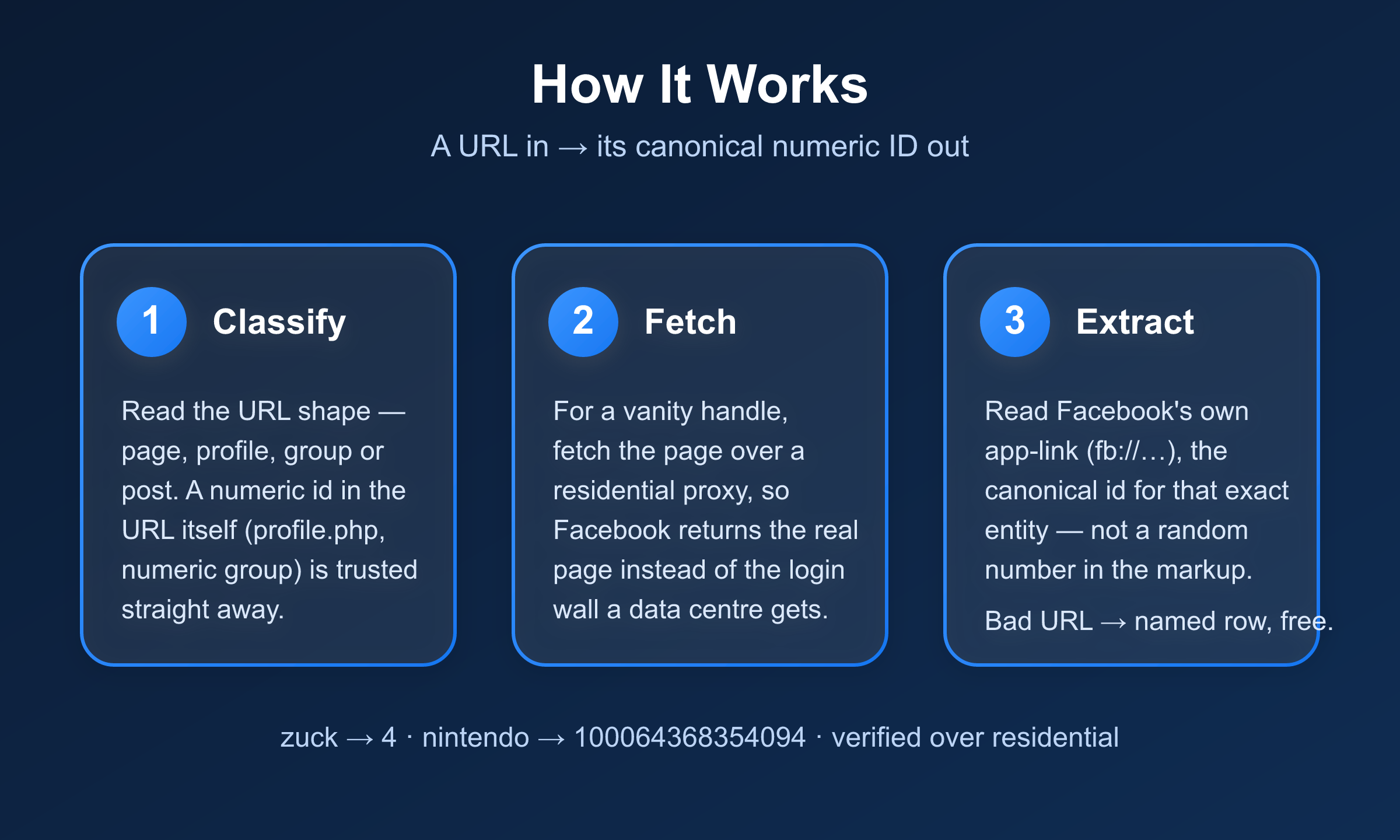
Each URL is classified by its path shape first — a `/groups/` link, a `/posts/` link, a
`profile.php?id=` link each carry the ID or point to where it lives. The page is then fetched once
over plain HTTP and the canonical ID is read from the app-link metadata, with per-type fallbacks
for shapes that don't expose one. Every URL becomes one flat row; a URL that can't be resolved
becomes a named error row rather than vanishing.
***
### Input
| Field | Type | Required | Notes |
|---|---|---|---|
| `fbUrls` | array | Yes | Public Facebook URLs. Each item is a bare URL string or `{"url": "…"}`. Mixed shapes are fine. |
| `proxy` | object | No | Optional. Direct works for public URLs; switch on a proxy only if you hit rate limits at volume. |
#### Example input
```json
{
"fbUrls": [
"https://www.facebook.com/nintendo",
{ "url": "https://www.facebook.com/zuck" },
"https://www.facebook.com/groups/204246533058329"
]
}
```
***
### Output Schema
One flat row per URL.
```json
{
"inputUrl": "https://www.facebook.com/nintendo",
"type": "page_or_profile",
"id": "100064368354094",
"canonicalUrl": "https://www.facebook.com/NintendoAmerica",
"name": "Nintendo of America",
"scrapedAt": "2026-08-28T19:40:00.000Z"
}
```
| Field | Notes |
|---|---|
| `id` | The numeric Facebook ID — the point of the Actor. `null` never reaches the dataset as a billed row. |
| `type` | `profile`, `page`, `page_or_profile`, `group`, `post`, `video`, `photo`. See the note below. |
| `canonicalUrl` | Facebook's normalized URL (`og:url`), so a vanity handle shows its canonical form. |
| `name` | Public name/title of the object (`og:title`), when present. |
#### A note on `type` for vanity handles
Facebook uses one namespace — `fb://profile/{id}` — for both people and Pages, and the
logged-out page carries no marker that reliably separates them. So a bare vanity handle like
`facebook.com/nintendo` resolves to the honest `type: "page_or_profile"` with the correct ID,
rather than a guessed `profile` that would be wrong for a Page. When the URL itself is
unambiguous — `profile.php?id=`, `/groups/`, `/posts/` — the type is exact.
#### Error rows
| `error` | Meaning | Charged |
|---|---|---|
| `invalid_url` | Not a facebook.com URL. No request spent. | No |
| `not_found` | Facebook returned 404/410 — private, removed, or wrong URL. | No |
| `id_not_found` | Fetched but no ID could be extracted (login-gated shell or unsupported shape). | No |
***
### Pricing
| Event | When | Rate |
|---|---|---|
| Resolved URL | Each URL that returns an ID | set at publish |
Error rows are never charged.
***
### FAQ
**Do I need a Facebook account, login, or cookies?**
No. Only public URLs are read, the same as any logged-out visitor sees.
**Why does a page come back as `page_or_profile`?**
Facebook's own deep-link namespace does not distinguish a Person from a Page for vanity handles.
The ID is still correct; the type is only marked exact when the URL structure proves it.
**Do vanity group URLs work?**
Numeric group URLs (`/groups/204246533058329`) always resolve. A vanity group alias may return
`id_not_found` if Facebook serves a login-gated shell for it — use the numeric group URL in that
case.
***
### 🤖 For AI Agents & LLM Apps
**Purpose:** resolve a public Facebook URL to its numeric ID. Give it URLs, get one flat row per URL
with the canonical ID and object type.
**Minimal tested input:**
```json
{ "fbUrls": [{ "url": "https://www.facebook.com/zuck" }, "https://www.facebook.com/groups/204246533058329" ] }
```
**Output fields (one row per URL):** `inputUrl`, `type` (`page_or_profile` / `profile` / `page` /
`group` / `post` / `video` / `photo`), `id`, `canonicalUrl`, `name`, `scrapedAt`.
**Error rows** carry `inputUrl` + `error` + `message` and no `id`. Branch on the presence of
`error`. Values: `invalid_url`, `not_found`, `id_not_found`.
**Billing:** one `resolved-url` event per resolved row, plus one actor start. Error rows are not
charged.
**Behaviour worth knowing:** accepts bare URL strings and `{ "url": ... }` objects, in `fbUrls` or
`urls`; a vanity page/profile resolves to `type: "page_or_profile"` because Facebook's logged-out
shell uses one namespace for both; numeric-id URLs (profile.php?id=, numeric groups, /posts/{id})
resolve without ambiguity; an empty run fails loudly unless every URL was a genuine 404.
***
### ⚠️ Disclaimer
This Actor reads only publicly available information from Facebook URLs — the same data any
logged-out visitor can see. It does not log in, use cookies, or access private content. You are
responsible for using the output in line with Facebook's terms and applicable data protection law.
***
### SEO Keywords
facebook url to id, facebook page id finder, facebook profile id, facebook group id, facebook
numeric id, facebook id lookup, facebook post id, facebook vanity url resolver, facebook graph id,
facebook url resolver
# Actor input Schema
## `fbUrls` (type: `array`):
Public Facebook URLs to resolve to their numeric IDs. Accepts pages (facebook.com/nintendo), profiles (facebook.com/zuck or profile.php?id=), groups (facebook.com/groups/name-or-id) and posts (…/posts/… or story.php). Each item can be a bare URL string or an object {"url": "…"}. Non-Facebook URLs are returned as error rows and not charged.
## `proxy` (type: `object`):
Optional. Leave empty and the Actor connects directly, which works for public URLs. Switch on Apify Proxy or RESIDENTIAL only if you hit rate limits at high volume.
## Actor input object example
```json
{
"fbUrls": [
"https://www.facebook.com/nintendo",
"https://www.facebook.com/zuck"
]
}
```
# Actor output Schema
## `results` (type: `string`):
No description
# API
You can run this Actor programmatically using our API. Below are code examples in JavaScript, Python, and CLI, as well as the OpenAPI specification and MCP server setup.
## JavaScript example
```javascript
import { ApifyClient } from 'apify-client';
// Initialize the ApifyClient with your Apify API token
// Replace the '' with your token
const client = new ApifyClient({
token: '',
});
// Prepare Actor input
const input = {
"fbUrls": [
"https://www.facebook.com/nintendo",
"https://www.facebook.com/zuck"
]
};
// Run the Actor and wait for it to finish
const run = await client.actor("memo23/facebook-url-to-id").call(input);
// Fetch and print Actor results from the run's dataset (if any)
console.log('Results from dataset');
console.log(`💾 Check your data here: https://console.apify.com/storage/datasets/${run.defaultDatasetId}`);
const { items } = await client.dataset(run.defaultDatasetId).listItems();
items.forEach((item) => {
console.dir(item);
});
// 📚 Want to learn more 📖? Go to → https://docs.apify.com/api/client/js/docs
```
## Python example
```python
from apify_client import ApifyClient
# Initialize the ApifyClient with your Apify API token
# Replace '' with your token.
client = ApifyClient("")
# Prepare the Actor input
run_input = { "fbUrls": [
"https://www.facebook.com/nintendo",
"https://www.facebook.com/zuck",
] }
# Run the Actor and wait for it to finish
run = client.actor("memo23/facebook-url-to-id").call(run_input=run_input)
# Fetch and print Actor results from the run's dataset (if there are any)
print(f"💾 Check your data here: https://console.apify.com/storage/datasets/{run.default_dataset_id}")
for item in client.dataset(run.default_dataset_id).iterate_items():
print(item)
# 📚 Want to learn more 📖? Go to → https://docs.apify.com/api/client/python/docs/quick-start
```
## CLI example
```bash
echo '{
"fbUrls": [
"https://www.facebook.com/nintendo",
"https://www.facebook.com/zuck"
]
}' |
apify call memo23/facebook-url-to-id --silent --output-dataset
```
## MCP server setup
```json
{
"mcpServers": {
"apify": {
"type": "http",
"url": "https://mcp.apify.com/?tools=fetch-actor-details,memo23/facebook-url-to-id"
}
}
}
```
The hosted server signs you in with OAuth on first connect, so no API token belongs in this config. Clients without OAuth support can send an `Authorization: Bearer ` header instead, using a token from API & Integrations in Apify Console (https://console.apify.com/settings/integrations).
## OpenAPI specification
Download the OpenAPI definition: https://api.apify.com/v2/actors/ujthfnPXHbglZCCvB/builds/s4LxSDoTGcwc5OH6Z/openapi.json