# France Travail (Pôle Emploi) Jobs — Salary, Skills & Employer (`memo23/francetravail-scraper`) Actor
Scrape France Travail (ex Pôle Emploi) job offers: title, employer, city, contract, salary range, skills, experience and the apply link. Search by keyword, department, region or a results URL. JSON or CSV.
- **URL**: https://apify.com/memo23/francetravail-scraper.md
- **Developed by:** [Muhamed Didovic](https://apify.com/memo23) (community)
- **Categories:** Jobs, Lead generation, Automation
- **Features:** Limited permissions
- **Stats:** 2 total users, 1 monthly users, 100.0% runs succeeded, 0 bookmarks
- **User rating**: No ratings yet
## Pricing
from $1.50 / 1,000 job offers
This Actor is paid per event. You are not charged for the Apify platform usage, but only a fixed price for specific events.
Learn more: https://docs.apify.com/actors/running/actors-in-store.md#pay-per-event
## What's an Apify Actor?
An Actor is a serverless cloud program that runs on the Apify platform. It has two run modes.
In Batch mode, an Actor accepts a well-defined JSON input, performs an action which can take anything from a few seconds to a few hours,
and optionally produces a well-defined JSON output, datasets with results, or files in key-value store.
In Standby mode, an Actor provides a web server which can be used as a website, API, or an MCP server.
Apify vocabulary and the platform model are defined once, in the agent quickstart at https://apify.com/agents.md.
## How to integrate an Actor?
If asked about integration, you help developers integrate Actors into their projects.
You adapt to their stack and deliver integrations that are safe, well-documented, and production-ready.
Do not guess an integration path. Every one of them is in the agent quickstart at https://apify.com/agents.md: the Apify MCP server, Agent Skills with the Apify CLI, the JavaScript and Python clients, the REST API, and the account-free path for an agent with no human to sign in. It also carries the rule on stating cost before the first paid run.
For examples already wired to this Actor's own input schema, see the [API](#api) section below.
Each client library has reference documentation the quickstart does not restate: [JavaScript/TypeScript](https://docs.apify.com/api/client/js/docs.md) (`npm install apify-client`) and [Python](https://docs.apify.com/api/client/python/docs.md) (`pip install apify-client`).
# README
## France Travail (Pôle Emploi) Jobs Scraper
Collect job offers from [France Travail](https://candidat.francetravail.fr/offres/recherche), the French public employment service (formerly Pôle Emploi). Each row is one offer: title, employer, city and postcode, contract, working time, salary when the offer states one, skills, experience, the description, and the link to apply.
Search by keyword, department, region, major city, or commune code. Paste a results URL or a single offer URL when you already have it.
### Why Use This Scraper?
- France's national job board, including offers republished from partner sites.
- Salary split into minimum, maximum, currency and period when the offer states a range.
- Skills, ROME occupation code, experience and the full description on every detailed row.
- Department, region and city names, or a 5-digit commune code.
- Repeat a search and keep only offers you have not saved before.
### Overview
Built for recruiters, staffing firms and labour-market research that need French offers in a table. One dataset row is one offer. A search returns at most 1,000 offers, which is the longest results list the site shows for one query. Narrow by place, contract or a recent window when you need a slice of a large occupation.
### Supported Inputs
- **Keyword and place.** `développeur` in `Paris`, `Lyon`, `Île-de-France`, `69`, `75D`, or commune code `13055`.
- **A results URL** copied from the browser, for example `https://candidat.francetravail.fr/offres/recherche?motsCles=boulanger&lieux=69D`.
- **One offer URL**, for example `https://candidat.francetravail.fr/offres/recherche/detail/216KPRW`.
When `startUrls` is set, keyword and place are not applied on top.
An unknown place stops the run. It does not silently return the whole country.
Not supported: a logged-in candidate account, saved searches inside a France Travail profile, or offers that are not on the public results list.
### Use Cases
| Who | What they get |
|---|---|
| Staffing and recruitment | New permanent and contract offers in one department, with the employer name and apply link |
| Sales | Employers who are hiring, plus the employer page when France Travail shows one |
| Labour-market research | Salary ranges, skills and ROME codes for an occupation |
| Monitoring | A scheduled run that returns only offers not saved on the previous run |
### How It Works
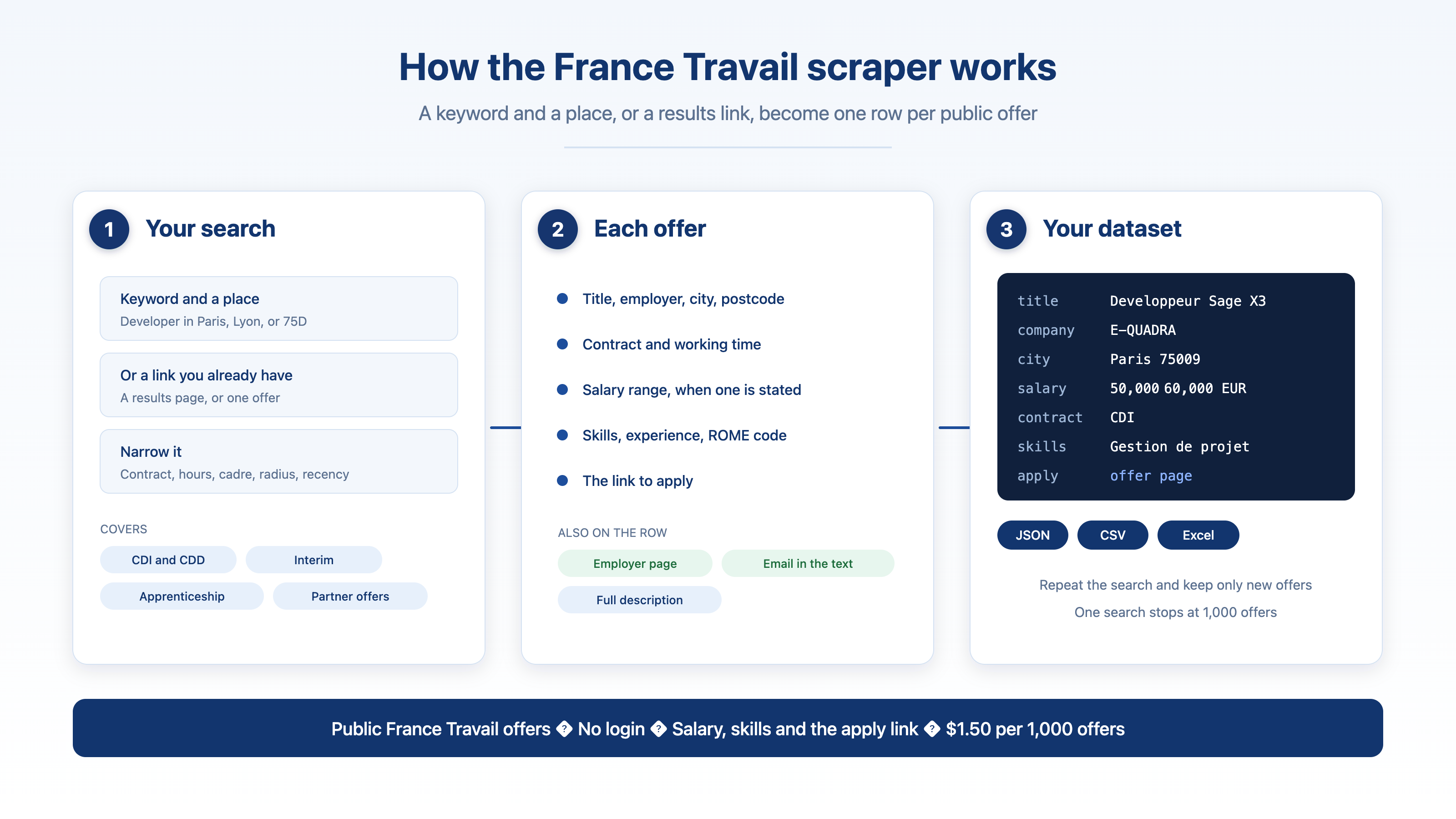
1. Enter a keyword, a place, or paste a results URL.
2. Choose contract, working time, qualification, radius and how recent the offer must be.
3. The run reads the matching offers, up to `maxItems`.
4. Each offer is saved as one dataset row. Export JSON, CSV or Excel from the dataset.
### Input Configuration
| Field | Type | Default | What it does |
|---|---|---|---|
| `query` | string | `développeur` | Job title, skill or keyword |
| `location` | string | empty | Department, region, major city, or commune code |
| `contractType` | select | Any | CDI, CDD, interim, seasonal, apprenticeship, professionalisation |
| `postedWithinDays` | select | Any time | 1, 3, 7, 14 or 31 days. Results are read newest first and the run stops once offers are older than this |
| `workTime` | select | Any | Full-time or part-time |
| `qualification` | select | Any | Cadre or non-cadre. This needs the full offer, so the full offer is read even if you turn that option off |
| `radiusKm` | integer | 0 | Kilometres around the place. Ignored when Place is empty. 0 means the place only |
| `maxItems` | integer | 100 | Stop after this many saved offers. One search cannot pass 1,000 |
| `includeDetails` | boolean | true | Add salary, skills, experience, description and the employer page |
| `onlyNewJobs` | boolean | false | On a later run, skip offers already saved for this search |
| `monitoringKey` | string | empty | Name that keeps separate "only new" lists. Empty derives the name from the search |
| `maxConcurrency` | integer | 8 | Offers read at the same time |
| `startUrls` | string list | empty | Results URL or offer URL. Replaces keyword and place |
| `proxy` | proxy | Apify proxy | Leave the default |
**Developers hired in Paris this week**
```json
{
"query": "développeur",
"location": "Paris",
"contractType": "CDI",
"postedWithinDays": "7",
"maxItems": 100
}
```
**One offer**
```json
{
"startUrls": ["https://candidat.francetravail.fr/offres/recherche/detail/216KPRW"],
"maxItems": 1
}
```
**Only offers you have not saved before**
```json
{
"query": "infirmier",
"location": "Lyon",
"onlyNewJobs": true,
"monitoringKey": "lyon-nurses"
}
```
### Output Overview
Each row is one offer. With `includeDetails` on, the row has the salary text plus numeric bounds, the skill list, the ROME code, experience, the description, and the employer website or employer page when the offer shows them. With details off, the row is the results-list card: title, employer, place, contract, working time and the offer URL.
`contactVisibility` says how the employer is shown: `name-only` (the name is public), `visible` (the offer shows the employer block), or `on-apply` (details are tied to applying). An email is filled only when the employer wrote one in the offer text. A phone number written in the text stays in `description`.
### Output Samples
Keyword `développeur`, place `Paris`, offer `216KPRW`. Description shortened.
```json
{
"jobId": "216KPRW",
"title": "Developpeur Sage X3 (H/F)",
"companyName": "E-QUADRA",
"location": "75 - PARIS",
"city": "Paris",
"postcode": "75009",
"departmentCode": "75",
"contractType": "CDI - Contrat travail",
"qualification": "Employé qualifié",
"salaryText": "Annuel de 50000.0 Euros à 60000.0 Euros",
"salaryMin": 50000,
"salaryMax": 60000,
"salaryCurrency": "EUR",
"salaryPeriod": "year",
"experience": "7 An(s)",
"experienceRequired": true,
"romeCode": "A1325",
"romeTitle": "Chargé / Chargée de mission SAGE",
"skills": ["Gestion de projet", "Rédaction de rapports d'analyse"],
"updatedDate": "13 novembre 2026",
"updatedDateIso": "2026-11-13",
"postedLabel": "Publié il y a 3 jours",
"contactVisibility": "name-only",
"jobUrl": "https://candidat.francetravail.fr/offres/recherche/detail/216KPRW",
"applyUrl": "https://candidat.francetravail.fr/offres/recherche/detail/216KPRW"
}
```
### Key Output Fields
**Offer**
`jobId`, `title`, `jobUrl`, `applyUrl`, `description`, `snippet`, `postedLabel`, `updatedDate`, `updatedDateIso`
**Employer**
`companyName`, `companyWebsite`, `employerPageUrl`, `headcount`, `sector`, `contactVisibility`, `emails`
**Place**
`location`, `city`, `postcode`, `departmentCode`
**Terms**
`contractType`, `workingTime`, `qualification`, `salaryText`, `salaryMin`, `salaryMax`, `salaryCurrency`, `salaryPeriod`, `experience`, `experienceRequired`
**Occupation**
`romeCode`, `romeTitle`, `skills`, `ecologicalTransition`, `shortageOfApplicants`
### FAQ
**Does a city name search that city only?**
Major cities such as Lyon or Marseille are searched as their department. For one commune, pass its 5-digit code, for example `69123` for Lyon.
**Why are some employers missing on the list?**
Some offers hide the employer name until the offer page. The detailed row fills it when France Travail shows it.
**Why is the salary empty?**
The offer did not state a number. `salaryText` still keeps wording such as "Selon profil" when that is what was written.
**How many offers can one search return?**
1,000. That is the longest list for one keyword and place. Split by department or by a shorter time window to cover more.
**What does "only new offers" remember?**
Offer ids already saved for that `monitoringKey`, or for the same keyword and place when the name is empty. A run with nothing new succeeds and saves zero rows.
### Pricing
$1.50 per 1,000 offers saved to the dataset. A run also charges $0.005 per GB of memory when it starts. Offers skipped because they were already saved are not charged.
### Support
Open the Issues tab on this actor's page and include the input you used plus the run id.
### Additional Services
Need a standing export, extra columns, or the same search across several boards? Ask via the Issues tab.
### Explore More Scrapers
- [HelloWork Jobs](https://apify.com/memo23/hellowork-scraper)
- [Welcome to the Jungle Jobs](https://apify.com/memo23/welcometothejungle-jobs-scraper)
- [Arbeitsagentur Jobs](https://apify.com/memo23/arbeitsagentur-scraper)
- [InfoJobs Spain](https://apify.com/memo23/infojobs-scraper)
### 🤖 For AI Agents & LLM Apps
Compact reference for agents calling this actor (`memo23/francetravail-scraper`).
**Purpose:** public France Travail job offers by keyword and place, or by a results or offer URL. One row per offer.
**Minimal input:**
```json
{ "query": "comptable", "location": "Lyon", "maxItems": 25 }
```
**Output fields:** jobId, title, companyName, companyWebsite, employerPageUrl, location, city, postcode, departmentCode, contractType, workingTime, qualification, salaryText, salaryMin, salaryMax, salaryCurrency, salaryPeriod, experience, experienceRequired, sector, romeCode, romeTitle, skills, description, emails, updatedDate, updatedDateIso, postedLabel, headcount, contactVisibility, ecologicalTransition, shortageOfApplicants, snippet, jobUrl, applyUrl.
**Behaviors:**
- Set `maxItems`. The default is 100, and one search stops at 1,000 offers.
- `startUrls` replaces `query` and `location`.
- `postedWithinDays` reads newest first and stops when offers are older than the window.
- `onlyNewJobs` returns offers not saved before for the same `monitoringKey`. Zero new offers is a successful run.
- An unknown `location` fails the run instead of searching all of France.
- On the platform, a free account is limited to 100 offers. The Store test account receives 1.
### ⚠️ Disclaimer
This actor is an independent tool and is not affiliated with, endorsed by, or sponsored by France Travail (formerly Pôle emploi). All trademarks mentioned are the property of their respective owners.
It reads publicly listed job offers only. It does not sign in to a candidate or employer account. You are responsible for using the data in line with France Travail's terms, data-protection law including the GDPR, and your own obligations.
### SEO Keywords
france travail scraper, francetravail scraper, pole emploi scraper, pole emploi api, france travail jobs, offres d'emploi scraper, french job board scraper, scrape francetravail, france jobs dataset, cdi cdd scraper, salaire offre emploi, rome code jobs, french labour market data, recrutement france leads, offres emploi csv, job alerts france, new jobs france monitoring, paris jobs scraper, lyon jobs scraper, france travail export, emploi france data, staffing france leads, french vacancies dataset, apify france travail
# Actor input Schema
## `query` (type: `string`):
Job title, skill, or keyword. Leave empty when you paste a search URL or only want a place.
## `location` (type: `string`):
Department, region, major city, or commune code. Examples: Paris, 75, 75D, Île-de-France, 13055. An unknown place stops the run instead of returning the whole country.
## `contractType` (type: `string`):
Keep only this contract type.
## `postedWithinDays` (type: `string`):
Only offers published in this window.
## `workTime` (type: `string`):
Full-time or part-time offers.
## `qualification` (type: `string`):
Executive (cadre) or non-executive offers.
## `radiusKm` (type: `integer`):
Extend the search this many kilometres around the place. Ignored when Place is empty.
## `maxItems` (type: `integer`):
Stop after this many offers. One search returns at most 1,000.
## `includeDetails` (type: `boolean`):
Add salary, skills, experience, description and the employer page. Turn off for a faster title-and-company list.
## `onlyNewJobs` (type: `boolean`):
On a repeat run with the same search, return only offers that were not saved before.
## `monitoringKey` (type: `string`):
Name that keeps 'Only new offers' separate for each search. Leave empty to derive it from the keyword and place.
## `maxConcurrency` (type: `integer`):
How many offers to read at once.
## `startUrls` (type: `array`):
Paste a France Travail search URL or an offer URL. When set, Keyword and Place are not applied on top.
## `proxy` (type: `object`):
Connection used to reach France Travail. The default is enough.
## Actor input object example
```json
{
"query": "comptable",
"location": "Lyon",
"contractType": "",
"postedWithinDays": "",
"workTime": "",
"qualification": "",
"radiusKm": 0,
"maxItems": 100,
"includeDetails": true,
"onlyNewJobs": false,
"monitoringKey": "paris-developers",
"maxConcurrency": 8,
"proxy": {
"useApifyProxy": true
}
}
```
# Actor output Schema
## `jobs` (type: `string`):
One row per France Travail offer, with employer, place, contract, salary, skills and the apply link.
# API
You can run this Actor programmatically using our API. Below are code examples in JavaScript, Python, and CLI, as well as the OpenAPI specification and MCP server setup.
## JavaScript example
```javascript
import { ApifyClient } from 'apify-client';
// Initialize the ApifyClient with your Apify API token
// Replace the '' with your token
const client = new ApifyClient({
token: '',
});
// Prepare Actor input
const input = {
"query": "développeur",
"maxItems": 100
};
// Run the Actor and wait for it to finish
const run = await client.actor("memo23/francetravail-scraper").call(input);
// Fetch and print Actor results from the run's dataset (if any)
console.log('Results from dataset');
console.log(`💾 Check your data here: https://console.apify.com/storage/datasets/${run.defaultDatasetId}`);
const { items } = await client.dataset(run.defaultDatasetId).listItems();
items.forEach((item) => {
console.dir(item);
});
// 📚 Want to learn more 📖? Go to → https://docs.apify.com/api/client/js/docs
```
## Python example
```python
from apify_client import ApifyClient
# Initialize the ApifyClient with your Apify API token
# Replace '' with your token.
client = ApifyClient("")
# Prepare the Actor input
run_input = {
"query": "développeur",
"maxItems": 100,
}
# Run the Actor and wait for it to finish
run = client.actor("memo23/francetravail-scraper").call(run_input=run_input)
# Fetch and print Actor results from the run's dataset (if there are any)
print(f"💾 Check your data here: https://console.apify.com/storage/datasets/{run.default_dataset_id}")
for item in client.dataset(run.default_dataset_id).iterate_items():
print(item)
# 📚 Want to learn more 📖? Go to → https://docs.apify.com/api/client/python/docs/quick-start
```
## CLI example
```bash
echo '{
"query": "développeur",
"maxItems": 100
}' |
apify call memo23/francetravail-scraper --silent --output-dataset
```
## MCP server setup
```json
{
"mcpServers": {
"apify": {
"type": "http",
"url": "https://mcp.apify.com/?tools=fetch-actor-details,memo23/francetravail-scraper"
}
}
}
```
The hosted server signs you in with OAuth on first connect, so no API token belongs in this config. Clients without OAuth support can send an `Authorization: Bearer ` header instead, using a token from API & Integrations in Apify Console (https://console.apify.com/settings/integrations).
## OpenAPI specification
Download the OpenAPI definition: https://api.apify.com/v2/actors/C1jWPvLjWEzNAW5PT/builds/DwHqGsgk7HUgXbhgD/openapi.json