# Goofish Scraper 闲鱼 Xianyu \[From $2] Listings, Prices & Sellers (`memo23/goofish-xianyu-scraper`) Actor
\[From $2 per 1,000 listings] Goofish (闲鱼 / Xianyu / Idlefish) scraper with no login: search by keyword or listing link and get price in CNY, condition, price drops, want count, region, photos and seller stats. English brand names are mapped to Chinese. Only-new monitoring for deal alerts.
- **URL**: https://apify.com/memo23/goofish-xianyu-scraper.md
- **Developed by:** [Muhamed Didovic](https://apify.com/memo23) (community)
- **Categories:** E-commerce, Automation
- **Stats:** 2 total users, 1 monthly users, 100.0% runs succeeded, 0 bookmarks
- **User rating**: No ratings yet
## Pricing
from $2.00 / 1,000 listings
This Actor is paid per event. You are not charged for the Apify platform usage, but only a fixed price for specific events.
Learn more: https://docs.apify.com/actors/running/actors-in-store.md#pay-per-event
## What's an Apify Actor?
An Actor is a serverless cloud program that runs on the Apify platform. It has two run modes.
In Batch mode, an Actor accepts a well-defined JSON input, performs an action which can take anything from a few seconds to a few hours,
and optionally produces a well-defined JSON output, datasets with results, or files in key-value store.
In Standby mode, an Actor provides a web server which can be used as a website, API, or an MCP server.
Apify vocabulary and the platform model are defined once, in the agent quickstart at https://apify.com/agents.md.
## How to integrate an Actor?
If asked about integration, you help developers integrate Actors into their projects.
You adapt to their stack and deliver integrations that are safe, well-documented, and production-ready.
Do not guess an integration path. Every one of them is in the agent quickstart at https://apify.com/agents.md: the Apify MCP server, Agent Skills with the Apify CLI, the JavaScript and Python clients, the REST API, and the account-free path for an agent with no human to sign in. It also carries the rule on stating cost before the first paid run.
For examples already wired to this Actor's own input schema, see the [API](#api) section below.
Each client library has reference documentation the quickstart does not restate: [JavaScript/TypeScript](https://docs.apify.com/api/client/js/docs.md) (`npm install apify-client`) and [Python](https://docs.apify.com/api/client/python/docs.md) (`pip install apify-client`).
# README
## Goofish Scraper 闲鱼 Xianyu — Listings, Prices & Sellers
Search **Goofish (闲鱼 / Xianyu / Idlefish)**, Alibaba's second-hand marketplace, and get every listing as a clean row: price in CNY, condition, cumulative price drop, how many buyers want it, region, images and the seller. Turn on full details for the description, all photos, views, favorites, city and district, and the seller's sales history and reply rate. **No login, no cookies, no Chinese phone number.**
Type English if you like: common brand names are swapped for the Chinese word sellers actually write (`xiaomi 14` → `小米 14`, `huananzhi` → `华南金牌`). And with **monitoring mode** on, a scheduled run returns only listings it has not shown you before.
### Why use this Goofish scraper?
- **English-friendly search.** Goofish matches words literally. `huananzhi` returns nothing and `xiaomi` finds a fraction of `小米`. This actor maps about 75 common brands and categories to the Chinese term, and every row shows what was actually searched in `searchedAs`.
- **Only-new monitoring.** Schedule it every hour and get just the listings that appeared since the last run. Listings you already received are skipped and not billed.
- **Fields parsed, not dumped.** Goofish packs condition, price drops and seller badges into a tag list. Here they come out as `condition`, `priceDropCny` and `sellerBadges`, with the rest kept as `specs` (`256GB`, `大陆国行`, `无任何维修`).
- **Correct timestamps.** `postedAt` is real UTC. (One upstream source labels Beijing time as UTC, which shifts posts by eight hours; this actor corrects it.)
- **Pay for depth only when you need it.** Search rows are cheap. Full detail rows cost more and are opt-in.
### Overview
| | |
|---|---|
| **Input** | Keywords (Chinese or English), goofish.com search links, or listing links / ids |
| **Output** | One row per listing, JSON / CSV / Excel |
| **Per keyword** | Up to 50 listings |
| **Filters** | Price range, posted within N days, free shipping, no auctions |
| **Sorting** | Relevance, newest, price up / down, most wanted |
| **Login** | None |
### Supported inputs
- **Keywords**: `iPhone 15`, `小米 14`, `乐高`, `Nintendo Switch`, `huananzhi x99`
- **Search links**: `https://www.goofish.com/search?q=小米`
- **Listing links**: `https://www.goofish.com/item?id=1089872772258` or just `1089872772258` (always returned with full details)
### Use cases
- **Resale arbitrage and deal alerts.** Watch `iPhone 15`, `Switch OLED` or `大疆` every hour and get only fresh listings under your price.
- **Price research.** What do used Xiaomi 14s actually sell for this week, by storage size and condition?
- **Sourcing from China.** Find second-hand camera bodies, lenses, LEGO sets or designer bags, with the seller's sales count and review rate to judge them.
- **Market monitoring for brands.** Track how many of your products appear second-hand, at what discount, and in which provinces.
- **Seller vetting.** Items listed, items sold, good-review rate, 24-hour reply rate and last-seen time for each seller.
### How it works
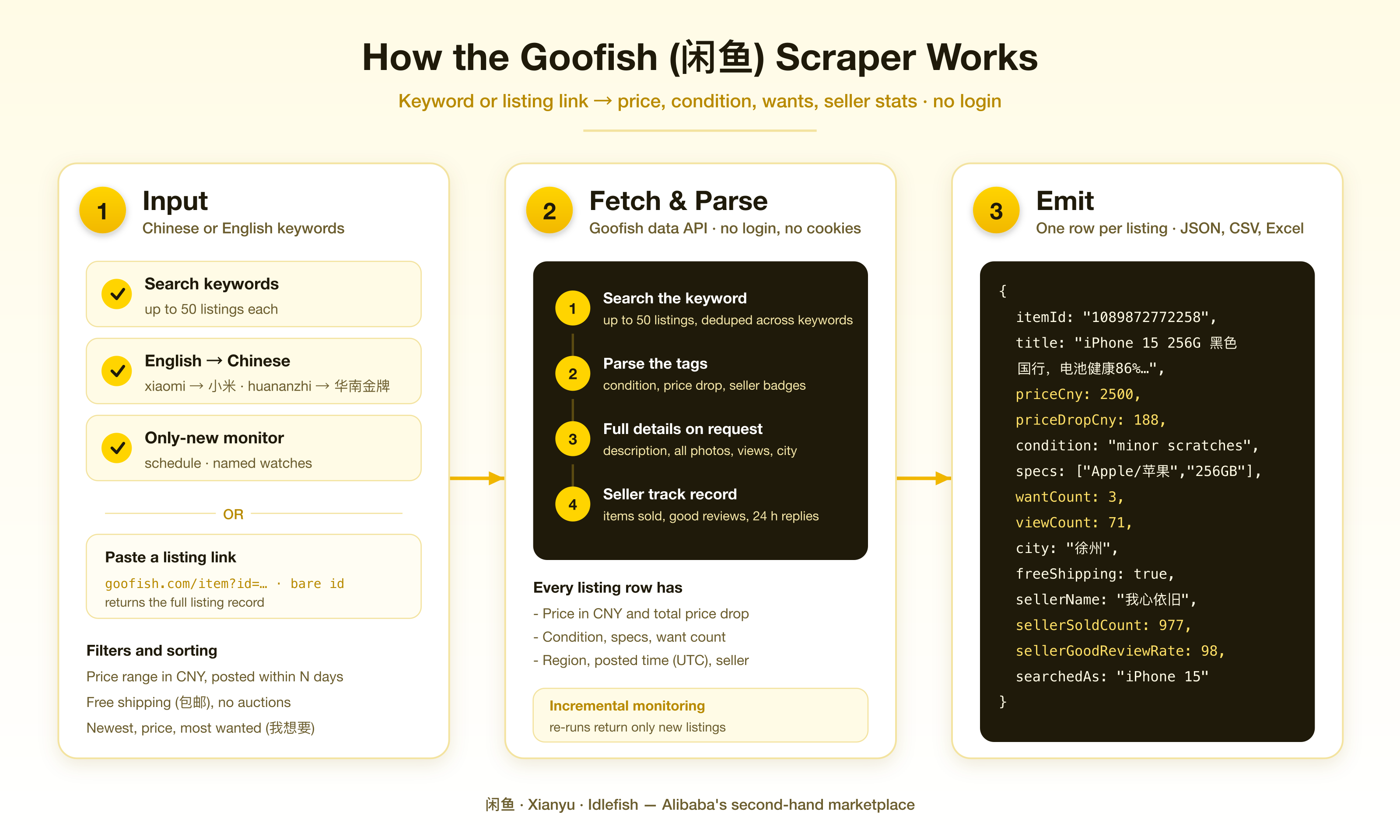
1. Each keyword is mapped to the Chinese term sellers use (when it is a known brand or category) and searched on Goofish.
2. Up to 50 listings come back per keyword. Your filters and sort order are applied, then your per-keyword cap.
3. In monitoring mode, listings you have already received are skipped.
4. With **Full listing details** on, each remaining listing's detail page is fetched in batches of 20 and merged in.
5. Rows go to the dataset as they are ready.
### Input configuration
```json
{
"keywords": ["iPhone 15", "xiaomi 14", "乐高 42115"],
"maxItemsPerKeyword": 50,
"includeDetails": false,
"sortBy": "newest",
"maxPrice": 3000,
"publishedWithinDays": 3,
"monitorMode": true,
"monitorStateName": "phone-deals"
}
```
| Field | What it does |
|---|---|
| `keywords` | Search terms. Chinese gives the most results. |
| `searchUrls` | goofish.com search links; the keyword is read from `q`. |
| `itemUrls` | Listing links or ids, returned with full details. |
| `translateKeywords` | Map English/pinyin brand and category names to Chinese (default on). |
| `includeDetails` | Fetch the full listing page for each result (default off). |
| `maxItemsPerKeyword` | 1 to 50 (default 50). |
| `maxItems` | Cap for the whole run (default 500; free plan 100). |
| `sortBy` | `relevance`, `newest`, `priceAsc`, `priceDesc`, `mostWanted`. |
| `minPrice` / `maxPrice` | Price range in CNY. |
| `publishedWithinDays` | Only listings posted in the last N days. |
| `freeShippingOnly`, `excludeAuctions` | Self-explanatory. |
| `monitorMode` | Return only listings not delivered in earlier runs. |
| `monitorStateName` | Separate seen-lists for separate schedules. |
| `emitBaseline` | Off: the first monitoring run only remembers listings. |
| `resetMonitoringState` | Forget everything delivered so far. |
### Output overview
Every row has `detailLevel`: `summary` for search rows, `full` when details were fetched. Fields that only exist on the detail page are `null` on summary rows.
### Output samples
**Search row** (`detailLevel: "summary"`):
```json
{
"itemId": "1089872772258",
"url": "https://www.goofish.com/item?id=1089872772258",
"title": "iPhone 15 256G 黑色 国行,型号MV9P3CH /A,iOS 27.0系统 2023年8月生产,10月激活,电池健康86%…",
"priceCny": 2500,
"currency": "CNY",
"priceDropCny": 188,
"freeShipping": true,
"condition": "minor scratches",
"conditionLabel": "少量磕碰划痕",
"specs": ["Apple/苹果", "256GB"],
"sellerBadges": ["卖家信用极好"],
"wantCount": 2,
"location": "江苏",
"categoryId": "50025386",
"imageUrl": "https://img.alicdn.com/bao/uploaded/i2/O1CN01LWSHHo4ChyF2vHAO~livephoto~_!!4611686018427383414-0-fleamarket.jpg",
"postedAt": "2026-10-02T13:52:45.000Z",
"sellerName": "我心依旧",
"searchKeyword": "iPhone 15",
"searchedAs": "iPhone 15",
"position": 1,
"detailLevel": "summary"
}
```
**Extra fields with full details** (`detailLevel: "full"`):
```json
{
"description": "iPhone 15 256G 黑色 国行,型号MV9P3CH /A,iOS 27.0系统\n2023年8月生产,10月激活,电池健康86%,循环953次\n账号已退,插卡即用,功能全好…",
"images": ["https://img.alicdn.com/bao/uploaded/i2/…jpg", "… 7 images"],
"viewCount": 71,
"wantCount": 3,
"favoriteCount": 0,
"conditionLevel": 9,
"status": "在线",
"shippingFeeCny": 0,
"province": "江苏",
"city": "徐州",
"district": "贾汪区",
"sellerId": "47656566",
"sellerUrl": "https://www.goofish.com/personal?userId=47656566",
"sellerItemCount": 1113,
"sellerSoldCount": 977,
"sellerGoodReviewRate": 98,
"sellerReplyRate24h": 92,
"sellerLastSeen": "4小时前来过"
}
```
### Key output fields
| Field | Meaning |
|---|---|
| `priceCny` | Asking price in yuan. |
| `priceDropCny` | Total the seller has cut the price by (累计降价). |
| `condition` / `conditionLabel` | Condition from the listing's tags, in English and the original Chinese. |
| `conditionLevel` | Goofish's numeric condition grade (detail rows). |
| `wantCount` | Buyers who tapped 我想要 (I want this). A strong demand signal. |
| `viewCount`, `favoriteCount` | Detail rows only. |
| `location` | Region shown on the search card, usually the province. |
| `province`, `city`, `district` | Detail rows only. |
| `specs` | Remaining tags: storage, model, region version, repair status. |
| `sellerBadges` | Tags about the seller: 卖家信用极好, 百分百好评, 超赞鱼小铺. |
| `sellerSoldCount`, `sellerGoodReviewRate`, `sellerReplyRate24h` | Seller track record (detail rows). |
| `searchKeyword` / `searchedAs` | What you typed, and the term actually searched. |
| `postedAt` | When the listing was posted, UTC. |
### FAQ
**How many listings can I get per keyword?**
Up to 50. Goofish search does not page beyond that for this data source. To go deeper, add variants: `iPhone 15 128G`, `iPhone 15 256G`, `iPhone 15 Pro`, `苹果15`. Each listing is returned once per run even if several keywords find it.
**Why did my English keyword return nothing?**
Goofish does not translate. Known brands and categories are mapped for you, but other words are searched as typed. Check `searchedAs`, and try the Chinese term.
**Do filters and sorting apply on Goofish's side?**
They apply to the up-to-50 listings each keyword returns. A tight price range can leave fewer than 50.
**Why is the seller name masked (我**\*旧) on some rows?\*\*
Rows from listing links come only from the detail page, which masks names. Rows found through search carry the full name.
**Does monitoring cost money on runs with nothing new?**
Each keyword searched is billed once (see Pricing), because the search itself is the expensive part. Listings you already have are never billed again.
**Which fields can be empty?**
`originalPriceCny`, `soldCount`, coordinates and some seller profile fields are often empty on Goofish itself. They are filled when the listing has them.
### Support
Found a bug or need a field? Open an issue on the actor's Issues tab and include your run ID.
### Additional services
Need Goofish data on a schedule into your own database, or a scraper for another Chinese marketplace? Get in touch through the Issues tab or muhamed.didovic@gmail.com.
### Explore more scrapers
- [Xiaohongshu (RedNote) all-in-one scraper](https://apify.com/memo23/xiaohongshu-all-in-one-scraper)
- [Douyin scraper](https://apify.com/memo23/douyin-scraper)
- [Bilibili scraper](https://apify.com/memo23/bilibili-scraper)
- [WeChat Official Account scraper](https://apify.com/memo23/wechat-official-account-scraper)
### 🤖 For AI agents & LLM apps
Call it through the Apify API or MCP with a small JSON input: `{"keywords": ["小米 14"], "maxItemsPerKeyword": 20}`. Rows are flat JSON with stable field names, prices as numbers in CNY and times in ISO 8601 UTC. Use `monitorMode` with a `monitorStateName` per agent task to fetch only new listings between calls.
### ⚠️ Disclaimer
This actor collects publicly visible listing data. It does not log in, and it does not access private messages, orders or account data. You are responsible for using the data in line with Goofish's terms, the laws that apply to you, and data-protection rules such as PIPL and GDPR, especially for seller names and locations. Goofish, 闲鱼 and Xianyu are trademarks of their owners; this actor is not affiliated with or endorsed by Alibaba Group.
### SEO Keywords
goofish scraper, xianyu scraper, 闲鱼, 闲鱼爬虫, 闲鱼数据, idlefish scraper, goofish api, xianyu api, alibaba second hand marketplace, china resale data, chinese used goods, goofish listings, xianyu price monitor, xianyu deal alerts, goofish seller data, china secondhand prices, 二手 price tracking, 闲鱼 监控
# Actor input Schema
## `keywords` (type: `array`):
Goofish searches. Up to 50 listings per keyword. Chinese works best (`小米`, `乐高`), and common English brand names are mapped to Chinese for you (see below). Example: `iPhone 15`.
## `searchUrls` (type: `array`):
goofish.com search links, e.g. `https://www.goofish.com/search?q=小米`. The keyword is read from the link and searched like the ones above.
## `itemUrls` (type: `array`):
Specific listings, as `https://www.goofish.com/item?id=…` links or bare numeric ids. Always returned with full details.
## `translateKeywords` (type: `boolean`):
Goofish matches words literally, so `xiaomi` finds a fraction of what `小米` does and pinyin like `huananzhi` finds nothing. When on, about 75 common brands and categories are swapped for the Chinese term sellers write (`xiaomi 14` → `小米 14`). Other words are left as typed. Each row shows the term actually searched in `searchedAs`.
## `includeDetails` (type: `boolean`):
OFF: search-result data (title, price, condition, price drop, want count, region, cover image, seller name). ON: also the full description, every image, views, favorites, city and district, coordinates, and seller stats (items listed, items sold, good-review rate, 24-hour reply rate, last seen). Full rows are billed at the higher rate.
## `maxItemsPerKeyword` (type: `integer`):
Goofish returns up to 50 listings per keyword. For more, add keyword variants (`iPhone 15 128G`, `iPhone 15 256G`, `iPhone 15 Pro`). Default 50.
## `maxItems` (type: `integer`):
Cap on rows for the whole run. Default 500. Free-plan runs are capped at 100.
## `sortBy` (type: `string`):
Order applied to each keyword's results before the per-keyword cap.
## `minPrice` (type: `integer`):
Drop listings cheaper than this. Leave empty for no lower bound.
## `maxPrice` (type: `integer`):
Drop listings dearer than this. Leave empty for no upper bound.
## `publishedWithinDays` (type: `integer`):
Keep only listings posted in this many days. Leave empty for any date.
## `freeShippingOnly` (type: `boolean`):
Keep only listings that ship for free.
## `excludeAuctions` (type: `boolean`):
Drop auction listings (拍卖).
## `monitorMode` (type: `boolean`):
Skip listings already delivered to you in earlier runs; they are not billed. Schedule the actor to get only new listings each time. Default: false.
## `resetMonitoringState` (type: `boolean`):
Forget every listing delivered so far, at the start of this run. Default: false.
## `monitorStateName` (type: `string`):
Keeps separate seen-lists for several schedules. Example: `camera-deals`.
## `emitBaseline` (type: `boolean`):
ON (default): the first monitoring run returns the current listings. OFF: the first run only remembers them, and later runs return what is new.
## Actor input object example
```json
{
"keywords": [
"iPhone 15"
],
"translateKeywords": true,
"includeDetails": false,
"maxItemsPerKeyword": 50,
"maxItems": 500,
"sortBy": "relevance",
"freeShippingOnly": false,
"excludeAuctions": false,
"monitorMode": false,
"resetMonitoringState": false,
"emitBaseline": true
}
```
# Actor output Schema
## `results` (type: `string`):
One row per listing: title, price in CNY, condition, price drop, want count, region, images, seller name, and the keyword that found it. With full details on: description, all images, views, favorites, city, coordinates and seller stats (`detailLevel` is `full`).
# API
You can run this Actor programmatically using our API. Below are code examples in JavaScript, Python, and CLI, as well as the OpenAPI specification and MCP server setup.
## JavaScript example
```javascript
import { ApifyClient } from 'apify-client';
// Initialize the ApifyClient with your Apify API token
// Replace the '' with your token
const client = new ApifyClient({
token: '',
});
// Prepare Actor input
const input = {
"keywords": [
"iPhone 15"
]
};
// Run the Actor and wait for it to finish
const run = await client.actor("memo23/goofish-xianyu-scraper").call(input);
// Fetch and print Actor results from the run's dataset (if any)
console.log('Results from dataset');
console.log(`💾 Check your data here: https://console.apify.com/storage/datasets/${run.defaultDatasetId}`);
const { items } = await client.dataset(run.defaultDatasetId).listItems();
items.forEach((item) => {
console.dir(item);
});
// 📚 Want to learn more 📖? Go to → https://docs.apify.com/api/client/js/docs
```
## Python example
```python
from apify_client import ApifyClient
# Initialize the ApifyClient with your Apify API token
# Replace '' with your token.
client = ApifyClient("")
# Prepare the Actor input
run_input = { "keywords": ["iPhone 15"] }
# Run the Actor and wait for it to finish
run = client.actor("memo23/goofish-xianyu-scraper").call(run_input=run_input)
# Fetch and print Actor results from the run's dataset (if there are any)
print(f"💾 Check your data here: https://console.apify.com/storage/datasets/{run.default_dataset_id}")
for item in client.dataset(run.default_dataset_id).iterate_items():
print(item)
# 📚 Want to learn more 📖? Go to → https://docs.apify.com/api/client/python/docs/quick-start
```
## CLI example
```bash
echo '{
"keywords": [
"iPhone 15"
]
}' |
apify call memo23/goofish-xianyu-scraper --silent --output-dataset
```
## MCP server setup
```json
{
"mcpServers": {
"apify": {
"type": "http",
"url": "https://mcp.apify.com/?tools=fetch-actor-details,memo23/goofish-xianyu-scraper"
}
}
}
```
The hosted server signs you in with OAuth on first connect, so no API token belongs in this config. Clients without OAuth support can send an `Authorization: Bearer ` header instead, using a token from API & Integrations in Apify Console (https://console.apify.com/settings/integrations).
## OpenAPI specification
Download the OpenAPI definition: https://api.apify.com/v2/actors/80sHrdcUXwTAP30lv/builds/FCP4LjEtYcBT22ivD/openapi.json