# Google Play Scraper · Apps, Reviews, Search & Developer Emails (`memo23/google-play-scraper`) Actor
Scrape Google Play — app details, reviews, ranked search (ASO), similar apps and developer portfolios — across multiple countries in one run. Optional data-safety, permissions and developer contact-email enrichment. Prices, ratings and ranking per country. JSON, CSV, Excel.
- **URL**: https://apify.com/memo23/google-play-scraper.md
- **Developed by:** [Muhamed Didovic](https://apify.com/memo23) (community)
- **Categories:** Lead generation, AI, Agents
- **Stats:** 4 total users, 2 monthly users, 100.0% runs succeeded, 0 bookmarks
- **User rating**: 5.00 out of 5 stars
## Pricing
from $1.00 / 1,000 result rows
This Actor is paid per event. You are not charged for the Apify platform usage, but only a fixed price for specific events.
Learn more: https://docs.apify.com/platform/actors/running/actors-in-store#pay-per-event
## What's an Apify Actor?
Actors are a software tools running on the Apify platform, for all kinds of web data extraction and automation use cases.
In Batch mode, an Actor accepts a well-defined JSON input, performs an action which can take anything from a few seconds to a few hours,
and optionally produces a well-defined JSON output, datasets with results, or files in key-value store.
In Standby mode, an Actor provides a web server which can be used as a website, API, or an MCP server.
Actors are written with capital "A".
## How to integrate an Actor?
If asked about integration, you help developers integrate Actors into their projects.
You adapt to their stack and deliver integrations that are safe, well-documented, and production-ready.
The best way to integrate Actors is as follows.
In JavaScript/TypeScript projects, use official [JavaScript/TypeScript client](https://docs.apify.com/api/client/js.md):
```bash
npm install apify-client
```
In Python projects, use official [Python client library](https://docs.apify.com/api/client/python.md):
```bash
pip install apify-client
```
In shell scripts, use [Apify CLI](https://docs.apify.com/cli/docs.md):
````bash
# MacOS / Linux
curl -fsSL https://apify.com/install-cli.sh | bash
# Windows
irm https://apify.com/install-cli.ps1 | iex
```bash
In AI frameworks, you might use the [Apify MCP server](https://docs.apify.com/platform/integrations/mcp.md).
If your project is in a different language, use the [REST API](https://docs.apify.com/api/v2.md).
For usage examples, see the [API](#api) section below.
For more details, see Apify documentation as [Markdown index](https://docs.apify.com/llms.txt) and [Markdown full-text](https://docs.apify.com/llms-full.txt).
# README
## Google Play Scraper — App Details, Reviews, Search, Similar & Developer Emails
Turn any Google Play app, search term, or developer into a clean, structured dataset. Pull full app info, reviews, ranked search results, similar apps, or a developer's whole portfolio — and run every input across **multiple countries** in a single run.
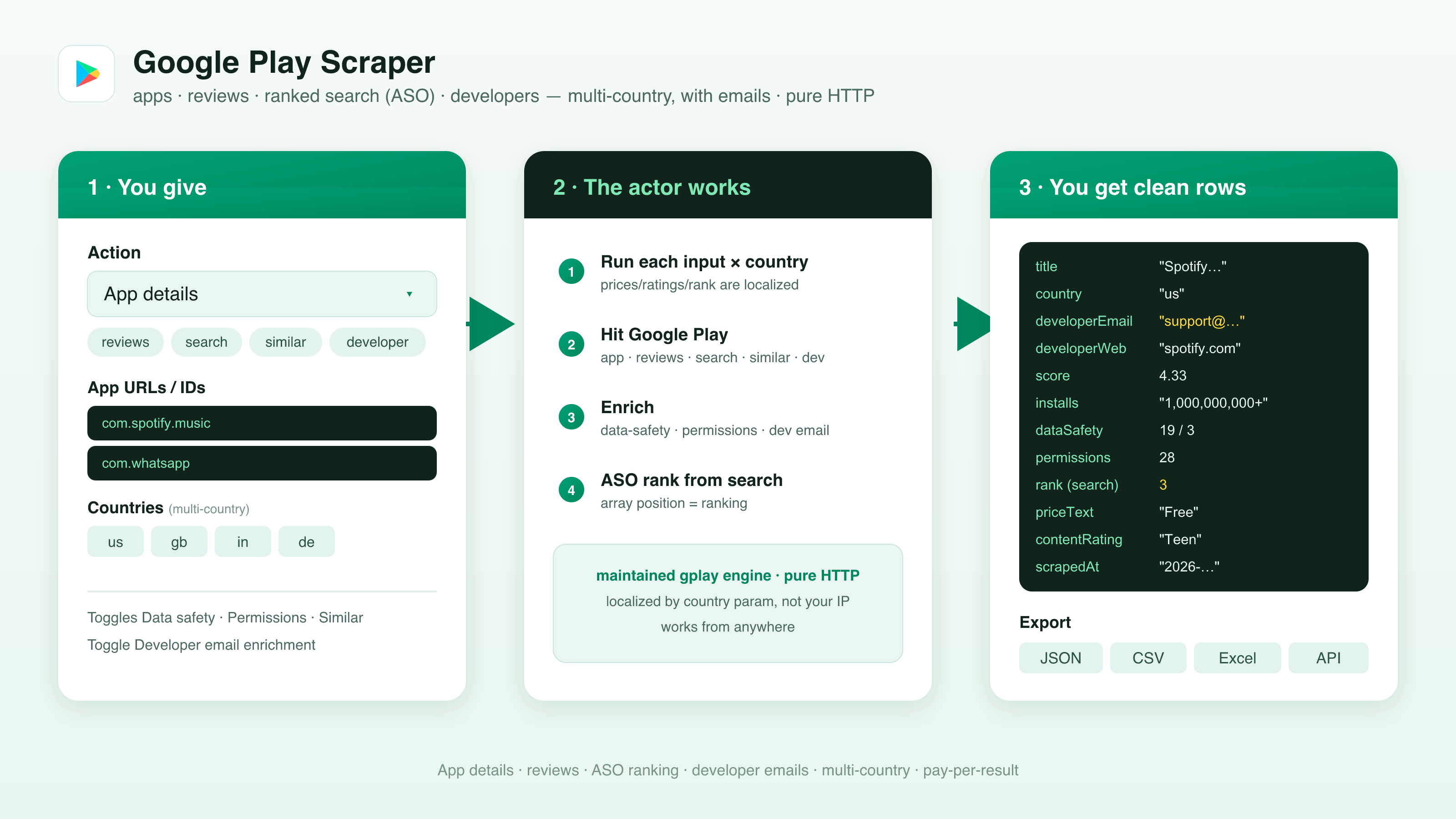
Get 40+ fields per app including score, ratings histogram, installs, price, content rating, version, and a screenshot gallery — plus optional **Data safety** disclosures, **permissions**, **similar apps**, **ASO search rank**, and the **developer contact email + website** for lead generation. Pure HTTP, no browser.
### Why Use This Scraper?
- ✅ Multi-country in one run — every input runs against each country you list; prices, ratings, availability, and ranking are returned per country
- ✅ Five actions from one actor — app details, reviews, ranked search (ASO), similar apps, and a developer's full app list
- ✅ ASO rank tracking built in — search results come back in Google Play's ranked order, and the array position **is** the rank
- ✅ Optional Data safety section — what data the app collects and shares, plus purposes (privacy & compliance audits)
- ✅ Optional permissions list — every declared Android permission, grouped by type
- ✅ Developer contact email + website on every app row — turn the store into a lead list for app-marketing/ASO outreach (with optional email enrichment)
- ✅ JSON, CSV, or Excel output, ready for spreadsheets, CRMs, and BI tools
### Overview
The Google Play Scraper is built for ASO specialists, app marketers, market researchers, and developers who need Google Play data in a spreadsheet instead of a browser tab.
You pick one **action** per run and feed it the matching input — app URLs/IDs, search terms, or developer IDs. Every input is then executed against each country in `countries`, so a single run can compare an app's rating in the US, UK, and India side by side, or capture how a keyword ranks in different markets.
The actor is pure HTTP — it parses Google Play's public web data (built on the maintained `google-play-scraper` engine plus a value-add normalization and enrichment layer). No login, no browser, no API key. Output is clean, flat rows you can export straight to CSV or Excel.
### Supported Inputs
#### Actions
| Action | What it returns | Input used |
|---|---|---|
| **App details** (`appDetails`) | Full app info per app, with optional Data safety, permissions, similar apps, and developer email | `appUrls` |
| **Reviews** (`reviews`) | App reviews, sorted newest / rating / helpfulness, paginated | `appUrls` |
| **Search** (`search`) | Ranked search results — the array position is the ASO rank | `searchQueries` |
| **Similar apps** (`similar`) | Apps similar to a given app | `appUrls` |
| **Developer's apps** (`developer`) | Every app published by a developer | `devIds` |
Every action runs across **each country** in `countries`, so the row count is roughly `inputs × countries` (capped by `maxItems`).
#### Input formats
| Input | Accepts | Example |
|---|---|---|
| `appUrls` | Full Google Play URL **or** bare package ID | `https://play.google.com/store/apps/details?id=com.spotify.music` or `com.spotify.music` |
| `searchQueries` | Plain keywords | `podcast app` |
| `devIds` | Developer profile URL **or** developer ID | `https://play.google.com/store/apps/developer?id=Spotify+AB` or `Spotify+AB` |
| `countries` | Two-letter `gl` country codes | `["us", "gb", "in"]` |
| `language` | Two-letter `hl` language code | `en` |
#### Copy-pasteable input
```json
{
"action": "appDetails",
"appUrls": ["com.spotify.music", "com.whatsapp"],
"countries": ["us", "gb", "in"],
"language": "en",
"includeDataSafety": true,
"includePermissions": true,
"includeSimilar": true
}
````
#### Unsupported inputs
- ❌ Content behind a Google account login (purchase history, library, account settings)
- ❌ Apple App Store / iOS apps — this actor targets `play.google.com` only
- ❌ Mixing actions in one run — pick one `action` per run (chain runs or schedule for multiple)
### Use Cases
| Audience | Use case |
|---|---|
| **App marketers & ASO specialists** | Track keyword rank over time, benchmark competitors, study titles, ratings, and screenshots |
| **Market researchers & analysts** | Bulk-export app catalogs, installs, ratings, and pricing across categories and countries |
| **Pricing & availability teams** | Monitor per-country price, IAP, and availability — Play is localized, so it varies by market |
| **Review intelligence teams** | Pull review streams (newest/rating/helpfulness) for sentiment, bug surfacing, and feature requests |
| **Privacy & compliance** | Audit Data safety disclosures and declared permissions across an app portfolio |
| **Sales / lead-gen & agencies** | Turn search results and developer portfolios into a prospect list with contact emails + websites |
### How It Works

1. **Input** — choose an `action` and supply the matching input (app URLs/IDs, search terms, or developer IDs)
2. **Fan out by country** — each input is queued once per country in `countries`, so prices/ratings/ranking are captured per market
3. **Fetch** — Google Play's public web data is retrieved over HTTP (no browser), via the maintained `google-play-scraper` engine
4. **Parse & enrich** — raw data is normalized into clean rows; optionally attach Data safety, permissions, similar apps, and the developer contact email
5. **Output** — flat `app`, `review`, or `searchResult` rows as JSON, CSV, or Excel, stopping once `maxItems` is reached
### Input Configuration
| Field | Type | Required | Notes |
|---|---|---|---|
| `action` | `string` | yes | One of `appDetails`, `reviews`, `search`, `similar`, `developer`. Default `appDetails`. |
| `appUrls` | `array` | for `appDetails` / `reviews` / `similar` | Google Play app URLs or bare package IDs. |
| `searchQueries` | `array` | for `search` | Keywords to search. Results come back in ranked (ASO) order. |
| `devIds` | `array` | for `developer` | Developer profile URLs or IDs. |
| `countries` | `array` | no | Two-letter `gl` codes. **Every input runs against each one.** Default `["us"]`. |
| `language` | `string` | no | Two-letter `hl` code for returned text. Default `en`. |
| `includeDataSafety` | `boolean` | no | Attach the Data safety section (data collected/shared + purposes). One extra request per app. App details only. Default `false`. |
| `includePermissions` | `boolean` | no | Attach the declared permissions list. One extra request per app. App details only. Default `false`. |
| `includeSimilar` | `boolean` | no | Attach a `similarApps[]` list to each app row. One extra request per app. App details only. Default `false`. |
| `enrichEmails` | `boolean` | no | Resolve a contact email from the developer's website (lead-gen). Adds `contactEmail` + `emailEnrichment`. **Billed per email found**, only when an email is returned. App details only. Default `false`. |
| `reviewsSort` | `string` | no | `newest`, `rating`, or `helpfulness` (action = Reviews). Default `newest`. |
| `maxReviewsPerApp` | `integer` | no | Upper bound on reviews per app per country (action = Reviews). Default `100`. |
| `resultsLimit` | `integer` | no | Max results per search term, developer, or similar-apps call. Default `50`. |
| `maxItems` | `integer` | no | Hard cap on **total dataset rows** across all inputs and countries. Default `1000`. Free-tier runs are capped at `100`. |
| `maxConcurrency` | `integer` | no | Maximum requests in flight. Default `6`. |
| `proxy` | `object` | no | Defaults to Apify Proxy. Geo is handled by the `countries` param in-request, so a proxy mainly spreads load and avoids rate-limits. |
#### Common scenarios
**1. Compare one app across three countries**
```json
{
"action": "appDetails",
"appUrls": ["com.spotify.music"],
"countries": ["us", "gb", "in"]
}
```
**2. Track a keyword's ASO rank in two markets**
```json
{
"action": "search",
"searchQueries": ["podcast app", "meditation"],
"countries": ["us", "de"],
"resultsLimit": 50
}
```
**3. App details with Data safety, permissions, similar apps + developer email**
```json
{
"action": "appDetails",
"appUrls": ["com.whatsapp"],
"countries": ["us"],
"includeDataSafety": true,
"includePermissions": true,
"includeSimilar": true,
"enrichEmails": true
}
```
**4. Newest reviews for an app**
```json
{
"action": "reviews",
"appUrls": ["com.spotify.music"],
"countries": ["us"],
"reviewsSort": "newest",
"maxReviewsPerApp": 200
}
```
### Output Overview
Each dataset item is one of three shapes, set by `rowType`:
- **`app`** — emitted by `appDetails`, `similar`, and `developer`. Carries the full 40+ field app schema, plus optional `dataSafety`, `permissions[]`, `similarApps[]`, and (with `enrichEmails`) `contactEmail` + `emailEnrichment`.
- **`review`** — emitted by `reviews`. One row per review.
- **`searchResult`** — emitted by `search`. One row per ranked result; `rank` is the 1-based ASO position.
Notes on when fields are populated:
- **`country`** is set on every row — the same app/keyword pulled for three countries produces three rows.
- **`developerEmail` / `developerWebsite`** come straight from the app's store page (usually present; some apps hide the email).
- **`dataSafety`**, **`permissions[]`**, and **`similarApps[]`** appear only when the matching `include*` toggle is on. **`contactEmail`** + **`emailEnrichment`** appear only with `enrichEmails` and a resolvable website.
Output is JSON by default; the Apify Console "Export" tab also produces CSV and Excel.
### Output Samples
#### App row — `appDetails` with optional sections
```json
{
"rowType": "app",
"appId": "com.spotify.music",
"url": "https://play.google.com/store/apps/details?id=com.spotify.music&gl=us",
"country": "us",
"title": "Spotify: Music and Podcasts",
"developer": "Spotify AB",
"developerEmail": "support@spotify.com",
"developerWebsite": "https://www.spotify.com",
"genre": "Music & Audio",
"score": 4.33,
"ratings": 30000000,
"installs": "1,000,000,000+",
"priceText": "Free",
"free": true,
"contentRating": "Teen",
"version": "VARY",
"icon": "https://play-lh.googleusercontent.com/...",
"dataSafety": { "collectedData": [], "sharedData": [], "securityPractices": [] },
"permissions": [{ "permission": "...", "type": "..." }],
"similarApps": [{ "appId": "...", "title": "...", "score": 4.2 }],
"scrapedAt": "2026-06-25T20:00:00.000Z"
}
```
#### Review row — `reviews`
```json
{
"rowType": "review",
"appId": "com.spotify.music",
"country": "us",
"reviewId": "gp:AOqpTOH...",
"userName": "Jane D.",
"score": 5,
"title": null,
"text": "Love the new Jam feature — listening together is great.",
"thumbsUp": 142,
"reviewDate": "2026-06-20T10:11:00.000Z",
"version": "8.9.0.123",
"replyText": "Thanks for the kind words! — Spotify",
"scrapedAt": "2026-06-25T20:00:00.000Z"
}
```
#### Search-result row — `search` (`rank` = ASO position)
```json
{
"rowType": "searchResult",
"query": "podcast app",
"country": "us",
"rank": 1,
"appId": "com.spotify.music",
"title": "Spotify: Music and Podcasts",
"developer": "Spotify AB",
"score": 4.33,
"scrapedAt": "2026-06-25T20:00:00.000Z"
}
```
### Key Output Fields
#### App row (`rowType: "app"`)
| Field | Description |
|---|---|
| `appId` | Package ID, e.g. `com.spotify.music` |
| `url` | Canonical Play URL (with the row's `gl` country) |
| `country` | The `gl` country this row was scraped for |
| `title`, `summary`, `description` | App name, short summary, full description |
| `developer`, `developerId` | Developer name and ID |
| `developerEmail` | Developer contact email (lead-gen) |
| `developerWebsite` | Developer website (lead-gen) |
| `developerAddress` | Listed physical address |
| `genre`, `genreId` | Category name and ID |
| `score`, `scoreText` | Average rating (number + display text) |
| `ratings`, `reviewsCount` | Total ratings and review count |
| `histogram` | Star distribution (1★–5★ counts) |
| `installs`, `minInstalls`, `maxInstalls` | Install band text + numeric bounds |
| `priceText`, `price`, `free`, `currency` | Price display, numeric price, free flag, currency |
| `offersIAP` | Whether the app has in-app purchases |
| `contentRating` | Content/age rating |
| `released`, `updated`, `version` | Release date, last-updated, current version |
| `recentChanges` | "What's new" release notes |
| `androidVersion` | Minimum Android version |
| `privacyPolicy` | Privacy-policy URL |
| `icon`, `screenshots`, `video` | Icon URL, screenshot gallery, promo video |
| `dataSafety` *(optional)* | Data collected/shared + purposes (`includeDataSafety`) |
| `permissions[]` *(optional)* | Declared permissions, by type (`includePermissions`) |
| `similarApps[]` *(optional)* | `{ appId, title, score }` per similar app (`includeSimilar`) |
| `contactEmail` *(optional)* | Email resolved from the developer site (`enrichEmails`) |
| `scrapedAt` | ISO timestamp of the scrape |
#### Review row (`rowType: "review"`)
`reviewId`, `userName`, `score`, `title`, `text`, `thumbsUp`, `reviewDate`, `version`, `replyText` — plus `appId`, `country`, and `scrapedAt`.
#### Search-result row (`rowType: "searchResult"`)
`rank` (1-based ASO position), `appId`, `title`, `developer`, `score` — plus `query`, `country`, and `scrapedAt`.
### FAQ
#### Do I need to log in or supply an API key?
No. The actor reads Google Play's public web data over HTTP — no Google account, no login, no API key.
#### Is this the official Google Play API?
No. It is not an official API and is not affiliated with Google. It parses the same public app pages you'd see in a browser and returns them as clean, structured rows.
#### Why do I get different data per country?
Google Play is localized — prices, ratings, availability, and search ranking all differ by market. So you pass `countries` (two-letter `gl` codes), and every input is scraped once per country. A row's `country` field tells you which market it came from.
#### Does it work outside the country I'm in?
Yes. Geo is controlled by the `countries` parameter, in-request — not by your IP or the proxy location. You can sit anywhere and pull US, UK, and Indian data in the same run.
#### Is the developer email always present?
Usually, but not always. The email and website come from the app's store listing; some developers don't publish a contact email, in which case `developerEmail` is `null`. The optional `enrichEmails` step can resolve one from the developer's website when available.
#### What's the difference between `search` rank and the other actions?
`search` returns results in Google Play's own ranked order and stamps each with a 1-based `rank` — that's the ASO position for the keyword. The other actions (`appDetails`, `reviews`, `similar`, `developer`) aren't ranked.
#### Can I export to JSON, CSV, or Excel?
Yes. Output is JSON by default; the Apify Console "Export" tab also produces CSV and Excel (XLSX).
#### What about rate limits?
Google Play can throttle heavy runs. Keep `maxConcurrency` reasonable (the default `6` is a safe start) and use a proxy for large jobs. The actor defaults to Apify Proxy; supply your own pool for very large runs.
### Support
Found a bug, hit throttling we don't handle gracefully, or want another action or field supported? Open an issue on the actor's **Issues** tab, or reach out via the [memo23 profile](https://apify.com/memo23) on Apify.
### Additional Services
Need a custom export shape, a new entry point, scheduled rank monitoring, or a bespoke enrichment pipeline? I build tailored scrapers and data pipelines — get in touch via the [memo23 profile](https://apify.com/memo23).
### Explore More Scrapers
If you track apps, rankings, and developers, these pair well:
- [**App Store Scraper**](https://apify.com/memo23) — the iOS side of the same workflow; cross-reference Android vs Apple
- [**Trustpilot Scraper**](https://apify.com/memo23/trustpilot-scraper-ppe) — company-level sentiment for the developers behind the apps
- [**G2 Scraper**](https://apify.com/memo23/g2-scraper) — see how an app's vendor ranks on B2B software reviews
- [**Product Hunt Scraper**](https://apify.com/memo23) — discover newly launched apps and their makers
- [**LinkedIn Profiles Scraper**](https://apify.com/memo23/linkedin-profiles-cheerio) — backfill founder/developer profiles for outreach
Full portfolio: [apify.com/memo23](https://apify.com/memo23).
***
### ⚠️ Disclaimer
This Actor is an independent tool and is not affiliated with, endorsed by, or sponsored by Google LLC, Google Play, or any of their parent companies or subsidiaries. All trademarks mentioned are the property of their respective owners.
The scraper accesses only publicly available Google Play pages — no authenticated endpoints, no account-gated content, and nothing behind a Google login. Users are responsible for ensuring their use complies with Google Play's Terms of Service, applicable data-protection law (GDPR, CCPA, etc.), and any contractual obligations of their own organization. Developer contact emails and reviewer data are personal data — process them responsibly, honor opt-outs, and seek legal advice before outbound marketing.
***
### SEO Keywords
google play scraper, scrape google play, google play store scraper, play store scraper, google play api, android app scraper, google play app data, play.google.com scraper, Apify google play, google play reviews scraper, google play search scraper, aso rank tracker, app store optimization data, google play developer scraper, android app reviews api, app market research, google play data safety, android app permissions scraper, multi country app pricing, developer contact email scraper, app marketing lead generation
# Actor input Schema
## `action` (type: `string`):
What to extract. appDetails returns full app info (with optional data-safety, permissions, similar apps and developer email); reviews returns app reviews; search returns ranked results (ASO position); similar returns related apps; developer returns a developer's apps. Tip: you can just fill the field you have — a keyword in Search terms OR an app URL in App URLs — and the Actor auto-runs the matching action even if this dropdown says something else.
## `appUrls` (type: `array`):
Google Play app URLs or package IDs (e.g. https://play.google.com/store/apps/details?id=com.spotify.music or com.spotify.music). Used by App details / Reviews / Similar apps.
## `searchQueries` (type: `array`):
Keywords to search (Search action). If you fill this and leave App URLs empty, the Actor runs a search automatically — even if Action is still on 'App details'. Results come back in Google Play's ranked order (array position = ASO rank).
## `devIds` (type: `array`):
Developer profile URLs or IDs (used by action = Developer's apps), e.g. https://play.google.com/store/apps/developer?id=Spotify+AB or Spotify+AB.
## `countries` (type: `array`):
Two-letter country codes (gl) to scrape — every input runs against each country. Prices, ratings, availability and ranking are country-specific. Default \['us'].
## `language` (type: `string`):
Two-letter language code (hl) for the returned text. Default 'en'.
## `includeDataSafety` (type: `boolean`):
Attach the Data safety section (what data the app collects/shares + purposes). One extra request per app. (App details only.)
## `includePermissions` (type: `boolean`):
Attach the declared permissions list. One extra request per app. (App details only.)
## `includeSimilar` (type: `boolean`):
Attach a list of similar apps to each app row. One extra request per app. (App details only.)
## `enrichEmails` (type: `boolean`):
Resolve a contact email from the developer's website (lead generation). Adds contactEmail + emailEnrichment. Billed per email found; only charged when an email is returned. (App details only.)
## `reviewsSort` (type: `string`):
Order for reviews (action = Reviews).
## `maxReviewsPerApp` (type: `integer`):
Upper bound on reviews collected per app per country (action = Reviews).
## `resultsLimit` (type: `integer`):
Max results per search term, developer, or similar-apps call.
## `maxItems` (type: `integer`):
Hard cap on total dataset rows across all inputs and countries.
## `maxConcurrency` (type: `integer`):
Maximum requests in flight.
## `proxy` (type: `object`):
Leave empty — the actor already routes all traffic through its own built-in residential proxy at no extra cost to you. Only set this if you want to use your own proxies.
## Actor input object example
```json
{
"action": "appDetails",
"appUrls": [
"com.spotify.music",
"com.whatsapp"
],
"searchQueries": [],
"devIds": [],
"countries": [
"us",
"gb",
"in"
],
"language": "en",
"includeDataSafety": false,
"includePermissions": false,
"includeSimilar": false,
"enrichEmails": false,
"reviewsSort": "newest",
"maxReviewsPerApp": 100,
"resultsLimit": 50,
"maxItems": 1000,
"maxConcurrency": 6
}
```
# API
You can run this Actor programmatically using our API. Below are code examples in JavaScript, Python, and CLI, as well as the OpenAPI specification and MCP server setup.
## JavaScript example
```javascript
import { ApifyClient } from 'apify-client';
// Initialize the ApifyClient with your Apify API token
// Replace the '' with your token
const client = new ApifyClient({
token: '',
});
// Prepare Actor input
const input = {
"appUrls": [
"com.spotify.music",
"com.whatsapp"
],
"searchQueries": [],
"devIds": [],
"countries": [
"us",
"gb",
"in"
]
};
// Run the Actor and wait for it to finish
const run = await client.actor("memo23/google-play-scraper").call(input);
// Fetch and print Actor results from the run's dataset (if any)
console.log('Results from dataset');
console.log(`💾 Check your data here: https://console.apify.com/storage/datasets/${run.defaultDatasetId}`);
const { items } = await client.dataset(run.defaultDatasetId).listItems();
items.forEach((item) => {
console.dir(item);
});
// 📚 Want to learn more 📖? Go to → https://docs.apify.com/api/client/js/docs
```
## Python example
```python
from apify_client import ApifyClient
# Initialize the ApifyClient with your Apify API token
# Replace '' with your token.
client = ApifyClient("")
# Prepare the Actor input
run_input = {
"appUrls": [
"com.spotify.music",
"com.whatsapp",
],
"searchQueries": [],
"devIds": [],
"countries": [
"us",
"gb",
"in",
],
}
# Run the Actor and wait for it to finish
run = client.actor("memo23/google-play-scraper").call(run_input=run_input)
# Fetch and print Actor results from the run's dataset (if there are any)
print("💾 Check your data here: https://console.apify.com/storage/datasets/" + run["defaultDatasetId"])
for item in client.dataset(run["defaultDatasetId"]).iterate_items():
print(item)
# 📚 Want to learn more 📖? Go to → https://docs.apify.com/api/client/python/docs/quick-start
```
## CLI example
```bash
echo '{
"appUrls": [
"com.spotify.music",
"com.whatsapp"
],
"searchQueries": [],
"devIds": [],
"countries": [
"us",
"gb",
"in"
]
}' |
apify call memo23/google-play-scraper --silent --output-dataset
```
## MCP server setup
```json
{
"mcpServers": {
"apify": {
"command": "npx",
"args": [
"mcp-remote",
"https://mcp.apify.com/?tools=memo23/google-play-scraper",
"--header",
"Authorization: Bearer "
]
}
}
}
```
## OpenAPI specification
```json
{
"openapi": "3.0.1",
"info": {
"title": "Google Play Scraper · Apps, Reviews, Search & Developer Emails",
"description": "Scrape Google Play — app details, reviews, ranked search (ASO), similar apps and developer portfolios — across multiple countries in one run. Optional data-safety, permissions and developer contact-email enrichment. Prices, ratings and ranking per country. JSON, CSV, Excel.",
"version": "0.0",
"x-build-id": "PaZB6XWpomRhnJYMg"
},
"servers": [
{
"url": "https://api.apify.com/v2"
}
],
"paths": {
"/acts/memo23~google-play-scraper/run-sync-get-dataset-items": {
"post": {
"operationId": "run-sync-get-dataset-items-memo23-google-play-scraper",
"x-openai-isConsequential": false,
"summary": "Executes an Actor, waits for its completion, and returns Actor's dataset items in response.",
"tags": [
"Run Actor"
],
"requestBody": {
"required": true,
"content": {
"application/json": {
"schema": {
"$ref": "#/components/schemas/inputSchema"
}
}
}
},
"parameters": [
{
"name": "token",
"in": "query",
"required": true,
"schema": {
"type": "string"
},
"description": "Enter your Apify token here"
}
],
"responses": {
"200": {
"description": "OK"
}
}
}
},
"/acts/memo23~google-play-scraper/runs": {
"post": {
"operationId": "runs-sync-memo23-google-play-scraper",
"x-openai-isConsequential": false,
"summary": "Executes an Actor and returns information about the initiated run in response.",
"tags": [
"Run Actor"
],
"requestBody": {
"required": true,
"content": {
"application/json": {
"schema": {
"$ref": "#/components/schemas/inputSchema"
}
}
}
},
"parameters": [
{
"name": "token",
"in": "query",
"required": true,
"schema": {
"type": "string"
},
"description": "Enter your Apify token here"
}
],
"responses": {
"200": {
"description": "OK",
"content": {
"application/json": {
"schema": {
"$ref": "#/components/schemas/runsResponseSchema"
}
}
}
}
}
}
},
"/acts/memo23~google-play-scraper/run-sync": {
"post": {
"operationId": "run-sync-memo23-google-play-scraper",
"x-openai-isConsequential": false,
"summary": "Executes an Actor, waits for completion, and returns the OUTPUT from Key-value store in response.",
"tags": [
"Run Actor"
],
"requestBody": {
"required": true,
"content": {
"application/json": {
"schema": {
"$ref": "#/components/schemas/inputSchema"
}
}
}
},
"parameters": [
{
"name": "token",
"in": "query",
"required": true,
"schema": {
"type": "string"
},
"description": "Enter your Apify token here"
}
],
"responses": {
"200": {
"description": "OK"
}
}
}
}
},
"components": {
"schemas": {
"inputSchema": {
"type": "object",
"properties": {
"action": {
"title": "Action",
"enum": [
"appDetails",
"reviews",
"search",
"similar",
"developer"
],
"type": "string",
"description": "What to extract. appDetails returns full app info (with optional data-safety, permissions, similar apps and developer email); reviews returns app reviews; search returns ranked results (ASO position); similar returns related apps; developer returns a developer's apps. Tip: you can just fill the field you have — a keyword in Search terms OR an app URL in App URLs — and the Actor auto-runs the matching action even if this dropdown says something else.",
"default": "appDetails"
},
"appUrls": {
"title": "App URLs or package IDs",
"type": "array",
"description": "Google Play app URLs or package IDs (e.g. https://play.google.com/store/apps/details?id=com.spotify.music or com.spotify.music). Used by App details / Reviews / Similar apps.",
"items": {
"type": "string"
}
},
"searchQueries": {
"title": "Search terms",
"type": "array",
"description": "Keywords to search (Search action). If you fill this and leave App URLs empty, the Actor runs a search automatically — even if Action is still on 'App details'. Results come back in Google Play's ranked order (array position = ASO rank).",
"items": {
"type": "string"
}
},
"devIds": {
"title": "Developer URLs or IDs",
"type": "array",
"description": "Developer profile URLs or IDs (used by action = Developer's apps), e.g. https://play.google.com/store/apps/developer?id=Spotify+AB or Spotify+AB.",
"items": {
"type": "string"
}
},
"countries": {
"title": "Countries",
"type": "array",
"description": "Two-letter country codes (gl) to scrape — every input runs against each country. Prices, ratings, availability and ranking are country-specific. Default ['us'].",
"items": {
"type": "string"
}
},
"language": {
"title": "Language",
"type": "string",
"description": "Two-letter language code (hl) for the returned text. Default 'en'.",
"default": "en"
},
"includeDataSafety": {
"title": "Include Data safety",
"type": "boolean",
"description": "Attach the Data safety section (what data the app collects/shares + purposes). One extra request per app. (App details only.)",
"default": false
},
"includePermissions": {
"title": "Include permissions",
"type": "boolean",
"description": "Attach the declared permissions list. One extra request per app. (App details only.)",
"default": false
},
"includeSimilar": {
"title": "Include similar apps",
"type": "boolean",
"description": "Attach a list of similar apps to each app row. One extra request per app. (App details only.)",
"default": false
},
"enrichEmails": {
"title": "Enrich with developer contact email (billed per email)",
"type": "boolean",
"description": "Resolve a contact email from the developer's website (lead generation). Adds contactEmail + emailEnrichment. Billed per email found; only charged when an email is returned. (App details only.)",
"default": false
},
"reviewsSort": {
"title": "Reviews sort",
"enum": [
"newest",
"rating",
"helpfulness"
],
"type": "string",
"description": "Order for reviews (action = Reviews).",
"default": "newest"
},
"maxReviewsPerApp": {
"title": "Max reviews per app",
"minimum": 1,
"type": "integer",
"description": "Upper bound on reviews collected per app per country (action = Reviews).",
"default": 100
},
"resultsLimit": {
"title": "Results per query / developer / similar",
"minimum": 1,
"type": "integer",
"description": "Max results per search term, developer, or similar-apps call.",
"default": 50
},
"maxItems": {
"title": "Maximum items to scrape",
"minimum": 1,
"type": "integer",
"description": "Hard cap on total dataset rows across all inputs and countries.",
"default": 1000
},
"maxConcurrency": {
"title": "Max concurrency",
"minimum": 1,
"type": "integer",
"description": "Maximum requests in flight.",
"default": 6
},
"proxy": {
"title": "Proxy configuration (optional override)",
"type": "object",
"description": "Leave empty — the actor already routes all traffic through its own built-in residential proxy at no extra cost to you. Only set this if you want to use your own proxies."
}
}
},
"runsResponseSchema": {
"type": "object",
"properties": {
"data": {
"type": "object",
"properties": {
"id": {
"type": "string"
},
"actId": {
"type": "string"
},
"userId": {
"type": "string"
},
"startedAt": {
"type": "string",
"format": "date-time",
"example": "2025-01-08T00:00:00.000Z"
},
"finishedAt": {
"type": "string",
"format": "date-time",
"example": "2025-01-08T00:00:00.000Z"
},
"status": {
"type": "string",
"example": "READY"
},
"meta": {
"type": "object",
"properties": {
"origin": {
"type": "string",
"example": "API"
},
"userAgent": {
"type": "string"
}
}
},
"stats": {
"type": "object",
"properties": {
"inputBodyLen": {
"type": "integer",
"example": 2000
},
"rebootCount": {
"type": "integer",
"example": 0
},
"restartCount": {
"type": "integer",
"example": 0
},
"resurrectCount": {
"type": "integer",
"example": 0
},
"computeUnits": {
"type": "integer",
"example": 0
}
}
},
"options": {
"type": "object",
"properties": {
"build": {
"type": "string",
"example": "latest"
},
"timeoutSecs": {
"type": "integer",
"example": 300
},
"memoryMbytes": {
"type": "integer",
"example": 1024
},
"diskMbytes": {
"type": "integer",
"example": 2048
}
}
},
"buildId": {
"type": "string"
},
"defaultKeyValueStoreId": {
"type": "string"
},
"defaultDatasetId": {
"type": "string"
},
"defaultRequestQueueId": {
"type": "string"
},
"buildNumber": {
"type": "string",
"example": "1.0.0"
},
"containerUrl": {
"type": "string"
},
"usage": {
"type": "object",
"properties": {
"ACTOR_COMPUTE_UNITS": {
"type": "integer",
"example": 0
},
"DATASET_READS": {
"type": "integer",
"example": 0
},
"DATASET_WRITES": {
"type": "integer",
"example": 0
},
"KEY_VALUE_STORE_READS": {
"type": "integer",
"example": 0
},
"KEY_VALUE_STORE_WRITES": {
"type": "integer",
"example": 1
},
"KEY_VALUE_STORE_LISTS": {
"type": "integer",
"example": 0
},
"REQUEST_QUEUE_READS": {
"type": "integer",
"example": 0
},
"REQUEST_QUEUE_WRITES": {
"type": "integer",
"example": 0
},
"DATA_TRANSFER_INTERNAL_GBYTES": {
"type": "integer",
"example": 0
},
"DATA_TRANSFER_EXTERNAL_GBYTES": {
"type": "integer",
"example": 0
},
"PROXY_RESIDENTIAL_TRANSFER_GBYTES": {
"type": "integer",
"example": 0
},
"PROXY_SERPS": {
"type": "integer",
"example": 0
}
}
},
"usageTotalUsd": {
"type": "number",
"example": 0.00005
},
"usageUsd": {
"type": "object",
"properties": {
"ACTOR_COMPUTE_UNITS": {
"type": "integer",
"example": 0
},
"DATASET_READS": {
"type": "integer",
"example": 0
},
"DATASET_WRITES": {
"type": "integer",
"example": 0
},
"KEY_VALUE_STORE_READS": {
"type": "integer",
"example": 0
},
"KEY_VALUE_STORE_WRITES": {
"type": "number",
"example": 0.00005
},
"KEY_VALUE_STORE_LISTS": {
"type": "integer",
"example": 0
},
"REQUEST_QUEUE_READS": {
"type": "integer",
"example": 0
},
"REQUEST_QUEUE_WRITES": {
"type": "integer",
"example": 0
},
"DATA_TRANSFER_INTERNAL_GBYTES": {
"type": "integer",
"example": 0
},
"DATA_TRANSFER_EXTERNAL_GBYTES": {
"type": "integer",
"example": 0
},
"PROXY_RESIDENTIAL_TRANSFER_GBYTES": {
"type": "integer",
"example": 0
},
"PROXY_SERPS": {
"type": "integer",
"example": 0
}
}
}
}
}
}
}
}
}
}
```