# Homes.com Scraper: For Sale, Rent, Sold & Agents \[$1.50/1k] (`memo23/homes-com-scraper`) Actor
Homes.com scraper for sale, rent and sold listings by city, county, ZIP, map area or URL. Price, beds, baths, sqft, photos, open houses, agent phone. Add agent emails, brokerage, year built, HOA, tax and price history, owner records. Agents mode, 30+ filters, new-listing alerts.
- **URL**: https://apify.com/memo23/homes-com-scraper.md
- **Developed by:** [Muhamed Didovic](https://apify.com/memo23) (community)
- **Categories:** Real estate
- **Stats:** 17 total users, 16 monthly users, 96.9% runs succeeded, 0 bookmarks
- **User rating**: No ratings yet
## Pricing
from $1.50 / 1,000 results
This Actor is paid per event. You are not charged for the Apify platform usage, but only a fixed price for specific events.
Learn more: https://docs.apify.com/actors/running/actors-in-store.md#pay-per-event
## What's an Apify Actor?
An Actor is a serverless cloud program that runs on the Apify platform. It has two run modes.
In Batch mode, an Actor accepts a well-defined JSON input, performs an action which can take anything from a few seconds to a few hours,
and optionally produces a well-defined JSON output, datasets with results, or files in key-value store.
In Standby mode, an Actor provides a web server which can be used as a website, API, or an MCP server.
Apify vocabulary and the platform model are defined once, in the agent quickstart at https://apify.com/agents.md.
## How to integrate an Actor?
If asked about integration, you help developers integrate Actors into their projects.
You adapt to their stack and deliver integrations that are safe, well-documented, and production-ready.
Do not guess an integration path. Every one of them is in the agent quickstart at https://apify.com/agents.md: the Apify MCP server, Agent Skills with the Apify CLI, the JavaScript and Python clients, the REST API, and the account-free path for an agent with no human to sign in. It also carries the rule on stating cost before the first paid run.
For examples already wired to this Actor's own input schema, see the [API](#api) section below.
Each client library has reference documentation the quickstart does not restate: [JavaScript/TypeScript](https://docs.apify.com/api/client/js/docs.md) (`npm install apify-client`) and [Python](https://docs.apify.com/api/client/python/docs.md) (`pip install apify-client`).
# README
## Homes.com Scraper: For Sale, Rent, Sold & Agents \[$1.50/1k]

Scrape **Homes.com** listings **for sale, for rent or recently sold** in any US city, county, ZIP code or map area, or straight from a homes.com search or property URL. One clean row per property with price, beds, baths, square footage, lot size, description, photos, open houses and the listing agent. Turn on full details for agent emails, brokerages, year built, HOA, tax and price history, MLS numbers and schools, switch to **agents mode** for a lead list of an area's most active agents, or add **owner records** from county deeds. JSON, CSV or Excel out.
### Why use this Homes.com scraper?
- **Every listing type in one actor**: for sale, for rent (including apartment communities with rent ranges) and recently sold, with sale dates.
- **Real boundaries, full coverage**: a city or ZIP is searched inside its actual boundary, not a rectangle around it, and large areas are split until every listing is found (about 4,000 for-sale homes inside Austin's city limits).
- **Paste any homes.com URL**: search URLs keep their filters (type, price, beds, baths, open houses, newest, price reduced, foreclosure, keyword, sort); property URLs return that one listing.
- **Agent contacts**: listing agent name and phone on every row; email, license, brokerage name, phone and email with full details.
- **Agents mode**: one row per listing agent in an area, ranked by how many of its listings they hold. An area covered before comes back in seconds, with no listings to read.
- **Instant Database**: pull homes.com listing agents straight from our agent directory by state, city or brokerage, with email, phone, brokerage, license and profile URL. No location search and no listings to read: thousands of agents in seconds.
- **Owner records**: deed history with buyers and sellers, mortgages with lenders, and current owners, when you ask for them.
- **Only new listings**: schedule a search and get only listings added since the last run, plus price changes if you want them.
- **30+ filters**: price, beds, baths, square feet, lot size, year built, HOA, keyword, days on market, price drops, sold date, foreclosure and other sale types, pending, open houses, 3D tours, and 11 sort orders.
- **Flat pricing**: $1.50 per 1,000 rows; full details add $1.50 per 1,000 from 20 October 2026.
### Overview
This actor is for investors, agents and brokerages, proptech teams, lenders and researchers who need US property listings in bulk. It returns **one dataset row per property**, or one row per agent in agents mode. Rows are flat: nested data (open houses, photos, price history, schools, deeds) sits in arrays on the same row, so CSV and Excel exports stay one line per property.
There are three levels of detail. **Basic rows** (the default) come from homes.com's search cards and are fast, about 8 listings a second. **Full details** open each listing's page for about 40 more fields, about 3 listings a second. **Owner records** add the county deed and mortgage history on top.
### Supported inputs
#### Locations (one per line)
| You type | What gets searched |
|---|---|
| `Austin, TX` | Everything inside Austin's city limits |
| `Brooklyn, NY`, `Hudson County, NJ`, `Texas` | A borough, county, neighborhood or whole state |
| `10001` | Everything inside ZIP code 10001 |
| `{"bb":{"tl":{"lt":40.76,"ln":-74.12},"br":{"lt":40.66,"ln":-74.02}}}` | A map rectangle: `tl` is the north-west corner, `br` the south-east corner |
#### Homes.com URLs
| URL | What you get |
|---|---|
| `https://www.homes.com/austin-tx/homes-for-rent/?bed-min=2` | Rentals in Austin with 2+ bedrooms |
| `https://www.homes.com/jersey-city-nj/?price-min=400000&price-max=900000&bed-min=3&bath=2` | For sale, $400k to $900k, 3+ beds, 2+ baths |
| `https://www.homes.com/los-angeles-ca/sold/` | Recently sold homes |
| `https://www.homes.com/jersey-city-nj/07302/condos-for-sale/` | Condos for sale in one ZIP |
| `https://www.homes.com/jersey-city-nj/the-heights-neighborhood/` | One neighborhood |
| `https://www.homes.com/jersey-city-nj/newest/`, `/open-houses/`, `/price-reduced/`, `/foreclosure/` | Newest first, open houses, price drops in the last 30 days, foreclosures |
| `https://www.homes.com/jersey-city-nj/?so=1&kws=pool&yb-min=2015` | Sorted by price, mentions a pool, built 2015 or later |
| `https://www.homes.com/property/9437-caves-valley-dr-austin-tx/sj444hdbkqxsx/` | That one listing |
Copy-pasteable:
```json
{
"startUrls": [
{ "url": "https://www.homes.com/austin-tx/homes-for-rent/?bed-min=2" },
{ "url": "https://www.homes.com/jersey-city-nj/sold/" }
]
}
```
#### Not supported
- Agent profile pages (`/real-estate-agents/...`) and agent search by name. Use agents mode on the agent's area instead.
- Building, school and local-guide pages.
- Map-drawn custom shapes from the homes.com site (use a map rectangle instead).
- Filters in a URL other than the ones listed above. They are named in the run log and the search runs without them.
### Use cases
| Who | What they do with it |
|---|---|
| Investors | Find foreclosures, price drops and long-listed homes; pull sold comps with sale dates |
| Agents and brokerages | Build lead lists of active listing agents per city or ZIP; track competitor inventory |
| Wholesalers and lenders | Combine listings with owner, deed and mortgage records |
| Property managers | Monitor rents and new rental communities in a market |
| Proptech and data teams | Feed listings, prices and features into models and dashboards |
| Market researchers | Track inventory, price per square foot and days on market by area |
### How it works
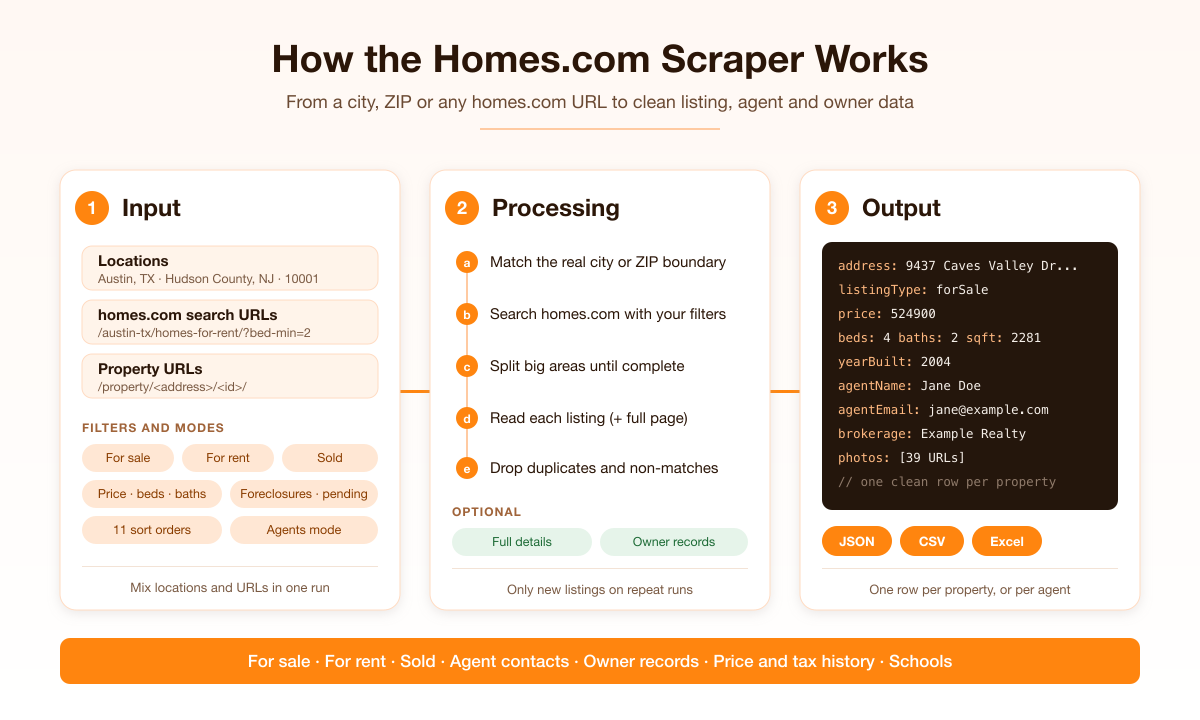
1. You give locations, homes.com URLs, or both, plus any filters.
2. Each location is matched to its real boundary: city limits from OpenStreetMap, ZIP areas from the US Census.
3. The actor searches homes.com's map for that boundary with your filters, splitting large areas into smaller pieces so no listing is missed.
4. Each listing is read from homes.com, with its full page too when you ask for details, owner records or agents.
5. You get one clean row per property, or one row per agent, up to your limits.
### Input configuration
| Field | Type | Default | Description |
|---|---|---|---|
| `locations` | array | | Cities, counties, boroughs, neighborhoods, states, ZIP codes or map rectangles, one per line |
| `startUrls` | array | | homes.com search or property URLs |
| `scrapeMode` | string | `listings` | `listings`, or `agents` for one row per listing agent |
| `maxListingsToScan` | integer | 300 | Agents mode: listings read per location before ranking agents |
| `forceFresh` | boolean | false | Agents mode: always read the area's listings live, even when it was covered before |
| `dbState` / `dbCity` / `dbBrokerage` | string | | Instant Database: agents by state, city or brokerage name; any of them turns the mode on |
| `dbHasEmail` / `dbHasPhone` | boolean | false | Instant Database: only agents with an email / a phone |
| `listingType` | string | `forSale` | `forSale`, `forRent` or `sold` |
| `propertyTypes` | array | all | `house`, `townhouse`, `condo`, `coop`, `multiFamily`, `apartment`, `land`, `mobile` |
| `sortBy` | string | `recommended` | `newest`, `priceLowToHigh`, `priceHighToLow`, `priceReduced`, `sqftHighToLow`, `bedsHighToLow`, `pricePerSqft`, `yearBuiltNewToOld`, `lotSizeHighToLow`, `openHouse` |
| `minPrice`, `maxPrice` | integer | | Asking price, sold price, or monthly rent |
| `minBeds`, `maxBeds`, `minBaths`, `maxBaths` | integer | | Bedrooms and bathrooms |
| `minSqft`, `maxSqft` | integer | | Living area |
| `minLotAcres`, `maxLotAcres` | number | | Lot size in acres |
| `minYearBuilt`, `maxYearBuilt` | integer | | Year built |
| `maxHoaFee` | integer | | Most HOA fee per month |
| `keywords` | string | | Words the listing must mention, such as `pool` |
| `daysOnMarket` | string | `any` | `newListings`, `lessThan3Days` … `moreThan1Year` |
| `priceReduced` | string | `any` | `lastDay` … `last30Days`, `overOneMonth`, `overThreeMonths` |
| `saleTypes` | array | all | `resale`, `newConstruction`, `foreclosure`, `preForeclosure`, `shortSale`, `auction`, `bankOwned` |
| `saleStatuses` | array | active + coming soon | `active`, `comingSoon`, `underContract`, `pending` (for sale only) |
| `soldWithin` | string | `any` | `lastWeek`, `lastMonth`, `last3Months`, `last6Months`, `lastYear` (sold only) |
| `openHousesOnly`, `with3dTour` | boolean | `false` | Only listings with an upcoming open house, or with a 3D tour |
| `includeDetails` | boolean | `false` | Open each listing's full page for the extra fields |
| `includeOwnerRecords` | boolean | `false` | Add deed and mortgage records (turns on full details) |
| `onlyNewListings` | boolean | `false` | Return only listings not returned by earlier runs of the same search |
| `includePriceChanges` | boolean | `false` | With `onlyNewListings`, also return listings whose price changed |
| `monitorName` | string | | Optional name that ties runs to one memory |
| `maxItems` | integer | 100 | Most rows to save in the run |
| `maxItemsPerLocation` | integer | 100 | Most rows to save from any one location or URL |
Filters apply to every location, and to homes.com URLs wherever the URL itself does not set them.
#### Common scenarios
Rentals with 2+ bedrooms under $3,000 a month:
```json
{ "locations": ["Austin, TX"], "listingType": "forRent", "minBeds": 2, "maxPrice": 3000, "maxItems": 500 }
```
Foreclosures and pre-foreclosures with owner records:
```json
{ "locations": ["Hudson County, NJ"], "saleTypes": ["foreclosure", "preForeclosure"], "includeOwnerRecords": true, "maxItems": 200 }
```
The 50 most active listing agents in a ZIP code:
```json
{ "locations": ["10001"], "scrapeMode": "agents", "maxListingsToScan": 300, "maxItems": 50 }
```
Every Compass agent in California with a phone, straight from the Instant Database:
```json
{ "dbState": "CA", "dbBrokerage": "Compass", "dbHasPhone": true, "maxItems": 5000 }
```
New listings every morning (schedule this daily):
```json
{ "locations": ["Jersey City, NJ"], "onlyNewListings": true, "sortBy": "newest", "maxItems": 5000 }
```
### Output overview
Each listing row starts with what the search card shows: ids, `listingType`, the address in full and in parts, coordinates, price, beds, baths, square footage, lot size, property type, description, main photo, open houses, the listing agent and the listing URL. Full details add photos and floor plans, agent and brokerage contacts, listing and tax facts, history, schools, scores and the MLS feature list. Owner records add deeds, mortgages and current owners. Agent rows have their own shape, shown below. Every row has `rowType` (`listing` or `agent`), `searchLocation` (which of your inputs found it) and `scrapedAt`.
### Output samples
Real rows from runs on 12 October 2026, shortened. Names, emails and phone numbers of people are replaced.
#### For sale, with full details and owner records (`Austin, TX`, houses)
```json
{
"rowType": "listing",
"propertyKey": "sj444hdbkqxsx",
"listingType": "forSale",
"address": "9437 Caves Valley Dr, Austin, TX 78717",
"city": "Austin",
"state": "TX",
"postalCode": "78717",
"latitude": 30.495646,
"longitude": -97.758355,
"price": 524900,
"priceLabel": "$524,900",
"beds": 4,
"baths": 2,
"sqft": 2281,
"lotSizeAcres": 0.17,
"propertyType": "House",
"description": "Bright, open, and designed for the way you actually live...",
"has3dTour": true,
"agentName": "Jane Doe",
"agentPhone": "(555) 010-0001",
"agentEmail": "jane.doe@example.com",
"brokerage": "Example Realty",
"yearBuilt": 2004,
"county": "Williamson County",
"neighborhood": "Avery Ranch",
"listDate": "2026-04-10",
"daysOnMarket": 185,
"pricePerSqft": 230,
"hoaFeeMonthly": 55,
"annualTax": 12097,
"mlsName": "Unlock MLS (Austin Board of REALTORS®)",
"mlsNumber": "8700879",
"parcelId": "20|2772|R424414|1",
"photos": ["https://images.homes.com/listings/111/5365956584-262873812-original.jpg", "..."],
"priceHistory": [{ "date": "09/25/2026", "event": "Price Changed", "price": 524900, "changePercent": -1.87 }],
"schools": [{ "name": "Elsa England Elementary School", "rating": 10, "grades": "PK to 5th", "type": "Public", "distance": "17 min walk" }],
"walkScore": 30,
"features": { "Interior Features": { "Flooring": "Carpet, Laminate, Tile", "Appliances": "Dishwasher, Disposal, Range" } },
"saleHistory": [{ "date": "2013-02-19", "documentType": "Vendors Lien", "salePrice": null, "buyers": ["Owner A", "Owner B"], "sellers": ["Seller C", "Seller D"], "titleCompany": "None Available" }],
"mortgages": [{ "date": "2024-12-17", "amount": 907500, "lender": "Federal Housing Commissioner", "borrowers": ["Owner B"], "interestRate": 6.84, "termYears": 83, "status": "Open" }],
"currentOwners": ["Owner A", "Owner B"],
"detailUrl": "https://www.homes.com/property/9437-caves-valley-dr-austin-tx/sj444hdbkqxsx/",
"searchLocation": "Austin, TX",
"scrapedAt": "2026-10-12T15:40:02.031Z"
}
```
#### For rent, an apartment community (`/jersey-city-nj/apartments-for-rent/`)
```json
{
"rowType": "listing",
"listingType": "forRent",
"address": "626 Newark Ave, Jersey City, NJ 07306",
"buildingName": "CMPND 15 Central",
"price": 2354,
"priceMax": 4339,
"priceLabel": "$2,354 - $4,339",
"beds": 0,
"bedsMax": 2,
"propertyType": "Multi-Family",
"managementCompany": { "name": "Namdar Group of Companies", "phone": "(201) 685-3269", "website": "https://www.cmpnd.com/residential/15-central" }
}
```
#### Recently sold (`Austin, TX`, sold in the last month)
```json
{
"rowType": "listing",
"propertyKey": "0fc3j50znd0ef",
"listingType": "sold",
"statusLabel": "Sold Sep 18, 2026",
"address": "2700 Addison Ave, Austin, TX 78757",
"price": 1050000,
"soldDate": "2026-09-18",
"beds": 4,
"baths": 3,
"sqft": 2060,
"propertyType": "House",
"detailUrl": "https://www.homes.com/property/2700-addison-ave-austin-tx/0fc3j50znd0ef/"
}
```
#### Agents mode (`Hoboken, NJ`, 60 listings read)
```json
{
"rowType": "agent",
"agentName": "Jane Doe",
"agentEmail": "jane.doe@example.com",
"agentPhone": "(555) 010-0001",
"brokerage": "Example Realty",
"brokeragePhone": "(555) 010-0002",
"agentLicenseNumber": "0000000",
"agentProfileUrl": "https://www.homes.com/real-estate-agents/jane-doe/abc1234/",
"listingsFound": 6,
"listingsTotalValue": 6770000,
"listingTypes": ["forSale"],
"cities": ["Hoboken"],
"listingUrls": ["https://www.homes.com/property/921-madison-st-hoboken-nj-unit-607/q7q1re9dv9qgq/", "..."],
"searchLocation": "Hoboken, NJ"
}
```
### Key output fields
#### Listing
`propertyKey`, `listingKey`, `listingType` (`forSale` / `forRent` / `sold`), `statusLabel`, `propertyType`, `description`, `detailUrl`
#### Address and location
`address`, `street`, `unit`, `buildingName`, `city`, `state`, `postalCode`, `latitude`, `longitude`; with details also `county`, `neighborhood`
#### Price and size
`price`, `priceMax` (top of a rent range), `priceLabel`, `soldDate`, `beds`, `bedsMax`, `baths`, `bathsMax`, `sqft`, `lotSizeSqft`, `lotSizeAcres`; with details also `pricePerSqft`, `hoaFeeMonthly`, `annualTax`, `estimatedMonthlyPayment`, `yearBuilt`, `garageSpaces`
#### Media and open houses
`photoUrl`, `has3dTour`, `openHouses` (`startLocal`, `endLocal`, `startUtc`, `endUtc`); with details also `photos`, `floorPlans`, `virtualTours`
#### Agent and brokerage
`agentName`, `agentPhone`; with details also `agentEmail`, `agentLicenseNumber`, `agentProfileUrl`, `brokerage`, `brokeragePhone`, `brokerageEmail`, `agents` (everyone on the listing), `managementCompany` (rental communities)
#### Listing history and records (full details)
`listDate`, `daysOnMarket`, `priceHistory`, `taxHistory`, `mlsName`, `mlsNumber`, `parcelId`, `views`, `favorites`
#### Neighborhood (full details)
`schools` (name, rating 1-10, grades, type, distance), `walkScore`, `transitScore`, `bikeScore`, `highlights`, `features` (MLS feature list by category)
#### Owner records
`saleHistory` (date, document type, sale price, buyers, sellers, title company), `mortgages` (date, amount, lender, borrowers, rate, term, status), `currentOwners`
#### Only new listings
`changeType` (`new` or `priceChange`), `previousMapPrice`
#### Agent rows
`agentKey`, `agentName`, `agentEmail`, `agentPhone`, `agentLicenseNumber`, `agentProfileUrl`, `agentPhotoUrl`, `agentBio`, `brokerage`, `brokeragePhone`, `brokerageEmail`, `listingsFound`, `listingsTotalValue`, `activeListingsOnHomes`, `listingTypes`, `cities`, `listingUrls`
The dataset has three ready-made views: **Overview**, **Agent contacts** and **Agents**.
### Pricing
| Event | When | Price |
|---|---|---|
| Actor start | Once per run | $0.005 |
| Result | Each row saved (listing or agent) | $1.50 per 1,000 |
| Full listing details | Each listing page opened: rows with full details or owner records, and every listing read in agents mode | $1.50 per 1,000, from 20 October 2026 |
Free Apify plans can save up to 60 rows from one location per run. Set a maximum cost per run in Apify and the actor stops before going over it.
### What you get here that most Homes.com actors don't offer
| Capability | Typical Homes.com actors | This actor |
|---|---|---|
| For sale, for rent and sold in one actor | Often one or two | All three |
| Search inside the real city or ZIP boundary | Rectangle or homes.com's own area | Exact boundary |
| Full coverage of large cities | Stops at the first few hundred | Splits the area until done |
| Filters from a pasted search URL | Sometimes | Yes, plus 30+ input filters |
| Agent email and brokerage | Often a paid add-on | With full details |
| Agent lead list for an area | Separate actor, if at all | Agents mode |
| Deed and mortgage records | Rare | Owner records |
| Only new listings on repeat runs | Rare | Built in |
### Speed
About 8 listings per second, or about 3 with full details (1,000 detailed listings take around 6 minutes). Agents mode reads listings at the full-details speed.
### FAQ
**Which homes.com URLs work?** City, county, state, ZIP and neighborhood search pages, with or without type paths (`homes-for-rent`, `condos-for-sale`, `sold`, `open-houses`, `newest`, `price-reduced`, `foreclosure`) and the price, bed, bath, year-built, keyword and sort parameters, plus single property pages. See "Not supported" above for the rest.
**Why did I get fewer rows than `maxItems`?** The location has fewer matching listings, or `maxItemsPerLocation` is lower. The run log says how many listings each location has.
**Why are some sold or rental searches slower?** homes.com describes each property by its current listing. A home that sold and was listed again, or a condo that is for rent and for sale at once, no longer matches a sold or rental search, so the actor skips it and fetches the next one. The log says how many were skipped.
**Why are some fields empty?** homes.com and the local MLS decide what each listing carries. Some MLSs publish no year built; rental communities have a management company instead of an agent; agent emails need full details.
**Why does a row say "Unlisted Address"?** The owner or agent hid the address on homes.com, so there is no street, city or ZIP to return.
**Can I look up one agent by name or profile URL?** No. homes.com does not offer that to this actor. Use agents mode on the area the agent works in; an agent with no active listing there will not appear.
**How does "only new listings" remember what it returned?** In a key-value store named `homes-com-scraper-monitor` in your own Apify account, one record per search. Delete it to start over. Set `maxItems` high enough to cover the whole search, otherwise later runs also return older listings earlier runs left out.
**Does it log in or use private data?** No. It reads public listing data only. Owner records are public county deed and mortgage records.
**Can I search outside the US?** No. Homes.com covers the United States only.
### Support
Found a bug or need a field added? Open an issue on the actor's **Issues** tab and it'll be looked at quickly.
### Additional services
Need this data enriched, on a schedule, or pushed to your warehouse or webhook? Reach out via the Issues tab. Custom fields, monitoring runs and integrations are available.
### Explore more scrapers
- [**Zillow Scraper**](https://apify.com/memo23/zillow-scraper-ppe): for sale, rent and sold listings from Zillow
- [**Realtor.com Scraper**](https://apify.com/memo23/realtor-search-cheerio): Realtor.com listings and agents
- [**Redfin Scraper**](https://apify.com/memo23/apify-redfin-cheerio-ppe): Redfin listings with an agent database
- [**Apartments.com Scraper**](https://apify.com/memo23/apartments-cheerio-ppe): US and Canada rentals with emails
- [**Real Estate Skip Trace**](https://apify.com/memo23/property-skip-tracing): owner phone and email for a property address
Full list at [apify.com/memo23](https://apify.com/memo23).
### 🤖 For AI Agents & LLM Apps
Compact reference for AI agents calling this actor via the [Apify MCP server](https://mcp.apify.com) or the Apify API (actor: `memo23/homes-com-scraper`).
**Purpose:** US property listings from Homes.com (for sale, for rent, recently sold) by location or homes.com URL, searched inside real city and ZIP boundaries; optional full details, owner records, or one row per listing agent.
**Minimal input:**
```json
{ "locations": ["Austin, TX"], "listingType": "forSale", "maxItems": 20 }
```
**Output:** one dataset row per property: rowType, propertyKey, listingType, address, city, state, postalCode, latitude, longitude, price, priceLabel, soldDate, beds, baths, sqft, lotSizeAcres, propertyType, description, photoUrl, openHouses, agentName, agentPhone, detailUrl. With `includeDetails`: photos, agentEmail, brokerage, yearBuilt, hoaFeeMonthly, annualTax, priceHistory, taxHistory, mlsNumber, schools, features. With `scrapeMode: "agents"`: one row per agent with agentName, agentEmail, agentPhone, brokerage, listingsFound, listingUrls.
**Behaviors an agent should know:**
- Always set `maxItems`; a whole city can return thousands of rows.
- `locations` takes "City, ST", county, state, a 5-digit ZIP or a bounding-box JSON; `startUrls` takes homes.com search or property URLs, whose own filters win over input filters.
- `onlyNewListings` keeps state in the caller's key-value store `homes-com-scraper-monitor`; later runs skip listings already returned.
- Billing: $0.005 per run, $0.0015 per row; from 2026-10-20 also $0.0015 per listing page opened (full details, owner records, agents mode). Rows not saved are not charged.
- US only. No agent lookup by name; no login-gated data.
### ⚠️ Disclaimer
This Actor is an independent tool and is not affiliated with, endorsed by, or sponsored by Homes.com or its parent company CoStar Group, Inc. All trademarks mentioned are the property of their respective owners. Listing data and photos belong to the listing brokers and their MLSs.
The scraper accesses only publicly available listing pages and public property records. It uses no authenticated endpoints or paid features. Users are responsible for ensuring their use complies with Homes.com's Terms of Service, MLS rules, applicable data-protection law (GDPR, CCPA, etc.), and laws on contacting homeowners and agents (for example the TCPA and CAN-SPAM in the US), as well as any contractual obligations of their own organization.
### SEO Keywords
homes.com scraper, scrape homes.com, homes.com API, homes.com data extraction, Apify homes.com, real estate scraper, property listings scraper, homes for sale scraper, rental listings scraper, sold homes data, real estate agent leads, agent email scraper, property owner records, foreclosure listings data, real estate comps data, MLS listing data, new listings alerts, US housing market data, proptech data, real estate investor leads
# Actor input Schema
## `locations` (type: `array`):
Places to search, one per line. Accepts a US city, county, borough, neighborhood or state ("Austin, TX", "Brooklyn, NY", "Hudson County, NJ", "Texas"), a 5-digit ZIP code ("10001"), or a map rectangle as JSON ({"bb":{"tl":{"lt":40.9,"ln":-74.1},"br":{"lt":40.5,"ln":-73.7}}}, tl = north-west corner, br = south-east corner). Cities and ZIP codes are searched inside their real boundary. Use this field, Homes.com URLs, or both; at least one entry is required.
## `startUrls` (type: `array`):
homes.com URLs to scrape. A search URL (e.g. https://www.homes.com/austin-tx/homes-for-rent/?bed-min=2) keeps its own filters: for sale / for rent / sold, property type paths (houses-for-sale, condos-for-rent, ...), open-houses, newest, price-reduced, foreclosure, short-sale, new homes, and the parameters price-min, price-max, bed-min, bed-max, bath, yb-min, kws (keyword) and so (sort). A property URL (https://www.homes.com/property///) returns that one listing. Agent, building and school pages are not supported. Default: empty.
## `scrapeMode` (type: `string`):
What each row is. "listings" (default): one row per property. "agents": one row per listing agent found in the search, with name, email, phones, brokerage, license, bio and how many of the listings read are theirs, ranked most active first. Agents mode opens every listing's full page, so it is billed like full details for each listing read. "agentDirectory": every real estate agent in a city from homes.com's agent directory page (homes.com/real-estate-agents/{city}/), not just those with active listings. Pulled through a multi-lane web fetcher (harvester box first, then third-party unblockers); no listings read. Turn on "Include agent profiles" to also open each agent's profile page for license number, email and active listings.
## `maxListingsToScan` (type: `integer`):
Agents mode only: how many listings to read in each location before ranking their agents. More listings give better counts and cost more, since each one is billed like full details. Example: 300. Default: 300.
## `forceFresh` (type: `boolean`):
Agents mode answers a city or ZIP it has covered before in seconds, with the most active agents listing there. Turn this on to read the area's listings live instead. Filtered searches (price, beds, listing type and so on) always scan live.
## `includeAgentProfiles` (type: `boolean`):
Agent directory mode only: also open each agent's profile page (homes.com/real-estate-agents/{name}/{id}/) to add license number, email (when public) and active listing URLs. Costs one extra web fetch per agent. Default: false (listing-page fields only: name, phone, brokerage, city, profile URL, photo).
## `instantDatabase` (type: `boolean`):
Turn on to pull agents from the directory with the filters below. Setting a state, city or brokerage turns it on by itself.
## `dbState` (type: `string`):
Agents listing in this US state, e.g. TX, CA, NY. Leave empty for all states.
## `dbCity` (type: `string`):
Agents listing in this city, e.g. Houston (case-insensitive). Combine with State to avoid same-named cities.
## `dbBrokerage` (type: `string`):
Only agents whose brokerage name contains this text, e.g. "Keller Williams" or "Compass".
## `dbHasEmail` (type: `boolean`):
Skip agents without an email address.
## `dbHasPhone` (type: `boolean`):
Skip agents without a phone number.
## `listingType` (type: `string`):
Which listings to search: "forSale" (default), "forRent" (monthly rents, including apartment communities) or "sold" (recently sold homes, with sale dates). A homes.com URL that says /homes-for-rent/ or /sold/ overrides this for that URL.
## `propertyTypes` (type: `array`):
Only these property types. Values: house, townhouse, condo, coop, multiFamily, apartment, land, mobile. Example: \["house", "townhouse"]. Default: empty = all types.
## `sortBy` (type: `string`):
Order of the results: recommended (default, homes.com's order), newest, priceLowToHigh, priceHighToLow, priceReduced, sqftHighToLow, bedsHighToLow, pricePerSqft, yearBuiltNewToOld, lotSizeHighToLow or openHouse. Exact for the first 700 listings of each location.
## `minPrice` (type: `integer`):
Lowest price in USD: asking price for sale, sold price for sold homes, monthly rent for rentals. Example: 300000 (or 1500 for rentals). Default: no minimum.
## `maxPrice` (type: `integer`):
Highest price in USD: asking price for sale, sold price for sold homes, monthly rent for rentals. Example: 900000 (or 3000 for rentals). Default: no maximum.
## `minBeds` (type: `integer`):
Fewest bedrooms. 0 includes studios. Example: 2. Default: no minimum.
## `maxBeds` (type: `integer`):
Most bedrooms. Example: 4. Default: no maximum.
## `minBaths` (type: `integer`):
Fewest bathrooms. Example: 2. Default: no minimum.
## `maxBaths` (type: `integer`):
Most bathrooms. Example: 3. Default: no maximum.
## `minSqft` (type: `integer`):
Smallest living area in square feet. Example: 1500. Default: no minimum.
## `maxSqft` (type: `integer`):
Largest living area in square feet. Example: 3000. Default: no maximum.
## `minLotAcres` (type: `number`):
Smallest lot in acres (0.25 acres = about 10,900 sq ft). Example: 0.25. Default: no minimum.
## `maxLotAcres` (type: `number`):
Largest lot in acres. Example: 2. Default: no maximum.
## `minYearBuilt` (type: `integer`):
Only homes built in or after this year. Example: 2000. Default: no minimum.
## `maxYearBuilt` (type: `integer`):
Only homes built in or before this year. Example: 1980. Default: no maximum.
## `maxHoaFee` (type: `integer`):
Highest HOA fee in USD per month. Example: 300. Default: any HOA fee.
## `keywords` (type: `string`):
Words the listing must mention, as homes.com's keyword filter matches them. Example: "pool" or "waterfront". Default: empty = no keyword filter.
## `daysOnMarket` (type: `string`):
How long the listing has been on homes.com. Values: any (default), newListings, lessThan3Days, lessThan7Days, lessThan14Days, lessThan1Month, lessThan3Months, moreThan1Month, moreThan3Months, moreThan6Months, moreThan1Year.
## `priceReduced` (type: `string`):
Only listings whose price dropped in this window. Values: any (default), lastDay, last3Days, last7Days, last14Days, last30Days, overOneMonth, overThreeMonths.
## `saleTypes` (type: `array`):
For-sale and sold searches only: kinds of sale to include. Values: resale, newConstruction, foreclosure, preForeclosure, shortSale, auction, bankOwned. Example: \["foreclosure", "preForeclosure"]. Default: empty = all.
## `saleStatuses` (type: `array`):
For-sale searches only: listing statuses to include. Values: active, comingSoon, underContract, pending. Example: \["pending"]. Default: empty = homes.com's default (active and coming soon).
## `soldWithin` (type: `string`):
Sold searches only: how recent the sale must be. Values: any (default), lastWeek, lastMonth, last3Months, last6Months, lastYear.
## `openHousesOnly` (type: `boolean`):
true = only for-sale listings with an upcoming open house. Default: false.
## `with3dTour` (type: `boolean`):
true = only listings that have a 3D tour. Default: false.
## `includeDetails` (type: `boolean`):
true = also open each listing's full page and add every photo, floor plans, 3D tours, agent email and license, brokerage name, phone and email, year built, HOA fee, annual tax, price history, tax history, MLS name and number, parcel id, days on market, schools, Walk/Transit/Bike scores and the MLS feature list. About 3 listings per second instead of 8. Charged as an extra per-listing event from 20 October 2026. Default: false.
## `includeOwnerRecords` (type: `boolean`):
true = also add county deed and mortgage records: saleHistory (buyers, sellers, dates), mortgages (lenders, borrowers, amounts, rates) and currentOwners. Turns on full details. These are public records about private individuals; use them lawfully (for example not for unsolicited marketing where the law forbids it). Default: false.
## `onlyNewListings` (type: `boolean`):
true = remember every listing this search returns and, on later runs of the same search, return only listings not returned before. The first run returns everything. Memory is kept in a key-value store named homes-com-scraper-monitor in your account. Not used in agents mode. Default: false.
## `includePriceChanges` (type: `boolean`):
With onlyNewListings on: true = also return listings returned before whose price changed since. Rows get changeType "new" or "priceChange". Default: false.
## `monitorName` (type: `string`):
Optional name for the onlyNewListings memory. Runs with the same name share one memory even if other inputs change; without a name the memory is tied to the exact locations and filters. Example: "austin-rentals". Default: empty.
## `maxItems` (type: `integer`):
Most rows to save in this run (listings, or agents in agents mode), across all locations and URLs. Example: 500. Default: 100.
## `maxItemsPerLocation` (type: `integer`):
Most rows to save from any one location or search URL; the total cap above still applies. Example: 200. Default: 100.
## Actor input object example
```json
{
"locations": [
"Austin, TX",
"10001",
"Hudson County, NJ"
],
"startUrls": [
{
"url": "https://www.homes.com/austin-tx/homes-for-rent/?bed-min=2"
},
{
"url": "https://www.homes.com/property/8921-corran-ferry-dr-austin-tx/njqrj4wsjgbjz/"
}
],
"scrapeMode": "listings",
"maxListingsToScan": 300,
"forceFresh": false,
"includeAgentProfiles": false,
"instantDatabase": false,
"dbHasEmail": false,
"dbHasPhone": false,
"listingType": "forSale",
"sortBy": "recommended",
"daysOnMarket": "any",
"priceReduced": "any",
"soldWithin": "any",
"openHousesOnly": false,
"with3dTour": false,
"includeDetails": false,
"includeOwnerRecords": false,
"onlyNewListings": false,
"includePriceChanges": false,
"maxItems": 100,
"maxItemsPerLocation": 100
}
```
# Actor output Schema
## `results` (type: `string`):
For-sale properties with address, price, beds, baths, sqft, lot size, property type, description, photo, open houses, agent name and phone, and listing URL.
# API
You can run this Actor programmatically using our API. Below are code examples in JavaScript, Python, and CLI, as well as the OpenAPI specification and MCP server setup.
## JavaScript example
```javascript
import { ApifyClient } from 'apify-client';
// Initialize the ApifyClient with your Apify API token
// Replace the '' with your token
const client = new ApifyClient({
token: '',
});
// Prepare Actor input
const input = {
"locations": [
"Austin, TX"
],
"maxItems": 100
};
// Run the Actor and wait for it to finish
const run = await client.actor("memo23/homes-com-scraper").call(input);
// Fetch and print Actor results from the run's dataset (if any)
console.log('Results from dataset');
console.log(`💾 Check your data here: https://console.apify.com/storage/datasets/${run.defaultDatasetId}`);
const { items } = await client.dataset(run.defaultDatasetId).listItems();
items.forEach((item) => {
console.dir(item);
});
// 📚 Want to learn more 📖? Go to → https://docs.apify.com/api/client/js/docs
```
## Python example
```python
from apify_client import ApifyClient
# Initialize the ApifyClient with your Apify API token
# Replace '' with your token.
client = ApifyClient("")
# Prepare the Actor input
run_input = {
"locations": ["Austin, TX"],
"maxItems": 100,
}
# Run the Actor and wait for it to finish
run = client.actor("memo23/homes-com-scraper").call(run_input=run_input)
# Fetch and print Actor results from the run's dataset (if there are any)
print(f"💾 Check your data here: https://console.apify.com/storage/datasets/{run.default_dataset_id}")
for item in client.dataset(run.default_dataset_id).iterate_items():
print(item)
# 📚 Want to learn more 📖? Go to → https://docs.apify.com/api/client/python/docs/quick-start
```
## CLI example
```bash
echo '{
"locations": [
"Austin, TX"
],
"maxItems": 100
}' |
apify call memo23/homes-com-scraper --silent --output-dataset
```
## MCP server setup
```json
{
"mcpServers": {
"apify": {
"type": "http",
"url": "https://mcp.apify.com/?tools=fetch-actor-details,memo23/homes-com-scraper"
}
}
}
```
The hosted server signs you in with OAuth on first connect, so no API token belongs in this config. Clients without OAuth support can send an `Authorization: Bearer ` header instead, using a token from API & Integrations in Apify Console (https://console.apify.com/settings/integrations).
## OpenAPI specification
Download the OpenAPI definition: https://api.apify.com/v2/actors/zRUMAF2baeiKxhzIA/builds/i8IxCeMOBb36kdYdW/openapi.json