# idealo Scraper — Prices, Shop Offers & Specs, 6 Countries (`memo23/idealo-scraper`) Actor
Scrape idealo price comparison in 6 countries (DE, AT, UK, FR, IT, ES): lowest price, offer count, cheapest shop, specs, rating and bestseller rank per product, plus brand, GTIN/EAN, variants and every shop's offer with item price, total and delivery. Paste category or product URLs, or search.
- **URL**: https://apify.com/memo23/idealo-scraper.md
- **Developed by:** [Muhamed Didovic](https://apify.com/memo23) (community)
- **Categories:** E-commerce, Developer tools, Automation
- **Stats:** 16 total users, 15 monthly users, 100.0% runs succeeded, 0 bookmarks
- **User rating**: No ratings yet
## Pricing
from $2.00 / 1,000 products
This Actor is paid per event. You are not charged for the Apify platform usage, but only a fixed price for specific events.
Learn more: https://docs.apify.com/actors/running/actors-in-store.md#pay-per-event
## What's an Apify Actor?
An Actor is a serverless cloud program that runs on the Apify platform. It has two run modes.
In Batch mode, an Actor accepts a well-defined JSON input, performs an action which can take anything from a few seconds to a few hours,
and optionally produces a well-defined JSON output, datasets with results, or files in key-value store.
In Standby mode, an Actor provides a web server which can be used as a website, API, or an MCP server.
Apify vocabulary and the platform model are defined once, in the agent quickstart at https://apify.com/agents.md.
## How to integrate an Actor?
If asked about integration, you help developers integrate Actors into their projects.
You adapt to their stack and deliver integrations that are safe, well-documented, and production-ready.
Do not guess an integration path. Every one of them is in the agent quickstart at https://apify.com/agents.md: the Apify MCP server, Agent Skills with the Apify CLI, the JavaScript and Python clients, the REST API, and the account-free path for an agent with no human to sign in. It also carries the rule on stating cost before the first paid run.
For examples already wired to this Actor's own input schema, see the [API](#api) section below.
Each client library has reference documentation the quickstart does not restate: [JavaScript/TypeScript](https://docs.apify.com/api/client/js/docs.md) (`npm install apify-client`) and [Python](https://docs.apify.com/api/client/python/docs.md) (`pip install apify-client`).
# README
## idealo Scraper — Prices, Shop Offers & Specs, 6 Countries
Turn any idealo category page, product page or keyword into clean rows: lowest price, number of offers, cheapest shop and its shipping, specs, test rating, review count and bestseller rank for every product, plus, if you want it, each shop's offer with item price, total price including shipping and delivery estimate. Works on idealo.de, idealo.at, idealo.co.uk, idealo.fr, idealo.it and idealo.es. Pure HTTP, no browser.
| Input | Row(s) emitted |
|---|---|
| Category URL (`/preisvergleich/ProductCategory/…`, `/cat/…`) | one row per product, 36 per page, paginated |
| Product URL (`/OffersOfProduct/…`, `/compare/…`, `/prix/…`, `/confronta-prezzi/…`, `/precios/…`) | one full product row: brand, GTIN/EAN, price range, rating, variants and shop offers |
| Search query (`laptop`, `waschmaschine`, `iphone 16`) | one row per product from the first 5 matching categories, or from the matching products when the term names a product |
### Why Use This Scraper?
- **Six country sites, one input.** Germany, Austria, the UK, France, Italy and Spain. Paste URLs from several sites in one run; each URL's domain decides the site and currency.
- **Structured data, not screen scraping.** Product rows come from the JSON idealo embeds in its own pages, so prices are numbers and specs arrive as a clean list.
- **The cheapest shop on every row.** Lowest price, shop name, shop id and shipping costs come with each product without any extra request.
- **Per-shop offers on demand.** Turn on Fetch shop offers to add each shop's item price, total price including shipping, delivery estimate, payment methods and position.
- **Bestseller and test data.** idealo's bestseller rank, test rating, user review count and energy efficiency class are included where idealo shows them.
- **Keyword search.** Type a keyword and the actor picks the matching idealo categories for you.
### Overview
Built for price monitoring tools, e-commerce and marketplace teams, brand managers and retail analysts who need public idealo price comparison data without an official API.
The dataset has one row per product. Category and search rows carry the product summary idealo shows in its listings. Rows from product URLs, and every row when Fetch shop offers is on, also carry the product page's data (brand, GTIN/EAN, highest price, rating and every variant with its own GTIN) and an `offers` array with up to 20 shop offers in idealo's default order (cheapest total first). Apify's CSV and Excel exports flatten nested values into columns.
idealo protects its site with Akamai bot protection that refuses plain datacenter and residential proxies. The actor fetches pages through a scraping API that solves the challenge on its side, with Apify's Unblocker proxy as a switchable alternative. You do not need to set up a proxy.
### Supported Inputs
| Site | Category URL example | Product URL example |
|---|---|---|
| idealo.de | `https://www.idealo.de/preisvergleich/ProductCategory/19116F1827447.html` | `https://www.idealo.de/preisvergleich/OffersOfProduct/207644441_-iphone-17-pro-apple.html` |
| idealo.at | `https://www.idealo.at/preisvergleich/ProductCategory/19116F1827658.html` | `https://www.idealo.at/preisvergleich/OffersOfProduct/204731275_-fenix-8-garmin.html` |
| idealo.co.uk | `https://www.idealo.co.uk/cat/19116F1827856/mobile-phones.html` | `https://www.idealo.co.uk/compare/209556232/apple-iphone-17e.html` |
| idealo.fr | `https://www.idealo.fr/cat/19116F1828062/smartphones.html` | `https://www.idealo.fr/prix/207643424/apple-iphone-17.html` |
| idealo.it | `https://www.idealo.it/cat/19116F1860330/cellulari-e-smartphone.html` | `https://www.idealo.it/confronta-prezzi/207644441/apple-iphone-17-pro.html` |
| idealo.es | `https://www.idealo.es/cat/19116F2478918/moviles.html` | `https://www.idealo.es/precios/207643424/apple-iphone-17.html` |
Filtered category pages (brand, price range, specs) work too: apply the filters on idealo, then paste the resulting URL.
### Use Cases
- **Price monitoring:** track the lowest price and offer count for a category or a list of products on a schedule.
- **Competitor and shop research:** see which shops win the cheapest spot, at what total price and with what delivery time.
- **Assortment mapping:** pull every product in a category with specs, ratings and bestseller rank.
- **Market entry analysis:** compare the same products across six European markets.
- **Repricing input:** feed per-shop item and total prices into your own pricing rules.
### How It Works
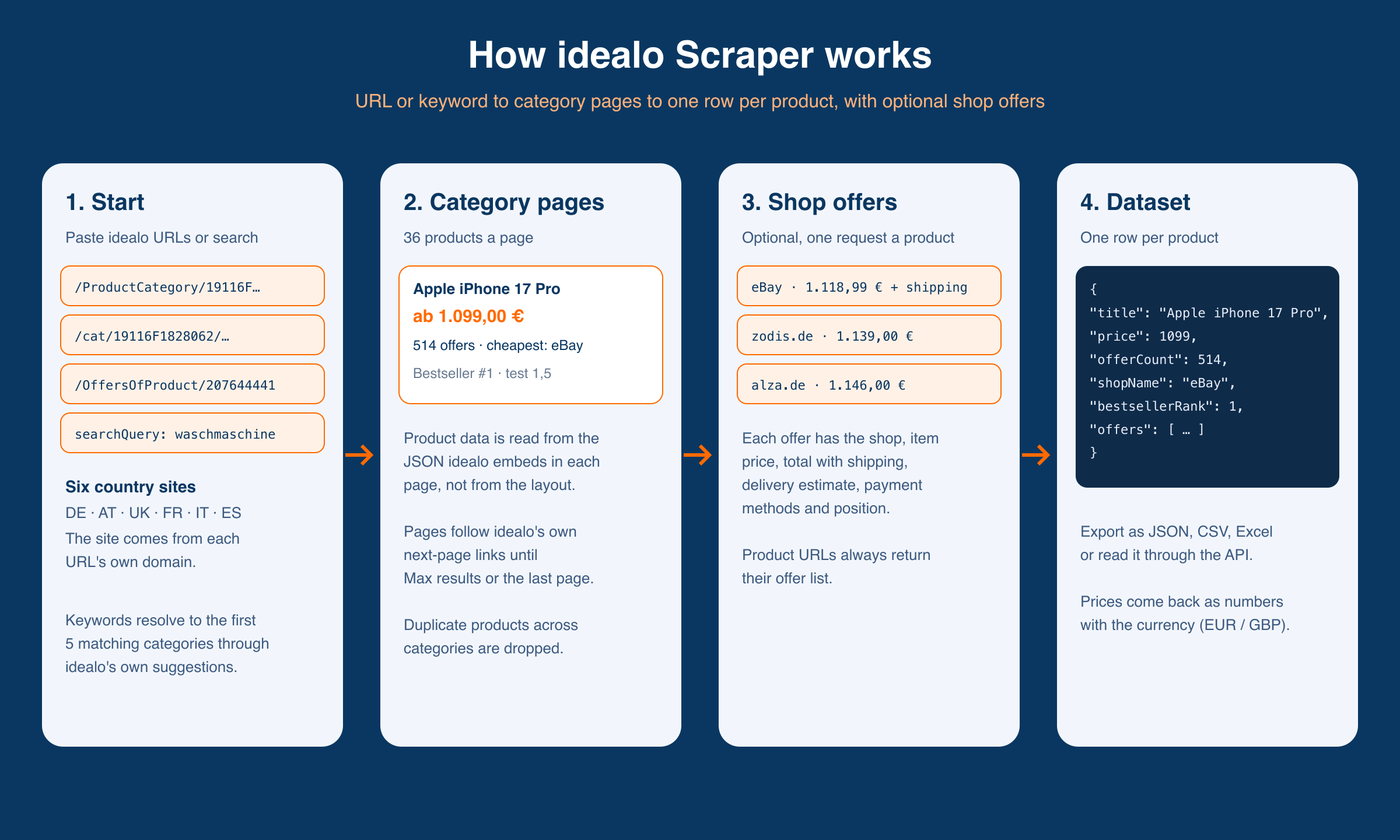
1. You give it idealo URLs or a keyword. A keyword is matched to idealo categories through idealo's own search suggestions, and the first 5 categories are used.
2. Category pages are read page by page (36 products each), following idealo's own next-page links until Max results, Max pages per URL or the last page. Products seen in more than one category are kept once.
3. With Fetch shop offers on, each product's page is fetched (one extra request per product) for its offers, brand, GTIN/EAN and variants. Product URLs always get this.
4. Rows land in the dataset. Export as JSON, CSV, Excel or through the API.
### Input Configuration
| Field | Type | Default | Description |
|---|---|---|---|
| `startUrls` | array | – | idealo category or product URLs. The site is taken from each URL's domain. |
| `searchQuery` | string | – | Used only when `startUrls` is empty. Scrapes the first 5 matching categories, or the matching products when the term names a product. |
| `country` | string | `DE` | Site for `searchQuery`: `DE`, `AT`, `UK`, `FR`, `IT`, `ES`. Pasted URLs ignore it. |
| `maxItems` | integer | `100` | Maximum rows across the run. |
| `maxPages` | integer | `0` | Maximum category pages per URL (36 products each). `0` = no page limit. |
| `fetchOffers` | boolean | `false` | Add each product's shop offers, brand, GTIN/EAN and variants (one extra request per product). |
| `fetchMode` | string | `geonode` | `geonode` (scraping API, default) or `unblocker` (Apify Unblocker proxy). |
| `geonodeProxyType` | string | `datacenter` | `datacenter` or `residential`; only with `fetchMode: geonode`. |
| `proxy` | object | Apify UNBLOCKER | Only with `fetchMode: unblocker`. |
#### Example input: category with shop offers
```json
{
"startUrls": [{ "url": "https://www.idealo.de/preisvergleich/ProductCategory/19116F1827447.html" }],
"maxItems": 50,
"fetchOffers": true
}
```
#### Example input: keyword search in France
```json
{
"searchQuery": "iphone",
"country": "FR",
"maxItems": 100
}
```
### Output Overview
| Row | When | Key fields |
|---|---|---|
| Product | category URL or search | productId, title, price, offerCount, shopName, shippingCosts, characteristics, testRating, bestsellerRank |
| Product + offers | `fetchOffers: true` | all product fields plus brand, gtin, highPrice, rating, `variants[]`, `offers[]` |
| Product page | product URL | productId, title, brand, gtin, price, highPrice, offerCount, rating, imageUrl, `variants[]`, `offers[]` |
### Output Samples
#### Product row with offers (idealo.de, `fetchOffers: true`)
```json
{
"productId": "207644441",
"title": "Apple iPhone 17 Pro",
"categoryId": "19116",
"url": "https://www.idealo.de/preisvergleich/OffersOfProduct/207644441_-iphone-17-pro-apple.html",
"price": 1118.99,
"formattedPrice": "1.118,99 €",
"currency": "EUR",
"offerCount": 536,
"usedOnly": false,
"shopName": "eBay",
"shopId": "9701",
"shippingCosts": "9,90 €",
"imageUrl": "https://cdn.idealo.com/folder/Product/207644/4/207644441/s1_produktbild_mittelgross/apple-iphone-17-pro.jpg",
"subheading": "5G Handy",
"characteristics": ["5G Handy", "6,3 Zoll", "120 Hz", "48 MP", "12 GB RAM", "A19 Pro", "iOS 26", "3.988 mAh"],
"testRating": "1,5",
"userReviewCount": 163,
"isBestseller": true,
"bestsellerRank": 1,
"energyEfficiencyClass": "A",
"leadoutUrl": "https://www.idealo.de/relocator/relocate?offerKey=1b7aee572eddb64a3e28958b75fb01dd&price=1118.99&sid=9701&type=offer&pos=1",
"scrapedAt": "2026-10-03T05:37:20.217Z",
"offers": [
{
"shopName": "eBay",
"shopId": "9701",
"offerKey": "1b7aee572eddb64a3e28958b75fb01dd",
"productName": "Apple iPhone 17 Pro 256GB Cosmic Orange",
"price": 1118.99,
"totalPrice": 1128.89,
"formattedTotalPrice": "1.128,89 €",
"deliveryTime": "bis Fr. 09.10.",
"paymentMethods": [],
"offerPosition": 1,
"leadoutType": "offer"
}
]
}
```
#### Product URL row (idealo.es)
```json
{
"productId": "204697967",
"title": "Kingston NV3 M.2",
"brand": "Kingston",
"gtin": "0740617344790",
"url": "https://www.idealo.es/precios/204697967/kingston-nv3-1tb.html",
"price": 138.61,
"highPrice": 235.17,
"currency": "EUR",
"offerCount": 28,
"rating": 4.87,
"userReviewCount": 310,
"imageUrl": "https://cdn.idealo.com/folder/Product/204697/9/204697967/s11_produktbild_gross/kingston-nv3-1tb.jpg",
"variants": [],
"offers": [
{
"shopName": "speedler.es",
"shopId": "319532",
"offerKey": "83c090f0cb79bdeec0f467ac78defbff",
"productName": "Kingston NV3 1TB",
"price": 138.61,
"totalPrice": 138.61,
"formattedTotalPrice": "138,61 €",
"deliveryTime": "hasta sáb 10.10.",
"paymentMethods": ["Pago adelantado por transferencia"],
"offerPosition": 0,
"leadoutType": "offer"
}
],
"scrapedAt": "2026-10-08T07:09:17.450Z"
}
```
A product with variants lists each one, e.g. `{ "productId": "207702129", "title": "Apple iPhone 17 256 Go lavande", "gtin": "0195950644036", "price": 899.94, "highPrice": 1506.33, "offerCount": 17, "url": "https://www.idealo.fr/prix/207702129/apple-iphone-17-256-go-lavande.html" }`.
### Key Output Fields
| Field | Description |
|---|---|
| `productId` | idealo product id. |
| `title` | Product name. |
| `price` | Lowest price on idealo, as a number. |
| `formattedPrice` | Lowest price as idealo displays it. |
| `currency` | `EUR`, or `GBP` on idealo.co.uk. |
| `offerCount` | Total number of offers idealo lists for the product. |
| `shopName`, `shopId`, `shippingCosts` | The shop with the lowest price and its shipping costs. |
| `characteristics` | Key specs idealo shows on the listing. |
| `testRating` | idealo's aggregated test grade (German school grades on .de, lower is better). |
| `userReviewCount` | Number of user reviews. |
| `isBestseller`, `bestsellerRank` | idealo bestseller flag and rank within the category. |
| `energyEfficiencyClass` | EU energy label class, where shown. |
| `leadoutUrl` | idealo's redirect link to the cheapest offer. |
| `brand` | Brand, from the product page. |
| `gtin` | GTIN/EAN barcode of the product, on single-variant products. |
| `highPrice`, `rating` | Highest offer price and average user rating (out of 5), from the product page. |
| `variants[]` | Each variant (colour, size, storage) with its own productId, title, gtin, price, highPrice and offerCount. |
| `offers[].price` | The shop's item price. |
| `offers[].totalPrice` | Item price plus shipping, as shown in the offer list. |
| `offers[].deliveryTime` | Delivery estimate as the shop states it. |
| `offers[].paymentMethods` | Payment methods idealo lists for the offer, where shown. |
| `offers[].offerPosition` | Position in idealo's offer list (0 = first). |
### FAQ
#### Which idealo sites are supported?
idealo.de, idealo.at, idealo.co.uk, idealo.fr, idealo.it and idealo.es.
#### Can I mix sites in one run?
Yes. Each pasted URL uses its own domain's site and currency. The Country site field only applies to Search query.
#### How many offers does each product get?
Up to 20, the first page of idealo's offer list in its default order (cheapest total first). `offerCount` on the product row tells you how many idealo lists in total.
#### Why is `price` on an offer sometimes lower than `totalPrice`?
`price` is the shop's item price; `totalPrice` adds shipping, which is what idealo displays in the offer list.
#### Why is an offer's `price` empty while `totalPrice` is set?
A few shops do not publish a separate item price in idealo's offer data. The total including shipping is still returned.
#### Why is `testRating` or `energyEfficiencyClass` empty?
idealo only shows them for products that have test results or an energy label.
#### How does Search query choose what to scrape?
It asks idealo's own search suggestions for the keyword. A general term (`laptop`) matches categories, and the first 5 are scraped. A product term (`iphone 16`) often matches only products, and then those products are scraped as full product rows. For full control, paste category or product URLs instead.
#### Do I get EAN / GTIN barcodes?
Yes, from product pages: product URLs always, and every product when Fetch shop offers is on. A single-variant product has `gtin`; a product with variants lists each variant's GTIN in `variants[]`. EAN lookup as an input (barcode in, product out) is not supported.
#### Do I need a proxy?
No. The default fetch mode handles idealo's bot protection without proxy setup, and any page it cannot load is retried through Apify Unblocker automatically. If a run still fails to reach idealo, it ends as failed with the reason, instead of returning an empty dataset.
#### Is anything different on the free Apify plan?
Yes. On the free plan the first 3 rows of a run are complete. Later rows hide the shop offers, the cheapest shop's id and its redirect link, show only the first 3 characters of the shop name, and carry a `freePlanNote` field saying so. Prices, offer counts, specs and ratings stay visible. Any paid Apify plan returns every field in full.
#### What does the actor not scrape?
Full technical spec sheets, user review texts, price history charts, and anything behind an idealo login.
### Support
Open an issue on the actor's [Issues tab](https://apify.com/memo23/idealo-scraper/issues) or email .
### Additional Services
Need barcode-to-product lookup, price history, a scheduled price monitor or a custom export shape? Email .
### Explore More Scrapers
- [**Walmart Scraper**](https://apify.com/memo23/walmart-scraper): products, prices, sellers and reviews
- [**Amazon Product Scraper**](https://apify.com/memo23/amazon-search): products from URLs, search and detail pages
- [**Wayfair Scraper**](https://apify.com/memo23/wayfair-scraper): products, prices, stock and ratings
Full list at [apify.com/memo23](https://apify.com/memo23).
### 🤖 For AI Agents & LLM Apps
Compact reference for AI agents calling this actor via the [Apify MCP server](https://mcp.apify.com) or the Apify API (actor: `memo23/idealo-scraper`).
**Purpose:** idealo price comparison data from idealo.de, .at, .co.uk, .fr, .it and .es: products with lowest price, offer count, cheapest shop, specs and ratings, and optionally every shop's offer.
**Minimal input:**
```json
{ "searchQuery": "iphone", "country": "DE", "maxItems": 20 }
```
**Output:** one dataset row per product. Product: productId, title, categoryId, url, price, formattedPrice, currency, offerCount, usedOnly, shopName, shopId, shippingCosts, imageUrl, subheading, characteristics, testRating, userReviewCount, isBestseller, bestsellerRank, energyEfficiencyClass, leadoutUrl, scrapedAt. With `fetchOffers: true`, or for product URLs: brand, gtin, highPrice, rating, variants\[] (productId, title, gtin, price, highPrice, offerCount, url) and offers\[] with shopName, shopId, offerKey, productName, price, totalPrice, formattedTotalPrice, deliveryTime, paymentMethods, offerPosition, leadoutType. Product-URL rows carry productId, title, brand, gtin, url, price, highPrice, currency, offerCount, rating, userReviewCount, imageUrl, variants, offers, scrapedAt.
**Behaviors an agent should know:**
- Always set `maxItems`; it caps rows across the run. Category pages hold 36 products each.
- `startUrls` take priority; `searchQuery` is ignored when URLs are given. `country` applies only to `searchQuery`.
- `fetchOffers` adds one request per product, so runs take noticeably longer; offers are capped at 20 per product.
- Prices are numbers; `currency` is EUR, or GBP on idealo.co.uk.
- A run with no matches writes one row with `noResults: true` and a message.
- On the free Apify plan, rows after the first 3 hide offers, shopId and leadoutUrl, truncate shopName and add `freePlanNote`. Paid plans get full rows.
- Billing is per product row, plus one offers charge per product whose offer list comes back, plus the actor start. See the Pricing tab for amounts.
***
### ⚠️ Disclaimer
This Actor is an independent tool and is not affiliated with, endorsed by, or sponsored by idealo internet GmbH or any of its subsidiaries. All trademarks mentioned are the property of their respective owners.
The scraper accesses only publicly available category and product offer pages. It uses no authenticated endpoints, paid features, or content behind an idealo login. Users are responsible for making sure their use complies with idealo's terms of use, applicable data-protection law (GDPR and similar), and any contractual obligations of their own organization.
***
### SEO Keywords
idealo scraper, scrape idealo, idealo API, idealo.de scraper, idealo price scraper, idealo product scraper, idealo offers scraper, idealo price comparison data, idealo price monitoring, idealo.at scraper, idealo.co.uk scraper, idealo.fr scraper, idealo.it scraper, idealo.es scraper, Preisvergleich scraper, German price comparison scraper, European price monitoring, e-commerce price tracking, competitor price monitoring, shop offers data, lowest price tracker, idealo EAN scraper, idealo GTIN data, product barcode data, Apify idealo
# Actor input Schema
## `startUrls` (type: `array`):
idealo URLs to scrape. Category pages (e.g. https://www.idealo.de/preisvergleich/ProductCategory/19116F1827447.html or https://www.idealo.fr/cat/19116F1828062/smartphones.html) return one row per product. Product pages (e.g. https://www.idealo.de/preisvergleich/OffersOfProduct/207644441\_-iphone-17-pro-apple.html, or /compare/, /prix/, /confronta-prezzi/, /precios/ on the other sites) return one full product row: brand, GTIN/EAN, price range, rating, variants with their GTINs, and the shop offers. The site is taken from each URL's domain. Leave empty to use Search query instead.
## `searchQuery` (type: `string`):
Used only when Start URLs is empty. The keyword is matched through idealo's own search suggestions: a general term ('laptop', 'waschmaschine') scrapes the first 5 matching categories; a product term ('iphone 16') that matches only products scrapes those products as full product rows. Runs on the site picked in Country site.
## `country` (type: `string`):
Which idealo site Search query runs on: DE = idealo.de, AT = idealo.at, UK = idealo.co.uk, FR = idealo.fr, IT = idealo.it, ES = idealo.es. Pasted Start URLs ignore this and use their own domain. Default DE.
## `maxItems` (type: `integer`):
Maximum number of rows to output across the whole run. Category pages hold 36 products each, so 100 results reads 3 pages. Default 100.
## `maxPages` (type: `integer`):
Maximum category pages to read per start URL or resolved category (36 products per page). 0 = no page limit; the run still stops at Max results. Default 0.
## `fetchOffers` (type: `boolean`):
Open each product's page and add its brand, GTIN/EAN, highest price, rating and variants, plus an offers array: each shop's name, item price, total price including shipping, delivery estimate, payment methods and offer position (up to 20 offers per product, idealo's default sort). Costs one extra request per product, so runs take longer. Product URLs always get this. On the free Apify plan only the first 3 rows include offers. Default off.
## `fetchMode` (type: `string`):
How pages are fetched past idealo's bot protection. 'geonode' (default) uses a scraping API that solves the challenge on its side and needs no proxy setup. 'unblocker' uses Apify's Unblocker proxy instead, configured in Proxy configuration. Switch only if the default starts failing.
## `geonodeProxyType` (type: `string`):
Only used when Fetch mode is 'geonode'. 'datacenter' (default) works for idealo; 'residential' is an alternative if datacenter requests start failing.
## `proxy` (type: `object`):
Only used when Fetch mode is 'unblocker'. Defaults to the Apify UNBLOCKER proxy group. Plain datacenter and residential proxies are refused by idealo, so change this only if you know what you are doing.
## Actor input object example
```json
{
"startUrls": [
{
"url": "https://www.idealo.de/preisvergleich/ProductCategory/19116F1827447.html"
}
],
"country": "DE",
"maxItems": 100,
"maxPages": 0,
"fetchOffers": false,
"fetchMode": "geonode",
"geonodeProxyType": "datacenter"
}
```
# Actor output Schema
## `results` (type: `string`):
One row per product. With Fetch shop offers on (or for product URLs), each row carries an offers array.
# API
You can run this Actor programmatically using our API. Below are code examples in JavaScript, Python, and CLI, as well as the OpenAPI specification and MCP server setup.
## JavaScript example
```javascript
import { ApifyClient } from 'apify-client';
// Initialize the ApifyClient with your Apify API token
// Replace the '' with your token
const client = new ApifyClient({
token: '',
});
// Prepare Actor input
const input = {
"startUrls": [
{
"url": "https://www.idealo.de/preisvergleich/ProductCategory/19116F1827447.html"
}
]
};
// Run the Actor and wait for it to finish
const run = await client.actor("memo23/idealo-scraper").call(input);
// Fetch and print Actor results from the run's dataset (if any)
console.log('Results from dataset');
console.log(`💾 Check your data here: https://console.apify.com/storage/datasets/${run.defaultDatasetId}`);
const { items } = await client.dataset(run.defaultDatasetId).listItems();
items.forEach((item) => {
console.dir(item);
});
// 📚 Want to learn more 📖? Go to → https://docs.apify.com/api/client/js/docs
```
## Python example
```python
from apify_client import ApifyClient
# Initialize the ApifyClient with your Apify API token
# Replace '' with your token.
client = ApifyClient("")
# Prepare the Actor input
run_input = { "startUrls": [{ "url": "https://www.idealo.de/preisvergleich/ProductCategory/19116F1827447.html" }] }
# Run the Actor and wait for it to finish
run = client.actor("memo23/idealo-scraper").call(run_input=run_input)
# Fetch and print Actor results from the run's dataset (if there are any)
print(f"💾 Check your data here: https://console.apify.com/storage/datasets/{run.default_dataset_id}")
for item in client.dataset(run.default_dataset_id).iterate_items():
print(item)
# 📚 Want to learn more 📖? Go to → https://docs.apify.com/api/client/python/docs/quick-start
```
## CLI example
```bash
echo '{
"startUrls": [
{
"url": "https://www.idealo.de/preisvergleich/ProductCategory/19116F1827447.html"
}
]
}' |
apify call memo23/idealo-scraper --silent --output-dataset
```
## MCP server setup
```json
{
"mcpServers": {
"apify": {
"type": "http",
"url": "https://mcp.apify.com/?tools=fetch-actor-details,memo23/idealo-scraper"
}
}
}
```
The hosted server signs you in with OAuth on first connect, so no API token belongs in this config. Clients without OAuth support can send an `Authorization: Bearer ` header instead, using a token from API & Integrations in Apify Console (https://console.apify.com/settings/integrations).
## OpenAPI specification
Download the OpenAPI definition: https://api.apify.com/v2/actors/I1smhbsg11NMm7QxP/builds/nvHPiG6AgKVFaTakQ/openapi.json