# IEA Energy Data — SDG7 & Energy Indicators (`memo23/iea-energy-data`) Actor
Query any indicator in the public IEA indicator catalogue by country and year, with a free indicator list, flow and product dimensions, provenance and source age. JSON or CSV out.
- **URL**: https://apify.com/memo23/iea-energy-data.md
- **Developed by:** [Muhamed Didovic](https://apify.com/memo23) (community)
- **Stats:** 2 total users, 1 monthly users, 100.0% runs succeeded, 0 bookmarks
- **User rating**: No ratings yet
## Pricing
from $10.00 / 1,000 scraped items
This Actor is paid per event. You are not charged for the Apify platform usage, but only a fixed price for specific events.
Learn more: https://docs.apify.com/actors/running/actors-in-store.md#pay-per-event
## What's an Apify Actor?
An Actor is a serverless cloud program that runs on the Apify platform. It has two run modes.
In Batch mode, an Actor accepts a well-defined JSON input, performs an action which can take anything from a few seconds to a few hours,
and optionally produces a well-defined JSON output, datasets with results, or files in key-value store.
In Standby mode, an Actor provides a web server which can be used as a website, API, or an MCP server.
Apify vocabulary and the platform model are defined once, in the agent quickstart at https://apify.com/agents.md.
## How to integrate an Actor?
If asked about integration, you help developers integrate Actors into their projects.
You adapt to their stack and deliver integrations that are safe, well-documented, and production-ready.
Do not guess an integration path. Every one of them is in the agent quickstart at https://apify.com/agents.md: the Apify MCP server, Agent Skills with the Apify CLI, the JavaScript and Python clients, the REST API, and the account-free path for an agent with no human to sign in. It also carries the rule on stating cost before the first paid run.
For examples already wired to this Actor's own input schema, see the [API](#api) section below.
Each client library has reference documentation the quickstart does not restate: [JavaScript/TypeScript](https://docs.apify.com/api/client/js/docs.md) (`npm install apify-client`) and [Python](https://docs.apify.com/api/client/python/docs.md) (`pip install apify-client`).
# README
## IEA Energy Data — SDG7 & Energy Indicators
Query any indicator in the public IEA indicator catalogue by country and year, with a free indicator list, flow and product dimensions, provenance and source age. Built for energy research, policy analysis, and SDG7 monitoring. One row per indicator-country-year, clean JSON out.
***
### Why use this scraper
- **Full indicator catalogue.** Query any IEA indicator — SDG7 (access to electricity, clean cooking, renewables, energy efficiency) plus broader energy statistics (TPES, TFC, CO2 emissions, electricity generation, energy intensity).
- **Country and year filtering.** Query any combination of ISO3 country codes and years. WORLD for global aggregates.
- **Flow and product dimensions.** Energy data broken down by flow (consumption, production, transformation) and product (coal, oil, gas, renewables, electricity).
- **Provenance and source age.** Each data point includes its source and how recent it is.
- **Free indicator list.** Optionally fetch the full IEA indicator catalogue to discover available codes.
***
### Overview
The International Energy Agency (IEA) publishes energy data through a public API at `api.iea.org`. This actor queries that API by indicator, country, and year, returning structured data with flow/product dimensions, provenance, and source age. It covers SDG7 indicators (access to electricity, clean cooking, renewable energy share, energy efficiency) plus broader energy statistics (total final consumption, total primary energy supply, CO2 emissions, electricity generation).
***
### Use cases
- **SDG7 monitoring** — track progress on access to electricity, clean cooking, renewables, and energy efficiency.
- **Energy research** — analyze energy consumption, production, and transformation by country and year.
- **Policy analysis** — compare countries on CO2 emissions, energy intensity, and renewable share.
- **Data journalism** — source IEA data for energy reporting and visualizations.
- **Academic research** — build energy datasets for econometric and climate modeling.
***
### How it works
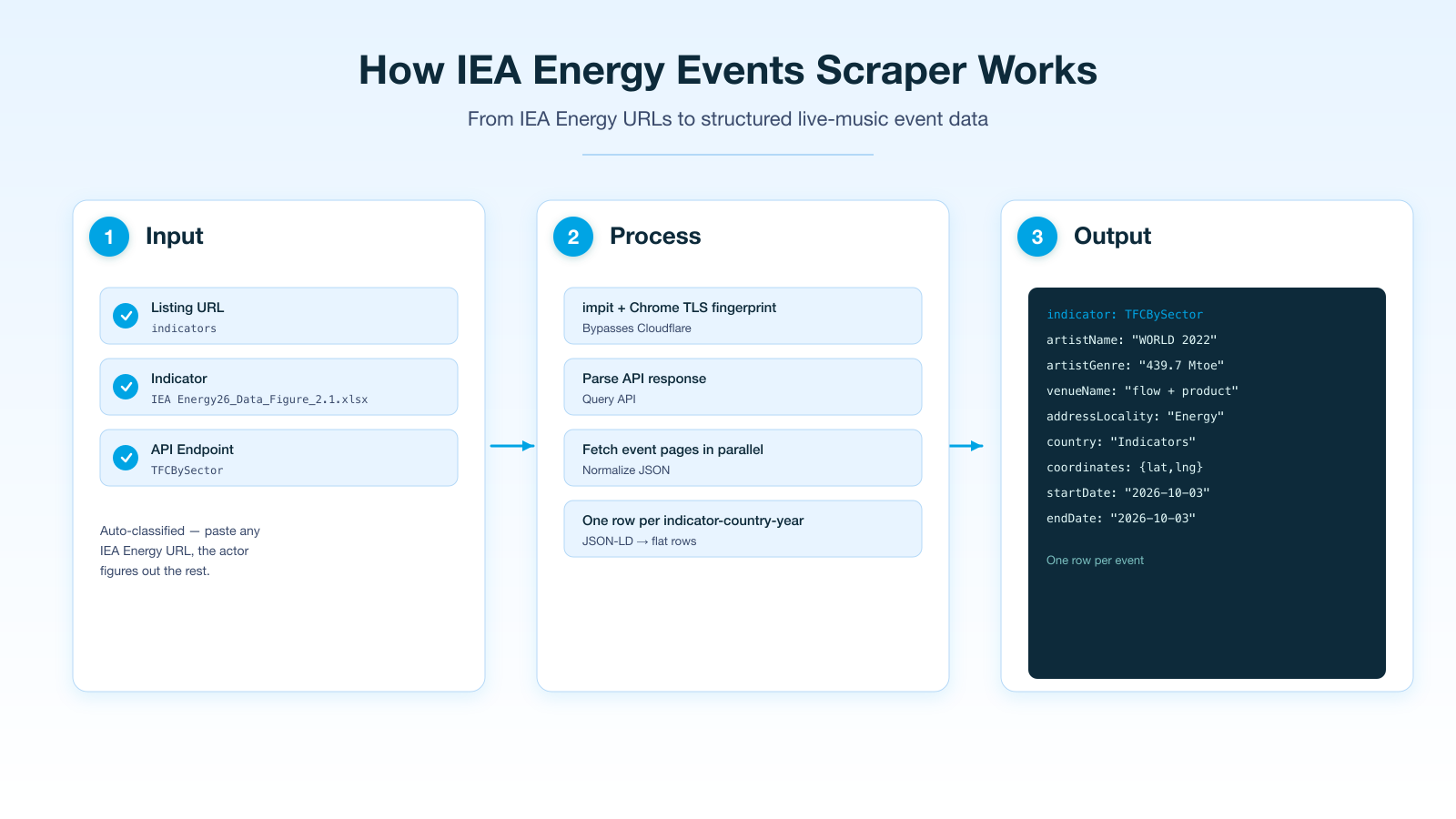
1. You provide indicator codes, ISO3 country codes, and years.
2. The actor queries the IEA API (`api.iea.org/indicator`) for each combination.
3. It normalizes the response into flat rows with indicator, country, year, value, unit, flow, product, source, and source age.
4. Each data point becomes one row in the dataset.
***
### Input
| Field | Type | Default | Notes |
|---|---|---|---|
| `indicators` | array | SDG7 + energy defaults | IEA indicator codes (e.g. `TFCBySector`, `TPESBySource`). |
| `countries` | array | `WORLD` | ISO3 country codes (e.g. `USA`, `CHN`, `WORLD`). |
| `years` | array | 2020–2022 | Years to query. |
| `includeIndicatorList` | boolean | false | Fetch the free IEA indicator catalogue. |
| `maxItems` | integer | 10000 | Maximum data rows to output. |
| `proxy` | object | Apify proxy | **Residential recommended** — IEA API is behind Cloudflare Turnstile. |
```json
{
"indicators": ["TFCBySector", "TPESBySource", "CO2EmissionsBySector"],
"countries": ["WORLD", "USA", "CHN"],
"years": [2020, 2021, 2022]
}
```
***
### Default indicators
When `indicators` is empty, the actor uses these defaults:
- `TFCBySector` — Total Final Consumption by Sector
- `TPESBySource` — Total Primary Energy Supply by Source
- `CO2EmissionsBySector` — CO2 Emissions by Sector
- `ElectricityGenerationBySource` — Electricity Generation by Source
- `EnergyIntensity` — Energy Intensity (GDP-based)
- `AccessToElectricity` — SDG7: Access to Electricity
- `AccessToCleanCooking` — SDG7: Access to Clean Cooking
- `RenewableShare` — SDG7: Renewable Energy Share
***
### Output
One row per indicator-country-year:
```json
{
"type": "energy-indicator",
"indicator": "TFCBySector",
"country": "WORLD",
"year": 2022,
"value": 439.7,
"unit": "Mtoe",
"flow": "Final consumption",
"product": "Total",
"source": "IEA Energy Balances",
"sourceAge": 45,
"scrapedAt": "2026-10-03T22:30:00.000Z"
}
```
#### Key output fields
- **`indicator`** — IEA indicator code.
- **`country`** — ISO3 country code.
- **`year`** — data year.
- **`value`** — indicator value.
- **`unit`** — unit of measurement (Mtoe, GWh, %, etc.).
- **`flow`** — energy flow dimension (consumption, production, transformation).
- **`product`** — energy product dimension (coal, oil, gas, renewables, electricity).
- **`source`** — data source (IEA Energy Balances, IEA CO2 Emissions, etc.).
- **`sourceAge`** — source age in days.
***
### ⚠️ Cloudflare Turnstile
The IEA API (`api.iea.org`) is behind Cloudflare Turnstile. From datacenter IPs, all endpoints return 404. **Use residential proxies** (Apify's residential pool) to bypass the challenge. The actor is configured to use Apify proxy by default — switch to residential in the proxy settings for production runs.
***
### ⚠️ Disclaimer
This Actor queries the public IEA API. The data is © IEA and is used here under their published terms. You are responsible for using the output in line with IEA's terms and any applicable law in your jurisdiction. This Actor is not affiliated with, endorsed by, or sponsored by the IEA.
***
### SEO Keywords
iea energy data, iea api, sdg7 data, energy indicators, energy statistics, energy balances, total final consumption, total primary energy supply, co2 emissions, electricity generation, energy intensity, access to electricity, clean cooking, renewable energy share, iea data browser, energy data by country, energy data by year, international energy agency data
# Actor input Schema
## `indicators` (type: `array`):
IEA indicator codes or names, e.g. TESbySource (total energy supply by source), TFCbySector, ElecGenByFuel, CO2BySector, SDG71 (access to electricity), SDG72 (renewable share). Turn on Include indicator list to get all 73 codes. Leave empty for a standard energy and SDG 7 set.
## `countries` (type: `array`):
Country codes or names: ISO3 (DEU), ISO2 (DE) or the name (Germany). WORLD and IEA regions also work. Leave empty for WORLD.
## `years` (type: `array`):
Years to keep, e.g. 2020, 2022. Leave empty for every year from 1990.
## `includeIndicatorList` (type: `boolean`):
Fetch the free IEA indicator catalogue and include it in the output.
## `maxItems` (type: `integer`):
Maximum number of data rows to output.
## `proxy` (type: `object`):
Apify proxy to use. Residential recommended — IEA API is behind Cloudflare Turnstile.
## Actor input object example
```json
{
"indicators": [
"TESbySource",
"ElecGenByFuel"
],
"countries": [
"WORLD"
],
"years": [
"2021",
"2022",
"2023"
],
"includeIndicatorList": false,
"maxItems": 10000,
"proxy": {
"useApifyProxy": true
}
}
```
# Actor output Schema
## `results` (type: `string`):
No description
# API
You can run this Actor programmatically using our API. Below are code examples in JavaScript, Python, and CLI, as well as the OpenAPI specification and MCP server setup.
## JavaScript example
```javascript
import { ApifyClient } from 'apify-client';
// Initialize the ApifyClient with your Apify API token
// Replace the '' with your token
const client = new ApifyClient({
token: '',
});
// Prepare Actor input
const input = {
"indicators": [
"TESbySource",
"ElecGenByFuel"
],
"countries": [
"WORLD"
],
"years": [
"2021",
"2022",
"2023"
]
};
// Run the Actor and wait for it to finish
const run = await client.actor("memo23/iea-energy-data").call(input);
// Fetch and print Actor results from the run's dataset (if any)
console.log('Results from dataset');
console.log(`💾 Check your data here: https://console.apify.com/storage/datasets/${run.defaultDatasetId}`);
const { items } = await client.dataset(run.defaultDatasetId).listItems();
items.forEach((item) => {
console.dir(item);
});
// 📚 Want to learn more 📖? Go to → https://docs.apify.com/api/client/js/docs
```
## Python example
```python
from apify_client import ApifyClient
# Initialize the ApifyClient with your Apify API token
# Replace '' with your token.
client = ApifyClient("")
# Prepare the Actor input
run_input = {
"indicators": [
"TESbySource",
"ElecGenByFuel",
],
"countries": ["WORLD"],
"years": [
"2021",
"2022",
"2023",
],
}
# Run the Actor and wait for it to finish
run = client.actor("memo23/iea-energy-data").call(run_input=run_input)
# Fetch and print Actor results from the run's dataset (if there are any)
print(f"💾 Check your data here: https://console.apify.com/storage/datasets/{run.default_dataset_id}")
for item in client.dataset(run.default_dataset_id).iterate_items():
print(item)
# 📚 Want to learn more 📖? Go to → https://docs.apify.com/api/client/python/docs/quick-start
```
## CLI example
```bash
echo '{
"indicators": [
"TESbySource",
"ElecGenByFuel"
],
"countries": [
"WORLD"
],
"years": [
"2021",
"2022",
"2023"
]
}' |
apify call memo23/iea-energy-data --silent --output-dataset
```
## MCP server setup
```json
{
"mcpServers": {
"apify": {
"type": "http",
"url": "https://mcp.apify.com/?tools=fetch-actor-details,memo23/iea-energy-data"
}
}
}
```
The hosted server signs you in with OAuth on first connect, so no API token belongs in this config. Clients without OAuth support can send an `Authorization: Bearer ` header instead, using a token from API & Integrations in Apify Console (https://console.apify.com/settings/integrations).
## OpenAPI specification
Download the OpenAPI definition: https://api.apify.com/v2/actors/K02fv8cfeE8sFMGsF/builds/z2ZG42jyO0eDaB2Bh/openapi.json