# Instagram Fake Followers Checker · Bot Detector · No Login (`memo23/instagram-fake-followers-checker`) Actor
Audit any public Instagram account's audience. Samples its followers, scores each on post count, follow ratio, avatar and handle pattern, then returns a fake-follower percentage, quality grade, estimated real reach and a scored row per follower. No login. JSON, CSV, Excel.
- **URL**: https://apify.com/memo23/instagram-fake-followers-checker.md
- **Developed by:** [Muhamed Didovic](https://apify.com/memo23) (community)
- **Categories:** Social media, AI, Automation
- **Stats:** 24 total users, 19 monthly users, 73.1% runs succeeded, 0 bookmarks
- **User rating**: 5.00 out of 5 stars
## Pricing
from $3.50 / 1,000 follower analyseds
This Actor is paid per event. You are not charged for the Apify platform usage, but only a fixed price for specific events.
Since this Actor supports Apify Store discounts, the price gets lower the higher subscription plan you have.
Learn more: https://docs.apify.com/actors/running/actors-in-store.md#pay-per-event
## What's an Apify Actor?
Actors are web data automations that power AI and operations. They run on the Apify platform to scrape websites, process data, connect APIs, and automate workflows.
In Batch mode, an Actor accepts a well-defined JSON input, performs an action which can take anything from a few seconds to a few hours,
and optionally produces a well-defined JSON output, datasets with results, or files in key-value store.
In Standby mode, an Actor provides a web server which can be used as a website, API, or an MCP server.
Actors are written with capital "A".
## How to integrate an Actor?
If asked about integration, you help developers integrate Actors into their projects.
You adapt to their stack and deliver integrations that are safe, well-documented, and production-ready.
The best way to integrate Actors is as follows.
- **AI agents and MCP clients** — the [Apify MCP server](https://docs.apify.com/integrations/mcp.md) at `https://mcp.apify.com` (remote, streamable HTTP, OAuth on first use).
- **Agentic workflows and local Actor development** — [Agent Skills](https://apify.com/.well-known/agent-skills/index.json) with the [Apify CLI](https://docs.apify.com/cli/docs.md): `npm install -g apify-cli`, then `apify login`.
- **JavaScript/TypeScript projects** — the official [JS/TS client](https://docs.apify.com/api/client/js/docs.md): `npm install apify-client`.
- **Python projects** — the official [Python client](https://docs.apify.com/api/client/python/docs.md): `pip install apify-client`.
- **Any other language** — the [REST API](https://docs.apify.com/api/v2.md).
For usage examples, see the [API](#api) section below.
For more details, see Apify documentation as [Markdown index](https://docs.apify.com/llms.txt) and [Markdown full-text](https://docs.apify.com/llms-full.txt).
# README
## Instagram Fake Followers Checker

Find out how much of an Instagram audience is real.
Paste a handle like `nasa`, `@natgeo`, or a profile URL, and get a fake-follower percentage, an audience quality grade, an estimated real reach — and a scored row for every follower that was checked, with the exact reasons it was flagged.
***
### Why Use This Checker?
- A fake-follower percentage backed by evidence, not a black-box number
- One scored row per sampled follower — post count, follow ratio, bio, avatar, handle pattern, and the flags that fired
- Audience quality score out of 100 and an A–F grade you can put in a report
- Estimated real follower count, extrapolated from the sample
- Deep mode looks up every sampled follower's own profile, which is where the real bot signal lives
- Fast mode screens from the follower list alone, roughly 50x cheaper, for scanning many accounts at once
- Audit any public account — an influencer you are about to pay, a competitor, or your own
- No login, no cookies, no session tokens — nothing to get your account flagged
***
### Overview
The Instagram Fake Followers Checker is built for brands vetting influencers before a paid collaboration, agencies reporting on campaign quality, and creators auditing their own audience after a follower spike.
It produces **two row shapes in one dataset**, labelled by `rowType`:
- `summary` — one row per audited account: the counts, the percentage, the grade, and the flags that fired most often.
- `follower` — one row per sampled follower: their public numbers, their bot score, their verdict, and the flag list behind it.
Nothing is hidden behind a proprietary index. Every verdict can be re-derived from the fields in its own row.
***
### Supported Inputs
#### Input types
| Input | Example | What happens |
|---|---|---|
| Handle | `nasa` | Audited directly |
| @-prefixed handle | `@natgeo` | The `@` is stripped |
| Profile URL | `https://www.instagram.com/apify/` | Handle extracted from the URL |
#### Copy-pasteable input
```json
{
"usernames": ["nasa", "@natgeo", "https://www.instagram.com/apify/"],
"followersSampleSize": 200,
"analysisDepth": "deep",
"includeFollowerRows": true
}
```
#### Unsupported inputs
- Private accounts — Instagram does not serve their follower list to non-followers, so there is nothing to sample. These return an error row.
- Numeric user IDs — pass the handle instead.
- Post or reel URLs — this actor audits accounts, not posts.
***
### Use Cases
**Influencer vetting before a paid deal.** Run the creator's handle at a 500-follower sample and read the grade. A B or better is a normal organic audience; a D or F on an account with a big follower number is the classic bought-audience shape.
**Campaign reporting.** Audit every creator in a campaign in one run and put the fake percentages side by side in the client deck.
**Self-audit after a follower spike.** A sudden jump in followers with no matching jump in engagement usually shows up here as a wave of zero-post accounts.
**Competitor benchmarking.** Compare the audience quality of accounts in your niche, not just their follower counts.
**Lead qualification.** Filter out prospects whose apparent reach is manufactured before spending sales time on them.
***
### How It Works
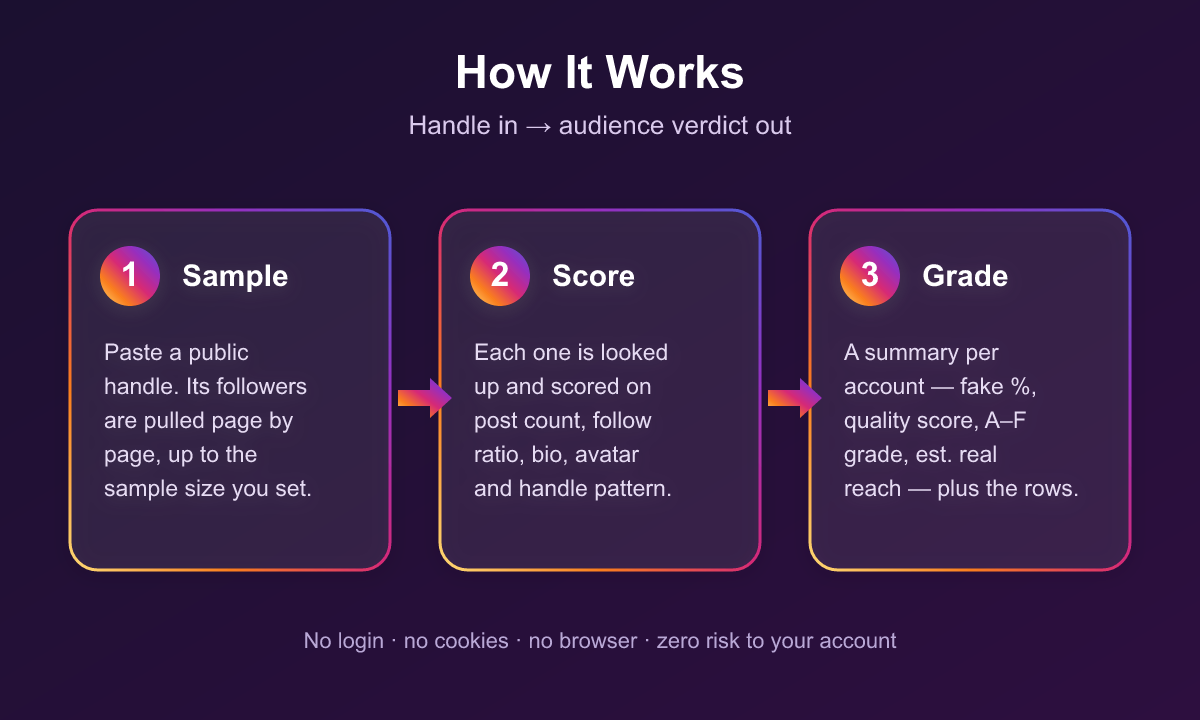
1. Each handle is resolved to a profile — follower count, following count, post count, verified and private status.
2. Followers are sampled page by page (about 50 per request) up to `followersSampleSize`.
3. In **deep** mode, every sampled follower's own profile is looked up: post count, follower and following counts, bio, external link.
4. Each follower is scored on additive signals — no posts, almost no followers, lopsided follow ratio, mass following, empty bio, default avatar, no display name, auto-generated handle patterns. Verified accounts short-circuit to a clean score.
5. A score of 60+ is `likely_fake`, 35–59 is `suspicious`, below 35 is `likely_real`. The summary counts each bucket, averages the scores into a quality score out of 100, and grades it A–F.
Weights are deliberately tuned so no single weak signal can condemn an account. A real person with an empty bio and no display name lands at `suspicious` at worst; it takes the full bot shape — no posts, no followers, hundreds followed — to reach `likely_fake`.
***
### Input Configuration
| Field | Type | Default | Description |
|---|---|---|---|
| `usernames` | array | — | Public accounts to audit. Required. |
| `followersSampleSize` | integer | `200` | Followers to analyse per account (10–5000). |
| `analysisDepth` | select | `deep` | `deep` looks up each follower's profile; `fast` screens from the list only. |
| `includeFollowerRows` | boolean | `true` | Return the evidence row per follower alongside the summary. |
#### Example — vetting one creator thoroughly
```json
{
"usernames": ["@somecreator"],
"followersSampleSize": 1000,
"analysisDepth": "deep",
"includeFollowerRows": true
}
```
#### Example — cheap screen across a shortlist
```json
{
"usernames": ["creator_one", "creator_two", "creator_three"],
"followersSampleSize": 300,
"analysisDepth": "fast",
"includeFollowerRows": false
}
```
***
### Output Overview
One `summary` row per audited account, plus one `follower` row per sampled follower when `includeFollowerRows` is on.
Accounts that could not be audited — not found, private, or with no follower list served — are returned as error rows carrying `username`, `error`, and `message`. These are never charged.
***
### Output Samples
Real `summary` row, produced from `usernames: ["nasa"]` with a 20-follower sample:
```json
{
"rowType": "summary",
"username": "nasa",
"userId": "528817151",
"fullName": "NASA",
"isVerified": true,
"isPrivate": false,
"followerCount": 104428024,
"followingCount": 92,
"mediaCount": 4890,
"analysisDepth": "deep",
"sampledFollowers": 20,
"likelyFake": 4,
"suspicious": 7,
"likelyReal": 9,
"fakePercent": 20,
"audienceQualityScore": 67,
"grade": "C",
"estimatedRealFollowers": 83542419,
"topFlags": [
{ "flag": "no_posts", "count": 11 },
{ "flag": "empty_bio", "count": 9 },
{ "flag": "almost_no_followers", "count": 6 }
],
"profileUrl": "https://www.instagram.com/nasa/"
}
```
Real `follower` row from the same run — a flagged account. The handle, ID and display name are redacted here; your dataset carries the real ones:
```json
{
"rowType": "follower",
"auditedUsername": "nasa",
"username": "",
"userId": "",
"fullName": "",
"isPrivate": false,
"isVerified": false,
"hasDefaultAvatar": false,
"followerCount": 4,
"followingCount": 512,
"mediaCount": 0,
"followingToFollowerRatio": 128,
"biography": "",
"externalUrl": null,
"botScore": 75,
"verdict": "likely_fake",
"flags": ["no_posts", "almost_no_followers", "lopsided_follow_ratio", "empty_bio"],
"profileUrl": "https://www.instagram.com//"
}
```
Error row for a private account:
```json
{
"username": "someprivateaccount",
"error": "private_account",
"message": "@someprivateaccount is private — Instagram does not serve its follower list, so its audience cannot be audited."
}
```
***
### Key Output Fields
**Summary rows**
`username`, `userId`, `fullName`, `isVerified`, `isPrivate`, `followerCount`, `followingCount`, `mediaCount`, `analysisDepth`, `sampledFollowers`, `likelyFake`, `suspicious`, `likelyReal`, `fakePercent`, `audienceQualityScore`, `grade`, `estimatedRealFollowers`, `topFlags`, `profileUrl`
**Follower rows**
`auditedUsername`, `username`, `userId`, `fullName`, `isPrivate`, `isVerified`, `hasDefaultAvatar`, `followerCount`, `followingCount`, `mediaCount`, `followingToFollowerRatio`, `biography`, `externalUrl`, `botScore`, `verdict`, `flags`, `profileUrl`
**Flags you may see**
`no_posts`, `almost_no_followers`, `lopsided_follow_ratio`, `mass_following`, `empty_bio`, `private_and_empty`, `default_avatar`, `no_display_name`, `digit_suffix`, `long_digit_suffix`, `mostly_digits`, `placeholder_handle`, `no_vowels`, `promo_handle`, `verified_account`
***
### FAQ
**How accurate is the fake percentage?**
It is a sample estimate from public signals, not a verdict from Instagram. A 200-follower sample places the percentage within a few points for most accounts; raising the sample tightens it. Treat a grade difference (B vs. E) as meaningful and a two-point difference as noise.
**Why is a big verified brand not graded A?**
Large accounts accumulate dormant and abandoned followers over years — accounts with no posts, no bio, and almost no followers of their own. They look identical to purchased accounts from the outside, and they dilute reach the same way. A C on a hundred-million-follower account is normal.
**What is the difference between deep and fast?**
Deep looks up each sampled follower's own profile, so it can see post counts and follow ratios — the signals that actually separate bots from lurkers. Fast only sees what the follower list carries (handle, display name, avatar) and costs about one request per 50 followers instead of one per follower.
Fast systematically under-reports, and by a lot: auditing the same account both ways returned 20% fake / grade C on deep and 1.7% fake / grade A on fast. That is not a bug in either mode — the bought-account signature is a zero-post profile following hundreds of accounts, and fast mode cannot see either number. Use fast to rank a shortlist against each other, deep for any figure you intend to quote or act on.
**Can I audit a private account?**
No. Instagram does not serve a private account's follower list to anyone who does not follow it, so there is nothing to sample. The run returns an error row saying so.
**Why did I get fewer sampled followers than I asked for?**
Instagram limits how deep the follower list goes, especially on very large accounts. The `sampledFollowers` field always reports what was actually analysed.
**Does turning off follower rows make a run cheaper?**
No. Followers are charged per follower analysed, not per row returned, because a deep audit spends an upstream lookup on each one whether or not you keep its row. The toggle controls how much evidence lands in your dataset, not the bill. To spend less, lower the sample size or switch to fast.
**Does a `suspicious` verdict mean the account is fake?**
No. It means the account shows some of the shape without enough of it to call. Dormant real accounts land there routinely. Only `likelyFake` feeds the `fakePercent` figure.
**Can I check which specific followers are fake?**
Yes — that is what the `follower` rows are. Sort by `botScore` descending and read the `flags` column.
***
### Support
Found a bug or need a field that is not there? Open an issue on the actor's **Issues** tab and it will be looked at.
Email: muhamed.didovic@gmail.com
***
### Additional Services
Need a custom scraper, a tailored export format, or an integration into your own pipeline? Custom builds are available — get in touch at muhamed.didovic@gmail.com.
***
### Explore More Scrapers
- **Instagram Followers & Following Scraper** — full follower and following lists
- **Instagram Profile Scraper** — profiles, posts and comments from any public account
- **Instagram Post Likers Scraper** — who liked any public post or reel
- **Instagram Comments Scraper** — full comment threads with replies
- **Instagram Similar Profiles & Lookalike Finder** — accounts similar to any profile
- **Instagram Hashtag Scraper** — top posts and reels from any public hashtag
- **Instagram Location Scraper** — place cards and geotagged posts
Browse the full collection at [apify.com/memo23](https://apify.com/memo23).
***
### 🤖 For AI Agents & LLM Apps
Compact reference for AI agents calling this actor via the [Apify MCP server](https://mcp.apify.com) or the Apify API (actor: `memo23/instagram-fake-followers-checker`).
**Purpose:** Samples a public Instagram account's followers, scores each for bot-like signals, and returns a fake-follower percentage with an audience quality grade.
**Minimal input:**
```json
{ "usernames": ["nasa"], "followersSampleSize": 200, "analysisDepth": "deep" }
```
**Output:** two row shapes in one dataset, distinguished by `rowType`. `summary` rows carry sampledFollowers, likelyFake, suspicious, likelyReal, fakePercent, audienceQualityScore, grade, estimatedRealFollowers, topFlags. `follower` rows carry the sampled account's public numbers plus botScore, verdict and flags. Unauditable accounts return `{username, error, message}` instead.
**Behaviors an agent should know:**
- `analysisDepth: "deep"` costs roughly one upstream request per sampled follower; `"fast"` costs one per 50. Pick deep for decisions, fast for ranking.
- Private accounts always return `error: "private_account"` — check before scheduling a run over a list.
- `sampledFollowers` may be lower than `followersSampleSize`; Instagram caps follower-list depth on large accounts.
- `fakePercent` counts only `likely_fake` verdicts. `suspicious` is a separate bucket and is not included.
- `estimatedRealFollowers` extrapolates the sample across the full follower count — it inherits the sample's margin of error.
- Billing: one `profile` event per summary row, one `follower` event per follower ANALYSED. `includeFollowerRows: false` suppresses the rows but not the charge — a deep audit looks each follower up either way. Error rows are never charged.
- No login is used, so no authenticated-only fields are available.
***
### ⚠️ Disclaimer
This Actor is an independent tool and is not affiliated with, endorsed by, or sponsored by Meta Platforms, Inc. or any of its subsidiaries. All trademarks mentioned are the property of their respective owners.
The scraper accesses only publicly available Instagram profile and follower data — no authenticated endpoints, paid features, or content behind the instagram.com login wall. Scores and verdicts are statistical estimates derived from public signals, not statements of fact about any individual account, and should not be used as the sole basis for consequential decisions about a person. Users are responsible for ensuring their use complies with instagram.com's Terms of Service, applicable data-protection law (GDPR, CCPA, etc.), and any contractual obligations of their own organization.
***
### SEO Keywords
instagram fake followers checker, instagram bot detector, fake follower audit, instagram audience quality, influencer vetting tool, check fake followers instagram, instagram engagement audit, bot follower detection, influencer fraud detection, instagram follower analysis, audience authenticity score, instagram account audit, social media fraud check, creator vetting data, instagram follower quality, instagram.com scraper, Apify instagram, no login instagram scraper
# Actor input Schema
## `usernames` (type: `array`):
Public Instagram accounts to audit — one per line. Accepts handles (nasa), @-prefixed handles (@nasa), or profile URLs (https://www.instagram.com/nasa/). Private accounts return an error item: Instagram does not serve their follower list to anyone who does not follow them.
## `followersSampleSize` (type: `integer`):
How many of the account's followers to analyse. 200 is enough to place the fake percentage within a few points; raise it for a tighter estimate on a large account. Instagram caps how deep the follower list goes, so a big account may serve fewer than requested — the summary always reports how many were actually sampled.
## `analysisDepth` (type: `string`):
Deep looks up every sampled follower's own profile — post count, follower/following ratio, bio — which is where the real bot signal lives. Fast scores only what the follower list carries (handle pattern, display name, default avatar), costs roughly 50x less, and systematically under-reports: the same account measured 20% fake on deep and 1.7% on fast. Use fast to rank a shortlist, deep for a number you will quote.
## `includeFollowerRows` (type: `boolean`):
On: return the scored evidence row for every sampled follower alongside the summary, so you can see exactly which accounts were flagged and why. Off: return only the one summary row per audited account. Billing is unaffected either way — followers are charged per follower analysed, because a deep audit looks each one up whether or not its row is returned. Default: on.
## Actor input object example
```json
{
"usernames": [
"nasa",
"@natgeo",
"https://www.instagram.com/apify/"
],
"followersSampleSize": 200,
"analysisDepth": "deep",
"includeFollowerRows": true
}
```
# Actor output Schema
## `results` (type: `string`):
summary rows carry the fake-follower percentage, audience quality score, grade and estimated real reach. follower rows carry each sampled account's public numbers, its bot score and the flags behind the verdict.
# API
You can run this Actor programmatically using our API. Below are code examples in JavaScript, Python, and CLI, as well as the OpenAPI specification and MCP server setup.
## JavaScript example
```javascript
import { ApifyClient } from 'apify-client';
// Initialize the ApifyClient with your Apify API token
// Replace the '' with your token
const client = new ApifyClient({
token: '',
});
// Prepare Actor input
const input = {
"usernames": [
"nasa"
]
};
// Run the Actor and wait for it to finish
const run = await client.actor("memo23/instagram-fake-followers-checker").call(input);
// Fetch and print Actor results from the run's dataset (if any)
console.log('Results from dataset');
console.log(`💾 Check your data here: https://console.apify.com/storage/datasets/${run.defaultDatasetId}`);
const { items } = await client.dataset(run.defaultDatasetId).listItems();
items.forEach((item) => {
console.dir(item);
});
// 📚 Want to learn more 📖? Go to → https://docs.apify.com/api/client/js/docs
```
## Python example
```python
from apify_client import ApifyClient
# Initialize the ApifyClient with your Apify API token
# Replace '' with your token.
client = ApifyClient("")
# Prepare the Actor input
run_input = { "usernames": ["nasa"] }
# Run the Actor and wait for it to finish
run = client.actor("memo23/instagram-fake-followers-checker").call(run_input=run_input)
# Fetch and print Actor results from the run's dataset (if there are any)
print(f"💾 Check your data here: https://console.apify.com/storage/datasets/{run.default_dataset_id}")
for item in client.dataset(run.default_dataset_id).iterate_items():
print(item)
# 📚 Want to learn more 📖? Go to → https://docs.apify.com/api/client/python/docs/quick-start
```
## CLI example
```bash
echo '{
"usernames": [
"nasa"
]
}' |
apify call memo23/instagram-fake-followers-checker --silent --output-dataset
```
## MCP server setup
```json
{
"mcpServers": {
"apify": {
"type": "http",
"url": "https://mcp.apify.com/?tools=fetch-actor-details,memo23/instagram-fake-followers-checker"
}
}
}
```
The hosted server signs you in with OAuth on first connect, so no API token belongs in this config. Clients without OAuth support can send an `Authorization: Bearer ` header instead, using a token from API & Integrations in Apify Console (https://console.apify.com/settings/integrations).
## OpenAPI specification
Download the OpenAPI definition: https://api.apify.com/v2/actors/fTZcoVqijnhMLdjJD/builds/erdEv8jIEY7hf0Gkb/openapi.json