# Instagram Followers Count Scraper · Bulk · No Login (`memo23/instagram-followers-count-scraper`) Actor
Follower and following counts for any list of Instagram handles. One request per profile, no login and no cookies. Also returns post count, verified and business flags, public email, phone, category and bio at the same price. Handles that do not exist come back as a named row.
- **URL**: https://apify.com/memo23/instagram-followers-count-scraper.md
- **Developed by:** [Muhamed Didovic](https://apify.com/memo23) (community)
- **Categories:**
- **Stats:** 2 total users, 1 monthly users, 100.0% runs succeeded, 0 bookmarks
- **User rating**: 5.00 out of 5 stars
## Pricing
from $1.30 / 1,000 profiles
This Actor is paid per event. You are not charged for the Apify platform usage, but only a fixed price for specific events.
Since this Actor supports Apify Store discounts, the price gets lower the higher subscription plan you have.
Learn more: https://docs.apify.com/actors/running/actors-in-store.md#pay-per-event
## What's an Apify Actor?
Actors are web data automations that power AI and operations. They run on the Apify platform to scrape websites, process data, connect APIs, and automate workflows.
In Batch mode, an Actor accepts a well-defined JSON input, performs an action which can take anything from a few seconds to a few hours,
and optionally produces a well-defined JSON output, datasets with results, or files in key-value store.
In Standby mode, an Actor provides a web server which can be used as a website, API, or an MCP server.
Actors are written with capital "A".
## How to integrate an Actor?
If asked about integration, you help developers integrate Actors into their projects.
You adapt to their stack and deliver integrations that are safe, well-documented, and production-ready.
The best way to integrate Actors is as follows.
- **AI agents and MCP clients** — the [Apify MCP server](https://docs.apify.com/integrations/mcp.md) at `https://mcp.apify.com` (remote, streamable HTTP, OAuth on first use).
- **Agentic workflows and local Actor development** — [Agent Skills](https://apify.com/.well-known/agent-skills/index.json) with the [Apify CLI](https://docs.apify.com/cli/docs.md): `npm install -g apify-cli`, then `apify login`.
- **JavaScript/TypeScript projects** — the official [JS/TS client](https://docs.apify.com/api/client/js/docs.md): `npm install apify-client`.
- **Python projects** — the official [Python client](https://docs.apify.com/api/client/python/docs.md): `pip install apify-client`.
- **Any other language** — the [REST API](https://docs.apify.com/api/v2.md).
For usage examples, see the [API](#api) section below.
For more details, see Apify documentation as [Markdown index](https://docs.apify.com/llms.txt) and [Markdown full-text](https://docs.apify.com/llms-full.txt).
# README
## Instagram Followers Count Scraper

Paste a list of Instagram handles, get follower and following counts back — plus post count,
verified and business flags, public email, phone, category and the Facebook ID linked to the
account, all in the same row at the same price.
| Input | Row emitted |
|---|---|
| `humansofny` | one profile row with counts |
| `@nasa` | one profile row with counts |
| `https://www.instagram.com/cristiano/` | one profile row with counts |
| a handle that does not exist | one error row naming it, not charged |
> Pure HTTP. No browser, no login, no cookies, no session to get flagged.
***
### Why Use This Scraper?
Follower counts are usually bought one of two ways: a heavyweight profile scraper that also
drags in posts and comments you did not ask for, or a thin one that returns two numbers and
nothing else. This is the cheap bulk lookup, carrying everything the same request already had.
***
### Switching From Another Instagram Followers Scraper?
**Your existing setup keeps working unchanged.** The first eight output fields are a
field-for-field match of the widely used followers-count Actor in this category — same names,
same order, same formats, down to `followsCount` rather than `followingCount`, `userUrl` with no
trailing slash, and the `YYYY-MM-DD - HH:mm` UTC stamp:
```json
{
"profilePic": "https://instagram.frix7-1.fna.fbcdn.net/v/t51.2885-19/488057622_...",
"userName": "humansofny",
"followersCount": 12639945,
"followsCount": 744,
"timestamp": "2026-08-28 - 16:06",
"userUrl": "https://www.instagram.com/humansofny",
"userFullName": "Humans of New York",
"userId": "242598499"
}
```
Point your spreadsheet, Make scenario, or script at this Actor and nothing downstream needs
touching. Everything past `userId` is added on the end, where it cannot break a consumer that
only reads the eight.
***
### How It Works
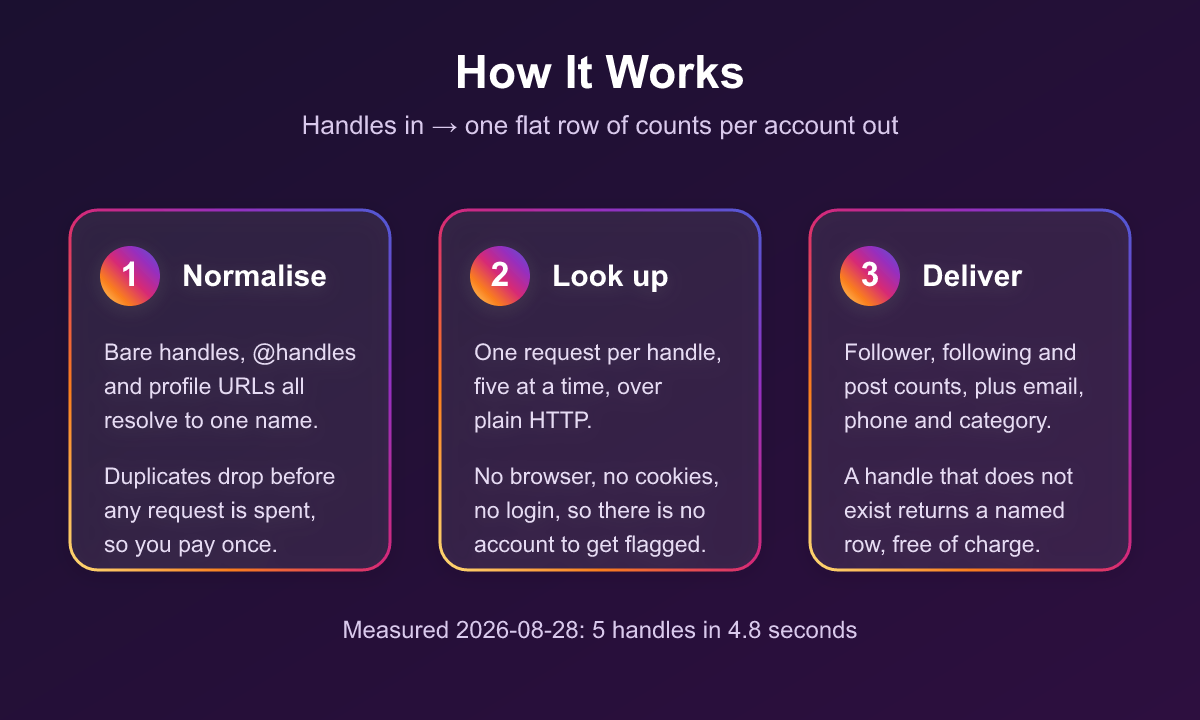
Handles are normalised first — bare names, `@handles` and profile URLs all resolve to one form,
case-insensitively, and duplicates drop before any request is spent. Each surviving handle is
then looked up once, five in flight at a time, over plain HTTP. Every profile becomes one flat
row, and a handle that cannot be resolved becomes an error row naming it rather than vanishing
from a silently shorter list.
Measured 2026-08-28: five handles in 4.8 seconds.
***
### Supported Inputs
| Input type | Pattern | Example |
|---|---|---|
| Bare handle | `name` | `humansofny` |
| @-prefixed handle | `@name` | `@nasa` |
| Profile URL | `instagram.com//` | `https://www.instagram.com/cristiano/` |
Mixed formats in one list are fine. Duplicates across formats collapse to one lookup, so
`nasa`, `NASA`, `@nasa` and the full URL cost you once.
***
### Input
| Field | Type | Required | Default | Notes |
|---|---|---|---|---|
| `usernames` | array of strings | Yes | — | Handles to look up. Bare names, `@handles`, or profile URLs. |
#### Example input
```json
{
"usernames": [
"humansofny",
"@nasa",
"https://www.instagram.com/cristiano/"
]
}
```
***
### Output Schema
One flat row per handle, ready for a spreadsheet without unpicking nested JSON.
```jsonc
{
// --- the eight fields the incumbent Actor also returns, same names and order ---
"profilePic": "https://instagram.frix7-1.fna.fbcdn.net/v/t51.2885-19/488057622_...",
"userName": "humansofny",
"followersCount": 12639945,
"followsCount": 744,
"timestamp": "2026-08-28 - 16:06", // UTC, no seconds - matches the incumbent's format
"userUrl": "https://www.instagram.com/humansofny",
"userFullName": "Humans of New York",
"userId": "242598499",
// --- everything the same request already carried ---
"postsCount": 5870,
"isPrivate": false,
"isVerified": true,
"isBusiness": false,
"biography": "New York City, one story at a time.",
"externalUrl": "https://bit.ly/4tX4uZt",
"publicEmail": null, // business accounts that published one
"publicPhone": null, // assembled from IG's country-code + number fields
"category": null, // e.g. "Clothing (Brand)", "Restaurant"
"fbId": "107111740685519", // the Facebook user id Instagram links to this account
"locationId": null, // a business's place id, when set
"accountType": 3, // 2 on business accounts, 3 on personal/creator
"scrapedAt": "2026-08-28T16:06:51.495Z" // full ISO 8601 - use this for date maths
}
```
Business accounts fill the contact fields. Measured 2026-08-28: `zara` returned
`instagramcare@zara.com` and category `Clothing (Brand)`, `sephora` returned `+18777374672`,
`gymshark` returned `support@gymshark.com`, `shakeshack` returned `locationId` `235910714`.
#### Error rows
A handle that cannot be resolved returns a row instead of vanishing:
```json
{
"userName": "zzzqqqxxxnotarealuser12345",
"error": "user_not_found",
"message": "Instagram has no public account @zzzqqqxxxnotarealuser12345. The handle may be misspelled, renamed, deactivated, or banned."
}
```
| `error` | Meaning | Charged |
|---|---|---|
| `invalid_username` | Not a usable handle or profile URL. No request was spent. | No |
| `user_not_found` | Instagram has no public account under that handle. | No |
| `no_follower_count` | The account resolved but returned no follower count. | No |
***
### Pricing
| Event | When it fires | Rate |
|---|---|---|
| Actor start | Once per run | $0.001 |
| Profile | Each profile row delivered with a follower count | from $0.0006 per profile |
Error rows are never charged. A profile found without a follower count is returned free rather
than billed as a result.
***
### What Makes This Richer Than the Competition
| Capability | Typical followers-count Actor | This Actor |
|---|---|---|
| Follower + following counts | yes | yes |
| Drop-in field names | no | yes, first eight fields match exactly |
| Post count | no | yes |
| Verified / business / private flags | no | yes |
| Public email + phone | no | yes, on business accounts |
| Business category | no | yes |
| Facebook ID (`fbId`) | no | yes, present on every profile measured |
| Named row for a bad handle | no, silently shorter list | yes, and not charged |
| Duplicates billed once | no | yes, deduped before any request |
***
### Notes & Limitations
Private accounts work — follower and following counts are public on them, so they come back
normally, and `isPrivate` marks which ones they are. Verified 2026-08-28 against a live private
account.
Contact fields exist only on business and creator accounts that filled them in. Personal
accounts leave them blank and the row reports `null` rather than guessing.
Instagram exposes `address_street`, `city_name` and `zip` on this endpoint but returned them
empty on every profile measured, local businesses with real addresses included, so they are
deliberately not surfaced. A column that is always blank is worse than no column.
`profilePic` is the same 150x150 asset the incumbent returns. Instagram's HD portrait field was
null on every profile measured.
***
### FAQ
**Do I need an Instagram account, login, or cookies?**
No. Nothing is authenticated and no session is used, so there is no account to get flagged.
**Do private accounts work?**
Yes. Their counts are public, so they come back normally. `isPrivate` tells you which they are.
**How fast is it?**
About 1.2 seconds per handle, five at a time. Five handles took 4.8 seconds end to end.
**What happens to duplicates in my list?**
They are removed before any request is made, so you are charged once.
**What is `fbId` for?**
It is the Facebook user id Instagram links the account to. It was present on every profile
measured, and it is what lets you join an Instagram handle to Facebook data without a second
lookup.
**What if a run returns nothing at all?**
It exits FAILED with a reason, rather than reporting success with an empty dataset. The one
exception is every requested handle being confirmed non-existent — that exits SUCCEEDED, with a
row per handle explaining why.
***
### 🤖 For AI Agents & LLM Apps
**Purpose:** bulk Instagram profile metrics. Give it handles, get follower/following/post counts
plus business contact fields, one flat row per handle.
**Minimal tested input:**
```json
{ "usernames": ["humansofny", "@nasa", "https://www.instagram.com/cristiano/"] }
```
**Output fields (flat, no nesting):** `profilePic`, `userName`, `followersCount`, `followsCount`,
`timestamp`, `userUrl`, `userFullName`, `userId`, `postsCount`, `isPrivate`, `isVerified`,
`isBusiness`, `biography`, `externalUrl`, `publicEmail`, `publicPhone`, `category`, `fbId`,
`locationId`, `accountType`, `scrapedAt`.
**Error rows** carry `userName` + `error` + `message` and no metric fields. Branch on the
presence of `error`. Values: `invalid_username`, `user_not_found`, `no_follower_count`.
**Billing:** one `profile` event per delivered profile row, plus one actor start. Error rows are
not charged. Duplicate handles are deduplicated before billing.
**Behaviour worth knowing:** input accepts bare handles, `@handles` and profile URLs
interchangeably; private accounts return counts normally; `timestamp` has no seconds or timezone
marker, so use `scrapedAt` for date arithmetic; an empty run fails loudly unless every handle was
confirmed non-existent.
***
### ⚠️ Disclaimer
This Actor collects only publicly available information from Instagram profiles — the same data
any logged-out visitor can see. It does not log in, use cookies, or access private accounts.
You are responsible for using the output in line with Instagram's terms and applicable data
protection law, including GDPR where personal data is involved.
***
### SEO Keywords
instagram followers count scraper, instagram follower count api, bulk instagram followers,
instagram following count, instagram profile metrics, instagram follower tracker, influencer
follower count, instagram audience size, instagram account stats, instagram bulk profile lookup,
instagram business email scraper, instagram category scraper
# Actor input Schema
## `usernames` (type: `array`):
Handles to look up. Accepts bare names (humansofny), @handles (@humansofny), or profile URLs (https://www.instagram.com/humansofny/) — one per line, mixed formats are fine. Any handle that is misspelled or has no public account comes back as an error row naming it, so a short result is never a mystery. Error rows are not charged.
## Actor input object example
```json
{
"usernames": [
"humansofny",
"@nasa",
"https://www.instagram.com/cristiano/"
]
}
```
# Actor output Schema
## `results` (type: `string`):
No description
# API
You can run this Actor programmatically using our API. Below are code examples in JavaScript, Python, and CLI, as well as the OpenAPI specification and MCP server setup.
## JavaScript example
```javascript
import { ApifyClient } from 'apify-client';
// Initialize the ApifyClient with your Apify API token
// Replace the '' with your token
const client = new ApifyClient({
token: '',
});
// Prepare Actor input
const input = {
"usernames": [
"humansofny"
]
};
// Run the Actor and wait for it to finish
const run = await client.actor("memo23/instagram-followers-count-scraper").call(input);
// Fetch and print Actor results from the run's dataset (if any)
console.log('Results from dataset');
console.log(`💾 Check your data here: https://console.apify.com/storage/datasets/${run.defaultDatasetId}`);
const { items } = await client.dataset(run.defaultDatasetId).listItems();
items.forEach((item) => {
console.dir(item);
});
// 📚 Want to learn more 📖? Go to → https://docs.apify.com/api/client/js/docs
```
## Python example
```python
from apify_client import ApifyClient
# Initialize the ApifyClient with your Apify API token
# Replace '' with your token.
client = ApifyClient("")
# Prepare the Actor input
run_input = { "usernames": ["humansofny"] }
# Run the Actor and wait for it to finish
run = client.actor("memo23/instagram-followers-count-scraper").call(run_input=run_input)
# Fetch and print Actor results from the run's dataset (if there are any)
print(f"💾 Check your data here: https://console.apify.com/storage/datasets/{run.default_dataset_id}")
for item in client.dataset(run.default_dataset_id).iterate_items():
print(item)
# 📚 Want to learn more 📖? Go to → https://docs.apify.com/api/client/python/docs/quick-start
```
## CLI example
```bash
echo '{
"usernames": [
"humansofny"
]
}' |
apify call memo23/instagram-followers-count-scraper --silent --output-dataset
```
## MCP server setup
```json
{
"mcpServers": {
"apify": {
"type": "http",
"url": "https://mcp.apify.com/?tools=fetch-actor-details,memo23/instagram-followers-count-scraper"
}
}
}
```
The hosted server signs you in with OAuth on first connect, so no API token belongs in this config. Clients without OAuth support can send an `Authorization: Bearer ` header instead, using a token from API & Integrations in Apify Console (https://console.apify.com/settings/integrations).
## OpenAPI specification
Download the OpenAPI definition: https://api.apify.com/v2/actors/fG6Dp4qotiwMZ7qWz/builds/wThTezGSCDcd8C2PP/openapi.json