# Instagram Location Scraper · Stats & Tagged Posts · No Login (`memo23/instagram-location-scraper`) Actor
Scrape any Instagram location by place name, ID, or URL. Get the place card — phone, website, category, address, coordinates, opening hours — plus top and recent posts tagged there with captions, likes, comments, play counts and creator handles. No login. JSON, CSV, Excel.
- **URL**: https://apify.com/memo23/instagram-location-scraper.md
- **Developed by:** [Muhamed Didovic](https://apify.com/memo23) (community)
- **Categories:** Social media, Lead generation, AI
- **Stats:** 1 total users, 1 monthly users, 75.0% runs succeeded, 0 bookmarks
- **User rating**: 5.00 out of 5 stars
## Pricing
from $0.70 / 1,000 posts
This Actor is paid per event. You are not charged for the Apify platform usage, but only a fixed price for specific events.
Since this Actor supports Apify Store discounts, the price gets lower the higher subscription plan you have.
Learn more: https://docs.apify.com/actors/running/actors-in-store.md#pay-per-event
## What's an Apify Actor?
Actors are web data automations that power AI and operations. They run on the Apify platform to scrape websites, process data, connect APIs, and automate workflows.
In Batch mode, an Actor accepts a well-defined JSON input, performs an action which can take anything from a few seconds to a few hours,
and optionally produces a well-defined JSON output, datasets with results, or files in key-value store.
In Standby mode, an Actor provides a web server which can be used as a website, API, or an MCP server.
Actors are written with capital "A".
## How to integrate an Actor?
If asked about integration, you help developers integrate Actors into their projects.
You adapt to their stack and deliver integrations that are safe, well-documented, and production-ready.
The best way to integrate Actors is as follows.
- **AI agents and MCP clients** — the [Apify MCP server](https://docs.apify.com/integrations/mcp.md) at `https://mcp.apify.com` (remote, streamable HTTP, OAuth on first use).
- **Agentic workflows and local Actor development** — [Agent Skills](https://apify.com/.well-known/agent-skills/index.json) with the [Apify CLI](https://docs.apify.com/cli/docs.md): `npm install -g apify-cli`, then `apify login`.
- **JavaScript/TypeScript projects** — the official [JS/TS client](https://docs.apify.com/api/client/js/docs.md): `npm install apify-client`.
- **Python projects** — the official [Python client](https://docs.apify.com/api/client/python/docs.md): `pip install apify-client`.
- **Any other language** — the [REST API](https://docs.apify.com/api/v2.md).
For usage examples, see the [API](#api) section below.
For more details, see Apify documentation as [Markdown index](https://docs.apify.com/llms.txt) and [Markdown full-text](https://docs.apify.com/llms-full.txt).
# README
## Instagram Location Scraper
Turn any Instagram place into structured data — the place card and the posts tagged at it.
Paste a name like `Eiffel Tower`, a business plus its city, a numeric location ID, or an explore URL, and get phone, website, category, address, coordinates and opening hours, plus the top and recent posts tagged there — no login, no cookies, no account risk.
***
### Why Use This Scraper?
- The place card **and** its post feeds in one run — most location tools make you run two separate scrapers
- Real contact data Instagram publishes about a place: phone number, website, category, street address, zip, opening hours per day
- Top posts (Instagram's ranked best) and recent posts, each row tagged with which feed it came from
- Sweep a whole chain from one line of input — "Starbucks Seattle" with a location cap of 20 returns 20 separate stores, each with its own phone and website
- Automatic deduplication — Instagram serves overlapping pages, this actor does not bill you twice for the same post
- Flattened rows that drop straight into CSV, Excel, or a spreadsheet
- No login, no cookies, no session tokens — nothing to get your account flagged
***
### Overview
The Instagram Location Scraper is built for local-lead prospectors, tourism and hospitality analysts, brand teams tracking venue mentions, and researchers who need geotagged post data.
It produces **two row shapes in one dataset**, each labelled by its `resultsType`:
- `details` — one row per resolved place: the business-card data Instagram holds about it.
- `top` / `recent` — one row per post tagged at that place, carrying its engagement counts and creator.
Every row carries the `query` you typed and the `locationId` it resolved to, so a run over fifty place names stays filterable and pivotable by input.
***
### Supported Inputs
#### Input types
| Input | Example | What happens |
|---|---|---|
| Place name | `Eiffel Tower` | Resolved through Instagram's own place search, best match first |
| Business + city | `Blue Bottle Coffee Oakland` | Same, narrowed by the city term |
| Numeric location ID | `103912118089363` | Used directly, no search request spent |
| Explore URL | `https://www.instagram.com/explore/locations/103912118089363/` | ID extracted from the URL |
#### Copy-pasteable input
```json
{
"locations": [
"Eiffel Tower",
"Blue Bottle Coffee Oakland",
"103912118089363",
"https://www.instagram.com/explore/locations/213385402/"
],
"resultsType": "all",
"maxLocationsPerQuery": 1,
"maxPostsPerLocation": 50
}
```
#### Unsupported inputs
- Latitude/longitude pairs — Instagram's place search takes names, not coordinates
- Google Maps or Foursquare place IDs — Instagram uses its own location IDs
- Private or restricted places whose feeds Instagram does not serve publicly
***
### Use Cases
**Local lead generation.** Search a category plus a city, raise `maxLocationsPerQuery`, and take the `details` rows: name, category, phone, website, street address and opening hours for every matching venue.
**Tourism and destination analytics.** Track what visitors post at a landmark — volume, captions, engagement, and which creators are driving reach.
**Hospitality and venue monitoring.** Watch the recent feed of your own restaurant, hotel or store for customer photos, complaints and user-generated content worth resharing.
**Chain and competitor sweeps.** One query per brand, `maxLocationsPerQuery` at 20–50, returns every branch Instagram knows about with its own contact card.
**Influencer discovery by place.** The top feed of a venue surfaces the creators whose posts about it performed best.
***
### How It Works
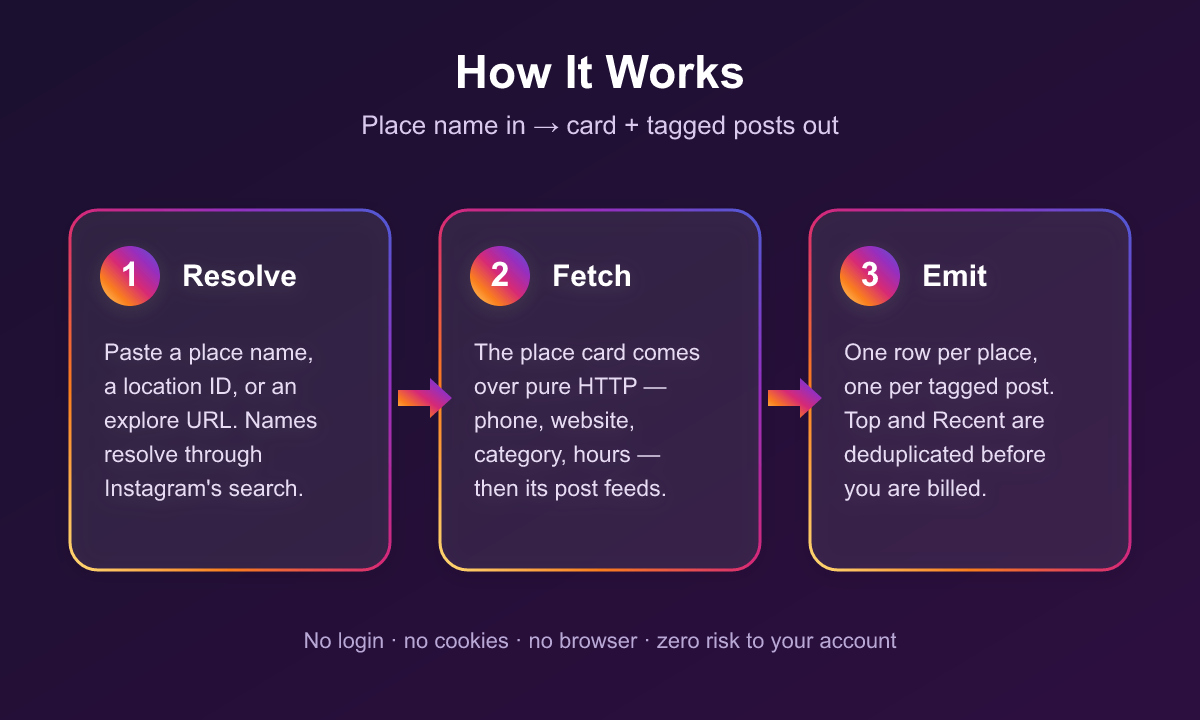
1. Each input line is classified: a numeric ID or explore URL goes straight through; anything else is a name.
2. Names are resolved through Instagram's place search. `maxLocationsPerQuery` decides how many matches are taken (1 = best match only).
3. For each resolved place, the location record is fetched — name, category, phone, website, address, zip, opening hours — and emitted as the `details` row. Coordinates come from the search hit, which is the only place Instagram exposes them.
4. The top and recent feeds are paged through, deduplicated by post ID across both feeds, and emitted as `top` / `recent` rows.
5. Paging stops when a full page returns nothing new, when your cap is reached, or when Instagram stops serving the feed.
***
### Input Configuration
| Field | Type | Default | Description |
|---|---|---|---|
| `locations` | array | — | Place names, numeric IDs, or explore URLs. Required. |
| `resultsType` | select | `all` | `all`, `details`, `top`, or `recent`. |
| `maxLocationsPerQuery` | integer | `1` | Matches to take per name. Ignored for IDs and URLs. |
| `maxPostsPerLocation` | integer | unlimited | Cap on posts per location. Split evenly across the selected feeds. |
| `onlyVideos` | boolean | `false` | Return only videos and reels, skipping photo posts. |
#### Example — contact data only, chain sweep
```json
{
"locations": ["Blue Bottle Coffee"],
"resultsType": "details",
"maxLocationsPerQuery": 30
}
```
#### Example — recent user-generated content at one venue
```json
{
"locations": ["https://www.instagram.com/explore/locations/103912118089363/"],
"resultsType": "recent",
"maxPostsPerLocation": 200,
"onlyVideos": false
}
```
***
### Output Overview
One `details` row per resolved place, plus one row per post tagged at it. Every row identifies the `query` it came from, the `locationId` it resolved to, and its `resultsType`.
Places that could not be resolved are returned as error rows carrying `query`, `error`, and `message` — these are never charged.
***
### Output Samples
Real `details` row, produced from `locations: ["Eiffel Tower"]`:
```json
{
"query": "Eiffel Tower",
"resultsType": "details",
"locationId": "103912118089363",
"name": "Eiffel Tower, Paris, France",
"category": "Monument",
"phone": "+33 892 70 12 39",
"website": "https://www.toureiffel.paris/fr",
"address": "Champ-de-Mars",
"city": null,
"zip": "75007",
"latitude": 48.85824768693,
"longitude": 2.2944650859978,
"hoursStatus": "Open until 12:00 AM",
"hoursToday": "12:00 AM",
"isOpenNow": true,
"hoursSchedule": [
{ "day": "Monday", "hours": ["9:00 AM - 12:00 AM"] },
{ "day": "Tuesday", "hours": ["9:00 AM - 12:00 AM"] }
],
"locationUrl": "https://www.instagram.com/explore/locations/103912118089363/"
}
```
Real post row from the same run (CDN URLs shortened):
```json
{
"query": "Eiffel Tower",
"resultsType": "top",
"locationId": "103912118089363",
"locationName": "Eiffel Tower, Paris, France",
"postId": "3967420748134994528",
"shortCode": "DcPHCZvGdJg",
"postUrl": "https://www.instagram.com/p/DcPHCZvGdJg/",
"mediaType": "carousel",
"productType": "carousel_container",
"takenAt": "2026-08-19T21:03:50Z",
"caption": "🇫🇷♥️💍",
"likeCount": 116310,
"commentCount": 726,
"playCount": null,
"videoDuration": null,
"isPaidPartnership": false,
"ownerUsername": "carolmourah",
"ownerFullName": "Carol Moura",
"ownerId": "5770756794",
"ownerProfilePicUrl": "https://scontent-iev1-1.cdninstagram.com/v/t51.82787-19/...",
"thumbnailUrl": "https://scontent-iev1-1.cdninstagram.com/v/t51.82787-15/...",
"videoUrl": null,
"taggedUsernames": ["_cldo12"]
}
```
Error row for a name that matches nothing:
```json
{
"query": "asdkjhasdkjhasd",
"error": "location_not_found",
"message": "No Instagram place matched \"asdkjhasdkjhasd\"."
}
```
***
### Key Output Fields
**Source**
`query`, `resultsType`, `locationId`
**Place card** (`details` rows)
`name`, `category`, `phone`, `website`, `address`, `city`, `zip`, `latitude`, `longitude`, `hoursStatus`, `hoursToday`, `isOpenNow`, `hoursSchedule`, `locationUrl`
**Post identity** (`top` / `recent` rows)
`postId`, `shortCode`, `postUrl`, `mediaType`, `productType`, `takenAt`
**Content**
`caption`, `taggedUsernames`, `locationName`, `isPaidPartnership`
**Engagement**
`likeCount`, `commentCount`, `playCount`
**Media**
`thumbnailUrl`, `videoUrl`, `videoDuration`
**Creator**
`ownerUsername`, `ownerFullName`, `ownerId`, `ownerProfilePicUrl`
***
### FAQ
**Can I search by coordinates instead of a name?**
No. Instagram's public place index takes text queries. Search the venue by name plus city, then use the returned `locationId` for repeat runs.
**Why is `city` sometimes empty when `address` is filled?**
Instagram stores these as free-text fields supplied by the place owner, and many places fill one but not the other. The `address` and `zip` are usually the reliable pair.
**Why are `latitude` and `longitude` null on some rows?**
Coordinates are carried on the place-search result, not on the location record itself. If you pass a numeric location ID directly, no search happens, so no coordinates are available — pass the place name instead if you need them.
**How many posts can I get per location?**
Instagram's location feeds are live sets of limited depth, not full archives. Expect a few hundred posts for a busy place. Setting `maxPostsPerLocation` to 10,000 will not produce 10,000 rows — paging stops once the feed stops returning new posts.
**Does a post appearing in both Top and Recent get charged twice?**
No. Posts are deduplicated by ID across both feeds before billing, so each post is delivered and charged once per location.
**Why does a chain sweep return a place that is not part of the chain?**
The matches come from Instagram's own place search, which is fuzzy — a sweep for "Blue Bottle Coffee" returned four genuine Blue Bottle cafés and one unrelated venue whose name shares a word. Filter the `details` rows on `name` or `category` after the run; every row carries both.
**How do I get every branch of a chain?**
Put the brand name in `locations` and raise `maxLocationsPerQuery`. Adding a city ("Starbucks Seattle") narrows the matches; leaving it off returns whatever Instagram ranks highest globally.
***
### Support
Found a bug or need a field that is not there? Open an issue on the actor's **Issues** tab and it will be looked at.
Email: muhamed.didovic@gmail.com
***
### Additional Services
Need a custom scraper, a tailored export format, or an integration into your own pipeline? Custom builds are available — get in touch at muhamed.didovic@gmail.com.
***
### Explore More Scrapers
- **Instagram Hashtag Scraper** — top posts and reels from any public hashtag
- **Instagram Profile Scraper** — profiles, posts and comments from any public account
- **Instagram Stories & Highlights Scraper** — active stories and permanent highlights
- **Instagram Followers & Following Scraper** — full follower and following lists
- **Instagram Post Likers Scraper** — who liked any public post or reel
- **Instagram Comments Scraper** — full comment threads with replies
- **Instagram Reels Search & Viral Finder** — find trending reels by keyword
Browse the full collection at [apify.com/memo23](https://apify.com/memo23).
***
### 🤖 For AI Agents & LLM Apps
Compact reference for AI agents calling this actor via the [Apify MCP server](https://mcp.apify.com) or the Apify API (actor: `memo23/instagram-location-scraper`).
**Purpose:** Resolves Instagram places by name or ID and returns the location's contact card plus the top and recent posts tagged there.
**Minimal input:**
```json
{ "locations": ["Eiffel Tower"], "resultsType": "all", "maxPostsPerLocation": 20 }
```
**Output:** two row shapes in one dataset, distinguished by `resultsType`. `details` rows carry name, category, phone, website, address, city, zip, latitude, longitude, hoursStatus, hoursToday, isOpenNow, hoursSchedule, locationUrl. `top`/`recent` rows carry postId, shortCode, postUrl, mediaType, productType, takenAt, caption, likeCount, commentCount, playCount, videoDuration, isPaidPartnership, ownerUsername, ownerFullName, ownerId, ownerProfilePicUrl, thumbnailUrl, videoUrl, taggedUsernames. Unresolvable inputs return `{query, error, message}` instead.
**Behaviors an agent should know:**
- Always set `maxPostsPerLocation`. Uncapped runs page until Instagram stops returning new posts.
- `resultsType: "details"` spends no post requests — use it when only contact data is needed.
- A name input costs one extra search request; a numeric location ID does not.
- `maxLocationsPerQuery` only applies to name inputs; IDs and URLs resolve to exactly one place.
- With `resultsType: "all"` the post cap is split evenly between the top and recent feeds.
- Billing: one `location` event per `details` row, one `post` event per post row. Error rows are never charged, and posts are deduplicated across feeds before billing.
- No login is used, so no authenticated-only fields are available.
***
### ⚠️ Disclaimer
This Actor is an independent tool and is not affiliated with, endorsed by, or sponsored by Meta Platforms, Inc. or any of its subsidiaries. All trademarks mentioned are the property of their respective owners.
The scraper accesses only publicly available Instagram location pages — no authenticated endpoints, paid features, or content behind the instagram.com login wall. Users are responsible for ensuring their use complies with instagram.com's Terms of Service, applicable data-protection law (GDPR, CCPA, etc.), and any contractual obligations of their own organization.
***
### SEO Keywords
instagram location scraper, scrape instagram location, instagram place scraper, instagram geotag scraper, instagram location API, instagram location posts, instagram location stats, location based instagram data, instagram business phone scraper, local lead generation instagram, geotagged posts scraper, instagram venue data, instagram place search, tourism analytics instagram, hospitality social monitoring, user generated content by location, instagram.com scraper, Apify instagram, no login instagram scraper
# Actor input Schema
## `locations` (type: `array`):
Places to scrape — one per line, mixed formats are fine. Accepts a place name (Eiffel Tower), a business name plus city (Blue Bottle Coffee Oakland), a numeric Instagram location ID (103912118089363), or an explore URL (https://www.instagram.com/explore/locations/103912118089363/). Names are resolved through Instagram's own place search; a name that matches nothing returns an error item.
## `resultsType` (type: `string`):
Location details are the place card itself: name, category, phone, website, address, zip, coordinates and opening hours. Top posts are Instagram's ranked best-performing posts tagged at the place; recent posts are the newest ones. A post appearing in both feeds is returned — and charged — only once.
## `maxLocationsPerQuery` (type: `integer`):
How many matching places to take when the input is a name rather than an ID. Leave at 1 for the best match. Raise it to sweep a chain or a brand — "Starbucks Seattle" with 20 returns 20 separate Starbucks locations, each with its own phone, website and category. Ignored for numeric IDs and explore URLs.
## `maxPostsPerLocation` (type: `integer`):
Cap how many posts to collect per location. Leave empty for as many as Instagram will serve. Instagram's location feeds are live sets of limited depth, so very large numbers will stop early once the feed stops returning new posts. Set 0 posts by choosing "Location details only" above.
## `onlyVideos` (type: `boolean`):
Skip photo posts and return only videos and reels. Applies to both post feeds. Default: off.
## Actor input object example
```json
{
"locations": [
"Eiffel Tower",
"Blue Bottle Coffee Oakland",
"103912118089363"
],
"resultsType": "all",
"maxLocationsPerQuery": 1,
"maxPostsPerLocation": 50,
"onlyVideos": false
}
```
# Actor output Schema
## `results` (type: `string`):
details rows carry name, category, phone, website, address, coordinates and opening hours. top and recent rows carry the post, its engagement counts and its creator.
# API
You can run this Actor programmatically using our API. Below are code examples in JavaScript, Python, and CLI, as well as the OpenAPI specification and MCP server setup.
## JavaScript example
```javascript
import { ApifyClient } from 'apify-client';
// Initialize the ApifyClient with your Apify API token
// Replace the '' with your token
const client = new ApifyClient({
token: '',
});
// Prepare Actor input
const input = {
"locations": [
"Eiffel Tower"
],
"maxPostsPerLocation": 50
};
// Run the Actor and wait for it to finish
const run = await client.actor("memo23/instagram-location-scraper").call(input);
// Fetch and print Actor results from the run's dataset (if any)
console.log('Results from dataset');
console.log(`💾 Check your data here: https://console.apify.com/storage/datasets/${run.defaultDatasetId}`);
const { items } = await client.dataset(run.defaultDatasetId).listItems();
items.forEach((item) => {
console.dir(item);
});
// 📚 Want to learn more 📖? Go to → https://docs.apify.com/api/client/js/docs
```
## Python example
```python
from apify_client import ApifyClient
# Initialize the ApifyClient with your Apify API token
# Replace '' with your token.
client = ApifyClient("")
# Prepare the Actor input
run_input = {
"locations": ["Eiffel Tower"],
"maxPostsPerLocation": 50,
}
# Run the Actor and wait for it to finish
run = client.actor("memo23/instagram-location-scraper").call(run_input=run_input)
# Fetch and print Actor results from the run's dataset (if there are any)
print(f"💾 Check your data here: https://console.apify.com/storage/datasets/{run.default_dataset_id}")
for item in client.dataset(run.default_dataset_id).iterate_items():
print(item)
# 📚 Want to learn more 📖? Go to → https://docs.apify.com/api/client/python/docs/quick-start
```
## CLI example
```bash
echo '{
"locations": [
"Eiffel Tower"
],
"maxPostsPerLocation": 50
}' |
apify call memo23/instagram-location-scraper --silent --output-dataset
```
## MCP server setup
```json
{
"mcpServers": {
"apify": {
"type": "http",
"url": "https://mcp.apify.com/?tools=fetch-actor-details,memo23/instagram-location-scraper"
}
}
}
```
The hosted server signs you in with OAuth on first connect, so no API token belongs in this config. Clients without OAuth support can send an `Authorization: Bearer ` header instead, using a token from API & Integrations in Apify Console (https://console.apify.com/settings/integrations).
## OpenAPI specification
Download the OpenAPI definition: https://api.apify.com/v2/actors/D6Wihh3xh9Kkq9xyd/builds/A8qffrrgKTq72reVf/openapi.json