# Instagram Reel Script — On-Screen Text, Hooks & Transcript (`memo23/instagram-reel-script-scraper`) Actor
Instagram reel script: spoken transcript, on-screen text, the 3-second hook, CTA and beats. Handle, URL or chained dataset. No login. Flat price, silent reels free.
- **URL**: https://apify.com/memo23/instagram-reel-script-scraper.md
- **Developed by:** [Muhamed Didovic](https://apify.com/memo23) (community)
- **Categories:** AI, Social media, Agents
- **Features:** Limited permissions
- **Stats:** 1 total users, 1 monthly users, 100.0% runs succeeded, 0 bookmarks
- **User rating**: No ratings yet
## Pricing
from $6.50 / 1,000 transcript delivereds
This Actor is paid per event. You are not charged for the Apify platform usage, but only a fixed price for specific events.
Since this Actor supports Apify Store discounts, the price gets lower the higher subscription plan you have.
Learn more: https://docs.apify.com/actors/running/actors-in-store.md#pay-per-event
## What's an Apify Actor?
An Actor is a serverless cloud program that runs on the Apify platform. It has two run modes.
In Batch mode, an Actor accepts a well-defined JSON input, performs an action which can take anything from a few seconds to a few hours,
and optionally produces a well-defined JSON output, datasets with results, or files in key-value store.
In Standby mode, an Actor provides a web server which can be used as a website, API, or an MCP server.
Apify vocabulary and the platform model are defined once, in the agent quickstart at https://apify.com/agents.md.
## How to integrate an Actor?
If asked about integration, you help developers integrate Actors into their projects.
You adapt to their stack and deliver integrations that are safe, well-documented, and production-ready.
Do not guess an integration path. Every one of them is in the agent quickstart at https://apify.com/agents.md: the Apify MCP server, Agent Skills with the Apify CLI, the JavaScript and Python clients, the REST API, and the account-free path for an agent with no human to sign in. It also carries the rule on stating cost before the first paid run.
For examples already wired to this Actor's own input schema, see the [API](#api) section below.
Each client library has reference documentation the quickstart does not restate: [JavaScript/TypeScript](https://docs.apify.com/api/client/js/docs.md) (`npm install apify-client`) and [Python](https://docs.apify.com/api/client/python/docs.md) (`pip install apify-client`).
# README
## Instagram Reel Script Scraper — On-Screen Text, Hooks & Transcript
> Same code as [Instagram Transcript Scraper](https://apify.com/memo23/instagram-transcript-scraper). This listing is the one Store search hits for **reel script**, on-screen text and hooks.
Turn a public Instagram Reel into the **script you actually swipe**: spoken words, the **3-second hook** (`hook3s`, always on the row), and the **on-screen text** audio-only tools miss — caption cards, prices, step numbers, URLs burned into the frames. Tick **Read on-screen text, hook and structure** for `onScreenText`, `hookOnScreen`, `ctaText` and beats. Silent / music-only reels still return the written script. Paste a handle, reel URLs, or chain another Instagram scraper's dataset. No login. From **$0.0065 per delivered transcript** ($0.015 on the Free plan).
### Which one should I use?
This actor covers Reels, `/p/` video posts and IGTV, charges one flat price per transcript whatever the length ($0.015 on the Free plan, down to $0.0065 on Gold and above), and can add on-screen text, a summary, chapters and keywords. If you only need Reels and they are short, [Instagram Reel Transcript Scraper](https://apify.com/memo23/instagram-reel-transcript-scraper) is usually cheaper: it bills $0.003 per started minute of video, capped at 5 minutes per Reel.
### Why use this Instagram Reel Script Scraper?
- **Transcript *and* breakdown in one run** — one actor returns the spoken transcript, the hook and timestamped subtitles, and optionally the on-screen text, CTA and beat structure, an AI summary with chapters and keywords, and a full AI video breakdown. The full script of a reel, spoken and written, plus the brief on why it works, from one call. No second actor and no second run for the analysis.
- **AI video breakdown (optional)** — a creative brief for every reel, written from its transcript: what it is about, why it holds attention, the hook and why it works, key points, the call to action, content format, tone and target audience, topic tags and timestamped segments. Built for swipe files, competitor research and as ready context for ChatGPT or Claude.
- **No Instagram login or cookies required** — works on any public reel/post/IGTV URL.
- **Hook on every row** — `hook3s` is the first 3 spoken seconds, the line that stops the scroll. Always included, no extra charge.
- **On-screen text (optional)** — caption cards, prices, step numbers and URLs burned into the frames. Whisper cannot hear these; tick the vision pass to get `onScreenText`, `hookOnScreen` and `ctaText`.
- **Summary, chapters and keywords (optional)** — Claude Haiku 5.5 writes them from the transcript, in the language the reel is spoken in, with chapter starts taken from the transcript's own timestamps.
- **Real speech-to-text, not just captions** — Instagram exposes no caption track to the public, so this actor downloads each video's audio and transcribes it with Whisper AI.
- **Timestamped segments** — every transcript comes with a `segments` array (`start`, `end`, `text`) you can turn into subtitles or jump-to-moment links.
- **30+ languages** — set the language or let Whisper auto-detect it per video.
- **Rich metadata included** — username, display name, caption, like/comment counts, thumbnail and upload date alongside the transcript.
- **Pay per transcript** — $0.015 per delivered transcript on the Free plan, down to $0.0065 on Gold and above (a 2★ volume listing charges $0.026). Image-only, private, silent and music-only items are skipped or written as `no_speech` and not billed.
- **Fresh Whisper, not cached captions** — every run transcribes the audio. Failed items go to the `ERRORS` record with a reason instead of a charged empty row.
- **Handle + reel URLs** — `nasa`, `@nasa`, or a reel/post/IGTV URL. No fake channel-caption scrape.
### What does it do?
Give it a creator handle, reel URLs, or a dataset from another Instagram scraper. For each video the actor:
1. Resolves the public video and its metadata (cookieless).
2. Downloads the audio.
3. Runs Whisper speech-to-text.
4. Pushes one row: metadata + full transcript + timestamped segments.
### Supported input
| Input | Example |
|-------|---------|
| Creator handle / profile | `nasa`, `@nasa`, `https://www.instagram.com/nasa/` |
| Reel URL | `https://www.instagram.com/reel/Dabg9j1xNHM/` |
| Post URL (video) | `https://www.instagram.com/p/ABC123xyz/` |
| IGTV URL | `https://www.instagram.com/tv/ABC123xyz/` |
| Dataset chain | `datasetId` of a finished IG scraper run, or pasted `datasetItems` |
| Direct `.mp4` | Instagram CDN `videoUrl` from another scraper |
| Files in your key-value store | Record URLs of videos a downloader actor saved to your Apify key-value store, or the store itself under `videoStoreIds` |
Image-only posts are detected and skipped (there is no audio to transcribe). Empty input transcribes one sample reel so "Start" still produces a row.
### Use cases
- **Creative briefs & hook swipe files** — turn on the AI video breakdown to get why each reel works, its hook type and key points, and add the reel analysis for the on-screen text, CTA and beat structure. Run it over a batch of top-performing reels, sort by hook type or format, and brief a creator or draft the next script.
- **Content research & repurposing** — turn a creator's reels into searchable text, blog drafts or scripts.
- **Social listening & brand monitoring** — analyze what's actually *said* in videos, not just captions.
- **Accessibility** — ready-made `.srt` and `.vtt` subtitle files with every transcript.
- **Competitive & influencer analysis** — mine talking points, hooks, CTAs and on-screen text across many videos, with an AI summary and keywords per reel.
- **Dataset building** — collect speech transcripts for NLP, trend detection or LLM fine-tuning.
### How it works
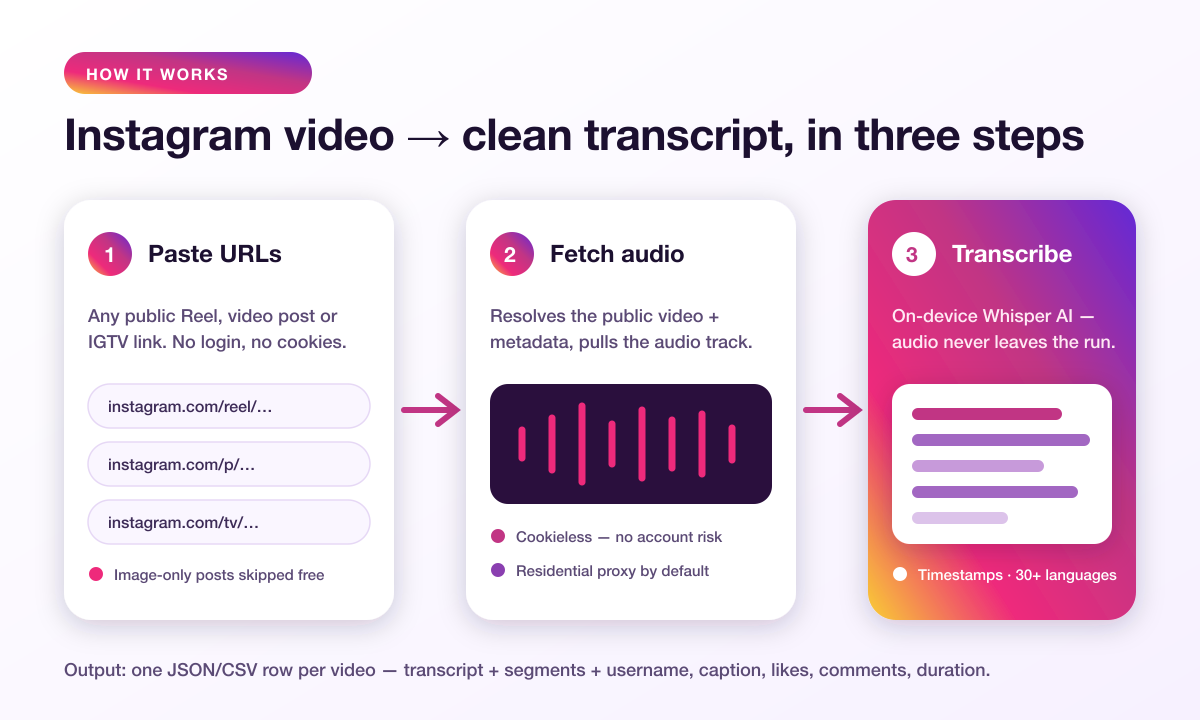
The actor opens each public Instagram video and pulls its audio without any login, then transcribes the audio with **OpenAI Whisper**. Each row's `whisperModel` and `asrEngine` fields say which Whisper model wrote that transcript.
### Input configuration
| Field | Type | Default | Description |
|-------|------|---------|-------------|
| `startUrls` | array | — | Reel / post / IGTV URLs, or a profile URL. |
| `handles` | array | — | Creator usernames (`nasa`, `@nasa`). Lists recent reels, newest first. |
| `maxReelsPerHandle` | integer | `12` | How many of each creator's latest reels to transcribe. |
| `datasetId` | string | — | Default dataset of a finished IG scraper run; reel URLs are picked out of each row. |
| `datasetItems` | array | — | Paste scraper rows instead of chaining by ID. |
| `watchlistId` | string | — | Named store that remembers transcribed shortcodes across scheduled runs. |
| `newReelsOnly` | boolean | `false` | Skip reels already on that watchlist. Needs `watchlistId`. |
| `resumeUnfinished` | boolean | `true` | If an earlier run with the same input stopped before finishing (aborted or timed out), skip the reels it already delivered and do only the rest, uncharged for the repeats. A finished run is never resumed. |
| `videoUrls` | array | — | Direct `.mp4` / `.webm` links (CDN `videoUrl` from another scraper). |
| `videoStoreIds` | array | — | Key-value stores in your account that hold video or audio files. The actor may read only the stores you select here, so a record URL from a private store needs its store selected. A selected store that none of your URLs point into is transcribed whole (keys ending in `.mp4`, `.webm`, `.mov`, `.mp3`, `.m4a` and similar), up to `maxItems`. |
| `whisperModel` | select | `tiny` | `tiny` (fast, reliable), `base` or `small` (more accurate, slower). |
| `language` | string | `auto` | ISO code (`en`, `es`, `ar`, …) or `auto` to detect per video. |
| `includeSegments` | boolean | `true` | Include the `segments` array of timestamped chunks. |
| `maxItems` | integer | `25` | Maximum videos to transcribe this run. |
| `maxDurationSec` | integer | `300` | Skip videos longer than this (compute guard). `0` disables. |
| `maxConcurrency` | integer | `2` | Videos transcribed in parallel (1–4). |
| `analyzeReel` | boolean | `false` | Vision pass over sampled frames. Adds an `analysis` object: `onScreenText` (caption cards, prices, step numbers, URLs burned into the frames), `hookOnScreen`, `ctaText`, `beats` and `structure` — the half of the script audio cannot see, and the whole script on a silent reel. Charged per analysis delivered. Paid plans only. |
| `analysisMaxFrames` | integer | `8` | Frames sampled per reel for the vision pass. More frames catch more on-screen text at higher cost; 8 is the sweet spot, 12 the ceiling. |
| `summarize` | boolean | `false` | Claude Haiku 5.5 writes a summary, chapters with start times and keywords, in the reel's own language. Charged per summary delivered. |
| `aiBreakdown` | boolean | `false` | AI video breakdown: a creative brief per reel from its transcript. Adds `breakdownSummary`, `breakdownWhyItWorks`, the hook read (`breakdownHookText`, `breakdownHookType`, `breakdownHookWhyItWorks`), `breakdownKeyPoints`, the CTA (`breakdownCtaText`, `breakdownCtaType`), `breakdownContentFormat`, `breakdownTone`, `breakdownAudience`, `breakdownTopics` and timestamped `breakdownSegments`, in the reel's own language. Charged per breakdown delivered. Paid plans only. |
| `cleanTranscript` | boolean | `false` | Adds `transcriptClean`: Haiku 4.5 corrects the words the fast speech model misheard, using the post's caption for names and terms. Never paraphrased; `transcript`, segments and subtitle files stay verbatim. $0.003 per clean transcript delivered. |
| `proxy` | object | Residential | Proxy configuration. |
#### Example input
```json
{
"handles": ["nasa"],
"maxReelsPerHandle": 12,
"watchlistId": "nasa-daily",
"newReelsOnly": true,
"startUrls": [
{ "url": "https://www.instagram.com/reel/Dabg9j1xNHM/" }
],
"whisperModel": "tiny",
"language": "auto",
"includeSegments": true,
"maxItems": 25
}
```
### What was not delivered, and why
Every reel the input asked for ends as a charged dataset row or as an entry in the run's `ERRORS` record (key-value store), never neither. A reel that was not delivered also gets an uncharged row in the dataset with its `status` set to the reason and an `error` saying what to change, so an integration that reads only the dataset (the API, Make, n8n) sees it too. The record is written on every run, with an empty `items` list when everything was delivered, so an integration can read it unconditionally. Each entry carries a `reason`, a plain-language `detail` saying what happened and what to change, and a `retryable` flag:
| `reason` | What happened | Re-run as-is? |
|---|---|---|
| `private_or_gone` | Instagram does not show the reel publicly: private account, deleted, region-locked | No |
| `no_audio` | An image post, or a key-value store record that is not a video or audio file; nothing to transcribe | No |
| `storage_no_access` | The file is in a key-value store this actor may not read. Apify lets an actor read only the stores you select in its input | No: select the store under `videoStoreIds` (or set its General access to "Anyone with ID can read"), then re-run |
| `no_speech` | Music or silence, including a transcript made only of the filler speech models invent over music ("Thank you.", "♪"). The row is in the dataset with `status: no_speech`, not charged | No |
| `too_long` | Over your `maxDurationSec` (a value from 1 to 9 would skip every reel, so the run uses the default 300 instead and says so) | Raise the limit, or set 0 to turn it off |
| `deadline` | The run would have hit its timeout before this reel finished | Raise the timeout or lower the batch |
| `transport` | The reel could not be fetched after several tries, or Instagram turned the run away for a while | Yes, in a few minutes |
| `transcription_failed` | Whisper or the download failed | Yes |
The run's status line carries the same arithmetic, for example *"Delivered 9 of 10 reels. 1 not delivered and not charged: 1 private, removed or not found — see the ERRORS record."* A run that delivers nothing because every fetch failed on the network is marked FAILED so it stands out in your run list; a run whose misses describe the reels themselves, or a store it was not allowed to read, finishes SUCCEEDED. Reels left out by the watchlist are counted separately on the status line and never charged.
### Output
One row per video. Example (abridged):
```json
{
"id": "Dabg9j1xNHM",
"shortcode": "Dabg9j1xNHM",
"url": "https://www.instagram.com/reel/Dabg9j1xNHM/",
"username": "nasaadmin",
"userId": "79712351002",
"fullName": "NASA Administrator Jared Isaacman",
"caption": "For 250 years, America has inspired generations to dream bigger…",
"durationSec": 58,
"thumbnailUrl": "https://instagram.f…/735552979_….jpg",
"timestamp": 1783294802,
"uploadDate": "20260705",
"likeCount": 56053,
"commentCount": 1923,
"viewCount": null,
"isVideo": true,
"transcript": "For 250 years, the United States of America has been the hope, the promise, the light and the glory of all the nations of the world…",
"hook3s": "For 250 years, the United States of America has been the hope",
"hookStartSeconds": 0.46,
"status": "ok",
"language": "en",
"segments": [
{ "start": 0.46, "end": 5.46, "text": "For 250 years, the United States of America has been the hope" }
],
"srt": "1\n00:00:00,460 --> 00:00:05,460\nFor 250 years, the United States of America has been the hope\n",
"vtt": "WEBVTT\n\n00:00:00.460 --> 00:00:05.460\nFor 250 years, the United States of America has been the hope\n",
"srtFileUrl": "https://api.apify.com/v2/key-value-stores/…/records/Dabg9j1xNHM.srt",
"vttFileUrl": "https://api.apify.com/v2/key-value-stores/…/records/Dabg9j1xNHM.vtt",
"transcriptSource": "whisper",
"whisperModel": "tiny",
"transcribedAt": "2026-07-15T09:49:00.990Z"
}
```
### Key output fields
| Field | Description |
|-------|-------------|
| `transcript` | Full spoken text of the video. |
| `hook3s` | Spoken text that starts in the first 3 seconds (always present). |
| `hookStartSeconds` | Offset of that hook, or `null` if there is no speech. |
| `status` | `ok` for a transcript. Anything else is an uncharged row: `no_speech`, or the reason a reel was not delivered (`too_long`, `private_or_gone`, `no_audio`, `deadline`, `transport`, `transcription_failed`), with `error` saying what to change. Only `ok` rows are charged. |
| `segments` | Array of `{start, end, text}` timestamped chunks (subtitle-ready). |
| `srt` / `vtt` | The transcript as ready-made SubRip and WebVTT subtitle text. |
| `srtFileUrl` / `vttFileUrl` | Direct download links to the `.srt` / `.vtt` files. |
| `language` | Detected (or specified) spoken language. |
| `username` / `fullName` | Creator handle and display name. |
| `caption` | The post's written caption. |
| `likeCount` / `commentCount` | Engagement metrics when available. |
| `durationSec` | Video length in seconds. |
| `transcribedAt` | UTC timestamp of transcription. |
| `analysis` | On-screen text, hook, CTA, beats and structure read from sampled frames. Only with `analyzeReel`. |
| `analysis.onScreenText` | Text shown on the video — caption cards, prices, step numbers, URLs — that audio transcription cannot capture. Also `onScreenTextCards` and `onScreenTextJoined`. |
| `analysis.hookOnScreen` | The on-screen hook: the text written on the opening frames. |
| `analysis.ctaText` | The call to action, spoken or on screen. |
| `analysis.beats` / `analysis.structure` | The reel's beat-by-beat breakdown and its overall structure. |
| `summary` | Two to four sentences on what the reel covers, in the reel's language. Only with `summarize`. |
| `summaryChapters` | `{start, end, startTime, title}` per chapter, timed from the transcript itself. |
| `summaryKeywords` | The names, topics and terms that matter most, most important first. |
| `summaryError` | Why a summary is missing on a row that asked for one. The transcript is unaffected. |
| `breakdownSummary` | What the reel is about, two to four sentences. Only with `aiBreakdown`. |
| `breakdownWhyItWorks` | Why the reel holds attention and earns engagement: pacing, structure, the promise it makes and keeps. |
| `breakdownHookText` / `breakdownHookType` / `breakdownHookWhyItWorks` | The opening line that stops the scroll, its type (`question`, `bold_claim`, `listicle`, `contrarian`, `story`, `demo`, `problem`, `statistic`, `other`) and why it works. |
| `breakdownKeyPoints` | The main points or takeaways, most important first. |
| `breakdownCtaText` / `breakdownCtaType` | What the creator asks the viewer to do, and its type (`follow`, `comment`, `dm`, `link_in_bio`, `save`, `share`, `purchase`, `subscribe`, `visit`, `other`); empty when the reel asks for nothing. |
| `breakdownContentFormat` / `breakdownTone` / `breakdownAudience` | Short labels for the format (tutorial, listicle, story, review…), the tone, and who the reel is for. |
| `breakdownTopics` | Topic tags for the reel. |
| `breakdownSegments` | `{start, end, startTime, title}` per moment of the reel, timed from the transcript itself. |
| `breakdownError` | Why a breakdown is missing on a row that asked for one. The transcript is unaffected. |
| `transcriptClean` | The transcript with misheard words corrected ("no-boyo-bree" becomes "no-boil brie"). Only with `cleanTranscript`; empty when the text came from Whisper's large model or from Instagram's own track, which need no correction. |
| `transcriptCleanError` | Why `transcriptClean` is missing on a row that asked for it. |
| `asrEngine` | Which engine produced the spoken text: `whisper-local` (the Whisper model picked in `whisperModel`), `whisper-large-v3-turbo` (Whisper's large model) or `subtitles` (Instagram's own track). |
### Free Apify plan
On the free Apify plan, the first 3 transcripts of each run come back in full, so you can check the data. After that, rows keep the reel's id, shortcode, URL, creator, caption, upload time, duration, language and status, while the transcript and spoken hook are cut to their first 3 characters, the segments, subtitle text, subtitle files and thumbnail URL are hidden, and the reel analysis and summary text are cut or hidden. Like, comment and view counts are rounded to their order of magnitude, and a `freePlanNote` field marks those rows. Any paid Apify plan returns every field in full. The reel analysis (`analyzeReel`), the AI summary (`summarize`) and the AI video breakdown (`aiBreakdown`) are available on paid Apify plans only, so on the free plan they are off for the whole run; transcription itself is unaffected.
### FAQ
**Coming from another Instagram transcript actor?** If a listing charged you and returned cached or empty text, or failed on a handle / channel scrape, this actor transcribes the audio with Whisper on every run. Price is **$0.015 per delivered transcript** on the Free plan and $0.0065 on Gold and above (vs $0.026 on the 2★ volume listing). Silent and music-only reels are written with `status: no_speech` and not charged. A handle (`nasa`, `@nasa`) lists recent reels; there is no channel-scrape mode that invents captions. Failed items land in the `ERRORS` key-value record with a `reason` — they are not billed.
**What does it cost?** A flat price per delivered transcript, set by your Apify plan: $0.015 Free, $0.0095 Bronze, $0.007 Silver, $0.0065 Gold and above, plus a $0.0001 run start. A 10-minute IGTV costs the same as a 15-second Reel. Silent / music-only reels (`status: no_speech`) and skipped items are never charged.
**Can it break a reel down like a creative brief?** Yes. Turn on `aiBreakdown` and every reel with speech gets a breakdown next to its transcript: a summary, why it works, the hook and its type, key points, the call to action, format, tone, audience, topics and timestamped segments. It runs in the same run as the transcript, so there is no second actor to chain. For the text written on the video and the shot-by-shot beats, add `analyzeReel` as well.
**Do I need an Instagram account or cookies?** No. The actor works on public videos without any login.
**Can I get subtitle files?** Yes. Every row carries the full `srt` and `vtt` text plus `srtFileUrl` / `vttFileUrl` download links (after the first 3 rows of a free-plan run these are hidden, see Free Apify plan above) — drop them straight into CapCut, Premiere, DaVinci Resolve or Instagram's own caption upload.
**Why not just read Instagram's captions?** Instagram does not expose a caption/subtitle track to logged-out clients. This actor transcribes the actual audio, so you get text even for videos the creator never captioned.
**What about image posts or carousels with no video?** They're detected and skipped (reported as skipped, not charged) — there is no audio to transcribe.
**What about carousel posts with videos?** A carousel is one row. Its video slides are transcribed in the order they play, as one transcript, and `carouselVideoCount` and `carouselSlides` (each slide's start and end second) show how the post was put together. With the on-screen text option on, a frame is read from every slide. One transcript charge per post, and `maxDurationSec` applies to the slides' total length.
**Which languages are supported?** 30+ via Whisper. Set `language` for best speed/accuracy, or use `auto`.
**Why is `tiny` the default model?** It is ~5× faster than larger models and reliable on Apify's CPU. Use `base`/`small` for higher accuracy on clear speech; they are slower and can time out on long videos.
### Support
- **Found a bug or need a new field?** Open a ticket on the **Issues** tab of this actor — it's the fastest way to reach me and I actively maintain this scraper.
- **Email:**
- **Website:** [muhamed-didovic.github.io](https://muhamed-didovic.github.io/)
### Additional Services
Need something beyond the standard output? I build and maintain custom scrapers and data pipelines. Happy to help with:
- Transcripts from other platforms (TikTok, YouTube, Douyin) in the same output shape
- Scheduled, incremental transcript feeds wired into your CMS, data warehouse, or vector store
- Custom fields, summaries, translations, or export formats tailored to your workflow
- Private or dedicated actors for high-volume or compliance-sensitive use
Reach out via the Issues tab or email and describe what you need.
### Explore More Scrapers
More of my actors in the same space:
- [Social Video Transcript Scraper](https://apify.com/memo23/tiktok-profile-videos-cheerio) — transcribe TikTok **and** Instagram videos in one run, same Whisper pipeline
- [Douyin Scraper](https://apify.com/memo23/douyin-scraper) — Chinese TikTok profiles, videos and search
- [YouTube Shorts Scraper](https://apify.com/memo23/youtube-shorts-scraper) — Shorts metadata at scale
- [Instagram Profile Scraper](https://apify.com/memo23/apify-instagram-profile-scraper-ppe) — profiles, followers, bio and contact data
Browse the full catalog — job boards, business directories, review sites, social platforms — on my profile: [memo23 on Apify](https://apify.com/memo23).
### 🤖 For AI Agents & LLM Apps
Compact reference for AI agents calling this actor via the [Apify MCP server](https://mcp.apify.com) or the Apify API (actor: `memo23/instagram-transcript-scraper`).
**Purpose:** Transcribe public Instagram Reels, video posts and IGTV to text with Whisper AI, returning one row per video with metadata, `hook3s`, a full transcript and timestamped segments.
**Minimal input:**
```json
{
"handles": ["nasa"],
"maxReelsPerHandle": 5,
"maxItems": 5
}
```
**Output:** one row per video — id, shortcode, url, username, userId, fullName, caption, durationSec, thumbnailUrl, timestamp, uploadDate, likeCount, commentCount, viewCount, isVideo, transcript, hook3s, hookStartSeconds, status, language, segments \[{ start, end, text }], srt, vtt, srtFileUrl, vttFileUrl, transcriptSource, whisperModel, transcribedAt. With `summarize`: summary, summaryChapters \[{ start, end, startTime, title }], summaryKeywords, summaryError. With `aiBreakdown`: breakdownSummary, breakdownWhyItWorks, breakdownHookText, breakdownHookType, breakdownHookWhyItWorks, breakdownKeyPoints, breakdownCtaText, breakdownCtaType, breakdownContentFormat, breakdownTone, breakdownAudience, breakdownTopics, breakdownSegments \[{ start, end, startTime, title }], breakdownError. With `cleanTranscript`: transcriptClean, transcriptCleanError. Always: asrEngine. Carousel posts: carouselVideoCount, carouselSlides \[{ index, startSec, endSec }].
**Behaviors an agent should know:**
- Accepts `handles` / profile URLs, reel `/p/` `/tv/` URLs, `datasetId` / `datasetItems`, direct `.mp4` `videoUrls` (including record URLs from your own key-value store), and `videoStoreIds` to read whole stores. Empty input transcribes one sample reel (charged if speech is delivered) unless `watchlistId` / `newReelsOnly` emptied the list.
- `watchlistId` + `newReelsOnly` persist seen shortcodes in a named KV store so a scheduled run only transcribes new reels. `newReelsOnly` without `watchlistId` is ignored.
- Image-only posts are skipped (not charged). `status: no_speech` rows are written and not charged.
- Always set `maxItems`; transcription is the slow, billed step, so start small.
- `whisperModel` is `tiny` (default, fastest) / `base` / `small`; `base`/`small` are more accurate but slower and can time out on long videos.
- `language` accepts an ISO code (`en`, `es`, `ar`) or `auto`; setting it is faster and more accurate than auto-detect.
- `maxDurationSec` (default 300) skips videos longer than the limit; `includeSegments` toggles the timestamped `segments` array.
- `summarize: true` adds `summary`, `summaryChapters` and `summaryKeywords`, written by Claude Haiku 5.5 from the transcript in the reel's own language. Chapter starts come from the transcript's timestamps, so they always land inside the recording. A reel with no speech is not summarized; a summary that fails leaves the transcript intact and puts the reason in `summaryError`.
- `aiBreakdown: true` adds the `breakdown*` fields: a creative brief per reel (summary, why it works, hook text/type/why, key points, CTA text/type, content format, tone, audience, topics, timestamped segments), written from the transcript in the reel's own language. `breakdownHookType` and `breakdownCtaType` come from closed lists, so they sort and count across a batch. A reel with no speech is not broken down; a breakdown that fails leaves the transcript intact and puts the reason in `breakdownError`. Paid plans only; billed per breakdown delivered.
- `cleanTranscript: true` adds `transcriptClean`, the transcript with misheard words corrected by Haiku 4.5 (measured on English reels: about a fifth fewer word errors, never worse). `transcript` stays verbatim. Paid plans only; $0.003 per clean transcript delivered.
- Flat per-transcript price by plan tier ($0.015 Free, $0.0095 Bronze, $0.007 Silver, $0.0065 Gold+) plus a $0.0001 run start; skipped and `no_speech` items are not charged. `summarize` bills its own event per summary delivered, and only when one is delivered.
### ⚠️ Disclaimer
This actor collects only publicly available data from Instagram and is intended for lawful uses such as research, accessibility and content analysis. You are responsible for how you use the output, including compliance with Instagram's Terms of Service, applicable copyright, and data-protection laws (e.g. GDPR/CCPA) where relevant. Do not use transcripts to infringe copyright or process personal data unlawfully.
### SEO Keywords
Instagram transcript scraper, Instagram reel transcript, Instagram video to text, transcribe Instagram reels, Instagram speech to text, Instagram captions scraper, IGTV transcript, Instagram subtitles generator, Whisper Instagram, Instagram audio transcription, Instagram reels text extractor, social media transcription, Instagram AI transcript extractor, reel to text converter, Instagram video transcription API, extract text from Instagram videos, Instagram content analysis, Instagram reel breakdown, video breakdown AI, reel hook analysis, creative brief from video, why a reel went viral, Instagram VTT subtitles, bulk Instagram transcription, Instagram NLP dataset, influencer content research, no-code Instagram scraper.
# Actor input Schema
## `startUrls` (type: `array`):
Paste Instagram Reel, post (/p/) or IGTV (/tv/) URLs, or a creator profile / @handle. A profile is expanded into that account's most recent reels (see Max reels per creator). Image-only posts are skipped.
## `handles` (type: `array`):
Instagram usernames to walk — nasa, @nasa, or a profile URL. The actor lists each creator's most recent reels and transcribes them. No login. Example: nasa.
## `maxReelsPerHandle` (type: `integer`):
How many of each creator's most recent reels to transcribe. Newest first. Capped by Max videos below.
## `maxItems` (type: `integer`):
Maximum number of videos to transcribe this run. Transcription is the slow/costly step, so start small.
## `aiBreakdown` (type: `boolean`):
Turns each transcript into a structured creative brief — the breakdown other tools sell as a separate, pricier product, done in the same run. Adds breakdownSummary, breakdownWhyItWorks (why the reel holds attention), the hook read (breakdownHookText, breakdownHookType, breakdownHookWhyItWorks), breakdownKeyPoints, the call to action (breakdownCtaText, breakdownCtaType), breakdownContentFormat, breakdownTone, breakdownAudience, breakdownTopics and timestamped breakdownSegments — each in the reel's own language. Built for swipe files, competitor briefs and feeding into ChatGPT or Claude. Reels with no speech are skipped; a breakdown that fails leaves the transcript untouched and says why in breakdownError. Charged per breakdown delivered. Default: off. Paid Apify plans only.
## `analyzeReel` (type: `boolean`):
Samples frames from each reel and reads what is written ON the video — caption cards, recipe quantities, prices, step numbers, URLs — plus the hook, the call to action and a beat-by-beat breakdown with timings. This is the half of the script that audio-only transcription cannot see, and on a silent or music-only reel it is the ENTIRE script. Costs one extra AI call per reel, so it is off by default. Paid Apify plans only.
## `analysisMaxFrames` (type: `integer`):
How many frames are sampled from each reel and sent to the vision model. More frames catch more on-screen text but cost more — vision input is about 970 tokens per frame. 8 is the sweet spot, 12 the ceiling.
## `summarize` (type: `boolean`):
After transcribing, Claude Haiku 5.5 writes a short summary of the reel, a list of chapters with start times, and the keywords that matter most in it — each in the language the reel is spoken in. Reels with no speech are skipped, and a summary that fails to come back leaves the transcript untouched and says why in summaryError. Charged per summary delivered. Default: off. Paid Apify plans only.
## `cleanTranscript` (type: `boolean`):
Adds transcriptClean: the transcript with the words the fast speech model misheard corrected by Claude Haiku, using the post's caption for names and terms. Never paraphrased; the verbatim transcript, timings and subtitle files stay as they are. In a test on English reels it removed about a fifth of the word errors. Charged per reel it is delivered for ($0.003, the clean-transcript event). Paid Apify plans only.
## `language` (type: `string`):
Spoken language of the videos as an ISO code (e.g. en, es, ar), or auto to let Whisper detect it per video. Setting the correct language is faster and more accurate than auto-detect.
## `includeSegments` (type: `boolean`):
When enabled (default), each row includes a segments array of {start, end, text} chunks (subtitle-style timings) in addition to the full transcript string. Disable for a smaller, text-only output.
## `maxDurationSec` (type: `integer`):
Videos longer than this are skipped (a guard so one very long video can't burn minutes of compute). Default 300 (5 min); set 0 to disable.
## `whisperModel` (type: `string`):
tiny (default) is ~5× faster and reliable on Apify's CPU. base/small are more accurate but slower and can time out on longer videos.
## `datasetId` (type: `string`):
Default dataset ID of a finished Instagram scraper run. The actor deep-scans each row for reel/post/IGTV URLs. Works with memo23/instagram-reel-scraper, instagram-post-scraper, and the official apify/instagram-scraper.
## `datasetItems` (type: `array`):
Paste rows from an Instagram scraper instead of chaining by ID. Any field that holds an instagram.com/reel, /p/ or /tv/ URL is picked up.
## `videoUrls` (type: `array`):
Instagram CDN or other direct .mp4 / .webm links (the videoUrl field on another IG scraper's row), or record URLs of video files saved in an Apify key-value store (https://api.apify.com/v2/key-value-stores/…/records/clip.mp4). Transcribed the same as a reel URL. If the store is private, also select it under Key-value stores to read. Default: none.
## `videoStoreIds` (type: `array`):
Key-value stores in your account that hold video or audio files, for example the store a downloader actor saved its videos into. This actor may read only the stores you select here, so a record URL from a private store needs its store selected. A selected store that none of your URLs point into is transcribed whole: every key ending in .mp4, .webm, .mov, .mp3, .m4a or similar, up to Max videos. Default: none.
## `watchlistId` (type: `string`):
Named key-value store that remembers which shortcodes this run already transcribed. Use the same id on a schedule (e.g. nasa-daily) so later runs can skip old reels. Letters, numbers, hyphens, underscores. Example: nasa-daily. Default: none.
## `newReelsOnly` (type: `boolean`):
When enabled, skip reels already stored on the Watchlist ID. Requires watchlistId. Newest-first profile walks stop at the first seen reel. Empty incremental runs do not transcribe the sample reel. Default: false.
## `resumeUnfinished` (type: `boolean`):
If an earlier run with exactly this input stopped before it finished (aborted, out of memory or timed out), skip the reels it already delivered and transcribe only the rest, without charging them again. A run that finished is never resumed, so re-running the same input gives a full run. Turned off when you set a Watchlist ID. Default: on.
## `skipMusicOnly` (type: `boolean`):
For creator handles and profile URLs: reels Instagram labels as a licensed song with no original audio get no row and are not transcribed or charged. Someone talking over a song is kept. Direct reel links are always transcribed. Default: on.
## `useCache` (type: `boolean`):
Reuse a complete successful transcript of the same reel with the same options from a named key-value store in your account. Cache hits are not charged. Default: off.
## `forceRefresh` (type: `boolean`):
With Reuse successful transcripts on, ignore the cache and transcribe again. A new successful row replaces the cached one. Has no effect when the cache is off. Default: off.
## `maxConcurrency` (type: `integer`):
How many videos to transcribe in parallel. Each Whisper pass is CPU-heavy, so 1–2 is safest on standard Apify runners; higher can time out.
## `proxy` (type: `object`):
Residential proxies recommended. The default works out of the box; set it only if you need a specific country or want to use your own proxies.
## Actor input object example
```json
{
"startUrls": [
{
"url": "https://www.instagram.com/reel/Dabg9j1xNHM/"
}
],
"handles": [],
"maxReelsPerHandle": 12,
"maxItems": 25,
"aiBreakdown": false,
"analyzeReel": false,
"analysisMaxFrames": 8,
"summarize": false,
"cleanTranscript": false,
"language": "auto",
"includeSegments": true,
"maxDurationSec": 300,
"whisperModel": "tiny",
"videoUrls": [],
"newReelsOnly": false,
"resumeUnfinished": true,
"skipMusicOnly": true,
"useCache": false,
"forceRefresh": false,
"maxConcurrency": 2,
"proxy": {
"useApifyProxy": true,
"apifyProxyGroups": [
"RESIDENTIAL"
]
}
}
```
# Actor output Schema
## `results` (type: `string`):
No description
# API
You can run this Actor programmatically using our API. Below are code examples in JavaScript, Python, and CLI, as well as the OpenAPI specification and MCP server setup.
## JavaScript example
```javascript
import { ApifyClient } from 'apify-client';
// Initialize the ApifyClient with your Apify API token
// Replace the '' with your token
const client = new ApifyClient({
token: '',
});
// Prepare Actor input
const input = {
"startUrls": [
{
"url": "https://www.instagram.com/reel/Dabg9j1xNHM/"
}
],
"handles": [],
"videoUrls": [],
"proxy": {
"useApifyProxy": true,
"apifyProxyGroups": [
"RESIDENTIAL"
]
}
};
// Run the Actor and wait for it to finish
const run = await client.actor("memo23/instagram-reel-script-scraper").call(input);
// Fetch and print Actor results from the run's dataset (if any)
console.log('Results from dataset');
console.log(`💾 Check your data here: https://console.apify.com/storage/datasets/${run.defaultDatasetId}`);
const { items } = await client.dataset(run.defaultDatasetId).listItems();
items.forEach((item) => {
console.dir(item);
});
// 📚 Want to learn more 📖? Go to → https://docs.apify.com/api/client/js/docs
```
## Python example
```python
from apify_client import ApifyClient
# Initialize the ApifyClient with your Apify API token
# Replace '' with your token.
client = ApifyClient("")
# Prepare the Actor input
run_input = {
"startUrls": [{ "url": "https://www.instagram.com/reel/Dabg9j1xNHM/" }],
"handles": [],
"videoUrls": [],
"proxy": {
"useApifyProxy": True,
"apifyProxyGroups": ["RESIDENTIAL"],
},
}
# Run the Actor and wait for it to finish
run = client.actor("memo23/instagram-reel-script-scraper").call(run_input=run_input)
# Fetch and print Actor results from the run's dataset (if there are any)
print(f"💾 Check your data here: https://console.apify.com/storage/datasets/{run.default_dataset_id}")
for item in client.dataset(run.default_dataset_id).iterate_items():
print(item)
# 📚 Want to learn more 📖? Go to → https://docs.apify.com/api/client/python/docs/quick-start
```
## CLI example
```bash
echo '{
"startUrls": [
{
"url": "https://www.instagram.com/reel/Dabg9j1xNHM/"
}
],
"handles": [],
"videoUrls": [],
"proxy": {
"useApifyProxy": true,
"apifyProxyGroups": [
"RESIDENTIAL"
]
}
}' |
apify call memo23/instagram-reel-script-scraper --silent --output-dataset
```
## MCP server setup
```json
{
"mcpServers": {
"apify": {
"type": "http",
"url": "https://mcp.apify.com/?tools=fetch-actor-details,memo23/instagram-reel-script-scraper"
}
}
}
```
The hosted server signs you in with OAuth on first connect, so no API token belongs in this config. Clients without OAuth support can send an `Authorization: Bearer ` header instead, using a token from API & Integrations in Apify Console (https://console.apify.com/settings/integrations).
## OpenAPI specification
Download the OpenAPI definition: https://api.apify.com/v2/actors/Q4hRPIYQ39xHKXMmk/builds/i4eqIJXep9bfBWhU0/openapi.json