# JD.com Price Scraper 京东 — SKU Prices, Stock & Variants (`memo23/jd-com-price-scraper`) Actor
JD.com (京东 / Jingdong) price scraper with no login: paste SKU ids, product links or keywords and get every variant with its real CNY price (not the masked ¥1??9), stock, delivery promise, promo tags, subsidy flags, shop and brand. Add product details for gallery, model and warranty.
- **URL**: https://apify.com/memo23/jd-com-price-scraper.md
- **Developed by:** [Muhamed Didovic](https://apify.com/memo23) (community)
- **Categories:** E-commerce
- **Stats:** 2 total users, 1 monthly users, 100.0% runs succeeded, 0 bookmarks
- **User rating**: No ratings yet
## Pricing
from $4.00 / 1,000 skus
This Actor is paid per event. You are not charged for the Apify platform usage, but only a fixed price for specific events.
Learn more: https://docs.apify.com/actors/running/actors-in-store.md#pay-per-event
## What's an Apify Actor?
An Actor is a serverless cloud program that runs on the Apify platform. It has two run modes.
In Batch mode, an Actor accepts a well-defined JSON input, performs an action which can take anything from a few seconds to a few hours,
and optionally produces a well-defined JSON output, datasets with results, or files in key-value store.
In Standby mode, an Actor provides a web server which can be used as a website, API, or an MCP server.
Apify vocabulary and the platform model are defined once, in the agent quickstart at https://apify.com/agents.md.
## How to integrate an Actor?
If asked about integration, you help developers integrate Actors into their projects.
You adapt to their stack and deliver integrations that are safe, well-documented, and production-ready.
Do not guess an integration path. Every one of them is in the agent quickstart at https://apify.com/agents.md: the Apify MCP server, Agent Skills with the Apify CLI, the JavaScript and Python clients, the REST API, and the account-free path for an agent with no human to sign in. It also carries the rule on stating cost before the first paid run.
For examples already wired to this Actor's own input schema, see the [API](#api) section below.
Each client library has reference documentation the quickstart does not restate: [JavaScript/TypeScript](https://docs.apify.com/api/client/js/docs.md) (`npm install apify-client`) and [Python](https://docs.apify.com/api/client/python/docs.md) (`pip install apify-client`).
# README
## JD.com Price Scraper 京东 — SKU Prices, Stock & Variants
Get the real price of every variant of a JD.com (京东 / Jingdong) product: each color, storage size, bundle and pack, with its own CNY price, stock state, delivery promise and subsidy flags. Paste SKU ids, product links or keywords. No JD account, no cookies, no proxy setup.
Signed-out, JD shows prices on product pages masked as `¥1??9`. This actor returns the full number for every SKU.
### Why use this JD.com scraper?
- **Real prices, not `¥1??9`.** Every row has the numeric CNY price for that exact SKU.
- **Every variant in one run.** One product link returns all its SKUs (up to 100), each with its own price, stock and properties (`外观: 曜金黑【512GB】`).
- **Stock and delivery.** `inStock`, `stockState`, stock count when JD shows it, and the delivery promise text (`预计明天发货,后天送达`).
- **Subsidy and presale flags.** Government subsidy (国补), presale, purchase limits.
- **Shop and brand.** Shop id, name and link, the JD self-run (自营) flag, and the brand.
- **Barcodes.** EAN/UPC codes per SKU, cleaned of JD's placeholder zeros.
- **Optional product details.** Image gallery, model, category, warranty and place of origin.
- **Free search suggestions.** The related searches JD shows for each keyword (`手机` → `苹果17pro max`, `红米k90`), to find the terms buyers type.
### Overview
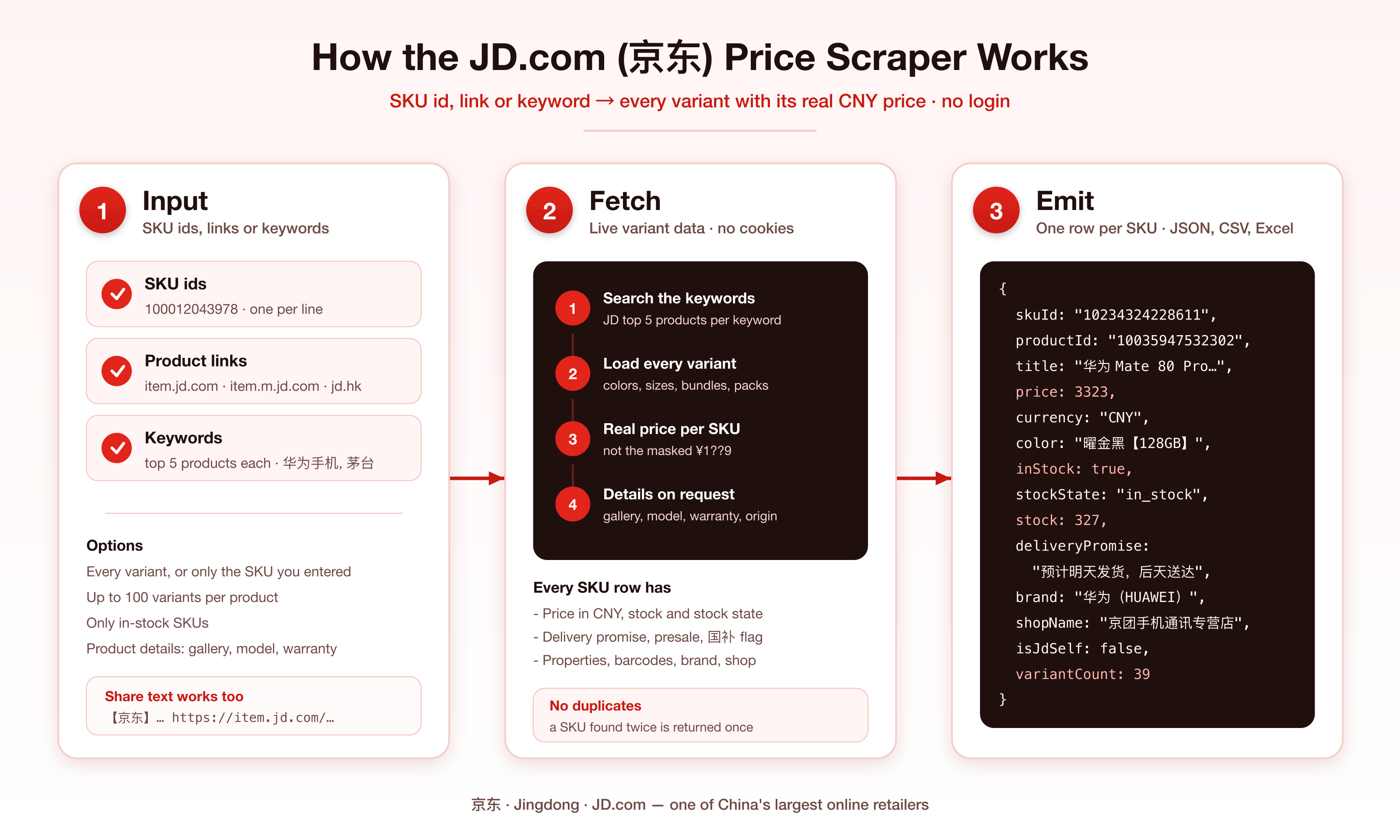
The actor takes JD SKU ids, product links or keywords. For each product it fetches the full variant list, then writes one dataset row per SKU. Keywords return JD's top 5 products for that search, and each of those is expanded into its variants the same way.
### Supported inputs
| Input | Example |
|---|---|
| SKU id | `100012043978` |
| PC product link | `https://item.jd.com/100012043978.html` |
| Mobile product link | `https://item.m.jd.com/product/100012043978.html?from=share` |
| WeChat product link | `https://wqitem.jd.com/item/view?sku=100012043978` |
| JD Global (京东国际) link | `https://npcitem.jd.hk/100009475513.html` |
| Share text with a link inside | `【京东】茅台飞天 https://item.jd.com/100012043978.html` |
| Keyword | `华为手机`, `蓝牙耳机`, `茅台` |
Short links (`3.cn/…`, `u.jd.com/…`) only resolve in a browser. Open them and paste the `item.jd.com` link.
### Use cases
- **Price monitoring.** Schedule a run over your SKU list and track price changes per variant.
- **Cross-border and dropshipping research.** Compare JD prices for the exact variant you sell.
- **Brand protection.** See which shops sell your products on JD and at what price.
- **Catalog matching.** Match JD SKUs to your catalog by barcode.
- **Stock tracking.** Watch when a variant goes out of stock or into presale.
- **Subsidy tracking.** See which SKUs carry the 国补 government-subsidy flag.
### How it works
1. You enter SKU ids, product links or keywords.
2. Keywords are searched first; each returns JD's top 5 products.
3. For each product, the actor fetches every variant with its live price and stock. The SKU you entered always comes first.
4. With product details on, it adds the product page fields once per product.
5. Each SKU becomes one row. SKUs that appear under several inputs are returned once.
### Input configuration
| Field | Type | Default | What it does |
|---|---|---|---|
| `products` | list | — | SKU ids or product links, one per line |
| `keywords` | list | — | Search terms; top 5 products each |
| `searchKeywords` | boolean | `true` | OFF: keywords only feed suggestions, nothing is searched or charged |
| `includeSuggestions` | boolean | `false` | Save JD's related searches per keyword to the `SUGGESTIONS` record (free) |
| `allVariants` | boolean | `true` | ON: every variant. OFF: only the SKU you entered |
| `maxVariantsPerProduct` | integer | `100` | Cap on variants per product (max 100) |
| `includeProductDetails` | boolean | `false` | Add gallery, model, category, warranty, origin |
| `onlyInStock` | boolean | `false` | Drop SKUs that cannot be ordered now |
| `maxItems` | integer | `1000` | Cap on rows for the run (free plan: 100) |
Example input:
```json
{
"products": ["100012043978", "https://item.jd.com/10233787625364.html"],
"keywords": ["蓝牙耳机"],
"allVariants": true,
"maxVariantsPerProduct": 20,
"includeProductDetails": false
}
```
To refresh prices on a known SKU list cheaply, set `allVariants` to `false`: one row per SKU you entered.
### Output overview
One row per SKU. Rows from the same product share `productId`. `sourceInput` says which id, link or keyword produced the row, and keyword rows also carry `searchKeyword` and `searchRank` (1-5).
### Output sample
A real row from keyword `蓝牙耳机` with product details on:
```json
{
"skuId": "100207440191",
"productId": "100104950402",
"isRequestedSku": true,
"title": "Viken【2026最新款丨柏林之声第1名】骨传导蓝牙耳机耳夹式概念无线开放式运动跑步超长续航不入耳挂耳",
"url": "https://item.jd.com/100207440191.html",
"mobileUrl": "https://item.m.jd.com/product/100207440191.html",
"price": 198,
"currency": "CNY",
"onSale": true,
"inStock": true,
"stockState": "in_stock",
"stock": null,
"purchaseLimit": null,
"deliveryPromise": "23:10前付款,预计明天(10月19日)送达",
"isPresale": false,
"isGovernmentSubsidy": true,
"isBillionSubsidy": null,
"isFlashSale": null,
"promoTags": [],
"properties": {
"版本": "【12重空间音效丨ENC通话降噪】",
"颜色": "【京东独家】星际黑丨APP升级版"
},
"color": "【京东独家】星际黑丨APP升级版",
"size": "【12重空间音效丨ENC通话降噪】",
"brand": "维肯(Viken)",
"barcodes": ["6941463424375", "6979854450061", "6979854453161"],
"imageUrl": "https://img14.360buyimg.com/n0/jfs/t1/528727/28/4600/117062/6aaf4700F357ff9f3/0083320320641c06.jpg",
"shopId": "1000462847",
"shopName": "维肯(Viken)京东自营旗舰店",
"shopUrl": "https://mall.jd.com/index-1000462847.html",
"isJdSelf": true,
"variantCount": 1,
"detailLevel": "full",
"sourceInput": "蓝牙耳机",
"searchKeyword": "蓝牙耳机",
"searchRank": 1,
"model": "i113",
"categoryId": "842",
"weight": null,
"warranty": "1年质保",
"productArea": null,
"isJdExpress": false,
"imageUrls": [
"https://img14.360buyimg.com/n1/jfs/t1/528727/28/4600/117062/6aaf4700F357ff9f3/0083320320641c06.jpg"
],
"scrapedAt": "2026-10-18T11:23:06.396Z"
}
```
Without product details, rows stop at `searchRank` and `detailLevel` is `sku`.
#### Search suggestions
With `includeSuggestions` on, the run's key-value store gets a `SUGGESTIONS` record, one entry per keyword (real output for `茅台`):
```json
[
{
"keyword": "茅台",
"suggestions": [
{ "keyword": "茅台53度飞天", "searchKey": "茅台53度飞天", "keywordType": 1, "iconUrl": null },
{ "keyword": "茅台飞天礼盒", "searchKey": "茅台飞天礼盒", "keywordType": 1, "iconUrl": null },
{ "keyword": "茅台迎宾", "searchKey": "茅台迎宾", "keywordType": 1, "iconUrl": null }
],
"error": null
}
]
```
Suggestions are not dataset rows and are not charged. They cover the first 100 keywords of a run. To get only suggestions, turn `searchKeywords` off.
### Key output fields
| Field | Meaning |
|---|---|
| `skuId` | JD SKU id (one color/size/bundle) |
| `productId` | Product group id shared by all variants. Not a SKU; it cannot be used as input |
| `isRequestedSku` | `true` on the SKU you entered or the one search returned |
| `price` | Live CNY price of this SKU, as shown signed-out in JD's default delivery region |
| `inStock` | Can be ordered now. Presale and reservation SKUs are `false` |
| `stockState` | JD's stock state code (`in_stock`, `out_of_stock`, …) |
| `stock` | Stock count when JD shows one; `null` means not shown, not zero |
| `deliveryPromise` | JD's delivery text for the default region |
| `properties` | Sale properties of this SKU, name → value, as JD writes them |
| `isGovernmentSubsidy` | JD flags the SKU for the 国补 subsidy. The flag alone does not say whether `price` already includes it |
| `barcodes` | EAN/UPC codes for the SKU |
| `variantCount` | How many SKUs the product has. Larger than the rows returned means `maxVariantsPerProduct` cut it |
### FAQ
**Why are the prices different from what I see in the JD app?**
Prices are JD's signed-out prices for its default delivery region. Member prices (PLUS), coupons applied at checkout and region-specific prices can differ.
**Why did a product return fewer variants than `variantCount`?**
JD's variant list does not always load in full. The actor asks a second time when a product comes back empty or short, and keeps the longer answer. If a run still shows fewer rows than `variantCount`, run that product again or pass the missing SKU ids directly.
**Why is `stock` often `null`?**
JD only shows a count for some SKUs. `inStock` and `stockState` are always filled.
**Can I get more than 5 products per keyword?**
Not today: keyword search returns JD's top 5 products. Use more specific keywords (`华为 Mate 80`, `华为 nova 16`), or paste SKU ids and links, which have no such limit.
**Do you return reviews or a shop's full catalog?**
Not yet.
**Why do `isBillionSubsidy` and `promoTags` come back empty?**
They are filled only when JD tags the SKU. Most SKUs carry no tag.
**Where are the search suggestions?**
In the run's key-value store, record `SUGGESTIONS` (Storage tab → Key-value store), not in the dataset. JD usually returns 10 per keyword.
**English keywords?**
They work, but JD titles are in Chinese, so Chinese keywords match better.
### Support
Found a problem or need a field? Open an issue on the actor's Issues tab and include the run id.
### Additional services
Need a custom JD dataset, a scheduled price feed, or another Chinese marketplace? Reach out through the Issues tab.
### Explore more scrapers
- [1688 Wholesale Scraper](https://apify.com/memo23/1688-wholesale-scraper)
- [Alibaba Scraper](https://apify.com/memo23/alibaba-scraper)
- [AliExpress Scraper](https://apify.com/memo23/aliexpress-scraper)
- [Temu Product Scraper](https://apify.com/memo23/temu-scraper)
- [Goofish (闲鱼) Scraper](https://apify.com/memo23/goofish-xianyu-scraper)
### 🤖 For AI agents & LLM apps
Call this actor through the Apify API or the Apify MCP server. Minimal input: `{"products": [""]}`. Each output row is one SKU with a numeric `price` in CNY, so variants compare without text parsing. Use `allVariants: false` when you only need the price of the SKUs you passed. `productId` groups variants of the same product.
### ⚠️ Disclaimer
This actor is not affiliated with, endorsed by, or connected to JD.com, Inc. or any of its subsidiaries. It collects publicly visible product information. You are responsible for using the data in line with JD.com's terms, applicable laws, and data-protection rules in your jurisdiction.
### SEO Keywords
JD.com scraper, JD price scraper, Jingdong scraper, 京东爬虫, 京东价格, 京东商品数据, JD SKU scraper, JD.com product prices, JD stock tracker, China e-commerce prices, JD price monitoring, JD variants, JD barcode lookup, Chinese marketplace scraper, JD.com API alternative
# Actor input Schema
## `products` (type: `array`):
One per line: a numeric SKU id (`100012043978`), a product link (`https://item.jd.com/100012043978.html`, `https://item.m.jd.com/product/100012043978.html`, `wqitem.jd.com` links) or share text that contains one. Short links (`3.cn`, `u.jd.com`) only open in a browser: open them and paste the item.jd.com link.
## `keywords` (type: `array`):
Each keyword returns JD's top 5 products, and each of those is fetched with its variants like the ids above. Chinese works best (`华为手机`, `茅台`). For more products, add more specific keywords (`华为 Mate 80`, `华为 nova 16`).
## `searchKeywords` (type: `boolean`):
ON (default): each keyword returns JD's top 5 products with all their variants. OFF: keywords are only used for suggestions (below), and nothing is searched or charged for them.
## `includeSuggestions` (type: `boolean`):
For each keyword, also save the related searches JD suggests (相关搜索, e.g. `手机` → `苹果17pro max`, `红米k90`). Saved to the `SUGGESTIONS` record of the run's key-value store, not as dataset rows. Free: no charge per suggestion. Up to 100 keywords per run.
## `allVariants` (type: `boolean`):
ON (default): one row per variant (color, storage, size, bundle) with its own price and stock. OFF: only the SKU you entered, one row per product.
## `maxVariantsPerProduct` (type: `integer`):
Cap on variant rows per product when every variant is on. The SKU you entered always comes first. Default and maximum 100.
## `includeProductDetails` (type: `boolean`):
Adds the product page fields to each row: full image gallery, model, category id, weight, warranty, place of origin, JD Logistics flag, and the barcode when the variant data has none. Billed once per product. Prices and stock always come from the variant data, which is unmasked.
## `onlyInStock` (type: `boolean`):
Drop variants that cannot be ordered right now (out of stock, presale, reservation). Default: false.
## `maxItems` (type: `integer`):
Cap on rows for the whole run. Default 1000. Free-plan runs are capped at 100.
## Actor input object example
```json
{
"products": [
"100012043978",
"https://item.jd.com/10233787625364.html"
],
"searchKeywords": true,
"includeSuggestions": false,
"allVariants": true,
"maxVariantsPerProduct": 100,
"includeProductDetails": false,
"onlyInStock": false,
"maxItems": 1000
}
```
# Actor output Schema
## `results` (type: `string`):
One row per SKU: price in CNY, stock, delivery promise, variant properties, promo tags, subsidy and presale flags, brand, shop, and the input or keyword that found it. With product details on: image gallery, model, warranty and origin (`detailLevel` is `full`).
## `suggestions` (type: `string`):
Only when 'Add JD search suggestions' is on: for each keyword, the related searches JD suggests (keyword, searchKey, keywordType, iconUrl).
# API
You can run this Actor programmatically using our API. Below are code examples in JavaScript, Python, and CLI, as well as the OpenAPI specification and MCP server setup.
## JavaScript example
```javascript
import { ApifyClient } from 'apify-client';
// Initialize the ApifyClient with your Apify API token
// Replace the '' with your token
const client = new ApifyClient({
token: '',
});
// Prepare Actor input
const input = {
"products": [
"100012043978",
"https://item.jd.com/10233787625364.html"
]
};
// Run the Actor and wait for it to finish
const run = await client.actor("memo23/jd-com-price-scraper").call(input);
// Fetch and print Actor results from the run's dataset (if any)
console.log('Results from dataset');
console.log(`💾 Check your data here: https://console.apify.com/storage/datasets/${run.defaultDatasetId}`);
const { items } = await client.dataset(run.defaultDatasetId).listItems();
items.forEach((item) => {
console.dir(item);
});
// 📚 Want to learn more 📖? Go to → https://docs.apify.com/api/client/js/docs
```
## Python example
```python
from apify_client import ApifyClient
# Initialize the ApifyClient with your Apify API token
# Replace '' with your token.
client = ApifyClient("")
# Prepare the Actor input
run_input = { "products": [
"100012043978",
"https://item.jd.com/10233787625364.html",
] }
# Run the Actor and wait for it to finish
run = client.actor("memo23/jd-com-price-scraper").call(run_input=run_input)
# Fetch and print Actor results from the run's dataset (if there are any)
print(f"💾 Check your data here: https://console.apify.com/storage/datasets/{run.default_dataset_id}")
for item in client.dataset(run.default_dataset_id).iterate_items():
print(item)
# 📚 Want to learn more 📖? Go to → https://docs.apify.com/api/client/python/docs/quick-start
```
## CLI example
```bash
echo '{
"products": [
"100012043978",
"https://item.jd.com/10233787625364.html"
]
}' |
apify call memo23/jd-com-price-scraper --silent --output-dataset
```
## MCP server setup
```json
{
"mcpServers": {
"apify": {
"type": "http",
"url": "https://mcp.apify.com/?tools=fetch-actor-details,memo23/jd-com-price-scraper"
}
}
}
```
The hosted server signs you in with OAuth on first connect, so no API token belongs in this config. Clients without OAuth support can send an `Authorization: Bearer ` header instead, using a token from API & Integrations in Apify Console (https://console.apify.com/settings/integrations).
## OpenAPI specification
Download the OpenAPI definition: https://api.apify.com/v2/actors/ZXCIE1AsSUYI02qSh/builds/K4XrqtDUMwdejTRAB/openapi.json