# Kuaishou Scraper 快手 \[From $1] Videos, Comments & Hot Lists (`memo23/kuaishou-scraper`) Actor
\[From $1 per 1000 results] Kuaishou (快手) scraper with no login: search videos by keyword, get views, likes, shares and collects, comments with replies, creator profiles with followers, a creator's videos, creator search and the live hot boards. Videos $3, comments $2 per 1,000.
- **URL**: https://apify.com/memo23/kuaishou-scraper.md
- **Developed by:** [Muhamed Didovic](https://apify.com/memo23) (community)
- **Categories:** Social media, Videos
- **Stats:** 1 total users, 1 monthly users, 93.3% runs succeeded, 0 bookmarks
- **User rating**: No ratings yet
## Pricing
from $3.00 / 1,000 videos
This Actor is paid per event. You are not charged for the Apify platform usage, but only a fixed price for specific events.
Learn more: https://docs.apify.com/actors/running/actors-in-store.md#pay-per-event
## What's an Apify Actor?
An Actor is a serverless cloud program that runs on the Apify platform. It has two run modes.
In Batch mode, an Actor accepts a well-defined JSON input, performs an action which can take anything from a few seconds to a few hours,
and optionally produces a well-defined JSON output, datasets with results, or files in key-value store.
In Standby mode, an Actor provides a web server which can be used as a website, API, or an MCP server.
Apify vocabulary and the platform model are defined once, in the agent quickstart at https://apify.com/agents.md.
## How to integrate an Actor?
If asked about integration, you help developers integrate Actors into their projects.
You adapt to their stack and deliver integrations that are safe, well-documented, and production-ready.
Do not guess an integration path. Every one of them is in the agent quickstart at https://apify.com/agents.md: the Apify MCP server, Agent Skills with the Apify CLI, the JavaScript and Python clients, the REST API, and the account-free path for an agent with no human to sign in. It also carries the rule on stating cost before the first paid run.
For examples already wired to this Actor's own input schema, see the [API](#api) section below.
Each client library has reference documentation the quickstart does not restate: [JavaScript/TypeScript](https://docs.apify.com/api/client/js/docs.md) (`npm install apify-client`) and [Python](https://docs.apify.com/api/client/python/docs.md) (`pip install apify-client`).
# README
## Kuaishou Scraper 快手 — Videos, Comments, Creators & Hot Lists
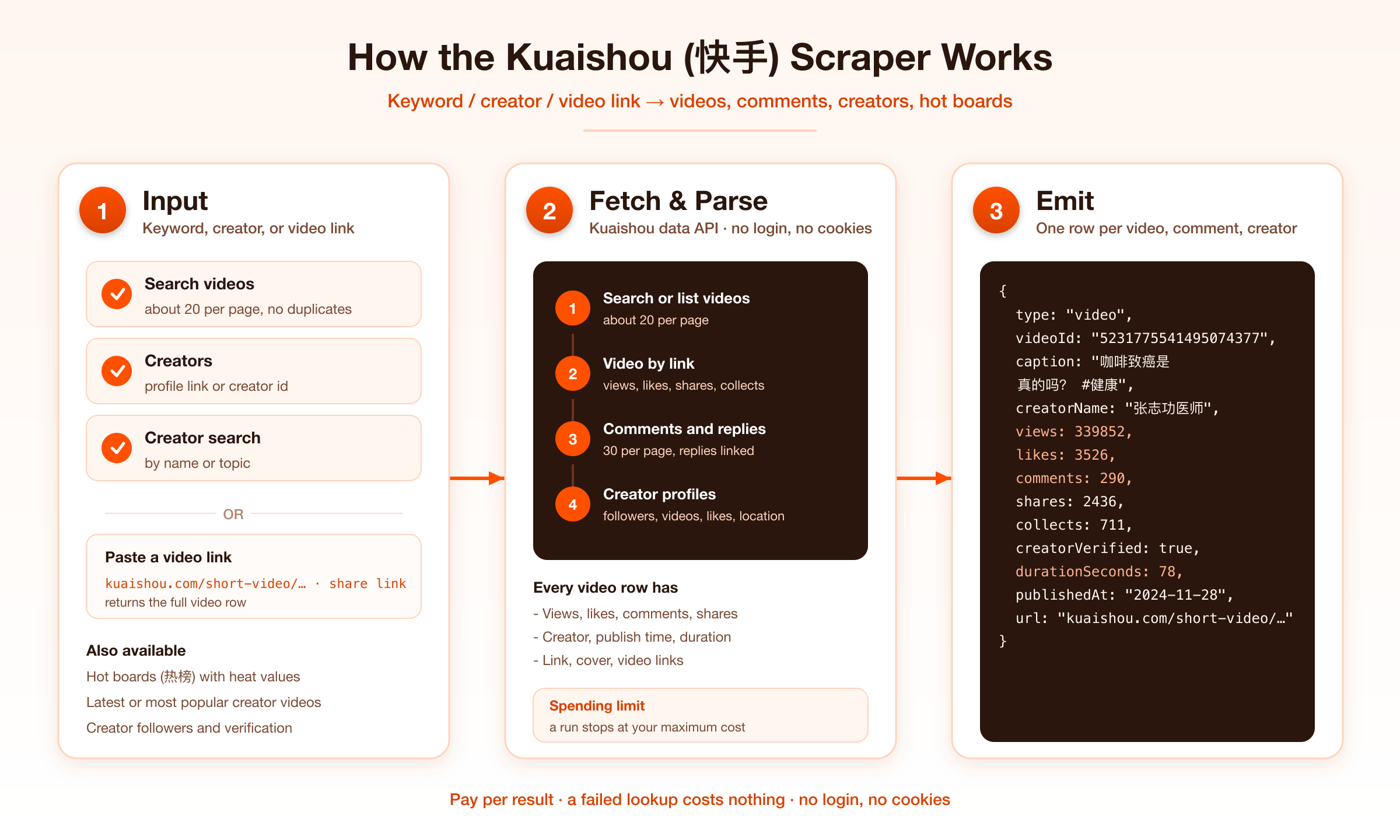
Get structured data from **Kuaishou (快手)**, China's second-largest short-video app: videos by keyword, video details, comments with replies, creator profiles and their videos, creator search and the live hot boards. No login, no cookies, no proxy to set up.
### What it does
| Input | You get |
|-------|---------|
| Search keyword | Videos matching the keyword, about 20 per page |
| Video link, share link or id | The full video row |
| Creator profile link or id | The creator's videos, latest or most popular first |
| `includeCreatorProfile` | Followers, following, video count, total likes, verification, bio, location, schools |
| Creator-search keyword | Creators matching a name or topic, with followers and video count |
| `includeComments` / `includeReplies` | Comments of every video in the run, and the replies under them |
| `hotBoards` | Kuaishou's live hot boards, about 50 ranked terms each |
| `rankings` | Live, shopping, brand, hot-people and music rankings, 50 entries per tab |
| Live-search keyword | Live rooms on air right now, with viewers and likes |
| Hashtag-search keyword | Hashtags with their video count and plays |
| Music-search keyword | Songs and sounds with artist, audio link and usage |
Every row carries a `type`: `video`, `comment`, `reply`, `creator`, `hot-search`, `ranking-row`, `live-room`, `tag` or `music`. The dataset has **Videos**, **Comments**, **Creators**, **Hot boards**, **Rankings**, **Live rooms** and **Hashtags and music** views.
### How It Works
### Input
| Field | Type | Description |
|-------|------|-------------|
| `keywords` | `string[]` | Search keywords. A video found by two keywords is returned once. |
| `maxResultsPerKeyword` | integer | Videos per keyword. Default 50. |
| `videoUrls` | `string[]` | `kuaishou.com/short-video/…` links, `v.kuaishou.com/…` share links, or video ids. |
| `creators` | `string[]` | `kuaishou.com/profile/…` links or creator ids. |
| `includeCreatorProfile` | boolean | Add a full `creator` row per creator (billed `creator-profile`). |
| `includeCreatorVideos` | boolean | Return the creator's videos. Default on. |
| `creatorVideoOrder` | string | `latest` (default) or `popular`. |
| `maxVideosPerCreator` | integer | Default 40. |
| `creatorKeywords` / `maxCreatorsPerKeyword` | `string[]` / integer | Find creators by keyword. Default 20 per keyword. |
| `includeComments` / `maxCommentsPerVideo` | boolean / integer | Comment rows, about 30 per page. Default 30. |
| `includeReplies` / `maxRepliesPerComment` | boolean / integer | Reply rows under each comment. Default 10. |
| `hotBoards` | `string[]` | Any of `hot`, `entertainment`, `society`, `useful`. |
| `rankings` | `string[]` | Any of `liveTop`, `shoppingTop`, `brandTop`, `hotPeople`, `music`. |
| `rankingCategories` | `string[]` | Tab names in Chinese (`音乐`, `舞蹈`, `游戏` for live; `美妆`, `汽车`, `手机`, `食品饮料` for brands). Empty returns each ranking's main tab. |
| `maxItemsPerRanking` | integer | Rows per ranking tab. Default 50. |
| `liveKeywords` / `maxLiveRoomsPerKeyword` | `string[]` / integer | Live rooms on air. Default 20 per keyword. |
| `tagKeywords` / `maxTagsPerKeyword` | `string[]` / integer | Hashtag search. Default 10 per keyword. |
| `musicKeywords` / `maxMusicPerKeyword` | `string[]` / integer | Music search. Default 40 per keyword. |
| `maxItems` | integer | Cap on video rows per run. Default 100. |
#### Example: search with comments
```json
{
"keywords": ["咖啡", "露营"],
"maxResultsPerKeyword": 100,
"includeComments": true,
"maxCommentsPerVideo": 20,
"maxItems": 200
}
```
#### Example: a creator with profile and latest videos
```json
{
"creators": ["https://www.kuaishou.com/profile/3xgevw3ryternmi"],
"includeCreatorProfile": true,
"maxVideosPerCreator": 60
}
```
#### Example: hot boards and rankings
```json
{
"hotBoards": ["hot", "entertainment"],
"rankings": ["brandTop", "liveTop"],
"rankingCategories": ["美妆", "汽车"]
}
```
#### Example: live rooms, hashtags and music for a topic
```json
{ "liveKeywords": ["咖啡"], "tagKeywords": ["咖啡"], "musicKeywords": ["咖啡"] }
```
### Output
Video:
```json
{
"type": "video",
"source": "url",
"videoId": "5231775541495074377",
"webId": "3xwj3denedfszne",
"url": "https://www.kuaishou.com/short-video/3xwj3denedfszne",
"caption": "咖咖啡致癌是真的吗? #健康 #医学科普 #生活常识 #致癌物",
"hashtags": ["健康", "医学科普", "生活常识", "致癌物"],
"publishedAt": "2024-11-28T08:20:42.083Z",
"durationSeconds": 78,
"views": 339852,
"likes": 3526,
"comments": 290,
"shares": 2436,
"collects": 711,
"creatorId": "1265518419",
"creatorName": "胸外科张志功医师",
"creatorHandle": "DrZhangzhigong",
"creatorUrl": "https://www.kuaishou.com/profile/3xgevw3ryternmi",
"creatorVerified": true,
"creatorVerifiedAs": "湖南省人民医院胸外一病区医生",
"width": 720,
"height": 1280
}
```
Video rows also carry `coverUrl`, `videoUrl`, `qualities[]` (label, size, codec and a link per quality), `creatorAvatar`, `creatorGender`, `soundName` and, for search rows, `searchKeyword`. Media links are signed by Kuaishou and expire after a while.
Creator:
```json
{
"type": "creator",
"creatorId": "1265518419",
"url": "https://www.kuaishou.com/profile/3xgevw3ryternmi",
"name": "胸外科张志功医师",
"handle": "DrZhangzhigong",
"isVerified": true,
"verifiedAs": "湖南省人民医院胸外一病区医生",
"followers": 38553,
"following": 327,
"videoCount": 1411,
"totalLikes": 282369,
"ipLocation": "湖南",
"city": "湖南 长沙市",
"schools": ["中南大学"]
}
```
Comment and reply:
```json
{
"type": "comment",
"videoId": "5231775541495074377",
"commentId": "1014765527224",
"text": "长期每天喝一杯呢。14岁",
"likes": 25,
"replyCount": 8,
"postedAt": "2025-07-04T02:03:06.951Z",
"author": "妳的凝",
"authorLocation": "湖南"
}
```
A `reply` row has the same columns plus `parentCommentId` and `replyToUser`, and follows its comment in the dataset.
Hot board term:
```json
{
"type": "hot-search",
"board": "hot",
"boardName": "热榜",
"rank": 1,
"keyword": "人社部动员未参保人参保",
"hotValue": 11650496,
"viewCount": 12334615
}
```
Ranking entry, live room, hashtag and song:
```json
{ "type": "ranking-row", "ranking": "brandTop", "category": "汽车", "rank": 1, "title": "捷途", "hotValue": 222000, "hotText": "22.2万", "creatorId": "1806424049", "isLive": false }
```
```json
{ "type": "live-room", "searchKeyword": "咖啡", "liveStreamId": "rHgmnJhuehQ", "title": "「瑞幸咖啡」直播福利来啦", "viewers": 0, "likes": 195, "creatorId": "3819263008", "creatorName": "瑞幸咖啡官方团购优惠券" }
```
```json
{ "type": "tag", "searchKeyword": "咖啡", "tagId": "7004", "name": "咖啡", "videoCount": 9993430, "playsText": "10.7b次播放" }
```
```json
{ "type": "music", "searchKeyword": "咖啡", "musicId": "5x7vqpaeyq93jzw", "name": "咖啡", "artist": "薇妮", "durationSeconds": 237, "isOriginal": true, "videoCount": 820 }
```
### Pricing
Pay per event. You pay for rows you receive; a failed lookup costs nothing.
| Event | When | Price |
|-------|------|-------|
| Actor start | Once per run | $0.005 |
| Video | Each video row | $0.003 |
| Comment | Each comment or reply row | $0.002 |
| Creator profile | Each full creator row | $0.02 |
| Creator search result | Each creator found by keyword | $0.002 |
| Hot search term | Each hot board term | $0.001 |
| Ranking row | Each entry of a ranking | $0.001 |
| Live room | Each live room found by keyword | $0.003 |
| Hashtag | Each hashtag found by keyword | $0.002 |
| Music | Each song found by keyword | $0.002 |
1,000 videos from search cost $3. Set a maximum cost per run in the run options and the Actor stops there with what it has.
### FAQ
**Do I need a Kuaishou account, cookies or a proxy?**
No.
**How many results does a keyword return?**
Usually a few hundred. The Actor stops a keyword early when further pages bring almost nothing new.
**Can I get a creator's videos from a profile link?**
Yes. Paste the profile link into `creators`. Add `includeCreatorProfile` for the follower numbers.
**Are the video files downloaded?**
No. Each row has direct links (`videoUrl`, `qualities[]`) you can download from while they are valid.
**Why is a run with comments and replies slower?**
Replies are fetched per comment. Lower `maxRepliesPerComment` or turn replies off for a faster run.
**Is Kwai (the international app) covered?**
No, this Actor covers Kuaishou (快手), the mainland China app.
### 🤖 For AI Agents & LLM Apps
**Purpose:** Kuaishou (快手) videos, comments, creators and hot boards as structured JSON.
**Minimal input:** `{"keywords": ["咖啡"], "maxResultsPerKeyword": 20}`
**Output:** rows with `type` = `video` | `comment` | `reply` | `creator` | `hot-search` | `ranking-row` | `live-room` | `tag` | `music`. Videos: videoId, url, caption, hashtags, publishedAt, durationSeconds, views, likes, comments, shares, collects, creatorId, creatorName, creatorUrl, videoUrl. Comments: videoId, commentId, text, likes, replyCount, postedAt, author. Replies add parentCommentId.
**Behaviors to know:** `maxItems` caps video rows only. Comments apply to every video in the run. Free-plan runs return up to 100 videos.
### ⚠️ Disclaimer
This Actor collects publicly available data only. It is not affiliated with, endorsed by, or sponsored by Kuaishou. You are responsible for using the data in line with applicable laws and Kuaishou's terms, including rules on personal data.
### SEO Keywords
kuaishou scraper, 快手 scraper, kuaishou api, kuaishou video scraper, kuaishou comments scraper, kuaishou creator data, kuaishou hot list, 快手热榜, 快手数据采集, kuaishou search api, china short video data, kuaishou kol, kuaishou analytics
# Actor input Schema
## `keywords` (type: `array`):
Keywords to search videos for. Chinese, English and brand names all work. Each keyword is searched on its own and a video found by two keywords is returned once.
## `videoUrls` (type: `array`):
Video links (`https://www.kuaishou.com/short-video/3xwj3denedfszne`), share links (`https://v.kuaishou.com/…`) or video ids. Each returns the full video row.
## `creators` (type: `array`):
Creator profile links (`https://www.kuaishou.com/profile/3xgevw3ryternmi`) or ids. Returns the creator's videos; turn on 'Creator profile' for followers and the rest of the profile.
## `creatorKeywords` (type: `array`):
Find creators by name or topic. Each result is a `creator` row with name, handle, followers and video count. Billed as `creator-search-result`.
## `hotBoards` (type: `array`):
Kuaishou's live hot boards, about 50 ranked terms each with heat values. Billed as `hot-search-term`.
## `rankings` (type: `array`):
Kuaishou's rankings, 50 entries per tab, as `ranking-row` rows with rank, heat value and the creator or live room behind each entry.
## `rankingCategories` (type: `array`):
Tab names in Chinese, for rankings that have tabs. Live: `音乐`, `舞蹈`, `颜值`, `游戏`, `二次元`. Brand: `美妆`, `服饰`, `汽车`, `游戏`, `3C数码`, `手机`, `家电`, `母婴`, `食品饮料`. Shopping: `热门主播`, `热销商品`. Empty returns each ranking's main tab.
## `liveKeywords` (type: `array`):
Find live rooms that are on air right now. Each result is a `live-room` row with title, viewers, likes and the creator.
## `tagKeywords` (type: `array`):
Find hashtags by keyword. Each result is a `tag` row with its video count and plays.
## `musicKeywords` (type: `array`):
Find songs and sounds by keyword. Each result is a `music` row with artist, duration, audio link and how many videos use it.
## `maxResultsPerKeyword` (type: `integer`):
Upper bound on videos collected per search keyword. About 20 arrive per page.
## `includeCreatorProfile` (type: `boolean`):
For each entry in Creators, add a `creator` row: followers, following, video count, total likes, verification, bio, location, schools and whether they are live right now. Billed as `creator-profile`.
## `includeCreatorVideos` (type: `boolean`):
For each entry in Creators, return their videos.
## `creatorVideoOrder` (type: `string`):
Which of a creator's videos come first.
## `maxVideosPerCreator` (type: `integer`):
Upper bound on videos collected per creator.
## `maxCreatorsPerKeyword` (type: `integer`):
Upper bound on creators collected per creator-search keyword.
## `maxLiveRoomsPerKeyword` (type: `integer`):
Upper bound on live rooms per live-search keyword. About 10 arrive per page.
## `maxTagsPerKeyword` (type: `integer`):
Upper bound on hashtags per hashtag-search keyword.
## `maxMusicPerKeyword` (type: `integer`):
Upper bound on songs per music-search keyword.
## `maxItemsPerRanking` (type: `integer`):
Upper bound on rows per ranking tab. Tabs hold 50 entries; the music ranking goes further.
## `includeComments` (type: `boolean`):
For every video in the run, also return its comments as `comment` rows (about 30 per page).
## `maxCommentsPerVideo` (type: `integer`):
Upper bound on comments collected per video.
## `includeReplies` (type: `boolean`):
With comments on, also return the replies under each comment as `reply` rows linked by `parentCommentId`. Billed as `comment`.
## `maxRepliesPerComment` (type: `integer`):
Upper bound on replies collected under one comment.
## `maxItems` (type: `integer`):
Cap on video rows across the whole run. Comments, creators and hot terms have their own limits. Free-plan runs return up to 100 videos.
## Actor input object example
```json
{
"keywords": [
"咖啡"
],
"maxResultsPerKeyword": 50,
"includeCreatorProfile": false,
"includeCreatorVideos": true,
"creatorVideoOrder": "latest",
"maxVideosPerCreator": 40,
"maxCreatorsPerKeyword": 20,
"maxLiveRoomsPerKeyword": 20,
"maxTagsPerKeyword": 10,
"maxMusicPerKeyword": 40,
"maxItemsPerRanking": 50,
"includeComments": false,
"maxCommentsPerVideo": 30,
"includeReplies": false,
"maxRepliesPerComment": 10,
"maxItems": 100
}
```
# Actor output Schema
## `results` (type: `string`):
Rows told apart by `type`: `video` (caption, creator, views, likes, comments, shares, collects, duration, video and cover links), `comment` and `reply`, `creator` (followers, video count, total likes, verification, location) and `hot-search` (board, rank, keyword, heat value).
# API
You can run this Actor programmatically using our API. Below are code examples in JavaScript, Python, and CLI, as well as the OpenAPI specification and MCP server setup.
## JavaScript example
```javascript
import { ApifyClient } from 'apify-client';
// Initialize the ApifyClient with your Apify API token
// Replace the '' with your token
const client = new ApifyClient({
token: '',
});
// Prepare Actor input
const input = {
"keywords": [
"咖啡"
]
};
// Run the Actor and wait for it to finish
const run = await client.actor("memo23/kuaishou-scraper").call(input);
// Fetch and print Actor results from the run's dataset (if any)
console.log('Results from dataset');
console.log(`💾 Check your data here: https://console.apify.com/storage/datasets/${run.defaultDatasetId}`);
const { items } = await client.dataset(run.defaultDatasetId).listItems();
items.forEach((item) => {
console.dir(item);
});
// 📚 Want to learn more 📖? Go to → https://docs.apify.com/api/client/js/docs
```
## Python example
```python
from apify_client import ApifyClient
# Initialize the ApifyClient with your Apify API token
# Replace '' with your token.
client = ApifyClient("")
# Prepare the Actor input
run_input = { "keywords": ["咖啡"] }
# Run the Actor and wait for it to finish
run = client.actor("memo23/kuaishou-scraper").call(run_input=run_input)
# Fetch and print Actor results from the run's dataset (if there are any)
print(f"💾 Check your data here: https://console.apify.com/storage/datasets/{run.default_dataset_id}")
for item in client.dataset(run.default_dataset_id).iterate_items():
print(item)
# 📚 Want to learn more 📖? Go to → https://docs.apify.com/api/client/python/docs/quick-start
```
## CLI example
```bash
echo '{
"keywords": [
"咖啡"
]
}' |
apify call memo23/kuaishou-scraper --silent --output-dataset
```
## MCP server setup
```json
{
"mcpServers": {
"apify": {
"type": "http",
"url": "https://mcp.apify.com/?tools=fetch-actor-details,memo23/kuaishou-scraper"
}
}
}
```
The hosted server signs you in with OAuth on first connect, so no API token belongs in this config. Clients without OAuth support can send an `Authorization: Bearer ` header instead, using a token from API & Integrations in Apify Console (https://console.apify.com/settings/integrations).
## OpenAPI specification
Download the OpenAPI definition: https://api.apify.com/v2/actors/OGziQ6gfbrET2ksH0/builds/QAtexAemlvM0hcYjV/openapi.json