# LinkedIn Profile Scraper — Profiles & Your Own Connections (`memo23/linkedin-profile-scraper`) Actor

Scrape LinkedIn profiles for name, headline, full work history, education and skills. Paste profile URLs, or flip one toggle to export your own first-degree connections and scrape every one — no 1,000-result cap. Clean JSON, CSV or Excel at $0.001 per profile, no monthly rental.

- **URL**: https://apify.com/memo23/linkedin-profile-scraper.md
- **Developed by:** [Muhamed Didovic](https://apify.com/memo23) (community)
- **Categories:** Lead generation, Automation
- **Stats:** 60 total users, 1 monthly users, 71.4% runs succeeded, 5 bookmarks
- **User rating**: 5.00 out of 5 stars

## Pricing

from $1.00 / 1,000 results

This Actor is paid per event. You are not charged for the Apify platform usage, but only a fixed price for specific events.

Learn more: https://docs.apify.com/platform/actors/running/actors-in-store#pay-per-event

## What's an Apify Actor?

Actors are web data automations that power AI and operations. They run on the Apify platform to scrape websites, process data, connect APIs, and automate workflows.
In Batch mode, an Actor accepts a well-defined JSON input, performs an action which can take anything from a few seconds to a few hours,
and optionally produces a well-defined JSON output, datasets with results, or files in key-value store.
In Standby mode, an Actor provides a web server which can be used as a website, API, or an MCP server.
Actors are written with capital "A".

## How to integrate an Actor?

If asked about integration, you help developers integrate Actors into their projects.
You adapt to their stack and deliver integrations that are safe, well-documented, and production-ready.
The best way to integrate Actors is as follows.

- **AI agents and MCP clients** — the [Apify MCP server](https://docs.apify.com/integrations/mcp.md) at `https://mcp.apify.com` (remote, streamable HTTP, OAuth on first use).
- **Agentic workflows and local Actor development** — [Agent Skills](https://apify.com/.well-known/agent-skills/index.json) with the [Apify CLI](https://docs.apify.com/cli/docs.md): `npm install -g apify-cli`, then `apify login`.
- **JavaScript/TypeScript projects** — the official [JS/TS client](https://docs.apify.com/api/client/js/docs.md): `npm install apify-client`.
- **Python projects** — the official [Python client](https://docs.apify.com/api/client/python/docs.md): `pip install apify-client`.
- **Any other language** — the [REST API](https://docs.apify.com/api/v2.md).

For usage examples, see the [API](#api) section below.

For more details, see Apify documentation as [Markdown index](https://docs.apify.com/llms.txt) and [Markdown full-text](https://docs.apify.com/llms-full.txt).

# README

## LinkedIn Profile Scraper — Profiles & Your Own Connections

<p align="center">
  <img src="https://raw.githubusercontent.com/muhamed-didovic/muhamed-didovic.github.io/main/assets/linkedin-profile-logo.png" alt="LinkedIn Profile Scraper" width="140" height="140">
</p>

**Scrape any LinkedIn profile, or your entire first-degree network in one run.** Paste profile URLs, or tick one box and the actor pulls your own connection list and scrapes every person on it — name, headline, full experience history, education and skills, as clean JSON or CSV.

| Input | Rows emitted |
|---|---|
| A LinkedIn profile URL | One fully enriched profile |
| Several profile URLs | One row per profile |
| **Your own connections** (toggle, no URLs needed) | One row per first-degree connection |

> Pure HTTP through LinkedIn's own internal API. No browser, no headless Chrome, no third-party bypass service.

**You pay per profile delivered — $0.001 each.** A run that returns nothing costs half a cent (the $0.005 start fee), never dollars.

***

### Switching from another LinkedIn profile scraper?

If you've been burned elsewhere, here is exactly how this actor behaves on the failure modes people complain about most:

| What happens elsewhere | What happens here |
|---|---|
| "Charged $2 and got an empty JSON" | Profile charges fire **only when a profile row lands in your dataset**. Nothing delivered = $0.005 total for the run start, nothing more. |
| "Aborted runs charged in full" | Pay-per-event billing accrues per delivered row. Abort a run and you pay only for the profiles already in your dataset at that moment. |
| "Anomalous billing across runs" | Two events, both listed on the pricing tab: $0.005 per run start + $0.001 per profile. A 1,000-profile run is about **$1.01** — you can predict the bill before you press Start. |
| Silent failures | A malformed or incomplete cookie stops the run within seconds with a plain-language explanation of what to fix, instead of burning your time and money first. |

***

### Related LinkedIn Scrapers

- **[LinkedIn Company About Scraper](https://apify.com/memo23/linkedin-company-about-scraper)** — company details from About pages
- **[LinkedIn Search Jobs Scraper (Without Cookies)](https://apify.com/memo23/apify-linkedin-search-results-scraper)** — job listings, no authentication
- **[LinkedIn Search Groups Scraper](https://apify.com/memo23/linkedin-search-groups-scraper)** — find and extract groups
- **[LinkedIn Company Employees/People Scraper](https://apify.com/memo23/linkedin-company-people-scraper)** — employee profiles from companies
- **[LinkedIn People Search Scraper](https://apify.com/memo23/linkedin-people-search)** — search people by keyword, title, company or school

***

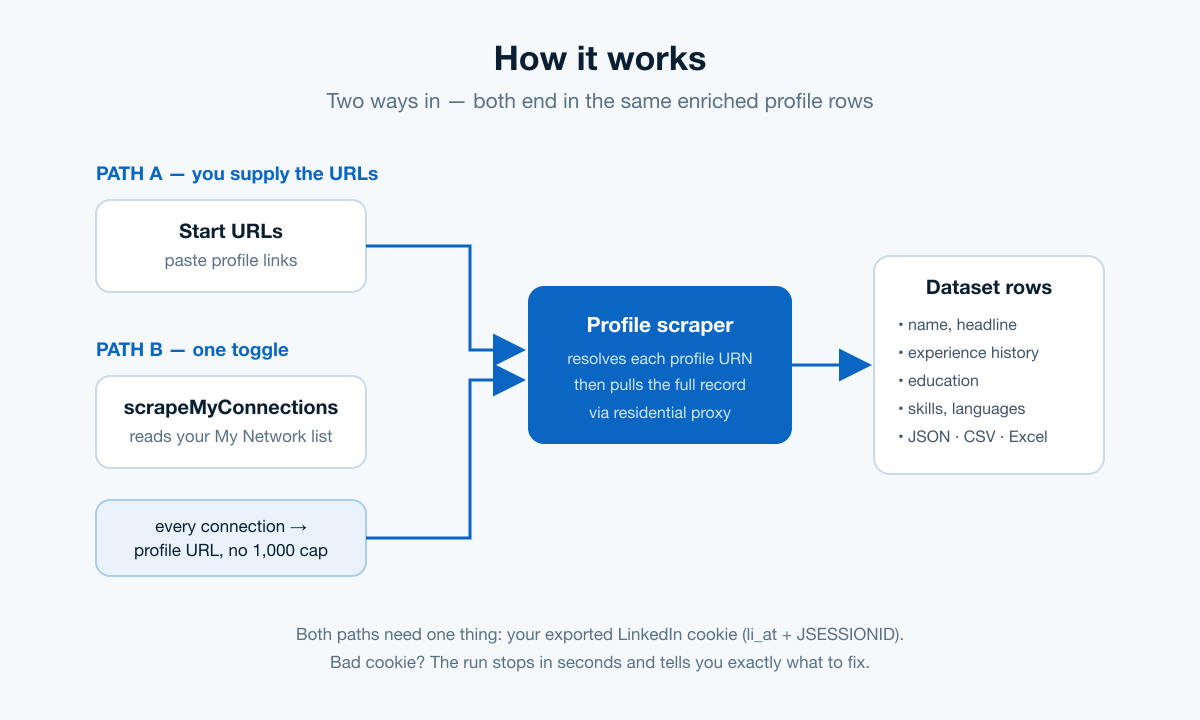
### How it works

<p align="center">
  <img src="https://raw.githubusercontent.com/muhamed-didovic/muhamed-didovic.github.io/main/assets/how-it-works-linkedin-profile.png" alt="How the LinkedIn Profile Scraper works" width="100%">
</p>

1. **You supply a session cookie.** LinkedIn profile data is only visible to logged-in members, so the actor uses your own session. Nothing is stored — the cookie is used for this run and discarded.
2. **It works out who to scrape.** Either from the Start URLs you paste, or — with *Scrape my own connections* on — by reading your My Network list and turning every connection into a profile URL.
3. **It resolves each profile.** The actor fetches the profile page, extracts the internal profile URN, then calls LinkedIn's own GraphQL endpoints for the top card and profile cards.
4. **It writes one row per person** to the dataset, ready to export as JSON, CSV or Excel.

Traffic runs through residential proxy, because datacenter IPs get blocked.

***

### Two ways to use it

#### A. You already have profile URLs

Paste them into **Start URLs** and leave the connections toggle off.

```json
{
  "startUrls": [
    { "url": "https://www.linkedin.com/in/williamhgates/" },
    { "url": "https://www.linkedin.com/in/satyanadella/" }
  ],
  "cookies": [
    { "name": "li_at", "value": "AQED...", "domain": ".linkedin.com" },
    { "name": "JSESSIONID", "value": "ajax:...", "domain": ".linkedin.com" }
  ],
  "maxItems": 100
}
```

#### B. You want your own network

Most people cannot produce a list of their connections' profile URLs by hand. Turn on **Scrape my own connections** and leave Start URLs empty — the actor builds the list for you.

```json
{
  "scrapeMyConnections": true,
  "maxConnections": 5000,
  "cookies": [
    { "name": "li_at", "value": "AQED...", "domain": ".linkedin.com" },
    { "name": "JSESSIONID", "value": "ajax:...", "domain": ".linkedin.com" }
  ],
  "maxItems": 5000
}
```

This reads your **My Network → Connections** list directly, so there is no 1,000-result search limit. Whether you have 300 connections or 12,000, it walks the whole list.

***

### Input

| Field | Type | Required | Notes |
|---|---|---|---|
| `cookies` | array | **yes** | Full EditThisCookie export. Must contain `li_at` **and** `JSESSIONID`. |
| `scrapeMyConnections` | boolean | no | Scrape your own first-degree connections instead of supplying URLs. Default `false`. |
| `maxConnections` | integer | no | Cap on connections enumerated when the toggle is on. Default `5000`. |
| `startUrls` | array | no | Profile URLs. Leave empty when the toggle is on. |
| `maxItems` | integer | no | Max profiles scraped per run. Default `100`. |
| `maxConcurrency` | integer | no | Parallel requests. Default `10`. |
| `maxRequestRetries` | integer | no | Retries before giving up on a request. Default `10`. |
| `proxy` | object | no | Optional override. Leave empty to use the built-in residential proxy. |

#### Getting your cookie

1. Install [EditThisCookie](https://chrome.google.com/webstore/detail/editthiscookie/fngmhnnpilhplaeedifhccceomclgfbg) for Chrome.
2. Log in to linkedin.com in that browser.
3. With linkedin.com open, click the extension icon and press **Export**.
4. Clear the Cookies field in this actor and paste.

Paste the **whole exported list**, keeping the brackets. Both cookies are needed: `li_at` is the session, `JSESSIONID` is the CSRF token for LinkedIn's internal API. Pasting only the `li_at` value stops the run in a few seconds with an explanation rather than failing silently.

***

### Output

One row per profile.

```jsonc
{
  "name": "Harsh Shuddhalwar",
  "headline": "Software Developer 💻 || Full-stack & cloud",
  "profilePicture": "https://media.licdn.com/...",
  "profileUrl": "harsh-shuddhalwar",
  "experience": [
    {
      "title": "Senior Software Developer",
      "tenure": "Sep 2023 - Present · 1 yr 6 mos",
      "company": "withRemote · Full-time",
      "location": "Remote",
      "description": "Developed and delivered..."
    }
  ],
  "education": [
    { "school": "G H Raisoni Institute", "startDate": null, "endDate": null }
  ],
  "skills": []
}
```

#### Key fields

| Field | Description |
|---|---|
| `name` | Full name as displayed on the profile. |
| `headline` | Professional headline, up to ~220 chars, emojis included. |
| `profilePicture` | Image URL. Temporary — LinkedIn expires these after roughly six months. |
| `profileUrl` | Profile slug. Prefix with `linkedin.com/in/` for the full URL. |
| `experience[]` | `title`, `tenure`, `company` (name + employment type), `location`, `description`. |
| `education[]` | `school`, `startDate`, `endDate`. Dates are often `null` because members hide them. |
| `skills[]` | Endorsed skills. Frequently empty depending on profile privacy. |

***

### Pricing

Pay per event. No monthly rental.

| Event | When it fires | Price |
|---|---|---|
| Actor start | Once per run, per GB of memory | $0.005 |
| Dataset item | Each profile written | $0.001 |

A 1,000-profile run costs about **$1.01**.

**No profiles, no profile charges.** The dataset-item event fires only when a profile row is actually written — an empty run costs $0.005, full stop.

***

### FAQ

**Do I need a LinkedIn cookie?**
Yes. Profile detail is only visible to logged-in members. Without a session LinkedIn returns HTTP 999 to everything.

**Is my cookie stored?**
No. It is used for the requests in this run and nothing else.

**Can this scrape someone else's connections?**
No. LinkedIn exposes a connection list only to the account that owns it. The toggle reads your own network, never anyone else's.

**Why are some skills or dates empty?**
Members can hide them. When a field is hidden, the actor returns `null` or an empty array rather than inventing a value.

**My run failed with an HTTP 999 or a redirect to login.**
The session expired. Log in to LinkedIn again, export a fresh cookie and re-run.

**The run returned nothing — am I still charged?**
Only the $0.005 start fee. The $0.001 profile charge fires per row written to your dataset, so a run with zero results can never cost you dollars.

**Will this get my account restricted?**
Any tool that uses your session carries some risk. Traffic runs through residential proxy and at modest concurrency to reduce it, but scrape at a sensible pace and avoid very large runs on a brand-new account.

***

### 🤖 For AI Agents & LLM Apps

**Purpose:** Extract full LinkedIn profile records — identity, work history, education, skills — from profile URLs, or from the caller's own first-degree connection list.

**Auth:** Requires the end user's LinkedIn session cookies (`li_at` + `JSESSIONID`) as an array of cookie objects. There is no cookie-free mode; LinkedIn returns HTTP 999 to unauthenticated requests.

**Minimal tested input:**

```json
{
  "cookies": [{"name":"li_at","value":"...","domain":".linkedin.com"},
              {"name":"JSESSIONID","value":"...","domain":".linkedin.com"}],
  "startUrls": [{"url":"https://www.linkedin.com/in/williamhgates/"}],
  "maxItems": 1
}
```

**Connection-list mode:** set `scrapeMyConnections: true` and omit `startUrls`. Returns one row per first-degree connection of the cookie's owner. No 1,000-result cap.

**Output fields (flat):** `name`, `headline`, `profilePicture`, `profileUrl`, `experience[]` (`title`, `tenure`, `company`, `location`, `description`), `education[]` (`school`, `startDate`, `endDate`), `skills[]`.

**Billing:** $0.005 per run start (per GB), $0.001 per profile returned.

**Failure modes worth handling:** malformed cookies fail immediately with a descriptive status message; an expired session surfaces as HTTP 302/401/403 with a "cookie expired" message; hidden fields return `null` or `[]` rather than being omitted.

***

### Additional Services

Custom fields, a full dataset, or a different LinkedIn surface — email <muhamed.didovic@gmail.com>.

***

### Support

Issues and feature requests via the actor's Issues tab, or email above.

***

### ⚠️ Disclaimer

This actor accesses only data visible to the logged-in account whose session you supply. Use it on data you are entitled to access, and comply with LinkedIn's Terms of Service and applicable data-protection law — including the GDPR and CCPA — when storing or processing results. Personal data carries obligations around lawful basis, retention and subject access. You are the data controller for anything you collect; the actor's author is not. Do not use output for unlawful discrimination, harassment, or unsolicited bulk messaging.

***

### SEO Keywords

linkedin scraper, linkedin profile scraper, linkedin data extraction, scrape linkedin profiles, linkedin connections export, export linkedin connections, first degree connections, linkedin my network export, linkedin profile api, linkedin lead generation, recruitment data, candidate sourcing, linkedin crawler, linkedin json export, linkedin csv export, professional profile data, linkedin employment history, linkedin skills scraper, b2b prospecting, sales navigator alternative, reliable linkedin profile scraper, best linkedin profile scraper, linkedin scraper pay per result, cheap linkedin profile scraper, linkedin profile scraper alternative, linkedin scraper transparent billing, apify linkedin actor

# Actor input Schema

## `scrapeMyConnections` (type: `boolean`):

Turn this on to scrape <b>your own first-degree connections</b> instead of supplying URLs yourself. The actor reads your My Network list, then scrapes the full profile of every connection it finds. Leave Start URLs empty when using this. There is no 1,000-result limit — it walks your whole network.

## `maxConnections` (type: `integer`):

Only used when 'Scrape my own connections' is on. Caps how many connections are collected before scraping starts.

## `startUrls` (type: `array`):

Profile URLs to scrape. Leave empty if you turned on 'Scrape my own connections' above.

## `maxItems` (type: `integer`):

Maximum number of Profiles/Items to scrape per crawl.

## `language` (type: `string`):

Ask LinkedIn for profile text (headlines, job titles, school and skill names) in this locale. Members who published a translation come back in that language; everyone else keeps their original wording, so you never lose rows. Leave empty for US English.

## `maxSkills` (type: `integer`):

Keep only the first N skills on each profile. LinkedIn returns them ordered by endorsement strength, so the top ones survive. Leave at 0 to keep the full list (often 30-50 entries, which bloats CSV exports).

## `maxConcurrency` (type: `integer`):

Maximum number of pages that can be processed at the same time.

## `minConcurrency` (type: `integer`):

Minimum number of pages that will be processed at the same time.

## `maxRequestRetries` (type: `integer`):

Number of times the crawler will retry a failed request before giving up.

## `cookies` (type: `array`):

<p>Cookie used to authorize actor with linkedin.com. Install <a rel="noopener noreferrer nofollow" target="_blank" href="https://chrome.google.com/webstore/detail/editthiscookie/fngmhnnpilhplaeedifhccceomclgfbg" previewlistener="true">EditThisCookie</a> chrome extension. Login to your linkedin.com account. Click on the extension and press <b>Export</b> to copy all linkedin.com cookies, then paste them here.</p><p><b>Paste the full exported list of cookie objects — not a single value.</b> Both <code>li_at</code> and <code>JSESSIONID</code> must be present: <code>li_at</code> is the session, and <code>JSESSIONID</code> is used as the CSRF token for LinkedIn's internal API. It should look like this:</p><pre>[
  {"name":"li_at","value":"AQED...","domain":".linkedin.com"},
  {"name":"JSESSIONID","value":"ajax:...","domain":".linkedin.com"}
]</pre>
## `proxy` (type: `object`):

Leave empty — the actor already routes all traffic through its own built-in residential proxy at no extra cost to you. Only set this if you want to use your own proxies.

## Actor input object example

```json
{
  "scrapeMyConnections": false,
  "maxConnections": 5000,
  "startUrls": [
    {
      "url": "https://www.linkedin.com/in/harsh-shuddhalwar/"
    }
  ],
  "maxItems": 100,
  "language": "",
  "maxSkills": 0,
  "maxConcurrency": 10,
  "minConcurrency": 1,
  "maxRequestRetries": 10,
  "cookies": []
}
```

# API

You can run this Actor programmatically using our API. Below are code examples in JavaScript, Python, and CLI, as well as the OpenAPI specification and MCP server setup.

## JavaScript example

```javascript
import { ApifyClient } from 'apify-client';

// Initialize the ApifyClient with your Apify API token
// Replace the '<YOUR_API_TOKEN>' with your token
const client = new ApifyClient({
    token: '<YOUR_API_TOKEN>',
});

// Prepare Actor input
const input = {
    "startUrls": [
        {
            "url": "https://www.linkedin.com/in/harsh-shuddhalwar/"
        }
    ],
    "cookies": []
};

// Run the Actor and wait for it to finish
const run = await client.actor("memo23/linkedin-profile-scraper").call(input);

// Fetch and print Actor results from the run's dataset (if any)
console.log('Results from dataset');
console.log(`💾 Check your data here: https://console.apify.com/storage/datasets/${run.defaultDatasetId}`);
const { items } = await client.dataset(run.defaultDatasetId).listItems();
items.forEach((item) => {
    console.dir(item);
});

// 📚 Want to learn more 📖? Go to → https://docs.apify.com/api/client/js/docs

```

## Python example

```python
from apify_client import ApifyClient

# Initialize the ApifyClient with your Apify API token
# Replace '<YOUR_API_TOKEN>' with your token.
client = ApifyClient("<YOUR_API_TOKEN>")

# Prepare the Actor input
run_input = {
    "startUrls": [{ "url": "https://www.linkedin.com/in/harsh-shuddhalwar/" }],
    "cookies": [],
}

# Run the Actor and wait for it to finish
run = client.actor("memo23/linkedin-profile-scraper").call(run_input=run_input)

# Fetch and print Actor results from the run's dataset (if there are any)
print(f"💾 Check your data here: https://console.apify.com/storage/datasets/{run.default_dataset_id}")
for item in client.dataset(run.default_dataset_id).iterate_items():
    print(item)

# 📚 Want to learn more 📖? Go to → https://docs.apify.com/api/client/python/docs/quick-start

```

## CLI example

```bash
echo '{
  "startUrls": [
    {
      "url": "https://www.linkedin.com/in/harsh-shuddhalwar/"
    }
  ],
  "cookies": []
}' |
apify call memo23/linkedin-profile-scraper --silent --output-dataset

```

## MCP server setup

```json
{
    "mcpServers": {
        "apify": {
            "type": "http",
            "url": "https://mcp.apify.com/?tools=fetch-actor-details,memo23/linkedin-profile-scraper"
        }
    }
}

```

The hosted server signs you in with OAuth on first connect, so no API token belongs in this config. Clients without OAuth support can send an `Authorization: Bearer <APIFY_API_TOKEN>` header instead, using a token from API & Integrations in Apify Console (https://console.apify.com/settings/integrations).

## OpenAPI specification

Download the OpenAPI definition: https://api.apify.com/v2/actors/o6kG0foqWs6cu5Orb/builds/zj3PcEmB082xb4yU4/openapi.json