# Social Media Metrics MCP — Instagram, X & YouTube for AI (`memo23/social-metrics-mcp-server`) Actor
A hosted Social Media Metrics MCP server: pull live Instagram profile metrics + engagement rate, X (Twitter) follower stats and YouTube channel metrics straight from Claude, Cursor or any MCP client. No platform API keys. Billed per tool call.
- **URL**: https://apify.com/memo23/social-metrics-mcp-server.md
- **Developed by:** [Muhamed Didovic](https://apify.com/memo23) (community)
- **Categories:** Social media, MCP servers, AI
- **Stats:** 1 total users, 0 monthly users, 0.0% runs succeeded, 0 bookmarks
- **User rating**: No ratings yet
## Pricing
from $20.00 / 1,000 instagram profiles
This Actor is paid per event and usage. You are charged both the fixed price for specific events and for Apify platform usage.
Learn more: https://docs.apify.com/actors/running/actors-in-store.md#pay-per-event
## What's an Apify Actor?
An Actor is a serverless cloud program that runs on the Apify platform. It has two run modes.
In Batch mode, an Actor accepts a well-defined JSON input, performs an action which can take anything from a few seconds to a few hours,
and optionally produces a well-defined JSON output, datasets with results, or files in key-value store.
In Standby mode, an Actor provides a web server which can be used as a website, API, or an MCP server.
Apify vocabulary and the platform model are defined once, in the agent quickstart at https://apify.com/agents.md.
## How to integrate an Actor?
If asked about integration, you help developers integrate Actors into their projects.
You adapt to their stack and deliver integrations that are safe, well-documented, and production-ready.
Do not guess an integration path. Every one of them is in the agent quickstart at https://apify.com/agents.md: the Apify MCP server, Agent Skills with the Apify CLI, the JavaScript and Python clients, the REST API, and the account-free path for an agent with no human to sign in. It also carries the rule on stating cost before the first paid run.
For examples already wired to this Actor's own input schema, see the [API](#api) section below.
Each client library has reference documentation the quickstart does not restate: [JavaScript/TypeScript](https://docs.apify.com/api/client/js/docs.md) (`npm install apify-client`) and [Python](https://docs.apify.com/api/client/python/docs.md) (`pip install apify-client`).
# README
Social Media Metrics MCP — Instagram, X & YouTube for Claude, Cursor & AI Agents
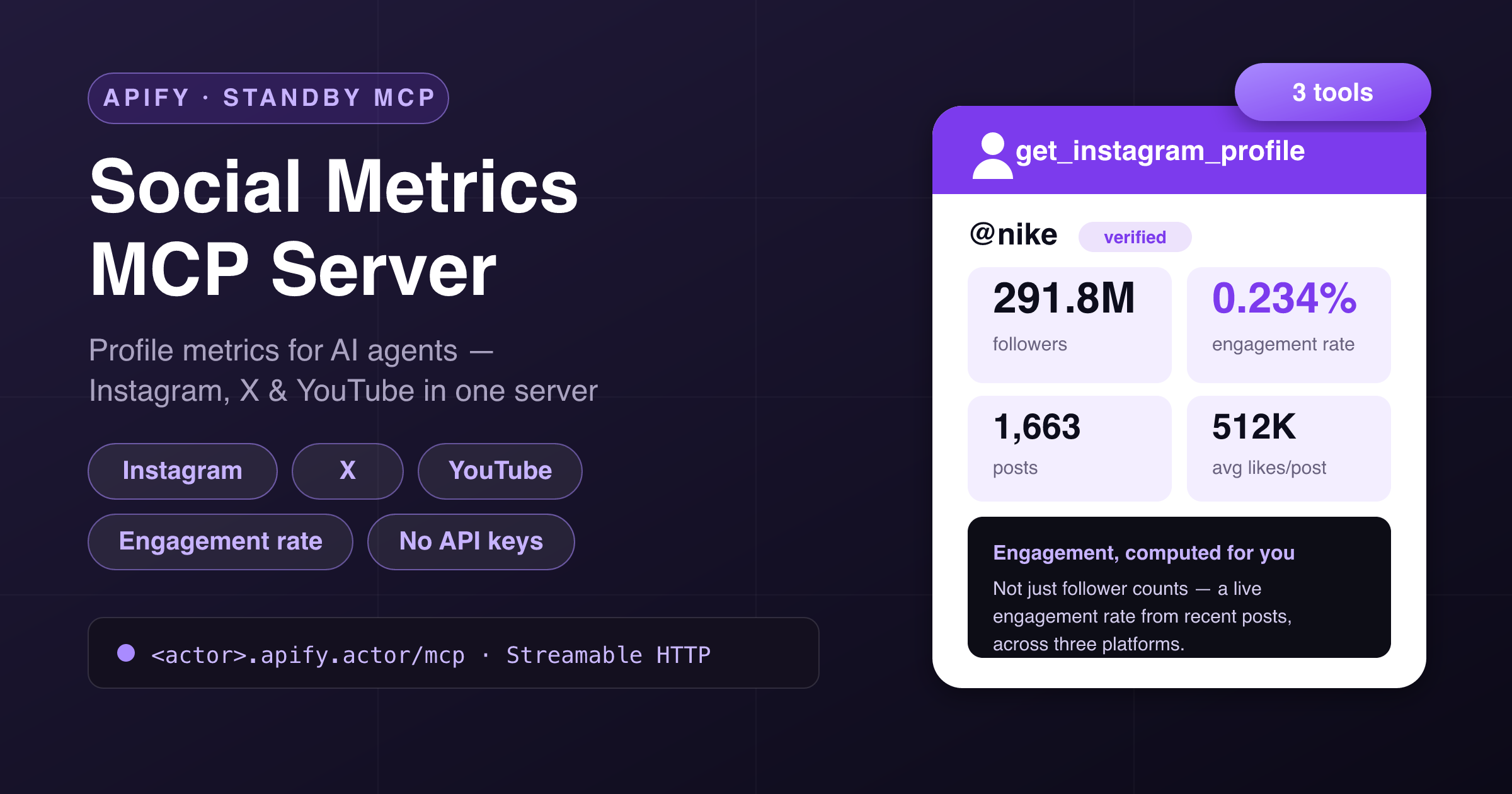
Give your AI assistant **live social-media metrics**. This Actor runs as a **hosted MCP server** (Model Context Protocol): connect Claude, Cursor, ChatGPT, VS Code or any MCP client and it can pull **public profile metrics** for **Instagram**, **X (Twitter)** and **YouTube** — followers, following, post/tweet/video counts, verification, bios and more — plus a computed **Instagram engagement rate**. One server, three platforms. **No platform API keys, no OAuth, no app review, nothing to host.**
Apify hosts it, authenticates it with your Apify token, and bills it **per tool call** — you don't run or host anything.
***
### 🧰 Tools
**Three tools**, all returning **clean, typed JSON** — ready for an LLM to reason over.
| Tool | What it does | Key arguments |
|---|---|---|
| **`get_instagram_profile`** | Instagram profile metrics: followers, following, post count, bio, category, verification & account type — **plus an engagement snapshot** (avg likes/comments and **engagement rate** from the 12 most recent posts). | `username` *(name or profile URL)* |
| **`get_x_profile`** | X (Twitter) profile metrics: followers, following, tweet count, listed count, bio, website, blue-check status, account-created date and profile image. | `username` *(name or profile URL)* |
| **`get_youtube_channel`** | YouTube channel metrics: subscribers, video count, description, keywords, country, channel id and avatar. Accepts **@handle, channel URL or UC… id**. | `channel` *(handle / URL / id)* |
> **Pricing** is per-call: one event per profile/channel lookup. `get_instagram_profile` (with engagement analytics) is the primary tool; `get_x_profile` and `get_youtube_channel` are billed at a lower per-call rate.
***
### 🔌 Connect it
This Actor runs in **Standby mode** and exposes an MCP endpoint at **`/mcp`** over the **Streamable HTTP** transport. Point your MCP client at the Actor's Standby URL and authenticate with your **Apify API token** as a bearer token.
Add this to your MCP client config (**Claude Desktop, Cursor, VS Code, Windsurf, …**):
```json
{
"mcpServers": {
"social-metrics": {
"url": "https:///mcp",
"headers": { "Authorization": "Bearer " }
}
}
}
```
- Your **Standby URL** is shown on the Actor's page once you enable Standby (looks like `https://--social-metrics-mcp-server.apify.actor`).
- Your **Apify API token** is under **Settings → Integrations** in the Apify Console.
That's it — your assistant will discover the three tools automatically and pick the right one.
***
### 💬 Example prompts
Once connected, just ask your assistant naturally:
- *“How many followers does @nike have on Instagram, and what's their engagement rate?”*
- *“Compare the follower counts of @apify on X and their YouTube channel.”*
- *“Pull the metrics for the Veritasium YouTube channel.”*
- *“Is @mkbhd verified? How many videos have they posted?”*
- *“Give me the follower and post counts for these five Instagram handles.”*
***
### 📦 Example tool calls & output
#### `get_instagram_profile`
```json
{ "username": "nike" }
```
```json
{
"platform": "instagram",
"username": "nike",
"fullName": "Nike",
"followers": 291786006,
"following": 143,
"postsCount": 1663,
"isVerified": true,
"category": "Sportswear",
"recentPostsSampled": 12,
"avgLikesPerPost": 512340,
"avgCommentsPerPost": 3120,
"engagementRatePct": 0.234
}
```
#### `get_x_profile`
```json
{ "username": "elonmusk" }
```
```json
{
"platform": "x",
"username": "elonmusk",
"name": "Elon Musk",
"followers": 240871936,
"following": 1367,
"tweets": 105565,
"isBlueVerified": true,
"createdAt": "2009-06-02T20:12:29.000Z"
}
```
#### `get_youtube_channel`
```json
{ "channel": "@veritasium" }
```
```json
{
"platform": "youtube",
"title": "Veritasium",
"handle": "@veritasium",
"channelId": "UCHnyfMqiRRG1u-2MsSQLbXA",
"subscribers": 21000000,
"subscribersText": "21M subscribers",
"videoCount": 520,
"country": "US"
}
```
***
### ✅ Why use it
- **Three platforms, one server.** Instagram, X and YouTube behind a single MCP connection — no juggling three separate integrations.
- **Engagement rate, computed for you.** Instagram returns avg likes/comments and an engagement-rate percentage from recent posts, not just raw follower counts.
- **No API keys.** No Meta app review, no X API tier, no YouTube Data API quota — nothing to apply for.
- **Built for agents.** Clean, typed tools with descriptions LLMs understand, so your assistant picks the right platform automatically.
- **Pay per call.** Billed per lookup — no subscription, no idle server cost, nothing to host.
- **Works everywhere.** Standard **Streamable HTTP** MCP transport — Claude, Cursor, ChatGPT, VS Code, Windsurf, or your own agent.
***
### 🎯 Great for
- **Influencer & creator research** — vet reach and engagement across platforms before outreach.
- **Competitive social benchmarking** — track follower and content counts for brands or rivals.
- **Marketing dashboards & reports** — feed live public metrics into an agent that writes the summary.
- **Lead qualification** — size up a prospect's social presence inside your agent workflow.
***
### ⚙️ Notes & limitations
- **Public data only.** Private Instagram accounts expose profile-level counts but no post engagement; the tool returns what's public.
- **Instagram engagement** is sampled from the **12 most recent posts** — a live snapshot, not a lifetime average — and is unavailable when recent posts hide their like counts.
- **YouTube counts** are the values YouTube shows logged-out visitors (approximate above 1,000, e.g. "21M subscribers"); total-view count is exposed only on some channels.
- **X** returns the public profile object; suspended or withheld handles return a clear error.
- One profile/channel per call — loop across a list with multiple calls.
***
### ⚠️ Disclaimer
This Actor accesses only **publicly available** profile data — the same information any logged-out visitor sees — with no login or private-account access. All metrics belong to the respective platforms and users; you are responsible for using the output in compliance with applicable laws and platform terms. Not affiliated with, endorsed by, or sponsored by Instagram/Meta, X (Twitter) or YouTube/Google.
***
### 🔎 SEO keywords
social media MCP, social metrics MCP, Instagram MCP server, X Twitter MCP, YouTube MCP server, Instagram followers API, engagement rate API, X follower count API, YouTube subscriber count API, social media API alternative, profile metrics for Claude, social data for Cursor, influencer metrics for ChatGPT, MCP server, Model Context Protocol, no-auth social API, follower count tool, social media analytics MCP, creator research MCP, social metrics for AI agents, hosted MCP server, Streamable HTTP MCP.
# Actor input Schema
## Actor input object example
```json
{}
```
# Actor output Schema
## `mcpEndpoint` (type: `string`):
Streamable HTTP MCP endpoint of this running server. Point Claude, Cursor or any MCP client at it with an Apify API token as the Bearer credential.
# API
You can run this Actor programmatically using our API. Below are code examples in JavaScript, Python, and CLI, as well as the OpenAPI specification and MCP server setup.
## JavaScript example
```javascript
import { ApifyClient } from 'apify-client';
// Initialize the ApifyClient with your Apify API token
// Replace the '' with your token
const client = new ApifyClient({
token: '',
});
// Prepare Actor input
const input = {};
// Run the Actor and wait for it to finish
const run = await client.actor("memo23/social-metrics-mcp-server").call(input);
// Fetch and print Actor results from the run's dataset (if any)
console.log('Results from dataset');
console.log(`💾 Check your data here: https://console.apify.com/storage/datasets/${run.defaultDatasetId}`);
const { items } = await client.dataset(run.defaultDatasetId).listItems();
items.forEach((item) => {
console.dir(item);
});
// 📚 Want to learn more 📖? Go to → https://docs.apify.com/api/client/js/docs
```
## Python example
```python
from apify_client import ApifyClient
# Initialize the ApifyClient with your Apify API token
# Replace '' with your token.
client = ApifyClient("")
# Prepare the Actor input
run_input = {}
# Run the Actor and wait for it to finish
run = client.actor("memo23/social-metrics-mcp-server").call(run_input=run_input)
# Fetch and print Actor results from the run's dataset (if there are any)
print(f"💾 Check your data here: https://console.apify.com/storage/datasets/{run.default_dataset_id}")
for item in client.dataset(run.default_dataset_id).iterate_items():
print(item)
# 📚 Want to learn more 📖? Go to → https://docs.apify.com/api/client/python/docs/quick-start
```
## CLI example
```bash
echo '{}' |
apify call memo23/social-metrics-mcp-server --silent --output-dataset
```
## MCP server setup
```json
{
"mcpServers": {
"apify": {
"type": "http",
"url": "https://mcp.apify.com/?tools=fetch-actor-details,memo23/social-metrics-mcp-server"
}
}
}
```
The hosted server signs you in with OAuth on first connect, so no API token belongs in this config. Clients without OAuth support can send an `Authorization: Bearer ` header instead, using a token from API & Integrations in Apify Console (https://console.apify.com/settings/integrations).
## OpenAPI specification
Download the OpenAPI definition: https://api.apify.com/v2/actors/URLtCuNCuqWsaFPan/builds/yK2EGpw1Wlj68CBaa/openapi.json