# Startup Fast \[Only $1/1k💰] · Launches, Websites & Emails (`memo23/startupfast-scraper`) Actor
\[Only $1/1k💰] startupfa.st scraper — scrape startup & product launches by category or across all 37 categories. Each project: name, tagline, the product's own website, logo, categories, upvotes, launch type & socials. Optional contact-email enrichment. Pure HTTP, JSON/CSV
- **URL**: https://apify.com/memo23/startupfast-scraper.md
- **Developed by:** [Muhamed Didovic](https://apify.com/memo23) (community)
- **Categories:** Lead generation, AI, Agents
- **Stats:** 2 total users, 1 monthly users, 100.0% runs succeeded, 0 bookmarks
- **User rating**: No ratings yet
## Pricing
from $1.00 / 1,000 result rows
This Actor is paid per event. You are not charged for the Apify platform usage, but only a fixed price for specific events.
Learn more: https://docs.apify.com/platform/actors/running/actors-in-store#pay-per-event
## What's an Apify Actor?
Actors are a software tools running on the Apify platform, for all kinds of web data extraction and automation use cases.
In Batch mode, an Actor accepts a well-defined JSON input, performs an action which can take anything from a few seconds to a few hours,
and optionally produces a well-defined JSON output, datasets with results, or files in key-value store.
In Standby mode, an Actor provides a web server which can be used as a website, API, or an MCP server.
Actors are written with capital "A".
## How to integrate an Actor?
If asked about integration, you help developers integrate Actors into their projects.
You adapt to their stack and deliver integrations that are safe, well-documented, and production-ready.
The best way to integrate Actors is as follows.
In JavaScript/TypeScript projects, use official [JavaScript/TypeScript client](https://docs.apify.com/api/client/js.md):
```bash
npm install apify-client
```
In Python projects, use official [Python client library](https://docs.apify.com/api/client/python.md):
```bash
pip install apify-client
```
In shell scripts, use [Apify CLI](https://docs.apify.com/cli/docs.md):
````bash
# MacOS / Linux
curl -fsSL https://apify.com/install-cli.sh | bash
# Windows
irm https://apify.com/install-cli.ps1 | iex
```bash
In AI frameworks, you might use the [Apify MCP server](https://docs.apify.com/platform/integrations/mcp.md).
If your project is in a different language, use the [REST API](https://docs.apify.com/api/v2.md).
For usage examples, see the [API](#api) section below.
For more details, see Apify documentation as [Markdown index](https://docs.apify.com/llms.txt) and [Markdown full-text](https://docs.apify.com/llms-full.txt).
# README
## Startup Fast Scraper — Launches, Websites & Contact Emails
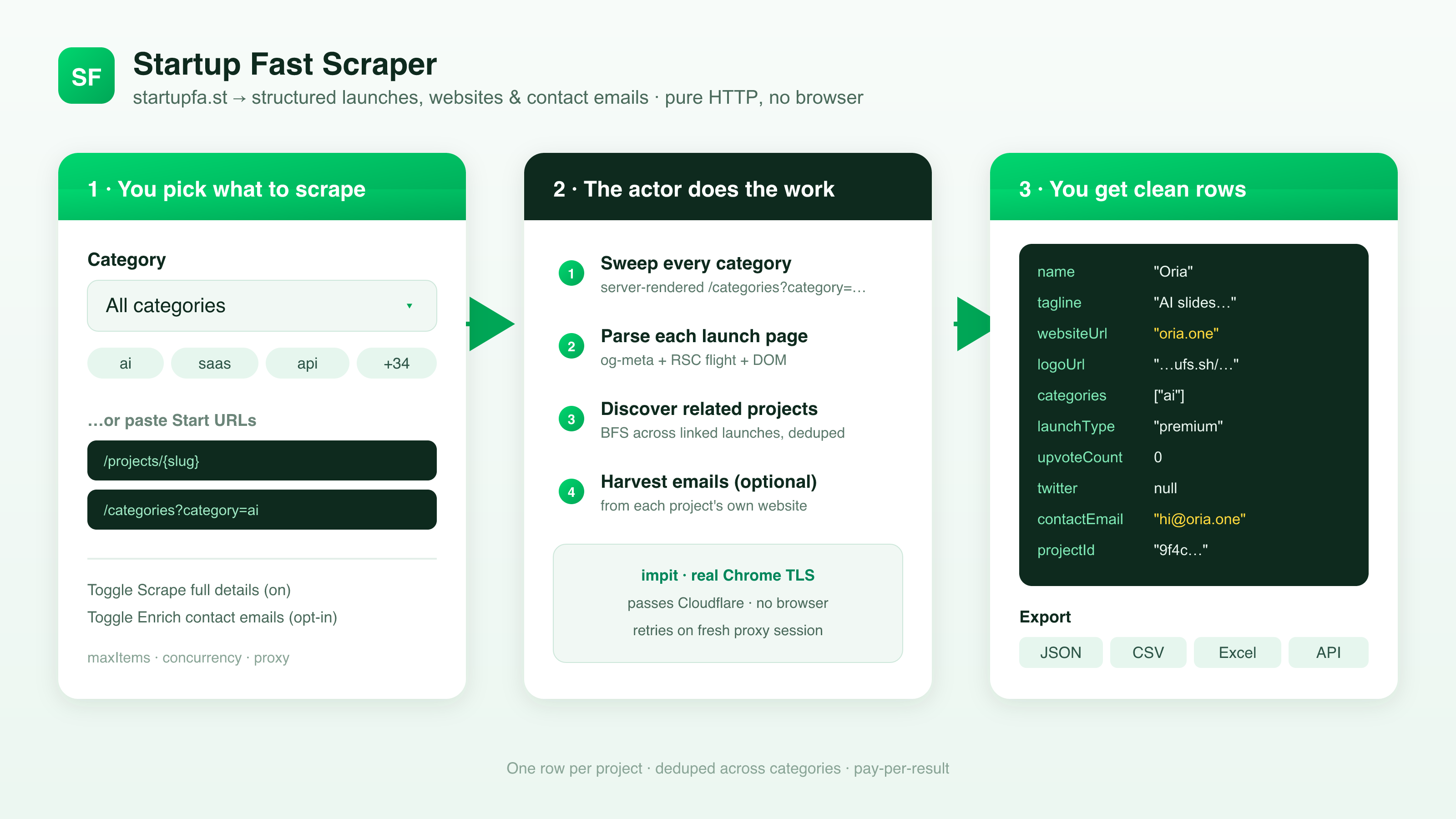
Turn [startupfa.st](https://www.startupfa.st) into a clean, structured dataset. Pick a category from the dropdown — "All categories" or any of 37 verticals — or paste specific Start URLs and let each one be auto-classified.
Get one row per startup/product launch with the essentials: name, tagline, the product's **own external website** (the lead-gen field), logo, categories, upvotes, launch type, and Twitter/X — plus an optional **contact email** harvested from each project's own site. Pure HTTP with a real Chrome TLS fingerprint, no browser.
### Why Use This Scraper?
- ✅ Pick by category or by URL — choose one of 37 verticals (or "All categories"), or paste `/projects`, `/categories`, `/`, `/trending`, `/directory` URLs; each is auto-classified
- ✅ The product's own website on every row — `websiteUrl` is the external site the launch links to, ready for outreach and enrichment
- ✅ Optional contact email per project — harvested from the product's own website (billed only when an email is actually found)
- ✅ Listing-level or full detail — keep `scrapeDetails` on for the full field set, or turn it off for cheap, fast rows
- ✅ Catalog coverage built in — a server-rendered category sweep plus related-project discovery walks beyond a single page
- ✅ JSON or CSV output, ready for spreadsheets, CRMs, and newsletters
### Overview
The Startup Fast Scraper is built for founders, marketers, and researchers who want startupfa.st launch data in a spreadsheet instead of a browser tab.
The output is **project-shaped rows** — one row per startup/product launch (`rowType: "project"`). Whether you start from a category, the homepage, the trending feed, or a direct project URL, the dataset is a single stream of project rows.
The parser reads startupfa.st's **server-rendered HTML** — Open Graph / Twitter meta tags plus the page's React flight data — rather than driving a headless browser, so it stays fast and cheap and passes Cloudflare on a Chrome TLS fingerprint. There is no official API; everything comes from public pages. URLs are auto-classified by shape — you just paste them, you don't tag them.
### Supported Inputs
#### URL types
| URL type | Pattern | Example |
|---|---|---|
| Project detail | `/projects/{slug}` | `https://www.startupfa.st/projects/oria` |
| Category listing | `/categories?category={slug}` | `https://www.startupfa.st/categories?category=ai` |
| Homepage | `startupfa.st/` | `https://www.startupfa.st/` |
| Trending feed | `/trending` | `https://www.startupfa.st/trending` |
| Directory | `/directory` | `https://www.startupfa.st/directory` |
Category, homepage, trending, and directory URLs **fan out** to project rows and stop once `maxItems` is reached. A direct `/projects/{slug}` URL emits a single project row.
#### Copy-pasteable startUrls
```json
{
"startUrls": [
"https://www.startupfa.st/projects/oria",
"https://www.startupfa.st/categories?category=ai",
"https://www.startupfa.st/",
"https://www.startupfa.st/trending",
"https://www.startupfa.st/directory"
]
}
````
`startUrls` accepts both plain strings (`"https://…"`) and request objects (`{ "url": "https://…" }`) — mix freely. When `startUrls` is set, it **overrides** the `category` dropdown.
#### Unsupported inputs
- ❌ Content behind a startupfa.st login (drafts, account settings)
- ❌ Hosts outside `startupfa.st`
- ❌ The full client-side-paginated `/directory` listing in one shot — see the catalog-completeness FAQ below
### Use Cases
| Audience | Use case |
|---|---|
| **Founders & indie makers** | Track new launches in your vertical, study winning taglines, benchmark upvotes |
| **Sales / lead-gen** | Build prospect lists from each project's own website, plus optional contact emails |
| **Marketing & growth teams** | Turn a category sweep into outreach-ready rows with sites and socials attached |
| **Researchers & analysts** | Bulk-export launches by category for SaaS/indie market research |
| **Newsletter & directory builders** | Feed fresh launches by category into a roundup or your own directory |
| **Competitive analysis** | Watch who's shipping in your space and where they live online |
### How It Works

1. **Input** — pick a `category` (one of 37, or "All categories"), or paste any mix of startupfa.st URLs
2. **Discover & fan out** — the server-rendered category sweep (`/categories?category={slug}`) plus the homepage and trending feeds list projects; each project's detail page seeds **BFS discovery** from its related-project links
3. **Fetch** — pages are retrieved over HTTP with a real Chrome TLS fingerprint (passes Cloudflare without a browser)
4. **Parse & enrich** — Open Graph / Twitter meta tags and the React flight data are read for the full field set; optionally fetch a contact email from each project's own website
5. **Output** — one project row per launch, as JSON or CSV
### Input Configuration
| Field | Type | Required | Notes |
|---|---|---|---|
| `category` | `string` (enum) | no | Default `all`. Which startupfa.st category to scrape. `all` sweeps every category plus the homepage and trending feed. One of 37 slugs scrapes just that vertical. Ignored when `startUrls` is set. |
| `startUrls` | `array` | no | Optional. Specific startupfa.st URLs (`/projects/{slug}`, `/categories?category={slug}`, `/`, `/trending`, `/directory`). Auto-classified. **Overrides** `category`. |
| `scrapeDetails` | `boolean` | no | Default `true`. Fetch each project's detail page for the full field set (name, tagline, website, logo, upvotes, launch type, Twitter, categories). Turn **off** for cheap listing-level rows (url + slug + categories) without a detail fetch — faster and lower cost. |
| `enrichEmails` | `boolean` | no | Default `false`. Harvest a contact email for each project from its own website; adds `contactEmail`, `contactWebsite`, and a detailed `emailEnrichment` object. **Billed per email found — never charged for a miss.** Requires `scrapeDetails`. |
| `maxItems` | `integer` | no | Hard cap on **total project rows**. Default `1000`. Free-tier runs are capped lower. |
| `maxConcurrency` | `integer` | no | Detail pages fetched in parallel. Default `8` (6–10 is the sweet spot). |
| `minConcurrency` | `integer` | no | Minimum parallelism. Default `1`. |
| `maxRequestRetries` | `integer` | no | Per-URL retry budget (each retry uses a fresh proxy session). Default `5`. |
| `proxy` | `object` | no | Defaults to Apify Proxy. The Chrome TLS fingerprint usually passes without a proxy; supply your own residential pool if you hit rate-limits. |
#### `category` enum
`all` (All categories), plus: `ai`, `analytics`, `api`, `ar-vr`, `blockchain`, `cms`, `data-science`, `databases`, `design-tools`, `developer-tools`, `devops`, `ecommerce`, `edtech`, `finance-tech`, `gaming`, `graphics`, `greentech`, `hardware`, `healthtech`, `iot`, `machine-learning`, `marketing-tools`, `mobile-dev`, `nlp`, `open-source`, `platform`, `productivity`, `prototyping`, `robotics`, `saas`, `sales-tools`, `security`, `serverless`, `testing-qa`, `ui-ux`, `wearables`, `web-dev`.
#### Common scenarios
**1. One category, full details**
```json
{
"category": "ai",
"scrapeDetails": true
}
```
**2. Every category, with contact emails**
```json
{
"category": "all",
"scrapeDetails": true,
"enrichEmails": true
}
```
**3. Specific projects only**
```json
{
"startUrls": [
"https://www.startupfa.st/projects/oria",
"https://www.startupfa.st/projects/soniox"
]
}
```
### Output Overview
Each dataset item is a single shape, `rowType: "project"` — one row per startup/product launch, from a category, the homepage, the trending feed, the directory, or a direct project URL.
Notes on when fields are populated:
- **`scrapeDetails: false`** emits cheap listing-level rows (url + slug + categories) and skips the per-project detail fetch. With it **on** (default), each row carries the full field set below.
- **`upvoteCount`** is nullable — premium launches sometimes omit the count on their page.
- **`twitter`**, **`websiteUrl`**, and **`logoUrl`** are best-effort and may be `null` if a project doesn't expose them.
- **`contactEmail` / `contactWebsite` / `emailEnrichment`** appear only with `enrichEmails` and only when an email is actually found.
Output is JSON by default; the Apify Console "Export" tab flattens it to CSV.
### Output Samples
#### Project row — category-discovered
```json
{
"rowType": "project",
"url": "https://www.startupfa.st/projects/oria",
"slug": "oria",
"projectId": "9f4c7242-2ccc-4cd0-9715-416c1fdcb697",
"name": "Oria",
"tagline": "AI for complex professional slides in PowerPoint",
"websiteUrl": "https://www.oria.one",
"logoUrl": "https://9s82gn6mgv.ufs.sh/f/gCFgcDLxaF0QCrjG3gFSemd5A61rpuQblhcOwq3svjXHYfg8",
"upvoteCount": null,
"launchType": "premium",
"twitter": null,
"categories": ["ai"],
"scrapedAt": "2026-06-23T16:46:02.089Z"
}
```
#### Project row — with `enrichEmails`
```jsonc
{
"rowType": "project",
"url": "https://www.startupfa.st/projects/oria",
"slug": "oria",
"name": "Oria",
"websiteUrl": "https://www.oria.one",
"categories": ["ai"],
"contactEmail": "hello@oria.one",
"contactWebsite": "https://www.oria.one",
"emailEnrichment": {
"emails": ["hello@oria.one"],
"website": "https://www.oria.one"
/* … source/provenance detail … */
},
"scrapedAt": "2026-06-23T16:46:02.089Z"
}
```
### Key Output Fields
#### Identity & links
- `rowType` — always `"project"`
- `url` — the startupfa.st project page
- `slug` — the project's URL slug
- `projectId` — startupfa.st's internal UUID
- `name` — the launch's display name
- `tagline` / `description` — the one-line pitch
- `websiteUrl` — **the product's own external website** (the lead-gen field)
- `logoUrl` — the project's logo image
- `twitter` — Twitter/X handle or URL (nullable)
#### Classification & engagement
- `categories[]` — the project's category slugs (e.g. `["ai"]`)
- `upvoteCount` — upvotes on the launch (**nullable** — premium launches sometimes omit it)
- `launchType` — the launch tier (e.g. `"premium"`)
#### Enrichment (with `enrichEmails`)
- `contactEmail` — the best contact email found on the product's own website
- `contactWebsite` — the site the email was harvested from
- `emailEnrichment` — the full enrichment object (all emails found + provenance)
#### Metadata
- `scrapedAt` — ISO timestamp of the scrape
### FAQ
#### Which startupfa.st URLs are supported?
Project detail (`/projects/{slug}`), category listings (`/categories?category={slug}`), the homepage (`/`), the trending feed (`/trending`), and the directory (`/directory`). Mix any of them in `startUrls`, or skip URLs entirely and just pick a `category` from the dropdown.
#### Do I get one row per project?
Yes. Every entry point fans out to project rows (`rowType: "project"`). There are no separate category or feed rows — the dataset is a single stream of launches.
#### Does it need a login?
No. The actor reads only publicly available startupfa.st pages. Nothing behind a login is in scope.
#### Does it use the official startupfa.st API?
There isn't one. The scraper parses the public server-rendered HTML — Open Graph / Twitter meta tags plus the page's React flight data. No private or authenticated endpoints are touched.
#### What does `scrapeDetails` change?
With it **on** (default), each discovered project's detail page is fetched for the full field set (name, tagline, website, logo, upvotes, launch type, Twitter, categories). With it **off**, you get cheap listing-level rows (url + slug + categories) and no per-project fetch — faster and lower cost.
#### Why is `upvoteCount` sometimes `null`?
Premium launches sometimes don't render an upvote count on their page, so there's nothing to read. The row is still emitted with every other field populated.
#### How complete is the catalog?
The category sweep returns the server-rendered projects for each vertical (roughly the first pages), and **related-project discovery** (BFS) then walks outward from each project's links to reach more. The full `/directory` listing is paginated **client-side** (loaded by JavaScript after the page loads), so it isn't enumerated in one shot — but the category sweep plus related discovery cover the catalog well. Raise `maxItems` to collect more.
#### Is email enrichment guaranteed?
No. `enrichEmails` is best-effort — a project's website may not publish an email, may load it via JavaScript, or may obfuscate it. You're **billed only when an email is actually found**, never for a miss.
#### Can I export to CSV?
Yes. Output is JSON by default; the Apify Console "Export" tab flattens it to CSV (or JSON, Excel, etc.).
#### What about rate limits?
The scraper runs cleanly at `maxConcurrency=8` on a Chrome TLS fingerprint that usually passes Cloudflare without a proxy. Lower the concurrency or attach a residential proxy under `proxy` if you ever see soft-blocks.
### Support
Found a bug, hit a block we don't detect, or want another URL kind supported? Open an issue on the actor's **Issues** tab, or reach out via the [memo23 profile](https://apify.com/memo23) on Apify.
### Additional Services
Need a custom export shape, a new entry point, or scheduled monitoring? I build tailored scrapers and enrichment pipelines — get in touch via the [memo23 profile](https://apify.com/memo23).
### Explore More Scrapers
If you track startup launches, founders, and prospects, these pair well:
- [**Product Hunt Scraper**](https://apify.com/memo23/producthunt-scraper) — the other big launch directory: votes, reviews, makers, and emails
- [**Y Combinator Scraper**](https://apify.com/memo23/y-combinator-scraper) — companies + jobs from YC
- [**G2 Scraper**](https://apify.com/memo23/g2-scraper) — see how a launched SaaS ranks on G2 reviews
- [**Trustpilot Scraper**](https://apify.com/memo23/trustpilot-scraper-ppe) — customer sentiment for products you discover
- [**LinkedIn Profiles Scraper**](https://apify.com/memo23/linkedin-profiles-cheerio) — backfill founder profiles
Full portfolio: [apify.com/memo23](https://apify.com/memo23).
***
### ⚠️ Disclaimer
This Actor is an independent tool and is not affiliated with, endorsed by, or sponsored by startupfa.st or any of its parent companies or subsidiaries. All trademarks mentioned are the property of their respective owners.
The scraper accesses only publicly available startupfa.st pages — no authenticated endpoints, drafts, or content behind a login. Users are responsible for ensuring their use complies with startupfa.st's Terms of Service, applicable data-protection law (GDPR, CCPA, etc.), and any contractual obligations of their own organization. Harvested contact emails are personal data — process them responsibly, honor opt-outs, and seek legal advice before outbound marketing.
***
### SEO Keywords
startupfa.st scraper, scrape startupfa.st, startup fast scraper, startup launch scraper, product launch scraper, startup directory scraper, indie launch tracker, startupfast.st api, Apify startupfa.st, startup category scraper, saas launch tracker, new product launch data, startup website scraper, founder contact scraper, b2b lead generation data, startup market research, product directory scraper, launch newsletter data, startup discovery tool, scrape startup launches
# Actor input Schema
## `category` (type: `string`):
Which startupfa.st category to scrape. Choose "All categories" to sweep every category (plus the homepage and trending feed). Ignored when Start URLs are provided.
## `startUrls` (type: `array`):
Optional. Paste specific startupfa.st URLs to scrape instead of a category — each is auto-classified and overrides the Category setting:
• Project detail — https://www.startupfa.st/projects/{slug} → emits one project row
• Category listing — https://www.startupfa.st/categories?category={slug} → fans out to that category's projects
• Feeds — / · /trending · /directory → fan out to listed projects
Leave empty to use the Category dropdown above.
## `scrapeDetails` (type: `boolean`):
When enabled (default), each discovered project's detail page is fetched for the full field set: name, tagline/description, the product's own website URL, logo, upvotes, launch type, Twitter/X and categories. Disable to emit cheap listing-level rows (url + slug + categories) without fetching each detail page — faster and lower cost.
## `enrichEmails` (type: `boolean`):
If enabled, finds a contact email for each project from its own website (the on-page website URL). Adds contactEmail + contactWebsite columns plus a detailed emailEnrichment object. Billed per contact email found; only charged when an email is returned, never for misses. Requires Scrape full details.
## `maxItems` (type: `integer`):
Hard cap on the number of project rows collected. A single category yields up to ~10 projects from the server-rendered page (plus more via related-project discovery); "All categories" fans across all 37.
## `maxConcurrency` (type: `integer`):
Maximum number of detail pages fetched in parallel. Higher = faster but more bandwidth. startupfa.st is forgiving; 6-10 is the sweet spot.
## `minConcurrency` (type: `integer`):
Minimum number of detail pages fetched in parallel.
## `maxRequestRetries` (type: `integer`):
Number of retries (with a fresh proxy session) before a failed request is given up.
## `proxy` (type: `object`):
Defaults to Apify Proxy. startupfa.st sits behind Cloudflare; impit's Chrome TLS fingerprint typically passes without a proxy. Provide your own residential pool here if you encounter rate-limits.
## Actor input object example
```json
{
"category": "all",
"startUrls": [
"https://www.startupfa.st/projects/soniox",
"https://www.startupfa.st/categories?category=ai"
],
"scrapeDetails": true,
"enrichEmails": false,
"maxItems": 1000,
"maxConcurrency": 8,
"minConcurrency": 1,
"maxRequestRetries": 5,
"proxy": {
"useApifyProxy": true
}
}
```
# API
You can run this Actor programmatically using our API. Below are code examples in JavaScript, Python, and CLI, as well as the OpenAPI specification and MCP server setup.
## JavaScript example
```javascript
import { ApifyClient } from 'apify-client';
// Initialize the ApifyClient with your Apify API token
// Replace the '' with your token
const client = new ApifyClient({
token: '',
});
// Prepare Actor input
const input = {
"startUrls": [
"https://www.startupfa.st/projects/soniox",
"https://www.startupfa.st/categories?category=ai"
],
"proxy": {
"useApifyProxy": true
}
};
// Run the Actor and wait for it to finish
const run = await client.actor("memo23/startupfast-scraper").call(input);
// Fetch and print Actor results from the run's dataset (if any)
console.log('Results from dataset');
console.log(`💾 Check your data here: https://console.apify.com/storage/datasets/${run.defaultDatasetId}`);
const { items } = await client.dataset(run.defaultDatasetId).listItems();
items.forEach((item) => {
console.dir(item);
});
// 📚 Want to learn more 📖? Go to → https://docs.apify.com/api/client/js/docs
```
## Python example
```python
from apify_client import ApifyClient
# Initialize the ApifyClient with your Apify API token
# Replace '' with your token.
client = ApifyClient("")
# Prepare the Actor input
run_input = {
"startUrls": [
"https://www.startupfa.st/projects/soniox",
"https://www.startupfa.st/categories?category=ai",
],
"proxy": { "useApifyProxy": True },
}
# Run the Actor and wait for it to finish
run = client.actor("memo23/startupfast-scraper").call(run_input=run_input)
# Fetch and print Actor results from the run's dataset (if there are any)
print("💾 Check your data here: https://console.apify.com/storage/datasets/" + run["defaultDatasetId"])
for item in client.dataset(run["defaultDatasetId"]).iterate_items():
print(item)
# 📚 Want to learn more 📖? Go to → https://docs.apify.com/api/client/python/docs/quick-start
```
## CLI example
```bash
echo '{
"startUrls": [
"https://www.startupfa.st/projects/soniox",
"https://www.startupfa.st/categories?category=ai"
],
"proxy": {
"useApifyProxy": true
}
}' |
apify call memo23/startupfast-scraper --silent --output-dataset
```
## MCP server setup
```json
{
"mcpServers": {
"apify": {
"command": "npx",
"args": [
"mcp-remote",
"https://mcp.apify.com/?tools=memo23/startupfast-scraper",
"--header",
"Authorization: Bearer "
]
}
}
}
```
## OpenAPI specification
```json
{
"openapi": "3.0.1",
"info": {
"title": "Startup Fast [Only $1/1k💰] · Launches, Websites & Emails",
"description": "[Only $1/1k💰] startupfa.st scraper — scrape startup & product launches by category or across all 37 categories. Each project: name, tagline, the product's own website, logo, categories, upvotes, launch type & socials. Optional contact-email enrichment. Pure HTTP, JSON/CSV",
"version": "0.0",
"x-build-id": "CxQ2on0PV7bxVq7v1"
},
"servers": [
{
"url": "https://api.apify.com/v2"
}
],
"paths": {
"/acts/memo23~startupfast-scraper/run-sync-get-dataset-items": {
"post": {
"operationId": "run-sync-get-dataset-items-memo23-startupfast-scraper",
"x-openai-isConsequential": false,
"summary": "Executes an Actor, waits for its completion, and returns Actor's dataset items in response.",
"tags": [
"Run Actor"
],
"requestBody": {
"required": true,
"content": {
"application/json": {
"schema": {
"$ref": "#/components/schemas/inputSchema"
}
}
}
},
"parameters": [
{
"name": "token",
"in": "query",
"required": true,
"schema": {
"type": "string"
},
"description": "Enter your Apify token here"
}
],
"responses": {
"200": {
"description": "OK"
}
}
}
},
"/acts/memo23~startupfast-scraper/runs": {
"post": {
"operationId": "runs-sync-memo23-startupfast-scraper",
"x-openai-isConsequential": false,
"summary": "Executes an Actor and returns information about the initiated run in response.",
"tags": [
"Run Actor"
],
"requestBody": {
"required": true,
"content": {
"application/json": {
"schema": {
"$ref": "#/components/schemas/inputSchema"
}
}
}
},
"parameters": [
{
"name": "token",
"in": "query",
"required": true,
"schema": {
"type": "string"
},
"description": "Enter your Apify token here"
}
],
"responses": {
"200": {
"description": "OK",
"content": {
"application/json": {
"schema": {
"$ref": "#/components/schemas/runsResponseSchema"
}
}
}
}
}
}
},
"/acts/memo23~startupfast-scraper/run-sync": {
"post": {
"operationId": "run-sync-memo23-startupfast-scraper",
"x-openai-isConsequential": false,
"summary": "Executes an Actor, waits for completion, and returns the OUTPUT from Key-value store in response.",
"tags": [
"Run Actor"
],
"requestBody": {
"required": true,
"content": {
"application/json": {
"schema": {
"$ref": "#/components/schemas/inputSchema"
}
}
}
},
"parameters": [
{
"name": "token",
"in": "query",
"required": true,
"schema": {
"type": "string"
},
"description": "Enter your Apify token here"
}
],
"responses": {
"200": {
"description": "OK"
}
}
}
}
},
"components": {
"schemas": {
"inputSchema": {
"type": "object",
"properties": {
"category": {
"title": "Category",
"enum": [
"all",
"ai",
"analytics",
"api",
"ar-vr",
"blockchain",
"cms",
"data-science",
"databases",
"design-tools",
"developer-tools",
"devops",
"ecommerce",
"edtech",
"finance-tech",
"gaming",
"graphics",
"greentech",
"hardware",
"healthtech",
"iot",
"machine-learning",
"marketing-tools",
"mobile-dev",
"nlp",
"open-source",
"platform",
"productivity",
"prototyping",
"robotics",
"saas",
"sales-tools",
"security",
"serverless",
"testing-qa",
"ui-ux",
"wearables",
"web-dev"
],
"type": "string",
"description": "Which startupfa.st category to scrape. Choose \"All categories\" to sweep every category (plus the homepage and trending feed). Ignored when Start URLs are provided.",
"default": "all"
},
"startUrls": {
"title": "Start URLs (optional)",
"type": "array",
"description": "Optional. Paste specific startupfa.st URLs to scrape instead of a category — each is auto-classified and overrides the Category setting:\n\n• Project detail — https://www.startupfa.st/projects/{slug} → emits one project row\n• Category listing — https://www.startupfa.st/categories?category={slug} → fans out to that category's projects\n• Feeds — / · /trending · /directory → fan out to listed projects\n\nLeave empty to use the Category dropdown above.",
"items": {
"type": "string"
}
},
"scrapeDetails": {
"title": "Scrape full details",
"type": "boolean",
"description": "When enabled (default), each discovered project's detail page is fetched for the full field set: name, tagline/description, the product's own website URL, logo, upvotes, launch type, Twitter/X and categories. Disable to emit cheap listing-level rows (url + slug + categories) without fetching each detail page — faster and lower cost.",
"default": true
},
"enrichEmails": {
"title": "Enrich with contact emails (experimental, billed per email)",
"type": "boolean",
"description": "If enabled, finds a contact email for each project from its own website (the on-page website URL). Adds contactEmail + contactWebsite columns plus a detailed emailEnrichment object. Billed per contact email found; only charged when an email is returned, never for misses. Requires Scrape full details.",
"default": false
},
"maxItems": {
"title": "Maximum items to scrape",
"minimum": 1,
"type": "integer",
"description": "Hard cap on the number of project rows collected. A single category yields up to ~10 projects from the server-rendered page (plus more via related-project discovery); \"All categories\" fans across all 37.",
"default": 1000
},
"maxConcurrency": {
"title": "Max concurrency",
"minimum": 1,
"type": "integer",
"description": "Maximum number of detail pages fetched in parallel. Higher = faster but more bandwidth. startupfa.st is forgiving; 6-10 is the sweet spot.",
"default": 8
},
"minConcurrency": {
"title": "Min concurrency",
"minimum": 1,
"type": "integer",
"description": "Minimum number of detail pages fetched in parallel.",
"default": 1
},
"maxRequestRetries": {
"title": "Max request retries",
"minimum": 0,
"type": "integer",
"description": "Number of retries (with a fresh proxy session) before a failed request is given up.",
"default": 5
},
"proxy": {
"title": "Proxy configuration",
"type": "object",
"description": "Defaults to Apify Proxy. startupfa.st sits behind Cloudflare; impit's Chrome TLS fingerprint typically passes without a proxy. Provide your own residential pool here if you encounter rate-limits."
}
}
},
"runsResponseSchema": {
"type": "object",
"properties": {
"data": {
"type": "object",
"properties": {
"id": {
"type": "string"
},
"actId": {
"type": "string"
},
"userId": {
"type": "string"
},
"startedAt": {
"type": "string",
"format": "date-time",
"example": "2025-01-08T00:00:00.000Z"
},
"finishedAt": {
"type": "string",
"format": "date-time",
"example": "2025-01-08T00:00:00.000Z"
},
"status": {
"type": "string",
"example": "READY"
},
"meta": {
"type": "object",
"properties": {
"origin": {
"type": "string",
"example": "API"
},
"userAgent": {
"type": "string"
}
}
},
"stats": {
"type": "object",
"properties": {
"inputBodyLen": {
"type": "integer",
"example": 2000
},
"rebootCount": {
"type": "integer",
"example": 0
},
"restartCount": {
"type": "integer",
"example": 0
},
"resurrectCount": {
"type": "integer",
"example": 0
},
"computeUnits": {
"type": "integer",
"example": 0
}
}
},
"options": {
"type": "object",
"properties": {
"build": {
"type": "string",
"example": "latest"
},
"timeoutSecs": {
"type": "integer",
"example": 300
},
"memoryMbytes": {
"type": "integer",
"example": 1024
},
"diskMbytes": {
"type": "integer",
"example": 2048
}
}
},
"buildId": {
"type": "string"
},
"defaultKeyValueStoreId": {
"type": "string"
},
"defaultDatasetId": {
"type": "string"
},
"defaultRequestQueueId": {
"type": "string"
},
"buildNumber": {
"type": "string",
"example": "1.0.0"
},
"containerUrl": {
"type": "string"
},
"usage": {
"type": "object",
"properties": {
"ACTOR_COMPUTE_UNITS": {
"type": "integer",
"example": 0
},
"DATASET_READS": {
"type": "integer",
"example": 0
},
"DATASET_WRITES": {
"type": "integer",
"example": 0
},
"KEY_VALUE_STORE_READS": {
"type": "integer",
"example": 0
},
"KEY_VALUE_STORE_WRITES": {
"type": "integer",
"example": 1
},
"KEY_VALUE_STORE_LISTS": {
"type": "integer",
"example": 0
},
"REQUEST_QUEUE_READS": {
"type": "integer",
"example": 0
},
"REQUEST_QUEUE_WRITES": {
"type": "integer",
"example": 0
},
"DATA_TRANSFER_INTERNAL_GBYTES": {
"type": "integer",
"example": 0
},
"DATA_TRANSFER_EXTERNAL_GBYTES": {
"type": "integer",
"example": 0
},
"PROXY_RESIDENTIAL_TRANSFER_GBYTES": {
"type": "integer",
"example": 0
},
"PROXY_SERPS": {
"type": "integer",
"example": 0
}
}
},
"usageTotalUsd": {
"type": "number",
"example": 0.00005
},
"usageUsd": {
"type": "object",
"properties": {
"ACTOR_COMPUTE_UNITS": {
"type": "integer",
"example": 0
},
"DATASET_READS": {
"type": "integer",
"example": 0
},
"DATASET_WRITES": {
"type": "integer",
"example": 0
},
"KEY_VALUE_STORE_READS": {
"type": "integer",
"example": 0
},
"KEY_VALUE_STORE_WRITES": {
"type": "number",
"example": 0.00005
},
"KEY_VALUE_STORE_LISTS": {
"type": "integer",
"example": 0
},
"REQUEST_QUEUE_READS": {
"type": "integer",
"example": 0
},
"REQUEST_QUEUE_WRITES": {
"type": "integer",
"example": 0
},
"DATA_TRANSFER_INTERNAL_GBYTES": {
"type": "integer",
"example": 0
},
"DATA_TRANSFER_EXTERNAL_GBYTES": {
"type": "integer",
"example": 0
},
"PROXY_RESIDENTIAL_TRANSFER_GBYTES": {
"type": "integer",
"example": 0
},
"PROXY_SERPS": {
"type": "integer",
"example": 0
}
}
}
}
}
}
}
}
}
}
```