# Temu Product Scraper | $3/1K | Prices & Sold Count (`memo23/temu-scraper`) Actor
Scrape Temu product search by keyword. One row per product: title, price, currency, discount, units sold, seller id, images and product URL. Paginated, 20 items per page. JSON, CSV, Excel or API. For catalogs, price monitoring and dropshipping research. $3 per 1,000 products.
- **URL**: https://apify.com/memo23/temu-scraper.md
- **Developed by:** [Muhamed Didovic](https://apify.com/memo23) (community)
- **Categories:** E-commerce
- **Stats:** 3 total users, 2 monthly users, 5.0% runs succeeded, 0 bookmarks
- **User rating**: No ratings yet
## Pricing
from $3.00 / 1,000 products
This Actor is paid per event. You are not charged for the Apify platform usage, but only a fixed price for specific events.
Learn more: https://docs.apify.com/actors/running/actors-in-store.md#pay-per-event
## What's an Apify Actor?
An Actor is a serverless cloud program that runs on the Apify platform. It has two run modes.
In Batch mode, an Actor accepts a well-defined JSON input, performs an action which can take anything from a few seconds to a few hours,
and optionally produces a well-defined JSON output, datasets with results, or files in key-value store.
In Standby mode, an Actor provides a web server which can be used as a website, API, or an MCP server.
Apify vocabulary and the platform model are defined once, in the agent quickstart at https://apify.com/agents.md.
## How to integrate an Actor?
If asked about integration, you help developers integrate Actors into their projects.
You adapt to their stack and deliver integrations that are safe, well-documented, and production-ready.
Do not guess an integration path. Every one of them is in the agent quickstart at https://apify.com/agents.md: the Apify MCP server, Agent Skills with the Apify CLI, the JavaScript and Python clients, the REST API, and the account-free path for an agent with no human to sign in. It also carries the rule on stating cost before the first paid run.
For examples already wired to this Actor's own input schema, see the [API](#api) section below.
Each client library has reference documentation the quickstart does not restate: [JavaScript/TypeScript](https://docs.apify.com/api/client/js/docs.md) (`npm install apify-client`) and [Python](https://docs.apify.com/api/client/python/docs.md) (`pip install apify-client`).
# README
## Temu Search Scraper
Turn Temu search keywords into a product dataset. Paste one or more terms, set a cap, and get one row per product: title, price, currency, discount, units sold, seller id, images, and product URL.
| Input | Rows |
|---|---|
| Search keyword (`iphone case`) | Paginated product rows (20 per page) |
### Why Use This Scraper?
- **Keyword in, products out** — no login, cookies, or tokens to paste.
- **One flat row per product** — title, price, sold count, images, URL.
- **Paginated** — walks Temu search 20 items at a time up to your cap.
- **Export-ready** — JSON, CSV, Excel, or the Apify API.
### Overview
Built for catalog work, price monitoring, and competitor research on Temu search. Each run takes keywords and a row cap. Output is one dataset row per product from the EU store.
Search only. No product-detail pages, no category crawl, no seller profiles.
### Supported Inputs
| Kind | Example | Notes |
|---|---|---|
| Keyword | `iphone case` | Required. One or more in `searchQueries`. |
| Cap | `maxItems: 20` | Optional. Default 100. Free-tier capped at 100. |
**Not supported:** product URLs, category URLs, seller pages, US-store-only keywords, login cookies.
#### Example `searchQueries`
```json
["iphone case", "kitchen gadgets"]
```
### Use Cases
| Who | What they get |
|---|---|
| Ecommerce / catalogs | Title, price, images, product URL for a keyword |
| Price monitoring | Current price, market price, discount text |
| Market research | Sold counts and mall ids across a niche |
| Agencies | Repeatable keyword runs, CSV/Excel export |
### How It Works
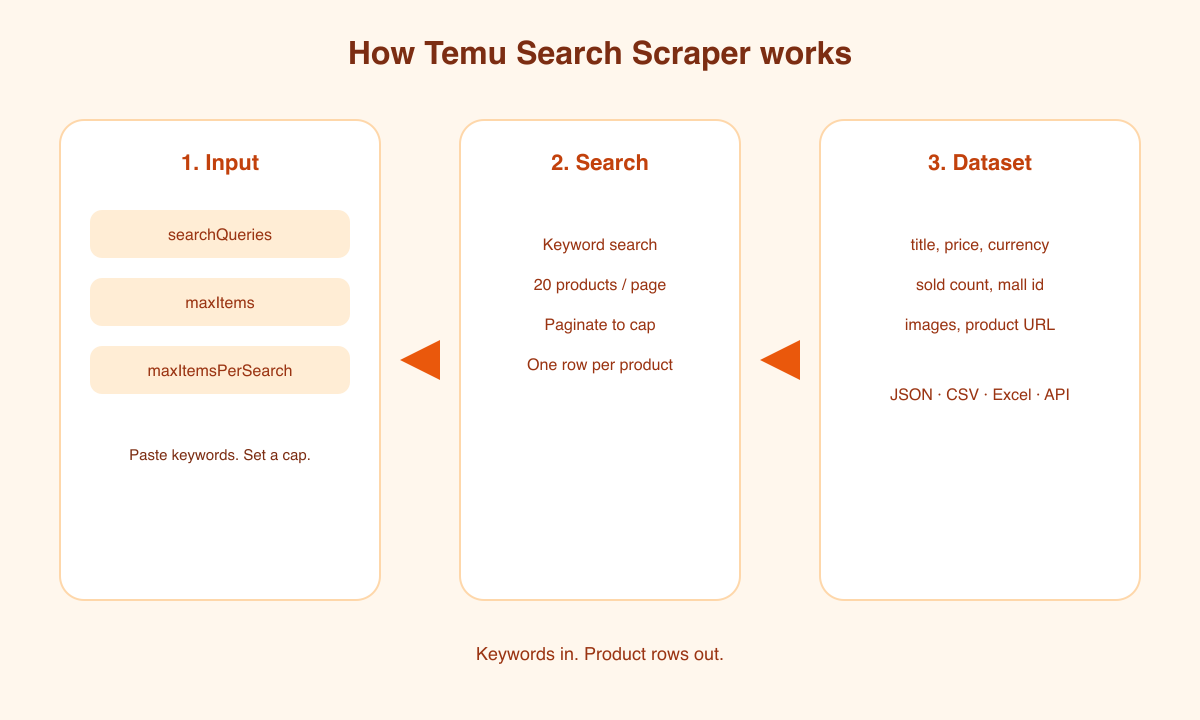
1. You paste keywords and a row cap.
2. The actor searches Temu for each keyword.
3. Results are walked 20 products per page until the cap.
4. Each product is written as one dataset row.
Keep `maxItems` modest (20–100). Large bursts can be rate-limited; wait and retry with a smaller cap.
### Input Configuration
| Field | Type | Required | Notes |
|---|---|---|---|
| `searchQueries` | string\[] | yes | Keywords. Prefill: `iphone case`. |
| `maxItems` | integer | no | Run cap across all keywords. Default 100. |
| `maxItemsPerSearch` | integer | no | Cap per keyword. Default 100. Temu returns 20 per page. |
#### Example input
```json
{
"searchQueries": ["iphone case"],
"maxItems": 20,
"maxItemsPerSearch": 20
}
```
### Output Overview
One row = one Temu product from search. Numeric `price` plus Temu's formatted `priceStr`. `soldQuantity` expands strings like `18K+`. `url` is the canonical goods page.
### Output Samples
Search keyword `gym set`:
```json
{
"rowType": "product",
"goodsId": "601099555078774",
"title": "Indoor Basketball Hoop Foldable Wall-Mounted",
"url": "https://eu.temu.com/goods.html?goods_id=601099555078774",
"price": 20.7,
"priceStr": "20,70 KM",
"currency": "KM",
"marketPrice": 32.1,
"discountText": "-35%",
"soldQuantity": 18000,
"soldText": "18K+",
"soldPercent": null,
"mallId": "3287190376615",
"tags": [],
"primaryImage": "https://img.kwcdn.com/product/fancy/013d71fa-d9c2-4f69-9f87-42bfb9e04c9c.jpg",
"images": ["https://img.kwcdn.com/product/fancy/013d71fa-d9c2-4f69-9f87-42bfb9e04c9c.jpg"],
"hasVideo": false,
"searchKeyword": "gym set",
"scrapedAt": "2026-08-28T16:40:00.000Z"
}
```
### Key Output Fields
**Identity:** `goodsId`, `title`, `url`, `searchKeyword`
**Price:** `price`, `priceStr`, `currency`, `marketPrice`, `discountText`
**Demand:** `soldQuantity`, `soldText`, `mallId`
**Media:** `primaryImage`, `images`, `hasVideo`
**Meta:** `rowType`, `scrapedAt`
### FAQ
#### Do I need a Temu account or token?
No. Paste keywords and a cap.
#### Which store is this?
EU Temu (`eu.temu.com`). Prices may be in BAM or EUR depending on the live session.
#### Can I scrape a product URL?
No. Keyword search only.
#### Why did a run stop early or fail?
Temu rate-limits large or back-to-back pulls. Wait a few minutes and retry with `maxItems` 20–40.
#### Is there a free-tier cap?
Yes. Non-paying runs stop at 100 rows.
#### Does this crawl categories or sellers?
No.
### Support
- **Bug or feature request?** Open a ticket on the **Issues** tab.
- **Email:**
- **Website:** [muhamed-didovic.github.io](https://muhamed-didovic.github.io/)
### Additional Services
Need a custom export, scheduled monitoring, or another marketplace? Email .
### Explore More Scrapers
- [TikTok Shop Sales Scraper](https://apify.com/memo23/tiktok-shop-scraper)
- [Google Autocomplete Scraper](https://apify.com/memo23/google-suggest-scraper)
- [1688 Scraper](https://apify.com/memo23/1688-scraper)
Full list at [apify.com/memo23](https://apify.com/memo23).
### 🤖 For AI Agents & LLM Apps
Compact reference for agents calling this actor via the [Apify MCP server](https://mcp.apify.com) or the Apify API (actor: `memo23/temu-scraper`).
**Purpose:** Temu keyword search → one product row each (title, price, sold, images, URL).
**Minimal input:**
```json
{
"searchQueries": ["iphone case"],
"maxItems": 20
}
```
`searchQueries` is required. Optional: `maxItems` (default 100), `maxItemsPerSearch` (default 100).
**Output fields:** `rowType, goodsId, title, url, price, priceStr, currency, marketPrice, discountText, soldQuantity, soldText, mallId, tags, primaryImage, images, hasVideo, searchKeyword, scrapedAt`
**Behaviors:**
- Always set `maxItems`. Prefer 20–40 for a first run.
- Free-tier users are capped at 100 rows.
- Search only — no product-detail or category URLs.
- Billing: $0.005 actor start (per GB) + $0.003 per dataset row.
### ⚠️ Disclaimer
This Actor is an independent tool and is not affiliated with, endorsed by, or sponsored by Whaleco Inc. or Temu. All trademarks mentioned are the property of their respective owners.
The scraper collects publicly listed Temu search results for research, price monitoring, and catalog work. Users are responsible for complying with Temu's Terms of Service, applicable data-protection law (GDPR, CCPA, etc.), and any contractual obligations of their own organization. Do not use the output to harass sellers or to republish copyrighted images without a licence.
### SEO Keywords
Temu scraper, scrape Temu, Temu product scraper, Temu search scraper, Temu API, Apify Temu, Temu price scraper, Temu catalog export, Temu sold count, ecommerce price monitoring, Temu goods scraper, Temu keyword search, Temu dataset, marketplace product scraper, Temu images export
# Actor input Schema
## `searchQueries` (type: `array`):
Keywords to search Temu for. Each keyword is paginated (20 products per page). Example: `iphone case`. Default: none — at least one is required.
## `maxItems` (type: `integer`):
Hard cap on rows for the whole run, across all keywords. Example: `20`. Default: `100`. Free-tier runs are capped at 100.
## `maxItemsPerSearch` (type: `integer`):
Cap per keyword. Temu returns 20 products per page. Example: `20`. Default: `100`.
## Actor input object example
```json
{
"searchQueries": [
"iphone case",
"kitchen gadgets"
],
"maxItems": 100,
"maxItemsPerSearch": 100
}
```
# Actor output Schema
## `results` (type: `string`):
The scraped product rows (title, price, images, URL) from the default dataset.
## `run` (type: `string`):
The actor run in the Apify Console.
# API
You can run this Actor programmatically using our API. Below are code examples in JavaScript, Python, and CLI, as well as the OpenAPI specification and MCP server setup.
## JavaScript example
```javascript
import { ApifyClient } from 'apify-client';
// Initialize the ApifyClient with your Apify API token
// Replace the '' with your token
const client = new ApifyClient({
token: '',
});
// Prepare Actor input
const input = {
"searchQueries": [
"iphone case"
]
};
// Run the Actor and wait for it to finish
const run = await client.actor("memo23/temu-scraper").call(input);
// Fetch and print Actor results from the run's dataset (if any)
console.log('Results from dataset');
console.log(`💾 Check your data here: https://console.apify.com/storage/datasets/${run.defaultDatasetId}`);
const { items } = await client.dataset(run.defaultDatasetId).listItems();
items.forEach((item) => {
console.dir(item);
});
// 📚 Want to learn more 📖? Go to → https://docs.apify.com/api/client/js/docs
```
## Python example
```python
from apify_client import ApifyClient
# Initialize the ApifyClient with your Apify API token
# Replace '' with your token.
client = ApifyClient("")
# Prepare the Actor input
run_input = { "searchQueries": ["iphone case"] }
# Run the Actor and wait for it to finish
run = client.actor("memo23/temu-scraper").call(run_input=run_input)
# Fetch and print Actor results from the run's dataset (if there are any)
print(f"💾 Check your data here: https://console.apify.com/storage/datasets/{run.default_dataset_id}")
for item in client.dataset(run.default_dataset_id).iterate_items():
print(item)
# 📚 Want to learn more 📖? Go to → https://docs.apify.com/api/client/python/docs/quick-start
```
## CLI example
```bash
echo '{
"searchQueries": [
"iphone case"
]
}' |
apify call memo23/temu-scraper --silent --output-dataset
```
## MCP server setup
```json
{
"mcpServers": {
"apify": {
"type": "http",
"url": "https://mcp.apify.com/?tools=fetch-actor-details,memo23/temu-scraper"
}
}
}
```
The hosted server signs you in with OAuth on first connect, so no API token belongs in this config. Clients without OAuth support can send an `Authorization: Bearer ` header instead, using a token from API & Integrations in Apify Console (https://console.apify.com/settings/integrations).
## OpenAPI specification
Download the OpenAPI definition: https://api.apify.com/v2/actors/gKrTQrqbOdoCoCRj5/builds/yZbnheeKcpkr06BpC/openapi.json