# TikTok Music & Sound Scraper: Trending Audio by Keyword (`memo23/tiktok-music-scraper`) Actor
Search TikTok sounds by keyword and get the title, artist, album, duration, cover image and a direct audio URL for each one. Switch on video collection to pull the posts using a sound and measure its real reach. Built for music and trend research. No login and no cookies needed.
- **URL**: https://apify.com/memo23/tiktok-music-scraper.md
- **Developed by:** [Muhamed Didovic](https://apify.com/memo23) (community)
- **Categories:** Social media, Videos, AI
- **Stats:** 2 total users, 1 monthly users, 0.0% runs succeeded, 0 bookmarks
- **User rating**: No ratings yet
## Pricing
from $2.00 / 1,000 results
This Actor is paid per event. You are not charged for the Apify platform usage, but only a fixed price for specific events.
Learn more: https://docs.apify.com/platform/actors/running/actors-in-store#pay-per-event
## What's an Apify Actor?
Actors are web data automations that power AI and operations. They run on the Apify platform to scrape websites, process data, connect APIs, and automate workflows.
In Batch mode, an Actor accepts a well-defined JSON input, performs an action which can take anything from a few seconds to a few hours,
and optionally produces a well-defined JSON output, datasets with results, or files in key-value store.
In Standby mode, an Actor provides a web server which can be used as a website, API, or an MCP server.
Actors are written with capital "A".
## How to integrate an Actor?
If asked about integration, you help developers integrate Actors into their projects.
You adapt to their stack and deliver integrations that are safe, well-documented, and production-ready.
The best way to integrate Actors is as follows.
- **AI agents and MCP clients** — the [Apify MCP server](https://docs.apify.com/integrations/mcp.md) at `https://mcp.apify.com` (remote, streamable HTTP, OAuth on first use).
- **Agentic workflows and local Actor development** — [Agent Skills](https://apify.com/.well-known/agent-skills/index.json) with the [Apify CLI](https://docs.apify.com/cli/docs.md): `npm install -g apify-cli`, then `apify login`.
- **JavaScript/TypeScript projects** — the official [JS/TS client](https://docs.apify.com/api/client/js/docs.md): `npm install apify-client`.
- **Python projects** — the official [Python client](https://docs.apify.com/api/client/python/docs.md): `pip install apify-client`.
- **Any other language** — the [REST API](https://docs.apify.com/api/v2.md).
For usage examples, see the [API](#api) section below.
For more details, see Apify documentation as [Markdown index](https://docs.apify.com/llms.txt) and [Markdown full-text](https://docs.apify.com/llms-full.txt).
# README
## TikTok Music & Sound Scraper

Search TikTok sounds by keyword, then find out who is actually using them.
Give it a track name, an artist, or a mood like `lofi`. Get one row per sound with its title, artist, album, duration, cover and a direct audio URL. Switch on video collection and every sound is followed by the posts using it.
### Why Use This Scraper
A sound's title tells you nothing about its reach. What matters is which creators picked it up, how many plays those posts got, and how big their audiences are. This Actor gives you both halves and links them by `soundId`, so you can sort a keyword's sounds by the engagement they actually generated.
Useful for spotting a track before it peaks, checking whether a sync placement travelled, or building a shortlist of creators already using your music.
### Supported Inputs
Any keyword TikTok's sound search understands: a track title, an artist name, a genre, or a mood.
| Keyword | Finds |
|---|---|
| `lofi` | Ambient and study-beat sounds |
| `phonk` | Genre catalogue |
| `taylor swift` | Official and user-uploaded cuts |
| `original sound` | Creator-recorded audio |
Several keywords in one run.
### Use Cases
Music and A\&R research, watching which tracks are being adopted and by whom.
Sync and licensing checks, confirming a placement actually spread on the platform.
Creator discovery, building a list of accounts already using a given sound.
Trend forecasting, comparing play counts across the videos on a rising sound.
Competitive audio analysis, seeing which sounds a rival brand's content leans on.
### How It Works
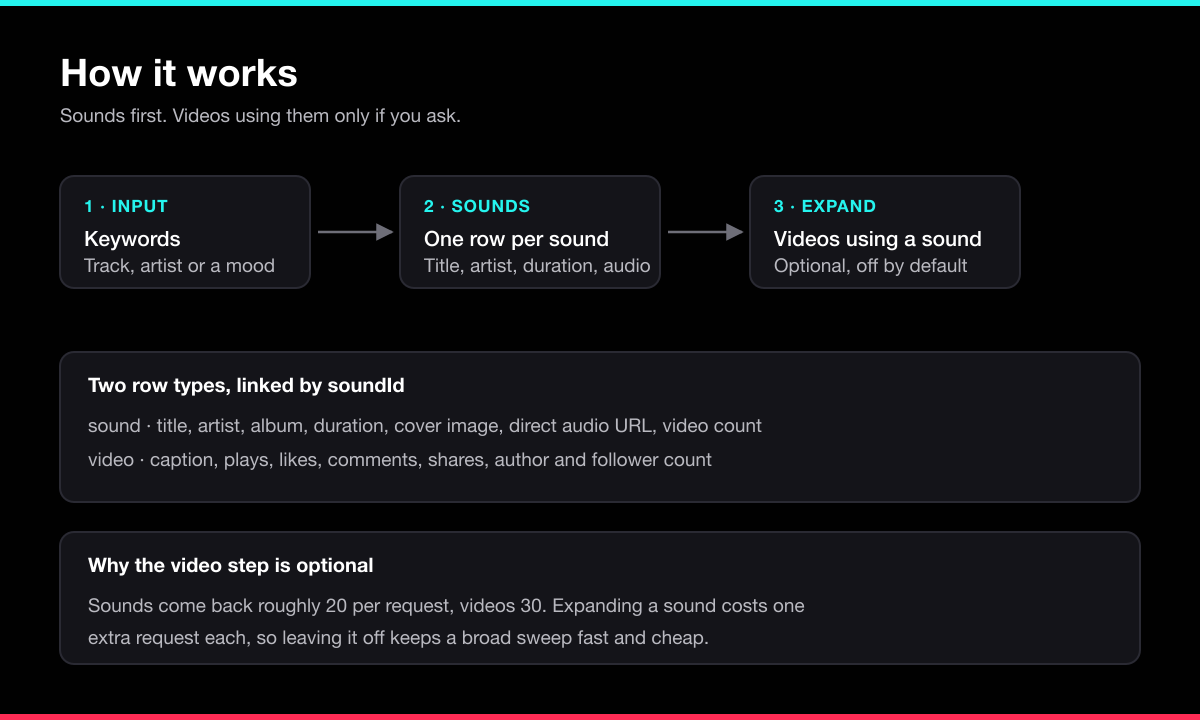
Each keyword is searched for sounds, which arrive roughly 20 per request and are deduplicated by sound ID. When video collection is on, each sound is then expanded into the posts using it, about 30 per request. A sound whose videos cannot be read still keeps its own row rather than failing the keyword.
### Input Configuration
| Field | Type | Default | Description |
|---|---|---|---|
| `keywords` | array | required | Words to search sounds for. |
| `maxSoundsPerKeyword` | integer | `40` | Stop after this many sounds per keyword. |
| `includeVideos` | boolean | `false` | Also collect the videos using each sound. |
| `maxVideosPerSound` | integer | `30` | Applies only when collecting videos. |
| `region` | string | `US` | Two-letter country code shaping which sounds are returned. |
#### Sounds only, fast and cheap
```json
{
"keywords": ["lofi", "phonk"],
"maxSoundsPerKeyword": 40
}
```
#### Sounds plus the videos using them
```json
{
"keywords": ["lofi"],
"maxSoundsPerKeyword": 10,
"includeVideos": true,
"maxVideosPerSound": 50
}
```
### Output Samples
#### A sound row
```json
{
"keyword": "lofi",
"rowType": "sound",
"soundId": "7181527934425892865",
"soundTitle": "Relax (Lofi)",
"soundAuthor": "Muspace Lofi",
"album": "Relax",
"durationSeconds": 144,
"isOriginal": false,
"playUrl": "https://sf16-ies-music.tiktokcdn.com/...",
"coverUrl": "https://p16-common-sign.tiktokcdn.com/...",
"soundUrl": "https://www.tiktok.com/music/x-7181527934425892865",
"videoCount": 128400,
"scrapedAt": "2026-08-19T06:26:44.102Z"
}
```
#### A video row using that sound
```json
{
"keyword": "lofi",
"rowType": "video",
"soundId": "7181527934425892865",
"soundTitle": "Relax (Lofi)",
"postId": "7481920384756102934",
"postUrl": "https://www.tiktok.com/@asmr.aplicado/video/7481920384756102934",
"caption": "study with me 🌙",
"createdAt": "2026-06-02T18:41:07.000Z",
"durationSeconds": 32,
"playCount": 13172810,
"likeCount": 1840233,
"commentCount": 9421,
"shareCount": 40118,
"authorId": "6913052849302340",
"authorUsername": "asmr.aplicado",
"authorNickname": "ASMR Aplicado",
"authorFollowerCount": 812004,
"scrapedAt": "2026-08-19T06:26:52.884Z"
}
```
### Key Output Fields
| Field | Description |
|---|---|
| `rowType` | `sound` or `video`. Filter on this to split the two. |
| `soundId` | Links a video row back to its sound row. |
| `playUrl` | Direct audio file for the sound. |
| `soundUrl` | The sound's page on TikTok. |
| `videoCount` | How many posts TikTok reports using the sound. |
| `playCount`, `likeCount`, `commentCount`, `shareCount` | Engagement on a video row. |
| `authorFollowerCount` | Reach of the creator who used the sound. |
| `error` / `message` | Present only on rows for keywords that returned nothing. |
### FAQ
**Why is video collection off by default?**
Expanding a sound costs an extra upstream request each. Leaving it off keeps a broad keyword sweep fast; turn it on when you have narrowed to a handful of sounds worth measuring.
**Why did I get fewer sounds than I asked for?**
The page size is a hint rather than a promise. Asking for 20 commonly returns 19. The Actor keeps paging until your limit is reached or TikTok reports no more, so the total is what you asked for even when individual pages come up short.
**Does `videoCount` match the number of video rows?**
No. `videoCount` is TikTok's own total for the sound, often in the hundreds of thousands. The video rows are capped by `maxVideosPerSound`.
**Do I need a login or cookies?**
No.
**What does it cost?**
One charge per row returned, plus a small per-run start fee. Sound rows and video rows are billed the same. No subscription.
### Support
Found a bug or need a field added? Open an issue on the Actor's **Issues** tab in Apify Console, or email .
### Additional Services
Need a custom TikTok or social-media scraper, or a private version of this Actor? Reach out at .
### Explore More Scrapers
- **[TikTok Video Downloader](https://apify.com/memo23/tiktok-video-downloader)** — watermark-free MP4, cover and audio on stable links
- **[TikTok Mention Scraper](https://apify.com/memo23/tiktok-mention-scraper)** — videos tagging an account, confirmed by account ID
- **[TikTok Playlist Scraper](https://apify.com/memo23/tiktok-playlist-scraper)** — every playlist on any account
- **[TikTok Post Scraper](https://apify.com/memo23/tiktok-post-scraper)** — full metadata and engagement for any post
- **[TikTok Search Scraper](https://apify.com/memo23/tiktok-search-scraper)** — TikTok's ranked search results for any keyword
Browse the full portfolio: [muhamed-didovic.github.io](https://muhamed-didovic.github.io/)
### 🤖 For AI Agents & LLM Apps
**Purpose:** Return TikTok sounds matching a keyword, and optionally the videos using each sound.
**Minimal tested input:**
```json
{ "keywords": ["lofi"] }
```
**Output:** array of flat objects. Every row carries `rowType`, either `sound` or `video`. Sound rows: `keyword`, `soundId`, `soundTitle`, `soundAuthor`, `album`, `durationSeconds`, `isOriginal`, `playUrl`, `coverUrl`, `soundUrl`, `videoCount`, `scrapedAt`. Video rows: `soundId`, `soundTitle`, `postId`, `postUrl`, `caption`, `createdAt`, `durationSeconds`, `playCount`, `likeCount`, `commentCount`, `shareCount`, `authorId`, `authorUsername`, `authorNickname`, `authorFollowerCount`.
**Critical for agents:** branch on `rowType` before reading fields, since the two shapes differ. Join video rows to their sound by `soundId`. Do not read `videoCount` as the number of returned video rows; it is TikTok's own total for the sound and is usually far larger. Video rows only appear when `includeVideos` is true.
**Behavior & billing:** Pay-per-event, one charge per row. Keywords matching no sounds yield one error item (`error`, `message`) rather than failing the run. No login or cookies required.
### ⚠️ Disclaimer
This Actor accesses publicly available data on TikTok for legitimate research, market-intelligence, and business-analysis purposes. It does not log in, bypass authentication, or access private content. Use of this Actor must comply with TikTok's Terms of Service and all applicable laws, including data-protection and copyright law. The authors are not responsible for any misuse. Users must:
- Respect rate limits and avoid overloading TikTok's infrastructure
- Not use scraped data to violate user privacy or platform terms
- Process any personal data only with a lawful basis and in compliance with their jurisdiction
- **Not download, republish or monetize audio without the rights to do so** — a returned audio URL does not grant you a licence to the recording
We do not store scraped data; the Actor returns it directly to your Apify dataset for your authorized use. TikTok is a trademark of ByteDance Ltd.; this Actor is not affiliated with or endorsed by TikTok or ByteDance.
### SEO Keywords
tiktok music scraper, tiktok sound scraper, tiktok audio scraper, scrape tiktok sounds, tiktok trending sounds, tiktok song data, tiktok music api, videos using a sound tiktok, tiktok sound analytics, tiktok audio download url, tiktok music trends, tiktok sound search, tiktok creator discovery by sound, tiktok music marketing, tiktok sync licensing research, apify tiktok music scraper
# Actor input Schema
## `keywords` (type: `array`):
Words to search TikTok sounds for, such as a track name, an artist, or a mood like "lofi". Each keyword returns matching sounds with their title, artist, duration, cover and audio URL.
## `maxSoundsPerKeyword` (type: `integer`):
Stop after this many sounds for each keyword. Sounds arrive 20 per upstream request.
## `includeVideos` (type: `boolean`):
Off by default. When on, every sound is followed by rows for the videos using it, which is how you measure a sound's reach. This costs one extra upstream request per sound and makes runs considerably longer.
## `maxVideosPerSound` (type: `integer`):
Applies only when videos are being collected. Videos arrive 30 per upstream request.
## `region` (type: `string`):
Two-letter country code shaping which sounds TikTok returns, for example US, GB, DE. Defaults to US.
## Actor input object example
```json
{
"keywords": [
"lofi",
"phonk",
"taylor swift"
],
"maxSoundsPerKeyword": 40,
"includeVideos": false,
"maxVideosPerSound": 30,
"region": "US"
}
```
# Actor output Schema
## `sounds` (type: `string`):
All rows in the default dataset.
# API
You can run this Actor programmatically using our API. Below are code examples in JavaScript, Python, and CLI, as well as the OpenAPI specification and MCP server setup.
## JavaScript example
```javascript
import { ApifyClient } from 'apify-client';
// Initialize the ApifyClient with your Apify API token
// Replace the '' with your token
const client = new ApifyClient({
token: '',
});
// Prepare Actor input
const input = {
"keywords": [
"lofi"
]
};
// Run the Actor and wait for it to finish
const run = await client.actor("memo23/tiktok-music-scraper").call(input);
// Fetch and print Actor results from the run's dataset (if any)
console.log('Results from dataset');
console.log(`💾 Check your data here: https://console.apify.com/storage/datasets/${run.defaultDatasetId}`);
const { items } = await client.dataset(run.defaultDatasetId).listItems();
items.forEach((item) => {
console.dir(item);
});
// 📚 Want to learn more 📖? Go to → https://docs.apify.com/api/client/js/docs
```
## Python example
```python
from apify_client import ApifyClient
# Initialize the ApifyClient with your Apify API token
# Replace '' with your token.
client = ApifyClient("")
# Prepare the Actor input
run_input = { "keywords": ["lofi"] }
# Run the Actor and wait for it to finish
run = client.actor("memo23/tiktok-music-scraper").call(run_input=run_input)
# Fetch and print Actor results from the run's dataset (if there are any)
print(f"💾 Check your data here: https://console.apify.com/storage/datasets/{run.default_dataset_id}")
for item in client.dataset(run.default_dataset_id).iterate_items():
print(item)
# 📚 Want to learn more 📖? Go to → https://docs.apify.com/api/client/python/docs/quick-start
```
## CLI example
```bash
echo '{
"keywords": [
"lofi"
]
}' |
apify call memo23/tiktok-music-scraper --silent --output-dataset
```
## MCP server setup
```json
{
"mcpServers": {
"apify": {
"type": "http",
"url": "https://mcp.apify.com/?tools=fetch-actor-details,memo23/tiktok-music-scraper"
}
}
}
```
The hosted server signs you in with OAuth on first connect, so no API token belongs in this config. Clients without OAuth support can send an `Authorization: Bearer ` header instead, using a token from API & Integrations in Apify Console (https://console.apify.com/settings/integrations).
## OpenAPI specification
Download the OpenAPI definition: https://api.apify.com/v2/actors/ZSSwyJEL0AXUH0gGI/builds/UTp8TGCXemuUxmGg3/openapi.json