# TikTok Playlist Scraper: Names, Video Counts, Covers (`memo23/tiktok-playlist-scraper`) Actor
List every public playlist on any TikTok account. Returns playlist name, ID, video count, cover image, playlist URL and creator details, for one account or hundreds at a time. Playlist metadata only, the videos inside are not included. No login, no cookies. JSON, CSV, Excel.
- **URL**: https://apify.com/memo23/tiktok-playlist-scraper.md
- **Developed by:** [Muhamed Didovic](https://apify.com/memo23) (community)
- **Categories:** Social media, Videos, AI
- **Stats:** 2 total users, 1 monthly users, 100.0% runs succeeded, 0 bookmarks
- **User rating**: No ratings yet
## Pricing
from $2.00 / 1,000 playlists
This Actor is paid per event. You are not charged for the Apify platform usage, but only a fixed price for specific events.
Learn more: https://docs.apify.com/platform/actors/running/actors-in-store#pay-per-event
## What's an Apify Actor?
Actors are web data automations that power AI and operations. They run on the Apify platform to scrape websites, process data, connect APIs, and automate workflows.
In Batch mode, an Actor accepts a well-defined JSON input, performs an action which can take anything from a few seconds to a few hours,
and optionally produces a well-defined JSON output, datasets with results, or files in key-value store.
In Standby mode, an Actor provides a web server which can be used as a website, API, or an MCP server.
Actors are written with capital "A".
## How to integrate an Actor?
If asked about integration, you help developers integrate Actors into their projects.
You adapt to their stack and deliver integrations that are safe, well-documented, and production-ready.
The best way to integrate Actors is as follows.
- **AI agents and MCP clients** — the [Apify MCP server](https://docs.apify.com/integrations/mcp.md) at `https://mcp.apify.com` (remote, streamable HTTP, OAuth on first use).
- **Agentic workflows and local Actor development** — [Agent Skills](https://apify.com/.well-known/agent-skills/index.json) with the [Apify CLI](https://docs.apify.com/cli/docs.md): `npm install -g apify-cli`, then `apify login`.
- **JavaScript/TypeScript projects** — the official [JS/TS client](https://docs.apify.com/api/client/js/docs.md): `npm install apify-client`.
- **Python projects** — the official [Python client](https://docs.apify.com/api/client/python/docs.md): `pip install apify-client`.
- **Any other language** — the [REST API](https://docs.apify.com/api/v2.md).
For usage examples, see the [API](#api) section below.
For more details, see Apify documentation as [Markdown index](https://docs.apify.com/llms.txt) and [Markdown full-text](https://docs.apify.com/llms-full.txt).
# README
## TikTok Playlist Scraper

List every public playlist on any TikTok account, with names, video counts, covers and direct links.
Give it a handle. Get one row per playlist, ready for CSV or Excel.
### What this returns, and what it does not
This returns playlist **metadata**: name, ID, video count, cover image, playlist URL and creator details.
It does **not** return the videos inside each playlist. TikTok exposes no public route to playlist contents, and individual video records carry no playlist membership, so the two cannot be joined afterwards. If you need the videos themselves, use the TikTok Profile Videos or Search scrapers and filter from there.
Saying so here rather than letting you discover it in a run.
### Why Use This Scraper
Playlists are how creators and brands organise a channel, so the list of them is a fast read on content strategy: which themes an account commits to, how many videos each theme carries, and which series are being built out.
Useful when you want that across many accounts at once rather than clicking through profiles.
### Supported Inputs
| Input | Example |
|---|---|
| Bare handle | `gymshark` |
| With the @ | `@gymshark` |
| Profile URL | `https://www.tiktok.com/@gymshark` |
Many accounts in one run.
### Use Cases
Competitor content audits, where you compare how rival brands structure their channels.
Creator vetting before a partnership, to see whether an account maintains organised series or posts ad hoc.
Content planning, using video counts per playlist as a signal of what an account invests in.
Channel monitoring, by rerunning and diffing to catch new playlists as they launch.
### How It Works
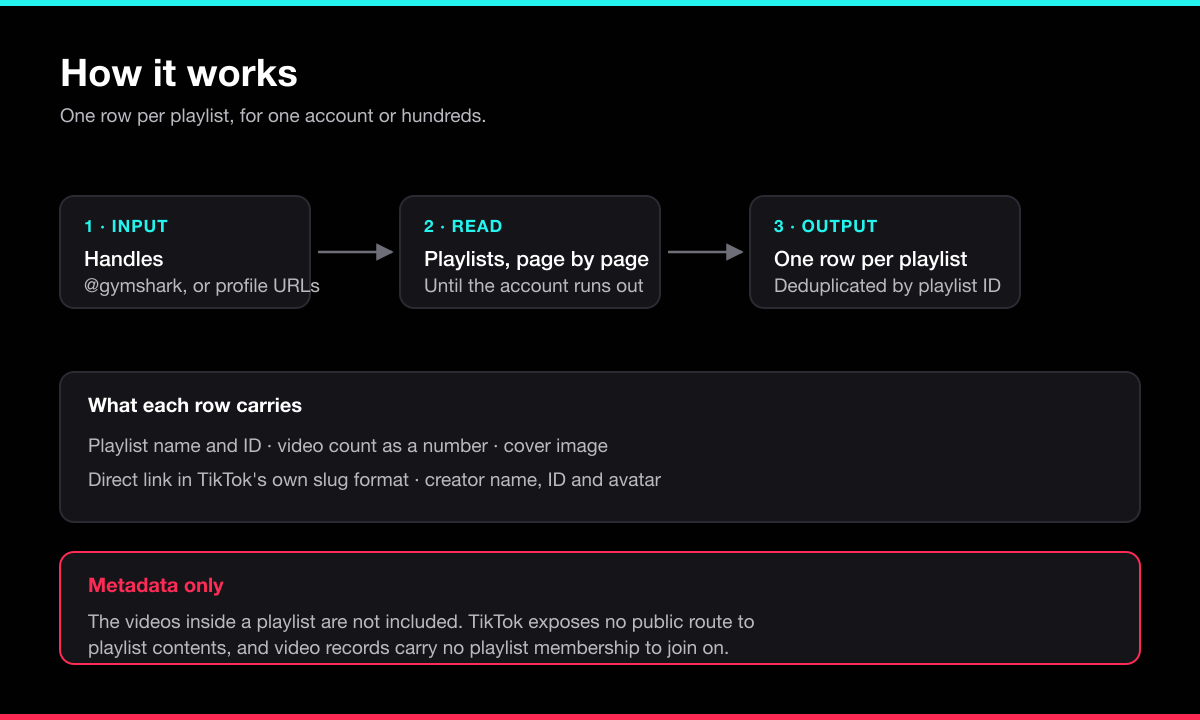
Each handle is normalized, then its playlists are read one page at a time until the account runs out. Pages are deduplicated by playlist ID. An account with no public playlists returns a single explanatory row rather than nothing at all.
### Input Configuration
| Field | Type | Default | Description |
|---|---|---|---|
| `handles` | array | required | Usernames or profile URLs. |
| `maxPlaylistsPerHandle` | integer | `200` | Stop after this many playlists per account. |
| `includeCreator` | boolean | `true` | Add creator ID, nickname, avatar and private flag. |
#### Minimal input
```json
{
"handles": ["@gymshark"]
}
```
### Output Sample
```json
{
"handle": "gymshark",
"playlistId": "7506522272257280790",
"playlistName": "Motivation",
"videoCount": 38,
"playlistUrl": "https://www.tiktok.com/@gymshark/playlist/Motivation-7506522272257280790",
"coverUrl": "https://p16-common-sign.tiktokcdn.com/...",
"creatorId": "6536068161471517696",
"creatorNickname": "Gymshark",
"creatorAvatarUrl": "https://p19-common-sign.tiktokcdn.com/...",
"creatorPrivate": false,
"scrapedAt": "2026-08-18T20:43:11.402Z"
}
```
#### Account with no playlists
```json
{
"handle": "@someaccount",
"error": "no_playlists_found",
"message": "@someaccount has no public playlists."
}
```
### Key Output Fields
| Field | Description |
|---|---|
| `playlistName` | The playlist title as shown on TikTok. |
| `videoCount` | How many videos it holds, as a number rather than a string. |
| `playlistUrl` | Direct link, built in TikTok's own name-slug format. |
| `playlistId` | Stable ID, for diffing runs over time. |
| `coverUrl` | Playlist cover image. |
| `creatorNickname` | Display name of the account. |
| `error` / `message` | Present only on rows for handles that returned nothing. |
### FAQ
**Can I get the videos in a playlist?**
No, and no TikTok scraper can through the public API. See the section at the top.
**Do I need a login or cookies?**
No.
**What if an account has no playlists?**
You get one row saying so. Most accounts do not use playlists at all.
**Why is `videoCount` sometimes higher than what I can see?**
It counts everything the creator added, including videos since made private or deleted.
**What does it cost?**
One charge per playlist returned, plus a small per-run start fee. No subscription.
### Support
Found a bug or need a field added? Open an issue on the Actor's **Issues** tab in Apify Console, or email .
### Additional Services
Need a custom TikTok or social-media scraper, or a private version of this Actor? Reach out at .
### Explore More Scrapers
- **[TikTok Video Downloader](https://apify.com/memo23/tiktok-video-downloader)** — watermark-free MP4, cover and audio on stable links
- **[TikTok Mention Scraper](https://apify.com/memo23/tiktok-mention-scraper)** — videos tagging an account, confirmed by account ID
- **[TikTok Post Scraper](https://apify.com/memo23/tiktok-post-scraper)** — full metadata and engagement for any post
- **[TikTok Profile Scraper](https://apify.com/memo23/tiktok-profile-scraper)** — profile details and stats for any account
- **[TikTok Search Scraper](https://apify.com/memo23/tiktok-search-scraper)** — TikTok's ranked search results for any keyword
Browse the full portfolio: [muhamed-didovic.github.io](https://muhamed-didovic.github.io/)
### 🤖 For AI Agents & LLM Apps
**Purpose:** Return the public playlists of TikTok accounts, as metadata. Playlist contents are not retrievable through TikTok's public API.
**Minimal tested input:**
```json
{ "handles": ["@gymshark"] }
```
**Output:** array of flat objects, one per playlist. Fields: `handle`, `playlistId`, `playlistName`, `videoCount`, `playlistUrl`, `coverUrl`, `scrapedAt`. With `includeCreator`: `creatorId`, `creatorNickname`, `creatorAvatarUrl`, `creatorPrivate`.
**Critical for agents:** do not expect video lists. `videoCount` is a count, not an array, and there is no field holding the playlist's videos. Handles with no public playlists return one row carrying `error` and `message` instead.
**Behavior & billing:** Pay-per-event, one charge per playlist returned. Unknown handles and accounts without playlists yield one error item each rather than failing the run. No login or cookies required.
### ⚠️ Disclaimer
This Actor accesses publicly available data on TikTok for legitimate research, market-intelligence, and business-analysis purposes. It does not log in, bypass authentication, or access private content. Use of this Actor must comply with TikTok's Terms of Service and all applicable laws, including data-protection regulations (GDPR, CCPA, etc.). The authors are not responsible for any misuse. Users must:
- Respect rate limits and avoid overloading TikTok's infrastructure
- Not use scraped data to violate user privacy or platform terms
- Process any personal data only with a lawful basis and in compliance with their jurisdiction
- Not republish scraped content in violation of copyright
We do not store scraped data; the Actor returns it directly to your Apify dataset for your authorized use. TikTok is a trademark of ByteDance Ltd.; this Actor is not affiliated with or endorsed by TikTok or ByteDance.
### SEO Keywords
tiktok playlist scraper, tiktok playlists, scrape tiktok playlists, tiktok playlist api, tiktok mix scraper, tiktok playlist list, tiktok content series, tiktok channel structure, tiktok creator playlists, tiktok brand playlists, export tiktok playlists, tiktok playlist names, tiktok playlist video count, tiktok competitor audit, tiktok content strategy, apify tiktok playlist scraper
# Actor input Schema
## `handles` (type: `array`):
Usernames or profile URLs. Returns every public playlist on each account, with its name, video count and cover.
## `maxPlaylistsPerHandle` (type: `integer`):
Stop after this many playlists for each account.
## `includeCreator` (type: `boolean`):
Add the account's id, nickname, avatar and private flag to every row.
## Actor input object example
```json
{
"handles": [
"@gymshark",
"https://www.tiktok.com/@tiktok"
],
"maxPlaylistsPerHandle": 200,
"includeCreator": true
}
```
# Actor output Schema
## `playlists` (type: `string`):
All playlist rows in the default dataset.
# API
You can run this Actor programmatically using our API. Below are code examples in JavaScript, Python, and CLI, as well as the OpenAPI specification and MCP server setup.
## JavaScript example
```javascript
import { ApifyClient } from 'apify-client';
// Initialize the ApifyClient with your Apify API token
// Replace the '' with your token
const client = new ApifyClient({
token: '',
});
// Prepare Actor input
const input = {
"handles": [
"@gymshark"
]
};
// Run the Actor and wait for it to finish
const run = await client.actor("memo23/tiktok-playlist-scraper").call(input);
// Fetch and print Actor results from the run's dataset (if any)
console.log('Results from dataset');
console.log(`💾 Check your data here: https://console.apify.com/storage/datasets/${run.defaultDatasetId}`);
const { items } = await client.dataset(run.defaultDatasetId).listItems();
items.forEach((item) => {
console.dir(item);
});
// 📚 Want to learn more 📖? Go to → https://docs.apify.com/api/client/js/docs
```
## Python example
```python
from apify_client import ApifyClient
# Initialize the ApifyClient with your Apify API token
# Replace '' with your token.
client = ApifyClient("")
# Prepare the Actor input
run_input = { "handles": ["@gymshark"] }
# Run the Actor and wait for it to finish
run = client.actor("memo23/tiktok-playlist-scraper").call(run_input=run_input)
# Fetch and print Actor results from the run's dataset (if there are any)
print(f"💾 Check your data here: https://console.apify.com/storage/datasets/{run.default_dataset_id}")
for item in client.dataset(run.default_dataset_id).iterate_items():
print(item)
# 📚 Want to learn more 📖? Go to → https://docs.apify.com/api/client/python/docs/quick-start
```
## CLI example
```bash
echo '{
"handles": [
"@gymshark"
]
}' |
apify call memo23/tiktok-playlist-scraper --silent --output-dataset
```
## MCP server setup
```json
{
"mcpServers": {
"apify": {
"type": "http",
"url": "https://mcp.apify.com/?tools=fetch-actor-details,memo23/tiktok-playlist-scraper"
}
}
}
```
The hosted server signs you in with OAuth on first connect, so no API token belongs in this config. Clients without OAuth support can send an `Authorization: Bearer ` header instead, using a token from API & Integrations in Apify Console (https://console.apify.com/settings/integrations).
## OpenAPI specification
Download the OpenAPI definition: https://api.apify.com/v2/actors/IcJnNZL9U9ELuFgzO/builds/1E3hZsTXpkP7fYRmd/openapi.json