# TikTok Shop Sales Scraper: Units Sold & Revenue (`memo23/tiktok-shop-sales-scraper`) Actor
Most TikTok Shop scrapers return a catalogue. This one returns sales: lifetime units sold and estimated revenue on every product, plus units per day and growth percent calculated from a daily history we keep, so the figures are there on your first run. US market. No login or proxy
- **URL**: https://apify.com/memo23/tiktok-shop-sales-scraper.md
- **Developed by:** [Muhamed Didovic](https://apify.com/memo23) (community)
- **Categories:** E-commerce, Social media, AI
- **Stats:** 17 total users, 17 monthly users, 100.0% runs succeeded, 0 bookmarks
- **User rating**: 5.00 out of 5 stars
## Pricing
from $2.00 / 1,000 products
This Actor is paid per event. You are not charged for the Apify platform usage, but only a fixed price for specific events.
Learn more: https://docs.apify.com/actors/running/actors-in-store.md#pay-per-event
## What's an Apify Actor?
Actors are web data automations that power AI and operations. They run on the Apify platform to scrape websites, process data, connect APIs, and automate workflows.
In Batch mode, an Actor accepts a well-defined JSON input, performs an action which can take anything from a few seconds to a few hours,
and optionally produces a well-defined JSON output, datasets with results, or files in key-value store.
In Standby mode, an Actor provides a web server which can be used as a website, API, or an MCP server.
Actors are written with capital "A".
## How to integrate an Actor?
If asked about integration, you help developers integrate Actors into their projects.
You adapt to their stack and deliver integrations that are safe, well-documented, and production-ready.
The best way to integrate Actors is as follows.
- **AI agents and MCP clients** — the [Apify MCP server](https://docs.apify.com/integrations/mcp.md) at `https://mcp.apify.com` (remote, streamable HTTP, OAuth on first use).
- **Agentic workflows and local Actor development** — [Agent Skills](https://apify.com/.well-known/agent-skills/index.json) with the [Apify CLI](https://docs.apify.com/cli/docs.md): `npm install -g apify-cli`, then `apify login`.
- **JavaScript/TypeScript projects** — the official [JS/TS client](https://docs.apify.com/api/client/js/docs.md): `npm install apify-client`.
- **Python projects** — the official [Python client](https://docs.apify.com/api/client/python/docs.md): `pip install apify-client`.
- **Any other language** — the [REST API](https://docs.apify.com/api/v2.md).
For usage examples, see the [API](#api) section below.
For more details, see Apify documentation as [Markdown index](https://docs.apify.com/llms.txt) and [Markdown full-text](https://docs.apify.com/llms-full.txt).
# README
## TikTok Shop Sales Scraper: Units Sold, Revenue & Sales Trend

Search TikTok Shop by keyword and get the number most scrapers leave out: **how many units each product has actually sold.**
Every row carries lifetime units sold, estimated revenue, current price and discount, rating, and the shop behind it. Turn on the sales trend and you also get units sold per day and growth percent — figures TikTok does not publish anywhere, calculated from a daily product history we keep ourselves.
Find what is selling, not just what is listed.
### Why Use This Scraper
- **Units sold on every product**, not just title and price
- **Estimated revenue** per product, so a niche can be ranked by money rather than listing count
- **Units sold per day and growth percent**, built from our own daily snapshots
- **Sales figures on your first run** — you are reading history we recorded before you arrived, not waiting for your own second run to have something to compare against
- **Filter out dead listings** with a minimum units-sold threshold
- **No login, no cookies, no proxy configuration, no captchas** to solve
### Overview
This actor is for people deciding what to sell, source, or promote on TikTok Shop: product researchers, dropshippers, DTC brands, affiliate creators picking what to push, and agencies building client reports.
You give it product keywords. It returns one row per product, sorted by units sold, with the commercial figures attached. It does not need a proxy, a TikTok account, or any captcha handling.
Output is a flat dataset you can export as JSON, CSV, or Excel.
### Supported Inputs
#### Keyword search
The actor takes product search terms, the same words a shopper would type:
```json
{
"keywords": ["stanley tumbler", "lash serum", "led strip lights"]
}
```
Each keyword is searched independently and its results are labelled with the `keyword` that produced them, so one run can cover several niches and stay sortable afterwards.
#### Unsupported inputs
- **Product URLs.** This is a search actor. Paste keywords, not links to individual products.
- **Shop or storefront URLs.** Searching a brand name usually surfaces that shop's products instead.
- **Markets other than the United States.** See the FAQ for why.
### Use Cases
| Audience | What they use it for |
|---|---|
| Product researchers | Rank a niche by units sold before committing to inventory |
| Dropshippers | Spot products already moving volume rather than guessing from view counts |
| DTC brands | Track a competitor's catalogue day over day and read the growth rate |
| Affiliate creators | Pick proven sellers to promote instead of untested listings |
| Agencies | Build category reports with real sales figures for client pitches |
| Sourcing teams | Size a category by estimated revenue per product |
### How It Works
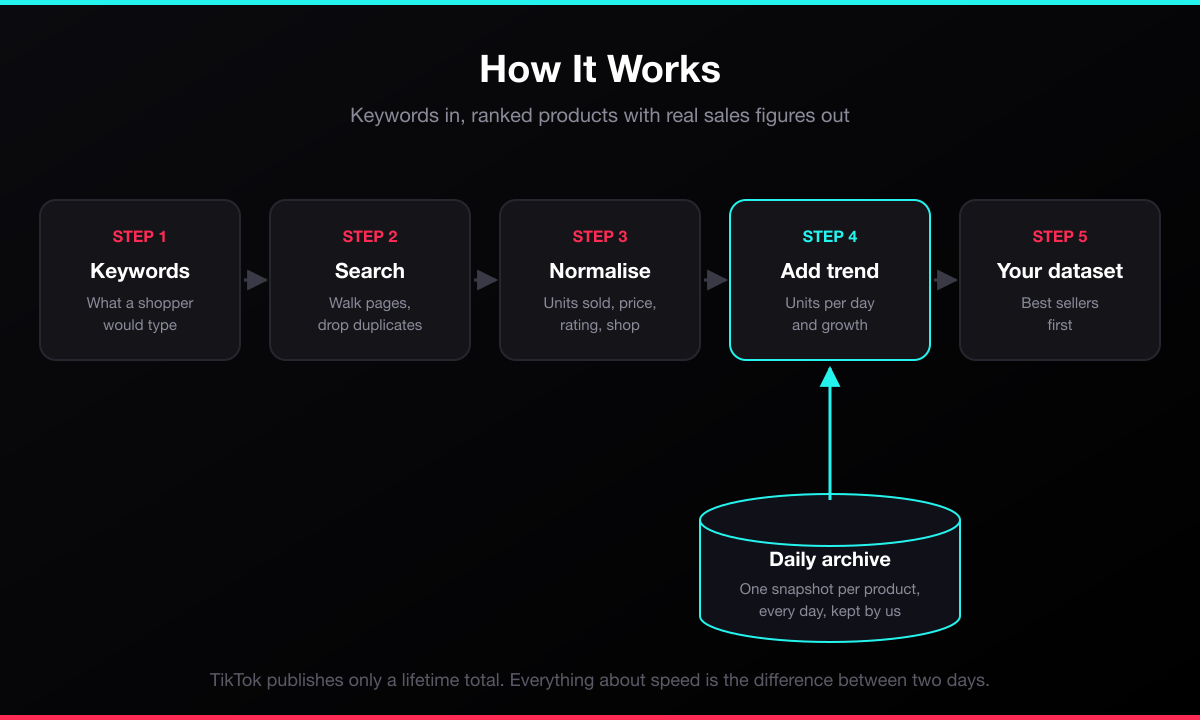
1. You supply one or more product keywords.
2. The actor searches TikTok Shop US for each keyword, walking as many result pages as you allow and discarding duplicates.
3. Every product is normalised into a flat row: units sold, price and discount, rating, shop, and links.
4. Products below your minimum units-sold threshold are dropped, and the rest are sorted with the best sellers first.
5. Each product is matched against our daily archive to calculate units sold per day and growth percent, then written to your dataset.
### Input Configuration
| Field | Type | Default | Description |
|---|---|---|---|
| `keywords` | array of strings | required | Product search terms, for example `["stanley tumbler"]`. Each is searched separately. |
| `maxResultsPerKeyword` | integer | `50` | Stop after this many products per keyword. |
| `maxPagesPerKeyword` | integer | `3` | Search pages to walk per keyword. Pages overlap, so page two typically adds about half a page of new products. The walk stops early once a page brings nothing new. |
| `minSoldCount` | integer | `0` | Skip products below this many lifetime units sold. Set to 100 or 500 to see only proven movers. |
| `sortBySales` | boolean | `true` | Return best sellers first instead of TikTok's own search order. |
| `includeSalesTrend` | boolean | `true` | Add units sold per day, growth percent, and first-seen date from our daily history. |
| `trendLookbackDays` | integer | `7` | How far back to compare when calculating the trend. Shorter history is reported honestly in `trendWindowDays`. |
#### Example: proven sellers in one niche
```json
{
"keywords": ["creatine"],
"minSoldCount": 500,
"maxPagesPerKeyword": 3,
"sortBySales": true
}
```
#### Example: wide sweep across several niches
```json
{
"keywords": ["lash serum", "shapewear", "car vacuum"],
"maxResultsPerKeyword": 100,
"maxPagesPerKeyword": 2,
"includeSalesTrend": true
}
```
### Output Overview
One row per product. The row carries four groups of data: what the product is, what it costs, how much it has sold, and how fast it is moving. Rows that the archive has no history for still carry every commercial field — only the four trend fields stay empty.
### Output Sample
A real row, shortened. Produced by keyword `air purifier`:
```json
{
"keyword": "air purifier",
"productId": "1729418122293055820",
"title": "ToLife TZ-K2 Air Purifier for Large Rooms (up to 1095 Ft2). PM 2.5 Display, Auto Mode, Timer, HEPA Filter",
"price": 35.88,
"originalPrice": 66.99,
"discount": "46%",
"currency": "USD",
"soldCount": 114630,
"estimatedLifetimeRevenue": 4112924.4,
"rating": 4.7,
"shopName": "ToLife US",
"sellerId": "7495436419788278092",
"isVerifiedSeller": false,
"labels": ["Free shipping"],
"productUrl": "https://www.tiktok.com/shop/pdp/1729418122293055820",
"imageUrl": "https://p16-oec-general-useast5.ttcdn-us.com/tos-useast5-i-omjb5zjo8w-tx/faca10d28fbf4e38a435e89f415f2dc9~tplv-fhlh96nyum-crop-webp:400:400.webp",
"unitsSoldInWindow": 114,
"unitsSoldPerDay": 114,
"salesGrowthPercent": 0.1,
"trendWindowDays": 1,
"firstSeenAt": "2026-08-20T21:09:30.079Z",
"scrapedAt": "2026-08-21T21:56:20.461Z"
}
```
`trendWindowDays` reports the real span the trend covers, so a short one is visible rather than dressed up as a full week. The window widens by a day for every day the product stays in the archive.
### Key Output Fields
**Sales**
| Field | Meaning |
|---|---|
| `soldCount` | Lifetime units sold, as TikTok reports it |
| `estimatedLifetimeRevenue` | `soldCount` multiplied by the current price |
| `unitsSoldInWindow` | Units sold since the comparison snapshot |
| `unitsSoldPerDay` | Average daily sales across the observed span |
| `salesGrowthPercent` | Percent growth of the lifetime total across that span |
| `trendWindowDays` | The real number of days the trend covers |
| `firstSeenAt` | When the product entered our history |
**Pricing**
`price`, `originalPrice`, `discount`, `currency`
**Product**
`productId`, `title`, `description`, `category`, `labels`, `productUrl`, `imageUrl`
**Seller**
`shopName`, `sellerId`, `isVerifiedSeller`, `shipsFrom`
**Quality**
`rating`, `reviewCount`, `keyword`, `scrapedAt`
### FAQ
**Where does the sales trend come from?**
TikTok publishes `soldCount` as a lifetime total and nothing else. There is no trend, no daily rate, no growth figure anywhere in its data. We snapshot every product we see once a day and derive the rest from the differences.
**Why is the trend empty on some products?**
Because we are seeing that product for the first time and have nothing to compare against yet. Its `soldCount` is there immediately; the trend fields fill in from the next run onward. Products already in our history return their trend on your very first run.
**Is `estimatedLifetimeRevenue` real revenue?**
No, and the name says so. It multiplies lifetime units by the *current* price. TikTok publishes no per-sale price history, so sales made at a discount are valued at today's price. Use it to rank, not to account.
**Why United States only?**
The upstream data source documents sixteen markets and we tested all sixteen. Only the US is trustworthy. France errored, Spain and Ireland returned nothing, the UK carried sales figures on ten of thirty-one products, Indonesia and Vietnam write prices with a dot as the thousands separator, and Mexico labels its currency USD while returning peso amounts. Publishing prices wrong by a factor of a thousand would be worse than not offering those markets at all.
**Why do two runs return different products?**
TikTok's own search ordering is not stable. Two runs minutes apart return overlapping but different sets. This is TikTok's behaviour, not a fault in the actor.
**Why is `reviewCount` empty?**
The review count lives on TikTok's product-detail endpoint, not its search endpoint. The star `rating` is present.
**Do I need a proxy or a TikTok account?**
No. No login, no cookies, no proxy configuration, and no captchas to solve.
### Support
Found a bug or missing a field? Open an issue on the actor's Issues tab and it will be looked at.
### Additional Services
Need a different market, a scheduled feed into your own warehouse, or a custom field set? Get in touch through the Issues tab and describe the shape you need.
### Explore More Scrapers
Other TikTok actors in this collection cover profiles, videos, hashtags, search, comments, ads, and transcripts. Browse the full list on the publisher profile.
### 🤖 For AI Agents & LLM Apps
Compact reference for AI agents calling this actor via the [Apify MCP server](https://mcp.apify.com) or the Apify API (actor: `memo23/tiktok-shop-sales-scraper`).
**Purpose:** TikTok Shop US keyword search returning one row per product with lifetime units sold, estimated revenue, and a sales trend derived from a daily archive maintained by the actor.
**Minimal input:**
```json
{ "keywords": ["creatine"], "maxResultsPerKeyword": 20, "maxPagesPerKeyword": 1 }
```
**Output:** one dataset row per product — keyword, productId, title, description, price, originalPrice, discount, currency, soldCount, estimatedLifetimeRevenue, rating, reviewCount, shopName, sellerId, isVerifiedSeller, shipsFrom, labels, category, productUrl, imageUrl, unitsSoldInWindow, unitsSoldPerDay, salesGrowthPercent, trendWindowDays, firstSeenAt, scrapedAt.
**Behaviors an agent should know:**
- Always set `maxResultsPerKeyword`. One search page yields roughly 30 to 45 products and `maxPagesPerKeyword` multiplies that per keyword.
- Pages overlap heavily; results are deduplicated by `productId` and the walk stops early when a page adds nothing new.
- US market only. There is no region input, deliberately — see the FAQ.
- `unitsSoldPerDay`, `salesGrowthPercent`, `unitsSoldInWindow`, and `trendWindowDays` are null for products with no prior history. Check for null rather than assuming.
- `estimatedLifetimeRevenue` is lifetime units times the current price, an estimate rather than reported revenue.
- Billing: every dataset row is charged. The sales trend is a separate charge that fires only for rows where `unitsSoldPerDay` is actually populated — an empty trend costs nothing extra.
### ⚠️ Disclaimer
This Actor accesses publicly available product listings on TikTok Shop for legitimate market-research and business-analysis purposes. It does not log in, bypass authentication, or access private content, seller accounts, or personal data. Use of this Actor must comply with TikTok's Terms of Service and all applicable laws, including data-protection regulations (GDPR, CCPA, etc.). The authors are not responsible for any misuse. Users must:
- Respect rate limits and avoid overloading TikTok's infrastructure
- Not use collected data to violate platform terms
- Not republish collected content in violation of copyright
Unlike most scrapers, this Actor **does retain a limited record of what it sees**, and it is only honest to say so plainly: for every product returned it stores the product id, title, shop name, price, and units-sold figure once per day. That commercial record is what the sales-trend fields are calculated from. No personal data, no reviewer identities, and no buyer information are stored.
TikTok and TikTok Shop are trademarks of ByteDance Ltd.; this Actor is not affiliated with, endorsed by, or sponsored by TikTok or ByteDance.
### SEO Keywords
tiktok shop scraper, tiktok shop api, tiktok shop product scraper, tiktok shop sales data, tiktok shop units sold, tiktok shop revenue estimate, tiktok product research tool, tiktok shop best sellers, tiktok shop analytics, tiktok shop competitor research, kalodata alternative, fastmoss alternative, tiktok shop sales tracker, winning product finder tiktok, tiktok dropshipping research, ecommerce product research, tiktok affiliate product finder, tiktok shop trend tracking, social commerce data, tiktok shop scraper no login
# Actor input Schema
## `keywords` (type: `array`):
Product terms to search TikTok Shop for, such as "stanley tumbler", "lash serum" or "led strip lights". Each keyword returns matching products with the number of units sold, so you can see what is actually selling rather than what is merely listed.
## `maxResultsPerKeyword` (type: `integer`):
Stop after this many products for each keyword. One upstream search page returns roughly 30 to 45 products, so going beyond that needs more pages below.
## `maxPagesPerKeyword` (type: `integer`):
How many search pages to walk for each keyword. Each page costs one upstream request and pages overlap heavily, so page 2 typically adds only about half a page of genuinely new products. The walk stops early on its own once a page brings nothing new.
## `minSoldCount` (type: `integer`):
Skip products below this many lifetime units sold. Set to 1 or higher to drop listings that have never sold, or to something like 500 to see only proven movers.
## `sortBySales` (type: `boolean`):
Return the best-selling products first instead of TikTok's own search order.
## `includeSalesTrend` (type: `boolean`):
Add units sold in the recent window, units per day and growth percent, calculated from our own daily history of each product. Products seen for the first time have no history yet, so their trend fields stay empty until the next run.
## `trendLookbackDays` (type: `integer`):
How far back to compare against when calculating the trend. If a product has less history than this, the trend is calculated over the span that does exist and the actual span is reported in trendWindowDays.
## Actor input object example
```json
{
"keywords": [
"stanley tumbler",
"lash serum",
"led strip lights"
],
"maxResultsPerKeyword": 50,
"maxPagesPerKeyword": 3,
"minSoldCount": 0,
"sortBySales": true,
"includeSalesTrend": true,
"trendLookbackDays": 7
}
```
# Actor output Schema
# API
You can run this Actor programmatically using our API. Below are code examples in JavaScript, Python, and CLI, as well as the OpenAPI specification and MCP server setup.
## JavaScript example
```javascript
import { ApifyClient } from 'apify-client';
// Initialize the ApifyClient with your Apify API token
// Replace the '' with your token
const client = new ApifyClient({
token: '',
});
// Prepare Actor input
const input = {
"keywords": [
"stanley tumbler"
]
};
// Run the Actor and wait for it to finish
const run = await client.actor("memo23/tiktok-shop-sales-scraper").call(input);
// Fetch and print Actor results from the run's dataset (if any)
console.log('Results from dataset');
console.log(`💾 Check your data here: https://console.apify.com/storage/datasets/${run.defaultDatasetId}`);
const { items } = await client.dataset(run.defaultDatasetId).listItems();
items.forEach((item) => {
console.dir(item);
});
// 📚 Want to learn more 📖? Go to → https://docs.apify.com/api/client/js/docs
```
## Python example
```python
from apify_client import ApifyClient
# Initialize the ApifyClient with your Apify API token
# Replace '' with your token.
client = ApifyClient("")
# Prepare the Actor input
run_input = { "keywords": ["stanley tumbler"] }
# Run the Actor and wait for it to finish
run = client.actor("memo23/tiktok-shop-sales-scraper").call(run_input=run_input)
# Fetch and print Actor results from the run's dataset (if there are any)
print(f"💾 Check your data here: https://console.apify.com/storage/datasets/{run.default_dataset_id}")
for item in client.dataset(run.default_dataset_id).iterate_items():
print(item)
# 📚 Want to learn more 📖? Go to → https://docs.apify.com/api/client/python/docs/quick-start
```
## CLI example
```bash
echo '{
"keywords": [
"stanley tumbler"
]
}' |
apify call memo23/tiktok-shop-sales-scraper --silent --output-dataset
```
## MCP server setup
```json
{
"mcpServers": {
"apify": {
"type": "http",
"url": "https://mcp.apify.com/?tools=fetch-actor-details,memo23/tiktok-shop-sales-scraper"
}
}
}
```
The hosted server signs you in with OAuth on first connect, so no API token belongs in this config. Clients without OAuth support can send an `Authorization: Bearer ` header instead, using a token from API & Integrations in Apify Console (https://console.apify.com/settings/integrations).
## OpenAPI specification
Download the OpenAPI definition: https://api.apify.com/v2/actors/nzk1Lc9NodYK6gsdc/builds/0Lw50wLbzzWsX6z4P/openapi.json