# TikTok Shop Scraper — Products, Reviews, Shops & Creators (`memo23/tiktok-shop-scraper`) Actor
Search TikTok Shop by keyword, or scrape any product, store or creator showcase — full product details with every SKU and stock, price and discount, sold count, rating, verified-purchase reviews, shop stats and the videos selling it. One row per product, 16 regions. No login, no cookies.
- **URL**: https://apify.com/memo23/tiktok-shop-scraper.md
- **Developed by:** [Muhamed Didovic](https://apify.com/memo23) (community)
- **Categories:** E-commerce, Social media, AI
- **Stats:** 2 total users, 1 monthly users, 100.0% runs succeeded, 0 bookmarks
- **User rating**: No ratings yet
## Pricing
from $12.00 / 1,000 products
This Actor is paid per event. You are not charged for the Apify platform usage, but only a fixed price for specific events.
Learn more: https://docs.apify.com/actors/running/actors-in-store.md#pay-per-event
## What's an Apify Actor?
An Actor is a serverless cloud program that runs on the Apify platform. It has two run modes.
In Batch mode, an Actor accepts a well-defined JSON input, performs an action which can take anything from a few seconds to a few hours,
and optionally produces a well-defined JSON output, datasets with results, or files in key-value store.
In Standby mode, an Actor provides a web server which can be used as a website, API, or an MCP server.
Apify vocabulary and the platform model are defined once, in the agent quickstart at https://apify.com/agents.md.
## How to integrate an Actor?
If asked about integration, you help developers integrate Actors into their projects.
You adapt to their stack and deliver integrations that are safe, well-documented, and production-ready.
Do not guess an integration path. Every one of them is in the agent quickstart at https://apify.com/agents.md: the Apify MCP server, Agent Skills with the Apify CLI, the JavaScript and Python clients, the REST API, and the account-free path for an agent with no human to sign in. It also carries the rule on stating cost before the first paid run.
For examples already wired to this Actor's own input schema, see the [API](#api) section below.
Each client library has reference documentation the quickstart does not restate: [JavaScript/TypeScript](https://docs.apify.com/api/client/js/docs.md) (`npm install apify-client`) and [Python](https://docs.apify.com/api/client/python/docs.md) (`pip install apify-client`).
# README
## TikTok Shop Scraper — Products, SKUs, Reviews, Shops & Creators
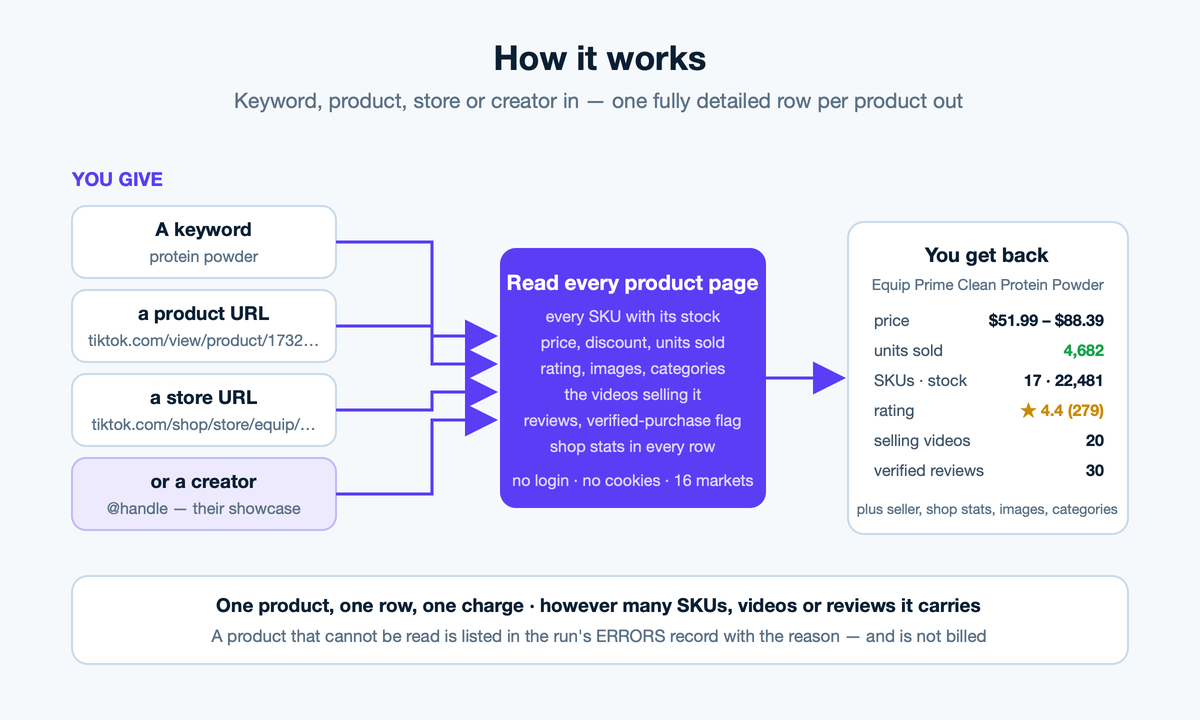
**Everything on a TikTok Shop product page, as data.** Search by keyword, paste product URLs, read a whole store, or see what a creator is selling — and get back one row per product with **every SKU and its stock**, price and discount, lifetime units sold, rating, images, categories, the shop's stats, the **videos that are selling it**, and optionally the customer reviews with verified-purchase flags.
> **No login. No cookies. No proxy to configure. 16 markets.** Press Start.
| You give | You get back |
|---|---|
| `protein powder` | The search results, 40 a page, each fully detailed |
| `https://www.tiktok.com/view/product/1732282041767727408` | Exactly one row for that product |
| `https://www.tiktok.com/shop/store/equip/7494352588342396208` | The store's whole catalogue |
| `@creator` | Every product in that creator's showcase |
### Why use it
- **Every SKU, with stock.** A protein powder with 17 flavours comes back as 17 SKUs, each with its own price, stock level and attributes — not one averaged row.
- **The videos selling the product.** Up to 20 related videos per product with author, plays, likes and upload date. See which creators move it.
- **Reviews that mean something.** Rating, text, date, country, photos, the SKU bought, and whether it was a **verified purchase** or an incentivised review.
- **Shop stats in every row.** Seller rating, review count, units sold, product count, followers and video count.
- **A single URL returns a single row.** No padding, no surprise charges — one product, one result, one charge.
- **Never silent.** A product that can't be read is listed in the run's `ERRORS` record with the reason, and is not billed.
### How it works
1. Your keywords, product URLs, store URLs and creator handles are turned into a list of products, de-duplicated across all four.
2. With **Full product details** on (default), every product is read from its own page: SKUs, stock, price interval, sold count, rating, images, categories, seller, shop, related videos.
3. With **Include reviews** on, reviews are paged in 10 at a time up to your cap, with verified-purchase and incentivised flags.
4. One row per product is written to the dataset. Anything unreadable goes to `ERRORS` instead — you see it, you don't pay for it.
Data is read through a stable commerce data provider rather than TikTok's web pages, so there is no captcha wall, no login and nothing to configure.
### ⬇️ Input
| Field | Type | Notes |
|---|---|---|
| `keywords` | array | Search like a shopper. 40 products per page. |
| `productUrls` | array | Product URLs, `/shop/pdp/…` links, bare ids, or short links. |
| `shopUrls` | array | Store URLs in either `www.tiktok.com/shop/store/…` or `shop.tiktok.com/…/store/…` form. |
| `creatorHandles` | array | `@handle` — the creator's product showcase. |
| `region` | string | Default `US`. Store catalogues support 16 markets; full product details are most reliable for US. |
| `includeDetails` | boolean | Default `true`. Off = lighter listing rows only. |
| `includeReviews` | boolean | Default `false`. |
| `maxReviewsPerProduct` | integer | Default `30`. |
| `maxProductsPerKeyword` / `maxProductsPerShop` / `maxProductsPerCreator` | integer | Depth per input. |
| `maxItems` | integer | Cap for the whole run. Default `200`. |
```json
{
"keywords": ["protein powder", "led strip lights"],
"productUrls": ["https://www.tiktok.com/view/product/1732282041767727408"],
"shopUrls": ["https://shop.tiktok.com/us/store/equip/7494352588342396208"],
"includeReviews": true,
"maxReviewsPerProduct": 30,
"maxItems": 200
}
```
### Output
One row per product. Real result, abridged:
```jsonc
{
"productId": "1732282041767727408",
"productUrl": "https://www.tiktok.com/view/product/1732282041767727408",
"title": "Equip Prime Clean Protein Powder - 21g Bioavailable Complete Protein",
"price": 51.99, "priceMax": 88.39, "priceDisplay": "$51.99", "currency": "USD",
"soldCount": 4682, "estimatedLifetimeRevenue": 243417.18,
"rating": 4.4, "reviewCount": 279,
"images": ["https://p16-oec-va.ibyteimg.com/…", "…"],
"categories": ["Health", "Nutrition & Wellness", "Fitness Supplements"],
"variantOptions": [{ "name": "Flavor", "values": ["Chocolate", "Vanilla", "Mocha", "…"] }],
"skuCount": 17, "totalStock": 22481,
"skus": [
{ "skuId": "1732282042194039088", "price": 51.99, "currency": "USD", "stock": 9775, "attributes": { "Flavor": "Chocolate" } },
{ "skuId": "1732296268139172144", "price": 51.99, "currency": "USD", "stock": 99, "attributes": { "Flavor": "Mocha" } }
],
"shop": { "name": "Equip", "rating": 4.5, "reviewCount": 10197, "soldCount": 7982, "productCount": 7, "followers": 2328, "videoCount": 311, "url": "https://shop.tiktok.com/us/store/equip/7494352588342396208" },
"relatedVideos": [
{ "url": "https://www.tiktok.com/@7105528771213886507/video/7626825545413676319", "authorName": "SOPH", "playCount": 206618, "likeCount": 21144, "uploadedAt": "2026-04-09T18:18:32.000Z", "adLabel": "Creator earns commission" }
],
"reviews": [
{ "rating": 5, "text": "Absolutely incredible protein!…", "time": "2026-03-12T20:09:34.826Z", "country": "US", "isVerifiedPurchase": true, "isIncentivized": false, "skuSpecification": "Item: Variety Pack - 10 Servings" }
],
"source": { "kind": "keyword", "ref": "protein powder" },
"scrapedAt": "2026-09-21T10:12:41.000Z"
}
```
#### Key fields
| Field | Description |
|---|---|
| `price` / `priceMax` | Lowest and highest current SKU price. `priceDisplay` is TikTok's own string. |
| `soldCount` | Lifetime units sold. `estimatedLifetimeRevenue` is sold × current price — an estimate, named so nobody mistakes it for reported revenue. |
| `skus[]` | Every variant with `stock`, `price` and human-readable `attributes`. |
| `relatedVideos[]` | The videos selling the product, with plays and likes. |
| `reviews[]` | Only when `includeReviews` is on. `isVerifiedPurchase` is TikTok's own flag. |
| `shop` | The seller's storefront stats. |
| `source` | Which input produced the row. |
### Pricing
Pay per product. One row, one charge, however many SKUs, videos or reviews it carries. Unreadable products are not charged.
### Notes & limitations
- **Full product details are most reliable for the US market.** Store catalogues work across all 16 regions; product-page reads in other regions can return errors, which are reported in `ERRORS` and not billed.
- `estimatedLifetimeRevenue` values past sales at today's price. TikTok publishes no price history.
- Creator showcases are empty for creators who don't sell anything — that is a true empty, not an error.
- Reviews are paged 10 at a time; `maxReviewsPerProduct` bounds the extra requests per product.
### FAQ
**Do I need a TikTok account or cookies?** No.
**Can I read one product only?** Yes — one URL in `productUrls` returns exactly one row.
**Why does a product have several prices?** Because its SKUs differ. `price` is the lowest, `priceMax` the highest, and every SKU carries its own.
**What's in `ERRORS`?** Any product that could not be read, with the reason. It's a key-value record on the run, so nothing fails silently and nothing unreadable is billed.
**Can I get units sold per day and growth?** Not from a single read — TikTok only publishes the lifetime `soldCount`. The companion [TikTok Shop Sales Scraper](https://apify.com/memo23/tiktok-shop-sales-scraper) keeps a daily history of every product it sees and returns units per day and growth percent on top of the search results. Run both and join on `productId`.
### Related
- [TikTok Shop Sales Scraper](https://apify.com/memo23/tiktok-shop-sales-scraper) — keyword search ranked by units sold, with sales trend (units/day, growth %) from a daily product history.
### 🤖 For AI Agents & LLM Apps
- **Purpose:** turn TikTok Shop keywords, product URLs, store URLs or creator handles into structured product records with SKUs, stock, sales, reviews and selling videos.
- **Minimal input:** `{ "keywords": ["protein powder"] }` — no auth.
- **Output fields:** `productId, productUrl, title, description, price, priceMax, priceDisplay, originalPrice, discount, currency, soldCount, estimatedLifetimeRevenue, rating, reviewCount, images[], categories[], variantOptions[], skus[], skuCount, totalStock, seller, shop, relatedVideos[], reviews[], shipsFrom, labels[], saleRegion, source, scrapedAt`.
- **Billing:** per product row; `maxItems` bounds cost. Reviews add requests but not charges.
- **Errors:** read the run's `ERRORS` key-value record for products that could not be fetched.
### ⚠️ Disclaimer
This Actor collects only publicly visible TikTok Shop product information, without logging in or bypassing any access control. Use it in compliance with TikTok's Terms of Service and applicable law, including data-protection rules. You are responsible for how you use the data. This tool is not affiliated with or endorsed by TikTok or ByteDance Ltd.
### SEO Keywords
TikTok Shop scraper, scrape TikTok Shop products, TikTok Shop product data, TikTok Shop API, TikTok Shop reviews scraper, TikTok Shop SKU stock, TikTok Shop sold count, TikTok Shop store scraper, TikTok Shop creator showcase, TikTok affiliate products, TikTok Shop search, TikTok ecommerce data, TikTok product research, TikTok Shop price tracking, TikTok Shop analytics.
# Actor input Schema
## `keywords` (type: `array`):
Search TikTok Shop like a shopper would. 40 products per page; Max products per keyword below controls how deep it goes.
## `productUrls` (type: `array`):
https://www.tiktok.com/view/product/1732282041767727408, …/shop/pdp/…, a bare product id, or a short link. One row each — a single URL returns exactly one result.
## `shopUrls` (type: `array`):
A store's whole catalogue: https://www.tiktok.com/shop/store/goli-nutrition/7495794203056835079 or the shop.tiktok.com/…/store/… form from a product page. Cursor-paginated.
## `creatorHandles` (type: `array`):
What a creator is selling from their profile showcase, e.g. @handle or handle.
## `region` (type: `string`):
Market to read. US is the most reliable for full product details; store catalogues support all of these.
## `includeDetails` (type: `boolean`):
Read every product's own page: all SKUs with stock, price and discount, sold count, rating, images, seller and shop stats, the videos selling it. Off = the lighter listing row from search/store/showcase only.
## `includeReviews` (type: `boolean`):
Attach customer reviews to each product — rating, text, date, country, verified-purchase flag, photos, the SKU bought. 10 per page.
## `maxReviewsPerProduct` (type: `integer`):
Cap on reviews attached per product when reviews are on.
## `maxProductsPerKeyword` (type: `integer`):
Search depth per keyword (40 per page).
## `maxProductsPerShop` (type: `integer`):
Catalogue depth per store URL.
## `maxProductsPerCreator` (type: `integer`):
Showcase depth per creator handle.
## `shopSortBy` (type: `string`):
How a store's products are paged.
## `maxItems` (type: `integer`):
Hard cap on dataset rows for the whole run — the run is never more expensive than this.
## `maxConcurrency` (type: `integer`):
Products resolved in parallel.
## Actor input object example
```json
{
"keywords": [
"protein powder"
],
"region": "US",
"includeDetails": true,
"includeReviews": false,
"maxReviewsPerProduct": 30,
"maxProductsPerKeyword": 40,
"maxProductsPerShop": 100,
"maxProductsPerCreator": 100,
"shopSortBy": "top",
"maxItems": 200,
"maxConcurrency": 5
}
```
# Actor output Schema
## `results` (type: `string`):
Dataset of TikTok Shop products from keyword search, product URLs, store catalogues and creator showcases.
# API
You can run this Actor programmatically using our API. Below are code examples in JavaScript, Python, and CLI, as well as the OpenAPI specification and MCP server setup.
## JavaScript example
```javascript
import { ApifyClient } from 'apify-client';
// Initialize the ApifyClient with your Apify API token
// Replace the '' with your token
const client = new ApifyClient({
token: '',
});
// Prepare Actor input
const input = {
"keywords": [
"protein powder"
]
};
// Run the Actor and wait for it to finish
const run = await client.actor("memo23/tiktok-shop-scraper").call(input);
// Fetch and print Actor results from the run's dataset (if any)
console.log('Results from dataset');
console.log(`💾 Check your data here: https://console.apify.com/storage/datasets/${run.defaultDatasetId}`);
const { items } = await client.dataset(run.defaultDatasetId).listItems();
items.forEach((item) => {
console.dir(item);
});
// 📚 Want to learn more 📖? Go to → https://docs.apify.com/api/client/js/docs
```
## Python example
```python
from apify_client import ApifyClient
# Initialize the ApifyClient with your Apify API token
# Replace '' with your token.
client = ApifyClient("")
# Prepare the Actor input
run_input = { "keywords": ["protein powder"] }
# Run the Actor and wait for it to finish
run = client.actor("memo23/tiktok-shop-scraper").call(run_input=run_input)
# Fetch and print Actor results from the run's dataset (if there are any)
print(f"💾 Check your data here: https://console.apify.com/storage/datasets/{run.default_dataset_id}")
for item in client.dataset(run.default_dataset_id).iterate_items():
print(item)
# 📚 Want to learn more 📖? Go to → https://docs.apify.com/api/client/python/docs/quick-start
```
## CLI example
```bash
echo '{
"keywords": [
"protein powder"
]
}' |
apify call memo23/tiktok-shop-scraper --silent --output-dataset
```
## MCP server setup
```json
{
"mcpServers": {
"apify": {
"type": "http",
"url": "https://mcp.apify.com/?tools=fetch-actor-details,memo23/tiktok-shop-scraper"
}
}
}
```
The hosted server signs you in with OAuth on first connect, so no API token belongs in this config. Clients without OAuth support can send an `Authorization: Bearer ` header instead, using a token from API & Integrations in Apify Console (https://console.apify.com/settings/integrations).
## OpenAPI specification
Download the OpenAPI definition: https://api.apify.com/v2/actors/b2lYCc6dvrDwbGnKs/builds/IxdFxxwygzc3Qcuz4/openapi.json