# Website Traffic Checker - Rankings, Keywords & Competitors (`memo23/website-traffic-checker`) Actor
Check any website's estimated monthly search traffic, Google ranking footprint, top keywords and organic competitors. Bulk domains, 88 countries, pay per row. Traffic is estimated from Google organic rankings, not panel/clickstream total visits.
- **URL**: https://apify.com/memo23/website-traffic-checker.md
- **Developed by:** [Muhamed Didovic](https://apify.com/memo23) (community)
- **Categories:** SEO tools
- **Stats:** 2 total users, 1 monthly users, 100.0% runs succeeded, 0 bookmarks
- **User rating**: No ratings yet
## Pricing
from $3.00 / 1,000 domains
This Actor is paid per event. You are not charged for the Apify platform usage, but only a fixed price for specific events.
Learn more: https://docs.apify.com/actors/running/actors-in-store.md#pay-per-event
## What's an Apify Actor?
An Actor is a serverless cloud program that runs on the Apify platform. It has two run modes.
In Batch mode, an Actor accepts a well-defined JSON input, performs an action which can take anything from a few seconds to a few hours,
and optionally produces a well-defined JSON output, datasets with results, or files in key-value store.
In Standby mode, an Actor provides a web server which can be used as a website, API, or an MCP server.
Apify vocabulary and the platform model are defined once, in the agent quickstart at https://apify.com/agents.md.
## How to integrate an Actor?
If asked about integration, you help developers integrate Actors into their projects.
You adapt to their stack and deliver integrations that are safe, well-documented, and production-ready.
Do not guess an integration path. Every one of them is in the agent quickstart at https://apify.com/agents.md: the Apify MCP server, Agent Skills with the Apify CLI, the JavaScript and Python clients, the REST API, and the account-free path for an agent with no human to sign in. It also carries the rule on stating cost before the first paid run.
For examples already wired to this Actor's own input schema, see the [API](#api) section below.
Each client library has reference documentation the quickstart does not restate: [JavaScript/TypeScript](https://docs.apify.com/api/client/js/docs.md) (`npm install apify-client`) and [Python](https://docs.apify.com/api/client/python/docs.md) (`pip install apify-client`).
# README
## Website Traffic Checker - Rankings, Keywords & Competitors

Check how much search traffic any website gets, which keywords it ranks for, and who it competes with — in bulk, one clean row per domain.
Paste a list of domains and get back each site's estimated monthly search traffic, its Google ranking footprint, its top keywords, its organic competitors, and free extras like the tech stack and domain age. Built for competitor research, lead qualification, prospecting and market sizing.
Estimated traffic is modelled from real Google search rankings, so you get a defensible number for any domain, with no login and nothing to install.
### Why Use This Scraper?
- **Any website, in bulk.** One row per domain, hundreds of domains per run.
- **Estimated monthly search traffic** for every domain, plus its paid-search footprint.
- **Ranking footprint** — how many keywords a site ranks for and how many land in the top 3, top 10 and page 2.
- **Top keywords** a site ranks for, with position, search volume, CPC and intent.
- **Organic competitors** — the sites that fight for the same keywords, with overlap and their own size.
- **Free extras at no added cost** — tech stack, registrar and domain age, and real-user performance.
- **88 countries.** Read any site's footprint in the market that matters to you.
- **Pay per row.** You pay for the domains and add-ons you actually pull.
### Overview
Website Traffic Checker turns a bare list of domains into a comparable table of search-traffic and SEO metrics. It is for marketers, SEOs, agencies, sales teams and researchers who need to size up websites quickly without opening ten browser tabs.
The core number is **estimated monthly search traffic**: the approximate visits a domain earns from its Google organic rankings, modelled from the keywords it ranks for and their search volume. It is a search-traffic estimate, in the same family as the "organic traffic" figure in tools like Ahrefs and Semrush — not a panel or clickstream measurement of total visits across every channel.
Every run returns a base row per domain. Optional add-ons expand each domain into extra rows for its keywords and competitors, and free blocks enrich the base row with registration data, the tech stack and performance.
### Supported Inputs
The only required input is a list of domains. Anything wrapped around a domain is stripped automatically.
| You enter | The actor reads |
|---|---|
| `stripe.com` | `stripe.com` |
| `https://www.stripe.com/pricing` | `stripe.com` |
| `notion.so/product` | `notion.so` |
Copy-pasteable input:
```json
{
"domains": ["stripe.com", "notion.so", "figma.com"],
"country": "us"
}
```
**Not supported:** full-text search for a company by name (enter the domain), social-profile URLs, and app-store listings. Enter web domains.
### Use Cases
| Audience | What they get |
|---|---|
| SEO & content teams | A site's keyword footprint, top keywords and organic rivals |
| Sales & lead gen | Qualify and rank prospect websites by size and maturity |
| Agencies | Pitch decks with a prospect's traffic, keywords and competitors |
| Market research | Size a market by comparing every player's search footprint |
| Investors & analysts | Fast, comparable due-diligence snapshots across a portfolio |
| Growth & marketing | Benchmark your site against named competitors |
### How It Works
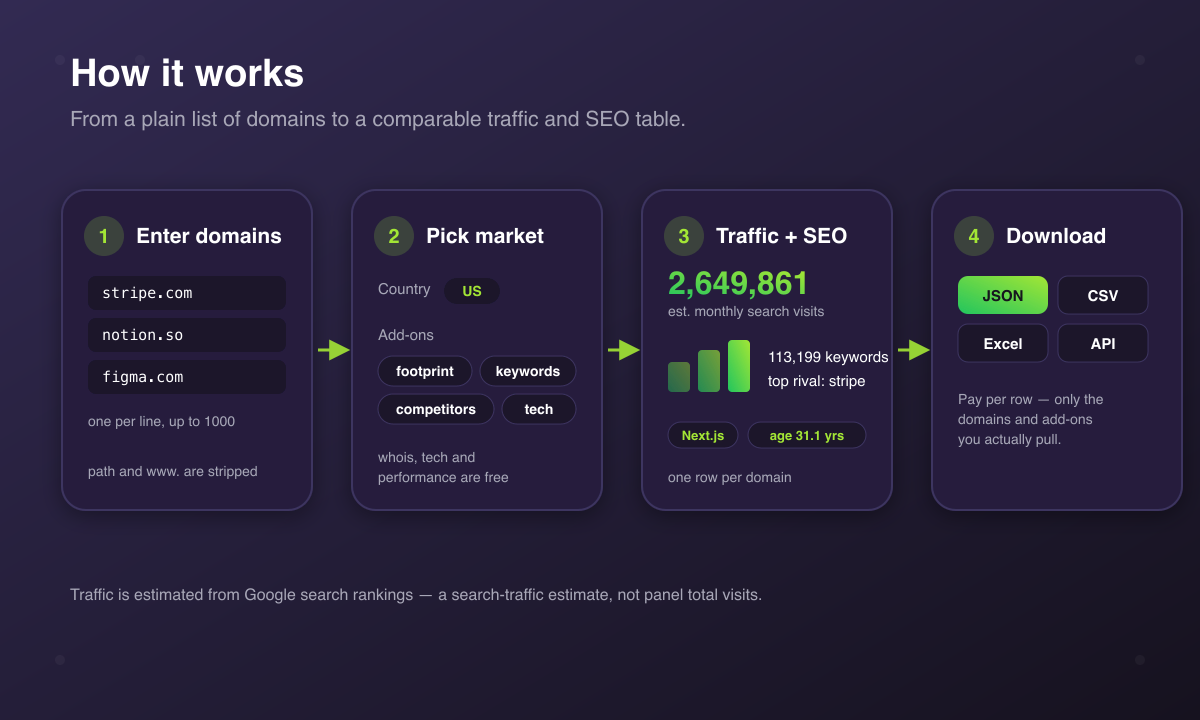
1. Enter a list of domains and pick a country.
2. Turn on the add-ons you want — keywords, competitors — and the free extras — tech stack, WHOIS, performance.
3. Each domain is looked up in the chosen Google market and returns a base traffic row.
4. Enabled add-ons expand each domain into extra keyword and competitor rows.
5. Download the dataset as JSON, CSV, Excel or via the API.
### Input Configuration
| Field | Type | Default | Description |
|---|---|---|---|
| `domains` | array | — | Domains to check, one per line. Required. |
| `country` | string | `us` | Two-letter country code to read Google rankings from. Unknown codes fall back to `us`. |
| `language` | string | — | Labs language code. Empty uses the country's main language. |
| `includeKeywords` | boolean | `false` | Add the top keywords each domain ranks for. Billed per keyword. |
| `maxKeywords` | integer | `20` | Keywords per domain when `includeKeywords` is on (max 3000). |
| `includeCompetitors` | boolean | `false` | Add the domain's organic search competitors. Billed per competitor. |
| `maxCompetitors` | integer | `10` | Competitors per domain when `includeCompetitors` is on (max 50). |
| `includeFootprint` | boolean | `false` | Add the richer ranking breakdown: top-3/top-10/page-2 keyword counts, traffic value, new and lost keywords. Billed per domain. |
| `minSearchVolume` | integer | — | Only fetch keywords at or above this monthly volume. |
| `excludeBrandTerms` | boolean | `false` | Drop keywords that contain the domain's own brand name. |
| `includeWhois` | boolean | `false` | Add registration date, age, registrar and name servers. Free. |
| `includeTech` | boolean | `false` | Detect the site's CMS, framework, analytics and hosting. Free. |
| `includePerformance` | boolean | `false` | Add real-user Core Web Vitals from Google CrUX. Free. |
Common setups:
```json
{ "domains": ["stripe.com", "notion.so"], "country": "us" }
```
```json
{
"domains": ["stripe.com"],
"country": "us",
"includeKeywords": true,
"maxKeywords": 50,
"includeCompetitors": true,
"includeTech": true,
"includeWhois": true
}
```
### Output Overview
Every domain produces one **traffic** row with its estimated organic and paid search traffic and its ranked-keyword count, enriched with any free blocks you turned on. Turn on `includeFootprint` to add the richer ranking breakdown to that row. When `includeKeywords` is on, each domain also produces one **ranking** row per keyword. When `includeCompetitors` is on, each domain also produces one **competitor** row per rival. Every row carries a `type` field so you can split them, and the dataset ships with ready-made Traffic, Keywords and Competitors table views.
### Output Samples
Traffic row (base, shown with `includeFootprint`, `includeWhois` and `includeTech` on):
```json
{
"type": "overview",
"domain": "stripe.com",
"estimatedTraffic": 2649861,
"estimatedPaidTraffic": 121,
"rankedKeywords": 113199,
"top3Keywords": 18898,
"top10Keywords": 49536,
"page2Keywords": 26986,
"trafficValueUsd": 33697822,
"newKeywords": 58128,
"lostKeywords": 72039,
"domainAgeYears": 31.1,
"whoisRegistrar": "SafeNames Ltd.",
"whoisExpirationDate": "2027-09-11T04:00:00Z",
"technologies": ["Next.js", "Nginx"],
"country": "us",
"language": "en"
}
```
Without `includeFootprint`, the base row carries `estimatedTraffic`, `estimatedPaidTraffic` and `rankedKeywords`; the footprint fields above are added only when that add-on is on.
Keyword row (`includeKeywords`):
```json
{
"type": "ranking",
"domain": "stripe.com",
"keyword": "stripe",
"position": 1,
"estimatedTraffic": 250192,
"searchVolume": 823000,
"cpc": 1.1,
"keywordDifficulty": 51,
"searchIntent": "informational",
"url": "https://stripe.com/"
}
```
Competitor row (`includeCompetitors`):
```json
{
"type": "competitor",
"domain": "stripe.com",
"competitor": "investopedia.com",
"sharedKeywords": 35724,
"overlapPct": 31.6,
"avgPositionOnShared": 21.1,
"competitorTotalKeywords": 1659720,
"competitorTotalTraffic": 45977578
}
```
### Key Output Fields
**Traffic (base row):** `estimatedTraffic`, `estimatedPaidTraffic`, `rankedKeywords`.
**Ranking footprint (`includeFootprint`):** `top3Keywords`, `top10Keywords`, `page2Keywords`, `trafficValueUsd`, `newKeywords`, `lostKeywords`.
**Keywords (ranking rows):** `keyword`, `position`, `searchVolume`, `estimatedTraffic`, `cpc`, `keywordDifficulty`, `searchIntent`, `competitionLevel`, `serpFeatures`, `url`.
**Competitors (competitor rows):** `competitor`, `sharedKeywords`, `overlapPct`, `avgPositionOnShared`, `competitorTotalKeywords`, `competitorTotalTraffic`.
**Domain & registrar (free, `includeWhois`):** `whoisRegistrar`, `whoisRegistrationDate`, `whoisExpirationDate`, `domainAgeYears`, `whoisNameServers`, `whoisStatus`.
**Tech stack (free, `includeTech`):** `technologies`, `technologiesByCategory`.
**Performance (free, `includePerformance`):** `perfLcpMs`, `perfInpMs`, `perfCls`, `perfFcpMs`, `perfTtfbMs`, `perfInCrux`, `perfCollectionPeriod`.
### FAQ
**Is this the same number as a panel traffic tool?** No. `estimatedTraffic` is modelled from a domain's Google search rankings (its organic search traffic). It does not include direct, social, referral or email traffic, and it is not a clickstream or panel measurement of total visits.
**Does it return traffic sources, AI traffic or audience demographics?** No. Those come from consumer-panel products and are not available here. This actor covers search traffic, rankings, keywords, competitors and the free technical extras.
**Do the free extras cost anything?** No. WHOIS, tech stack and performance read public sources, not the paid data, so they add no per-row charge. They also work for domains that have no ranking data.
**What if a domain has no ranking data?** You still get a base row (with the free extras you enabled); the traffic and keyword fields come back empty and the domain is reported as not tracked.
**Which countries are supported?** 88 Google markets. Pass the two-letter country code; unknown codes fall back to the US.
**Do I need an API key?** No. The actor is self-contained. The optional performance block uses Google CrUX and needs a free key configured in the actor.
### Support
Found a bug or need a field added? Open an issue on the actor's **Issues** tab — it is monitored. For custom work, see the contact details on the developer profile.
### Additional Services
Need a tailored export, a scheduled run, or a different metric blended in? Custom builds and one-off data pulls are available — reach out through the developer profile.
### Explore More Scrapers
Browse the full catalogue of SEO, traffic and lead-generation actors on the [memo23 developer profile](https://apify.com/memo23).
### 🤖 For AI Agents & LLM Apps
- **Purpose:** estimated website search traffic, ranking footprint, top keywords, organic competitors and free domain/tech/performance extras, one row per domain.
- **Minimal input:**
```json
{ "domains": ["stripe.com"], "country": "us" }
```
- **Base output fields:** `domain`, `estimatedTraffic`, `estimatedPaidTraffic`, `rankedKeywords`, `country`, `language`.
- **Add-on fields:** ranking footprint (`top3Keywords`, `top10Keywords`, `page2Keywords`, `trafficValueUsd`, `newKeywords`, `lostKeywords`) with `includeFootprint`; keywords (`keyword`, `position`, `searchVolume`, `cpc`) with `includeKeywords`; competitors (`competitor`, `sharedKeywords`, `overlapPct`) with `includeCompetitors`; `technologies`, `whoisRegistrar`, `domainAgeYears`, `perfLcpMs` with the free toggles.
- **Billing:** per domain for the base row, plus per domain for footprint, per keyword and per competitor when those add-ons are on; the free extras add no charge.
- **Note:** `estimatedTraffic` is search-traffic estimated from Google rankings, not panel total visits.
### ⚠️ Disclaimer
This actor is an independent tool and is not affiliated with, endorsed by, or sponsored by Google LLC, Similarweb Ltd., or any website it profiles. All product names, logos and brands are the property of their respective owners and are used for identification only.
The actor returns estimates and factual metrics derived from public search engine rankings and public domain registries. Traffic figures are modelled estimates, not measured visits. Use the data in line with applicable laws and the terms of the services involved, and handle any personal data in accordance with GDPR, CCPA and other applicable regulations. You are responsible for how you use the output.
### SEO Keywords
website traffic checker, website traffic estimator, check website traffic, domain traffic checker, estimate website visits, organic traffic checker, website seo checker, keyword rank checker, competitor analysis tool, organic competitors finder, domain authority checker, bulk domain analysis, website tech stack checker, whois lookup bulk, core web vitals checker, search traffic by country, seo competitor research, traffic analytics api, domain intelligence, website profiler
# Actor input Schema
## `domains` (type: `array`):
Domains to check, one per line. Anything around a domain is removed: `https://www.stripe.com/pricing` becomes `stripe.com`.
## `country` (type: `string`):
Two-letter country code to read Google rankings from (for example `us`, `gb`, `de`, `fr`). Unknown or unsupported codes fall back to `us`.
## `language` (type: `string`):
Labs language code. Leave empty to use the country's main language.
## `includeKeywords` (type: `boolean`):
Add the top keywords each domain ranks for in Google organic, with position, volume, estimated traffic and CPC. Billed per keyword.
## `maxKeywords` (type: `integer`):
How many keywords to return per domain when 'Include top keywords' is on.
## `includeCompetitors` (type: `boolean`):
Add the sites that compete with each domain in Google organic search, with shared-keyword count and their own footprint. Billed per competitor.
## `maxCompetitors` (type: `integer`):
How many competitors to return per domain when 'Include competitors' is on.
## `includeFootprint` (type: `boolean`):
Add the richer ranking breakdown per domain: keywords in the top 3, top 10 and page 2, estimated traffic value, and newly gained or lost keywords. Billed per domain.
## `minSearchVolume` (type: `integer`):
Only keywords with at least this monthly search volume are fetched and charged. Leave empty for no floor.
## `excludeBrandTerms` (type: `boolean`):
Drop keywords that contain the domain's own brand name (for example `stripe login` for stripe.com).
## `includeWhois` (type: `boolean`):
Add the domain's registration date, age, registrar, expiry and name servers from the public registry (RDAP).
## `includeTech` (type: `boolean`):
Detect the CMS, framework, analytics, hosting and other technologies the site runs, from its homepage.
## `includePerformance` (type: `boolean`):
Add real-user LCP, INP, CLS, FCP and TTFB from Google CrUX. Requires a free Google CrUX API key configured in the actor.
## Actor input object example
```json
{
"domains": [
"stripe.com",
"notion.so"
],
"country": "us",
"includeKeywords": false,
"maxKeywords": 20,
"includeCompetitors": false,
"maxCompetitors": 10,
"includeFootprint": false,
"excludeBrandTerms": false,
"includeWhois": false,
"includeTech": false,
"includePerformance": false
}
```
# Actor output Schema
## `results` (type: `string`):
No description
# API
You can run this Actor programmatically using our API. Below are code examples in JavaScript, Python, and CLI, as well as the OpenAPI specification and MCP server setup.
## JavaScript example
```javascript
import { ApifyClient } from 'apify-client';
// Initialize the ApifyClient with your Apify API token
// Replace the '' with your token
const client = new ApifyClient({
token: '',
});
// Prepare Actor input
const input = {
"domains": [
"stripe.com",
"notion.so"
]
};
// Run the Actor and wait for it to finish
const run = await client.actor("memo23/website-traffic-checker").call(input);
// Fetch and print Actor results from the run's dataset (if any)
console.log('Results from dataset');
console.log(`💾 Check your data here: https://console.apify.com/storage/datasets/${run.defaultDatasetId}`);
const { items } = await client.dataset(run.defaultDatasetId).listItems();
items.forEach((item) => {
console.dir(item);
});
// 📚 Want to learn more 📖? Go to → https://docs.apify.com/api/client/js/docs
```
## Python example
```python
from apify_client import ApifyClient
# Initialize the ApifyClient with your Apify API token
# Replace '' with your token.
client = ApifyClient("")
# Prepare the Actor input
run_input = { "domains": [
"stripe.com",
"notion.so",
] }
# Run the Actor and wait for it to finish
run = client.actor("memo23/website-traffic-checker").call(run_input=run_input)
# Fetch and print Actor results from the run's dataset (if there are any)
print(f"💾 Check your data here: https://console.apify.com/storage/datasets/{run.default_dataset_id}")
for item in client.dataset(run.default_dataset_id).iterate_items():
print(item)
# 📚 Want to learn more 📖? Go to → https://docs.apify.com/api/client/python/docs/quick-start
```
## CLI example
```bash
echo '{
"domains": [
"stripe.com",
"notion.so"
]
}' |
apify call memo23/website-traffic-checker --silent --output-dataset
```
## MCP server setup
```json
{
"mcpServers": {
"apify": {
"type": "http",
"url": "https://mcp.apify.com/?tools=fetch-actor-details,memo23/website-traffic-checker"
}
}
}
```
The hosted server signs you in with OAuth on first connect, so no API token belongs in this config. Clients without OAuth support can send an `Authorization: Bearer ` header instead, using a token from API & Integrations in Apify Console (https://console.apify.com/settings/integrations).
## OpenAPI specification
Download the OpenAPI definition: https://api.apify.com/v2/actors/NpSHXLbrWsbaNdIU7/builds/YuQy5M7a7rSossP7p/openapi.json