# Websites by Technology — Tech Stack Lookup (`memo23/websites-by-technology`) Actor
Detect the technology stack of any website — CMS, framework, analytics, CDN, JS library, and more. Paste URLs, get a full tech stack report. JSON or CSV out.
- **URL**: https://apify.com/memo23/websites-by-technology.md
- **Developed by:** [Muhamed Didovic](https://apify.com/memo23) (community)
- **Categories:** Lead generation, Developer tools
- **Stats:** 2 total users, 1 monthly users, 100.0% runs succeeded, 0 bookmarks
- **User rating**: No ratings yet
## Pricing
from $10.00 / 1,000 scraped items
This Actor is paid per event. You are not charged for the Apify platform usage, but only a fixed price for specific events.
Learn more: https://docs.apify.com/actors/running/actors-in-store.md#pay-per-event
## What's an Apify Actor?
An Actor is a serverless cloud program that runs on the Apify platform. It has two run modes.
In Batch mode, an Actor accepts a well-defined JSON input, performs an action which can take anything from a few seconds to a few hours,
and optionally produces a well-defined JSON output, datasets with results, or files in key-value store.
In Standby mode, an Actor provides a web server which can be used as a website, API, or an MCP server.
Apify vocabulary and the platform model are defined once, in the agent quickstart at https://apify.com/agents.md.
## How to integrate an Actor?
If asked about integration, you help developers integrate Actors into their projects.
You adapt to their stack and deliver integrations that are safe, well-documented, and production-ready.
Do not guess an integration path. Every one of them is in the agent quickstart at https://apify.com/agents.md: the Apify MCP server, Agent Skills with the Apify CLI, the JavaScript and Python clients, the REST API, and the account-free path for an agent with no human to sign in. It also carries the rule on stating cost before the first paid run.
For examples already wired to this Actor's own input schema, see the [API](#api) section below.
Each client library has reference documentation the quickstart does not restate: [JavaScript/TypeScript](https://docs.apify.com/api/client/js/docs.md) (`npm install apify-client`) and [Python](https://docs.apify.com/api/client/python/docs.md) (`pip install apify-client`).
# README
## Websites by Technology — Tech Stack Lookup

Detect the technology stack of any website — CMS, framework, analytics, CDN, JS library, hosting provider, and more. Paste URLs, get a full tech stack report for each. One row per URL, clean JSON out.
***
### Why use this scraper
- **Full tech stack.** Detects CMS (WordPress, Shopify), frameworks (React, Astro), CDNs (Cloudflare), hosting (Vercel, Netlify), analytics (Google Tag Manager), security (HSTS), and hundreds more.
- **Batch processing.** Analyze one URL or thousands — parallel fetching with configurable concurrency.
- **No login, no API key.** Fetches the public HTML and headers, then runs Wappalyzer-based detection rules. No credentials needed.
- **Structured output.** Each URL gets a clean tech stack report — technology names, categories, versions, and confidence scores.
***
### Overview
This actor takes a list of website URLs, fetches each one's HTML and HTTP headers, and detects the technologies powering each site using Wappalyzer-based pattern matching. It identifies the CMS, JavaScript framework, CDN, analytics tools, hosting provider, and other technologies in the stack.
Each output row is a single website with its detected technologies (name, slug, categories, version, confidence) and a unique list of technology categories.
***
### Supported inputs
- **Any HTTP/HTTPS URLs:**
- `https://shopify.com`
- `https://netlify.com`
- `shopify.com` (https:// added automatically)
***
### Use cases
- **Lead generation** — find sites using a specific technology (e.g. all Shopify stores, all WordPress sites).
- **Competitor analysis** — see what stack your competitors use.
- **Market research** — analyze technology adoption across a list of sites.
- **Sales intelligence** — identify prospects by their tech stack.
- **Security research** — detect outdated or vulnerable technologies.
***
### How it works
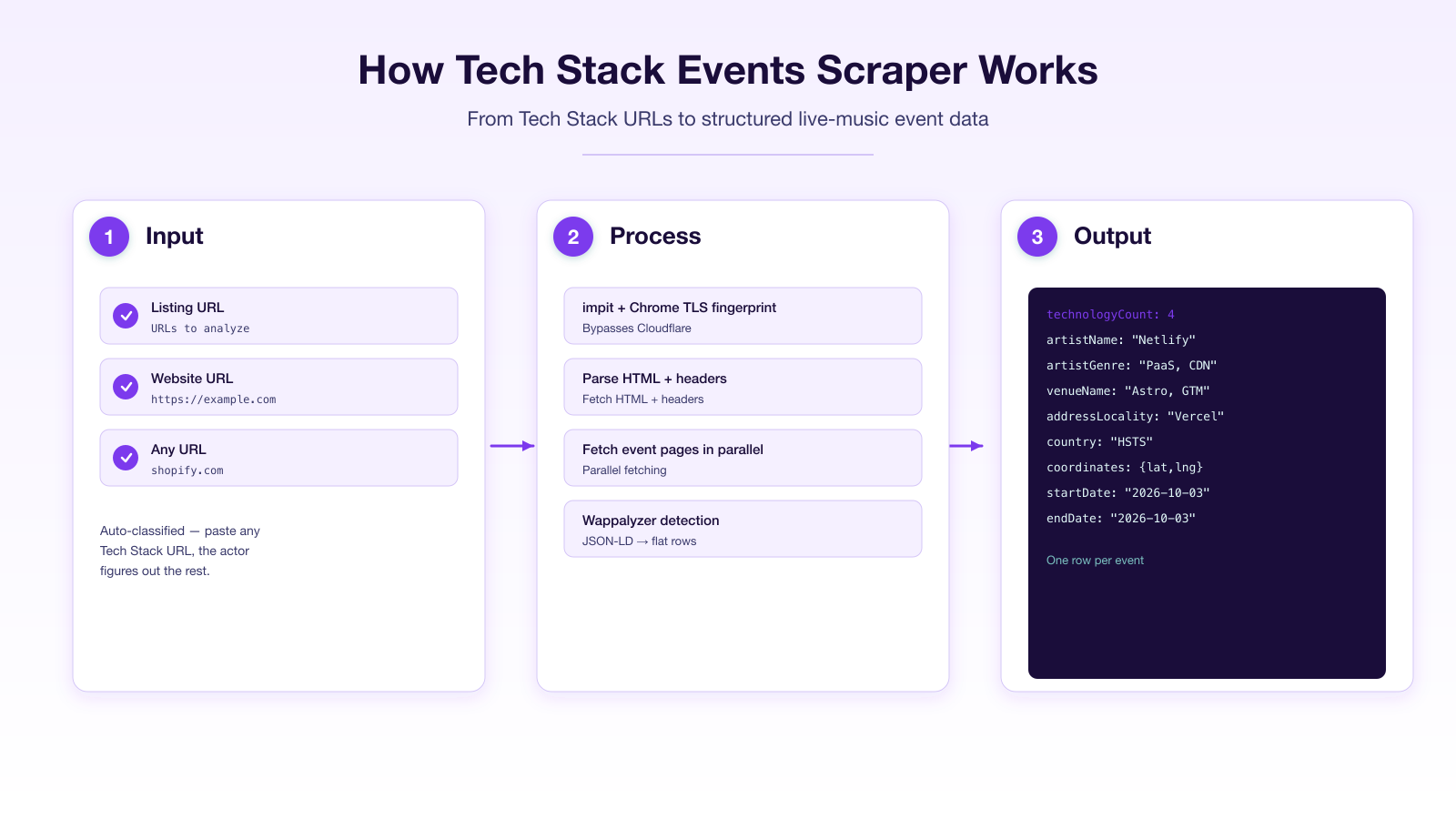
1. You provide a list of URLs.
2. The actor fetches each URL's HTML and HTTP headers with impit (real Chrome TLS fingerprint).
3. It runs Wappalyzer-based detection rules against the HTML and headers.
4. Each URL becomes one row with its full detected technology stack.
***
### Input
| Field | Type | Default | Notes |
|---|---|---|---|
| `startUrls` | array | — | Website URLs to analyze. https:// added automatically. |
| `maxItems` | integer | 1000 | Maximum URLs to analyze. |
| `maxConcurrency` | integer | 10 | How many URLs to fetch in parallel. |
| `proxy` | object | Apify proxy | Proxy configuration. |
```json
{
"startUrls": [
{ "url": "https://shopify.com" },
{ "url": "https://netlify.com" }
]
}
```
***
### Output
One row per URL:
```json
{
"type": "techStack",
"url": "https://netlify.com",
"statusCode": 200,
"technologyCount": 4,
"technologies": [
{ "name": "Astro", "slug": "astro", "categories": ["Static site generator", "JavaScript frameworks"], "confidence": 100 },
{ "name": "Netlify", "slug": "netlify", "categories": ["PaaS", "CDN"], "confidence": 100 },
{ "name": "HSTS", "slug": "hsts", "categories": ["Security"], "confidence": 100 },
{ "name": "Google Tag Manager", "slug": "google-tag-manager", "categories": ["Tag managers"], "confidence": 100 }
],
"categories": ["Static site generator", "JavaScript frameworks", "PaaS", "CDN", "Security", "Tag managers"]
}
```
#### Key output fields
- **`url`** — the analyzed URL.
- **`statusCode`** — HTTP status code of the response.
- **`technologyCount`** — number of technologies detected.
- **`technologies`** — array of `{ name, slug, categories, version, confidence }` for each detected technology.
- **`categories`** — unique list of technology categories detected.
***
### FAQ
**How does the detection work?**
The actor fetches the website's HTML and HTTP headers, then matches them against Wappalyzer's database of technology fingerprints — patterns in HTML, headers, scripts, and meta tags that identify specific technologies.
**Can it detect technologies that require JavaScript execution?**
No — this actor analyzes static HTML and headers only. Technologies that only manifest after JS execution (e.g. some SPA frameworks) may not be detected. For full browser-based detection, use a Playwright-based actor.
**How many URLs can I analyze?**
Thousands. The actor fetches URLs in parallel (configurable concurrency) with a polite delay between requests.
**Does it follow redirects?**
Yes — the actor follows redirects and analyzes the final destination page.
***
### ⚠️ Disclaimer
This Actor analyzes publicly available website data (HTML and HTTP headers). It does not access authenticated or private content. You are responsible for using the output in line with the target websites' terms and any applicable law in your jurisdiction.
***
### SEO Keywords
technology lookup, tech stack detector, builtwith alternative, wappalyzer alternative, website technology checker, cms detector, framework detector, what cms is this site, website stack analysis, technology fingerprinting, web technology detection, site tech stack, website platform detector, cdn detector, analytics detector, website profiling, tech stack scraper, website technology api, detect website technologies, site stack lookup
# Actor input Schema
## `startUrls` (type: `array`):
Website URLs to analyze for their technology stack. Add https:// automatically if missing.
## `maxItems` (type: `integer`):
Maximum number of URLs to analyze.
## `maxConcurrency` (type: `integer`):
How many URLs to fetch in parallel.
## `proxy` (type: `object`):
Apify proxy to use.
## Actor input object example
```json
{
"startUrls": [
{
"url": "https://shopify.com"
},
{
"url": "https://netlify.com"
}
],
"maxItems": 1000,
"maxConcurrency": 10,
"proxy": {
"useApifyProxy": true
}
}
```
# Actor output Schema
## `results` (type: `string`):
No description
# API
You can run this Actor programmatically using our API. Below are code examples in JavaScript, Python, and CLI, as well as the OpenAPI specification and MCP server setup.
## JavaScript example
```javascript
import { ApifyClient } from 'apify-client';
// Initialize the ApifyClient with your Apify API token
// Replace the '' with your token
const client = new ApifyClient({
token: '',
});
// Prepare Actor input
const input = {
"startUrls": [
{
"url": "https://shopify.com"
},
{
"url": "https://netlify.com"
}
]
};
// Run the Actor and wait for it to finish
const run = await client.actor("memo23/websites-by-technology").call(input);
// Fetch and print Actor results from the run's dataset (if any)
console.log('Results from dataset');
console.log(`💾 Check your data here: https://console.apify.com/storage/datasets/${run.defaultDatasetId}`);
const { items } = await client.dataset(run.defaultDatasetId).listItems();
items.forEach((item) => {
console.dir(item);
});
// 📚 Want to learn more 📖? Go to → https://docs.apify.com/api/client/js/docs
```
## Python example
```python
from apify_client import ApifyClient
# Initialize the ApifyClient with your Apify API token
# Replace '' with your token.
client = ApifyClient("")
# Prepare the Actor input
run_input = { "startUrls": [
{ "url": "https://shopify.com" },
{ "url": "https://netlify.com" },
] }
# Run the Actor and wait for it to finish
run = client.actor("memo23/websites-by-technology").call(run_input=run_input)
# Fetch and print Actor results from the run's dataset (if there are any)
print(f"💾 Check your data here: https://console.apify.com/storage/datasets/{run.default_dataset_id}")
for item in client.dataset(run.default_dataset_id).iterate_items():
print(item)
# 📚 Want to learn more 📖? Go to → https://docs.apify.com/api/client/python/docs/quick-start
```
## CLI example
```bash
echo '{
"startUrls": [
{
"url": "https://shopify.com"
},
{
"url": "https://netlify.com"
}
]
}' |
apify call memo23/websites-by-technology --silent --output-dataset
```
## MCP server setup
```json
{
"mcpServers": {
"apify": {
"type": "http",
"url": "https://mcp.apify.com/?tools=fetch-actor-details,memo23/websites-by-technology"
}
}
}
```
The hosted server signs you in with OAuth on first connect, so no API token belongs in this config. Clients without OAuth support can send an `Authorization: Bearer ` header instead, using a token from API & Integrations in Apify Console (https://console.apify.com/settings/integrations).
## OpenAPI specification
Download the OpenAPI definition: https://api.apify.com/v2/actors/ArAcPEGz82iEsBWvn/builds/JeEpfyenQ6915jkM7/openapi.json