# WeChat Channels Scraper 视频号 — Videos, Creators, Comments & MP4 (`memo23/wechat-channels-scraper`) Actor
WeChat Channels (视频号) scraper: search videos by keyword, list a creator's latest videos, get likes, shares and comments, creator followers and verified company, and download decrypted MP4 files. Paste share links, sph IDs or usernames. Only-new monitoring. No login.
- **URL**: https://apify.com/memo23/wechat-channels-scraper.md
- **Developed by:** [Muhamed Didovic](https://apify.com/memo23) (community)
- **Categories:** Social media, Videos
- **Stats:** 1 total users, 0 monthly users, 98.5% runs succeeded, 0 bookmarks
- **User rating**: No ratings yet
## Pricing
from $3.50 / 1,000 videos
This Actor is paid per event. You are not charged for the Apify platform usage, but only a fixed price for specific events.
Learn more: https://docs.apify.com/actors/running/actors-in-store.md#pay-per-event
## What's an Apify Actor?
An Actor is a serverless cloud program that runs on the Apify platform. It has two run modes.
In Batch mode, an Actor accepts a well-defined JSON input, performs an action which can take anything from a few seconds to a few hours,
and optionally produces a well-defined JSON output, datasets with results, or files in key-value store.
In Standby mode, an Actor provides a web server which can be used as a website, API, or an MCP server.
Apify vocabulary and the platform model are defined once, in the agent quickstart at https://apify.com/agents.md.
## How to integrate an Actor?
If asked about integration, you help developers integrate Actors into their projects.
You adapt to their stack and deliver integrations that are safe, well-documented, and production-ready.
Do not guess an integration path. Every one of them is in the agent quickstart at https://apify.com/agents.md: the Apify MCP server, Agent Skills with the Apify CLI, the JavaScript and Python clients, the REST API, and the account-free path for an agent with no human to sign in. It also carries the rule on stating cost before the first paid run.
For examples already wired to this Actor's own input schema, see the [API](#api) section below.
Each client library has reference documentation the quickstart does not restate: [JavaScript/TypeScript](https://docs.apify.com/api/client/js/docs.md) (`npm install apify-client`) and [Python](https://docs.apify.com/api/client/python/docs.md) (`pip install apify-client`).
# README
## WeChat Channels Scraper 视频号 — Videos, Creators, Comments & MP4 Download
Scrape **WeChat Channels (视频号, Shipinhao)**: search videos by keyword, list any creator's latest videos, get likes, favorites, shares, comments and location, look up creator followers and verified companies, and **download playable MP4 files**. Paste a share link, a `sph…` Channels ID or a creator username. No WeChat login.
| Input | Row(s) emitted |
|---|---|
| Search keyword | ~10 videos per page, with sort, date and length filters |
| Creator (`v2_…@finder`, `sph…` ID or a share link to one of their videos) | Their latest 15 videos |
| `includeCollections` | Videos from each creator's collections (合集), ~20 per page, hundreds per collection |
| `creatorSearchKeywords` | Videos inside a creator matching a keyword, ~20 per page |
| `includeLiveReplays` | The creator's live-stream replays as video rows |
| `includeShareLinks` | A clickable `weixin.qq.com/sph/…` link on each video |
| Video share link (`weixin.qq.com/sph/…`) or object id | The full video record |
| `includeCreatorProfile` / `includeVerification` | One creator row: followers, video count, region, verified company, license |
| `includeComments` / `includeReplies` | One row per comment and reply |
| `downloadVideos` | A decrypted, playable MP4 saved to the run's storage, linked from the row |
### Why Use This Scraper?
- **Playable MP4s.** WeChat scrambles the first 128 KB of every Channels video. This actor unscrambles it, so you get a normal MP4 that plays anywhere (verified with ffmpeg: h264 + aac).
- **Engagement numbers.** Likes, favorites, shares (转发) and comment count per video, e.g. `likes: 100002, shares: 396058`.
- **Creator intelligence.** Followers, video count, total likes, live-stream hours, IP region, linked Official Accounts, and the verification panel: verified company, entity type, news license number, verification date.
- **Comments with replies.** Author, text, likes, reply count, time.
- **Search with filters.** Relevance, newest or most liked; last 24 hours / 7 days / 6 months; under 5 min / 5-10 min / over 20 min.
- **Live-stream replays.** A creator's past live streams as video rows, with likes, shares, comments and a media link.
- **Shareable links.** Optional `shareUrl` (`https://weixin.qq.com/sph/…`) on every video, ready to open or send.
- **Deeper than the latest 15.** Pull a creator's collections (合集), where one collection can hold hundreds of videos, or search inside a creator by keyword to find older videos.
- **Only-new monitoring.** Watch creators or keywords on a schedule; videos already delivered are skipped and not billed.
- **Pay only for what comes back.** Every row type is its own event, charged only when the data arrives and never past your spending limit.
### Overview
This actor is for brand teams, agencies, researchers and media monitors who need **WeChat Channels** data without a WeChat account or a phone in the loop.
Rows are told apart by `type`:
- `video`: from search (`source: "search"`), a creator's latest list (`"creator"`), a collection (`"collection"`, with `collectionId` and `collectionName`), a search inside a creator (`"creator-search"`), a live-stream replay (`"live-replay"`) or a pasted link (`"url"`).
- `creator`: profile and/or verification for an entry in **Creators**.
- `comment` and `reply`: linked to their video by `objectId`, replies to their comment by `parentCommentId`.
Search results carry title, creator name, likes text and duration. Ask for **full details**, **comments** or **downloads** on search results and each one is looked up in full (billed as `video-detail`).
### Supported Inputs
| Input | Pattern | Example |
|---|---|---|
| Keyword | any topic | `美食`, `火锅` |
| Creator username | `v2_…@finder` | from any video row's `creatorUsername` |
| Channels ID | `sph…` (shown on the creator's profile) | `sphi9BjV8GK0Zsl` (人民日报) |
| Share link | `https://weixin.qq.com/sph/{id}` | `https://weixin.qq.com/sph/A08McxiQhh` |
| Object id / export id | numeric, or `export/…` from search | `13479598140693940492` |
**Limits to know:** a creator's own list is their **latest 15 videos** (WeChat serves no deeper page); use `includeCollections` or `creatorSearchKeywords` to go further back. View counts are hidden by WeChat and come back as `0`. Some accounts hide follower and like totals (they show `0`). Live streams are not included.
### Use Cases
| Who | What they do with the rows |
|---|---|
| Brand / comms | Watch keywords daily and catch new Channels videos about the brand |
| KOL / influencer agencies | Find creators by topic, then pull followers, verification and recent engagement |
| Competitor intel | Monitor competitor creators; only new videos come back |
| Media archiving | Download MP4s of videos you have rights to keep |
| Social listening | Comments with likes for sentiment |
| LLM / RAG pipelines | Titles, descriptions, hashtags and comments as text |
### How It Works
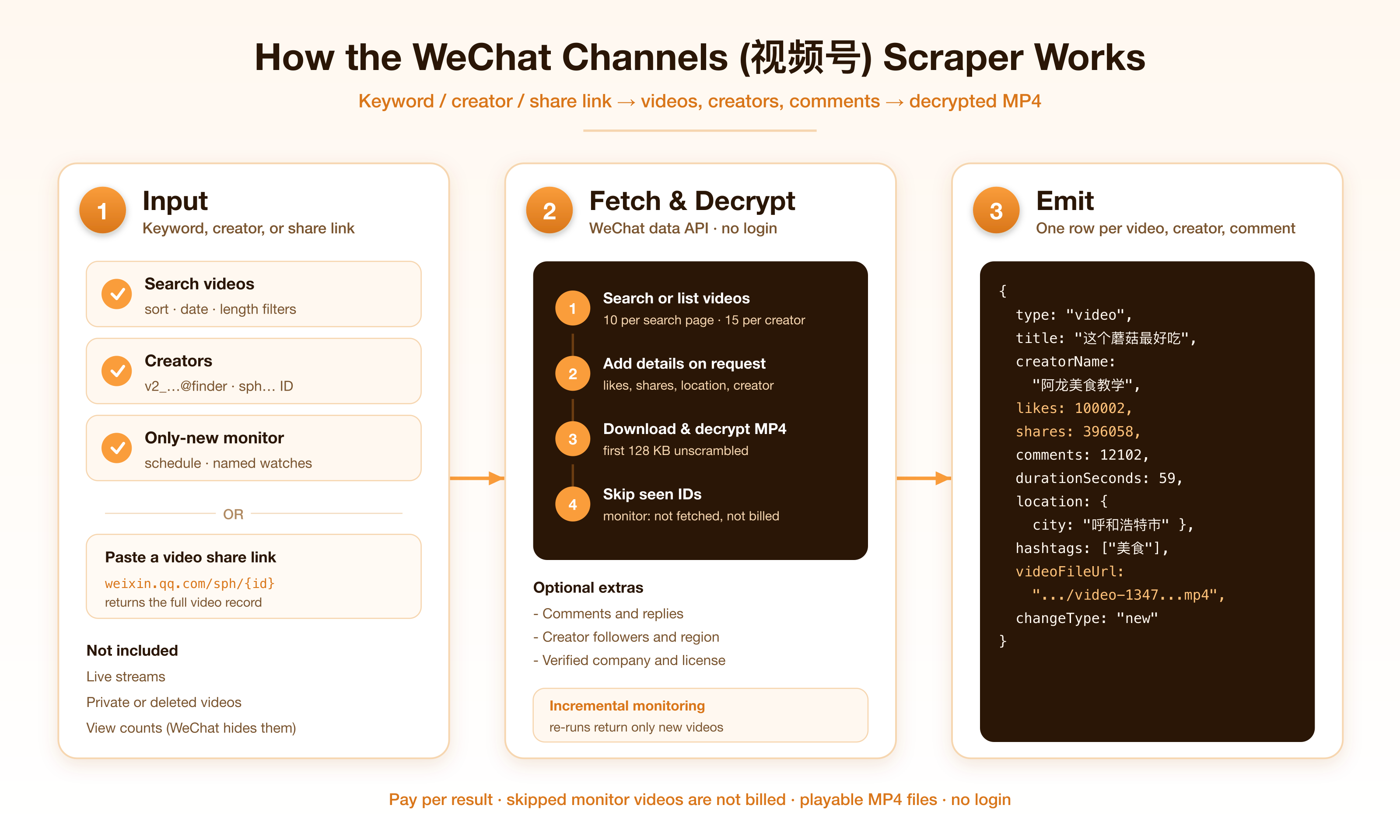
1. Keywords are searched on WeChat Channels; creators are resolved to their username and their latest videos listed; share links are opened.
2. Optional: each search result is looked up in full, and creators get a profile and verification row.
3. Optional: comments and replies are paged in.
4. Optional: each video is downloaded, its scrambled head is unscrambled, and the MP4 is saved to the run's key-value store.
5. Monitoring skips videos already delivered before any data is bought for them.
### Input Configuration
| Field | Type | Notes |
|---|---|---|
| `keywords` | `string[]` | Video search terms. |
| `creators` | `string[]` | `v2_…@finder`, `sph…` Channels IDs, or share links to one of their videos. |
| `includeLatestVideos` | boolean | The creator's latest 15 videos. Default on. |
| `includeCollections` | boolean | Also the creator's collections (合集) and their videos. |
| `creatorSearchKeywords` | `string[]` | Keywords searched inside each creator's videos. |
| `includeLiveReplays` | boolean | The creator's live-stream replays, as video rows. |
| `includeShareLinks` | boolean | Add `shareUrl` to each video with an object id (billed `share-link`). |
| `videoUrls` | `string[]` | Share links, object ids or export ids. |
| `sort` | `default` | `latest` | `hot` | Search order. |
| `publishTime` | `all` | `day` | `week` | `half_year` | Search time window. |
| `duration` | `all` | `short` | `medium` | `long` | Search length filter (<5 min, 5-10 min, >20 min). |
| `maxPages` | integer | Pages per search keyword (~10 videos), per in-creator keyword (~20) and per collection (~20). Default `3`. |
| `includeVideoDetails` | boolean | Full record for search results (billed `video-detail`). |
| `includeCreatorProfile` | boolean | Creator row with followers, video count, region, live hours. |
| `includeVerification` | boolean | Verified company, entity type, license, Channels ID, IP location. |
| `includeComments` / `maxCommentsPerVideo` | boolean / integer | Comment rows; 25 per page. Default 25. |
| `includeReplies` / `maxRepliesPerComment` | boolean / integer | Reply rows for comments with 5+ replies. Default 20. |
| `downloadVideos` / `maxVideoSizeMb` | boolean / integer | Save decrypted MP4s; skip files over the size cap. Default 200 MB, maximum 1000 MB. Files are decrypted in memory, so give the run at least twice the cap in memory. |
| `maxItems` | integer | Cap on video rows. Default `50`; free-tier runs cap at `100`. |
| `monitorMode`, `monitorStateName`, `emitBaseline`, `includeUnchanged`, `resetMonitoringState` | | Only-new monitoring, as in our other actors. |
#### Example input
Newest food videos from the past week, with full stats and comments:
```json
{
"keywords": ["美食"],
"sort": "latest",
"publishTime": "week",
"includeVideoDetails": true,
"includeComments": true,
"maxCommentsPerVideo": 25,
"maxItems": 30
}
```
Daily watch of two creators with profile, verification and MP4 download of new videos:
```json
{
"creators": ["sphi9BjV8GK0Zsl", "https://weixin.qq.com/sph/A08McxiQhh"],
"includeCreatorProfile": true,
"includeVerification": true,
"downloadVideos": true,
"monitorMode": true,
"monitorStateName": "creator-watch",
"maxItems": 30
}
```
Everything a news account published about cultural relics, plus its collections:
```json
{
"creators": ["sphi9BjV8GK0Zsl"],
"includeLatestVideos": false,
"includeCollections": true,
"creatorSearchKeywords": ["文物"],
"maxPages": 5,
"maxItems": 200
}
```
Download one video:
```json
{
"videoUrls": ["https://weixin.qq.com/sph/A08McxiQhh"],
"downloadVideos": true
}
```
### Output Overview
One dataset row per video, creator, comment or reply. The dataset has **Videos**, **Creators** and **Comments** tabs. Downloaded MP4s are in the run's key-value store as `video-{objectId}.mp4`; each video row links to its file in `videoFileUrl`.
### Output Samples
Video from a share link, with download (live run):
```json
{
"type": "video",
"source": "url",
"objectId": "13479598140693940492",
"title": "这个蘑菇最好吃,#美食#美食教程@微信时刻",
"hashtags": ["美食", "美食教程"],
"creatorUsername": "v2_060000231003b20faec8c6e48b11c5d7cf03e532b07791c9fdb843817ec2a431f166b7e5addf@finder",
"creatorName": "阿龙美食教学",
"publishedAt": "2020-12-02T07:15:17.000Z",
"likes": 100002,
"favorites": 100002,
"shares": 396058,
"comments": 12102,
"durationSeconds": 59,
"width": 1072,
"height": 1248,
"fileSizeBytes": 27359263,
"location": { "city": "呼和浩特市", "placeName": "金川国际", "latitude": 40.79, "longitude": 111.54 },
"videoFileUrl": "https://api.apify.com/v2/key-value-stores//records/video-13479598140693940492.mp4",
"videoFileBytes": 27359263
}
```
Search result without details:
```json
{
"type": "video",
"source": "search",
"keyword": "美食",
"title": "#皮蛋#溏心皮蛋",
"hashtags": ["皮蛋", "溏心皮蛋"],
"creatorName": "静静爱美食123",
"durationSeconds": 31,
"publishedAt": "2026-10-09T15:14:02.000Z",
"publishedAgo": "3分钟前",
"exportId": "export/UzFfBgAAxMKrCH9RS32tk8zT4DCKKinFsczkmCJbqzkUDb6G7Q",
"coverUrl": "https://findermp.video.qq.com/…"
}
```
Creator with profile and verification:
```json
{
"type": "creator",
"username": "v2_060000231003b20faec8c6e48b11c5d7cf03e532b07791c9fdb843817ec2a431f166b7e5addf@finder",
"nickname": "阿龙美食教学",
"region": "Inner Mongolia",
"followers": 0,
"videoCount": 1571,
"liveHours": 1629,
"channelId": "sphpJxaRRJqk4Qn",
"ipLocation": "Inner Mongolia",
"entityType": "个人"
}
```
Verification block of an organisation (人民日报): `verifiedEntity: "人民日报社"`, `entityType: "互联网新闻信息服务单位"`, `newsLicenseNumber: "10120180018"`.
Comment:
```json
{
"type": "comment",
"objectId": "13479598140693940492",
"commentId": "13490628930619709444",
"author": "longman",
"text": "蘑菇够甜了,不必加鸡精[哇]",
"likes": 384,
"postedAt": "2020-12-17T12:31:30.000Z"
}
```
### Key Output Fields
| Group | Fields |
|---|---|
| Identity | `type`, `source`, `objectId`, `exportId`, `keyword`, `input`, `collectionId`, `collectionName` |
| Video | `title`, `description`, `hashtags`, `publishedAt`, `durationSeconds`, `width`, `height`, `fileSizeBytes`, `coverUrl` |
| Engagement | `likes`, `favorites`, `shares`, `comments` (search rows: `likes` from WeChat's rounded text, e.g. 10万+) |
| Creator on a video | `creatorUsername`, `creatorName` |
| Location | `location.city`, `location.placeName`, `location.latitude`, `location.longitude` |
| File | `videoFileUrl`, `videoFileKey`, `videoFileBytes`, `downloadError`; raw `mediaUrl` + `decodeKey` for your own downloader |
| Link | `shareUrl` (with `includeShareLinks`) |
| Creator row | `nickname`, `bio`, `followers`, `videoCount`, `likes`, `region`, `liveHours`, `linkedAccounts`, `channelId`, `verifiedEntity`, `entityType`, `newsLicenseNumber`, `verifiedAt` |
| Comment / reply | `commentId`, `parentCommentId`, `author`, `text`, `likes`, `replyCount`, `postedAt` |
| Monitor | `changeType`, `scrapedAt` |
### FAQ
**Do I need a WeChat login?**
No.
**Are the MP4s really playable?**
Yes. WeChat scrambles the first 128 KB of each file; the actor unscrambles it and checks the result is a valid MP4 before saving. Files that fail the check are not saved and not billed (`downloadError` explains why).
**How long are the files kept?**
They live in the run's default key-value store, which Apify keeps for your plan's storage retention period. Download them or copy them elsewhere if you need them longer.
**Why only 15 videos per creator?**
That is all WeChat serves for a creator's own video list outside the app. Turn on `includeCollections` (collections often hold hundreds of videos) or use `creatorSearchKeywords` to reach older videos, and use monitoring on a schedule to collect new ones as they appear.
**Can I download live-stream replays?**
Yes, but replays are usually 1-3 GB, above the default 200 MB cap and the 1000 MB maximum. You still get the replay's stats, comments and `mediaUrl` + `decodeKey` for your own downloader.
**Why are view counts 0?**
WeChat does not expose play counts for Channels videos. Likes, favorites, shares and comments are real.
**Some videos have no details or fail.**
WeChat occasionally rejects a lookup; the actor retries once. Rows that never come back are not billed.
**Does monitoring charge for videos I already have?**
No. Already-delivered videos are skipped before any data is fetched for them.
### Pricing
| Event | When | Price |
|---|---|---|
| Actor start | Once per run (per GB of memory) | $0.005 |
| Video | Each video from search, a creator's list, a collection or a search inside a creator | $0.0035 |
| Video detail | Each video looked up in full (links, or search results with details, comments or download) | $0.02 |
| Comment | Each comment or reply | $0.0025 |
| Creator profile | Each creator profile | $0.02 |
| Creator verification | Each verification panel | $0.02 |
| Video download | Each MP4 saved | $0.03 |
| Share link | Each `shareUrl` added (`includeShareLinks`) | $0.02 |
Nothing is charged for rows that do not come back, and the run stops at your maximum charge.
### Support
Found a bug or need a field? Open a ticket on the [Issues](https://apify.com/memo23/wechat-channels-scraper/issues) tab.
### Additional Services
Need this data delivered somewhere specific, or another China platform covered? Get in touch through the Apify Console.
### Explore More Scrapers
China social in this family: [WeChat Official Accounts](https://apify.com/memo23/wechat-official-account-scraper), [Douyin](https://apify.com/memo23/douyin-scraper), [RedNote / Xiaohongshu](https://apify.com/memo23/rednote-scraper), [Weibo](https://apify.com/memo23/weibo-scraper), [Zhihu](https://apify.com/memo23/zhihu-scraper). Full list at [apify.com/memo23](https://apify.com/memo23).
### 🤖 For AI Agents & LLM Apps
Compact reference for agents calling this actor via the [Apify MCP server](https://mcp.apify.com) or the Apify API (actor: `memo23/wechat-channels-scraper`).
**Purpose:** WeChat Channels (视频号) videos by keyword, creator or share link; creator profiles and verification; comments; decrypted MP4 downloads.
**Minimal inputs:**
```json
{ "keywords": ["美食"], "maxItems": 10, "maxPages": 1 }
```
```json
{ "creators": ["sphi9BjV8GK0Zsl"], "includeCreatorProfile": true, "maxItems": 15 }
```
```json
{ "videoUrls": ["https://weixin.qq.com/sph/A08McxiQhh"], "downloadVideos": true }
```
**Output:** rows with `type` = `video` | `creator` | `comment` | `reply`. Downloaded files: `videoFileUrl` on the video row.
**Behaviors an agent should know:**
- Always set `maxItems` (video rows). Comments and replies have their own caps.
- A creator's own list is their latest 15 videos; `includeCollections` and `creatorSearchKeywords` go further back.
- Search rows are light; comments or downloads on search results trigger a full lookup billed as `video-detail`.
- `monitorMode` skips videos already delivered, unbilled.
- `includeLiveReplays` adds live-stream replays as video rows; `includeShareLinks` adds `shareUrl` (billed `share-link`).
- Billing: $0.005 start + $0.0035 per video (or $0.02 per full lookup) + $0.0025 per comment + $0.02 per creator profile or verification + $0.03 per MP4 + $0.02 per share link.
### ⚠️ Disclaimer
This Actor is an independent tool and is not affiliated with, endorsed by, or sponsored by Tencent Holdings Limited (WeChat / Weixin / 微信 / 视频号) or any of its subsidiaries. All trademarks mentioned are the property of their respective owners.
Data comes from a third-party WeChat data API and from WeChat's public video CDN. Downloaded videos remain the property of their creators: download only content you have the right to keep, and use it within copyright law. Users are responsible for complying with WeChat's terms of service, applicable data-protection law (GDPR, CCPA, and PRC personal-information rules), and their own organization's obligations.
### SEO Keywords
wechat channels scraper, 视频号 scraper, 视频号下载, shipinhao scraper, weixin channels, wechat video scraper, wechat channels downloader, wechat video download, 微信视频号, channels video api, wechat creator scraper, wechat kol research, wechat channels comments, wechat channels analytics, china video scraper, wechat channels monitoring, 视频号合集, wechat channels collections, sph id, wechat finder, wechat short video scraper, 视频号数据
# Actor input Schema
## `keywords` (type: `array`):
Search WeChat Channels videos. About 10 videos per page. Example: `美食`.
## `creators` (type: `array`):
Returns each creator's latest 15 videos. Give a finder username (`v2_…@finder`), a public Channels ID (`sph…`), or a share link to any of their videos (`https://weixin.qq.com/sph/…`).
## `includeLatestVideos` (type: `boolean`):
Return each creator's latest 15 videos. Turn off when you only want collections or in-creator search results. Default: on.
## `includeCollections` (type: `boolean`):
Also list each creator's collections and return their videos, about 20 per page with full stats and media. This reaches past the latest-15 limit: a news account's collection can hold hundreds of videos. Pages per collection follow Max search pages. Default: off.
## `includeLiveReplays` (type: `boolean`):
Also return each creator's live-stream replays as video rows, with likes, shares, comments and a media link (downloadable like any video). Pages follow Max pages. Default: off.
## `creatorSearchKeywords` (type: `array`):
Keywords searched within each creator's own videos, about 20 results per page. Finds older videos the latest-15 list does not show. Example: `新闻`.
## `videoUrls` (type: `array`):
Share links (`https://weixin.qq.com/sph/A08McxiQhh`), numeric object ids, or `export/…` ids. Each returns the full video record.
## `sort` (type: `string`):
Order of search results. Default: relevance.
## `publishTime` (type: `string`):
Limit search results to a time window. Default: any time.
## `duration` (type: `string`):
Limit search results by length. Default: any.
## `maxPages` (type: `integer`):
Pages per search keyword (~10 videos), per in-creator keyword (~20) and per collection (~20). Default 3.
## `includeVideoDetails` (type: `boolean`):
Search results carry title, creator name, likes and duration. Turn this on to look up each one in full: likes, favorites, shares, comment count, location, creator username and media link. Billed as `video-detail` instead of `video`. Turned on automatically when you ask for comments or downloads on search results. Default: off.
## `includeShareLinks` (type: `boolean`):
Add a clickable `shareUrl` (`https://weixin.qq.com/sph/…`) to each video that has an object id (all except light search results). Billed as `share-link` per link. Default: off.
## `includeCreatorProfile` (type: `boolean`):
For each entry in Creators, add a `creator` row with followers, video count, likes, region, bio, live hours and linked Official Accounts. Billed as `creator-profile`. Default: off.
## `includeVerification` (type: `boolean`):
For each entry in Creators, add the verified company, entity type, news license number, verification date, Channels ID and IP location. Billed as `creator-verification`. Default: off.
## `includeComments` (type: `boolean`):
Return each video's comments as rows with `type: comment`: author, text, likes, reply count, time. Default: off.
## `maxCommentsPerVideo` (type: `integer`):
Comments come 25 per page. Default 25.
## `includeReplies` (type: `boolean`):
Also return replies (`type: reply`) for comments with 5 or more replies. Needs Comments. Default: off.
## `maxRepliesPerComment` (type: `integer`):
Default 20.
## `downloadVideos` (type: `boolean`):
Download each video, decrypt it and save a playable MP4 to the run's key-value store. The row gets `videoFileUrl`. Billed as `video-download` per saved file. Default: off.
## `maxVideoSizeMb` (type: `integer`):
Skip files larger than this. A 1-minute video is about 25 MB; live-stream replays are often 1-3 GB and are skipped at the default. Files are held in memory while being decrypted, so raise the run's memory to at least twice this value. Default 200, maximum 1000.
## `maxItems` (type: `integer`):
Cap on video rows. Comments, replies and creator rows are capped separately. Default 50. Free-tier runs are capped at 100.
## `monitorMode` (type: `boolean`):
Skip videos already delivered to you; they are not billed and no data is bought for them. First run builds the baseline. Default: false.
## `monitorStateName` (type: `string`):
Separate seen-lists for several schedules. Example: `food-creators`.
## `resetMonitoringState` (type: `boolean`):
Clear the seen-list at the start of this run. Default: false.
## `emitBaseline` (type: `boolean`):
ON (default): first monitoring run returns current videos. OFF: first run seeds silently.
## `includeUnchanged` (type: `boolean`):
Also re-emit already-seen videos, tagged `changeType`. Billed. Default: false.
## Actor input object example
```json
{
"keywords": [
"美食"
],
"includeLatestVideos": true,
"includeCollections": false,
"includeLiveReplays": false,
"sort": "default",
"publishTime": "all",
"duration": "all",
"maxPages": 3,
"includeVideoDetails": false,
"includeShareLinks": false,
"includeCreatorProfile": false,
"includeVerification": false,
"includeComments": false,
"maxCommentsPerVideo": 25,
"includeReplies": false,
"maxRepliesPerComment": 20,
"downloadVideos": false,
"maxVideoSizeMb": 200,
"maxItems": 50,
"monitorMode": false,
"resetMonitoringState": false,
"emitBaseline": true,
"includeUnchanged": false
}
```
# Actor output Schema
## `results` (type: `string`):
Rows told apart by `type`: `video` (title, creator, likes, favorites, shares, comments, duration, location, media link, `videoFileUrl` when downloaded), `creator` (followers, video count, region, verified company), `comment` and `reply`.
# API
You can run this Actor programmatically using our API. Below are code examples in JavaScript, Python, and CLI, as well as the OpenAPI specification and MCP server setup.
## JavaScript example
```javascript
import { ApifyClient } from 'apify-client';
// Initialize the ApifyClient with your Apify API token
// Replace the '' with your token
const client = new ApifyClient({
token: '',
});
// Prepare Actor input
const input = {
"keywords": [
"美食"
]
};
// Run the Actor and wait for it to finish
const run = await client.actor("memo23/wechat-channels-scraper").call(input);
// Fetch and print Actor results from the run's dataset (if any)
console.log('Results from dataset');
console.log(`💾 Check your data here: https://console.apify.com/storage/datasets/${run.defaultDatasetId}`);
const { items } = await client.dataset(run.defaultDatasetId).listItems();
items.forEach((item) => {
console.dir(item);
});
// 📚 Want to learn more 📖? Go to → https://docs.apify.com/api/client/js/docs
```
## Python example
```python
from apify_client import ApifyClient
# Initialize the ApifyClient with your Apify API token
# Replace '' with your token.
client = ApifyClient("")
# Prepare the Actor input
run_input = { "keywords": ["美食"] }
# Run the Actor and wait for it to finish
run = client.actor("memo23/wechat-channels-scraper").call(run_input=run_input)
# Fetch and print Actor results from the run's dataset (if there are any)
print(f"💾 Check your data here: https://console.apify.com/storage/datasets/{run.default_dataset_id}")
for item in client.dataset(run.default_dataset_id).iterate_items():
print(item)
# 📚 Want to learn more 📖? Go to → https://docs.apify.com/api/client/python/docs/quick-start
```
## CLI example
```bash
echo '{
"keywords": [
"美食"
]
}' |
apify call memo23/wechat-channels-scraper --silent --output-dataset
```
## MCP server setup
```json
{
"mcpServers": {
"apify": {
"type": "http",
"url": "https://mcp.apify.com/?tools=fetch-actor-details,memo23/wechat-channels-scraper"
}
}
}
```
The hosted server signs you in with OAuth on first connect, so no API token belongs in this config. Clients without OAuth support can send an `Authorization: Bearer ` header instead, using a token from API & Integrations in Apify Console (https://console.apify.com/settings/integrations).
## OpenAPI specification
Download the OpenAPI definition: https://api.apify.com/v2/actors/ljksYSkd8KlJWahTr/builds/HmyU7CD2EEnQhfTHl/openapi.json