# X (Twitter) Search Scraper — Tweets, Replies, Followers, Trends (`memo23/x-twitter-search-scraper`) Actor
X (Twitter) scraper with no login or cookie: search tweets with all search operators, read an account's tweets and replies, the replies under any tweet, followers, following and retweeters, trends by country and X Communities. Views, bookmarks and media links on every tweet.
- **URL**: https://apify.com/memo23/x-twitter-search-scraper.md
- **Developed by:** [Muhamed Didovic](https://apify.com/memo23) (community)
- **Categories:** Social media, Lead generation
- **Stats:** 27 total users, 18 monthly users, 95.4% runs succeeded, 0 bookmarks
- **User rating**: No ratings yet
## Pricing
from $0.40 / 1,000 tweets
This Actor is paid per event. You are not charged for the Apify platform usage, but only a fixed price for specific events.
Learn more: https://docs.apify.com/actors/running/actors-in-store.md#pay-per-event
## What's an Apify Actor?
An Actor is a serverless cloud program that runs on the Apify platform. It has two run modes.
In Batch mode, an Actor accepts a well-defined JSON input, performs an action which can take anything from a few seconds to a few hours,
and optionally produces a well-defined JSON output, datasets with results, or files in key-value store.
In Standby mode, an Actor provides a web server which can be used as a website, API, or an MCP server.
Apify vocabulary and the platform model are defined once, in the agent quickstart at https://apify.com/agents.md.
## How to integrate an Actor?
If asked about integration, you help developers integrate Actors into their projects.
You adapt to their stack and deliver integrations that are safe, well-documented, and production-ready.
Do not guess an integration path. Every one of them is in the agent quickstart at https://apify.com/agents.md: the Apify MCP server, Agent Skills with the Apify CLI, the JavaScript and Python clients, the REST API, and the account-free path for an agent with no human to sign in. It also carries the rule on stating cost before the first paid run.
For examples already wired to this Actor's own input schema, see the [API](#api) section below.
Each client library has reference documentation the quickstart does not restate: [JavaScript/TypeScript](https://docs.apify.com/api/client/js/docs.md) (`npm install apify-client`) and [Python](https://docs.apify.com/api/client/python/docs.md) (`pip install apify-client`).
# README
## X (Twitter) Search Scraper — Tweets, Replies, Followers, Trends
Get structured data from **X (Twitter)** without an account: tweets by search query with every search operator, an account's tweets and replies, the replies under any tweet, followers, following and retweeters, trends by country and X Communities. No login, no cookie, no proxy to set up.
### What it does
| Input | You get | Row type |
|-------|---------|----------|
| Search query | Tweets matching it, from the Latest, Top or Media tab | `tweet` |
| Handle or profile link | The profile: followers, following, tweet count, bio, verification | `profile` |
| `includeAccountOrigin` | Where X says the account is based, and how often its handle changed | on the `profile` row |
| `includeTweets` / `includeUserReplies` | The account's tweets, or its tweets and replies | `tweet` |
| `includeFollowers` / `includeFollowing` | The accounts that follow it, or that it follows | `follower`, `following` |
| Tweet link or ID | The tweet with views, likes, retweets, quotes, bookmarks | `tweet` |
| `includeReplies` | The replies under that tweet | `reply` |
| `includeRetweeters` | The accounts that retweeted it | `retweeter` |
| Trend country | The current trending topics, about 50 per country, 58 countries | `trend` |
| Community keyword | X Communities with topic and member count | `community` |
| Community link or ID | The community's tweets | `tweet` |
| List link or ID | The tweets in the list, and on request its members and followers | `tweet`, `list-member`, `list-follower` |
The dataset has **Tweets and replies**, **Profiles and accounts** and **Trends and communities** views.
### How It Works
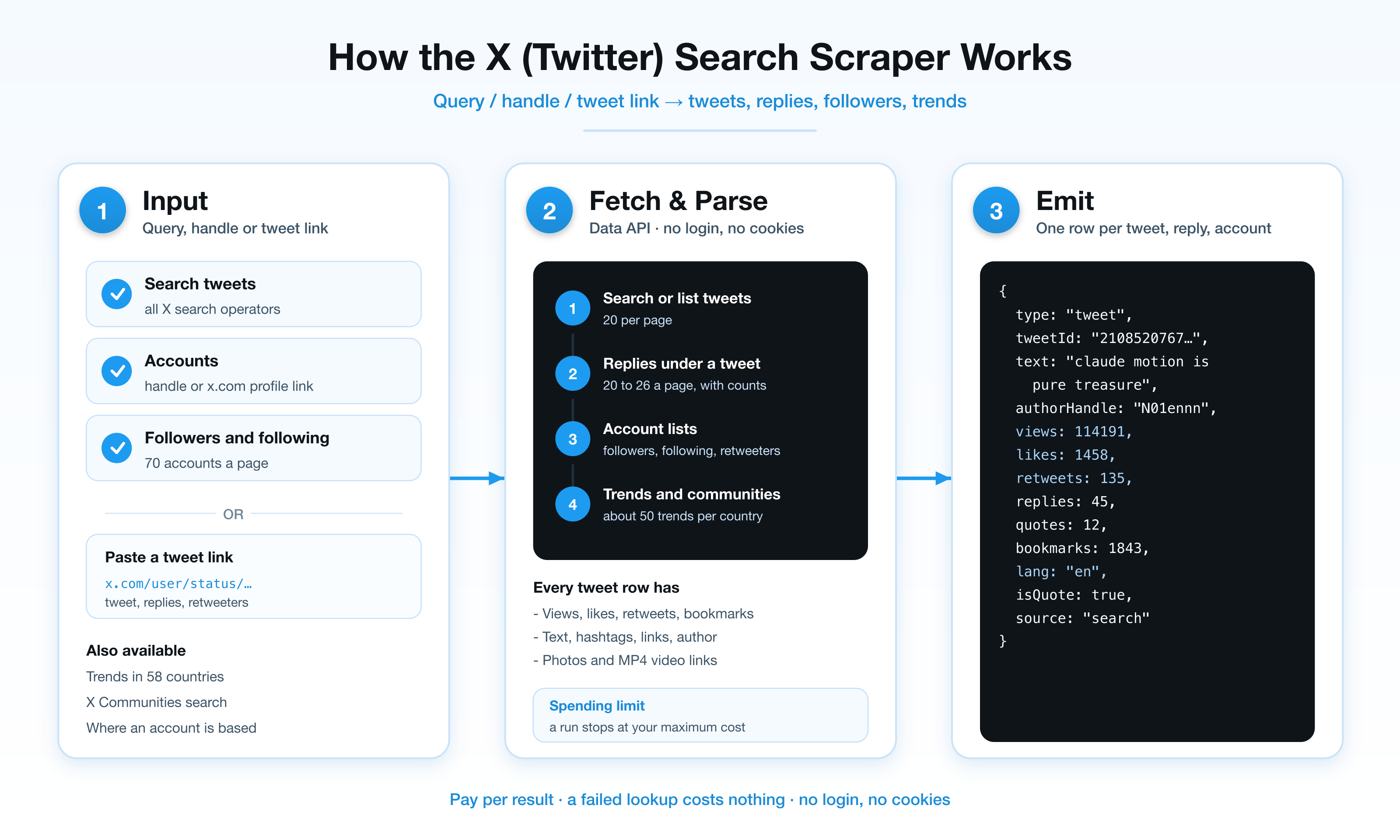
### Why this one
- **Search works, with operators.** `from:nasa`, `to:user`, `#hashtag`, `"exact phrase"`, `lang:en`, `since:2026-01-01`, `until:2026-02-01`, `min_faves:100`, `filter:media`, `-filter:replies`.
- **Replies under a tweet.** The conversation below any tweet, with each reply's own counts.
- **Follower graphs.** Followers, following and retweeters, 55 to 70 accounts a page.
- **Views and bookmarks.** Every tweet row has them, next to likes, retweets, replies and quotes.
- **Media links.** Photos and the best MP4 file of each video.
- **Nothing to log in to.** No cookie to paste and none to expire.
### Input
| Field | Type | Description |
|-------|------|-------------|
| `searchQueries` | `string[]` | Search queries. Operators work as in the X search box. |
| `searchType` | string | `Latest` (default), `Top` or `Media`. |
| `maxTweetsPerQuery` | integer | Tweets per query. Default 50, minimum 10. |
| `handles` | `string[]` | Handles (`nasa`, `@nasa`) or profile links. |
| `includeProfile` | boolean | The profile row. On by default. |
| `includeAccountOrigin` | boolean | Adds `accountBasedIn`, `connectedVia`, `usernameChanges` to the profile (billed `account-origin` when X returns them). |
| `includeTweets` / `includeUserReplies` | boolean | The account's tweets (on by default), or its tweets and replies. |
| `maxTweetsPerUser` | integer | Default 20, minimum 10, for each of the two lists. |
| `includeFollowers` / `includeFollowing` | boolean | Account rows, 70 a page. |
| `maxFollowersPerUser` | integer | Default 70, minimum 20, for each list. |
| `tweetUrls` | `string[]` | Tweet links or IDs. |
| `includeReplies` / `maxRepliesPerTweet` | boolean / integer | Replies under each tweet. Default 50. |
| `includeRetweeters` / `maxRetweetersPerTweet` | boolean / integer | Accounts that retweeted. Default 55. |
| `trendCountries` | `string[]` | Countries, picked from a list. |
| `communityKeywords` | `string[]` | Community search, about 8 per keyword. |
| `communities` / `maxTweetsPerCommunity` | `string[]` / integer | Community links or IDs and tweets per community. Default 20. |
| `lists` / `maxTweetsPerList` | `string[]` / integer | List links or IDs and tweets per list. Default 100. |
| `includeListMembers` / `includeListFollowers` / `maxAccountsPerList` | boolean / boolean / integer | The accounts on the list and the accounts following it, billed as follower rows. Default 100 each. |
| `maxItems` | integer | Cap on tweet rows per run. Default 1,000. |
#### Example: search with operators
```json
{
"searchQueries": ["coffee lang:en min_faves:100", "from:nasa since:2026-09-01"],
"searchType": "Latest",
"maxTweetsPerQuery": 200
}
```
#### Example: an account with its followers
```json
{
"handles": ["https://x.com/nasa"],
"includeAccountOrigin": true,
"maxTweetsPerUser": 100,
"includeFollowers": true,
"maxFollowersPerUser": 700
}
```
#### Example: a tweet with its replies and retweeters
```json
{
"tweetUrls": ["https://x.com/nasa/status/2109358009478414387"],
"includeReplies": true,
"maxRepliesPerTweet": 200,
"includeRetweeters": true
}
```
### Output
Tweet:
```json
{
"type": "tweet",
"tweetId": "2108520767092597182",
"url": "https://x.com/N01ennn/status/2108520767092597182",
"text": "claude motion is pure treasure",
"createdAt": "2026-10-09T11:31:39.000Z",
"lang": "en",
"likes": 1458,
"retweets": 135,
"replies": 45,
"quotes": 12,
"bookmarks": 1843,
"views": 114191,
"isRetweet": false,
"isQuote": true,
"isReply": false,
"hashtags": [],
"mentions": [],
"links": [],
"photos": [],
"videos": [{ "url": "https://video.twimg.com/…/1920x1080/….mp4", "durationMs": 24000, "bitrate": 2176000 }],
"authorHandle": "N01ennn",
"authorFollowers": 9985,
"authorVerified": true,
"source": "search",
"searchQuery": "coffee lang:en min_faves:50"
}
```
Tweet rows also carry `conversationId`, `inReplyToTweetId`, the retweeted or quoted tweet's id, text and author, and `authorName`, `authorId`, `authorUrl`, `authorAvatar`. A `reply` row has the same columns plus `replyToTweetId`.
Profile:
```json
{
"type": "profile",
"handle": "NASA",
"url": "https://x.com/NASA",
"userId": "11348282",
"name": "NASA",
"bio": "Making the seemingly impossible, possible. ✨",
"location": "Pale Blue Dot",
"website": "http://www.nasa.gov/",
"followers": 92325080,
"following": 115,
"tweets": 74416,
"createdAt": "2007-12-19T20:20:32.000Z",
"verified": true,
"verificationType": "Government"
}
```
A `follower`, `following` or `retweeter` row has `handle`, `name`, `bio`, `followers`, `following`, `tweets`, `verified`, `createdAt`, and `ofHandle` or `ofTweetId`. A `trend` row has `country`, `rank`, `name`, `context` and `searchUrl`. A `community` row has `communityId`, `name`, `topic`, `members` and `url`.
### Pricing
Pay per event. You pay for rows you receive; a lookup that returns nothing costs nothing.
| Event | When | Price |
|-------|------|-------|
| Actor start | Once per run | $0.005 |
| Tweet | Each tweet from search, an account or a community | $0.0004 |
| Reply | Each reply under a tweet | $0.0004 |
| Tweet detail | Each tweet given by link | $0.003 |
| Profile | Each profile row | $0.003 |
| Account origin | Each profile X returned an origin for | $0.003 |
| Follower | Each follower, following or retweeter row | $0.0003 |
| Trend | Each trending topic | $0.001 |
| Community | Each community found by keyword | $0.001 |
1,000 tweets from search cost $0.40. 1,000 followers cost $0.30. Set a maximum cost per run in the run options and the Actor stops there with what it has.
### FAQ
**Do I need an X account, a cookie or a proxy?**
No.
**Which search operators work?**
The ones the X search box accepts: `from:`, `to:`, `@mention`, `#hashtag`, quotes for an exact phrase, `OR`, `-word`, `lang:`, `since:`, `until:`, `min_faves:`, `min_retweets:`, `min_replies:`, `filter:media`, `filter:links`, `-filter:replies`.
**Why did I get 20 tweets when I asked for 25?**
Tweets arrive in pages of about 20. A further page is read only when at least 10 more tweets are wanted, so small remainders are dropped.
**How far back does search go?**
As far as X's own search does. Use `since:` and `until:` to walk through a date range in slices.
**Why is `accountBasedIn` empty for some accounts?**
X does not show an origin for every account, government accounts for example. The `account-origin` event is charged only when X returned one.
**Are deleted or protected tweets returned?**
No. They are reported in the log and not charged.
**Are images and videos downloaded?**
No. Each row has direct links you can download from.
### 🤖 For AI Agents & LLM Apps
**Purpose:** X (Twitter) tweets, replies, profiles, follower lists, trends and communities as structured JSON, with no login.
**Minimal input:** `{"searchQueries": ["coffee lang:en"], "maxTweetsPerQuery": 20}`
**Output:** rows with `type` = `tweet` | `reply` | `profile` | `follower` | `following` | `retweeter` | `trend` | `community`. Tweets: tweetId, url, text, createdAt, lang, likes, retweets, replies, quotes, bookmarks, views, hashtags, mentions, links, photos, videos, authorHandle, authorFollowers. Accounts: handle, name, bio, followers, following, tweets, verified.
**Behaviors to know:** `maxItems` caps tweet rows only. Per-source minimums are 10 tweets and 20 accounts. Search operators go inside the query string. Free-plan runs return up to 100 tweets.
### ⚠️ Disclaimer
This Actor collects publicly available data only. It is not affiliated with, endorsed by, or sponsored by X Corp. You are responsible for using the data in line with applicable laws and X's terms, including rules on personal data.
### SEO Keywords
twitter scraper, x scraper, twitter search scraper, x search scraper, tweet scraper, twitter replies scraper, twitter comments scraper, twitter followers scraper, twitter following scraper, retweeters scraper, twitter trends scraper, x communities scraper, twitter api alternative, x api alternative, twitter no login scraper, tweet views and bookmarks, twitter advanced search scraper
# Actor input Schema
## `searchQueries` (type: `array`):
Search X like the search box does. Operators work: from:nasa, to:user, #hashtag, "exact phrase", lang:en, since:2026-01-01, until:2026-02-01, min_faves:100, filter:media, -filter:replies. A page holds 20 tweets.
## `searchType` (type: `string`):
Latest returns the newest tweets, Top the ones X ranks highest, Media only tweets with photos or video.
## `maxTweetsPerQuery` (type: `integer`):
Tweets to return for each query (minimum 10).
## `handles` (type: `array`):
X handles (nasa, @nasa) or profile links (https://x.com/nasa). Each returns the profile and, as chosen below, the account's tweets, replies, followers and following.
## `includeProfile` (type: `boolean`):
Return the profile row: followers, following, tweet count, bio, location, join date, verification and affiliation.
## `includeAccountOrigin` (type: `boolean`):
Add where X says the account is based, how it connects (app store region) and how many times the handle changed. One extra lookup per account.
## `includeTweets` (type: `boolean`):
Return the account's tweets, newest first.
## `includeUserReplies` (type: `boolean`):
Return the account's Replies tab: its tweets together with the replies it wrote.
## `maxTweetsPerUser` (type: `integer`):
Tweets to return for each account, for each of the two lists above (minimum 10). A page holds 20 to 40.
## `includeFollowers` (type: `boolean`):
Return the accounts that follow each handle, 70 a page.
## `includeFollowing` (type: `boolean`):
Return the accounts each handle follows, 70 a page.
## `maxFollowersPerUser` (type: `integer`):
Accounts to return from each follower or following list (minimum 20).
## `tweetUrls` (type: `array`):
Tweet links (https://x.com/user/status/123…) or tweet IDs. Each returns the tweet with its counts.
## `includeReplies` (type: `boolean`):
Return the replies under each tweet as separate rows.
## `maxRepliesPerTweet` (type: `integer`):
Replies to return for each tweet (minimum 10). A page holds 20 to 26.
## `includeRetweeters` (type: `boolean`):
Return the accounts that retweeted each tweet, 55 a page.
## `maxRetweetersPerTweet` (type: `integer`):
Accounts to return for each tweet (minimum 20).
## `trendCountries` (type: `array`):
Return the current trending topics of each chosen country, about 50 each.
## `communityKeywords` (type: `array`):
Find X Communities by keyword: name, topic and member count. About 8 per keyword.
## `communities` (type: `array`):
Community links (https://x.com/i/communities/123…) or IDs, as returned by community search. Each returns the community's tweets.
## `maxTweetsPerCommunity` (type: `integer`):
Tweets to return for each community (minimum 10). A page holds 20.
## `lists` (type: `array`):
X lists (https://x.com/i/lists/123…) or list IDs. Each returns the tweets in the list, and on request its members and followers.
## `includeListTweets` (type: `boolean`):
Return the tweets in each list, newest first.
## `maxTweetsPerList` (type: `integer`):
Tweets to return for each list (minimum 10). A page holds about 100.
## `includeListMembers` (type: `boolean`):
Return the accounts on each list, one row per account.
## `includeListFollowers` (type: `boolean`):
Return the accounts that follow each list, one row per account.
## `maxAccountsPerList` (type: `integer`):
Members and followers to return for each list (minimum 20). A page holds 20.
## `maxItems` (type: `integer`):
Upper limit on tweet rows across the whole run (minimum 10). Free-plan accounts get up to 100.
## Actor input object example
```json
{
"searchQueries": [
"coffee lang:en"
],
"searchType": "Latest",
"maxTweetsPerQuery": 50,
"includeProfile": true,
"includeAccountOrigin": false,
"includeTweets": true,
"includeUserReplies": false,
"maxTweetsPerUser": 20,
"includeFollowers": false,
"includeFollowing": false,
"maxFollowersPerUser": 70,
"includeReplies": false,
"maxRepliesPerTweet": 50,
"includeRetweeters": false,
"maxRetweetersPerTweet": 55,
"maxTweetsPerCommunity": 20,
"includeListTweets": true,
"maxTweetsPerList": 100,
"includeListMembers": false,
"includeListFollowers": false,
"maxAccountsPerList": 100,
"maxItems": 1000
}
```
# Actor output Schema
## `results` (type: `string`):
Rows told apart by `type`: `tweet`, `reply`, `profile`, `follower`, `following`, `retweeter`, `trend` and `community`.
# API
You can run this Actor programmatically using our API. Below are code examples in JavaScript, Python, and CLI, as well as the OpenAPI specification and MCP server setup.
## JavaScript example
```javascript
import { ApifyClient } from 'apify-client';
// Initialize the ApifyClient with your Apify API token
// Replace the '' with your token
const client = new ApifyClient({
token: '',
});
// Prepare Actor input
const input = {
"searchQueries": [
"coffee lang:en"
]
};
// Run the Actor and wait for it to finish
const run = await client.actor("memo23/x-twitter-search-scraper").call(input);
// Fetch and print Actor results from the run's dataset (if any)
console.log('Results from dataset');
console.log(`💾 Check your data here: https://console.apify.com/storage/datasets/${run.defaultDatasetId}`);
const { items } = await client.dataset(run.defaultDatasetId).listItems();
items.forEach((item) => {
console.dir(item);
});
// 📚 Want to learn more 📖? Go to → https://docs.apify.com/api/client/js/docs
```
## Python example
```python
from apify_client import ApifyClient
# Initialize the ApifyClient with your Apify API token
# Replace '' with your token.
client = ApifyClient("")
# Prepare the Actor input
run_input = { "searchQueries": ["coffee lang:en"] }
# Run the Actor and wait for it to finish
run = client.actor("memo23/x-twitter-search-scraper").call(run_input=run_input)
# Fetch and print Actor results from the run's dataset (if there are any)
print(f"💾 Check your data here: https://console.apify.com/storage/datasets/{run.default_dataset_id}")
for item in client.dataset(run.default_dataset_id).iterate_items():
print(item)
# 📚 Want to learn more 📖? Go to → https://docs.apify.com/api/client/python/docs/quick-start
```
## CLI example
```bash
echo '{
"searchQueries": [
"coffee lang:en"
]
}' |
apify call memo23/x-twitter-search-scraper --silent --output-dataset
```
## MCP server setup
```json
{
"mcpServers": {
"apify": {
"type": "http",
"url": "https://mcp.apify.com/?tools=fetch-actor-details,memo23/x-twitter-search-scraper"
}
}
}
```
The hosted server signs you in with OAuth on first connect, so no API token belongs in this config. Clients without OAuth support can send an `Authorization: Bearer ` header instead, using a token from API & Integrations in Apify Console (https://console.apify.com/settings/integrations).
## OpenAPI specification
Download the OpenAPI definition: https://api.apify.com/v2/actors/KvRrkwDDFm4vmklVv/builds/jLwyn3X0c2EBhMfb4/openapi.json