# Xiaohongshu (RedNote) All-in-One Scraper 小红书 \[From $2] No Login (`memo23/xiaohongshu-all-in-one-scraper`) Actor
\[From $2 per 1000 results] Xiaohongshu / RedNote / Little Red Book (小红书, XHS) scraper with no login, cookie or xsec_token. Search notes, full notes with video files, all comments and replies, creators, creator search, topics, products with reviews and hot topics. Notes $3, comments $4 per 1,000.
- **URL**: https://apify.com/memo23/xiaohongshu-all-in-one-scraper.md
- **Developed by:** [Muhamed Didovic](https://apify.com/memo23) (community)
- **Categories:** Social media, E-commerce, Videos
- **Stats:** 10 total users, 6 monthly users, 100.0% runs succeeded, 0 bookmarks
- **User rating**: No ratings yet
## Pricing
from $3.00 / 1,000 notes
This Actor is paid per event. You are not charged for the Apify platform usage, but only a fixed price for specific events.
Learn more: https://docs.apify.com/actors/running/actors-in-store.md#pay-per-event
## What's an Apify Actor?
An Actor is a serverless cloud program that runs on the Apify platform. It has two run modes.
In Batch mode, an Actor accepts a well-defined JSON input, performs an action which can take anything from a few seconds to a few hours,
and optionally produces a well-defined JSON output, datasets with results, or files in key-value store.
In Standby mode, an Actor provides a web server which can be used as a website, API, or an MCP server.
Apify vocabulary and the platform model are defined once, in the agent quickstart at https://apify.com/agents.md.
## How to integrate an Actor?
If asked about integration, you help developers integrate Actors into their projects.
You adapt to their stack and deliver integrations that are safe, well-documented, and production-ready.
Do not guess an integration path. Every one of them is in the agent quickstart at https://apify.com/agents.md: the Apify MCP server, Agent Skills with the Apify CLI, the JavaScript and Python clients, the REST API, and the account-free path for an agent with no human to sign in. It also carries the rule on stating cost before the first paid run.
For examples already wired to this Actor's own input schema, see the [API](#api) section below.
Each client library has reference documentation the quickstart does not restate: [JavaScript/TypeScript](https://docs.apify.com/api/client/js/docs.md) (`npm install apify-client`) and [Python](https://docs.apify.com/api/client/python/docs.md) (`pip install apify-client`).
# README
## Xiaohongshu (RedNote) All-in-One Scraper 小红书 — No Login or Cookies
Get structured data from **Xiaohongshu (小红书)**, also called **RedNote**, **Little Red Book** or **XHS**, without an account or login: notes by keyword, full note details with video files, complete comment threads with replies, creator profiles and their notes, creator search, topics, shop products with buyer reviews, images, group chats and hot topics. There is no cookie to paste, no `xsec_token` to hunt for and no proxy to set up.
One run can mix all of these. You pay per row, from $2 per 1,000: 1,000 notes from search cost $3 and 1,000 comments cost $4. The full price list is in the Pricing section below.
### What it does
| Input | You get |
|-------|---------|
| Search keyword | Notes matching the keyword, with sort, note type and date filters |
| Note link, share link or ID | The full note: text, hashtags with topic IDs, images or the video file, subtitles, counts, IP location |
| `includeComments` / `includeReplies` | All comments of every note in the run, and the replies under them |
| Creator link or user ID | Followers, following, notes, likes and saves received, bio, emails found in the bio, location |
| `includeCreatorNotes` | The notes a creator has posted, newest first |
| Creator-search keyword | Creators matching a name or topic, with follower counts |
| Topic ID or link | The topic's view and note counts, plus the notes under it |
| Product keyword | Shop products with price, units sold, promotion and shop |
| Product link or ID | The product page: price, images, attributes, rating breakdown, shop scores |
| `includeReviews` | Buyer reviews: text, star ratings, tags, photos, variant bought |
| Image keyword | Single images with the note each belongs to |
| Group-chat keyword | Public group chats with member counts and recent activity |
| Suggestion keyword | The search suggestions shown while typing |
| `includeHotTopics` / `includeTrendingTopics` | The live hot list and the topics suggested to creators |
| Explore feed category | Notes from the explore feed (food, fashion, travel and ten more) |
Every row carries a `type`: `note`, `comment`, `reply`, `creator`, `creator-search-result`, `topic`, `product`, `product-detail`, `product-review`, `image`, `group-chat`, `keyword-suggestion` or `hot-topic`. The dataset has **Notes**, **Comments**, **Creators**, **Products and reviews** and **Topics and trends** views.
### How It Works
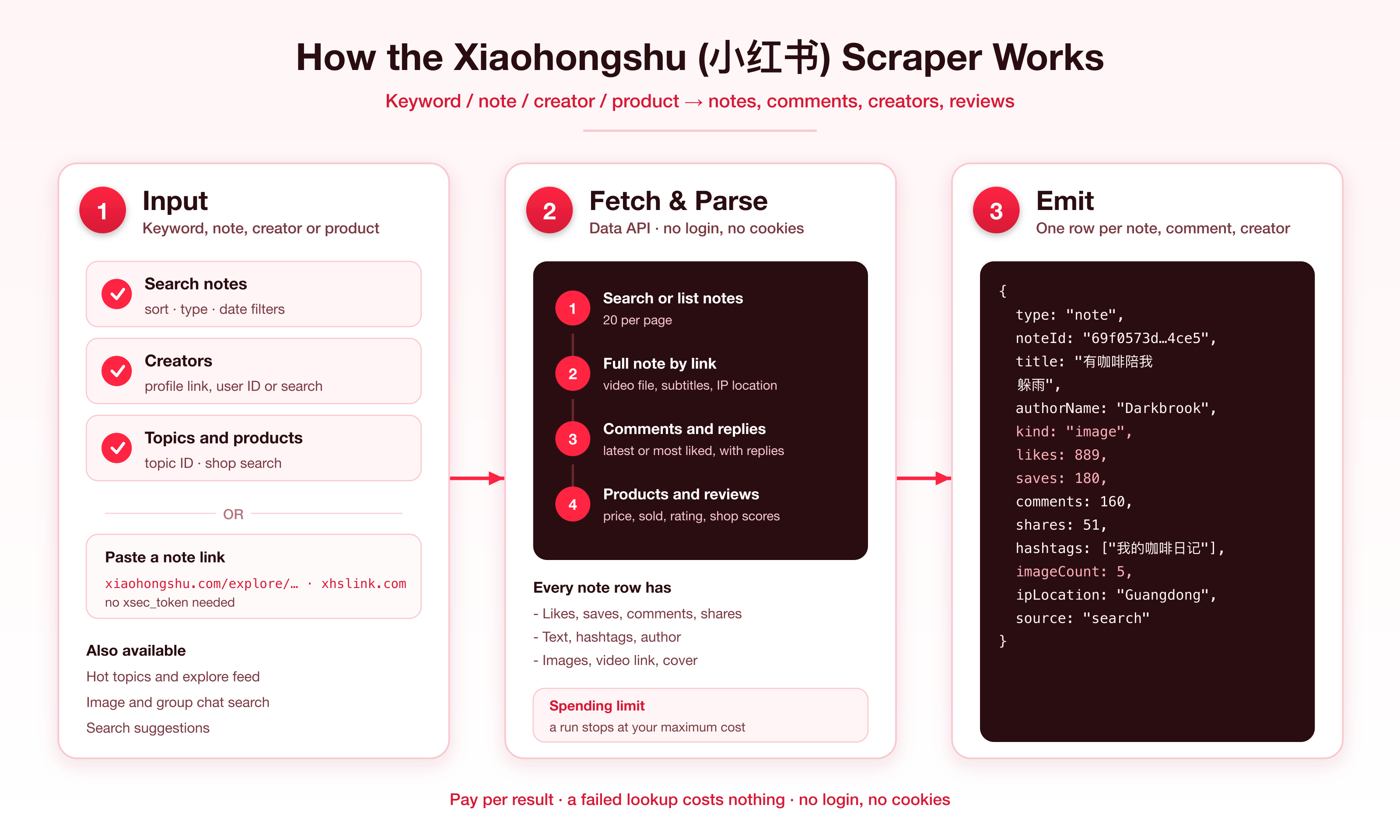
### Why this one
- **Nothing to log in to.** Comments, replies and creator search work without a `web_session` cookie.
- **Links are enough.** A plain note link or a 24-character note ID returns the note. No `xsec_token`.
- **Whole comment threads.** Comments are paged to the end, sorted by latest or most liked, with replies. When Xiaohongshu ends an order early on a note (it does on some older notes), the run carries on in another order and skips comments it already returned.
- **Video files.** Video notes come with a direct MP4 link, duration, size and subtitle files when the note has them.
- **Shop data.** Product search, product pages, shop scores and buyer reviews in the same run.
### Input
| Field | Type | Description |
|-------|------|-------------|
| `keywords` | `string[]` | Note search keywords, Chinese or English. A note found twice is returned once. |
| `maxResultsPerKeyword` | integer | Notes per keyword. Default 40, minimum 5. |
| `searchSort` | string | `general`, `latest`, `mostLiked`, `mostCommented` or `mostSaved`. |
| `searchNoteType` | string | `all`, `video` or `image`. |
| `searchTime` | string | `all`, `day`, `week` or `halfYear`. |
| `noteUrls` | `string[]` | Note links, `xhslink.com` share links or note IDs (billed `note-detail`). |
| `includeNoteDetails` | boolean | Open every found note for hashtags with topic IDs, IP location and the video file (billed `note-detail` instead of `note`). |
| `includeComments` / `maxCommentsPerNote` / `commentSort` | boolean / integer / string | Comment rows. Default 20 per note, sorted `latest` or `mostLiked`. |
| `includeReplies` / `maxRepliesPerComment` | boolean / integer | Reply rows. Default 10 per comment. |
| `creators` | `string[]` | Profile links, share links or user IDs (billed `creator-profile`). |
| `includeCreatorNotes` / `maxNotesPerCreator` | boolean / integer | The creator's notes. On by default, 20 per creator. |
| `creatorKeywords` / `maxCreatorsPerKeyword` | `string[]` / integer | Find creators by keyword. Default 20. |
| `topics` / `maxResultsPerTopic` / `topicSort` | `string[]` / integer / string | Topic IDs or links, 30 notes each, `trending` or `latest`. |
| `productKeywords` / `maxProductsPerKeyword` | `string[]` / integer | Shop search. Default 20. |
| `products` | `string[]` | Product links or IDs (billed `product-detail`). |
| `includeReviews` / `maxReviewsPerProduct` / `reviewSort` | boolean / integer / string | Buyer reviews for products given by link or ID. Default 24. |
| `imageKeywords` / `maxImagesPerKeyword` | `string[]` / integer | Image search. Default 20. |
| `groupKeywords` | `string[]` | Group chat search, up to 20 per keyword. |
| `suggestKeywords` | `string[]` | Search suggestions, about 10 per keyword. |
| `includeHotTopics` / `includeTrendingTopics` / `maxTopicsPerList` | boolean / boolean / integer | Topic lists. Default 20 rows each. |
| `feedCategories` / `maxResultsPerFeed` | `string[]` / integer | Explore feed categories. Default 20 notes each. |
| `maxItems` | integer | Cap on note rows per run. Default 200. |
#### Example: keyword search with comments and replies
```json
{
"keywords": ["咖啡", "skincare"],
"maxResultsPerKeyword": 60,
"searchSort": "mostLiked",
"includeComments": true,
"maxCommentsPerNote": 50,
"includeReplies": true
}
```
#### Example: notes by link, with the full comment thread
```json
{
"noteUrls": [
"https://www.xiaohongshu.com/explore/69f0573d0000000022024ce5",
"http://xhslink.com/a/AbCd123"
],
"includeComments": true,
"maxCommentsPerNote": 500
}
```
#### Example: creators and their notes
```json
{
"creators": ["https://www.xiaohongshu.com/user/profile/67cfe3f4000000000e01fcc4"],
"maxNotesPerCreator": 100,
"creatorKeywords": ["咖啡"]
}
```
#### Example: products with reviews
```json
{
"productKeywords": ["咖啡"],
"products": ["68e74207c753610001ba0bed"],
"includeReviews": true,
"maxReviewsPerProduct": 60
}
```
### Output
Note:
```json
{
"type": "note",
"noteId": "69f0573d0000000022024ce5",
"url": "https://www.xiaohongshu.com/explore/69f0573d0000000022024ce5",
"kind": "image",
"title": "有咖啡陪我躲雨",
"text": "下雨天和咖啡更配 #我的咖啡日记[话题]# #拿铁[话题]#",
"publishedAt": "2026-04-28T06:44:13.000Z",
"likes": 889,
"saves": 180,
"comments": 160,
"shares": 51,
"hashtags": ["我的咖啡日记", "咖啡日常", "拿铁"],
"topicIds": ["5ebce63af689490001eba6ef", "5c199aed8a056f000103d0cb"],
"imageCount": 5,
"ipLocation": "Guangdong",
"authorId": "67cfe3f4000000000e01fcc4",
"authorName": "Darkbrook",
"authorRedId": "95444681143",
"authorUrl": "https://www.xiaohongshu.com/user/profile/67cfe3f4000000000e01fcc4",
"source": "url"
}
```
Note rows also carry `images[]`, `coverUrl`, `mentions[]`, `authorAvatar`, `authorVerified` and, for video notes, `videoUrl`, `videoDurationSec`, `videoWidth`, `videoHeight` and `subtitles[]`. Search rows add `searchKeyword`, creator rows `creatorId` and `creatorFollowers`, topic rows `topic` and `topicId`, feed rows `feedCategory`. Image links give the full-resolution image as a JPEG (iPhone HEIC uploads included) at an address with no expiry; video links are signed and expire after a few days.
Which list fills which fields: search rows have text, counts, images, the video file and the author; a creator's notes and topic notes have the same without IP location; explore feed rows have title, cover, likes and author. `includeNoteDetails` fills the rest for all of them.
Comment:
```json
{
"type": "comment",
"commentId": "6aca5832000000001202ac5a",
"noteId": "69f0573d0000000022024ce5",
"text": "礼拿,剪视频,不商用",
"likes": 0,
"replyCount": 0,
"postedAt": "2026-10-10T15:22:27.000Z",
"ipLocation": "Spain",
"isAuthor": false,
"userName": "钦豆包_",
"userRedId": "Zhang_5114ST"
}
```
A `reply` row has the same columns plus `parentCommentId`, `replyToCommentId` and `replyToUser`. `ipLocation` on comments and replies is filled for recent ones (about the last month); older comments come back `null`. `images` holds full-size links to the stickers or photos in a comment and `imageType` says `photo` or `sticker` (`null` without one); `text` is `null` on a comment that is only a sticker or photo.
Creator:
```json
{
"type": "creator",
"creatorId": "67cfe3f4000000000e01fcc4",
"url": "https://www.xiaohongshu.com/user/profile/67cfe3f4000000000e01fcc4",
"name": "Darkbrook",
"redId": "95444681143",
"bio": "咖啡的流淌日记。",
"followers": 875,
"following": 8,
"notes": 51,
"likesReceived": 7103,
"savesReceived": 1569,
"location": "中国 广东 深圳",
"ipLocation": "Guangdong",
"verified": false
}
```
Product page:
```json
{
"type": "product-detail",
"productId": "68e74207c753610001ba0bed",
"title": "雀巢 · 1+2原味特浓奶香三合一咖啡粉",
"price": 8.5,
"originalPrice": 11,
"currency": "CNY",
"sold": 1956,
"rating": 4.5,
"reviewCount": 110,
"ratingBreakdown": { "1": 0, "2": 0, "3": 1, "4": 13, "5": 96 },
"shopName": "尔吾网络的店",
"shopFollowers": 656,
"shopSold": 433293,
"shopRating": 4.6,
"shopLogisticsScore": 4.8
}
```
`ratingBreakdown` and `purchases` come with `includeReviews`; without it they are `null`, while `rating` and `reviewCount` are always filled. `reviewCount` counts every review on the product page, so it can be higher than the sum of `ratingBreakdown`, which leaves out reviews without a star rating.
A `product-review` row has `text`, `rating`, `logisticsRating`, `serviceRating`, `likes`, `postedOn`, `tags[]`, `images[]`, `variant` and `userName`.
### Pricing
Pay per event. You pay for rows you receive; a lookup that returns nothing costs nothing.
| Event | When | Price |
|-------|------|-------|
| Actor start | Once per run | $0.005 |
| Note | Each note row from search, a creator, a topic or the feed | $0.003 |
| Note detail | Each note opened in full (by link, or with `includeNoteDetails`) | $0.025 |
| Comment | Each comment or reply row | $0.004 |
| Creator profile | Each full creator row | $0.02 |
| Creator search result | Each creator found by keyword | $0.003 |
| Topic | Each topic row with its counts | $0.02 |
| Product | Each product found by keyword | $0.003 |
| Product detail | Each product page | $0.03 |
| Product review | Each buyer review | $0.003 |
| Image | Each image found by keyword | $0.003 |
| Group chat | Each group chat found by keyword | $0.003 |
| Keyword suggestion | Each search suggestion | $0.002 |
| Hot topic | Each row of a topic list | $0.003 |
1,000 notes from search cost $3. Set a maximum cost per run in the run options and the Actor stops there with what it has.
### FAQ
**Do I need a Xiaohongshu account, a cookie or an xsec_token?**
No. Paste a keyword, a link or an ID.
**Why do some notes have no comment rows?**
Comments are fetched for notes with at least 3 comments.
**Why do some comments show fewer replies than `replyCount`?**
The reply shown under a comment always comes along. The full reply thread is opened for comments with 5 or more replies, up to `maxRepliesPerComment`.
**How do I find a topic ID?**
Run a note by link, or a search with `includeNoteDetails`: the note's `topicIds` line up with its `hashtags`. Use those IDs in `topics`.
**Can I search topics by name?**
Not directly. Search notes by the name and take the topic ID from a result.
**Are images and videos downloaded?**
No. Each row has direct links: full-resolution JPEG image links that stay valid, and video links you can download from for a few days.
**Why is the minimum per keyword 5?**
Results arrive in pages, so limits below 5 are raised to 5.
**Which currency are prices in?**
Chinese yuan (CNY), as shown in the Xiaohongshu shop.
### 🤖 For AI Agents & LLM Apps
**Purpose:** Xiaohongshu (RedNote) notes, comments, creators, topics, products and reviews as structured JSON, with no login.
**Minimal input:** `{"keywords": ["咖啡"], "maxResultsPerKeyword": 20}`
**Output:** rows with `type` = `note` | `comment` | `reply` | `creator` | `creator-search-result` | `topic` | `product` | `product-detail` | `product-review` | `image` | `group-chat` | `keyword-suggestion` | `hot-topic`. Notes: noteId, url, kind, title, text, publishedAt, likes, saves, comments, shares, hashtags, topicIds, images, videoUrl, authorId, authorName. Comments: noteId, commentId, text, likes, replyCount, postedAt, ipLocation, userName. Replies add parentCommentId.
**Behaviors to know:** `maxItems` caps note rows only. Per-source limits have a minimum of 5. IDs are 24 hexadecimal characters. Free-plan runs return up to 100 notes.
### ⚠️ Disclaimer
This Actor collects publicly available data only. It is not affiliated with, endorsed by, or sponsored by Xiaohongshu (Xingin) or RedNote. You are responsible for using the data in line with applicable laws and Xiaohongshu's terms, including rules on personal data.
### SEO Keywords
xiaohongshu scraper, rednote scraper, 小红书 scraper, xiaohongshu api, rednote api, little red book scraper, xiaohongshu comments scraper, rednote comments, xiaohongshu note scraper, xiaohongshu search scraper, xiaohongshu user scraper, xiaohongshu creator search, xiaohongshu product scraper, xiaohongshu reviews, xiaohongshu topic scraper, xiaohongshu video downloader link, xiaohongshu no login, xiaohongshu no cookie, rednote data export, xhs scraper
# Actor input Schema
## `keywords` (type: `array`):
Search Xiaohongshu notes by keyword, in Chinese or English. Each keyword is searched on its own; a page holds 20 notes.
## `maxResultsPerKeyword` (type: `integer`):
How many notes to return for each keyword (minimum 5).
## `searchSort` (type: `string`):
Order of the search results.
## `searchNoteType` (type: `string`):
Return all notes, only video notes or only image notes.
## `searchTime` (type: `string`):
Limit the search to recent notes.
## `noteUrls` (type: `array`):
Note links (xiaohongshu.com/explore/…, /discovery/item/…), xhslink.com share links, or 24-character note IDs. Each returns the full note: text, hashtags, images or the video file, counts and IP location. No xsec_token needed.
## `includeNoteDetails` (type: `boolean`):
Search, creator, topic and feed lists already return text, counts and images. Turn this on to also open each note for its hashtags with topic IDs, IP location, share count and, for video notes, the video file and subtitles. Each opened note is billed as a note detail instead of a note.
## `includeComments` (type: `boolean`):
Return the comments of every note in the run as separate rows. Notes known to have fewer than 3 comments are skipped.
## `maxCommentsPerNote` (type: `integer`):
Top-level comments to return for each note (minimum 5). A page holds 10 to 15.
## `commentSort` (type: `string`):
Order of the comments. On some notes Xiaohongshu ends an order early; the run then carries on in its own order, skipping comments already returned, so you still get the whole thread.
## `includeReplies` (type: `boolean`):
Also return the replies under each comment. The reply shown under a comment always comes along; longer reply threads are opened when a comment has 5 or more replies.
## `maxRepliesPerComment` (type: `integer`):
Replies to return for each comment (minimum 5).
## `creators` (type: `array`):
Profile links (xiaohongshu.com/user/profile/…), xhslink.com share links or 24-character user IDs. Each returns the profile: followers, following, note count, likes and saves received, bio, location and verification.
## `includeCreatorNotes` (type: `boolean`):
Also return the notes each creator has posted, newest first.
## `maxNotesPerCreator` (type: `integer`):
Notes to return for each creator (minimum 5). A page holds 20.
## `creatorKeywords` (type: `array`):
Find creators by name or keyword. Returns name, RED ID, follower count and verification. Works without login.
## `maxCreatorsPerKeyword` (type: `integer`):
Creators to return for each keyword (minimum 5). A page holds 20.
## `topics` (type: `array`):
Topic (hashtag) page IDs or topic links. Note rows carry the IDs of their topics in `topicIds`, so a first run can feed a second. Each topic returns its view and note counts plus its notes.
## `maxResultsPerTopic` (type: `integer`):
Notes to return for each topic (minimum 5). A page holds 10.
## `topicSort` (type: `string`):
Order of a topic's notes.
## `productKeywords` (type: `array`):
Search the Xiaohongshu shop by keyword. Returns title, price, original price, units sold, promotion and shop.
## `maxProductsPerKeyword` (type: `integer`):
Products to return for each keyword (minimum 5). A page holds 20.
## `products` (type: `array`):
Product links (…/goods-detail/…) or 24-character product IDs, as returned by product search. Each returns the product page: price, images, attributes, rating with its breakdown, and the shop with its scores.
## `includeReviews` (type: `boolean`):
Return buyer reviews of each product given by link or ID: text, star ratings, tags, photos and the variant bought. Also adds each product's star-rating breakdown and purchase count.
## `maxReviewsPerProduct` (type: `integer`):
Reviews to return for each product (minimum 5). A page holds 12.
## `reviewSort` (type: `string`):
Order of the reviews.
## `imageKeywords` (type: `array`):
Search single images by keyword. Each row is one image with the note it belongs to.
## `maxImagesPerKeyword` (type: `integer`):
Images to return for each keyword (minimum 5). A page holds 20.
## `groupKeywords` (type: `array`):
Find public group chats by keyword: name, description, member count and recent activity. Up to 20 per keyword.
## `suggestKeywords` (type: `array`):
Return the search suggestions Xiaohongshu shows while typing each keyword, about 10 per keyword.
## `includeHotTopics` (type: `boolean`):
Return the live hot list: trending events with the number of people viewing each.
## `includeTrendingTopics` (type: `boolean`):
Return the topics Xiaohongshu suggests to creators, each with the number of notes posted under it.
## `maxTopicsPerList` (type: `integer`):
Rows to return from each topic list (minimum 5).
## `feedCategories` (type: `array`):
Return notes from the explore feed of the chosen categories. Feed rows carry title, cover, likes and author; turn on full details for the rest.
## `maxResultsPerFeed` (type: `integer`):
Notes to return for each feed category (minimum 5). A page holds 20.
## `maxItems` (type: `integer`):
Upper limit on note rows across the whole run. Free-plan accounts get up to 100.
## Actor input object example
```json
{
"keywords": [
"咖啡"
],
"maxResultsPerKeyword": 40,
"searchSort": "general",
"searchNoteType": "all",
"searchTime": "all",
"includeNoteDetails": false,
"includeComments": false,
"maxCommentsPerNote": 20,
"commentSort": "latest",
"includeReplies": false,
"maxRepliesPerComment": 10,
"includeCreatorNotes": true,
"maxNotesPerCreator": 20,
"maxCreatorsPerKeyword": 20,
"maxResultsPerTopic": 30,
"topicSort": "trending",
"maxProductsPerKeyword": 20,
"includeReviews": false,
"maxReviewsPerProduct": 24,
"reviewSort": "default",
"maxImagesPerKeyword": 20,
"includeHotTopics": false,
"includeTrendingTopics": false,
"maxTopicsPerList": 20,
"maxResultsPerFeed": 20,
"maxItems": 200
}
```
# Actor output Schema
## `results` (type: `string`):
Rows told apart by `type`: `note`, `comment` and `reply`, `creator`, `creator-search-result`, `topic`, `product`, `product-detail`, `product-review`, `image`, `group-chat`, `keyword-suggestion` and `hot-topic`.
# API
You can run this Actor programmatically using our API. Below are code examples in JavaScript, Python, and CLI, as well as the OpenAPI specification and MCP server setup.
## JavaScript example
```javascript
import { ApifyClient } from 'apify-client';
// Initialize the ApifyClient with your Apify API token
// Replace the '' with your token
const client = new ApifyClient({
token: '',
});
// Prepare Actor input
const input = {
"keywords": [
"咖啡"
]
};
// Run the Actor and wait for it to finish
const run = await client.actor("memo23/xiaohongshu-all-in-one-scraper").call(input);
// Fetch and print Actor results from the run's dataset (if any)
console.log('Results from dataset');
console.log(`💾 Check your data here: https://console.apify.com/storage/datasets/${run.defaultDatasetId}`);
const { items } = await client.dataset(run.defaultDatasetId).listItems();
items.forEach((item) => {
console.dir(item);
});
// 📚 Want to learn more 📖? Go to → https://docs.apify.com/api/client/js/docs
```
## Python example
```python
from apify_client import ApifyClient
# Initialize the ApifyClient with your Apify API token
# Replace '' with your token.
client = ApifyClient("")
# Prepare the Actor input
run_input = { "keywords": ["咖啡"] }
# Run the Actor and wait for it to finish
run = client.actor("memo23/xiaohongshu-all-in-one-scraper").call(run_input=run_input)
# Fetch and print Actor results from the run's dataset (if there are any)
print(f"💾 Check your data here: https://console.apify.com/storage/datasets/{run.default_dataset_id}")
for item in client.dataset(run.default_dataset_id).iterate_items():
print(item)
# 📚 Want to learn more 📖? Go to → https://docs.apify.com/api/client/python/docs/quick-start
```
## CLI example
```bash
echo '{
"keywords": [
"咖啡"
]
}' |
apify call memo23/xiaohongshu-all-in-one-scraper --silent --output-dataset
```
## MCP server setup
```json
{
"mcpServers": {
"apify": {
"type": "http",
"url": "https://mcp.apify.com/?tools=fetch-actor-details,memo23/xiaohongshu-all-in-one-scraper"
}
}
}
```
The hosted server signs you in with OAuth on first connect, so no API token belongs in this config. Clients without OAuth support can send an `Authorization: Bearer ` header instead, using a token from API & Integrations in Apify Console (https://console.apify.com/settings/integrations).
## OpenAPI specification
Download the OpenAPI definition: https://api.apify.com/v2/actors/JMIsldw2gdS8PheJ5/builds/lJj5bcMZncFvVtcUH/openapi.json