# Yell.com Scraper (`memo23/yell-scraper`) Actor
Scrape yell.com (UK Yellow Pages) into structured business rows: name, phone, email when listed, website, address, hours, rating. Keyword plus city, nationwide UK, or a Yell search or /biz/ profile URL. HTTP first, Chrome if Cloudflare challenges. JSON or CSV out. $5 per 1,000 listings.
- **URL**: https://apify.com/memo23/yell-scraper.md
- **Developed by:** [Muhamed Didovic](https://apify.com/memo23) (community)
- **Categories:** Lead generation, Business
- **Stats:** 2 total users, 2 monthly users, 100.0% runs succeeded, 0 bookmarks
- **User rating**: No ratings yet
## Pricing
from $5.00 / 1,000 listings
This Actor is paid per event. You are not charged for the Apify platform usage, but only a fixed price for specific events.
Learn more: https://docs.apify.com/actors/running/actors-in-store.md#pay-per-event
## What's an Apify Actor?
An Actor is a serverless cloud program that runs on the Apify platform. It has two run modes.
In Batch mode, an Actor accepts a well-defined JSON input, performs an action which can take anything from a few seconds to a few hours,
and optionally produces a well-defined JSON output, datasets with results, or files in key-value store.
In Standby mode, an Actor provides a web server which can be used as a website, API, or an MCP server.
Apify vocabulary and the platform model are defined once, in the agent quickstart at https://apify.com/agents.md.
## How to integrate an Actor?
If asked about integration, you help developers integrate Actors into their projects.
You adapt to their stack and deliver integrations that are safe, well-documented, and production-ready.
Do not guess an integration path. Every one of them is in the agent quickstart at https://apify.com/agents.md: the Apify MCP server, Agent Skills with the Apify CLI, the JavaScript and Python clients, the REST API, and the account-free path for an agent with no human to sign in. It also carries the rule on stating cost before the first paid run.
For examples already wired to this Actor's own input schema, see the [API](#api) section below.
Each client library has reference documentation the quickstart does not restate: [JavaScript/TypeScript](https://docs.apify.com/api/client/js/docs.md) (`npm install apify-client`) and [Python](https://docs.apify.com/api/client/python/docs.md) (`pip install apify-client`).
# README
## Yell.com Scraper

Turn a Yell search into structured UK business rows: name, phone, email when listed, website, address, hours, rating, and profile link.
Keyword + city, nationwide UK, or a yell.com URL. JSON or CSV out.
This is **yell.com** (UK). It is not [Yellow Pages US](https://apify.com/memo23/yellow-pages-us-scraper), [Yellow Pages Canada](https://apify.com/memo23/yellowpages-ca-scraper), or [Yelp](https://www.yelp.com).
### Why Use This Scraper?
- Phone and address on the search card
- Profile pass for hours, extra website/email, and reviews
- Pretty `/s/{what}-{where}.html` URLs and UCS searches
- Uses the official Android listings API, so Unblocker is not required
### Overview
Built for sales teams, agencies, and researchers who need UK **business** leads from Yell.
Every start type becomes **one dataset row per listing**. A keyword search and a `/biz/{slug}/` profile emit the same flat shape. Rows are de-duplicated by listing id.
### Supported Inputs
#### Search terms and locations
| Field | Example |
| --- | --- |
| `searchTerms` | `["restaurants"]`, `["plumbers", "solicitors"]` |
| `locations` | `["London"]`, `["Manchester"]`, `["Glasgow"]` |
Every term is searched in every location. Leave `locations` empty for a nationwide UK category search.
#### URL types
| URL type | Pattern | Example |
| --- | --- | --- |
| Pretty search | `/s/{what}-{where}.html` | `https://www.yell.com/s/restaurants-london.html` |
| Search page | `?pageNum=N` | `https://www.yell.com/s/restaurants-london.html?pageNum=2` |
| UCS search | `/ucs/UcsSearchAction.do?keywords=&location=` | `https://www.yell.com/ucs/UcsSearchAction.do?keywords=plumbers&location=Manchester` |
| Profile | `/biz/{slug}/` | `https://www.yell.com/biz/dishoom-covent-garden-london-3420007/` |
Search URLs paginate automatically.
**Unsupported:** Yelp, Yellow Pages US/CA, Yell ads manager, account pages.
### Use Cases
| Audience | What they take from a run |
| --- | --- |
| Sales and outreach | Phone + email (when listed) + website by trade and city |
| Agencies | Cross-joined term × city lists in one dataset |
| Local SEO | Category, rating, and the Yell profile URL |
| Researchers | Hours and reviews for a trade in a city |
### How It Works
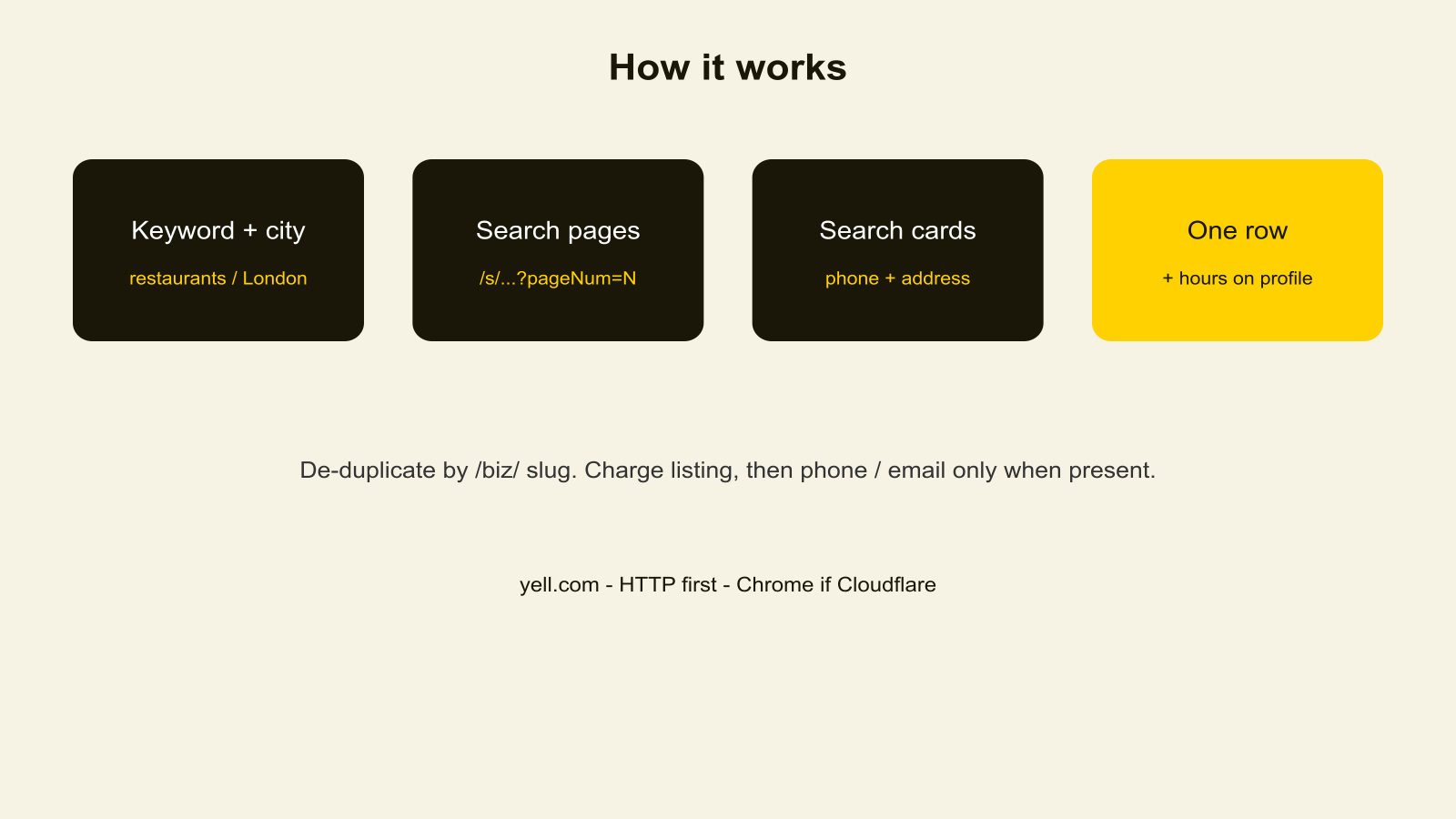
1. Cross-join `searchTerms` × `locations` (or nationwide UK if no city), plus any yell.com URLs.
2. Call the same listings API the official Yell Android app uses (`keywords` + `location` + `pageNum`).
3. Page in 25-row chunks, stopping at `maxItems` or `maxPages`.
4. Read name, phone, website, address, hours, and rating from each listing.
5. Optionally load the single-listing endpoint, then the business website when Yell has no inbox.
6. De-duplicate by listing id and push one row per business.
### Input Configuration
| Field | Type | Required | Notes |
| --- | --- | --- | --- |
| `searchTerms` | array | one of the start types | What you would type into Yell |
| `locations` | array | no | UK city / area. Empty = nationwide |
| `startUrls` | array | one of the start types | Search or `/biz/` URL |
| `maxItems` | integer | no | Default 50. Free users capped at 50. |
| `scrapeDetails` | boolean | no | Default true. Hours, extra website/email, reviews. |
| `maxPages` | integer | no | Default 20. |
| `maxConcurrency` | integer | no | Default 5. |
| `proxy` | object | no | Default is Apify residential, country GB. Do not use Unblocker. |
#### Example input
```json
{
"searchTerms": ["restaurants"],
"locations": ["London"],
"maxItems": 50
}
```
### Output Overview
One flat row per business. Contact and address fields sit at the top level. `searchTerm` tells you which input produced the row. Email is present when Yell publishes one on the card or the profile.
### Output Samples
Search: restaurants in London, with profile enrich.
```json
{
"listingId": "dishoom-covent-garden-london-3420007",
"name": "Dishoom Covent Garden",
"phone": "02074209320",
"email": "coventgarden@dishoom.com",
"street": "12 Upper St Martin's Lane",
"postalCode": "WC2H 9FB",
"city": "London",
"country": "GB",
"yellUrl": "https://www.yell.com/biz/dishoom-covent-garden-london-3420007/"
}
```
### Key Output Fields
**Identity:** `listingId`, `slug`, `name`, `yellUrl`
**Contact:** `phone`, `phones`, `email`, `website`, `social`
**Place:** `address`, `street`, `postalCode`, `city`, `region`, `country`, `latitude`, `longitude`
**Directory:** `category`, `categories`, `rating`, `reviewCount`, `hours`, `description`, `images`, `logo`, `reviews`
**Provenance:** `searchTerm`, `scrapedAt`
### Pricing
| Event | When | Rate |
| --- | --- | --- |
| Actor start | Once per run, per GB of memory | $0.005 |
| Listing | Each unique business in the dataset | $0.005 ($5 / 1k) |
| Contact phone | Row has a phone | $0.002 |
| Contact email | Row has an email | $0.05 |
Phone and email are billed only when Yell publishes that field. A miss is free. Phone is common on search cards. Inbox is rarer; keep `scrapeDetails` on if you want the extra chance.
### FAQ
**Will every row have an email?** No. Phone is common. Inbox is on a smaller share of cards and profiles. Phone and email are billed as extra events only when the field is present.
**What does scrapeDetails add?** The single-listing API (hours, extra website, reviews) plus the business website when Yell has no inbox. Phone is already on almost every search row.
**Do I need a proxy?** Yes — Apify residential (GB). The listings API rejects datacenter IPs. You do not need Unblocker.
**Is there an official Android app?** Yes — “Yell - Find Local Businesses” by YELL LIMITED (`com.yell.launcher2`) is live on Play. This actor uses that same listings API.
### Support
- Issues: [Actor Issues](https://console.apify.com/actors/ecsN2DmMI7kiGnvZJ/issues)
- Author site:
- Email:
### Additional Services
Bulk city sweeps, scheduled refreshes, or a private API wrapper:
### Explore More Scrapers
Directory cousins: [PanoramaFirm.pl](https://apify.com/memo23/panoramafirm-scraper), [PaginasAmarillas.es](https://apify.com/memo23/paginasamarillas-es-scraper), [Herold.at](https://apify.com/memo23/herold-at-scraper), [PagineGialle](https://apify.com/memo23/paginegialle-scraper), [local.ch](https://apify.com/memo23/local-ch-scraper), [Gelbe Seiten](https://apify.com/memo23/gelbeseiten-scraper), [Yellow Pages US](https://apify.com/memo23/yellow-pages-us-scraper), [Yellow Pages Canada](https://apify.com/memo23/yellowpages-ca-scraper), [Canada411](https://apify.com/memo23/canada411-scraper), and [PagesJaunes.fr](https://apify.com/memo23/pagesjaunes-scraper-cheerio). More actors on [memo23](https://apify.com/memo23) and [didovic](https://apify.com/didovic).
### 🤖 For AI Agents & LLM Apps
Compact reference for AI agents calling this actor via the [Apify MCP server](https://mcp.apify.com) or the Apify API (actor: `memo23/yell-scraper`).
**Purpose:** Extract Yell.com UK business listings (name, phone, email when listed, website, split address, hours) by keyword + city or URL.
**Minimal input:**
```json
{
"searchTerms": ["restaurants"],
"locations": ["London"],
"maxItems": 10
}
```
**Output:** one dataset row per business — `listingId`, `slug`, `name`, `phone`, `phones`, `email`, `website`, `social`, `address`, `street`, `postalCode`, `city`, `region`, `country`, `latitude`, `longitude`, `category`, `categories`, `rating`, `reviewCount`, `hours`, `description`, `images`, `logo`, `reviews`, `yellUrl`, `searchTerm`, `scrapedAt`.
**Behaviors an agent should know:**
- Always set `maxItems`. Free users are capped at 50.
- `searchTerms` without `locations` runs a nationwide UK category search.
- `startUrls` work on their own (yell.com only).
- Phone is often already on the search card. Keep `scrapeDetails` true for hours and a second look at email.
- Each listing is $0.005. A phone on the row is $0.002. An email is $0.05. Start is $0.005 per GB.
- UK directory only. Not Yelp.
### ⚠️ Disclaimer
This Actor is an independent tool and is not affiliated with, endorsed by, or sponsored by Yell Limited or yell.com. All trademarks mentioned are the property of their respective owners.
The scraper reads publicly listed UK business data from yell.com. Users are responsible for ensuring their use complies with Yell Terms of Service, applicable data-protection law (UK GDPR), and any contractual obligations of their own organization.
### SEO Keywords
yell scraper, yell.com scraper, scrape yell.com, UK business directory scraper, UK yellow pages scraper, yell API, UK company listings scraper, London leads scraper, Apify yell, UK restaurant leads, Manchester business scraper, plumber leads UK, Yell directory scraper
# Actor input Schema
## `startUrls` (type: `array`):
Paste yell.com search or profile links. Examples: https://www.yell.com/s/restaurants-london.html, https://www.yell.com/ucs/UcsSearchAction.do?keywords=plumbers\&location=Manchester, or https://www.yell.com/biz/dishoom-covent-garden-london-3420007/.
## `searchTerms` (type: `array`):
What you would type into Yell, e.g. restaurants, plumbers, solicitors. One row per term. Every term is searched in every city below. Leave cities empty for a nationwide UK category. A yell.com search or /biz/ URL also works here.
## `locations` (type: `array`):
UK city or area, e.g. London, Manchester, Glasgow. Empty = nationwide (United Kingdom).
## `maxItems` (type: `integer`):
Stop after this many unique businesses across the whole run. Free plan is capped at 50.
## `scrapeDetails` (type: `boolean`):
Loads the single-listing API, then the business website when Yell has no inbox. That is how we pick up extra phone, email, hours, and social. Turn off to keep search-row fields only.
## `maxPages` (type: `integer`):
Page N is ?pageNum=N on a /s/ URL, or pageNum on UCS.
## `maxConcurrency` (type: `integer`):
How many pages and profiles to load at the same time.
## `proxy` (type: `object`):
Apify residential (GB) by default. The listings API rejects datacenter IPs with 403. Do not use Unblocker.
## Actor input object example
```json
{
"searchTerms": [
"restaurants"
],
"locations": [
"London"
],
"maxItems": 50,
"scrapeDetails": true,
"maxPages": 20,
"maxConcurrency": 5,
"proxy": {
"useApifyProxy": true,
"apifyProxyGroups": [
"RESIDENTIAL"
],
"apifyProxyCountry": "GB"
}
}
```
# Actor output Schema
## `overview` (type: `string`):
No description
# API
You can run this Actor programmatically using our API. Below are code examples in JavaScript, Python, and CLI, as well as the OpenAPI specification and MCP server setup.
## JavaScript example
```javascript
import { ApifyClient } from 'apify-client';
// Initialize the ApifyClient with your Apify API token
// Replace the '' with your token
const client = new ApifyClient({
token: '',
});
// Prepare Actor input
const input = {
"searchTerms": [
"restaurants"
],
"locations": [
"London"
],
"proxy": {
"useApifyProxy": true,
"apifyProxyGroups": [
"RESIDENTIAL"
],
"apifyProxyCountry": "GB"
}
};
// Run the Actor and wait for it to finish
const run = await client.actor("memo23/yell-scraper").call(input);
// Fetch and print Actor results from the run's dataset (if any)
console.log('Results from dataset');
console.log(`💾 Check your data here: https://console.apify.com/storage/datasets/${run.defaultDatasetId}`);
const { items } = await client.dataset(run.defaultDatasetId).listItems();
items.forEach((item) => {
console.dir(item);
});
// 📚 Want to learn more 📖? Go to → https://docs.apify.com/api/client/js/docs
```
## Python example
```python
from apify_client import ApifyClient
# Initialize the ApifyClient with your Apify API token
# Replace '' with your token.
client = ApifyClient("")
# Prepare the Actor input
run_input = {
"searchTerms": ["restaurants"],
"locations": ["London"],
"proxy": {
"useApifyProxy": True,
"apifyProxyGroups": ["RESIDENTIAL"],
"apifyProxyCountry": "GB",
},
}
# Run the Actor and wait for it to finish
run = client.actor("memo23/yell-scraper").call(run_input=run_input)
# Fetch and print Actor results from the run's dataset (if there are any)
print(f"💾 Check your data here: https://console.apify.com/storage/datasets/{run.default_dataset_id}")
for item in client.dataset(run.default_dataset_id).iterate_items():
print(item)
# 📚 Want to learn more 📖? Go to → https://docs.apify.com/api/client/python/docs/quick-start
```
## CLI example
```bash
echo '{
"searchTerms": [
"restaurants"
],
"locations": [
"London"
],
"proxy": {
"useApifyProxy": true,
"apifyProxyGroups": [
"RESIDENTIAL"
],
"apifyProxyCountry": "GB"
}
}' |
apify call memo23/yell-scraper --silent --output-dataset
```
## MCP server setup
```json
{
"mcpServers": {
"apify": {
"type": "http",
"url": "https://mcp.apify.com/?tools=fetch-actor-details,memo23/yell-scraper"
}
}
}
```
The hosted server signs you in with OAuth on first connect, so no API token belongs in this config. Clients without OAuth support can send an `Authorization: Bearer ` header instead, using a token from API & Integrations in Apify Console (https://console.apify.com/settings/integrations).
## OpenAPI specification
Download the OpenAPI definition: https://api.apify.com/v2/actors/ecsN2DmMI7kiGnvZJ/builds/21fcWp5UukTqzcJ5Y/openapi.json