# YouTube Autocomplete Scraper: Keyword Suggestions \[Only $0.30] (`memo23/youtube-autocomplete-scraper`) Actor
YouTube keyword research from the search box: autocomplete suggestions for any seed, expanded with a-z, questions, prepositions, numbers and your own modifiers, two levels deep. Every phrase scored by how often and how high YouTube suggests it. Any language and country. $0.30 per 1,000.
- **URL**: https://apify.com/memo23/youtube-autocomplete-scraper.md
- **Developed by:** [Muhamed Didovic](https://apify.com/memo23) (community)
- **Categories:** SEO tools, Social media
- **Stats:** 2 total users, 1 monthly users, 100.0% runs succeeded, 0 bookmarks
- **User rating**: No ratings yet
## Pricing
from $0.30 / 1,000 suggestions
This Actor is paid per event. You are not charged for the Apify platform usage, but only a fixed price for specific events.
Learn more: https://docs.apify.com/actors/running/actors-in-store.md#pay-per-event
## What's an Apify Actor?
An Actor is a serverless cloud program that runs on the Apify platform. It has two run modes.
In Batch mode, an Actor accepts a well-defined JSON input, performs an action which can take anything from a few seconds to a few hours,
and optionally produces a well-defined JSON output, datasets with results, or files in key-value store.
In Standby mode, an Actor provides a web server which can be used as a website, API, or an MCP server.
Apify vocabulary and the platform model are defined once, in the agent quickstart at https://apify.com/agents.md.
## How to integrate an Actor?
If asked about integration, you help developers integrate Actors into their projects.
You adapt to their stack and deliver integrations that are safe, well-documented, and production-ready.
Do not guess an integration path. Every one of them is in the agent quickstart at https://apify.com/agents.md: the Apify MCP server, Agent Skills with the Apify CLI, the JavaScript and Python clients, the REST API, and the account-free path for an agent with no human to sign in. It also carries the rule on stating cost before the first paid run.
For examples already wired to this Actor's own input schema, see the [API](#api) section below.
Each client library has reference documentation the quickstart does not restate: [JavaScript/TypeScript](https://docs.apify.com/api/client/js/docs.md) (`npm install apify-client`) and [Python](https://docs.apify.com/api/client/python/docs.md) (`pip install apify-client`).
# README
## YouTube Autocomplete Scraper: Keyword Suggestions
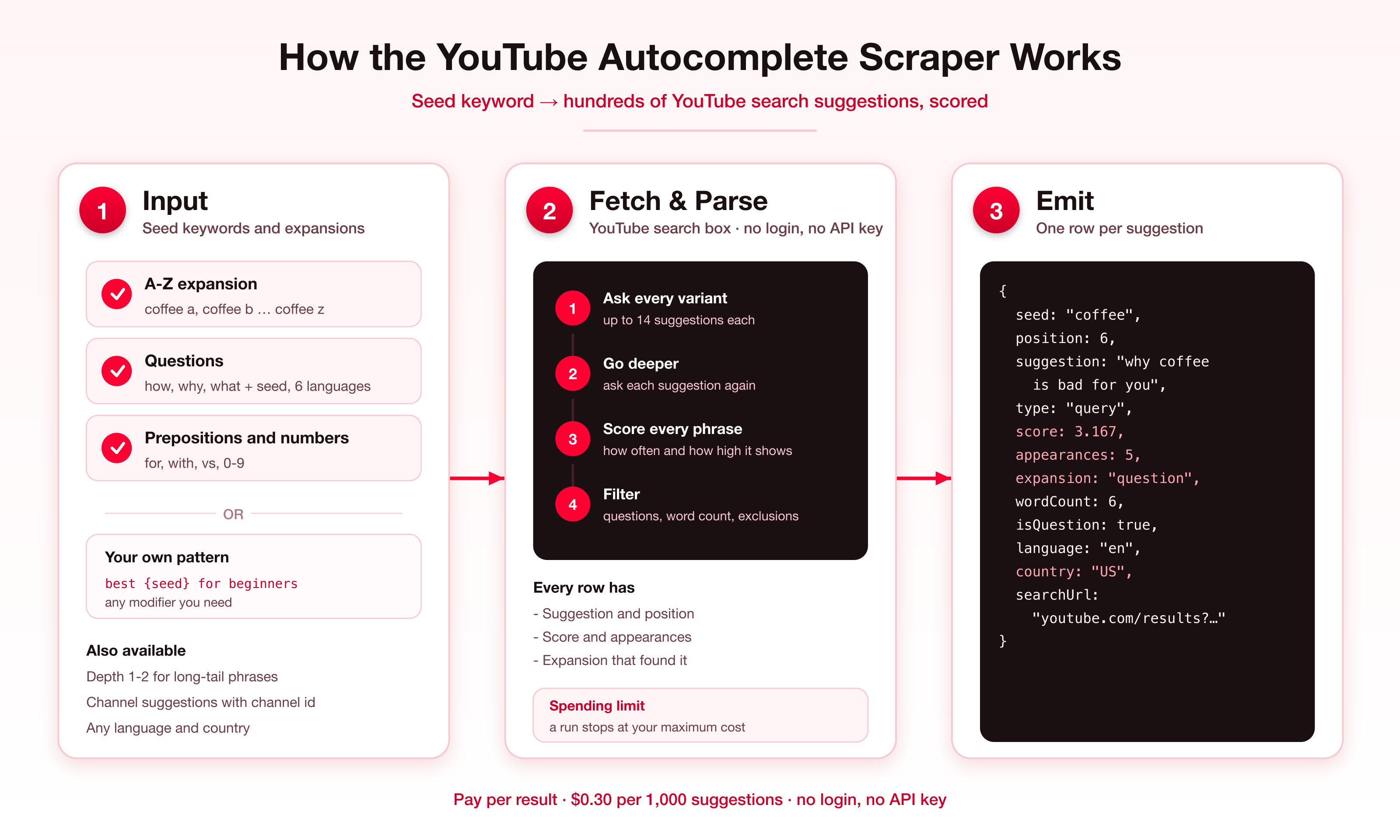
Get the phrases **YouTube's search box suggests** for any seed keyword, the same list a viewer sees while typing. Expand each seed with a-z, questions, prepositions, numbers or your own patterns, go one or two levels deeper for long-tail phrases, and get every phrase **scored** by how often and how high YouTube suggests it. Any language and country. No login, no API key.
### What it does
| Input | You get |
|-------|---------|
| Seed keyword | YouTube's suggestions for it, up to 14 per query |
| `expandAlphabet`, `expandPrefixAlphabet`, `expandNumbers` | Suggestions for `coffee a` … `coffee z`, `a coffee` … `z coffee`, `coffee 0` … `coffee 9` |
| `expandQuestions` | Suggestions for `how coffee`, `why coffee` …, in English, Spanish, Portuguese, German, French or Italian |
| `expandPrepositions` | Suggestions for `coffee for`, `coffee with`, `coffee vs` … |
| `customModifiers` | Your own words or patterns such as `best {seed} for beginners` |
| `depth` | Every suggestion asked again, one or two levels down, for long-tail phrases |
One row per suggestion. Channel suggestions (YouTube sometimes suggests a channel) come with the channel's name and id.
### How It Works
### Why this one
- **A score, not just a list.** A phrase that YouTube suggests under many queries, near the top, scores higher. Sort by `score` and the strongest ideas come first.
- **Long tail on request.** Depth 1 or 2 asks YouTube about its own suggestions, which is where specific video ideas are.
- **Questions in six languages.** The question words follow the language you pick.
- **Channels as well as phrases.** See which channels YouTube puts in front of searchers for your topic.
- **Filters built in.** Questions only, minimum word count, must contain the seed, excluded words, deduplication across seeds.
- **$0.30 per 1,000 suggestions.** No login, no API key, no proxy to set up.
### Input
| Field | Type | Description |
|-------|------|-------------|
| `keywords` | `string[]` | Seed keywords. |
| `language` / `country` | string | Interface language (`en`, `de`, `es`, `ja` …) and country (`US`, `GB`, `IN` …). Default `en` / `US`. |
| `expandAlphabet` | boolean | A-Z after the seed. Default on. |
| `expandPrefixAlphabet` | boolean | A-Z before the seed. |
| `expandNumbers` | boolean | 0-9 after the seed. |
| `expandQuestions` | boolean | Question words before the seed. Default on. |
| `expandPrepositions` | boolean | Prepositions after the seed. |
| `customModifiers` | `string[]` | Words added after the seed, or patterns with `{seed}`. |
| `depth` | integer | 0 (default), 1 or 2. |
| `includeChannels` | boolean | Keep channel suggestions. Default on. |
| `mustContainSeed`, `excludeTerms`, `onlyQuestions`, `minWords` | filters | Applied before anything is returned or billed. |
| `deduplicate` | boolean | A phrase only once across seeds. |
| `maxSuggestionsPerSeed` / `maxItems` | integer | Best N per seed by score (0 shares the run cap equally between seeds); cap per run (default 1,000). |
#### Example: video ideas for a channel
```json
{
"keywords": ["home workout", "meal prep"],
"expandAlphabet": true,
"expandQuestions": true,
"depth": 1,
"minWords": 3,
"maxSuggestionsPerSeed": 200
}
```
#### Example: German market
```json
{
"keywords": ["kaffee"],
"language": "de",
"country": "DE",
"expandQuestions": true,
"expandPrepositions": true
}
```
### Output
```json
{
"seed": "coffee",
"suggestion": "why coffee is bad for you",
"type": "query",
"position": 6,
"score": 3.167,
"appearances": 5,
"rankInFirstQuery": 1,
"queryUsed": "why coffee",
"expansion": "question",
"depth": 0,
"wordCount": 6,
"isQuestion": true,
"channelId": null,
"channelName": null,
"searchUrl": "https://www.youtube.com/results?search_query=why%20coffee%20is%20bad%20for%20you",
"language": "en",
"country": "US"
}
```
`position` is the rank within the seed by `score`. `score` adds 1 / rank for every query where the phrase appeared, so 1.0 is one appearance at the top. `appearances` is the number of queries that suggested it. A `channel` row also has `channelId`, `channelName`, `channelHandle` or `channelSubtitle`, and `channelUrl`.
### Pricing
Pay per result: **$0.30 per 1,000 suggestions**, plus $0.005 per run start. Filtered-out suggestions are not returned and not billed. Set a maximum cost per run in the run options and the Actor stops there with what it has.
### FAQ
**Do I need a YouTube account or an API key?**
No. These are the suggestions YouTube's search box shows to anyone.
**Is `score` a search volume?**
No. YouTube publishes no volumes. The score reflects how often and how high YouTube suggests a phrase, which tracks what people type. Use it to rank phrases against each other.
**How many suggestions does one seed give?**
About 14 for the seed alone, 250 to 400 with a-z and questions on, and more with depth 1.
**Why do some suggestions not contain my seed?**
YouTube suggests related phrases too. Turn on `mustContainSeed` to keep only those that contain it.
**Do results change by country?**
Yes. `country` decides which searches the suggestions come from, `language` the language they are in.
### 🤖 For AI Agents & LLM Apps
**Purpose:** YouTube search-box suggestions for seed keywords, expanded and scored, as JSON.
**Minimal input:** `{"keywords": ["coffee"]}`
**Output:** one row per suggestion: seed, suggestion, type (`query` or `channel`), position, score, appearances, expansion, depth, wordCount, isQuestion, searchUrl, language, country.
**Behaviors to know:** filters run before billing. `score` is relative, not a volume. Free-plan runs take up to 3 seeds and return up to 100 suggestions.
### ⚠️ Disclaimer
This Actor reads YouTube's public search suggestions. It is not affiliated with, endorsed by, or sponsored by YouTube or Google LLC. You are responsible for using the data in line with applicable laws and YouTube's terms.
### SEO Keywords
youtube autocomplete scraper, youtube keyword tool, youtube keyword research, youtube search suggestions, youtube suggest scraper, youtube keyword suggestions, youtube seo keywords, youtube video ideas, youtube long tail keywords, youtube search terms, youtube tags generator, youtube keyword finder, youtube autocomplete api
# Actor input Schema
## `keywords` (type: `array`):
Words or phrases to get YouTube suggestions for, for example coffee or home workout.
## `language` (type: `string`):
Interface language YouTube suggests in, as a code: en, es, de, fr, pt, it, ja, ko, ar, hi and so on.
## `country` (type: `string`):
Two-letter country code, for example US, GB, DE, IN, BR. Suggestions follow what people search in that country.
## `expandAlphabet` (type: `boolean`):
Also ask for 'coffee a', 'coffee b' … 'coffee z'. The usual way to get hundreds of suggestions.
## `expandPrefixAlphabet` (type: `boolean`):
Also ask for 'a coffee', 'b coffee' … 'z coffee'.
## `expandNumbers` (type: `boolean`):
Also ask for 'coffee 0' … 'coffee 9'.
## `expandQuestions` (type: `boolean`):
Also ask for 'how coffee', 'why coffee', 'what coffee' and so on, in English, Spanish, Portuguese, German, French or Italian.
## `expandPrepositions` (type: `boolean`):
Also ask for 'coffee for', 'coffee with', 'coffee vs' and so on.
## `customModifiers` (type: `array`):
Extra words added after the seed, or full patterns with {seed}, for example 'review' or 'best {seed} for beginners'.
## `depth` (type: `integer`):
0 asks only the queries above. 1 also asks every suggestion found, which finds long-tail phrases and takes longer. 2 goes one level further.
## `includeChannels` (type: `boolean`):
YouTube sometimes suggests a channel instead of a phrase. Keep those rows, with the channel's name and id.
## `mustContainSeed` (type: `boolean`):
Keep only suggestions that contain the seed keyword.
## `excludeTerms` (type: `array`):
Drop suggestions containing any of these words.
## `onlyQuestions` (type: `boolean`):
Keep only suggestions that are questions (how, what, why…).
## `minWords` (type: `integer`):
Keep only suggestions with at least this many words. 3 or more gives long-tail phrases.
## `deduplicate` (type: `boolean`):
Return a phrase only once even when several seeds lead to it.
## `maxSuggestionsPerSeed` (type: `integer`):
Keep the best this many per seed, by score. 0 shares the run's maximum equally between the seeds.
## `maxItems` (type: `integer`):
The run stops when it has returned this many suggestions.
## Actor input object example
```json
{
"keywords": [
"coffee"
],
"language": "en",
"country": "US",
"expandAlphabet": true,
"expandPrefixAlphabet": false,
"expandNumbers": false,
"expandQuestions": true,
"expandPrepositions": false,
"depth": 0,
"includeChannels": true,
"mustContainSeed": false,
"onlyQuestions": false,
"minWords": 0,
"deduplicate": false,
"maxSuggestionsPerSeed": 0,
"maxItems": 1000
}
```
# Actor output Schema
## `results` (type: `string`):
Keyword suggestions with score, expansion and, for channel suggestions, the channel.
# API
You can run this Actor programmatically using our API. Below are code examples in JavaScript, Python, and CLI, as well as the OpenAPI specification and MCP server setup.
## JavaScript example
```javascript
import { ApifyClient } from 'apify-client';
// Initialize the ApifyClient with your Apify API token
// Replace the '' with your token
const client = new ApifyClient({
token: '',
});
// Prepare Actor input
const input = {
"keywords": [
"coffee"
]
};
// Run the Actor and wait for it to finish
const run = await client.actor("memo23/youtube-autocomplete-scraper").call(input);
// Fetch and print Actor results from the run's dataset (if any)
console.log('Results from dataset');
console.log(`💾 Check your data here: https://console.apify.com/storage/datasets/${run.defaultDatasetId}`);
const { items } = await client.dataset(run.defaultDatasetId).listItems();
items.forEach((item) => {
console.dir(item);
});
// 📚 Want to learn more 📖? Go to → https://docs.apify.com/api/client/js/docs
```
## Python example
```python
from apify_client import ApifyClient
# Initialize the ApifyClient with your Apify API token
# Replace '' with your token.
client = ApifyClient("")
# Prepare the Actor input
run_input = { "keywords": ["coffee"] }
# Run the Actor and wait for it to finish
run = client.actor("memo23/youtube-autocomplete-scraper").call(run_input=run_input)
# Fetch and print Actor results from the run's dataset (if there are any)
print(f"💾 Check your data here: https://console.apify.com/storage/datasets/{run.default_dataset_id}")
for item in client.dataset(run.default_dataset_id).iterate_items():
print(item)
# 📚 Want to learn more 📖? Go to → https://docs.apify.com/api/client/python/docs/quick-start
```
## CLI example
```bash
echo '{
"keywords": [
"coffee"
]
}' |
apify call memo23/youtube-autocomplete-scraper --silent --output-dataset
```
## MCP server setup
```json
{
"mcpServers": {
"apify": {
"type": "http",
"url": "https://mcp.apify.com/?tools=fetch-actor-details,memo23/youtube-autocomplete-scraper"
}
}
}
```
The hosted server signs you in with OAuth on first connect, so no API token belongs in this config. Clients without OAuth support can send an `Authorization: Bearer ` header instead, using a token from API & Integrations in Apify Console (https://console.apify.com/settings/integrations).
## OpenAPI specification
Download the OpenAPI definition: https://api.apify.com/v2/actors/tJpduFSw9Xf4bA09d/builds/YgqynKcZFlcFeRHRl/openapi.json