# Zumper Rental Listings Scraper \[w/ EMAILS] Search + Details (`memo23/zumper-cheerio`) Actor
Zumper.com rental listings scraper — paste any city search or listing URL, get full property rows: price, beds/baths, sqft, address, photos, amenities, agent & brokerage, plus opt-in contact-email enrichment from the manager's own website. Dedup store, JSON or CSV. Pure HTTP, no browser.
- **URL**: https://apify.com/memo23/zumper-cheerio.md
- **Developed by:** [Muhamed Didovic](https://apify.com/memo23) (community)
- **Categories:** Automation, Real estate, Lead generation
- **Stats:** 5 total users, 1 monthly users, 100.0% runs succeeded, 0 bookmarks
- **User rating**: 1.00 out of 5 stars
## Pricing
from $2.50 / 1,000 property listing rows
This Actor is paid per event. You are not charged for the Apify platform usage, but only a fixed price for specific events.
Learn more: https://docs.apify.com/platform/actors/running/actors-in-store#pay-per-event
## What's an Apify Actor?
Actors are a software tools running on the Apify platform, for all kinds of web data extraction and automation use cases.
In Batch mode, an Actor accepts a well-defined JSON input, performs an action which can take anything from a few seconds to a few hours,
and optionally produces a well-defined JSON output, datasets with results, or files in key-value store.
In Standby mode, an Actor provides a web server which can be used as a website, API, or an MCP server.
Actors are written with capital "A".
## How to integrate an Actor?
If asked about integration, you help developers integrate Actors into their projects.
You adapt to their stack and deliver integrations that are safe, well-documented, and production-ready.
The best way to integrate Actors is as follows.
In JavaScript/TypeScript projects, use official [JavaScript/TypeScript client](https://docs.apify.com/api/client/js.md):
```bash
npm install apify-client
```
In Python projects, use official [Python client library](https://docs.apify.com/api/client/python.md):
```bash
pip install apify-client
```
In shell scripts, use [Apify CLI](https://docs.apify.com/cli/docs.md):
````bash
# MacOS / Linux
curl -fsSL https://apify.com/install-cli.sh | bash
# Windows
irm https://apify.com/install-cli.ps1 | iex
```bash
In AI frameworks, you might use the [Apify MCP server](https://docs.apify.com/platform/integrations/mcp.md).
If your project is in a different language, use the [REST API](https://docs.apify.com/api/v2.md).
For usage examples, see the [API](#api) section below.
For more details, see Apify documentation as [Markdown index](https://docs.apify.com/llms.txt) and [Markdown full-text](https://docs.apify.com/llms-full.txt).
# README
## Zumper Rental Listings Scraper [w/ EMAILS] Search + Details
All-in-one **Zumper.com scraper** — paste any city search URL (or a single listing URL) and get one complete row per rental listing: price, beds/baths, square footage, address, photos, amenities, pet policy, listing agent & brokerage, feed source — plus **opt-in contact-email enrichment** that discovers the property manager's real email from their own website.
| Input | Row(s) emitted |
|---|---|
| **City search URL** — `zumper.com/apartments-for-rent/{city}-{st}?…` | N listing rows — one full property-detail object per listing, paginated automatically up to `maxItems` |
| **Single listing URL** — `zumper.com/apartments/{id}/{slug}` | 1 listing row with the same full detail object |
| **City name without state** — `…/apartments-for-rent/toronto` | Auto-resolved via Zumper's own autocomplete API, then treated as a search |
> Pure HTTP (Cheerio). No Puppeteer, no Playwright, no headless Chromium, no CAPTCHA-solving service.
---
### Why Use This Scraper?
- **Full detail per row, not search-card stubs.** Every row is the listing's complete detail payload — the same data Zumper renders on the property page, including photo media, amenity lists, pet policy, lease info, and the managing agent/brokerage.
- **Contact-email enrichment (opt-in).** Flip `enrichEmails: true` and the actor discovers a contact email for the property's manager/brokerage — first from the business's own website when the listing links one, otherwise by locating the company's domain from its name. Adds `contactEmail`, `contactWebsite`, and a detailed `emailEnrichment` object. Most Zumper scrapers on the Store don't do this.
- **Built-in deduplication for monitoring.** Name a storage with `storeName` and re-runs skip listings you've already collected — ideal for daily new-listing alerts and lead pipelines.
- **Exact-result pagination.** The actor replays Zumper's own internal search API with the exact query the page uses, so results match what a visitor sees — no lossy HTML card parsing.
- **Cheap and fast.** Runs on Cheerio with residential proxies; typical listing rows return in seconds without browser overhead.
### Overview
The actor takes Zumper search or listing URLs and emits **one dataset row per rental listing**. Each row is the full property-detail object. Depending on the page variant Zumper serves, the core listing lives under `entity.data` (single-unit listings) or `activeListings[0]` (multi-listing/building pages) — both carry the same ~80 listing fields. Rows also include supporting blocks such as `units`, `nearby`, `ratings`, `locationSchools`, and `buildingReviews` when Zumper provides them.
Output is available as JSON, CSV, Excel, or via the Apify API.
### Supported Inputs
Paste any mix of these in `startUrls`:
- `https://www.zumper.com/apartments-for-rent/long-beach-ca?property-types=13,21,2,14` — city search with filters (price, beds, property types — any filter Zumper's UI supports survives in the URL and is honored)
- `https://www.zumper.com/apartments-for-rent/toronto` — city without a state/province suffix; the actor resolves the canonical city slug automatically
- `https://www.zumper.com/apartments/24552762p/2-bedroom-2-bath-apartment-at-445-w-6th-st-long-beach-ca-90802` — direct listing URL
**Not supported:** login-gated saved searches and Zumper's apply/messaging flows.
### Use Cases
| Who | What they do with it |
|---|---|
| **Lead-gen & proptech sales** | Pull every listing in a metro with the managing agent/brokerage per property, enrich with contact emails, feed the CRM |
| **Market research & rent analytics** | Track asking prices, freshness (`listed_on`/`modified_on`), and inventory mix by city, week over week |
| **Property managers & investors** | Monitor competing rentals around specific buildings; the dedup store means each scheduled run returns only new listings |
| **Relocation & rental platforms** | Ingest normalized listing data (beds, baths, sqft, photos, amenities) to power search products |
### How It Works
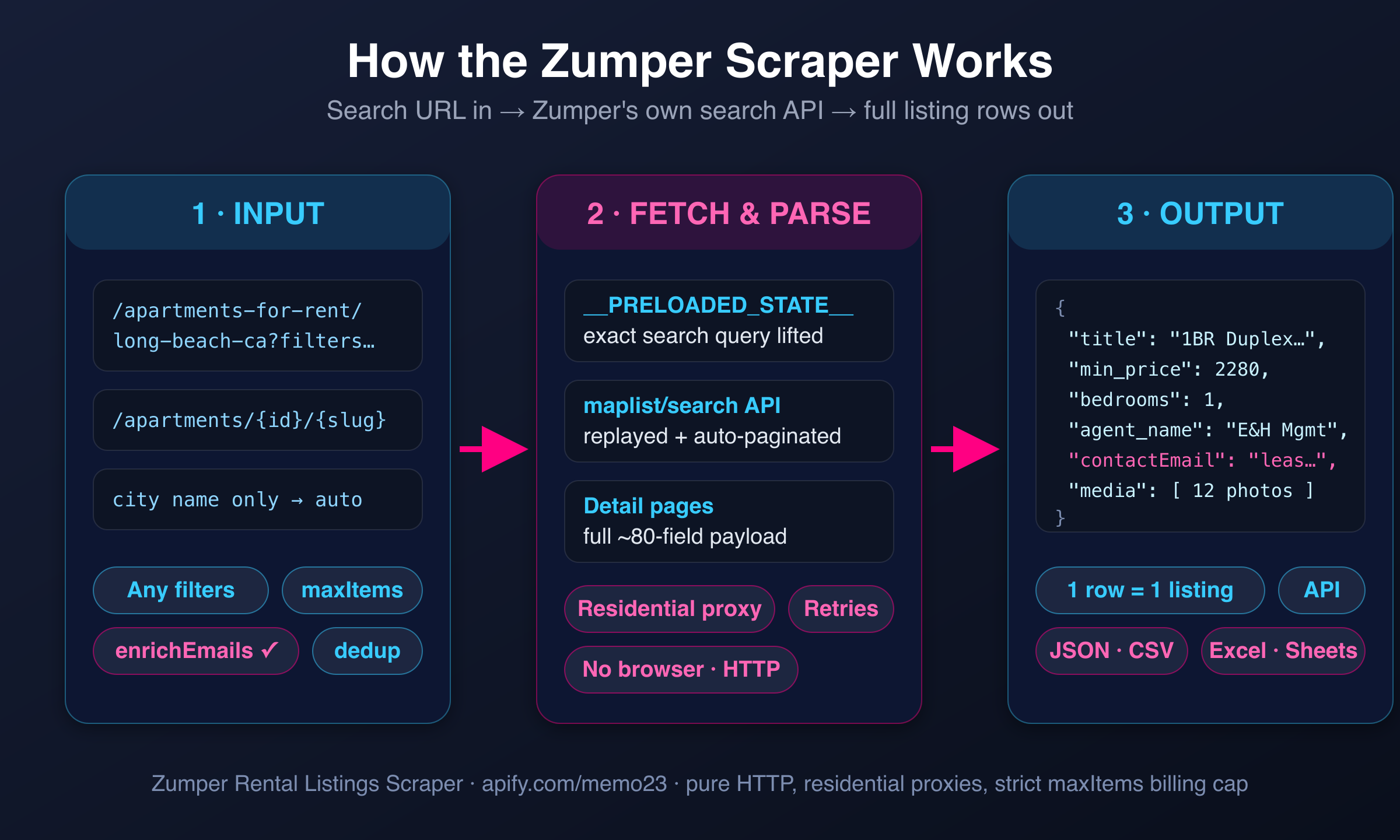
1. **Load the search page** through a residential proxy and extract Zumper's `__PRELOADED_STATE__` — the exact search query object the site itself uses (city, filters, property types).
2. **Replay Zumper's internal search API** (`maplist/search`) with that query, paging through results until `maxItems` is reached. This returns the identical result set a visitor sees.
3. **Fetch each listing's full detail page** and parse the complete property payload — ~80 fields per listing.
4. **Optionally enrich contacts**: with `enrichEmails: true`, the actor visits the property manager's own website (when the listing links one) or discovers the company domain from its name, and extracts a contact email.
5. **Deduplicate and push**: with `storeName` set, already-seen listings are skipped; everything else lands in the dataset as one row per listing.
### Input Configuration
| Field | Type | Required | Default | Notes |
|---|---|---|---|---|
| `startUrls` | array | **yes** | — | Zumper search or listing URLs. For city searches, include the city in the URL (e.g. `long-beach-ca`) |
| `maxItems` | integer | no | `5` | Hard cap on listings scraped per run — pagination stops once reached |
| `maxConcurrency` | integer | no | `40` | Max pages processed in parallel |
| `minConcurrency` | integer | no | `1` | Min pages processed in parallel |
| `maxRequestRetries` | integer | no | `30` | Retries per failed request before giving up |
| `maxDelay` | integer | no | `15` | Max seconds to wait between requests |
| `storeName` | string | no | `null` | Named key-value store for cross-run deduplication (letters, numbers, hyphens). Leave empty to disable |
| `enrichEmails` | boolean | no | `false` | Opt-in contact-email discovery for each listing's manager/brokerage. Best-effort; adds `contactEmail`, `contactWebsite`, `emailEnrichment` |
| `proxy` | object | no | Apify RESIDENTIAL | Residential proxies strongly recommended — datacenter IPs get blocked |
#### Example input
```json
{
"startUrls": [
"https://www.zumper.com/apartments-for-rent/long-beach-ca?property-types=13,21,2,14"
],
"maxItems": 100,
"enrichEmails": true,
"storeName": "zumper-long-beach-monitor",
"proxy": {
"useApifyProxy": true,
"apifyProxyGroups": ["RESIDENTIAL"]
}
}
````
### Output Overview
One row per listing. The core listing object (under `entity.data` or `activeListings[0]`, see Overview) carries pricing, layout, location, media, amenities, and the managing agent/brokerage. Supporting blocks (`units`, `nearby`, `ratings`, `locationSchools`, `buildingReviews`, `prosAndCons`) appear alongside when Zumper provides them. With `enrichEmails` on, `contactEmail` / `contactWebsite` / `emailEnrichment` are added at the top level of the row.
### Output Samples
Real (shortened) core listing object from a live run:
```jsonc
{
"listing_id": 60149939,
"title": "Spacious and Renovated-Quaint One-bedroom Duplex, close to Cal State Long Beach!",
"description": "++ PLEASE READ ENTIRE LISTING BEFORE INQUIRING++ Quaint-Quintessential Long Beach living, updated one bedroom front-duplex unit in the Zaferia District…",
"min_price": 2280,
"max_price": 2280,
"bedrooms": 1,
"bathrooms": 1,
"half_bathrooms": 0,
"square_feet": 585,
"address": "1537 Freeman Ave #NA",
"city": "Long Beach",
"state": "CA",
"zipcode": "90804",
"agent_name": "Ernst & Haas Management Co.",
"brokerage_name": "Ernst & Haas Management Co.",
"provider_url": "https://www.avail.com/l/60756121",
"feed_name": "avail",
"property_type": 13, // Zumper enum id (13 = apartment)
"pets": [1, 2], // Zumper enum ids (cats, dogs)
"amenities": [2, 5, 1, 3], // Zumper enum ids
"building_amenities": [8, 14, 4, 1],
"listed_on": 1783664864, // unix timestamp
"modified_on": 1783664864,
"media": [
{ "media_id": 792303238, "media_type": 1, "width": 2250, "height": 3000 }
// … 11 more photos
]
}
```
With `enrichEmails: true`, rows additionally carry:
```jsonc
{
"contactEmail": "leasing@example-management.com",
"contactWebsite": "https://www.example-management.com",
"emailEnrichment": { /* discovery method, source website, all candidate emails found */ }
}
```
### Key Output Fields
**Identity & pricing** — `listing_id`, `title`, `description`, `min_price`, `max_price`, `currency_code`, `listing_status`, `lease_type`
**Layout** — `bedrooms`, `bathrooms`, `half_bathrooms`, `square_feet`, `property_type`
**Location** — `address`, `city`, `state`, `zipcode`, `lat`, `lng`
**Contact** — `agent_name`, `brokerage_name`, `provider_url` (the feed/manager's own listing link), plus `contactEmail` / `contactWebsite` when enrichment is on
**Media & features** — `media` (photo objects with ids and dimensions), `amenities`, `building_amenities`, `pets`, `lease_terms`
**Freshness** — `listed_on`, `modified_on`, `created_on` (unix timestamps)
> Some fields use Zumper's internal numeric enums (e.g. `property_type: 13`, amenity ids). They're stable identifiers — map them once and they hold across runs.
### Pricing
The actor is priced **pay-per-event**: a small amount per listing row delivered, plus standard Apify platform usage (compute + residential proxy). `maxItems` is enforced strictly, so a run never delivers more listings than you asked for.
### FAQ
**Does it get blocked?**
Runs use Apify residential proxies by default and replay Zumper's own API with browser-equivalent headers. In testing, runs complete with a 100% request success rate. If you override the proxy config with datacenter IPs, expect 403/422 blocks.
**Why do some rows nest the listing under `entity.data` and others under `activeListings[0]`?**
Zumper serves two page variants — single-unit listings vs. building/multi-unit pages. The actor preserves the variant it received so no data is lost. Both carry the same core fields.
**What are the numeric codes in `property_type`, `amenities`, `pets`?**
Zumper's internal enum ids (e.g. `property_type: 13` = apartment; `pets: [1,2]` = cats & dogs allowed). They're consistent across all listings and runs.
**Can I monitor a city for new listings only?**
Yes — set `storeName` to any name (e.g. `"la-monitor"`). Every listing pushed is remembered in that store; subsequent runs skip them, so scheduled runs return only new inventory.
**How well does email enrichment work?**
It's best-effort. When the listing links the manager's own website (via `provider_url`), the actor scrapes that site directly — highest hit rate. Otherwise it tries to discover the company's domain from the brokerage/agent name. Aggregator links (Zillow, RentCafe, Craigslist, etc.) are recognized and skipped rather than mis-scraped. Rows always deliver even when no email is found.
**Does `maxItems` actually cap the output?**
Yes. The crawler stops enqueuing listings and stops paginating the moment the cap is reached — verified: `maxItems: 3` returns exactly 3 rows.
**Which countries does it cover?**
Everything Zumper lists — the US and Canada (Canadian cities like Toronto resolve automatically).
**Is scraping Zumper legal?**
The actor reads only publicly visible listing data — the same pages any logged-out visitor sees. See the Disclaimer below; compliance with local regulations and Zumper's ToS is the user's responsibility.
### Support
- For issues or feature requests, use the [Issues tab](https://console.apify.com/actors/3JtQCLqNeJYxezlsd/issues) of this actor.
- For further assistance, contact the author:
- Website:
- Email:
### Additional Services
Need a custom pipeline around this data — merged multi-portal feeds (Zumper + Apartments.com + Redfin), scheduled delivery to your database/Sheets, or a bespoke enrichment step? Contact the author above; custom actors and integrations are available.
### Explore More Scrapers
- [Apartments.com Scraper (US + Canada, w/ EMAILS)](https://apify.com/memo23/apartments-cheerio-ppe)
- [Redfin Scraper — Listings + Agent Database (Email & Phone)](https://apify.com/memo23/apify-redfin-cheerio-ppe)
- [Realtor.com Agents Scraper](https://apify.com/memo23/apify-realtor-scraper)
- [Zillow Agents Scraper (w/ Email)](https://apify.com/memo23/apify-zillow-agents-cheerio)
- [Crexi Commercial Real Estate Scraper](https://apify.com/memo23/apify-crexi)
### ⚠️ Disclaimer
This Actor is an independent tool and is **not affiliated with, endorsed by, or sponsored by** Zumper, Inc. or its subsidiaries (including PadMapper). All trademarks mentioned are the property of their respective owners.
The scraper extracts only **publicly visible** data from Zumper.com — rental listings as they appear to any logged-out visitor. No login, no CAPTCHA solving, no private-endpoint credentials. Use of this Actor must comply with Zumper's Terms of Service and all applicable laws, including data-protection regulations (GDPR, CCPA, etc.). Users must:
- Respect rate limits and avoid overloading Zumper's infrastructure
- Not use scraped data to violate individual privacy
- Use contact-email enrichment only for lawful B2B outreach in compliance with applicable anti-spam laws (CAN-SPAM, CASL, GDPR)
- Not republish scraped content in violation of copyright
We do not store any scraped data; the Actor returns it directly to your Apify dataset for your authorized use.
### SEO Keywords
zumper scraper, zumper rental listings scraper, zumper apartment scraper, zumper data extraction, zumper API alternative, zumper bulk export, rental listings scraper, apartment listings data, rental market data, property manager leads, brokerage contact emails, real estate lead generation, rent price analytics, rental inventory monitoring, US rentals scraper, Canada rentals scraper, apartments for rent data, zumper JSON export, zumper CSV export, proptech data, web scraping, Apify scraper, no-code scraper
# Actor input Schema
## `startUrls` (type: `array`):
URLs to start with. Important note if you are searching for listings in a specific city, make sure to include the city name in the URL. For example, if you are looking for listings in Long Beach, CA, the URL should include 'long-beach-ca'.
## `maxItems` (type: `integer`):
Maximum number of items to send message for.
## `maxConcurrency` (type: `integer`):
Maximum number of pages that can be processed at the same time.
## `minConcurrency` (type: `integer`):
Minimum number of pages that will be processed at the same time.
## `maxRequestRetries` (type: `integer`):
Number of times the crawler will retry a failed request before giving up.
## `maxDelay` (type: `integer`):
Maximum number of seconds that the crawler will wait before making the next request.
## `storeName` (type: `string`):
The Key-Value Store serves as a persistent database for storing listings, ensuring both deduplication and long-term data retention. By specifying a custom store name (using any combination of letters, numbers, and hyphens), you can preserve the listings indefinitely until manual deletion. If no store name is provided, the data will be saved to the default store which has standard retention limits. This named storage approach is particularly useful when you need to maintain listing data beyond the default retention period.
## `enrichEmails` (type: `boolean`):
If enabled, finds a contact email for each result from its own website (or by discovering it from the name). Adds contactEmail + contactWebsite columns plus a detailed emailEnrichment object. Best-effort.
## `proxy` (type: `object`):
Specifies proxy servers that will be used by the scraper in order to hide its origin.
For details, see Proxy configuration in README.
## Actor input object example
```json
{
"startUrls": [
"https://www.zumper.com/apartments-for-rent/long-beach-ca?property-types=13,21,2,14"
],
"maxItems": 5,
"maxConcurrency": 40,
"minConcurrency": 1,
"maxRequestRetries": 30,
"maxDelay": 15,
"enrichEmails": false,
"proxy": {
"useApifyProxy": true,
"apifyProxyGroups": [
"RESIDENTIAL"
]
}
}
```
# API
You can run this Actor programmatically using our API. Below are code examples in JavaScript, Python, and CLI, as well as the OpenAPI specification and MCP server setup.
## JavaScript example
```javascript
import { ApifyClient } from 'apify-client';
// Initialize the ApifyClient with your Apify API token
// Replace the '' with your token
const client = new ApifyClient({
token: '',
});
// Prepare Actor input
const input = {
"startUrls": [
"https://www.zumper.com/apartments-for-rent/long-beach-ca?property-types=13,21,2,14"
],
"proxy": {
"useApifyProxy": true,
"apifyProxyGroups": [
"RESIDENTIAL"
]
}
};
// Run the Actor and wait for it to finish
const run = await client.actor("memo23/zumper-cheerio").call(input);
// Fetch and print Actor results from the run's dataset (if any)
console.log('Results from dataset');
console.log(`💾 Check your data here: https://console.apify.com/storage/datasets/${run.defaultDatasetId}`);
const { items } = await client.dataset(run.defaultDatasetId).listItems();
items.forEach((item) => {
console.dir(item);
});
// 📚 Want to learn more 📖? Go to → https://docs.apify.com/api/client/js/docs
```
## Python example
```python
from apify_client import ApifyClient
# Initialize the ApifyClient with your Apify API token
# Replace '' with your token.
client = ApifyClient("")
# Prepare the Actor input
run_input = {
"startUrls": ["https://www.zumper.com/apartments-for-rent/long-beach-ca?property-types=13,21,2,14"],
"proxy": {
"useApifyProxy": True,
"apifyProxyGroups": ["RESIDENTIAL"],
},
}
# Run the Actor and wait for it to finish
run = client.actor("memo23/zumper-cheerio").call(run_input=run_input)
# Fetch and print Actor results from the run's dataset (if there are any)
print("💾 Check your data here: https://console.apify.com/storage/datasets/" + run["defaultDatasetId"])
for item in client.dataset(run["defaultDatasetId"]).iterate_items():
print(item)
# 📚 Want to learn more 📖? Go to → https://docs.apify.com/api/client/python/docs/quick-start
```
## CLI example
```bash
echo '{
"startUrls": [
"https://www.zumper.com/apartments-for-rent/long-beach-ca?property-types=13,21,2,14"
],
"proxy": {
"useApifyProxy": true,
"apifyProxyGroups": [
"RESIDENTIAL"
]
}
}' |
apify call memo23/zumper-cheerio --silent --output-dataset
```
## MCP server setup
```json
{
"mcpServers": {
"apify": {
"command": "npx",
"args": [
"mcp-remote",
"https://mcp.apify.com/?tools=memo23/zumper-cheerio",
"--header",
"Authorization: Bearer "
]
}
}
}
```
## OpenAPI specification
```json
{
"openapi": "3.0.1",
"info": {
"title": "Zumper Rental Listings Scraper [w/ EMAILS] Search + Details",
"description": "Zumper.com rental listings scraper — paste any city search or listing URL, get full property rows: price, beds/baths, sqft, address, photos, amenities, agent & brokerage, plus opt-in contact-email enrichment from the manager's own website. Dedup store, JSON or CSV. Pure HTTP, no browser.",
"version": "0.0",
"x-build-id": "wt9mi3ALHRHKCoAGL"
},
"servers": [
{
"url": "https://api.apify.com/v2"
}
],
"paths": {
"/acts/memo23~zumper-cheerio/run-sync-get-dataset-items": {
"post": {
"operationId": "run-sync-get-dataset-items-memo23-zumper-cheerio",
"x-openai-isConsequential": false,
"summary": "Executes an Actor, waits for its completion, and returns Actor's dataset items in response.",
"tags": [
"Run Actor"
],
"requestBody": {
"required": true,
"content": {
"application/json": {
"schema": {
"$ref": "#/components/schemas/inputSchema"
}
}
}
},
"parameters": [
{
"name": "token",
"in": "query",
"required": true,
"schema": {
"type": "string"
},
"description": "Enter your Apify token here"
}
],
"responses": {
"200": {
"description": "OK"
}
}
}
},
"/acts/memo23~zumper-cheerio/runs": {
"post": {
"operationId": "runs-sync-memo23-zumper-cheerio",
"x-openai-isConsequential": false,
"summary": "Executes an Actor and returns information about the initiated run in response.",
"tags": [
"Run Actor"
],
"requestBody": {
"required": true,
"content": {
"application/json": {
"schema": {
"$ref": "#/components/schemas/inputSchema"
}
}
}
},
"parameters": [
{
"name": "token",
"in": "query",
"required": true,
"schema": {
"type": "string"
},
"description": "Enter your Apify token here"
}
],
"responses": {
"200": {
"description": "OK",
"content": {
"application/json": {
"schema": {
"$ref": "#/components/schemas/runsResponseSchema"
}
}
}
}
}
}
},
"/acts/memo23~zumper-cheerio/run-sync": {
"post": {
"operationId": "run-sync-memo23-zumper-cheerio",
"x-openai-isConsequential": false,
"summary": "Executes an Actor, waits for completion, and returns the OUTPUT from Key-value store in response.",
"tags": [
"Run Actor"
],
"requestBody": {
"required": true,
"content": {
"application/json": {
"schema": {
"$ref": "#/components/schemas/inputSchema"
}
}
}
},
"parameters": [
{
"name": "token",
"in": "query",
"required": true,
"schema": {
"type": "string"
},
"description": "Enter your Apify token here"
}
],
"responses": {
"200": {
"description": "OK"
}
}
}
}
},
"components": {
"schemas": {
"inputSchema": {
"type": "object",
"required": [
"startUrls"
],
"properties": {
"startUrls": {
"title": "Start URLs",
"type": "array",
"description": "URLs to start with. Important note if you are searching for listings in a specific city, make sure to include the city name in the URL. For example, if you are looking for listings in Long Beach, CA, the URL should include 'long-beach-ca'.",
"items": {
"type": "string"
}
},
"maxItems": {
"title": "Max Items/Listings to scrape per crawl",
"type": "integer",
"description": "Maximum number of items to send message for.",
"default": 5
},
"maxConcurrency": {
"title": "Max Concurrency",
"type": "integer",
"description": "Maximum number of pages that can be processed at the same time.",
"default": 40
},
"minConcurrency": {
"title": "Min Concurrency",
"type": "integer",
"description": "Minimum number of pages that will be processed at the same time.",
"default": 1
},
"maxRequestRetries": {
"title": "Max Request Retries",
"type": "integer",
"description": "Number of times the crawler will retry a failed request before giving up.",
"default": 30
},
"maxDelay": {
"title": "Max Delay in seconds",
"type": "integer",
"description": "Maximum number of seconds that the crawler will wait before making the next request.",
"default": 15
},
"storeName": {
"title": "Name your storage for listings (deduplication)",
"type": "string",
"description": "The Key-Value Store serves as a persistent database for storing listings, ensuring both deduplication and long-term data retention. By specifying a custom store name (using any combination of letters, numbers, and hyphens), you can preserve the listings indefinitely until manual deletion. If no store name is provided, the data will be saved to the default store which has standard retention limits. This named storage approach is particularly useful when you need to maintain listing data beyond the default retention period."
},
"enrichEmails": {
"title": "Enrich with contact emails (experimental)",
"type": "boolean",
"description": "If enabled, finds a contact email for each result from its own website (or by discovering it from the name). Adds contactEmail + contactWebsite columns plus a detailed emailEnrichment object. Best-effort.",
"default": false
},
"proxy": {
"title": "Proxy configuration",
"type": "object",
"description": "Specifies proxy servers that will be used by the scraper in order to hide its origin.
For details, see Proxy configuration in README.",
"default": {
"useApifyProxy": true,
"apifyProxyGroups": [
"RESIDENTIAL"
]
}
}
}
},
"runsResponseSchema": {
"type": "object",
"properties": {
"data": {
"type": "object",
"properties": {
"id": {
"type": "string"
},
"actId": {
"type": "string"
},
"userId": {
"type": "string"
},
"startedAt": {
"type": "string",
"format": "date-time",
"example": "2025-01-08T00:00:00.000Z"
},
"finishedAt": {
"type": "string",
"format": "date-time",
"example": "2025-01-08T00:00:00.000Z"
},
"status": {
"type": "string",
"example": "READY"
},
"meta": {
"type": "object",
"properties": {
"origin": {
"type": "string",
"example": "API"
},
"userAgent": {
"type": "string"
}
}
},
"stats": {
"type": "object",
"properties": {
"inputBodyLen": {
"type": "integer",
"example": 2000
},
"rebootCount": {
"type": "integer",
"example": 0
},
"restartCount": {
"type": "integer",
"example": 0
},
"resurrectCount": {
"type": "integer",
"example": 0
},
"computeUnits": {
"type": "integer",
"example": 0
}
}
},
"options": {
"type": "object",
"properties": {
"build": {
"type": "string",
"example": "latest"
},
"timeoutSecs": {
"type": "integer",
"example": 300
},
"memoryMbytes": {
"type": "integer",
"example": 1024
},
"diskMbytes": {
"type": "integer",
"example": 2048
}
}
},
"buildId": {
"type": "string"
},
"defaultKeyValueStoreId": {
"type": "string"
},
"defaultDatasetId": {
"type": "string"
},
"defaultRequestQueueId": {
"type": "string"
},
"buildNumber": {
"type": "string",
"example": "1.0.0"
},
"containerUrl": {
"type": "string"
},
"usage": {
"type": "object",
"properties": {
"ACTOR_COMPUTE_UNITS": {
"type": "integer",
"example": 0
},
"DATASET_READS": {
"type": "integer",
"example": 0
},
"DATASET_WRITES": {
"type": "integer",
"example": 0
},
"KEY_VALUE_STORE_READS": {
"type": "integer",
"example": 0
},
"KEY_VALUE_STORE_WRITES": {
"type": "integer",
"example": 1
},
"KEY_VALUE_STORE_LISTS": {
"type": "integer",
"example": 0
},
"REQUEST_QUEUE_READS": {
"type": "integer",
"example": 0
},
"REQUEST_QUEUE_WRITES": {
"type": "integer",
"example": 0
},
"DATA_TRANSFER_INTERNAL_GBYTES": {
"type": "integer",
"example": 0
},
"DATA_TRANSFER_EXTERNAL_GBYTES": {
"type": "integer",
"example": 0
},
"PROXY_RESIDENTIAL_TRANSFER_GBYTES": {
"type": "integer",
"example": 0
},
"PROXY_SERPS": {
"type": "integer",
"example": 0
}
}
},
"usageTotalUsd": {
"type": "number",
"example": 0.00005
},
"usageUsd": {
"type": "object",
"properties": {
"ACTOR_COMPUTE_UNITS": {
"type": "integer",
"example": 0
},
"DATASET_READS": {
"type": "integer",
"example": 0
},
"DATASET_WRITES": {
"type": "integer",
"example": 0
},
"KEY_VALUE_STORE_READS": {
"type": "integer",
"example": 0
},
"KEY_VALUE_STORE_WRITES": {
"type": "number",
"example": 0.00005
},
"KEY_VALUE_STORE_LISTS": {
"type": "integer",
"example": 0
},
"REQUEST_QUEUE_READS": {
"type": "integer",
"example": 0
},
"REQUEST_QUEUE_WRITES": {
"type": "integer",
"example": 0
},
"DATA_TRANSFER_INTERNAL_GBYTES": {
"type": "integer",
"example": 0
},
"DATA_TRANSFER_EXTERNAL_GBYTES": {
"type": "integer",
"example": 0
},
"PROXY_RESIDENTIAL_TRANSFER_GBYTES": {
"type": "integer",
"example": 0
},
"PROXY_SERPS": {
"type": "integer",
"example": 0
}
}
}
}
}
}
}
}
}
}
```