# Zumper Scraper: Rental Listings, Rent Changes and Contacts (`memo23/zumper-scraper`) Actor
Zumper scraper for rental listings in any US or Canadian city: rent, beds, baths, square feet, address, photos, amenities, agent and phone. Search by city or paste a Zumper link, filter by rent and bedrooms, and schedule it for new listings and rent drops only. JSON, CSV, Excel.
- **URL**: https://apify.com/memo23/zumper-scraper.md
- **Developed by:** [Muhamed Didovic](https://apify.com/memo23) (community)
- **Categories:** Automation, Real estate, Lead generation
- **Features:** Limited permissions
- **Stats:** 36 total users, 1 monthly users, 96.6% runs succeeded, 0 bookmarks
- **User rating**: 1.00 out of 5 stars
## Pricing
from $2.50 / 1,000 property listing rows
This Actor is paid per event. You are not charged for the Apify platform usage, but only a fixed price for specific events.
Learn more: https://docs.apify.com/actors/running/actors-in-store.md#pay-per-event
## What's an Apify Actor?
An Actor is a serverless cloud program that runs on the Apify platform. It has two run modes.
In Batch mode, an Actor accepts a well-defined JSON input, performs an action which can take anything from a few seconds to a few hours,
and optionally produces a well-defined JSON output, datasets with results, or files in key-value store.
In Standby mode, an Actor provides a web server which can be used as a website, API, or an MCP server.
Apify vocabulary and the platform model are defined once, in the agent quickstart at https://apify.com/agents.md.
## How to integrate an Actor?
If asked about integration, you help developers integrate Actors into their projects.
You adapt to their stack and deliver integrations that are safe, well-documented, and production-ready.
Do not guess an integration path. Every one of them is in the agent quickstart at https://apify.com/agents.md: the Apify MCP server, Agent Skills with the Apify CLI, the JavaScript and Python clients, the REST API, and the account-free path for an agent with no human to sign in. It also carries the rule on stating cost before the first paid run.
For examples already wired to this Actor's own input schema, see the [API](#api) section below.
Each client library has reference documentation the quickstart does not restate: [JavaScript/TypeScript](https://docs.apify.com/api/client/js/docs.md) (`npm install apify-client`) and [Python](https://docs.apify.com/api/client/python/docs.md) (`pip install apify-client`).
# README
## Zumper Scraper: Rental Listings, Rent Changes and Contacts
Export **Zumper rental listings** for any US or Canadian city: rent, bedrooms, bathrooms, square feet, address, photos, amenities, fees, the managing agent or brokerage and their phone. Type a city or paste any Zumper link, add rent and bedroom filters if you like, and get one clean row per rental. Put it on a schedule and it returns **only new listings and rent changes**, with the previous price.
| You give | You get |
|---|---|
| **A city**: `Chicago, IL`, `Austin TX`, `new-york-ny` | Every rental Zumper shows for that city, one row each, up to your limit |
| **A Zumper search link**, e.g. `zumper.com/apartments-for-rent/chicago-il/2-beds/under-3000` | The same results a renter sees with those filters |
| **A building or listing link**, e.g. `zumper.com/apartment-buildings/p12453/...` | One full row for that building or unit |
| **Rent, bedroom, bathroom, size or pet filters** | Applied on top of every city and link |
| **Change tracking on a schedule** | Each row marked `new`, `price_drop`, `price_increase` or `unchanged`; unchanged rows can be left out and are then not billed |
> No Zumper account or API key needed. Export as JSON, CSV or Excel, or read it from the API.
***
### Why use this Zumper scraper?
- **Spreadsheet-ready columns first.** Every row starts with flat columns (`minPrice`, `maxPrice`, `minBedrooms`, `address`, `city`, `zipcode`, `agentName`, `phone`, `url`...) so a CSV export opens cleanly. The full listing record follows for anyone who needs every unit, fee and photo.
- **Rent-change alerts built in.** Turn on **Only new or changed listings**, schedule the run daily, and each run returns just the listings that are new or changed rent since the last one, with `previousMinPrice` and `priceChange`. Unchanged listings are skipped before they are fetched, so they cost nothing.
- **Search by city, not only by link.** Type `Chicago, IL` and the city is found for you. Filters for rent, bedrooms, bathrooms, square feet and pets work on cities and links alike.
- **Building pages with every floor plan.** A building row carries its floor plans, unit count, fees, pet policy, amenities, leasing office phone and website.
- **Contact emails on request.** Switch on email lookup and the actor looks for the property manager's or brokerage's email on their own website. You pay only when one is found.
- **Low price per row.** Pay per listing delivered, with a hard stop at your **Max listings**.
### How it works
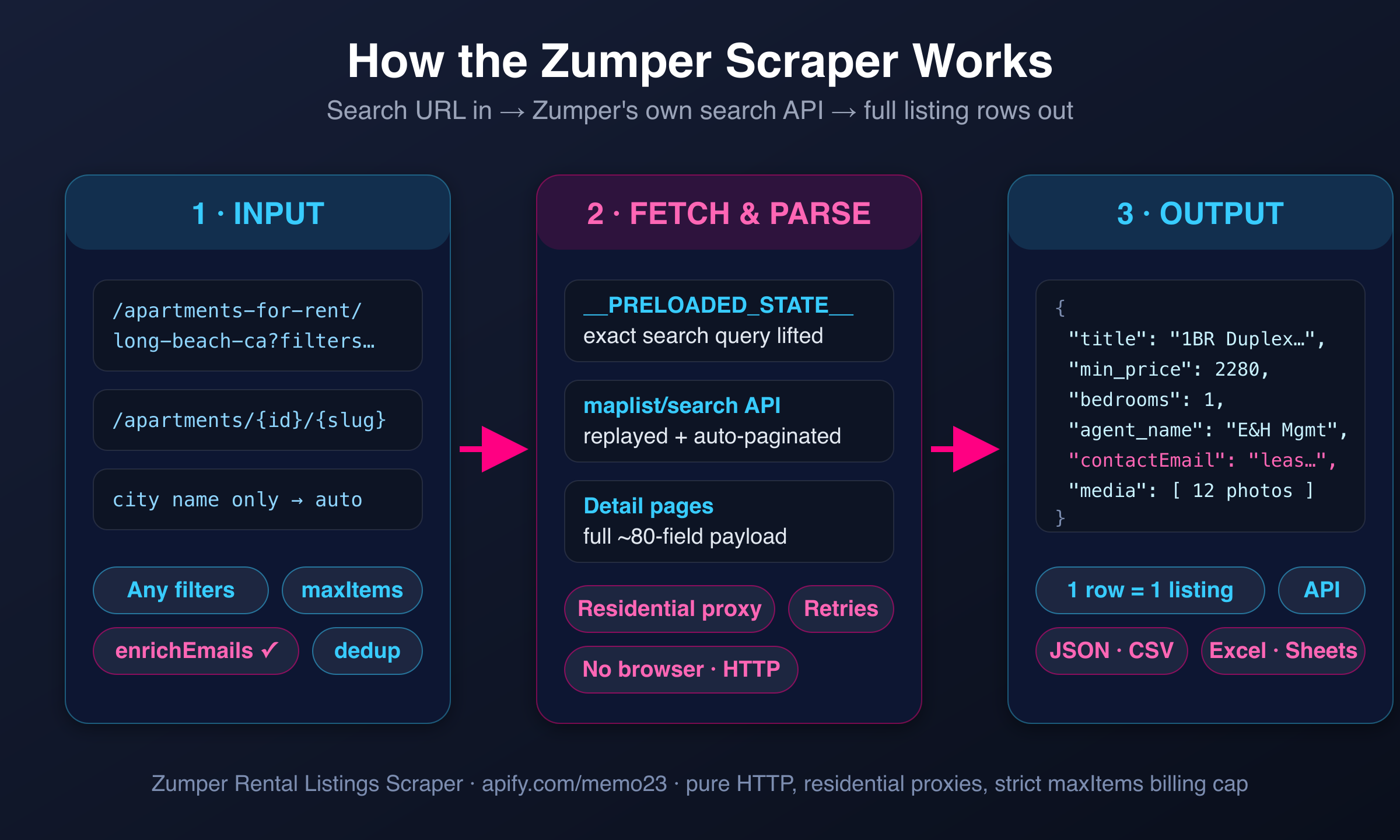
1. **You give a city or a link.** Cities become Zumper searches. Search links keep the filters in their address, and the filter fields in the input are added on top.
2. **The actor reads every result page** of the search until it reaches **Max listings**, then opens each listing to collect the full record.
3. **With change tracking on,** each listing's rent is compared with the previous run of the same monitor. With **Only new or changed listings**, unchanged ones are dropped before they are opened.
4. **Rows land in your dataset** as they are collected. Download them or connect them to Google Sheets, a webhook, Make, Zapier or your own code.
### Input
| Field | Type | Default | What it does |
|---|---|---|---|
| `startUrls` | array of URLs | - | Zumper search, building or listing links. Filters in a search link are kept. |
| `locations` | array of strings | - | Cities to search: `Chicago, IL`, `Austin TX`, `new-york-ny`. Use this, `startUrls`, or both. |
| `maxItems` | integer | 10 | Listings to return per run. With change tracking, how many search results are checked. |
| `minRent` / `maxRent` | integer | - | Monthly rent range in dollars. |
| `minBedrooms` / `maxBedrooms` | integer | - | Bedroom range; 0 includes studios. |
| `minBathrooms` | integer | - | At least this many bathrooms. |
| `minSquareFeet` / `maxSquareFeet` | integer | - | Floor space range. |
| `petFriendly` | boolean | false | Only listings that accept pets. |
| `trackChanges` | boolean | false | Add `changeType`, `previousMinPrice`, `previousMaxPrice`, `priceChange`, `firstSeenAt` to every row. |
| `onlyChanges` | boolean | false | Leave out listings whose rent did not change since the last run of this monitor. Turns on `trackChanges`. |
| `monitorName` | string | `default` | Keeps separate watch lists apart. Use one name per city or saved search. |
| `enrichEmails` | boolean | false | Look up a contact email for the manager or brokerage. |
| `storeName` | string | - | Older option: skip every listing this named store has seen before. |
| `maxConcurrency`, `minConcurrency`, `maxRequestRetries` | integer | 10, 1, 10 | Speed and retry settings. The defaults suit almost every run. |
| `proxy` | object | built-in | Leave as is unless you need your own proxy. |
#### Example: two cities, 2+ bedrooms under $3,000
```json
{
"locations": ["Chicago, IL", "Austin, TX"],
"minBedrooms": 2,
"maxRent": 3000,
"maxItems": 100
}
```
#### Example: daily alert for new listings and rent drops
Save this as a task and schedule it once a day.
```json
{
"startUrls": ["https://www.zumper.com/apartments-for-rent/long-beach-ca"],
"maxItems": 300,
"onlyChanges": true,
"monitorName": "long-beach"
}
```
The first run returns everything as `new` and remembers it. Each later run returns only new listings and the ones whose rent changed. Set **Max listings** high enough to cover the whole search, so every run checks the same set.
### Output schema
One row per building or listing. The flat columns come first, the full record after them.
```jsonc
{
"listingId": 64139,
"buildingId": 271197,
"listingType": "building", // "building" or "listing"
"title": "Bay Hill",
"url": "https://www.zumper.com/apartment-buildings/p12638/bay-hill-90802-long-beach-ca",
"address": "3801 E Pacific Coast Hwy",
"formattedAddress": "3801 E Pacific Coast Hwy, Long Beach, CA 90804",
"city": "Long Beach",
"state": "CA",
"zipcode": "90804",
"neighborhood": "90802",
"latitude": 33.7898,
"longitude": -118.148,
"minPrice": 2799,
"maxPrice": 3748,
"previousPrice": null,
"minBedrooms": 1,
"maxBedrooms": 2,
"minBathrooms": 1,
"maxBathrooms": 2,
"minSquareFeet": 717,
"maxSquareFeet": 1053,
"unitCount": 160,
"dateAvailable": null,
"listedAt": "2026-11-12T15:57:34.000Z",
"updatedAt": "2026-11-11T06:01:44.000Z",
"amenities": ["Courtyard", "Dishwasher", "In-Unit Laundry", "Private Balcony", "Air Conditioning"],
"buildingAmenities": ["Swimming Pool", "Fitness Center", "Roof Deck", "Elevator"],
"agentName": "Bay Hill",
"brokerageName": "Equity Residential",
"phone": "(909) 340-3127",
"website": "https://equityapartments.com/los-angeles/long-beach/bay-hill-apartments",
"imageCount": 10,
"description": "Breathtaking coastal vistas meet urban ease at Bay Hill Apartments...",
"scrapedAt": "2026-11-16T22:07:49.693Z",
// only with trackChanges / onlyChanges
"changeType": "price_drop", // new | price_drop | price_increase | unchanged
"previousMinPrice": 2999,
"previousMaxPrice": 3748,
"priceChange": -200,
"firstSeenAt": "2026-11-09T06:00:12.000Z",
"previousSeenAt": "2026-11-15T06:00:09.000Z",
// only with enrichEmails
"contactEmail": "leasing@example-property-site.com",
"contactWebsite": "https://www.example-property-site.com",
"emailEnrichment": { "...": "sources and confidence" },
// full Zumper record
"entity": { "data": { "...": "every field Zumper shows for the building or unit" } },
"units": { "...": "floor plans and available units" },
"activeListings": [],
"nearby": { "...": "nearby rentals" },
"ratings": { "...": "renter ratings, when shown" },
"locationSchools": { "...": "nearby schools" }
}
```
#### Key output fields
| Field | Meaning |
|---|---|
| `minPrice`, `maxPrice` | Monthly rent range in USD (CAD for Canadian cities). For a building, the range across its matching floor plans. |
| `minBedrooms`, `maxBedrooms`, `minBathrooms`, `maxBathrooms` | Bedroom and bathroom range. 0 bedrooms is a studio. |
| `minSquareFeet`, `maxSquareFeet` | Floor space range, when the listing states it. |
| `listingType` | `building` for an apartment building page, `listing` for a single unit or house. |
| `agentName`, `brokerageName`, `phone`, `website` | Who rents it out and how to reach them, as shown on Zumper. |
| `changeType` | `new`, `price_drop`, `price_increase` or `unchanged` compared with the previous run of the same monitor. |
| `priceChange` | Change in `minPrice` since the previous run, in dollars. Negative means cheaper. |
| `entity.data` | The complete Zumper record: fees, pet policy, lease terms, media, floor plans and more. |
### Pricing
Pay per event: you pay for listings delivered, not for time.
| Event | When it is charged | Price |
|---|---|---|
| Actor start | Once per run | $0.005 |
| Property listing row | Each listing saved to the dataset | $0.0025 |
| Contact email found | Only with `enrichEmails`, only when an email is found | $0.05 |
1,000 listings cost about $2.50. With **Only new or changed listings** on, unchanged listings are not saved and not billed, so a daily alert on a quiet city costs cents.
### FAQ
**Which areas does it cover?**
Every city Zumper lists in the United States and Canada.
**Can I use the filters from the Zumper website?**
Yes. Set the filters on zumper.com and copy the address from your browser. Links like `/chicago-il/2-beds/under-3000/pet-friendly` keep their filters. Forms like `?beds=2&max-price=3000` and `/1-bedroom` are understood too.
**How do I get only new listings and rent changes?**
Turn on **Only new or changed listings**, give the monitor a name, and schedule the run. The first run returns everything as `new`. After that each run returns only listings that are new or whose rent changed. The memory is kept in a key-value store named `zumper-scraper-monitor` in your own Apify account, one record per monitor name.
**What counts as a change?**
A different lowest or highest rent than the previous run. A listing that disappears from Zumper is not reported.
**Why is a row a building and not a single apartment?**
Zumper groups many apartments under a building page. That row has the rent and bedroom range across the building's floor plans, and the floor plans themselves under `units` and `entity.data.floorplan_listings`.
**Does Max listings cap the bill?**
Yes. The run stops collecting once it reaches the number, and you are billed only for rows saved.
**How good is the email lookup?**
Best effort. When the listing links the manager's own website, that site is searched first; otherwise the company is looked up by name. Directory and marketplace links are ignored. Rows are always delivered, with or without an email, and you pay only for emails found.
**Is it legal to scrape Zumper?**
The actor collects public listing data that any visitor can see without logging in. Read the Disclaimer below; how you use the data is your responsibility.
### Support
- Report problems or ask for features in the [Issues tab](https://console.apify.com/actors/3JtQCLqNeJYxezlsd/issues).
- Contact the author:
- Website:
- Email:
### Additional Services
Need Zumper data merged with other rental sites, delivered to your database or Google Sheets on a schedule, or a custom field added? Get in touch; custom actors and integrations are available.
### Explore More Scrapers
- [Apartments.com Scraper (US + Canada, w/ EMAILS)](https://apify.com/memo23/apartments-cheerio-ppe)
- [Redfin Scraper: Listings + Agent Database (Email & Phone)](https://apify.com/memo23/apify-redfin-cheerio-ppe)
- [Realtor.com Agents Scraper](https://apify.com/memo23/apify-realtor-scraper)
- [Zillow Agents Scraper (w/ Email)](https://apify.com/memo23/apify-zillow-agents-cheerio)
- [Crexi Commercial Real Estate Scraper](https://apify.com/memo23/apify-crexi)
### 🤖 For AI Agents & LLM Apps
Quick reference for agents calling this actor through the [Apify MCP server](https://mcp.apify.com) or the Apify API (actor: `memo23/zumper-scraper`, id `3JtQCLqNeJYxezlsd`).
**Purpose:** US and Canada rental listings from Zumper.com, one row per building or unit, with optional rent-change tracking between runs and optional contact-email lookup.
**Minimal input (tested):**
```json
{ "locations": ["Chicago, IL"], "maxItems": 10 }
```
Inputs: `startUrls` (Zumper search, building or listing URLs) and/or `locations` (city names). Filters: `minRent`, `maxRent`, `minBedrooms`, `maxBedrooms`, `minBathrooms`, `minSquareFeet`, `maxSquareFeet`, `petFriendly`. Monitoring: `trackChanges`, `onlyChanges`, `monitorName`. Extras: `enrichEmails`, `storeName`.
**Flat output fields:** listingId, buildingId, listingType, title, url, address, formattedAddress, city, state, zipcode, neighborhood, latitude, longitude, minPrice, maxPrice, previousPrice, minBedrooms, maxBedrooms, minBathrooms, maxBathrooms, minSquareFeet, maxSquareFeet, unitCount, dateAvailable, listedAt, updatedAt, amenities, buildingAmenities, agentName, brokerageName, phone, website, imageCount, description, scrapedAt; with monitoring: changeType, previousMinPrice, previousMaxPrice, priceChange, firstSeenAt, previousSeenAt; with enrichEmails: contactEmail, contactWebsite, emailEnrichment. The full record follows under `entity`, `units` and related keys.
**Behaviors:**
- Always set `maxItems` (default 10). A run never returns more rows than that.
- `onlyChanges: true` can return 0 rows when nothing changed; the run status message then says so. That is a success, not an error.
- `monitorName` scopes the change memory; reuse the same name on every scheduled run of one search.
- Billed per row saved ($0.0025) plus $0.005 per run; emails $0.05 each, only when found.
### ⚠️ Disclaimer
This Actor is an independent tool and is **not affiliated with, endorsed by, or sponsored by** Zumper, Inc. or its subsidiaries (including PadMapper). All trademarks mentioned are the property of their respective owners.
The scraper collects only **publicly visible** data from Zumper.com, the rental listings any logged-out visitor can see. Use of this Actor must comply with Zumper's Terms of Service and all applicable laws, including data-protection regulations (GDPR, CCPA and others). Users must:
- Not use collected data to violate anyone's privacy
- Use contact emails only for lawful business outreach that complies with anti-spam laws (CAN-SPAM, CASL, GDPR)
- Not republish listing content in breach of copyright
We do not store collected data; the Actor writes it to your own Apify dataset for your authorized use.
### SEO Keywords
zumper scraper, zumper rentals, zumper rental listings scraper, zumper apartment scraper, zumper api alternative, zumper data export, zumper csv export, rental listings scraper, apartments for rent data, rent price tracker, rent change alerts, new rental listings alert, rental market data, rent comps, apartment rent analytics, property manager leads, brokerage contact emails, real estate lead generation, US rentals scraper, Canada rentals scraper, padmapper listings, apartment building data, rental inventory monitoring, apify scraper
# Actor input Schema
## `startUrls` (type: `array`):
Paste any zumper.com page: a city or neighborhood search (filters in the address are kept, e.g. /apartments-for-rent/chicago-il/2-beds/under-3000), a building page or a single listing page. Leave empty if you use Cities below.
## `locations` (type: `array`):
Search by city instead of URL: Chicago, IL, Austin TX or new-york-ny. Each city is one search. The rent, bedroom and other filters below apply to it.
## `maxItems` (type: `integer`):
Stop after this many listings. With change tracking on, this is how many search results are checked, so set it high enough to cover the whole search.
## `minRent` (type: `integer`):
Leave out listings below this monthly rent. Applies to every search.
## `maxRent` (type: `integer`):
Leave out listings above this monthly rent.
## `minBedrooms` (type: `integer`):
0 means studios are included.
## `maxBedrooms` (type: `integer`):
Highest bedroom count to keep.
## `minBathrooms` (type: `integer`):
Keep listings with at least this many bathrooms.
## `minSquareFeet` (type: `integer`):
Keep listings with at least this much floor space.
## `maxSquareFeet` (type: `integer`):
Keep listings with at most this much floor space.
## `petFriendly` (type: `boolean`):
Keep only listings that accept pets.
## `trackChanges` (type: `boolean`):
Remember each listing's rent, and on the next run add changeType (new, price_drop, price_increase or unchanged), previousMinPrice, previousMaxPrice, priceChange and firstSeenAt to every row. Put the run on a schedule to follow new listings and rent cuts over time.
## `onlyChanges` (type: `boolean`):
Leave out listings whose rent did not change since the previous run of this monitor. They are not written to the dataset, so they are not billed. Turns on Compare with the previous run by itself.
## `monitorName` (type: `string`):
Keeps separate watch lists apart: two schedules with different names never compare against each other. Use one name per city or saved search you track.
## `enrichEmails` (type: `boolean`):
Look up a contact email for the property manager or brokerage behind each listing on its own website. Adds contactEmail, contactWebsite and an emailEnrichment object. Best-effort; billed only when an email is found.
## `storeName` (type: `string`):
Older de-duplication option. Name a key-value store (letters, numbers, hyphens) and every listing it has seen before is skipped on later runs. For rent changes as well as new listings, use the alerts section above instead.
## `maxConcurrency` (type: `integer`):
Most pages fetched at the same time.
## `minConcurrency` (type: `integer`):
Fewest pages fetched at the same time.
## `maxRequestRetries` (type: `integer`):
How many times a page that failed to load is tried again.
## `proxy` (type: `object`):
Leave as is: the default works out of the box. Supply your own only if you need a specific country or provider.
## Actor input object example
```json
{
"startUrls": [
"https://www.zumper.com/apartments-for-rent/long-beach-ca"
],
"maxItems": 10,
"petFriendly": false,
"trackChanges": false,
"onlyChanges": false,
"monitorName": "default",
"enrichEmails": false,
"maxConcurrency": 10,
"minConcurrency": 1,
"maxRequestRetries": 10,
"proxy": {}
}
```
# API
You can run this Actor programmatically using our API. Below are code examples in JavaScript, Python, and CLI, as well as the OpenAPI specification and MCP server setup.
## JavaScript example
```javascript
import { ApifyClient } from 'apify-client';
// Initialize the ApifyClient with your Apify API token
// Replace the '' with your token
const client = new ApifyClient({
token: '',
});
// Prepare Actor input
const input = {
"startUrls": [
"https://www.zumper.com/apartments-for-rent/long-beach-ca"
],
"maxItems": 10
};
// Run the Actor and wait for it to finish
const run = await client.actor("memo23/zumper-scraper").call(input);
// Fetch and print Actor results from the run's dataset (if any)
console.log('Results from dataset');
console.log(`💾 Check your data here: https://console.apify.com/storage/datasets/${run.defaultDatasetId}`);
const { items } = await client.dataset(run.defaultDatasetId).listItems();
items.forEach((item) => {
console.dir(item);
});
// 📚 Want to learn more 📖? Go to → https://docs.apify.com/api/client/js/docs
```
## Python example
```python
from apify_client import ApifyClient
# Initialize the ApifyClient with your Apify API token
# Replace '' with your token.
client = ApifyClient("")
# Prepare the Actor input
run_input = {
"startUrls": ["https://www.zumper.com/apartments-for-rent/long-beach-ca"],
"maxItems": 10,
}
# Run the Actor and wait for it to finish
run = client.actor("memo23/zumper-scraper").call(run_input=run_input)
# Fetch and print Actor results from the run's dataset (if there are any)
print(f"💾 Check your data here: https://console.apify.com/storage/datasets/{run.default_dataset_id}")
for item in client.dataset(run.default_dataset_id).iterate_items():
print(item)
# 📚 Want to learn more 📖? Go to → https://docs.apify.com/api/client/python/docs/quick-start
```
## CLI example
```bash
echo '{
"startUrls": [
"https://www.zumper.com/apartments-for-rent/long-beach-ca"
],
"maxItems": 10
}' |
apify call memo23/zumper-scraper --silent --output-dataset
```
## MCP server setup
```json
{
"mcpServers": {
"apify": {
"type": "http",
"url": "https://mcp.apify.com/?tools=fetch-actor-details,memo23/zumper-scraper"
}
}
}
```
The hosted server signs you in with OAuth on first connect, so no API token belongs in this config. Clients without OAuth support can send an `Authorization: Bearer ` header instead, using a token from API & Integrations in Apify Console (https://console.apify.com/settings/integrations).
## OpenAPI specification
Download the OpenAPI definition: https://api.apify.com/v2/actors/3JtQCLqNeJYxezlsd/builds/pyOBMVE9ZxukV3vEJ/openapi.json