# YouTube Scraper with Transcripts & Comments (`misterzaid.py/youtube-scraper`) Actor
YouTube crawler and video scraper. Alternative YouTube API with no limits or API key. Scrape search results, channels, and playlists. Extract views, likes, subscriber counts, and comments, and download transcripts and subtitles as text, SRT, or WebVTT.
- **URL**: https://apify.com/misterzaid.py/youtube-scraper.md
- **Developed by:** [Muhammad Zaid](https://apify.com/misterzaid.py) (community)
- **Stats:** 2 total users, 1 monthly users, 100.0% runs succeeded, 0 bookmarks
- **User rating**: No ratings yet
## Pricing
from $2.00 / 1,000 video results
This Actor is paid per event. You are not charged for the Apify platform usage, but only a fixed price for specific events.
Learn more: https://docs.apify.com/actors/running/actors-in-store.md#pay-per-event
## What's an Apify Actor?
An Actor is a serverless cloud program that runs on the Apify platform. It has two run modes.
In Batch mode, an Actor accepts a well-defined JSON input, performs an action which can take anything from a few seconds to a few hours,
and optionally produces a well-defined JSON output, datasets with results, or files in key-value store.
In Standby mode, an Actor provides a web server which can be used as a website, API, or an MCP server.
Apify vocabulary and the platform model are defined once, in the agent quickstart at https://apify.com/agents.md.
## How to integrate an Actor?
If asked about integration, you help developers integrate Actors into their projects.
You adapt to their stack and deliver integrations that are safe, well-documented, and production-ready.
Do not guess an integration path. Every one of them is in the agent quickstart at https://apify.com/agents.md: the Apify MCP server, Agent Skills with the Apify CLI, the JavaScript and Python clients, the REST API, and the account-free path for an agent with no human to sign in. It also carries the rule on stating cost before the first paid run.
For examples already wired to this Actor's own input schema, see the [API](#api) section below.
Each client library has reference documentation the quickstart does not restate: [JavaScript/TypeScript](https://docs.apify.com/api/client/js/docs.md) (`npm install apify-client`) and [Python](https://docs.apify.com/api/client/python/docs.md) (`pip install apify-client`).
# README
## YouTube Scraper
YouTube Scraper extracts public data from YouTube without the official API's quotas or keys. Scrape search results, channel videos, playlists, full video details, transcripts, and comments, and export everything as JSON, CSV, or Excel.
It runs on plain HTTP requests with no headless browser, which makes runs fast, stable, and cheap.
#### What does YouTube Scraper do?
- Scrape **YouTube search results** with the same filters YouTube offers: sort order, upload date, duration, type, and features such as HD, subtitles, live, 4K, or Creative Commons
- Scrape **all videos of a channel** from a URL, @handle, or channel ID
- Break down **playlists** with full pagination
- Enrich any video with **full details**: description, like count, comment count, subscriber count, and chapters
- Download **transcripts and subtitles** in plain text, SRT, WebVTT, or timestamped JSON, including YouTube's machine translation into other languages
- Fetch **comments** with like counts, creator badges, and optional reply threads
- Mix search terms and direct URLs in one run and get one unified dataset
#### Use cases for YouTube data
- **Brand monitoring**: track mentions of your brand or product in video titles, descriptions, and comments
- **Competitor analysis**: follow competitor channels, upload frequency, and engagement metrics
- **AI and NLP pipelines**: feed transcripts to language models for summarization, topic mining, or fine-tuning datasets
- **Trend research**: discover what creators and commenters say about any topic, sorted by recency or popularity
- **Lead generation**: find active channels in a niche together with subscriber counts and verification status
- **Content research**: collect playlists and top-performing videos in your field before planning your own content
#### What data can you scrape?
| | |
|---|---|
| 📝 Video title and URL | 👀 View count |
| 📺 Channel name, ID, and URL | 📈 Subscriber count |
| ⏱️ Duration | 📅 Publish date text |
| 🖍 Transcripts and subtitles | 💬 Comments and reply threads |
| 👍 Like count | 🔢 Comment count |
| 📖 Full description and chapters | 🖼️ Thumbnails |
| ✅ Verified and creator badges | 🔴 Live and Shorts flags |
#### How to scrape YouTube
1. Create a free Apify account and open **YouTube Scraper**.
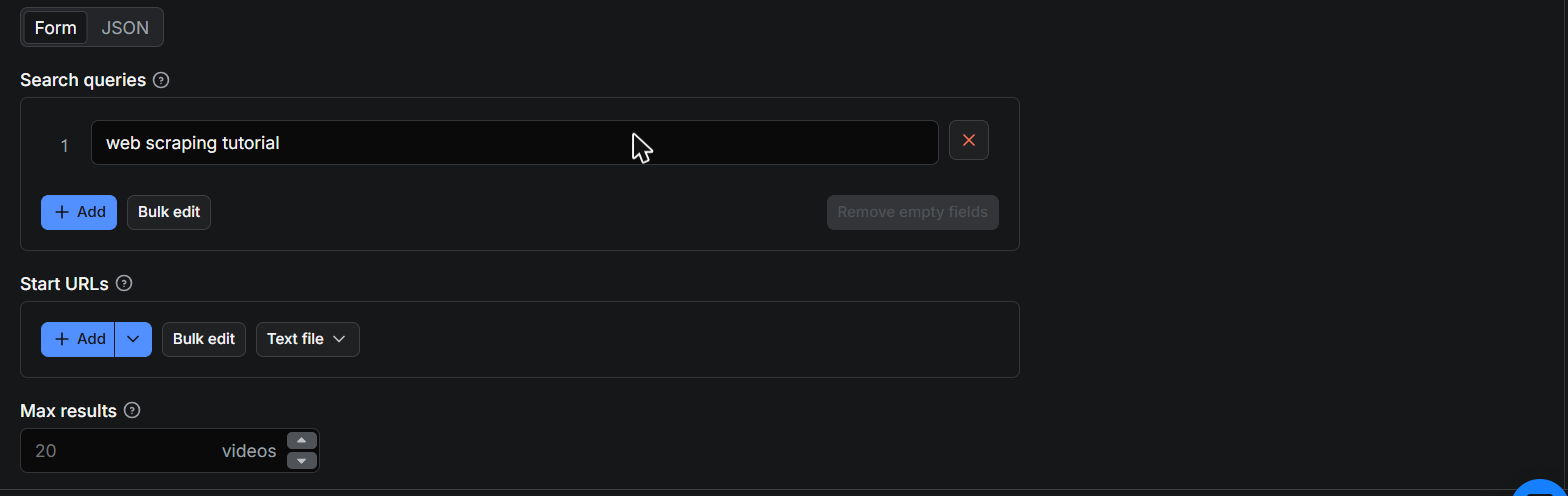
2. Enter one or more **search queries**, or paste **start URLs** (videos, channels, playlists).
3. Set **Max results** and any search filters you need.
4. Optionally switch on **video details**, **transcripts**, or **comments**.
5. Click **Start** and download your dataset in JSON, CSV, or Excel when the run finishes.
 #### Input example
You can fill in the form in Apify Console or pass JSON directly:
```json
{
"searchQueries": ["ai coding assistant review"],
"maxResults": 50,
"sortBy": "view_count",
"uploadDate": "this_year",
"downloadTranscripts": true,
"transcriptFormat": "text",
"includeComments": true,
"maxComments": 20
}
```
Scraping **by URL** works with videos, channels (URL, @handle, or ID), and playlists:
```json
{
"startUrls": [
{ "url": "https://www.youtube.com/watch?v=dQw4w9WgXcQ" },
{ "url": "@mkbhd" },
{ "url": "https://www.youtube.com/playlist?list=PLObrtcm1Kw6PmbXg8bmfJN-o2Hgx8sidf" }
],
"maxResults": 100
}
```
#### How to scrape YouTube transcripts
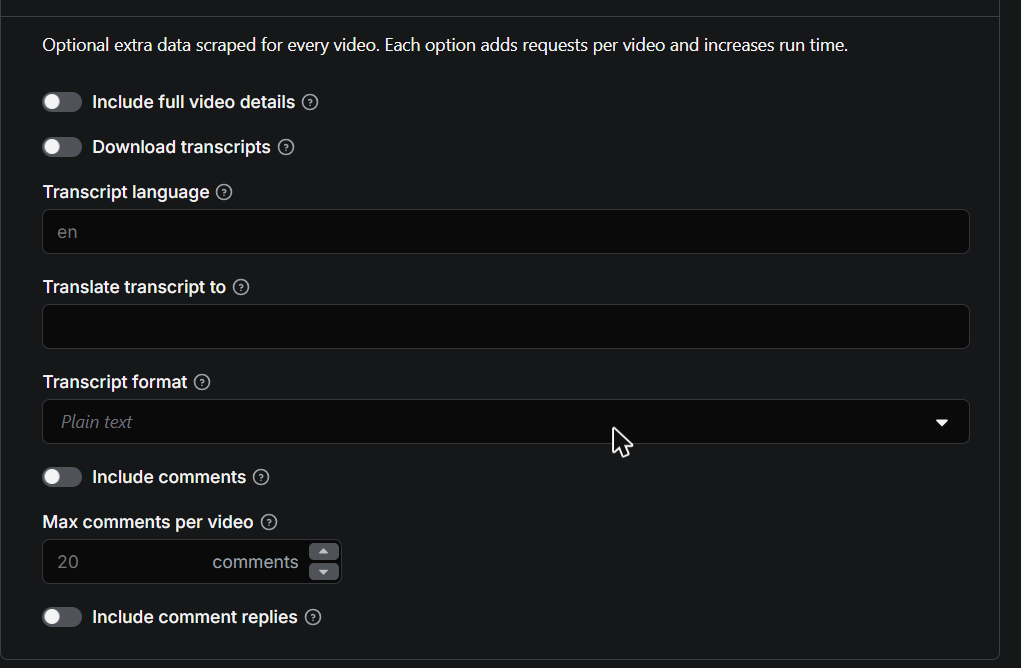
Switch on **Download transcripts** and every scraped video gets its transcript attached. Choose the output format: plain text for AI pipelines, SRT or WebVTT for subtitle files, or JSON segments with timestamps. Set **Transcript language** to pick the source language and **Translate transcript to** for YouTube's machine translation. Both uploaded and auto-generated subtitles are supported.
#### How to scrape YouTube comments
Switch on **Include comments** and set **Max comments per video**. Each comment includes the author, text, like count, and badges (verified, creator, hearted). Enable **Include comment replies** to also fetch full reply threads. Replies cost one extra request per thread, so use them on targeted runs.
#### Input example
You can fill in the form in Apify Console or pass JSON directly:
```json
{
"searchQueries": ["ai coding assistant review"],
"maxResults": 50,
"sortBy": "view_count",
"uploadDate": "this_year",
"downloadTranscripts": true,
"transcriptFormat": "text",
"includeComments": true,
"maxComments": 20
}
```
Scraping **by URL** works with videos, channels (URL, @handle, or ID), and playlists:
```json
{
"startUrls": [
{ "url": "https://www.youtube.com/watch?v=dQw4w9WgXcQ" },
{ "url": "@mkbhd" },
{ "url": "https://www.youtube.com/playlist?list=PLObrtcm1Kw6PmbXg8bmfJN-o2Hgx8sidf" }
],
"maxResults": 100
}
```
#### How to scrape YouTube transcripts
Switch on **Download transcripts** and every scraped video gets its transcript attached. Choose the output format: plain text for AI pipelines, SRT or WebVTT for subtitle files, or JSON segments with timestamps. Set **Transcript language** to pick the source language and **Translate transcript to** for YouTube's machine translation. Both uploaded and auto-generated subtitles are supported.
#### How to scrape YouTube comments
Switch on **Include comments** and set **Max comments per video**. Each comment includes the author, text, like count, and badges (verified, creator, hearted). Enable **Include comment replies** to also fetch full reply threads. Replies cost one extra request per thread, so use them on targeted runs.
 #### Output example
The scraped results appear as a structured dataset you can browse in the Output tab and export in any format:
#### Output example
The scraped results appear as a structured dataset you can browse in the Output tab and export in any format:
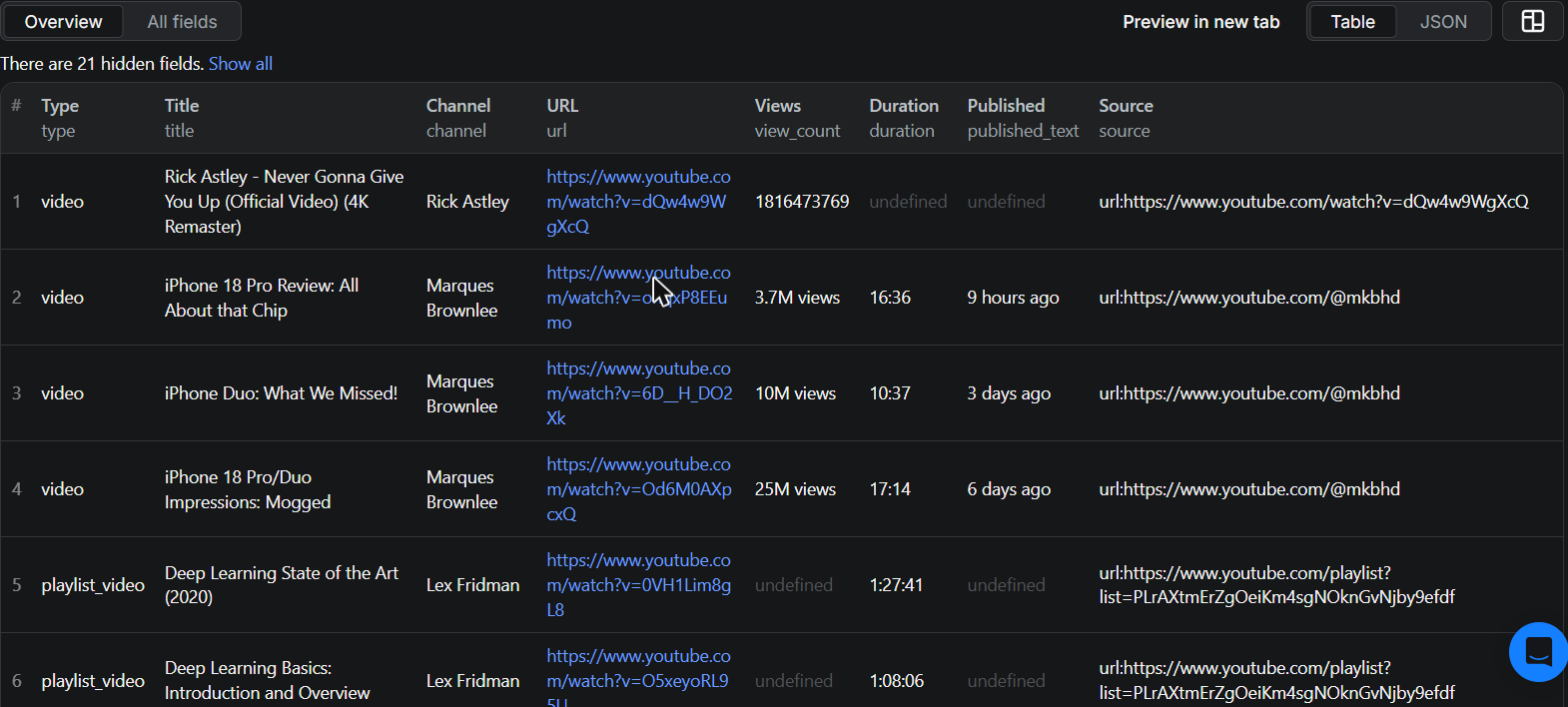 Each video becomes one dataset item:
```json
{
"type": "video",
"source": "search:ai coding assistant review",
"video_id": "dQw4w9WgXcQ",
"title": "I Tested Every AI Coding Assistant",
"channel": "Some Channel",
"channel_id": "UCxxxxxxxxxxxxxxxxxxxxxx",
"duration": "12:34",
"duration_seconds": 754,
"published_text": "3 months ago",
"view_count": "1,234,567 views",
"url": "https://www.youtube.com/watch?v=dQw4w9WgXcQ",
"is_verified": true,
"transcript": {
"language": "en",
"format": "text",
"text": "Today we are comparing every AI coding assistant..."
},
"comments": [
{ "author": "@someuser", "text": "Great comparison!", "like_count": 42 }
]
}
```
Playlist entries include `playlist_id` and `playlist_title`, and channel results include subscriber counts.
#### Error items
When a specific input cannot be scraped (deleted video, missing channel, disabled transcripts), the Actor pushes an **error item** instead of failing the whole run, so one bad URL never costs you the rest of your results. Error items are easy to filter by the presence of the `error` field:
```json
{
"type": "error",
"source": "url:https://www.youtube.com/watch?v=xxxxxxxxxxx",
"error": "VideoUnavailableError",
"note": "Video is unavailable"
}
```
| `error` | Meaning |
| --- | --- |
| `VideoUnavailableError` | Video is deleted, private, or region-blocked |
| `ChannelNotFoundError` | Channel does not exist |
| `PlaylistNotFoundError` | Playlist does not exist or is private |
| `TranscriptsDisabledError` | Video owner disabled transcripts |
| `TranscriptsNotAvailableError` | No transcript exists for the video |
| `AgeRestrictedError` | Content requires login due to age restriction |
| `RateLimitError` | YouTube temporarily rate-limited the request |
| `ValueError` | A start URL could not be recognized |
#### ❓ FAQ
##### How much will scraping YouTube cost?
You pay only for the data you actually receive, per feature:
| What | Price |
| --- | --- |
| Video, channel, or playlist result | $2.00 per 1,000 |
| Full video details add-on | $2.00 per 1,000 videos |
| Transcript add-on (**flat price, any video length**) | $5.00 per 1,000 videos |
| Comment (replies included) | $0.50 per 1,000 comments |
Error rows are **never charged**. Unlike scrapers that bill transcripts per minute of video, transcripts here cost the same whether the video is 2 minutes or 3 hours. Example: 1,000 videos with transcripts costs $7.00 total. See the **Pricing** tab for current rates.
##### Should I use a proxy?
Yes, and the default Apify datacenter proxies work well for search, channels, and playlists. For high-volume transcript scraping, residential proxies are more reliable because YouTube's caption endpoints are stricter with datacenter IP addresses.
##### Can I integrate this scraper with other apps?
Yes. Like any Apify Actor, it works with the Apify API, Python and Node.js clients, webhooks, and integrations such as Make, Zapier, Google Drive, and Slack. Check the **API** tab for ready-to-copy code examples.
##### Can I run it on a schedule?
Yes. Create a Task with your input in Apify Console and attach a schedule to it, for example to track a channel's new uploads daily.
##### Is it legal to scrape YouTube?
This Actor extracts only publicly available data. Scraping public data is generally legal, but you are responsible for complying with copyright rules and personal data regulations such as GDPR in your jurisdiction. If you are unsure whether your use case is compliant, consult a lawyer.
#### Disclaimer
This Actor is an independent project. It is **not affiliated with, endorsed by, or sponsored by YouTube or Google** in any way.
#### Feedback and support
Found a bug or missing a feature? Open an issue on the **Issues** tab and it will be handled promptly.
# Actor input Schema
## `searchQueries` (type: `array`):
Search terms, exactly as you would type them into the YouTube search bar. Each query returns up to Max results videos.
## `startUrls` (type: `array`):
Direct links to YouTube videos, channels (URL, @handle, or ID), or playlists. Can be combined with search queries.
## `maxResults` (type: `integer`):
Maximum number of videos to scrape per search query, channel, or playlist.
## `sortBy` (type: `string`):
Sorting order for search results. Applies to search queries only.
## `uploadDate` (type: `string`):
Only return videos uploaded within this period. Applies to search queries only.
## `duration` (type: `string`):
Filter search results by video length. Short is under 4 minutes, long is over 20 minutes.
## `resultType` (type: `string`):
What kind of results the search should return.
## `features` (type: `array`):
Only return search results with these features (HD, subtitles, live, and so on).
## `includeVideoDetails` (type: `boolean`):
Fetch full metadata for every video found (description, like count, comment count, subscriber count, chapters). Adds one or two extra requests per video, so runs take longer.
## `downloadTranscripts` (type: `boolean`):
Fetch the transcript (subtitles) of every video and attach it to the dataset item.
## `transcriptLanguage` (type: `string`):
Preferred transcript language code, for example
Each video becomes one dataset item:
```json
{
"type": "video",
"source": "search:ai coding assistant review",
"video_id": "dQw4w9WgXcQ",
"title": "I Tested Every AI Coding Assistant",
"channel": "Some Channel",
"channel_id": "UCxxxxxxxxxxxxxxxxxxxxxx",
"duration": "12:34",
"duration_seconds": 754,
"published_text": "3 months ago",
"view_count": "1,234,567 views",
"url": "https://www.youtube.com/watch?v=dQw4w9WgXcQ",
"is_verified": true,
"transcript": {
"language": "en",
"format": "text",
"text": "Today we are comparing every AI coding assistant..."
},
"comments": [
{ "author": "@someuser", "text": "Great comparison!", "like_count": 42 }
]
}
```
Playlist entries include `playlist_id` and `playlist_title`, and channel results include subscriber counts.
#### Error items
When a specific input cannot be scraped (deleted video, missing channel, disabled transcripts), the Actor pushes an **error item** instead of failing the whole run, so one bad URL never costs you the rest of your results. Error items are easy to filter by the presence of the `error` field:
```json
{
"type": "error",
"source": "url:https://www.youtube.com/watch?v=xxxxxxxxxxx",
"error": "VideoUnavailableError",
"note": "Video is unavailable"
}
```
| `error` | Meaning |
| --- | --- |
| `VideoUnavailableError` | Video is deleted, private, or region-blocked |
| `ChannelNotFoundError` | Channel does not exist |
| `PlaylistNotFoundError` | Playlist does not exist or is private |
| `TranscriptsDisabledError` | Video owner disabled transcripts |
| `TranscriptsNotAvailableError` | No transcript exists for the video |
| `AgeRestrictedError` | Content requires login due to age restriction |
| `RateLimitError` | YouTube temporarily rate-limited the request |
| `ValueError` | A start URL could not be recognized |
#### ❓ FAQ
##### How much will scraping YouTube cost?
You pay only for the data you actually receive, per feature:
| What | Price |
| --- | --- |
| Video, channel, or playlist result | $2.00 per 1,000 |
| Full video details add-on | $2.00 per 1,000 videos |
| Transcript add-on (**flat price, any video length**) | $5.00 per 1,000 videos |
| Comment (replies included) | $0.50 per 1,000 comments |
Error rows are **never charged**. Unlike scrapers that bill transcripts per minute of video, transcripts here cost the same whether the video is 2 minutes or 3 hours. Example: 1,000 videos with transcripts costs $7.00 total. See the **Pricing** tab for current rates.
##### Should I use a proxy?
Yes, and the default Apify datacenter proxies work well for search, channels, and playlists. For high-volume transcript scraping, residential proxies are more reliable because YouTube's caption endpoints are stricter with datacenter IP addresses.
##### Can I integrate this scraper with other apps?
Yes. Like any Apify Actor, it works with the Apify API, Python and Node.js clients, webhooks, and integrations such as Make, Zapier, Google Drive, and Slack. Check the **API** tab for ready-to-copy code examples.
##### Can I run it on a schedule?
Yes. Create a Task with your input in Apify Console and attach a schedule to it, for example to track a channel's new uploads daily.
##### Is it legal to scrape YouTube?
This Actor extracts only publicly available data. Scraping public data is generally legal, but you are responsible for complying with copyright rules and personal data regulations such as GDPR in your jurisdiction. If you are unsure whether your use case is compliant, consult a lawyer.
#### Disclaimer
This Actor is an independent project. It is **not affiliated with, endorsed by, or sponsored by YouTube or Google** in any way.
#### Feedback and support
Found a bug or missing a feature? Open an issue on the **Issues** tab and it will be handled promptly.
# Actor input Schema
## `searchQueries` (type: `array`):
Search terms, exactly as you would type them into the YouTube search bar. Each query returns up to Max results videos.
## `startUrls` (type: `array`):
Direct links to YouTube videos, channels (URL, @handle, or ID), or playlists. Can be combined with search queries.
## `maxResults` (type: `integer`):
Maximum number of videos to scrape per search query, channel, or playlist.
## `sortBy` (type: `string`):
Sorting order for search results. Applies to search queries only.
## `uploadDate` (type: `string`):
Only return videos uploaded within this period. Applies to search queries only.
## `duration` (type: `string`):
Filter search results by video length. Short is under 4 minutes, long is over 20 minutes.
## `resultType` (type: `string`):
What kind of results the search should return.
## `features` (type: `array`):
Only return search results with these features (HD, subtitles, live, and so on).
## `includeVideoDetails` (type: `boolean`):
Fetch full metadata for every video found (description, like count, comment count, subscriber count, chapters). Adds one or two extra requests per video, so runs take longer.
## `downloadTranscripts` (type: `boolean`):
Fetch the transcript (subtitles) of every video and attach it to the dataset item.
## `transcriptLanguage` (type: `string`):
Preferred transcript language code, for example en, es, or de. Falls back to whatever is available.
## `translateTranscriptTo` (type: `string`):
Optional target language code. If set, the transcript is machine-translated by YouTube where available.
## `transcriptFormat` (type: `string`):
Output format of the transcript text.
## `includeComments` (type: `boolean`):
Fetch top comments for every video and attach them to the dataset item.
## `maxComments` (type: `integer`):
Maximum number of top-level comments per video. Only used when comments are enabled.
## `includeCommentReplies` (type: `boolean`):
Also fetch replies for each comment. One extra request per comment thread, so this is slow on videos with many comments.
## `proxyConfiguration` (type: `object`):
Proxies used for scraping. Apify datacenter proxies work for search, channels, and playlists. For transcripts at scale, residential proxies are more reliable.
## Actor input object example
```json
{
"searchQueries": [
"web scraping tutorial"
],
"maxResults": 20,
"sortBy": "relevance",
"uploadDate": "any",
"duration": "any",
"resultType": "video",
"includeVideoDetails": false,
"downloadTranscripts": false,
"transcriptLanguage": "en",
"transcriptFormat": "text",
"includeComments": false,
"maxComments": 20,
"includeCommentReplies": false,
"proxyConfiguration": {
"useApifyProxy": true
}
}
```
# Actor output Schema
## `results` (type: `string`):
No description
# API
You can run this Actor programmatically using our API. Below are code examples in JavaScript, Python, and CLI, as well as the OpenAPI specification and MCP server setup.
## JavaScript example
```javascript
import { ApifyClient } from 'apify-client';
// Initialize the ApifyClient with your Apify API token
// Replace the '' with your token
const client = new ApifyClient({
token: '',
});
// Prepare Actor input
const input = {
"searchQueries": [
"web scraping tutorial"
],
"proxyConfiguration": {
"useApifyProxy": true
}
};
// Run the Actor and wait for it to finish
const run = await client.actor("misterzaid.py/youtube-scraper").call(input);
// Fetch and print Actor results from the run's dataset (if any)
console.log('Results from dataset');
console.log(`💾 Check your data here: https://console.apify.com/storage/datasets/${run.defaultDatasetId}`);
const { items } = await client.dataset(run.defaultDatasetId).listItems();
items.forEach((item) => {
console.dir(item);
});
// 📚 Want to learn more 📖? Go to → https://docs.apify.com/api/client/js/docs
```
## Python example
```python
from apify_client import ApifyClient
# Initialize the ApifyClient with your Apify API token
# Replace '' with your token.
client = ApifyClient("")
# Prepare the Actor input
run_input = {
"searchQueries": ["web scraping tutorial"],
"proxyConfiguration": { "useApifyProxy": True },
}
# Run the Actor and wait for it to finish
run = client.actor("misterzaid.py/youtube-scraper").call(run_input=run_input)
# Fetch and print Actor results from the run's dataset (if there are any)
print(f"💾 Check your data here: https://console.apify.com/storage/datasets/{run.default_dataset_id}")
for item in client.dataset(run.default_dataset_id).iterate_items():
print(item)
# 📚 Want to learn more 📖? Go to → https://docs.apify.com/api/client/python/docs/quick-start
```
## CLI example
```bash
echo '{
"searchQueries": [
"web scraping tutorial"
],
"proxyConfiguration": {
"useApifyProxy": true
}
}' |
apify call misterzaid.py/youtube-scraper --silent --output-dataset
```
## MCP server setup
```json
{
"mcpServers": {
"apify": {
"type": "http",
"url": "https://mcp.apify.com/?tools=fetch-actor-details,misterzaid.py/youtube-scraper"
}
}
}
```
The hosted server signs you in with OAuth on first connect, so no API token belongs in this config. Clients without OAuth support can send an `Authorization: Bearer ` header instead, using a token from API & Integrations in Apify Console (https://console.apify.com/settings/integrations).
## OpenAPI specification
Download the OpenAPI definition: https://api.apify.com/v2/actors/qWGyV6jF01aPLRZzJ/builds/jxhuaypUL3wRixR1H/openapi.json