# Google Trends Scraper: Unlimited Keywords + Daily History (`registryfeeds/google-trends-scraper`) Actor
Google Trends without the 5-keyword limit: compare 50+ keywords on one scale, get years of daily data, and receive momentum, YoY growth, seasonality and breakout insights plus a visual HTML report. Related queries, regions, YouTube, News, Shopping and Trending Now included.
- **URL**: https://apify.com/registryfeeds/google-trends-scraper.md
- **Developed by:** [Zach Wallace](https://apify.com/registryfeeds) (community)
- **Categories:** SEO tools, Marketing
- **Stats:** 2 total users, 1 monthly users, 100.0% runs succeeded, 0 bookmarks
- **User rating**: No ratings yet
## Pricing
from $4.00 / 1,000 keyword analyzeds
This Actor is paid per event. You are not charged for the Apify platform usage, but only a fixed price for specific events.
Learn more: https://docs.apify.com/actors/running/actors-in-store.md#pay-per-event
## What's an Apify Actor?
An Actor is a serverless cloud program that runs on the Apify platform. It has two run modes.
In Batch mode, an Actor accepts a well-defined JSON input, performs an action which can take anything from a few seconds to a few hours,
and optionally produces a well-defined JSON output, datasets with results, or files in key-value store.
In Standby mode, an Actor provides a web server which can be used as a website, API, or an MCP server.
Apify vocabulary and the platform model are defined once, in the agent quickstart at https://apify.com/agents.md.
## How to integrate an Actor?
If asked about integration, you help developers integrate Actors into their projects.
You adapt to their stack and deliver integrations that are safe, well-documented, and production-ready.
Do not guess an integration path. Every one of them is in the agent quickstart at https://apify.com/agents.md: the Apify MCP server, Agent Skills with the Apify CLI, the JavaScript and Python clients, the REST API, and the account-free path for an agent with no human to sign in. It also carries the rule on stating cost before the first paid run.
For examples already wired to this Actor's own input schema, see the [API](#api) section below.
Each client library has reference documentation the quickstart does not restate: [JavaScript/TypeScript](https://docs.apify.com/api/client/js/docs.md) (`npm install apify-client`) and [Python](https://docs.apify.com/api/client/python/docs.md) (`pip install apify-client`).
# README
 ### What does Google Trends Scraper do?
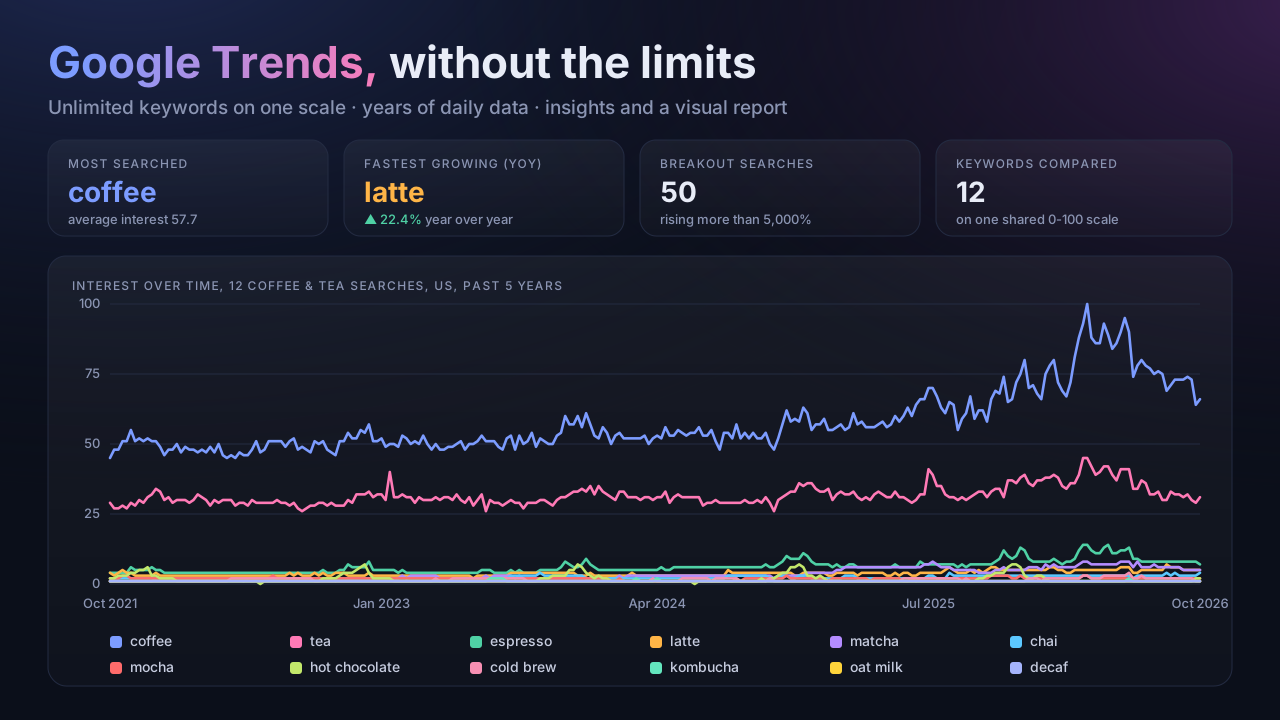
**Google Trends Scraper** pulls [Google Trends](https://trends.google.com) data and does the analysis for you. It removes the two limits that make Google Trends hard to use at scale:
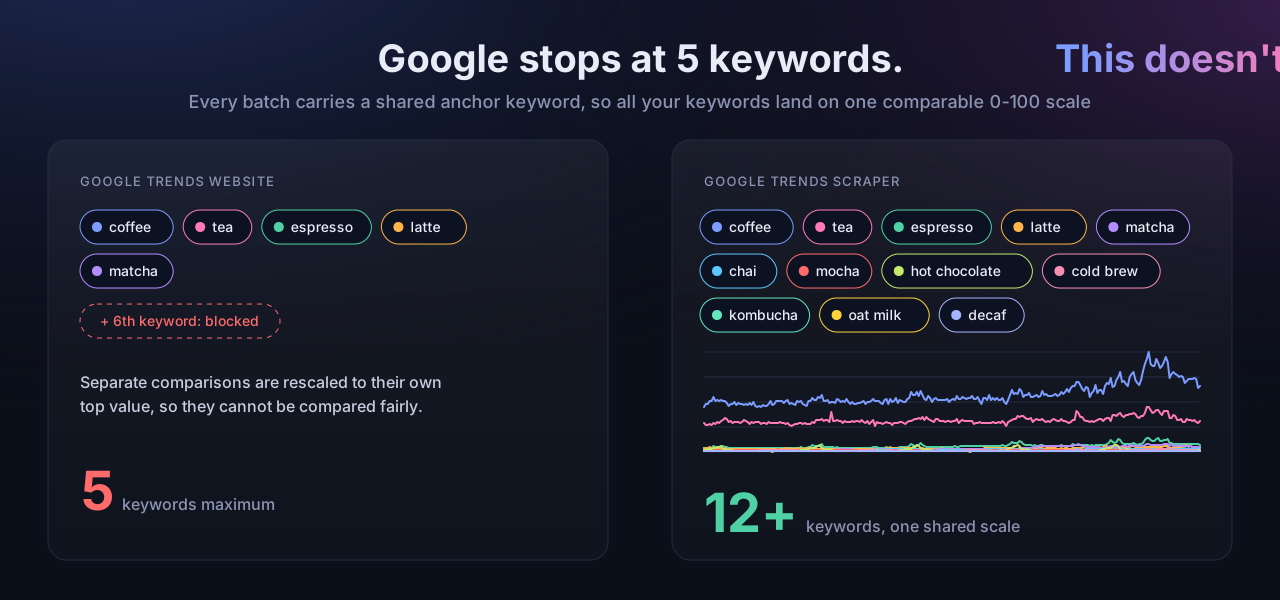
- **No 5-keyword limit.** Compare 10, 50 or 100 keywords and every one lands on **one shared 0-100 scale**, so the numbers are directly comparable. Google itself only compares 5 at a time and rescales every comparison.
- **Years of daily data.** Google switches to weekly or monthly points for anything longer than about 9 months. Turn on **daily resolution** and you get one continuous daily series for any range, even 5 years.
- **Compare countries and states.** Put one keyword in 20 countries, or all 50 states, on one scale and see where it is growing fastest.
- **A 3-month forecast** for every keyword, with an honest error range, so you see the next peak coming.
- **Paste a Google Trends URL.** Set up a comparison on trends.google.com, copy the address, and get it at scale.
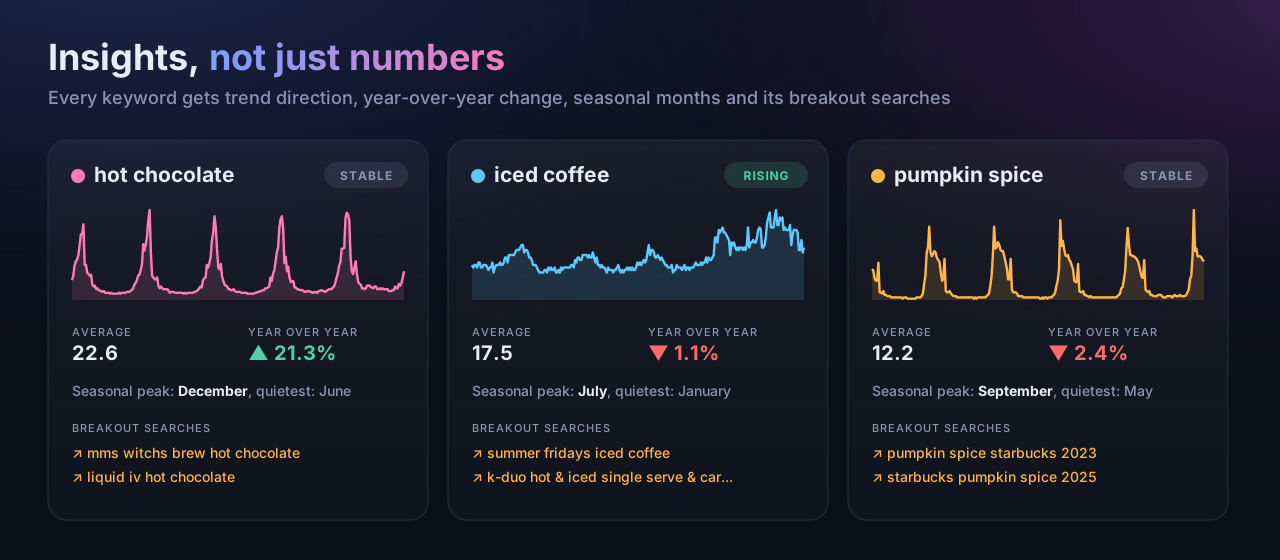
Every run also returns **ready-made insights** (30-day momentum, year-over-year change, trend direction, seasonal peak month, spikes and share of search), **related queries with Breakout flags**, **interest by region**, and a **visual HTML report** you can open, share or screenshot.
It runs on the Apify platform, so you get API access, scheduling, webhooks, integrations (Make, Zapier, n8n, Google Sheets) and monitoring with no setup.
### What does Google Trends Scraper do?
**Google Trends Scraper** pulls [Google Trends](https://trends.google.com) data and does the analysis for you. It removes the two limits that make Google Trends hard to use at scale:
- **No 5-keyword limit.** Compare 10, 50 or 100 keywords and every one lands on **one shared 0-100 scale**, so the numbers are directly comparable. Google itself only compares 5 at a time and rescales every comparison.
- **Years of daily data.** Google switches to weekly or monthly points for anything longer than about 9 months. Turn on **daily resolution** and you get one continuous daily series for any range, even 5 years.
- **Compare countries and states.** Put one keyword in 20 countries, or all 50 states, on one scale and see where it is growing fastest.
- **A 3-month forecast** for every keyword, with an honest error range, so you see the next peak coming.
- **Paste a Google Trends URL.** Set up a comparison on trends.google.com, copy the address, and get it at scale.
Every run also returns **ready-made insights** (30-day momentum, year-over-year change, trend direction, seasonal peak month, spikes and share of search), **related queries with Breakout flags**, **interest by region**, and a **visual HTML report** you can open, share or screenshot.
It runs on the Apify platform, so you get API access, scheduling, webhooks, integrations (Make, Zapier, n8n, Google Sheets) and monitoring with no setup.
 ### How is this different from other Google Trends scrapers?
| | Google Trends website | Typical Trends scraper | **This Actor** |
|---|---|---|---|
| Keywords on one comparable scale | 5 | 5 per request, each request rescaled | **Unlimited, one shared 0-100 scale** |
| Daily data for ranges over ~9 months | No (weekly or monthly) | No | **Yes, stitched into one daily series** |
| Momentum, YoY, trend direction, seasonality, spikes | No | No (raw numbers only) | **Yes, computed per keyword** |
| Share of search across your keywords | No | No | **Yes** |
| Rising and Breakout related queries | Yes, manually | Usually | **Yes, Breakout flagged** |
| Interest by region | Yes | Usually | **Yes** |
| Shareable visual report | No | No | **Yes, interactive HTML** |
| Compare one keyword across many countries or states | 5 regions | No | **Unlimited, one scale** |
| 3-month forecast with error range | No | No | **Yes, tested per keyword** |
| Paste a Google Trends URL as input | n/a | Sometimes | **Yes** |
| Trending now searches | Yes | Sometimes a separate tool | **Yes, same Actor** |
| Self-tested every day against live Google | n/a | Not stated | **Yes** |
### Live example reports
Open a real report from a real run. These are the exact pages the Actor saves, with the scale toggle, hover readouts, Breakout chips and the 3-month Outlook.
| Example | Keywords | Range | Report |
|---|---|---|---|
| **Streaming services compared** | Netflix, Hulu, Peacock, Disney Plus, Prime Video, Apple TV, HBO Max, Paramount Plus | US, 5 years | [Open report](https://api.apify.com/v2/key-value-stores/FhYqkFe80tgK1UZLV/records/google-trends-example-streaming.html) |
| **Matcha in 8 countries, one scale** | matcha in US, GB, CA, AU, DE, FR, JP, BR | 5 years | [Open report](https://api.apify.com/v2/key-value-stores/FhYqkFe80tgK1UZLV/records/google-trends-example-matcha-countries.html) |
| **AI chatbots compared** | ChatGPT, Gemini, Copilot, Grok, Perplexity, DeepSeek | US, 12 months | [Open report](https://api.apify.com/v2/key-value-stores/FhYqkFe80tgK1UZLV/records/google-trends-example-ai-chatbots.html) |
| **12 coffee drinks on one scale** | espresso, latte, mocha, cold brew, iced coffee, americano and 6 more | US, 5 years | [Open report](https://api.apify.com/v2/key-value-stores/FhYqkFe80tgK1UZLV/records/google-trends-example-coffee-drinks.html) |
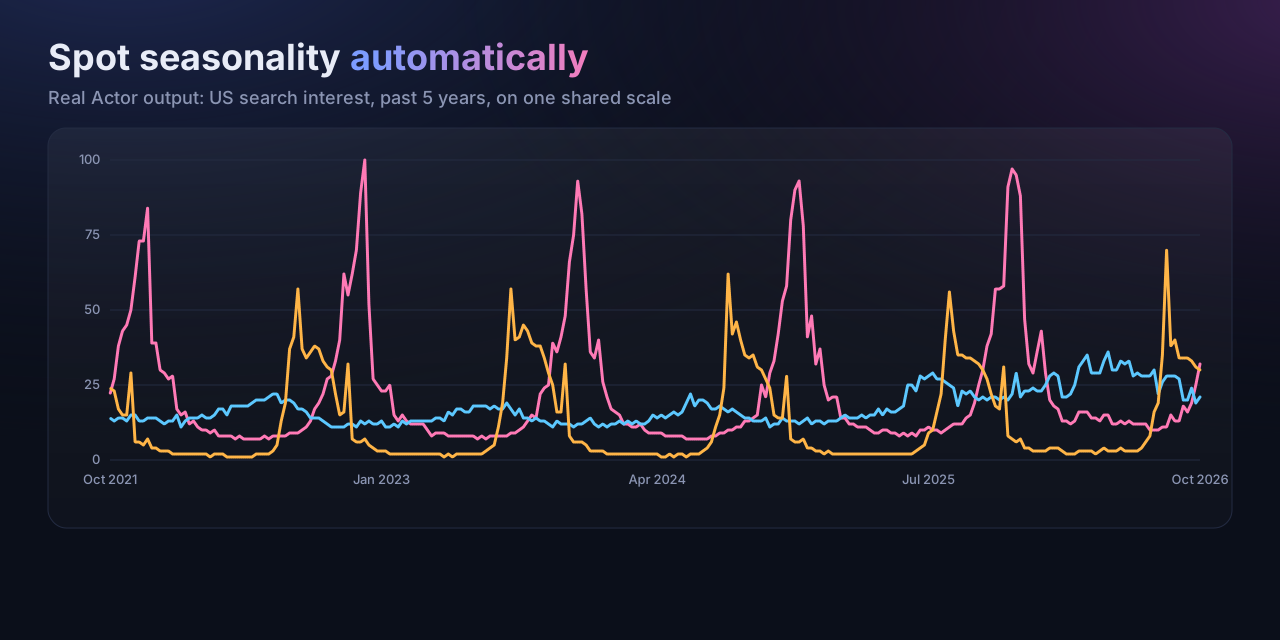
| **When does each seasonal product peak?** | christmas tree, sunscreen, halloween costume, hot chocolate, iced coffee, pumpkin spice | US, 5 years | [Open report](https://api.apify.com/v2/key-value-stores/FhYqkFe80tgK1UZLV/records/google-trends-example-seasonality.html) |
Each one ran in under a minute.
### How is this different from other Google Trends scrapers?
| | Google Trends website | Typical Trends scraper | **This Actor** |
|---|---|---|---|
| Keywords on one comparable scale | 5 | 5 per request, each request rescaled | **Unlimited, one shared 0-100 scale** |
| Daily data for ranges over ~9 months | No (weekly or monthly) | No | **Yes, stitched into one daily series** |
| Momentum, YoY, trend direction, seasonality, spikes | No | No (raw numbers only) | **Yes, computed per keyword** |
| Share of search across your keywords | No | No | **Yes** |
| Rising and Breakout related queries | Yes, manually | Usually | **Yes, Breakout flagged** |
| Interest by region | Yes | Usually | **Yes** |
| Shareable visual report | No | No | **Yes, interactive HTML** |
| Compare one keyword across many countries or states | 5 regions | No | **Unlimited, one scale** |
| 3-month forecast with error range | No | No | **Yes, tested per keyword** |
| Paste a Google Trends URL as input | n/a | Sometimes | **Yes** |
| Trending now searches | Yes | Sometimes a separate tool | **Yes, same Actor** |
| Self-tested every day against live Google | n/a | Not stated | **Yes** |
### Live example reports
Open a real report from a real run. These are the exact pages the Actor saves, with the scale toggle, hover readouts, Breakout chips and the 3-month Outlook.
| Example | Keywords | Range | Report |
|---|---|---|---|
| **Streaming services compared** | Netflix, Hulu, Peacock, Disney Plus, Prime Video, Apple TV, HBO Max, Paramount Plus | US, 5 years | [Open report](https://api.apify.com/v2/key-value-stores/FhYqkFe80tgK1UZLV/records/google-trends-example-streaming.html) |
| **Matcha in 8 countries, one scale** | matcha in US, GB, CA, AU, DE, FR, JP, BR | 5 years | [Open report](https://api.apify.com/v2/key-value-stores/FhYqkFe80tgK1UZLV/records/google-trends-example-matcha-countries.html) |
| **AI chatbots compared** | ChatGPT, Gemini, Copilot, Grok, Perplexity, DeepSeek | US, 12 months | [Open report](https://api.apify.com/v2/key-value-stores/FhYqkFe80tgK1UZLV/records/google-trends-example-ai-chatbots.html) |
| **12 coffee drinks on one scale** | espresso, latte, mocha, cold brew, iced coffee, americano and 6 more | US, 5 years | [Open report](https://api.apify.com/v2/key-value-stores/FhYqkFe80tgK1UZLV/records/google-trends-example-coffee-drinks.html) |
| **When does each seasonal product peak?** | christmas tree, sunscreen, halloween costume, hot chocolate, iced coffee, pumpkin spice | US, 5 years | [Open report](https://api.apify.com/v2/key-value-stores/FhYqkFe80tgK1UZLV/records/google-trends-example-seasonality.html) |
Each one ran in under a minute.
 ### Why use this Google Trends scraper?
- **Market and product research:** which of 40 product ideas is growing fastest, and when does each one peak in the year?
- **SEO and content planning:** find rising and Breakout queries before competitors do, and time content to seasonal peaks.
- **Brand and competitor tracking:** compare your brand against every competitor on one scale and watch share of search over time.
- **Investing and analytics:** long daily series feed straight into models and dashboards without stitching anything yourself.
- **Reporting:** the HTML report turns a run into something you can hand to a client or a team.
### How to scrape Google Trends
1. Click **Try for free**.
2. Enter your **keywords** (as many as you need), or paste a **Google Trends URL**.
3. Pick a **country** (or leave it empty for worldwide), or list several under **Compare across regions**, then a **time range** and, if you like, a **category**.
4. Optional: turn on **daily resolution**, choose **YouTube, News, Image or Shopping** search, or switch to **Trending now** mode.
5. Click **Start**. When the run finishes, open **Visual report** in the Output tab, or download the dataset.
### Input
Everything is on the **Input** tab. The main options:
| Field | What it does |
|---|---|
| `keywords` | Search terms to compare. No upper limit apart from `maxKeywords` (default 100). |
| `trendsUrl` | A trends.google.com/trends/explore address. Its terms, regions, dates, category and search type replace the fields below. |
| `geo` | Country or region code such as `US`, `GB`, `US-CA`. Empty means worldwide. |
| `compareGeos` | Several region codes. Every keyword is compared in every region, all on one scale. |
| `searchCategory` | Limit to one Google category, for example Food & Drink, Shopping or Travel. |
| `timeRange` | Past day, 7 days, 30 days, 90 days, 12 months, 5 years, since 2004, or custom dates. |
| `dailyResolution` | One continuous daily series for long ranges, stitched from overlapping windows. |
| `searchProperty` | Web, YouTube, News, Image or Google Shopping search. |
| `includeRelatedQueries` / `includeRelatedTopics` | Top and rising related searches, with Breakout flags. |
| `includeRegions`, `regionResolution` | Interest by state, city, metro area or country. |
| `includeForecast` | A 3-month forecast per keyword with its expected error. On by default. |
| `outputTimelineRows` | Adds one row per keyword per date (long format) for charting tools. |
| `generateReport` | Saves the visual HTML report. On by default. |
| `mode: trending` + `trendingGeo` | What people are searching for right now in a country. |
Example input:
```json
{
"keywords": ["coffee", "tea", "matcha", "kombucha", "cold brew", "oat milk", "chai"],
"geo": "US",
"timeRange": "today 5-y",
"includeRelatedQueries": true,
"includeRegions": true
}
```
Where is matcha growing fastest? One keyword, eight countries, one scale:
```json
{
"keywords": ["matcha"],
"compareGeos": ["US", "GB", "CA", "AU", "DE", "FR", "JP", "BR"],
"timeRange": "today 5-y"
}
```
Or paste a comparison straight from Google Trends:
```json
{ "trendsUrl": "https://trends.google.com/trends/explore?q=coffee,tea&geo=US&date=today%205-y" }
```
### Output
One row per keyword, ranked by interest, plus the visual report in the key-value store. You can download the dataset in various formats such as JSON, HTML, CSV, or Excel.
```json
{
"keyword": "matcha",
"rank": 3,
"summary": "matcha: rising (+38.2% a year), up 12.5% over the last 30 days, +41% year over year, seasonal peak in March.",
"averageInterest": 6.4,
"shareOfSearchPct": 5.1,
"momentum30dPct": 12.5,
"yoyChangePct": 41,
"trendDirection": "rising",
"seasonalPeakMonth": "March",
"peakInterest": 9,
"peakDate": "2026-03-15",
"breakoutQueries": ["matcha cold foam"],
"risingQueries": [{ "query": "matcha cold foam", "formattedValue": "Breakout", "breakout": true }],
"topRegions": [{ "geoCode": "US-HI", "geoName": "Hawaii", "value": 100 }],
"timeline": [{ "date": "2026-10-11", "value": 7 }],
"googleTrendsUrl": "https://trends.google.com/trends/explore?q=matcha&geo=US&date=today%205-y"
}
```
### Why use this Google Trends scraper?
- **Market and product research:** which of 40 product ideas is growing fastest, and when does each one peak in the year?
- **SEO and content planning:** find rising and Breakout queries before competitors do, and time content to seasonal peaks.
- **Brand and competitor tracking:** compare your brand against every competitor on one scale and watch share of search over time.
- **Investing and analytics:** long daily series feed straight into models and dashboards without stitching anything yourself.
- **Reporting:** the HTML report turns a run into something you can hand to a client or a team.
### How to scrape Google Trends
1. Click **Try for free**.
2. Enter your **keywords** (as many as you need), or paste a **Google Trends URL**.
3. Pick a **country** (or leave it empty for worldwide), or list several under **Compare across regions**, then a **time range** and, if you like, a **category**.
4. Optional: turn on **daily resolution**, choose **YouTube, News, Image or Shopping** search, or switch to **Trending now** mode.
5. Click **Start**. When the run finishes, open **Visual report** in the Output tab, or download the dataset.
### Input
Everything is on the **Input** tab. The main options:
| Field | What it does |
|---|---|
| `keywords` | Search terms to compare. No upper limit apart from `maxKeywords` (default 100). |
| `trendsUrl` | A trends.google.com/trends/explore address. Its terms, regions, dates, category and search type replace the fields below. |
| `geo` | Country or region code such as `US`, `GB`, `US-CA`. Empty means worldwide. |
| `compareGeos` | Several region codes. Every keyword is compared in every region, all on one scale. |
| `searchCategory` | Limit to one Google category, for example Food & Drink, Shopping or Travel. |
| `timeRange` | Past day, 7 days, 30 days, 90 days, 12 months, 5 years, since 2004, or custom dates. |
| `dailyResolution` | One continuous daily series for long ranges, stitched from overlapping windows. |
| `searchProperty` | Web, YouTube, News, Image or Google Shopping search. |
| `includeRelatedQueries` / `includeRelatedTopics` | Top and rising related searches, with Breakout flags. |
| `includeRegions`, `regionResolution` | Interest by state, city, metro area or country. |
| `includeForecast` | A 3-month forecast per keyword with its expected error. On by default. |
| `outputTimelineRows` | Adds one row per keyword per date (long format) for charting tools. |
| `generateReport` | Saves the visual HTML report. On by default. |
| `mode: trending` + `trendingGeo` | What people are searching for right now in a country. |
Example input:
```json
{
"keywords": ["coffee", "tea", "matcha", "kombucha", "cold brew", "oat milk", "chai"],
"geo": "US",
"timeRange": "today 5-y",
"includeRelatedQueries": true,
"includeRegions": true
}
```
Where is matcha growing fastest? One keyword, eight countries, one scale:
```json
{
"keywords": ["matcha"],
"compareGeos": ["US", "GB", "CA", "AU", "DE", "FR", "JP", "BR"],
"timeRange": "today 5-y"
}
```
Or paste a comparison straight from Google Trends:
```json
{ "trendsUrl": "https://trends.google.com/trends/explore?q=coffee,tea&geo=US&date=today%205-y" }
```
### Output
One row per keyword, ranked by interest, plus the visual report in the key-value store. You can download the dataset in various formats such as JSON, HTML, CSV, or Excel.
```json
{
"keyword": "matcha",
"rank": 3,
"summary": "matcha: rising (+38.2% a year), up 12.5% over the last 30 days, +41% year over year, seasonal peak in March.",
"averageInterest": 6.4,
"shareOfSearchPct": 5.1,
"momentum30dPct": 12.5,
"yoyChangePct": 41,
"trendDirection": "rising",
"seasonalPeakMonth": "March",
"peakInterest": 9,
"peakDate": "2026-03-15",
"breakoutQueries": ["matcha cold foam"],
"risingQueries": [{ "query": "matcha cold foam", "formattedValue": "Breakout", "breakout": true }],
"topRegions": [{ "geoCode": "US-HI", "geoName": "Hawaii", "value": 100 }],
"timeline": [{ "date": "2026-10-11", "value": 7 }],
"googleTrendsUrl": "https://trends.google.com/trends/explore?q=matcha&geo=US&date=today%205-y"
}
```
 #### Data fields
| Field | Meaning |
|---|---|
| `averageInterest`, `peakInterest`, `latestInterest` | Interest on the shared 0-100 scale |
| `shareOfSearchPct` | This keyword's share of all interest across your keywords |
| `momentum30dPct` | Last 30 days vs the 30 days before |
| `yoyChangePct` | Last 30 days vs the same period a year earlier |
| `trendDirection`, `trendSlopePctPerYear` | Rising, stable or falling, from a fitted trend line |
| `seasonalPeakMonth`, `seasonalLowMonth`, `seasonalityStrength` | Seasonal pattern (needs 2+ years of data) |
| `spikes` | Dates where interest jumped far above normal |
| `breakoutQueries`, `risingQueries`, `topQueries` | Related searches; Breakout means growth above 5,000% |
| `topRegions` | Where interest is highest |
| `forecastNext3MonthsChangePct` | Expected change over the next 3 months vs the last 3 |
| `forecastExpectedErrorPct` | The forecast method's average error on this keyword's own past |
| `forecast` | Week by week forecast with a low and high bound |
| `series`, `geo` | The keyword and region of this row (differ when comparing regions) |
| `timeline` | The full series, date by date |
### How much does it cost to scrape Google Trends?
You pay per analyzed keyword (each keyword row includes its insights, related queries, regions and timeline), with a much smaller charge per optional long-format timeline row. Trending now results are charged per trending search. The platform's free monthly credit covers plenty of test runs. Daily resolution and very large keyword lists make more requests, so they take longer, but they do not change the per-keyword price.
### Tips for faster, cheaper runs
- Leave **daily resolution** off unless you need daily points beyond 9 months; weekly data is often enough.
- Turn off related topics and regions if you only need the timeline.
- For very large runs (hundreds of keywords), use the **residential proxy** option. The Actor connects directly first and only switches to the proxy when Google starts rate-limiting.
- Schedule the Actor weekly and connect a webhook or Google Sheets to build a trend tracker.
### How does the forecast work?
Each keyword gets the method that predicted it best in the past. Three simple methods compete: the recent level carried forward, the same period last year, and the seasonal pattern of the last two years adjusted to the recent level. Each one forecasts four past cut-off points using only the data before them, and the most accurate wins. Its average error there is reported as `forecastExpectedErrorPct`, and the low/high band uses it.
Tested on 23 real five-year keywords, picking per keyword averaged **17.9% error at three months**, against 25% for assuming nothing changes. Seasonal keywords gain the most: Halloween costume searches went from 87% error to 30%. A forecast needs about two years of history, so it is skipped for short ranges and for low-volume keywords.
### How does the one-scale comparison work?
Google compares at most 5 keywords per request and rescales each request so its own top value is 100. The Actor puts one **anchor keyword** in every batch and uses it to convert each batch onto the same scale, then rescales everything so the single highest point is 100. When a keyword is searched far less than the anchor, its values are less precise, and the row is marked `lowPrecision: true` rather than hiding it.
### FAQ, disclaimers, and support
**Is the data exact search volume?** No. Google Trends reports relative interest (0-100), not absolute search counts. This Actor makes those relative numbers comparable across many keywords and long periods.
**Is scraping Google Trends legal?** The Actor reads publicly available Google Trends data. You are responsible for using the results in line with Google's terms and the laws that apply to you.
**Something not working?** Open an issue on the **Issues** tab and include the run link. Need a custom version, such as scheduled tracking dashboards or a different output format? Get in touch through the Issues tab.
# Actor input Schema
## `mode` (type: `string`):
Compare keywords: interest over time, insights, related queries and regions for your keywords. Trending now: what people are searching for right now in a country.
## `keywords` (type: `array`):
Search terms to analyze. No 5-keyword limit: every keyword is placed on one shared 0-100 scale, so 50 keywords compare as fairly as 2.
## `trendsUrl` (type: `string`):
Paste the address of any comparison you set up on trends.google.com/trends/explore. Its search terms, regions, time range, category and search type are used, and the fields below are ignored. Example: https://trends.google.com/trends/explore?q=coffee,tea\&geo=US\&date=today%205-y
## `geo` (type: `string`):
Two-letter country code (US, GB, DE), a region code (US-CA, GB-ENG), or leave empty for worldwide.
## `compareGeos` (type: `array`):
Compare the same keywords across several countries or states, all on one shared 0-100 scale (Google itself allows 5 per comparison; this has no limit). Use codes like US, GB, DE or US-CA, US-TX. Each keyword and region pair becomes one series. Leave empty to use the single region above.
## `timeRange` (type: `string`):
Period to analyze. Choose "Custom dates" to set your own start and end.
## `startDate` (type: `string`):
YYYY-MM-DD. Used only with "Custom dates".
## `endDate` (type: `string`):
YYYY-MM-DD. Used only with "Custom dates". Defaults to today.
## `dailyResolution` (type: `boolean`):
Google only returns daily points for ranges up to about 9 months and switches to weekly or monthly beyond that. Turn this on to get one continuous daily series for any range, stitched from overlapping windows. Uses more requests.
## `searchProperty` (type: `string`):
Which Google search to measure.
## `searchCategory` (type: `string`):
Limit interest to searches in one category, for example "apple" in Food & Drink rather than the company.
## `category` (type: `integer`):
Numeric Google Trends category id (kept for API compatibility; the Category field above is easier). Used when Category is "All categories".
## `includeRelatedQueries` (type: `boolean`):
Queries people also searched for, including rising ones Google marks as Breakout.
## `includeRelatedTopics` (type: `boolean`):
Topics people also searched for.
## `includeRegions` (type: `boolean`):
Where each keyword is most popular.
## `regionResolution` (type: `string`):
Granularity for interest by region.
## `includeForecast` (type: `boolean`):
Adds a 3-month forecast per keyword with its expected error. The method (seasonal pattern, same period last year, or recent level) is chosen per keyword by testing each on that keyword's own past. Needs about 2 years of history, so it is skipped for shorter ranges and low-volume keywords.
## `outputTimelineRows` (type: `boolean`):
Adds long-format rows (keyword, date, value) for charts and spreadsheets, in addition to one summary row per keyword. Each row is billed as a result.
## `generateReport` (type: `boolean`):
Builds an interactive-looking dashboard (charts, insight cards, breakout queries, top regions) and saves it as REPORT in the key-value store.
## `trendingGeo` (type: `string`):
Country code for Trending now mode, for example US, GB, IN, BR.
## `maxKeywords` (type: `integer`):
Safety cap on how many keywords one run analyzes.
## `proxyConfiguration` (type: `object`):
The Actor connects directly first and switches to this proxy only if Google starts rate-limiting. Residential proxies are the most reliable for very large runs.
## `selfTest` (type: `boolean`):
Used by the daily health check. Runs a fixed known-good case and fails the run if the output looks wrong.
## Actor input object example
```json
{
"mode": "keywords",
"keywords": [
"coffee",
"tea",
"matcha"
],
"geo": "US",
"compareGeos": [],
"timeRange": "today 5-y",
"dailyResolution": false,
"searchProperty": "",
"searchCategory": "0",
"category": 0,
"includeRelatedQueries": true,
"includeRelatedTopics": false,
"includeRegions": true,
"regionResolution": "REGION",
"includeForecast": true,
"outputTimelineRows": false,
"generateReport": true,
"trendingGeo": "US",
"maxKeywords": 100,
"proxyConfiguration": {
"useApifyProxy": true
},
"selfTest": false
}
```
# Actor output Schema
## `report` (type: `string`):
No description
## `insights` (type: `string`):
No description
## `dataset` (type: `string`):
No description
# API
You can run this Actor programmatically using our API. Below are code examples in JavaScript, Python, and CLI, as well as the OpenAPI specification and MCP server setup.
## JavaScript example
```javascript
import { ApifyClient } from 'apify-client';
// Initialize the ApifyClient with your Apify API token
// Replace the '' with your token
const client = new ApifyClient({
token: '',
});
// Prepare Actor input
const input = {
"keywords": [
"coffee",
"tea",
"matcha"
]
};
// Run the Actor and wait for it to finish
const run = await client.actor("registryfeeds/google-trends-scraper").call(input);
// Fetch and print Actor results from the run's dataset (if any)
console.log('Results from dataset');
console.log(`💾 Check your data here: https://console.apify.com/storage/datasets/${run.defaultDatasetId}`);
const { items } = await client.dataset(run.defaultDatasetId).listItems();
items.forEach((item) => {
console.dir(item);
});
// 📚 Want to learn more 📖? Go to → https://docs.apify.com/api/client/js/docs
```
## Python example
```python
from apify_client import ApifyClient
# Initialize the ApifyClient with your Apify API token
# Replace '' with your token.
client = ApifyClient("")
# Prepare the Actor input
run_input = { "keywords": [
"coffee",
"tea",
"matcha",
] }
# Run the Actor and wait for it to finish
run = client.actor("registryfeeds/google-trends-scraper").call(run_input=run_input)
# Fetch and print Actor results from the run's dataset (if there are any)
print(f"💾 Check your data here: https://console.apify.com/storage/datasets/{run.default_dataset_id}")
for item in client.dataset(run.default_dataset_id).iterate_items():
print(item)
# 📚 Want to learn more 📖? Go to → https://docs.apify.com/api/client/python/docs/quick-start
```
## CLI example
```bash
echo '{
"keywords": [
"coffee",
"tea",
"matcha"
]
}' |
apify call registryfeeds/google-trends-scraper --silent --output-dataset
```
## MCP server setup
```json
{
"mcpServers": {
"apify": {
"type": "http",
"url": "https://mcp.apify.com/?tools=fetch-actor-details,registryfeeds/google-trends-scraper"
}
}
}
```
The hosted server signs you in with OAuth on first connect, so no API token belongs in this config. Clients without OAuth support can send an `Authorization: Bearer ` header instead, using a token from API & Integrations in Apify Console (https://console.apify.com/settings/integrations).
## OpenAPI specification
Download the OpenAPI definition: https://api.apify.com/v2/actors/hI6e9Fr3oWvH6ph3c/builds/c6f8ba9cObZnsoyEh/openapi.json
#### Data fields
| Field | Meaning |
|---|---|
| `averageInterest`, `peakInterest`, `latestInterest` | Interest on the shared 0-100 scale |
| `shareOfSearchPct` | This keyword's share of all interest across your keywords |
| `momentum30dPct` | Last 30 days vs the 30 days before |
| `yoyChangePct` | Last 30 days vs the same period a year earlier |
| `trendDirection`, `trendSlopePctPerYear` | Rising, stable or falling, from a fitted trend line |
| `seasonalPeakMonth`, `seasonalLowMonth`, `seasonalityStrength` | Seasonal pattern (needs 2+ years of data) |
| `spikes` | Dates where interest jumped far above normal |
| `breakoutQueries`, `risingQueries`, `topQueries` | Related searches; Breakout means growth above 5,000% |
| `topRegions` | Where interest is highest |
| `forecastNext3MonthsChangePct` | Expected change over the next 3 months vs the last 3 |
| `forecastExpectedErrorPct` | The forecast method's average error on this keyword's own past |
| `forecast` | Week by week forecast with a low and high bound |
| `series`, `geo` | The keyword and region of this row (differ when comparing regions) |
| `timeline` | The full series, date by date |
### How much does it cost to scrape Google Trends?
You pay per analyzed keyword (each keyword row includes its insights, related queries, regions and timeline), with a much smaller charge per optional long-format timeline row. Trending now results are charged per trending search. The platform's free monthly credit covers plenty of test runs. Daily resolution and very large keyword lists make more requests, so they take longer, but they do not change the per-keyword price.
### Tips for faster, cheaper runs
- Leave **daily resolution** off unless you need daily points beyond 9 months; weekly data is often enough.
- Turn off related topics and regions if you only need the timeline.
- For very large runs (hundreds of keywords), use the **residential proxy** option. The Actor connects directly first and only switches to the proxy when Google starts rate-limiting.
- Schedule the Actor weekly and connect a webhook or Google Sheets to build a trend tracker.
### How does the forecast work?
Each keyword gets the method that predicted it best in the past. Three simple methods compete: the recent level carried forward, the same period last year, and the seasonal pattern of the last two years adjusted to the recent level. Each one forecasts four past cut-off points using only the data before them, and the most accurate wins. Its average error there is reported as `forecastExpectedErrorPct`, and the low/high band uses it.
Tested on 23 real five-year keywords, picking per keyword averaged **17.9% error at three months**, against 25% for assuming nothing changes. Seasonal keywords gain the most: Halloween costume searches went from 87% error to 30%. A forecast needs about two years of history, so it is skipped for short ranges and for low-volume keywords.
### How does the one-scale comparison work?
Google compares at most 5 keywords per request and rescales each request so its own top value is 100. The Actor puts one **anchor keyword** in every batch and uses it to convert each batch onto the same scale, then rescales everything so the single highest point is 100. When a keyword is searched far less than the anchor, its values are less precise, and the row is marked `lowPrecision: true` rather than hiding it.
### FAQ, disclaimers, and support
**Is the data exact search volume?** No. Google Trends reports relative interest (0-100), not absolute search counts. This Actor makes those relative numbers comparable across many keywords and long periods.
**Is scraping Google Trends legal?** The Actor reads publicly available Google Trends data. You are responsible for using the results in line with Google's terms and the laws that apply to you.
**Something not working?** Open an issue on the **Issues** tab and include the run link. Need a custom version, such as scheduled tracking dashboards or a different output format? Get in touch through the Issues tab.
# Actor input Schema
## `mode` (type: `string`):
Compare keywords: interest over time, insights, related queries and regions for your keywords. Trending now: what people are searching for right now in a country.
## `keywords` (type: `array`):
Search terms to analyze. No 5-keyword limit: every keyword is placed on one shared 0-100 scale, so 50 keywords compare as fairly as 2.
## `trendsUrl` (type: `string`):
Paste the address of any comparison you set up on trends.google.com/trends/explore. Its search terms, regions, time range, category and search type are used, and the fields below are ignored. Example: https://trends.google.com/trends/explore?q=coffee,tea\&geo=US\&date=today%205-y
## `geo` (type: `string`):
Two-letter country code (US, GB, DE), a region code (US-CA, GB-ENG), or leave empty for worldwide.
## `compareGeos` (type: `array`):
Compare the same keywords across several countries or states, all on one shared 0-100 scale (Google itself allows 5 per comparison; this has no limit). Use codes like US, GB, DE or US-CA, US-TX. Each keyword and region pair becomes one series. Leave empty to use the single region above.
## `timeRange` (type: `string`):
Period to analyze. Choose "Custom dates" to set your own start and end.
## `startDate` (type: `string`):
YYYY-MM-DD. Used only with "Custom dates".
## `endDate` (type: `string`):
YYYY-MM-DD. Used only with "Custom dates". Defaults to today.
## `dailyResolution` (type: `boolean`):
Google only returns daily points for ranges up to about 9 months and switches to weekly or monthly beyond that. Turn this on to get one continuous daily series for any range, stitched from overlapping windows. Uses more requests.
## `searchProperty` (type: `string`):
Which Google search to measure.
## `searchCategory` (type: `string`):
Limit interest to searches in one category, for example "apple" in Food & Drink rather than the company.
## `category` (type: `integer`):
Numeric Google Trends category id (kept for API compatibility; the Category field above is easier). Used when Category is "All categories".
## `includeRelatedQueries` (type: `boolean`):
Queries people also searched for, including rising ones Google marks as Breakout.
## `includeRelatedTopics` (type: `boolean`):
Topics people also searched for.
## `includeRegions` (type: `boolean`):
Where each keyword is most popular.
## `regionResolution` (type: `string`):
Granularity for interest by region.
## `includeForecast` (type: `boolean`):
Adds a 3-month forecast per keyword with its expected error. The method (seasonal pattern, same period last year, or recent level) is chosen per keyword by testing each on that keyword's own past. Needs about 2 years of history, so it is skipped for shorter ranges and low-volume keywords.
## `outputTimelineRows` (type: `boolean`):
Adds long-format rows (keyword, date, value) for charts and spreadsheets, in addition to one summary row per keyword. Each row is billed as a result.
## `generateReport` (type: `boolean`):
Builds an interactive-looking dashboard (charts, insight cards, breakout queries, top regions) and saves it as REPORT in the key-value store.
## `trendingGeo` (type: `string`):
Country code for Trending now mode, for example US, GB, IN, BR.
## `maxKeywords` (type: `integer`):
Safety cap on how many keywords one run analyzes.
## `proxyConfiguration` (type: `object`):
The Actor connects directly first and switches to this proxy only if Google starts rate-limiting. Residential proxies are the most reliable for very large runs.
## `selfTest` (type: `boolean`):
Used by the daily health check. Runs a fixed known-good case and fails the run if the output looks wrong.
## Actor input object example
```json
{
"mode": "keywords",
"keywords": [
"coffee",
"tea",
"matcha"
],
"geo": "US",
"compareGeos": [],
"timeRange": "today 5-y",
"dailyResolution": false,
"searchProperty": "",
"searchCategory": "0",
"category": 0,
"includeRelatedQueries": true,
"includeRelatedTopics": false,
"includeRegions": true,
"regionResolution": "REGION",
"includeForecast": true,
"outputTimelineRows": false,
"generateReport": true,
"trendingGeo": "US",
"maxKeywords": 100,
"proxyConfiguration": {
"useApifyProxy": true
},
"selfTest": false
}
```
# Actor output Schema
## `report` (type: `string`):
No description
## `insights` (type: `string`):
No description
## `dataset` (type: `string`):
No description
# API
You can run this Actor programmatically using our API. Below are code examples in JavaScript, Python, and CLI, as well as the OpenAPI specification and MCP server setup.
## JavaScript example
```javascript
import { ApifyClient } from 'apify-client';
// Initialize the ApifyClient with your Apify API token
// Replace the '' with your token
const client = new ApifyClient({
token: '',
});
// Prepare Actor input
const input = {
"keywords": [
"coffee",
"tea",
"matcha"
]
};
// Run the Actor and wait for it to finish
const run = await client.actor("registryfeeds/google-trends-scraper").call(input);
// Fetch and print Actor results from the run's dataset (if any)
console.log('Results from dataset');
console.log(`💾 Check your data here: https://console.apify.com/storage/datasets/${run.defaultDatasetId}`);
const { items } = await client.dataset(run.defaultDatasetId).listItems();
items.forEach((item) => {
console.dir(item);
});
// 📚 Want to learn more 📖? Go to → https://docs.apify.com/api/client/js/docs
```
## Python example
```python
from apify_client import ApifyClient
# Initialize the ApifyClient with your Apify API token
# Replace '' with your token.
client = ApifyClient("")
# Prepare the Actor input
run_input = { "keywords": [
"coffee",
"tea",
"matcha",
] }
# Run the Actor and wait for it to finish
run = client.actor("registryfeeds/google-trends-scraper").call(run_input=run_input)
# Fetch and print Actor results from the run's dataset (if there are any)
print(f"💾 Check your data here: https://console.apify.com/storage/datasets/{run.default_dataset_id}")
for item in client.dataset(run.default_dataset_id).iterate_items():
print(item)
# 📚 Want to learn more 📖? Go to → https://docs.apify.com/api/client/python/docs/quick-start
```
## CLI example
```bash
echo '{
"keywords": [
"coffee",
"tea",
"matcha"
]
}' |
apify call registryfeeds/google-trends-scraper --silent --output-dataset
```
## MCP server setup
```json
{
"mcpServers": {
"apify": {
"type": "http",
"url": "https://mcp.apify.com/?tools=fetch-actor-details,registryfeeds/google-trends-scraper"
}
}
}
```
The hosted server signs you in with OAuth on first connect, so no API token belongs in this config. Clients without OAuth support can send an `Authorization: Bearer ` header instead, using a token from API & Integrations in Apify Console (https://console.apify.com/settings/integrations).
## OpenAPI specification
Download the OpenAPI definition: https://api.apify.com/v2/actors/hI6e9Fr3oWvH6ph3c/builds/c6f8ba9cObZnsoyEh/openapi.json