# Wikipedia Pageviews: Trends, Top Articles & Languages (`registryfeeds/wikipedia-pageviews`) Actor
Real page-view numbers for any Wikipedia articles: daily history since 2015 with redirects included, momentum, year-over-year, seasonality and a 3-month forecast, every language edition of a topic, the most-read and surging articles, and a visual report.
- **URL**: https://apify.com/registryfeeds/wikipedia-pageviews.md
- **Developed by:** [Zach Wallace](https://apify.com/registryfeeds) (community)
- **Categories:** News, SEO tools
- **Stats:** 2 total users, 1 monthly users, 100.0% runs succeeded, 0 bookmarks
- **User rating**: No ratings yet
## Pricing
from $3.00 / 1,000 article analyzeds
This Actor is paid per event. You are not charged for the Apify platform usage, but only a fixed price for specific events.
Learn more: https://docs.apify.com/actors/running/actors-in-store.md#pay-per-event
## What's an Apify Actor?
An Actor is a serverless cloud program that runs on the Apify platform. It has two run modes.
In Batch mode, an Actor accepts a well-defined JSON input, performs an action which can take anything from a few seconds to a few hours,
and optionally produces a well-defined JSON output, datasets with results, or files in key-value store.
In Standby mode, an Actor provides a web server which can be used as a website, API, or an MCP server.
Apify vocabulary and the platform model are defined once, in the agent quickstart at https://apify.com/agents.md.
## How to integrate an Actor?
If asked about integration, you help developers integrate Actors into their projects.
You adapt to their stack and deliver integrations that are safe, well-documented, and production-ready.
Do not guess an integration path. Every one of them is in the agent quickstart at https://apify.com/agents.md: the Apify MCP server, Agent Skills with the Apify CLI, the JavaScript and Python clients, the REST API, and the account-free path for an agent with no human to sign in. It also carries the rule on stating cost before the first paid run.
For examples already wired to this Actor's own input schema, see the [API](#api) section below.
Each client library has reference documentation the quickstart does not restate: [JavaScript/TypeScript](https://docs.apify.com/api/client/js/docs.md) (`npm install apify-client`) and [Python](https://docs.apify.com/api/client/python/docs.md) (`pip install apify-client`).
# README
 ### What does Wikipedia Pageviews do?
**Wikipedia Pageviews** gives you **real page-view numbers** for any Wikipedia articles, in any language, straight from the Wikimedia Foundation's official statistics. Unlike Google Trends, which only shows relative interest from 0 to 100, these are **actual counts of people reading**, every day since July 2015.
It does the analysis for you:
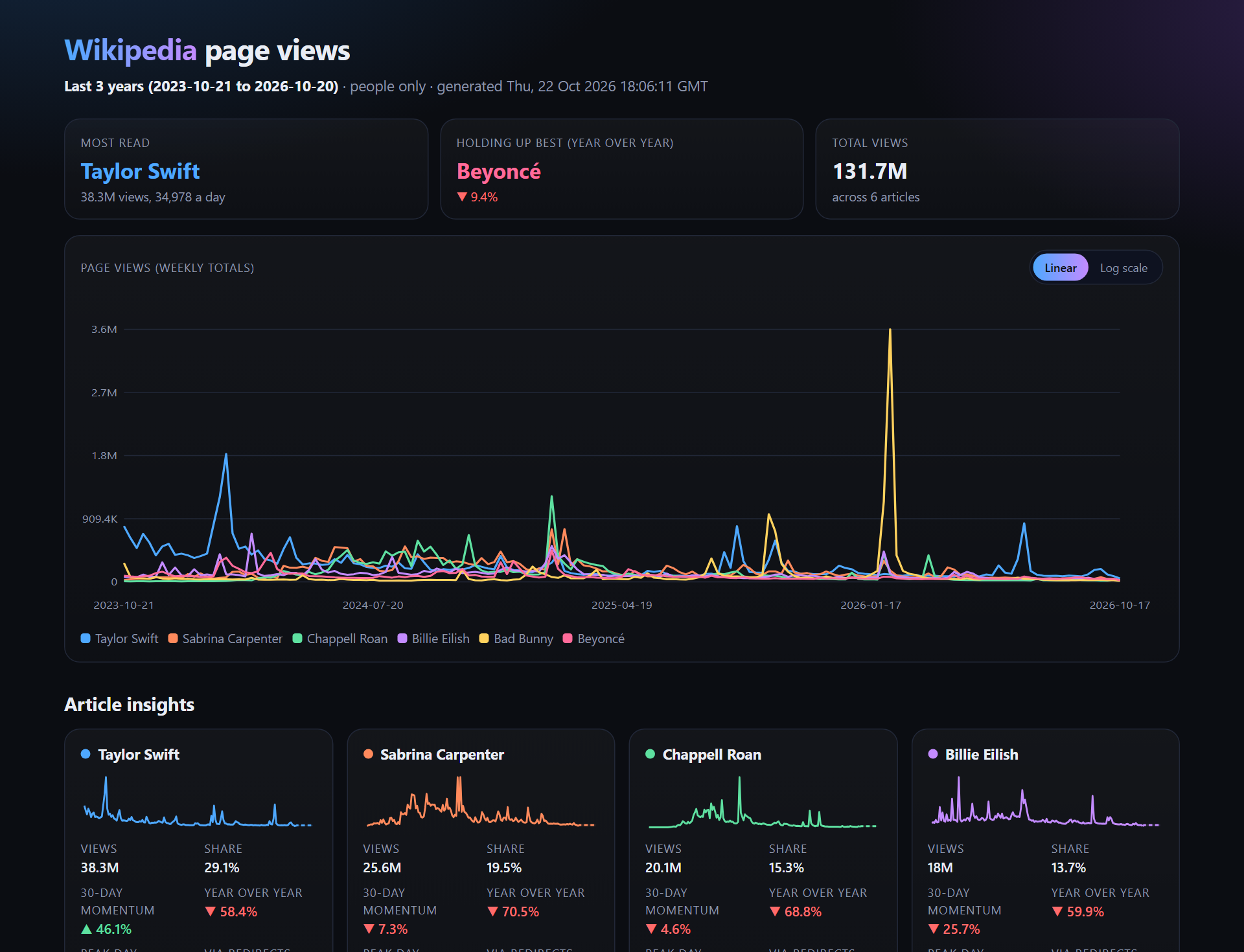
- **Compare any number of articles** over time: total views, daily average, share of attention, peak day, **30-day momentum, year-over-year change, trend direction, seasonal peak month, spikes**, and a **3-month forecast** for each.
- **True totals with redirects:** people reach "Taylor Swift" through "Taylor swift", "T. Swift" and dozens of other titles. Wikipedia counts each separately; this Actor adds them back in.
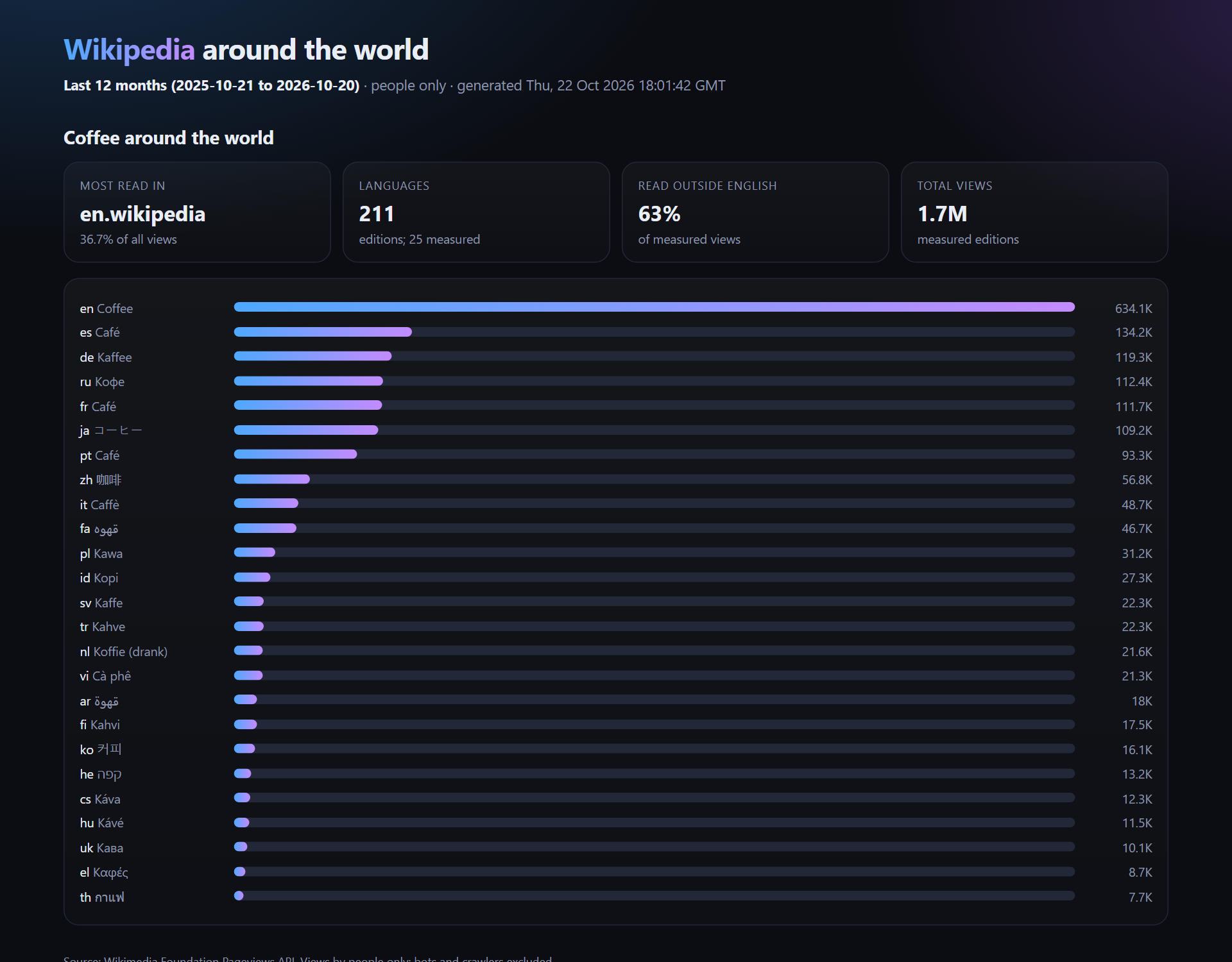
- **One topic in every language:** how much is "Coffee" read in Japanese, German, Spanish or Persian? See where in the world a topic is followed.
- **Most-read and surging articles** for any recent days: what the world is reading right now, and what is spiking.
Every run saves a **visual report**: an interactive chart with a log-scale toggle, article cards with forecasts, language bars and a top list.
It runs on the Apify platform, so you get API access, scheduling, webhooks, integrations (Make, Zapier, n8n, Google Sheets) and monitoring with no setup.
### Live example reports
Real reports from real runs:
| Example | What it shows | Report |
|---|---|---|
| **Pop stars compared** | Taylor Swift, Beyoncé, Bad Bunny, Sabrina Carpenter, Chappell Roan and Billie Eilish over 3 years | [Open report](https://api.apify.com/v2/key-value-stores/FhYqkFe80tgK1UZLV/records/wikipedia-example-pop-stars.html) |
| **Coffee in 25 languages** | Where in the world people read about coffee | [Open report](https://api.apify.com/v2/key-value-stores/FhYqkFe80tgK1UZLV/records/wikipedia-example-coffee-languages.html) |
| **Most read this week** | The top 100 articles and what is surging | [Open report](https://api.apify.com/v2/key-value-stores/FhYqkFe80tgK1UZLV/records/wikipedia-example-top-week.html) |
### What does Wikipedia Pageviews do?
**Wikipedia Pageviews** gives you **real page-view numbers** for any Wikipedia articles, in any language, straight from the Wikimedia Foundation's official statistics. Unlike Google Trends, which only shows relative interest from 0 to 100, these are **actual counts of people reading**, every day since July 2015.
It does the analysis for you:
- **Compare any number of articles** over time: total views, daily average, share of attention, peak day, **30-day momentum, year-over-year change, trend direction, seasonal peak month, spikes**, and a **3-month forecast** for each.
- **True totals with redirects:** people reach "Taylor Swift" through "Taylor swift", "T. Swift" and dozens of other titles. Wikipedia counts each separately; this Actor adds them back in.
- **One topic in every language:** how much is "Coffee" read in Japanese, German, Spanish or Persian? See where in the world a topic is followed.
- **Most-read and surging articles** for any recent days: what the world is reading right now, and what is spiking.
Every run saves a **visual report**: an interactive chart with a log-scale toggle, article cards with forecasts, language bars and a top list.
It runs on the Apify platform, so you get API access, scheduling, webhooks, integrations (Make, Zapier, n8n, Google Sheets) and monitoring with no setup.
### Live example reports
Real reports from real runs:
| Example | What it shows | Report |
|---|---|---|
| **Pop stars compared** | Taylor Swift, Beyoncé, Bad Bunny, Sabrina Carpenter, Chappell Roan and Billie Eilish over 3 years | [Open report](https://api.apify.com/v2/key-value-stores/FhYqkFe80tgK1UZLV/records/wikipedia-example-pop-stars.html) |
| **Coffee in 25 languages** | Where in the world people read about coffee | [Open report](https://api.apify.com/v2/key-value-stores/FhYqkFe80tgK1UZLV/records/wikipedia-example-coffee-languages.html) |
| **Most read this week** | The top 100 articles and what is surging | [Open report](https://api.apify.com/v2/key-value-stores/FhYqkFe80tgK1UZLV/records/wikipedia-example-top-week.html) |
 ### Why use it?
- **Attention research:** measure public interest in people, brands, products, events or ideas with real numbers rather than an index.
- **Media and entertainment:** track artists, films, shows and athletes; spot what is trending before it peaks.
- **Market and investment signals:** page views of companies and products are a well-known proxy for public attention.
- **SEO and content:** find seasonal topics and rising subjects, and see which language markets care about a topic.
- **Academic and data journalism:** clean daily series since 2015, with bots and crawlers excluded by default.
### How to get Wikipedia page views
1. Click **Try for free**.
2. Enter **articles**: titles, wikipedia.org links in any language, or `de:Berlin` style for a language edition.
3. Pick a **time range** and a mode: **Compare articles**, **One topic in every language**, or **Most-read and surging articles**.
4. Click **Start**. Open **Visual report** in the Output tab, or download the dataset.
### Input
| Field | What it does |
|---|---|
| `mode` | `compare`, `languages` or `top` |
| `articles` | Titles, links or `lang:Title`. Spelling and capitals are fixed and redirects followed automatically |
| `language` | Language edition for plain titles and for the top list (`en`, `de`, `ja` and so on) |
| `timeRange` | Last 30 days, 90 days, 12 months, 3 years, 5 years, since July 2015, or custom dates |
| `includeRedirects`, `maxRedirectsPerArticle` | Add views that arrive through alternative titles |
| `agent` | People only (default) or people, bots and crawlers |
| `includeForecast` | 3-month forecast per article (needs about 2.5 years of data) |
| `languagesLimit` | Languages mode: how many language editions to measure |
| `topDays`, `topEndDate`, `topLimit` | Top mode: which days and how many articles |
Example: five pop stars over three years.
```json
{
"articles": ["Taylor Swift", "Beyoncé", "Bad Bunny", "Sabrina Carpenter", "Chappell Roan"],
"timeRange": "last-3-years"
}
```
Example: where in the world people read about coffee.
```json
{ "mode": "languages", "articles": ["Coffee"], "timeRange": "last-12-months", "languagesLimit": 20 }
```
### Output
One row per article (compare), per language edition (languages) or per top article (top), plus the visual report. You can download the dataset in various formats such as JSON, HTML, CSV, or Excel.
A real result (trimmed):
```json
{
"article": "Taylor Swift",
"language": "en",
"summary": "Taylor Swift: falling (-57.8% a year), up 46.1% over the last 30 days, -58.4% year over year, seasonal peak in February.",
"totalViews": 38336297,
"averageDailyViews": 34978,
"peakDay": "2024-02-12",
"peakViews": 702450,
"momentum30dPct": 46.1,
"yoyChangePct": -58.4,
"seasonalPeakMonth": "February",
"viewsViaRedirects": 289343,
"redirectsCounted": 25,
"forecastNext3MonthsChangePct": -22.2,
"forecastExpectedErrorPct": 26.1,
"wikidataId": "Q26876",
"url": "https://en.wikipedia.org/wiki/Taylor_Swift"
}
```
#### Data fields
| Field | Meaning |
|---|---|
| `totalViews`, `averageDailyViews`, `latestViews` | Views in the range (people only by default) |
| `shareOfAttentionPct` | This article's share of all views across your articles |
| `peakDay`, `peakViews`, `spikes` | Biggest day and other unusual spikes |
| `momentum30dPct`, `yoyChangePct` | Last 30 days vs the 30 before, and vs the same period a year earlier |
| `trendDirection`, `trendSlopePctPerYear` | Rising, stable or falling, from a fitted trend line |
| `seasonalPeakMonth`, `seasonalLowMonth` | Seasonal pattern (needs 2+ years) |
| `viewsViaRedirects`, `redirectSharePct` | Views that arrived through alternative titles |
| `forecastNext3MonthsChangePct`, `forecastExpectedErrorPct`, `forecast` | 3-month forecast, its typical error, and the daily forecast with a range |
| `timeline` | Every day's views |
| `shareOfGlobalViewsPct` | Languages mode: each edition's share of the topic's views |
| `daysInDailyTop`, `bestDailyRank`, `lastDayVsEarlierPct` | Top mode: staying power and surge |
### How much does it cost?
You pay per article analysed (or per language edition, or per top article), plus an optional small charge per daily timeline row in long format. The Wikimedia API is fast, so runs are quick: three years of daily views for five articles, with redirects, take well under a minute.
### Tips
- Leave **redirects** on for true totals; for a quick look, lower `maxRedirectsPerArticle`.
- Use **Last 3 years** or longer to get year-over-year, seasonality and the forecast.
- **Schedule** the top mode daily with a webhook to catch what is surging every morning.
- Compare an article **across languages** before entering a new market.
### How does the forecast work?
Each article gets the method that predicted it best in the past. Three simple methods compete (the recent level, the same period last year, and the seasonal pattern adjusted to the recent level) on four past cut-off points, and the winner's average error is reported as `forecastExpectedErrorPct`.
### FAQ, disclaimers, and support
**Is this official data?** Yes. It comes from the Wikimedia Foundation's public Pageviews API, the same numbers as wikimedia.org statistics tools. Daily figures arrive about a day late, so ranges end two days ago.
**Why do some top articles look odd?** Wikimedia filters known bots, but occasional automated traffic still reaches the daily top lists. An article with millions of views and little news coverage may be one of those.
**Is it allowed?** The data is published openly by the Wikimedia Foundation for reuse. The Actor identifies itself to Wikimedia as their API policy asks.
**Something not working?** Open an issue on the **Issues** tab with the run link. Need a custom version? Get in touch through the Issues tab.
# Actor input Schema
## `mode` (type: `string`):
Compare articles over time, see how a topic is read across language editions, or list the most-read articles of recent days.
## `articles` (type: `array`):
Article titles ("Taylor Swift"), wikipedia.org links in any language, or "de:Berlin" for a specific language edition. Spelling and capitals are fixed automatically and redirects followed.
## `language` (type: `string`):
Language edition for plain titles and for the top list: en, de, fr, es, ja, and so on.
## `timeRange` (type: `string`):
Daily views back to July 2015. Year-over-year needs 12 months; the forecast needs about 2.5 years.
## `startDate` (type: `string`):
First day for Custom dates. Daily data starts on 2015-07-01.
## `endDate` (type: `string`):
Last day for Custom dates. Leave empty for the latest complete day.
## `includeRedirects` (type: `boolean`):
People also reach an article through alternative titles ("Taylor swift", "T. Swift"). Wikipedia counts those separately; this adds them in for the true total.
## `maxRedirectsPerArticle` (type: `integer`):
Each redirect is one more request; the main alternative titles carry almost all redirect views.
## `agent` (type: `string`):
People only excludes bots and crawlers, which is what most analyses want.
## `includeForecast` (type: `boolean`):
Per article, chosen by testing three methods on the article's own history. Needs about 2.5 years of data.
## `languagesLimit` (type: `integer`):
Measured in order of each Wikipedia's size.
## `topDays` (type: `integer`):
How many recent days to combine into the top list (1 to 31).
## `topEndDate` (type: `string`):
Leave empty for the latest complete day.
## `topLimit` (type: `integer`):
How many articles to return in top mode.
## `maxArticles` (type: `integer`):
Upper limit on articles per run.
## `outputTimelineRows` (type: `boolean`):
Long format for charting tools. Each article row already includes its full timeline.
## `generateReport` (type: `boolean`):
Saves an HTML report with charts in the key-value store as REPORT.
## `selfTest` (type: `boolean`):
Used by the daily health check.
## Actor input object example
```json
{
"mode": "compare",
"articles": [
"Taylor Swift",
"Beyoncé",
"Bad Bunny"
],
"language": "en",
"timeRange": "last-3-years",
"includeRedirects": true,
"maxRedirectsPerArticle": 25,
"agent": "user",
"includeForecast": true,
"languagesLimit": 25,
"topDays": 7,
"topLimit": 100,
"maxArticles": 100,
"outputTimelineRows": false,
"generateReport": true,
"selfTest": false
}
```
# Actor output Schema
## `dataset` (type: `string`):
No description
## `report` (type: `string`):
No description
# API
You can run this Actor programmatically using our API. Below are code examples in JavaScript, Python, and CLI, as well as the OpenAPI specification and MCP server setup.
## JavaScript example
```javascript
import { ApifyClient } from 'apify-client';
// Initialize the ApifyClient with your Apify API token
// Replace the '' with your token
const client = new ApifyClient({
token: '',
});
// Prepare Actor input
const input = {
"articles": [
"Taylor Swift",
"Beyoncé",
"Bad Bunny"
]
};
// Run the Actor and wait for it to finish
const run = await client.actor("registryfeeds/wikipedia-pageviews").call(input);
// Fetch and print Actor results from the run's dataset (if any)
console.log('Results from dataset');
console.log(`💾 Check your data here: https://console.apify.com/storage/datasets/${run.defaultDatasetId}`);
const { items } = await client.dataset(run.defaultDatasetId).listItems();
items.forEach((item) => {
console.dir(item);
});
// 📚 Want to learn more 📖? Go to → https://docs.apify.com/api/client/js/docs
```
## Python example
```python
from apify_client import ApifyClient
# Initialize the ApifyClient with your Apify API token
# Replace '' with your token.
client = ApifyClient("")
# Prepare the Actor input
run_input = { "articles": [
"Taylor Swift",
"Beyoncé",
"Bad Bunny",
] }
# Run the Actor and wait for it to finish
run = client.actor("registryfeeds/wikipedia-pageviews").call(run_input=run_input)
# Fetch and print Actor results from the run's dataset (if there are any)
print(f"💾 Check your data here: https://console.apify.com/storage/datasets/{run.default_dataset_id}")
for item in client.dataset(run.default_dataset_id).iterate_items():
print(item)
# 📚 Want to learn more 📖? Go to → https://docs.apify.com/api/client/python/docs/quick-start
```
## CLI example
```bash
echo '{
"articles": [
"Taylor Swift",
"Beyoncé",
"Bad Bunny"
]
}' |
apify call registryfeeds/wikipedia-pageviews --silent --output-dataset
```
## MCP server setup
```json
{
"mcpServers": {
"apify": {
"type": "http",
"url": "https://mcp.apify.com/?tools=fetch-actor-details,registryfeeds/wikipedia-pageviews"
}
}
}
```
The hosted server signs you in with OAuth on first connect, so no API token belongs in this config. Clients without OAuth support can send an `Authorization: Bearer ` header instead, using a token from API & Integrations in Apify Console (https://console.apify.com/settings/integrations).
## OpenAPI specification
Download the OpenAPI definition: https://api.apify.com/v2/actors/IXNSn842PwIGxIYHG/builds/THMzHr4Ymi2u6CNhb/openapi.json
### Why use it?
- **Attention research:** measure public interest in people, brands, products, events or ideas with real numbers rather than an index.
- **Media and entertainment:** track artists, films, shows and athletes; spot what is trending before it peaks.
- **Market and investment signals:** page views of companies and products are a well-known proxy for public attention.
- **SEO and content:** find seasonal topics and rising subjects, and see which language markets care about a topic.
- **Academic and data journalism:** clean daily series since 2015, with bots and crawlers excluded by default.
### How to get Wikipedia page views
1. Click **Try for free**.
2. Enter **articles**: titles, wikipedia.org links in any language, or `de:Berlin` style for a language edition.
3. Pick a **time range** and a mode: **Compare articles**, **One topic in every language**, or **Most-read and surging articles**.
4. Click **Start**. Open **Visual report** in the Output tab, or download the dataset.
### Input
| Field | What it does |
|---|---|
| `mode` | `compare`, `languages` or `top` |
| `articles` | Titles, links or `lang:Title`. Spelling and capitals are fixed and redirects followed automatically |
| `language` | Language edition for plain titles and for the top list (`en`, `de`, `ja` and so on) |
| `timeRange` | Last 30 days, 90 days, 12 months, 3 years, 5 years, since July 2015, or custom dates |
| `includeRedirects`, `maxRedirectsPerArticle` | Add views that arrive through alternative titles |
| `agent` | People only (default) or people, bots and crawlers |
| `includeForecast` | 3-month forecast per article (needs about 2.5 years of data) |
| `languagesLimit` | Languages mode: how many language editions to measure |
| `topDays`, `topEndDate`, `topLimit` | Top mode: which days and how many articles |
Example: five pop stars over three years.
```json
{
"articles": ["Taylor Swift", "Beyoncé", "Bad Bunny", "Sabrina Carpenter", "Chappell Roan"],
"timeRange": "last-3-years"
}
```
Example: where in the world people read about coffee.
```json
{ "mode": "languages", "articles": ["Coffee"], "timeRange": "last-12-months", "languagesLimit": 20 }
```
### Output
One row per article (compare), per language edition (languages) or per top article (top), plus the visual report. You can download the dataset in various formats such as JSON, HTML, CSV, or Excel.
A real result (trimmed):
```json
{
"article": "Taylor Swift",
"language": "en",
"summary": "Taylor Swift: falling (-57.8% a year), up 46.1% over the last 30 days, -58.4% year over year, seasonal peak in February.",
"totalViews": 38336297,
"averageDailyViews": 34978,
"peakDay": "2024-02-12",
"peakViews": 702450,
"momentum30dPct": 46.1,
"yoyChangePct": -58.4,
"seasonalPeakMonth": "February",
"viewsViaRedirects": 289343,
"redirectsCounted": 25,
"forecastNext3MonthsChangePct": -22.2,
"forecastExpectedErrorPct": 26.1,
"wikidataId": "Q26876",
"url": "https://en.wikipedia.org/wiki/Taylor_Swift"
}
```
#### Data fields
| Field | Meaning |
|---|---|
| `totalViews`, `averageDailyViews`, `latestViews` | Views in the range (people only by default) |
| `shareOfAttentionPct` | This article's share of all views across your articles |
| `peakDay`, `peakViews`, `spikes` | Biggest day and other unusual spikes |
| `momentum30dPct`, `yoyChangePct` | Last 30 days vs the 30 before, and vs the same period a year earlier |
| `trendDirection`, `trendSlopePctPerYear` | Rising, stable or falling, from a fitted trend line |
| `seasonalPeakMonth`, `seasonalLowMonth` | Seasonal pattern (needs 2+ years) |
| `viewsViaRedirects`, `redirectSharePct` | Views that arrived through alternative titles |
| `forecastNext3MonthsChangePct`, `forecastExpectedErrorPct`, `forecast` | 3-month forecast, its typical error, and the daily forecast with a range |
| `timeline` | Every day's views |
| `shareOfGlobalViewsPct` | Languages mode: each edition's share of the topic's views |
| `daysInDailyTop`, `bestDailyRank`, `lastDayVsEarlierPct` | Top mode: staying power and surge |
### How much does it cost?
You pay per article analysed (or per language edition, or per top article), plus an optional small charge per daily timeline row in long format. The Wikimedia API is fast, so runs are quick: three years of daily views for five articles, with redirects, take well under a minute.
### Tips
- Leave **redirects** on for true totals; for a quick look, lower `maxRedirectsPerArticle`.
- Use **Last 3 years** or longer to get year-over-year, seasonality and the forecast.
- **Schedule** the top mode daily with a webhook to catch what is surging every morning.
- Compare an article **across languages** before entering a new market.
### How does the forecast work?
Each article gets the method that predicted it best in the past. Three simple methods compete (the recent level, the same period last year, and the seasonal pattern adjusted to the recent level) on four past cut-off points, and the winner's average error is reported as `forecastExpectedErrorPct`.
### FAQ, disclaimers, and support
**Is this official data?** Yes. It comes from the Wikimedia Foundation's public Pageviews API, the same numbers as wikimedia.org statistics tools. Daily figures arrive about a day late, so ranges end two days ago.
**Why do some top articles look odd?** Wikimedia filters known bots, but occasional automated traffic still reaches the daily top lists. An article with millions of views and little news coverage may be one of those.
**Is it allowed?** The data is published openly by the Wikimedia Foundation for reuse. The Actor identifies itself to Wikimedia as their API policy asks.
**Something not working?** Open an issue on the **Issues** tab with the run link. Need a custom version? Get in touch through the Issues tab.
# Actor input Schema
## `mode` (type: `string`):
Compare articles over time, see how a topic is read across language editions, or list the most-read articles of recent days.
## `articles` (type: `array`):
Article titles ("Taylor Swift"), wikipedia.org links in any language, or "de:Berlin" for a specific language edition. Spelling and capitals are fixed automatically and redirects followed.
## `language` (type: `string`):
Language edition for plain titles and for the top list: en, de, fr, es, ja, and so on.
## `timeRange` (type: `string`):
Daily views back to July 2015. Year-over-year needs 12 months; the forecast needs about 2.5 years.
## `startDate` (type: `string`):
First day for Custom dates. Daily data starts on 2015-07-01.
## `endDate` (type: `string`):
Last day for Custom dates. Leave empty for the latest complete day.
## `includeRedirects` (type: `boolean`):
People also reach an article through alternative titles ("Taylor swift", "T. Swift"). Wikipedia counts those separately; this adds them in for the true total.
## `maxRedirectsPerArticle` (type: `integer`):
Each redirect is one more request; the main alternative titles carry almost all redirect views.
## `agent` (type: `string`):
People only excludes bots and crawlers, which is what most analyses want.
## `includeForecast` (type: `boolean`):
Per article, chosen by testing three methods on the article's own history. Needs about 2.5 years of data.
## `languagesLimit` (type: `integer`):
Measured in order of each Wikipedia's size.
## `topDays` (type: `integer`):
How many recent days to combine into the top list (1 to 31).
## `topEndDate` (type: `string`):
Leave empty for the latest complete day.
## `topLimit` (type: `integer`):
How many articles to return in top mode.
## `maxArticles` (type: `integer`):
Upper limit on articles per run.
## `outputTimelineRows` (type: `boolean`):
Long format for charting tools. Each article row already includes its full timeline.
## `generateReport` (type: `boolean`):
Saves an HTML report with charts in the key-value store as REPORT.
## `selfTest` (type: `boolean`):
Used by the daily health check.
## Actor input object example
```json
{
"mode": "compare",
"articles": [
"Taylor Swift",
"Beyoncé",
"Bad Bunny"
],
"language": "en",
"timeRange": "last-3-years",
"includeRedirects": true,
"maxRedirectsPerArticle": 25,
"agent": "user",
"includeForecast": true,
"languagesLimit": 25,
"topDays": 7,
"topLimit": 100,
"maxArticles": 100,
"outputTimelineRows": false,
"generateReport": true,
"selfTest": false
}
```
# Actor output Schema
## `dataset` (type: `string`):
No description
## `report` (type: `string`):
No description
# API
You can run this Actor programmatically using our API. Below are code examples in JavaScript, Python, and CLI, as well as the OpenAPI specification and MCP server setup.
## JavaScript example
```javascript
import { ApifyClient } from 'apify-client';
// Initialize the ApifyClient with your Apify API token
// Replace the '' with your token
const client = new ApifyClient({
token: '',
});
// Prepare Actor input
const input = {
"articles": [
"Taylor Swift",
"Beyoncé",
"Bad Bunny"
]
};
// Run the Actor and wait for it to finish
const run = await client.actor("registryfeeds/wikipedia-pageviews").call(input);
// Fetch and print Actor results from the run's dataset (if any)
console.log('Results from dataset');
console.log(`💾 Check your data here: https://console.apify.com/storage/datasets/${run.defaultDatasetId}`);
const { items } = await client.dataset(run.defaultDatasetId).listItems();
items.forEach((item) => {
console.dir(item);
});
// 📚 Want to learn more 📖? Go to → https://docs.apify.com/api/client/js/docs
```
## Python example
```python
from apify_client import ApifyClient
# Initialize the ApifyClient with your Apify API token
# Replace '' with your token.
client = ApifyClient("")
# Prepare the Actor input
run_input = { "articles": [
"Taylor Swift",
"Beyoncé",
"Bad Bunny",
] }
# Run the Actor and wait for it to finish
run = client.actor("registryfeeds/wikipedia-pageviews").call(run_input=run_input)
# Fetch and print Actor results from the run's dataset (if there are any)
print(f"💾 Check your data here: https://console.apify.com/storage/datasets/{run.default_dataset_id}")
for item in client.dataset(run.default_dataset_id).iterate_items():
print(item)
# 📚 Want to learn more 📖? Go to → https://docs.apify.com/api/client/python/docs/quick-start
```
## CLI example
```bash
echo '{
"articles": [
"Taylor Swift",
"Beyoncé",
"Bad Bunny"
]
}' |
apify call registryfeeds/wikipedia-pageviews --silent --output-dataset
```
## MCP server setup
```json
{
"mcpServers": {
"apify": {
"type": "http",
"url": "https://mcp.apify.com/?tools=fetch-actor-details,registryfeeds/wikipedia-pageviews"
}
}
}
```
The hosted server signs you in with OAuth on first connect, so no API token belongs in this config. Clients without OAuth support can send an `Authorization: Bearer ` header instead, using a token from API & Integrations in Apify Console (https://console.apify.com/settings/integrations).
## OpenAPI specification
Download the OpenAPI definition: https://api.apify.com/v2/actors/IXNSn842PwIGxIYHG/builds/THMzHr4Ymi2u6CNhb/openapi.json