# Google Maps Reviews Scraper (`rexreus/google-maps-reviews-scraper`) Actor
Extract Google Maps reviews, star ratings, reviewer Local Guide status, owner responses, and instant sentiment analysis at lightning speed.
- **URL**: https://apify.com/rexreus/google-maps-reviews-scraper.md
- **Developed by:** [REXREUS D.O](https://apify.com/rexreus) (community)
- **Stats:** 2 total users, 1 monthly users, 100.0% runs succeeded, 0 bookmarks
- **User rating**: No ratings yet
## Pricing
from $2.00 / 1,000 results
This Actor is paid per event. You are not charged for the Apify platform usage, but only a fixed price for specific events.
Learn more: https://docs.apify.com/actors/running/actors-in-store.md#pay-per-event
## What's an Apify Actor?
An Actor is a serverless cloud program that runs on the Apify platform. It has two run modes.
In Batch mode, an Actor accepts a well-defined JSON input, performs an action which can take anything from a few seconds to a few hours,
and optionally produces a well-defined JSON output, datasets with results, or files in key-value store.
In Standby mode, an Actor provides a web server which can be used as a website, API, or an MCP server.
Apify vocabulary and the platform model are defined once, in the agent quickstart at https://apify.com/agents.md.
## How to integrate an Actor?
If asked about integration, you help developers integrate Actors into their projects.
You adapt to their stack and deliver integrations that are safe, well-documented, and production-ready.
Do not guess an integration path. Every one of them is in the agent quickstart at https://apify.com/agents.md: the Apify MCP server, Agent Skills with the Apify CLI, the JavaScript and Python clients, the REST API, and the account-free path for an agent with no human to sign in. It also carries the rule on stating cost before the first paid run.
For examples already wired to this Actor's own input schema, see the [API](#api) section below.
Each client library has reference documentation the quickstart does not restate: [JavaScript/TypeScript](https://docs.apify.com/api/client/js/docs.md) (`npm install apify-client`) and [Python](https://docs.apify.com/api/client/python/docs.md) (`pip install apify-client`).
# README
Google Maps Reviews Scraper
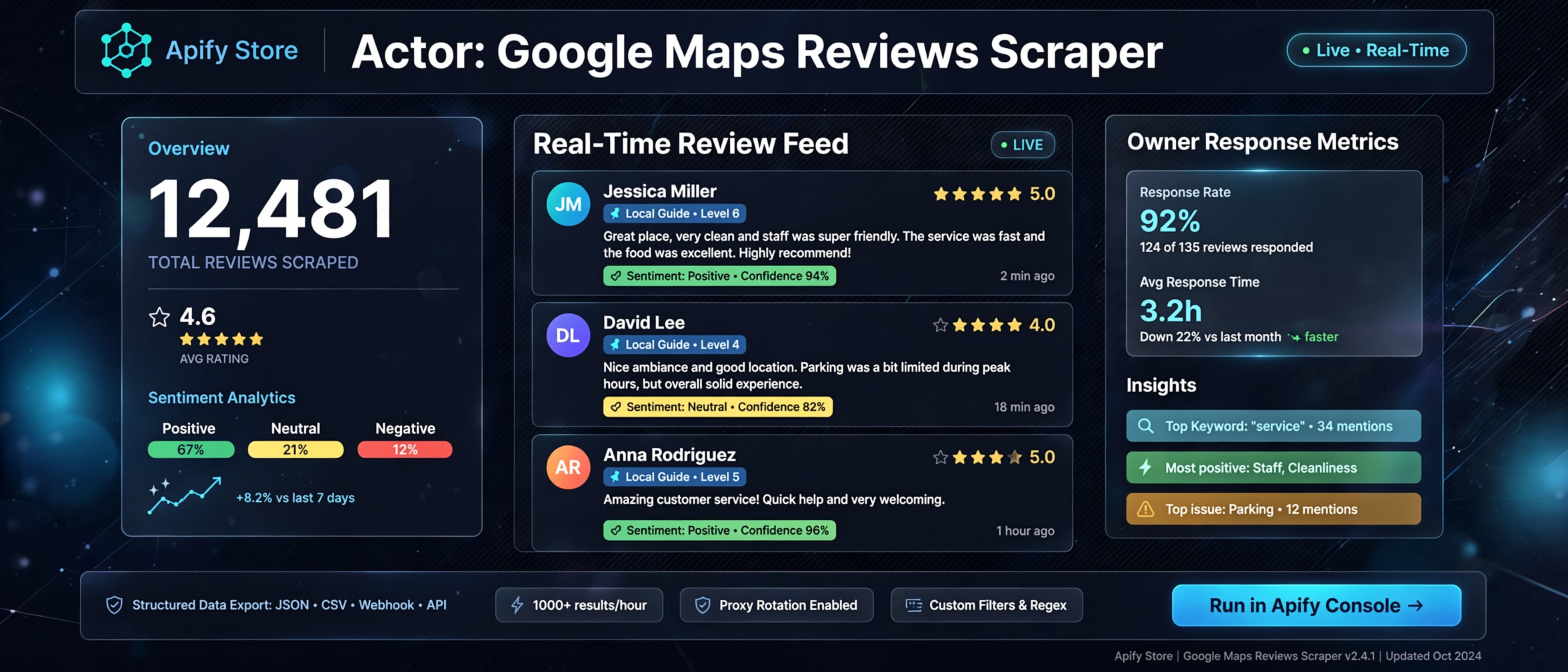
Extract Google Maps reviews, star ratings, reviewer Local Guide status, owner responses, and instant sentiment analysis at lightning speed.
Native HTTP-first engine · Zero Playwright/Puppeteer overhead · 256 MB RAM footprint



***
### Why this Actor?
| Feature | What you get |
|---|---|
| **Zero-Browser HTTP Speed** | 10x faster ingestion (up to 60 reviews/sec) running on 256 MB RAM without Chromium cold-start delays. |
| **Built-in Auto-Sentiment** | Instant classification (`POSITIVE`, `NEUTRAL`, `NEGATIVE`) calculated in-memory with zero third-party LLM token costs. |
| **Owner Response Tracking** | Captures business owner reply text and timestamps to evaluate customer care SLAs and ORM metrics. |
| **Local Guide & Reviewer Metrics** | Identifies verified Local Guides and reviewer review counts for authority-weighted sentiment modeling. |
| **Mobile Shortlink Resolution** | Seamlessly accepts mobile share links (`maps.app.goo.gl`), Place IDs (`ChIJ...`), and full place URLs. |
| **Incremental Date Cutoff** | Server-side early termination with `reviewsNewerThan`, saving 80–95% compute on daily monitoring runs. |
| **1NF Clean Tabular Output** | Strictly flattened columns optimized for 1-click export to CSV, Excel, Google Sheets, or PowerBI. |
***
### Quick start
1. Open **Google Maps Reviews Scraper** on Apify Console and click **Start**.
2. Paste one or more Google Maps place URLs, Place IDs, or search queries into the input form.
3. Configure optional limits like `maxReviews` (default: 50) and `reviewsSort` (e.g. `newest`).
4. Click **Save & Run** and watch real-time review batches appear in the default dataset.
5. Download your results in **JSON**, **CSV**, or **Excel**.
```json
{
"startUrls": [
{
"url": "https://www.google.com/maps/place/Googleplex/@37.4220041,-122.0862515,17z"
}
],
"maxReviews": 50,
"reviewsSort": "newest",
"language": "en"
}
```
***
### How it works
```text
Input URLs / Place IDs → Fast HTTP HEAD Resolver → Google Local Feed (GetLocalBoqProxy) → Lexicon Sentiment → Clean 1NF Dataset
```
Unlike legacy scrapers that spin up 2 GB headless Chromium instances to simulate human scrolling, this Actor interacts directly with Google's public Local Search UI data service (`GetLocalBoqProxy`). It paginates through continuation tokens in memory and streams batches of 25 records directly to the Apify dataset, ensuring zero out-of-memory crashes.
***
### Input
| Field | Type | Required | Default | Description |
|---|---|---|---|---|
| `startUrls` | Array | No\* | `[]` | List of Google Maps place URLs, search URLs, or mobile short links (`maps.app.goo.gl`). |
| `searchTerms` | Array | No\* | `[]` | Keywords or business names to search (e.g. `coffee shop brooklyn`). |
| `placeIds` | Array | No\* | `[]` | Google Maps Place IDs starting with `ChIJ...` or `GhIJ...`. |
| `maxReviews` | Integer | No | `50` | Maximum reviews to extract per location (`0` = unlimited). |
| `reviewsSort` | String | No | `"newest"` | Order of reviews: `newest`, `most_relevant`, `highest_rating`, `lowest_rating`. |
| `reviewsNewerThan` | String | No | `null` | ISO date cutoff (`YYYY-MM-DD`). Halts pagination when older reviews appear. |
| `language` | String | No | `"en"` | Language code for reviews and translations. |
| `proxyConfiguration` | Object | No | `{ "useApifyProxy": true }` | Apify Residential or Datacenter proxy configuration. |
*\*Note: At least one of `startUrls`, `searchTerms`, or `placeIds` must be provided.*
***
### Output
Each row represents one review item with flattened scalar columns:
```json
{
"placeId": "0x808fba02425dad8f:0x6c296c66619367e0",
"placeName": "Googleplex",
"placeUrl": "https://www.google.com/maps/place/Googleplex/@37.4220041,-122.0862515,17z",
"reviewId": "Ci9DQUlRQUNvZENodHljRjlvT214elZWTkdNRkJVY0RoWVQyZE9jMDlPVFRSMlJIYxAB",
"reviewerName": "Sarah Jenkins",
"reviewerId": "104928392019482710293",
"reviewerUrl": "https://www.google.com/maps/contrib/104928392019482710293/reviews",
"reviewerPhotoUrl": "https://lh3.googleusercontent.com/a/ACg8ocKeADoQthhp2IdgTlimVkywd7MKzT_0cHkxjSubl5M6kiVKnA=s120-c-rp-mo-br100",
"reviewerNumberOfReviews": 18,
"isLocalGuide": true,
"rating": 5,
"text": "Incredible campus with amazing facilities, delicious food options, and welcoming atmosphere!",
"textTranslated": null,
"publishAt": "2 weeks ago",
"publishedAtDate": "2026-09-30",
"likesCount": 4,
"responseFromOwnerDate": "1 week ago",
"responseFromOwnerText": "Thank you for the wonderful feedback, Sarah!",
"reviewPhotos": [
{
"url": "https://lh3.googleusercontent.com/p/AF1QipM..."
}
],
"sentiment": "POSITIVE",
"status": "SUCCESS"
}
```
***
### Cost, limits, proxy
- **Memory**: Runs comfortably on **256 MB – 512 MB** RAM (no browser overhead).
- **Concurrency**: Fast asynchronous requests with sticky per-place proxy sessions.
- **Proxy**:
- **Apify Cloud**: Automatic Apify Residential proxy rotation (`groups: ['RESIDENTIAL']`) prevents rate limiting.
- **Local Execution**: Automatic direct fallback with exponential backoff and randomized jitter.
- **Expected Runtime**:
- 50 reviews: ~2–4 seconds
- 1,000 reviews: ~15–25 seconds
***
### Recipes
#### Recipe 1: Single Business Reputation Audit
```json
{
"startUrls": [
{ "url": "https://www.google.com/maps/place/Central+Park/@40.785091,-73.968285,15z" }
],
"maxReviews": 100,
"reviewsSort": "newest"
}
```
#### Recipe 2: Incremental Monitoring Run (Reviews from 2026 Onward)
```json
{
"startUrls": [
{ "url": "https://maps.app.goo.gl/sample123" }
],
"maxReviews": 0,
"reviewsSort": "newest",
"reviewsNewerThan": "2026-01-01"
}
```
#### Recipe 3: Multi-Location Keyword Discovery
```json
{
"searchTerms": [
"specialty coffee seattle",
"artisan bakery portland"
],
"maxReviews": 25,
"reviewsSort": "highest_rating"
}
```
***
### Troubleshooting
| Symptom | Cause | Fix |
|---|---|---|
| `TargetResolveError` | The URL or search query could not be resolved to a Google Feature ID. | Ensure the Google Maps URL is public or use a canonical Place ID (`ChIJ...`). |
| `SoftBlockError` | Datacenter IP detected by Google's anti-bot protection. | Enable Apify Residential proxy (`"useApifyProxy": true`) in proxy configuration. |
| `0 reviews returned` | The business has zero public reviews or all reviews are older than `reviewsNewerThan`. | Remove `reviewsNewerThan` filter or verify reviews on Google Maps directly. |
***
### FAQ
**Q: Does this scraper use Playwright or Puppeteer?**\
A: No. It uses an ultra-fast, native HTTP-first reverse-engineered architecture with `got-scraping`. This reduces compute unit costs by up to 90% and uses a fraction of the RAM.
**Q: How does the auto-sentiment analysis work?**\
A: It combines normalized star-rating weighting with domain sentiment lexicons to assign `POSITIVE`, `NEUTRAL`, or `NEGATIVE` tags in sub-milliseconds without calling external LLM APIs.
**Q: Can I scrape reviews by Google Place ID?**\
A: Yes! Simply pass your Place IDs (`ChIJ...`) into the `placeIds` array, and the scraper automatically resolves them to internal feature endpoints.
**Q: Can I scrape private Google accounts or user emails?**\
A: No. This Actor extracts only publicly available review content. It never accesses private accounts, passwords, or personal email addresses.
**Q: Can I copy, modify, or republish this Actor?**\
A: No. This Actor is proprietary software. You may run it on Apify or locally under the terms of your Apify account. You may not rebrand, republish, or claim authorship. See [LICENSE](./LICENSE).
***
### Limitations
- Public reviews only. Reviews hidden, flagged, or deleted by Google moderation will not be visible.
- Rate-limiting rules apply; large-scale batch scraping requires residential proxy rotation.
***
### License
Proprietary License. Copyright (c) 2026 REXREUS. All rights reserved. See [LICENSE](./LICENSE) for full details.
# Actor input Schema
## `startUrls` (type: `array`):
Direct Google Maps place URLs or search URLs.
## `searchTerms` (type: `array`):
Keywords or business names to search and extract reviews for (e.g. 'coffee shop brooklyn').
## `placeIds` (type: `array`):
Google Maps Place IDs (e.g. 'ChIJ2eUgeAK6j4ARbn5u_nAGqWA').
## `maxReviews` (type: `integer`):
Maximum number of reviews to extract per location. Set to 0 for unlimited.
## `reviewsSort` (type: `string`):
Order in which reviews are retrieved from Google Maps.
## `reviewsNewerThan` (type: `string`):
Only extract reviews published on or after this date (YYYY-MM-DD).
## `language` (type: `string`):
Language code for reviews and translations (e.g. 'en', 'es', 'id', 'de').
## `proxyConfiguration` (type: `object`):
Select Apify Proxy or custom proxies. Residential proxy recommended for large scale scraping.
## Actor input object example
```json
{
"startUrls": [
{
"url": "https://www.google.com/maps/place/Alfamart+Terusan+Kopo+Kabupaten+Bandung/data=!4m2!3m1!1s0x2e68eecff3d224f9:0xe7f3561d424abef2?sa=X&ved=1t:242&ictx=111"
}
],
"maxReviews": 50,
"reviewsSort": "newest",
"language": "en",
"proxyConfiguration": {
"useApifyProxy": true
}
}
```
# Actor output Schema
## `dataset` (type: `string`):
No description
# API
You can run this Actor programmatically using our API. Below are code examples in JavaScript, Python, and CLI, as well as the OpenAPI specification and MCP server setup.
## JavaScript example
```javascript
import { ApifyClient } from 'apify-client';
// Initialize the ApifyClient with your Apify API token
// Replace the '' with your token
const client = new ApifyClient({
token: '',
});
// Prepare Actor input
const input = {
"startUrls": [
{
"url": "https://www.google.com/maps/place/Alfamart+Terusan+Kopo+Kabupaten+Bandung/data=!4m2!3m1!1s0x2e68eecff3d224f9:0xe7f3561d424abef2?sa=X&ved=1t:242&ictx=111"
}
]
};
// Run the Actor and wait for it to finish
const run = await client.actor("rexreus/google-maps-reviews-scraper").call(input);
// Fetch and print Actor results from the run's dataset (if any)
console.log('Results from dataset');
console.log(`💾 Check your data here: https://console.apify.com/storage/datasets/${run.defaultDatasetId}`);
const { items } = await client.dataset(run.defaultDatasetId).listItems();
items.forEach((item) => {
console.dir(item);
});
// 📚 Want to learn more 📖? Go to → https://docs.apify.com/api/client/js/docs
```
## Python example
```python
from apify_client import ApifyClient
# Initialize the ApifyClient with your Apify API token
# Replace '' with your token.
client = ApifyClient("")
# Prepare the Actor input
run_input = { "startUrls": [{ "url": "https://www.google.com/maps/place/Alfamart+Terusan+Kopo+Kabupaten+Bandung/data=!4m2!3m1!1s0x2e68eecff3d224f9:0xe7f3561d424abef2?sa=X&ved=1t:242&ictx=111" }] }
# Run the Actor and wait for it to finish
run = client.actor("rexreus/google-maps-reviews-scraper").call(run_input=run_input)
# Fetch and print Actor results from the run's dataset (if there are any)
print(f"💾 Check your data here: https://console.apify.com/storage/datasets/{run.default_dataset_id}")
for item in client.dataset(run.default_dataset_id).iterate_items():
print(item)
# 📚 Want to learn more 📖? Go to → https://docs.apify.com/api/client/python/docs/quick-start
```
## CLI example
```bash
echo '{
"startUrls": [
{
"url": "https://www.google.com/maps/place/Alfamart+Terusan+Kopo+Kabupaten+Bandung/data=!4m2!3m1!1s0x2e68eecff3d224f9:0xe7f3561d424abef2?sa=X&ved=1t:242&ictx=111"
}
]
}' |
apify call rexreus/google-maps-reviews-scraper --silent --output-dataset
```
## MCP server setup
```json
{
"mcpServers": {
"apify": {
"type": "http",
"url": "https://mcp.apify.com/?tools=fetch-actor-details,rexreus/google-maps-reviews-scraper"
}
}
}
```
The hosted server signs you in with OAuth on first connect, so no API token belongs in this config. Clients without OAuth support can send an `Authorization: Bearer ` header instead, using a token from API & Integrations in Apify Console (https://console.apify.com/settings/integrations).
## OpenAPI specification
Download the OpenAPI definition: https://api.apify.com/v2/actors/O13T5NNYbpalZyall/builds/Uu5kaR15ukyUEfrA7/openapi.json