# Snapchat Public Stories Spotlight Scraper| No Login | No Cookie (`rexreus/snapchat-public-stories-spotlight-scraper`) Actor
Turn public Snapchat profiles into a clean dataset of Stories, Highlights, and Spotlight — no login, no downloads.
- **URL**: https://apify.com/rexreus/snapchat-public-stories-spotlight-scraper.md
- **Developed by:** [REXREUS D.O](https://apify.com/rexreus) (community)
- **Stats:** 2 total users, 1 monthly users, 100.0% runs succeeded, 0 bookmarks
- **User rating**: No ratings yet
## Pricing
from $2.50 / 1,000 results
This Actor is paid per event. You are not charged for the Apify platform usage, but only a fixed price for specific events.
Learn more: https://docs.apify.com/actors/running/actors-in-store.md#pay-per-event
## What's an Apify Actor?
An Actor is a serverless cloud program that runs on the Apify platform. It has two run modes.
In Batch mode, an Actor accepts a well-defined JSON input, performs an action which can take anything from a few seconds to a few hours,
and optionally produces a well-defined JSON output, datasets with results, or files in key-value store.
In Standby mode, an Actor provides a web server which can be used as a website, API, or an MCP server.
Apify vocabulary and the platform model are defined once, in the agent quickstart at https://apify.com/agents.md.
## How to integrate an Actor?
If asked about integration, you help developers integrate Actors into their projects.
You adapt to their stack and deliver integrations that are safe, well-documented, and production-ready.
Do not guess an integration path. Every one of them is in the agent quickstart at https://apify.com/agents.md: the Apify MCP server, Agent Skills with the Apify CLI, the JavaScript and Python clients, the REST API, and the account-free path for an agent with no human to sign in. It also carries the rule on stating cost before the first paid run.
For examples already wired to this Actor's own input schema, see the [API](#api) section below.
Each client library has reference documentation the quickstart does not restate: [JavaScript/TypeScript](https://docs.apify.com/api/client/js/docs.md) (`npm install apify-client`) and [Python](https://docs.apify.com/api/client/python/docs.md) (`pip install apify-client`).
# README
Snapchat Stories Spotlight Scraper
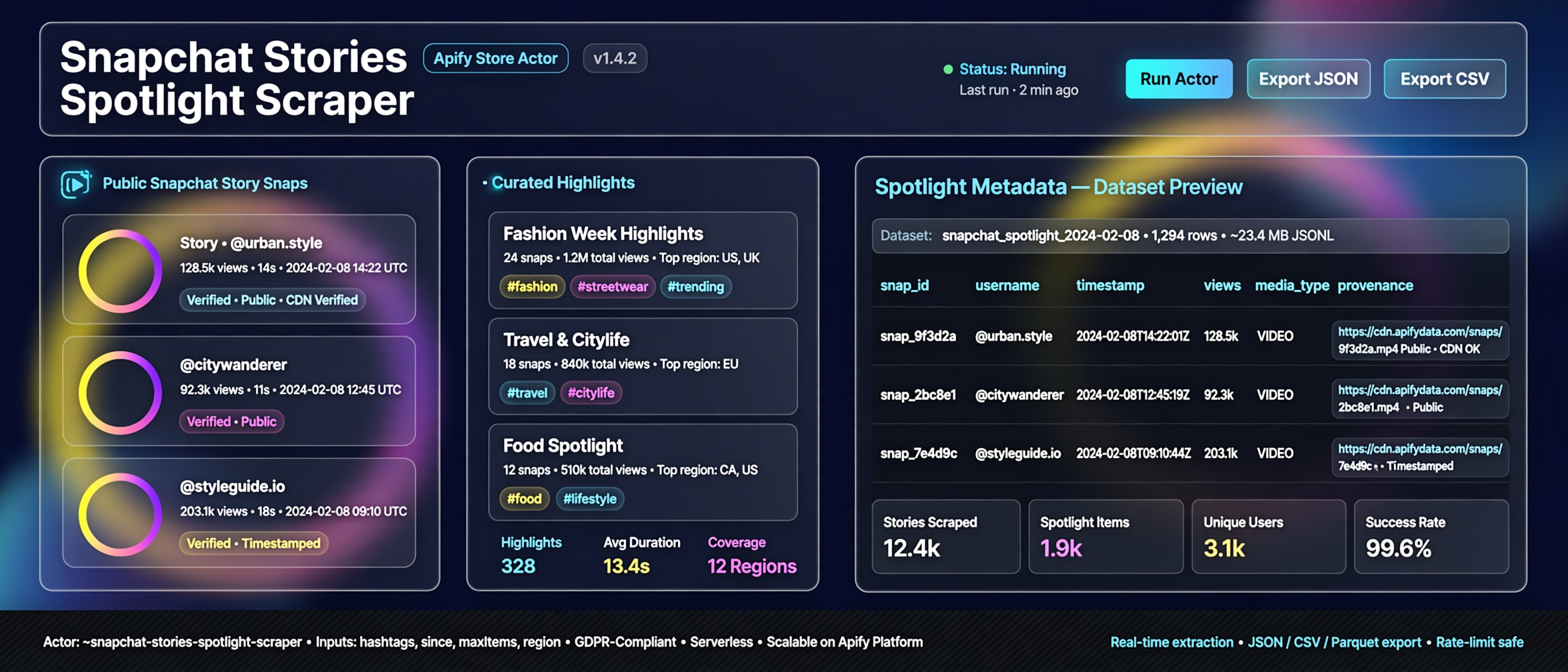
Turn public Snapchat profiles into a clean dataset of Stories, Highlights, and Spotlight — no login, no downloads.
Public pages only · one row per snap · missing values stay null


### Why this Actor?
| Feature | What you get |
|---|---|
| Stories + Highlights + Spotlight | One Actor, one dataset. Filter with `sources` if you only need one surface. |
| Public profiles | Paste handles like `fcbarcelona` or `nasa`. No cookies, no friends-only content. |
| Clean export | Title, timestamp, media URLs, Spotlight views/shares, status. CSV stays flat. Missing values stay null. |
| Fast runs | One public request per profile. Two brands typically finish in a few seconds. |
| Hard caps | `maxItems` and `maxItemsPerUser` stop a run before it wanders. |
| Incremental re-runs | `postedAfter` drops older timestamps. Missing timestamps are kept, never invented. |
| Honest failures | `SUCCESS`, `PARTIAL`, `NOT_FOUND`, `BLOCKED`, `ERROR` on the row. Empty is empty — not a fake snap. |
| No media download | Public CDN URL strings only. Video bytes stay on Snapchat. |
### Quick start
1. Open **Snapchat Stories Spotlight Scraper** on Apify Console and click **Start**.
2. Add public usernames or `https://www.snapchat.com/@user` URLs.
3. Download the dataset as JSON, CSV, or Excel.
```json
{
"usernames": ["fcbarcelona", "nasa"],
"sources": ["story", "highlight", "spotlight"],
"maxItems": 50,
"maxItemsPerUser": 20,
"includeEngagement": true
}
```
### How it works
```
Public handles → public Snapchat pages → one dataset row per Story, Highlight, or Spotlight
```
Stories expire. When a live Story is empty, Highlights and Spotlight still export.
### Input
| Field | Type | Required | Default | Description |
|---|---|---|---|---|
| `usernames` | string\[] | one of `usernames` / `startUrls` | `[]` | Public handles. Converted only to `https://www.snapchat.com/@user`. |
| `startUrls` | string\[] / `{url}` | one of `usernames` / `startUrls` | `[]` | Public profile or Spotlight URLs. |
| `sources` | `story` | `highlight` | `spotlight`\[] | no | all three | Which surfaces to collect. |
| `maxItems` | integer | no | `50` | Run-wide cap (1–200). |
| `maxItemsPerUser` | integer | no | `20` | Per-username cap (1–50). |
| `postedAfter` | ISO-8601 string | no | — | Keep items at or after this time. Missing timestamps are kept. |
| `includeEngagement` | boolean | no | `true` | Copy Spotlight view/share/comment/boost/recommend **counts**. Comment bodies are never collected. |
Rejected: search, feed, explore, login, private, or non-HTTPS URLs.
### Output
One row per Story snap, Highlight snap, or Spotlight item. Profile identity is copied onto every row so CSV export stays useful.
```json
{
"contentType": "spotlight",
"canonicalUrl": "https://www.snapchat.com/@fcbarcelona/spotlight/W7_EDlXWTBiXAEEniNoMPwAAYZGdqcHJkbGVoAaC_PXEQAaC_PWwoAAAAAw",
"username": "fcbarcelona",
"displayName": "FC Barcelona",
"snapId": "W7_EDlXWTBiXAEEniNoMPwAAYZGdqcHJkbGVoAaC_PXEQAaC_PWwoAAAAAw",
"highlightId": null,
"spotlightId": "W7_EDlXWTBiXAEEniNoMPwAAYZGdqcHJkbGVoAaC_PXEQAaC_PWwoAAAAAw",
"storyId": "W7_EDlXWTBiXAEEniNoMPwAAYZGdqcHJkbGVoAaC_PXEQAaC_PWwoAAAAAw",
"title": "HISTORIC START",
"description": "#fcbarcelona",
"llmTitle": "FC Barcelona Team Huddle Moment | Estrella Damm 'Good Day' Feature",
"timestamp": "2026-09-20T14:34:28.776Z",
"durationMs": 10070,
"width": 540,
"height": 960,
"mediaType": "VIDEO",
"mediaUrl": "https://bolt-gcdn.sc-cdn.net/bp/TVnFSjAhZtGteRP7CPXgL.27.IRZXSOY",
"mediaPreviewUrl": "https://bolt-gcdn.sc-cdn.net/bp/TVnFSjAhZtGteRP7CPXgL.256.IRZXSOY",
"thumbnailUrl": "https://bolt-gcdn.sc-cdn.net/bp/TVnFSjAhZtGteRP7CPXgL.256.IRZXSOY",
"viewCount": 7298,
"shareCount": 150,
"commentCount": 16,
"boostCount": 885,
"recommendCount": 115,
"hashtags": ["#fcbarcelona"],
"status": "SUCCESS",
"observedAt": "2026-09-21T20:17:06.682Z",
"httpStatus": 200
}
```
Media URLs expire. Recording a URL is not a download.
| Field | Type | Description |
|---|---|---|
| `contentType` | string | `story`, `highlight`, or `spotlight`. |
| `canonicalUrl` | string | Public page URL. |
| `username` | string | Public handle. |
| `displayName` | string | null | Public display name. |
| `snapId` | string | null | Story or Highlight snap id. |
| `highlightId` | string | null | Highlight group id. |
| `spotlightId` | string | null | Spotlight id. |
| `storyId` | string | null | Parent story id. |
| `title` | string | null | Title when Snap publishes one. |
| `description` | string | null | Description when Snap publishes one. |
| `llmTitle` | string | null | Caption string from Snapchat, not generated here. |
| `timestamp` | string | null | ISO timestamp. |
| `durationMs` | integer | null | Duration in milliseconds (common on Spotlight). |
| `width` / `height` | integer | null | Pixel size when Snap sends it. |
| `mediaType` | string | null | `IMAGE` or `VIDEO` when observed. |
| `mediaUrl` | string | null | Public CDN URL string. Never downloaded. |
| `mediaPreviewUrl` | string | null | Public preview URL string. |
| `thumbnailUrl` | string | null | Public thumbnail URL string. |
| `viewCount` | integer | null | Spotlight views. Stories/Highlights usually null. |
| `shareCount` | integer | null | Spotlight shares. |
| `commentCount` | integer | null | Spotlight comment **count** only. |
| `boostCount` | integer | null | Spotlight boosts. |
| `recommendCount` | integer | null | Spotlight recommends. |
| `hashtags` | string\[] | null | Observed hashtags. |
| `status` | string | `SUCCESS` | `PARTIAL` | `NOT_FOUND` | `BLOCKED` | `ERROR`. |
| `observedAt` | string | When this Actor saw the page. |
| `httpStatus` | integer | HTTP status of the public request. |
Story and Highlight rows often leave duration, size, and engagement as null because Snap does not publish those fields there. Spotlight usually fills them.
### Cost, limits, proxy
- Memory: 512 MB default, 1024 MB max.
- Concurrency: one profile at a time, about 2 seconds between requests.
- Proxy: none. Direct public HTTPS.
- Expected runtime: 2 profiles in a few seconds. ~10 profiles under a minute. ~100 profiles several minutes.
- Platform compute for 10 profiles is typically well under $0.01. No residential proxy bill.
### Recipes
#### One public profile
```json
{
"usernames": ["nasa"],
"sources": ["story", "highlight", "spotlight"],
"maxItems": 50,
"maxItemsPerUser": 20,
"includeEngagement": true
}
```
#### Spotlight only, two brands
```json
{
"usernames": ["fcbarcelona", "nasa"],
"sources": ["spotlight"],
"maxItems": 40,
"maxItemsPerUser": 20,
"includeEngagement": true
}
```
#### Highlights after a date
```json
{
"usernames": ["nasa"],
"sources": ["highlight"],
"postedAfter": "2026-01-01T00:00:00.000Z",
"maxItems": 50,
"maxItemsPerUser": 20
}
```
### Troubleshooting
| Symptom | Cause | Fix |
|---|---|---|
| `BLOCKED` | The public page challenged the request (login wall, rate limit, or similar) | Use another public profile later. This Actor does not log in or rotate proxies. |
| `NOT_FOUND` | Handle is gone or never public | Check the username. No fake snaps are invented. |
| `ERROR` | The public page was not readable | Retry later. Check `httpStatus` on the row. |
| Empty live Story | Stories expire | Switch `sources` to `highlight` / `spotlight`, or wait for a new Story. |
| Engagement is null | Snap does not publish counts on Stories/Highlights | Use `sources: ["spotlight"]` when you need views. |
| Media URL fails later | CDN links expire | Expected. Save metadata, not the file. |
### FAQ
**Q: Does this log in or use my Snapchat account?**
A: No. Public pages only. No cookies, tokens, or session reuse.
**Q: Can it scrape private or friends-only Snaps?**
A: No. If the page is not public, the row is `NOT_FOUND` or `BLOCKED`.
**Q: Why are some fields null?**
A: Snap does not send them on that surface. Null means absent, not a bug. Values are never invented.
**Q: Will it download videos?**
A: No. It copies public media URL strings. It never downloads Snap CDN files.
**Q: How much does a run cost?**
A: HTTP, 512 MB, no proxy. Two public profiles finish in a few seconds. Ten profiles are typically well under a cent of platform compute.
**Q: Can I add a residential proxy or a browser?**
A: Not in this Actor. Protection is classified as `BLOCKED`.
**Q: Are comments included?**
A: Comment **counts** on Spotlight, when Snap publishes them. Comment bodies, transcripts, emails, phones, and location are never collected.
**Q: Can I copy or republish this Actor?**
A: No. This Actor is proprietary. You may run it on Apify. You may not rebrand, republish, or claim authorship. See [LICENSE](./LICENSE).
### Limitations
- Public data only. You are responsible for Snapchat Terms of Service and privacy law (GDPR/CCPA) for your use of the dataset.
- First page of each public profile. No unbounded crawl.
- No CAPTCHA solving, cookie harvesting, stealth, or proxy rotation.
- Media URLs expire. Do not treat them as permanent storage.
- `llmTitle` is a Snapchat-emitted public string, not this Actor's AI.
### Run it
Open the Actor on [Apify Console](https://apify.com) and click **Start**.
### License
**Proprietary. All rights reserved.** Copyright (c) 2026 REXREUS.
You may run this Actor on Apify. You may not copy, rebrand, republish, or claim this Actor as your own. See [LICENSE](./LICENSE).
# Actor input Schema
## `usernames` (type: `array`):
Public Snapchat handles. Converted only to https://www.snapchat.com/@.
## `startUrls` (type: `array`):
Allowlisted public profile or Spotlight URLs (www.snapchat.com/@user, /spotlight/, /@user/spotlight/).
## `sources` (type: `array`):
Which public surfaces to emit. Default all three.
## `maxItems` (type: `integer`):
Hard stop after this many dataset rows (run-wide).
## `maxItemsPerUser` (type: `integer`):
Hard stop per username after this many rows.
## `postedAfter` (type: `string`):
ISO-8601 date or datetime. Drops items strictly before this instant. Missing timestamps are kept.
## `includeEngagement` (type: `boolean`):
Copy public Spotlight view/share/comment/boost/recommend counts. Comment bodies are never collected.
## Actor input object example
```json
{
"usernames": [
"fcbarcelona",
"nasa"
],
"startUrls": [
{
"url": "https://www.snapchat.com/@nasa"
}
],
"sources": [
"story",
"highlight",
"spotlight"
],
"maxItems": 50,
"maxItemsPerUser": 20,
"includeEngagement": true
}
```
# Actor output Schema
## `dataset` (type: `string`):
No description
# API
You can run this Actor programmatically using our API. Below are code examples in JavaScript, Python, and CLI, as well as the OpenAPI specification and MCP server setup.
## JavaScript example
```javascript
import { ApifyClient } from 'apify-client';
// Initialize the ApifyClient with your Apify API token
// Replace the '' with your token
const client = new ApifyClient({
token: '',
});
// Prepare Actor input
const input = {
"usernames": [
"fcbarcelona",
"nasa"
],
"startUrls": [
{
"url": "https://www.snapchat.com/@nasa"
}
]
};
// Run the Actor and wait for it to finish
const run = await client.actor("rexreus/snapchat-public-stories-spotlight-scraper").call(input);
// Fetch and print Actor results from the run's dataset (if any)
console.log('Results from dataset');
console.log(`💾 Check your data here: https://console.apify.com/storage/datasets/${run.defaultDatasetId}`);
const { items } = await client.dataset(run.defaultDatasetId).listItems();
items.forEach((item) => {
console.dir(item);
});
// 📚 Want to learn more 📖? Go to → https://docs.apify.com/api/client/js/docs
```
## Python example
```python
from apify_client import ApifyClient
# Initialize the ApifyClient with your Apify API token
# Replace '' with your token.
client = ApifyClient("")
# Prepare the Actor input
run_input = {
"usernames": [
"fcbarcelona",
"nasa",
],
"startUrls": [{ "url": "https://www.snapchat.com/@nasa" }],
}
# Run the Actor and wait for it to finish
run = client.actor("rexreus/snapchat-public-stories-spotlight-scraper").call(run_input=run_input)
# Fetch and print Actor results from the run's dataset (if there are any)
print(f"💾 Check your data here: https://console.apify.com/storage/datasets/{run.default_dataset_id}")
for item in client.dataset(run.default_dataset_id).iterate_items():
print(item)
# 📚 Want to learn more 📖? Go to → https://docs.apify.com/api/client/python/docs/quick-start
```
## CLI example
```bash
echo '{
"usernames": [
"fcbarcelona",
"nasa"
],
"startUrls": [
{
"url": "https://www.snapchat.com/@nasa"
}
]
}' |
apify call rexreus/snapchat-public-stories-spotlight-scraper --silent --output-dataset
```
## MCP server setup
```json
{
"mcpServers": {
"apify": {
"type": "http",
"url": "https://mcp.apify.com/?tools=fetch-actor-details,rexreus/snapchat-public-stories-spotlight-scraper"
}
}
}
```
The hosted server signs you in with OAuth on first connect, so no API token belongs in this config. Clients without OAuth support can send an `Authorization: Bearer ` header instead, using a token from API & Integrations in Apify Console (https://console.apify.com/settings/integrations).
## OpenAPI specification
Download the OpenAPI definition: https://api.apify.com/v2/actors/4u1NrNbdZ49eXQ6dc/builds/RLB9c0pMbeufVvwiz/openapi.json