# Trending Keywords for Your Niche: AI Google Trends Alerts (`rich_minds/trending-keywords-ai`) Actor
First 25 trends free. Find trending keywords and topics in your niche, pay per qualified trend: Black Friday 2026 & holiday peaks, rising & breakout keywords with AI angles. Works with MCP & AI agents. Free demo on any plan; live search runs on your Apify account, any plan that runs Store Actors.
- **URL**: https://apify.com/rich\_minds/trending-keywords-ai.md
- **Developed by:** [Rich Minds](https://apify.com/rich_minds) (community)
- **Categories:** SEO tools, Marketing, Automation
- **Stats:** 2 total users, 1 monthly users, 100.0% runs succeeded, 0 bookmarks
- **User rating**: No ratings yet
## Pricing
from $3.00 / 1,000 qualified trend (rules only)s
This Actor is paid per event. You are not charged for the Apify platform usage, but only a fixed price for specific events.
Learn more: https://docs.apify.com/actors/running/actors-in-store.md#pay-per-event
## What's an Apify Actor?
An Actor is a serverless cloud program that runs on the Apify platform. It has two run modes.
In Batch mode, an Actor accepts a well-defined JSON input, performs an action which can take anything from a few seconds to a few hours,
and optionally produces a well-defined JSON output, datasets with results, or files in key-value store.
In Standby mode, an Actor provides a web server which can be used as a website, API, or an MCP server.
Apify vocabulary and the platform model are defined once, in the agent quickstart at https://apify.com/agents.md.
## How to integrate an Actor?
If asked about integration, you help developers integrate Actors into their projects.
You adapt to their stack and deliver integrations that are safe, well-documented, and production-ready.
Do not guess an integration path. Every one of them is in the agent quickstart at https://apify.com/agents.md: the Apify MCP server, Agent Skills with the Apify CLI, the JavaScript and Python clients, the REST API, and the account-free path for an agent with no human to sign in. It also carries the rule on stating cost before the first paid run.
For examples already wired to this Actor's own input schema, see the [API](#api) section below.
Each client library has reference documentation the quickstart does not restate: [JavaScript/TypeScript](https://docs.apify.com/api/client/js/docs.md) (`npm install apify-client`) and [Python](https://docs.apify.com/api/client/python/docs.md) (`pip install apify-client`).
# README
## Trending Keywords for Your Niche: AI Google Trends Alerts
**Your niche's new trending keywords and Black Friday peaks, in your inbox every week.**
⚡ First **25 trends free** · 💵 from **$0.003** per qualified trend · 🤖 **≈ $0.015 all in** with AI · ⏱️ a week of 4 countries + 5 seeds read in 10 s
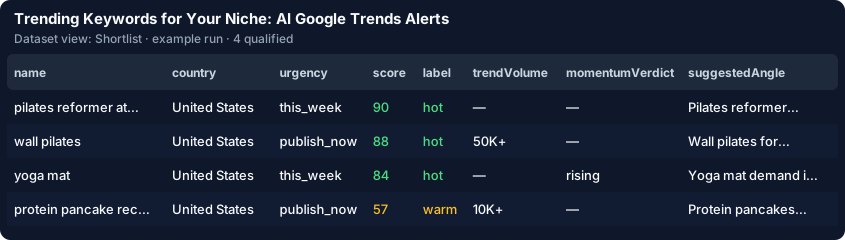
> **Try it in 30 seconds.** Click **Try it** — the form is pre-filled with 7 sample Google Trends rows, free. Then type
> your niche keywords (or pick one of 14 ready niches) and press **Start**: the first **25 qualified trends** are free;
> off-niche searches cost nothing here.
> → [How to use it](#-how-to-use-it) · [What a run costs](#-pricing--what-a-run-really-costs) · [What the AI adds](#-what-the-ai-tier-adds) · [Run it weekly](#-run-it-weekly--google-trends-alerts-on-a-schedule)
### ⚡ At a glance
| | |
|---|---|
| **What you get** | This week's trending searches in your countries that concern your niche, momentum for your own keywords — urgency, evidence and a headline to publish |
| **You provide** | a few niche keywords (e.g. coffee, pizza), the countries, optionally seed keywords |
| **Output** | a ranked sheet (Excel / CSV / Sheets) and an e-mail / Slack digest |
| **Typical run** | first run = the last 7 days of US, GB, CA (≈ 2,300 searches, free); measured 2026-09-29: 13 food, 16 travel, 1 fitness match — a food blog + 5 seeds: 28 qualified in 10 s |
| **Cost of that run** | $0.13 rules only · $0.48 with the AI (5 seeds × $0.01 + 28 trends × $0.003, or × $0.009 + ≈ $0.0062 tokens); your first 25 trends free |
| **Agencies** | pick **Agency roster**, edit its 2 example brands: 10 brands weekly ≈ $16 a month with the AI and a white-label report each — vs one Exploding Topics Business plan at $249 a month |
| **Free tier** | first 25 qualified trends per account and the first 5 digests, no start fee of ours |
| **Keys / setup** | Apify model access: no key · Other plans: your own key — free Gemini / Groq = 1–3 AI verdicts per run, paid = every trend |
| **Works with** | Schedules, e-mail, Slack, Teams, Discord, webhooks, Sheets, Make / n8n / Zapier, MCP & AI agents |
### 🎯 What this Actor does
It reads Google Trends directly — each country's **Trending Now** list and your seed keywords' curves — on any Apify
plan, and keeps only the trends worth your next post.
#### 🎄 Black Friday trending keywords and holiday trending keywords
The **Black Friday & holiday** preset watches decorations, costumes and gifts in 4 countries and reads 5 seasonal
seeds on 5-year curves — 7 days, 2026-09-29: 4 of 2,620 searches matched ("m\&s christmas food 2026" …).

- **Seasonal keyword calendar** (`calendarMode`) — up to 50 keywords on 5-year curves → the month each peaks and the
date to start publishing, page + CSV: $0.02 a keyword, one-off.
- **Instant alerts** (`trendAlerts`) — each publish-now trend above your bar posted to Slack / Teams at once, $0.01.
#### 🔎 Find trending topics in your niche — filtered for free
A country's feed is hundreds of searches of sport, celebrities and news. Your niche keywords are matched in each search
and its related searches; off-niche, excluded, small, sensitive and repeated searches drop out **before** anything is
charged. A narrow niche (< 3 matches) gets its keywords read as seeds, free.
#### 📈 Rising keywords and breakout keywords — a momentum verdict from the curve
Your seed keywords get **breakout / rising / seasonal peak soon / stable / declining** with the % change and the next
seasonal peak, plus up to 3 rising related queries each ("+4,250 %", "Breakout").
#### ✍️ Discover content ideas from Google Trends — an angle per trend
The AI says why the trend matters to your audience and writes a ≤ 90-character headline in your format with ≤ 5 target
keywords copied verbatim from the trend's own searches; without it you get a template angle. Every row links its own
Google Trends page.
### 🚀 How to use it
1. **Click Try it** — 7 sample rows run free: 4 qualify, the NFL game, the hurricane and a recall are dropped.
2. **Type your niche keywords** (or pick a preset) — they replace the sample and start the live read; the first run
reads 7 days, a schedule the last 24 h.
3. **Keep AI verdict and content angle on and press Start** — your first 5 trends get live AI verdicts on any plan;
all 25 free trends with Apify model access or a paid own key.
4. **Add your e-mail and schedule it weekly** — your first real run links a saved task.
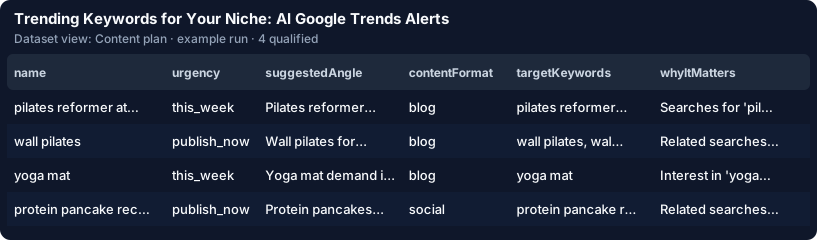
#### 🏢 Agency in 3 steps
1. Pick **Agency roster** in *Start from a ready niche search*.
2. Edit the 2 example clients in **Agency clients** — name, niche keywords, countries, the client's e-mail.
3. Press **Start**, then schedule it: each client gets its own search, memory, digest and a white-label report
($0.10 per report with new trends).

📚 **Learn more:** [Step-by-step tutorial — find trending keywords for your niche with this Actor](https://api.apify.com/v2/key-value-stores/jK1jums9v5YW91vBr/records/tutorial.html)
### 🆚 Why this instead of running Google Trends Scraper yourself?
#### vs other Google Trends Actors for "trending keywords"
Store API 2026-09-28; the same read — a week of US, GB, CA, AU (2,620 searches), 13 for a food blog (2026-09-29):
| | **This Actor** | [vnx0 Google Trends Daily Scraper](https://apify.com/vnx0/google-trends-scraper) | [steadyfetch Breakout Keywords](https://apify.com/steadyfetch/breakout-keywords-scraper) | [cybermax Swellmeter](https://apify.com/cybermax/google-trends) |
|---|---|---|---|---|
| **Price** | $0.003 · $0.009 AI per qualified trend, 25 free | $0.0012 per row | $0.006 per breakout keyword | $0.003 per keyword |
| **That week, all in** | $0.04 for the 13 rules only · $0.20 with the AI; the 2,620 read free | ≈ $3.14 for the 2,620 rows — you filter by hand | seeds only — no trending feed | your own keywords only, no feed |
| **Niche filter** | yes — rules, AI on top | no (its README) | no | no |
Running `data_xplorer/google-trends-fast-scraper` yourself (our fallback) for the same week + 5 seeds: ≈ $0.20 of runs
and 2,620 raw searches to read by hand; here 28 ranked trends for $0.13 rules only.
**💸 Exploding Topics alternative and Treendly alternative — no seat.** Exploding Topics: $39/month, Business
$249/month ([explodingtopics.com/pricing](https://explodingtopics.com/pricing), checked 2026-09-28); Treendly Pro:
$8/month billed yearly ([treendly.com/pricing](https://treendly.com/pricing), checked 2026-09-28). The food example
weekly here: ≈ $0.60 a month rules only, ≈ $1.50 with the AI.
**Google Trends (Trending now + Explore)** is free and wins for a one-off look and charts (FAQ below).
### 💵 Pricing — what a run really costs
Pay per result: **one event per qualified trend**; the extras below never grow with the trends.
| Event | When it is charged | Price |
|---|---|---|
| `free-tier` | your first 25 qualified trends on this Actor | **$0.00** |
| `qualified-trend-basic` | AI off — relevance with evidence, urgency, momentum, template angle | **$0.003** |
| `qualified-trend-ai` | AI on — plus the AI check, why it matters, sensitivity, the AI angle | **$0.009** |
| `seed-verdict` | one of your seed keywords read — curve, verdict, rising queries | **$0.01** |
| `digest-delivered` | a digest with ≥ 1 new trend reached you — the first 5 free | **$0.02** |
| `client-report` | one white-label report per agency client with new trends | **$0.10** |
| `trend-dossier` | one brief per top trend (`dossierTopN`) | **$0.03** |
| `trend-alert` | one instant alert per publish-now trend (`trendAlerts`) | **$0.01** |
| `calendar-seed` | one keyword on the seasonal calendar (`calendarMode`) | **$0.02** |
**Never charged by us:** off-niche trends, excluded words, small volumes, sensitive topics, repeats from earlier runs,
a narrow niche's own seed reads, the preview, demo rows; no start fee. Only a read Google refuses falls back to the
Store scraper on your account ($0.022 a run), capped by Max source spend.
**How that compares** — $0.003 is 1.2× the Store median ($0.0025 across the 10 priced Actors of the "trending
keywords" search): you pay per qualified trend, never per raw row — one qualified trend replaces ≈ 94 raw trending
searches read (2,620 → 28).
**Worked example** (measured 2026-09-29) — the food preset, 4 countries × 7 days (2,620 searches, free) + 5 seeds
($0.05) → 28 qualified × $0.003 → **$0.13 total, ≈ $0.005 per trend**. AI on: 28 × ($0.009 + ≈ $0.0062 tokens) +
$0.05 → **$0.48 total, ≈ $0.017 per trend**.
**AI tier, all in:** ≈ $0.0152 per trend ($0.009 + ≈ $0.004–0.006 tokens: 1,173 / 539 and 1,277 / 984 in / out
measured 2026-09-28 on Groq and Gemini, at Claude Haiku 4.5 rates; the higher one is used) — billed via Apify's model
access or your own key.
**At volume** — an agency, 10 clients weekly (5 seeds each, AI): ≈ $3.80 a week with 10 client reports (≈ $16 a
month). E-commerce: a 50-keyword Q4 calendar once ($1.00), then 20 seeds weekly ≈ $0.81 a week with the AI.
### 🤖 What the AI tier adds
The same trend as JSON — AI off vs AI on
The same trend, AI **off** (the demo run, 2026-09-28):
```json
{"name": "wall pilates", "urgency": "publish_now", "ruleScore": 80, "score": 80, "label": "hot", "fitScore": null,
"whyItMatters": null, "audienceIntent": "informational", "sensitivity": "none",
"suggestedAngle": "Wall pilates: what it means for your home fitness equipment store",
"targetKeywords": ["wall pilates", "wall pilates workout", "28 day wall pilates challenge", "wall pilates for beginners"]}
```
AI **on** — the verdict the free demo shows as its labelled sample (`aiModel: sample`), same grounding rules as a live
run with `anthropic/claude-haiku-4.5`:
```json
{"name": "wall pilates", "urgency": "publish_now", "ruleScore": 80, "fitScore": 88, "score": 88, "label": "hot",
"isRelevant": true, "audienceIntent": "informational", "sensitivity": "none",
"whyItMatters": "Related searches 'wall pilates for beginners' and '28 day wall pilates challenge' suggest beginners want a home routine — exactly the pilates and home-workout buyers of your store.",
"suggestedAngle": "Wall pilates for beginners: a 28-day home plan with a mat and light dumbbells",
"contentFormat": "blog",
"targetKeywords": ["wall pilates", "wall pilates for beginners", "28 day wall pilates challenge", "wall pilates workout"]}
```
The fields a buyer decides on, with their defaults
| Field | Type | Default | What it does |
|---|---|---|---|
| `nicheKeywords` | string\[] | — | Words of your niche; typed next to the sample = the live read |
| `goalDescription` | string | — | Your niche in one sentence, for the AI |
| `countries` | string\[] | `["US", "GB", "CA"]` | One trending feed per country, read free |
| `minScore` | 0–100 | `50` | Relevance below it = not delivered, not charged |
| `maxQualified` | integer | `50` | Cap on output and on this Actor's charge |
| `maxDiscoveryChargeUsd` | number | `0.5` | Cap on Store fallback / TikTok runs on your account |
| `enableAi` | boolean | `true` | AI tier on / off |
| `notifyEmail` | string | — | The digest by e-mail after every run with new trends |
| `seedKeywords` | string\[] | — | Your keywords, each with a momentum verdict ($0.01 each) |
| `previewOnly` | boolean | `false` | Free 7-day preview: how many trends last week, what that week costs |
| `calendarMode` | boolean | `false` | Seasonal keyword calendar of your seed keywords, $0.02 each |
| `clients` | object\[] | 2 examples | Agencies: one search, memory and white-label report per client |
| `trendAlerts` | boolean | `false` | Instant alert per publish-now trend ≥ `alertMinScore` (`80`) |
In the **Input** tab: `preset`, `trendingTimeframe` (24 h), `includeRisingQueries`, `dossierTopN`, `dedupeTtlDays`,
`reportBacklink`, `googleCategories`, `maxTrendsPerCountry`,
`maxSeedKeywords`, `seedTimeframe`, `seedGeo`, `momentumFilter`, `nicheSeedFallback`, `excludeKeywords`,
`minTrendVolume`, `includeSensitive`, `targetFlags`, `suppressionList`, `includeRejected`, `contentFormats`, the model,
the chat webhooks, `webhookUrl`, `dedupeStoreName`, `historyDatasetName`, `trendingSource`, `autoSwitchToLive`,
`includeTiktok` + `tiktokMaxHashtags` (30).
Every field of a row (the AI-off and AI-on rows are shown above)
| Field | Description |
|---|---|
| `itemId`, `dedupeKey` | Identity: short hash of `::[:]` |
| `name`, `url`, `trendType` | The term, its OWN Google Trends (or TikTok) page, the row type |
| `feedUrl`, `platform`, `client` | The country feed, google / tiktok, the agency client |
| `geo`, `country`, `rank`, `trendVolume`, `trendVolumeNumber`, `relatedTerms`, `timeframeHours`, `fetchedAt` | As Google reported them (null if not) |
| `seedKeyword`, `risingGrowthPercent`, `risingValue` | The seed and a rising query's growth |
| `momentumVerdict`, `changePercent`, `currentValue`, `peakValue`, `peakPeriod`, `nextSeasonalPeak`, `dataGranularity`, `timeline` | A seed's verdict from its curve |
| `urgency`, `matchedNicheTerms`, `relevanceReasons`, `flags`, `targetFlagsMatched` | When to act, the rule evidence |
| `fitScore`, `isRelevant`, `scoreReasons`, `whyItMatters` | The AI verdict (null on basic) |
| `audienceIntent`, `sensitivity`, `sensitivityReason` | AI, else patterns and a word list |
| `suggestedAngle`, `contentFormat`, `targetKeywords` | The headline, its format, verbatim keywords |
| `ruleScore`, `score`, `label` | Rule relevance, final relevance, hot / warm / cold |
| **Canonical fields** | `url` and `score` (the relevance 0–100) are the fields to map |
| **Which score to trend on** | `ruleScore` — the same rule scale on every row and run; `score` is the AI relevance where `aiModel` is set: sort one run on `score`, trend across runs on `ruleScore` |
| `status`, `charged`, `chargedEvent`, `billedAs`, `aiModel`, `sourceActor`, `source`, `scrapedAt` | Row status, billing (`billedAs` = the price tier), provenance |
The 14 ready niche searches with their measured 7-day matches
| Niche | Measured, 7 days | Preset |
|---|---|---|
| Black Friday & holiday | 4 matches + 5 seed verdicts | [`ecommerce-seasonal`](docs/img/preset-ecommerce-seasonal.json) |
| Personal finance | 28 matches | [`personal-finance`](docs/img/preset-personal-finance.json) |
| B2B SaaS & AI | 21 matches | [`b2b-saas`](docs/img/preset-b2b-saas.json) |
| Travel | 16 matches | [`travel`](docs/img/preset-travel.json) |
| Gaming | 16 matches | [`gaming`](docs/img/preset-gaming.json) |
| Food & recipes | 13 matches | [`food-recipes`](docs/img/preset-food-recipes.json) |
| Agency: tech news | 11 matches | [`agency-tech-news`](docs/img/preset-agency-tech-news.json) |
| Crypto | 7 matches | [`crypto`](docs/img/preset-crypto.json) |
| Fitness content | 3 matches + 3 seed verdicts | [`fitness-content`](docs/img/preset-fitness-content.json) |
| Pets | 3 matches + 2 seed verdicts | [`pets`](docs/img/preset-pets.json) |
| Parenting | 3 matches + 2 seed verdicts | [`parenting`](docs/img/preset-parenting.json) |
| Beauty & skincare | 1 match + 3 seed verdicts | [`beauty-skincare`](docs/img/preset-beauty-skincare.json) |
| Home decor & garden | 1 match + 3 seed verdicts | [`home-decor`](docs/img/preset-home-decor.json) |
| Agency roster | 9 + 10 qualified | [`agency-roster`](docs/img/preset-agency-roster.json) |
Python, JavaScript and MCP
```python
from apify_client import ApifyClient
client = ApifyClient("")
run = client.actor("rich_minds/trending-keywords-ai").call(
run_input={
# free first call: {} or {"sourceMode": "list", "itemsList": [{"term": "…"}]}
"nicheKeywords": ["pilates", "yoga", "protein"], "countries": ["US", "GB"],
"goalDescription": "Home fitness equipment store for women 30–50",
"maxQualified": 50,
"maxDiscoveryChargeUsd": 0.5, # spend cap on your account for the Store fallback runs
},
timeout_secs=3600, # the AI path with your own key can take minutes (FAQ)
# build="0.1.3", # pin the build your pipeline was tested with (Changelog); omit for the latest
)
for item in client.dataset(run["defaultDatasetId"]).iterate_items():
print(item["score"], item["label"], item["urgency"], item["url"])
```
```javascript
import { ApifyClient } from 'apify-client';
const client = new ApifyClient({ token: '' });
const run = await client.actor('rich_minds/trending-keywords-ai').call({
// free first call: {} or { sourceMode: 'list', itemsList: [...] }
nicheKeywords: ['pilates', 'yoga', 'protein'], countries: ['US', 'GB'],
goalDescription: 'Home fitness equipment store for women 30–50',
maxQualified: 50, maxDiscoveryChargeUsd: 0.5, // spend cap for the Store fallback runs
}, { timeout: 3600 /* , build: '0.1.3' — pin the tested build */ });
const { items } = await client.dataset(run.defaultDatasetId).listItems();
console.log(items.map((i) => [i.score, i.label, i.url]));
```
```json
{"mcpServers": {"apify": {"url": "https://mcp.apify.com/?actors=rich_minds/trending-keywords-ai"}}}
```
**Minimal agent input:** `{"nicheKeywords": ["pilates", "yoga", "protein"], "countries": ["US"], "goalDescription": "Home fitness equipment store for women 30–50", "maxQualified": 20, "maxDiscoveryChargeUsd": 0.5}`
Webhook: `webhookBatchSize: 1` sends `{"event": "trend.qualified", "trend": {…}, "runId": "…"}` per trend; a larger
size sends `{"event": "trends.qualified", "trends": [{…}, …], "runId": "…"}` per batch. A 429 / 5xx is retried once
after 2 s; a failed POST is counted in `OUTPUT.webhook.failed` and never fails the run.
The main fields of a pasted row
| Field | Needed? | What it enables |
|---|---|---|
| `term` | required (trending row) | the row's `name`; `title`, `query` or `name` work too |
| `geo`, `related_terms`, `trend_volume` | optional | country, related-search relevance, volume filters |
| `keyword` + `timeline_data` | required (seed row) | a `seed_keyword` row with its momentum verdict |
The outcomes that change what you receive (all of them: API reference)
| Outcome | Run status | `OUTPUT` | Charged? |
|---|---|---|---|
| Free demo | SUCCEEDED | `demo` | no |
| Nothing matched | SUCCEEDED | `qualified: 0`, `suggestedTerms` | seed verdicts only |
| Source failed (every read) | FAILED | `sourceError` | no |
| Source partial (a Store run timed out) | SUCCEEDED | `sourceStatus` | per qualified trend |
| AI unavailable | SUCCEEDED | `aiError`, `aiCoverage` | basic price, free trends first |
What the model sees, the grounding rules and the fallback
- **What it sees** — your niche sentence and keywords, the term, ≤ 10 related searches, country, volume, a seed's
verdict; only trends with rule relevance ≥ Minimum relevance − 20, up to `aiCandidateMultiplier` × `maxQualified`.
- **Grounded** — it may only cite the term, its related searches and your niche; target keywords not in the trend's
searches are dropped; an unconnected trend is `isRelevant: false`, scored ≤ 20, never billed.
- **Fallback** — a model error never fails the run: the rule verdict stays, at the basic price; an own key stops after
60 s of rate-limit waiting. Default model `anthropic/claude-haiku-4.5`.
Run time per mode, with the timeoutSecs to set
| Mode | Time | `timeoutSecs` |
|---|---|---|
| Free demo (7 sample rows) | 0.1 s measured | 120 |
| Trending feeds only | 1.7 s for 3 countries × 7 days, measured 2026-09-29 | 120 |
| Live read with seeds, rules only | 9.9 s for 4 countries + 5 seeds, measured 2026-09-29 | 300 |
| AI via Apify's model access, or a paid own key | ≈ 5–10 s per trend, 8 at a time (estimate) | 1200 |
| AI with a free own key (`byok`) | measured ≈ 1.1–187.7 s per trend: 1.1 s groq:openai/gpt-oss-120b, 187.7 s google:gemini-3.6-flash (2026-09-28) — the rest rule-scored after 60 s of waiting | 9565 for 50 trends |
Worst case with a slow own key: the AI stops after 60 s of waiting, so 100 trends end within the source time
- ≈ 2 min; `OUTPUT.timing` has every phase.
More answers — plans, the free units, duplicates
**Which Apify plan do I need?** Any plan runs the demo, the preview, the trending feeds and the seed keywords (built-in
reader); a read Google refuses and the built-in AI need a plan that runs Store Actors (else `llmProvider: "byok"`).
**Do rule-scored trends use my free ones?** Yes, while the AI is unavailable — except the last 5 (the AI reserve),
kept so your first AI-assessed trends are free too (`OUTPUT.chargeSplit.freeKeptForAi`).
**Will I be charged for the same trend twice?** Not for the same search with `dedupeAcrossRuns` on (default): every
charged trend is remembered on your account, per search, for `dedupeTtlDays` (60 — a recurring trend returns after it).
Adding or changing a country or keyword starts a new memory (`OUTPUT.dedupeStore.newMemory`) — keep one
`dedupeStoreName` to carry it over. A seed comes back only with a new verdict; each set of type filters
(`momentumFilter`, `targetFlags`, `contentFormats`) keeps its own memory.
CALENDAR page and CALENDAR\_CSV. $0.02 per keyword (calendar-seed), nothing else charged; then schedule the same seeds weekly. The free demo ignores it.
## `trendingTimeframe` (type: `string`):
How far back the country feeds look. The first run of a search reads the past 7 days (when this is left at 24 h), so you see a week of trends at once; your schedule then reads the past 24 h — only new trends. 4 h / 24 h trends are marked publish now, 48 h / 7 days this week.
## `googleCategories` (type: `array`):
Only trending searches of these Google categories (e.g. Health, Shopping). A trend from a category you chose gets +10 relevance. Empty = all categories.
## `maxTrendsPerCountry` (type: `integer`):
How many of a country's trending searches are read (1–1000). Free with the built-in reader; more searches = more chances for your niche.
## `maxSeedKeywords` (type: `integer`):
Cap on the seed keywords read per run ($0.01 each), also for the niche keywords a narrow niche reads as seeds (free). Seed keywords past it are not read; the calendar mode reads up to 50.
## `seedTimeframe` (type: `string`):
The curve the momentum verdict reads. Past 5 years is what finds seasonal peaks (two earlier years peaking in the same weeks).
## `seedGeo` (type: `string`):
The country of the seed curves. Auto = your one country when you watch one, else worldwide.
## `momentumFilter` (type: `array`):
Seed keywords are delivered (and charged) only with one of these verdicts; the rest are free. Stable and declining are off by default.
## `includeRisingQueries` (type: `boolean`):
On by default whenever you have seed keywords: up to 3 rising queries per seed (+4,250 %, Breakout), read with the seed's curve by the built-in reader; for a seed read by the Store scraper, one run of steadyfetch/breakout-keywords-scraper ($0.006 per query on the free plan, inside Max source spend). A failure never fails this run.
## `includeTimeline` (type: `boolean`):
Adds each seed keyword's full curve (timeline) to its row. Off = one summary line per keyword (verdict, % change, peak).
## `nicheSeedFallback` (type: `boolean`):
On (default): when today's trending feed matches fewer than 3 trends, the rest of Max source spend reads your niche keywords as seed keywords (momentum + rising queries), so a live run never comes back empty-handed; the status names the yield ("2 of 355 US searches matched").
## `includeTiktok` (type: `boolean`):
Adds each country's trending TikTok hashtags of the last 7 days (TikTok Creative Center, via data\_xplorer/tiktok-trends — 0 failed runs of 13,731 in 30 days) with the same niche filter, one trend each, platform: tiktok. ≈ $0.07 per country on your Apify plan at 30 hashtags, inside Max source spend.
## `tiktokMaxHashtags` (type: `integer`):
How many of a country's trending TikTok hashtags are read ($0.0015 each + $0.025 per country).
## `excludeKeywords` (type: `array`):
A trend whose search contains one of these is dropped free (e.g. a competitor, nfl); in its related searches it costs −30 relevance.
## `minTrendVolume` (type: `integer`):
Trending searches below this search volume (Google's 500K+ label as a number) are dropped free. 0 = keep all.
## `includeSensitive` (type: `boolean`):
Tragedies, politics, health claims, adult and legal topics are dropped free by default (brand safety). On = kept and flagged in sensitivity.
## `targetFlags` (type: `array`):
Only deliver trends with at least one of these flags, e.g. breakout, commercial\_intent, niche\_in\_term (nicheInTerm works too) — the README's flag table lists all 8; an unknown name stops the run at once with the valid ones.
## `suppressionList` (type: `array`):
Exact search terms, Google Trends URLs or dedupe keys to skip. Skipped before any processing, never charged.
## `includeRejected` (type: `boolean`):
Adds the filtered trends after the qualified ones with their status (below\_threshold, excluded, duplicate, no\_data, sensitive) — never charged, useful to tune the filters.
## `dossierTopN` (type: `integer`):
0 = off. N = a one-page brief for each of the top N publish-now trends (why now, why it matters, the angle, related searches, a 3-point outline) as a DOSSIER-n record to forward to an editor — $0.03 per dossier.
## `contentFormats` (type: `array`):
The AI picks one per trend for the angle; without AI the first one is used.
## `outputLanguage` (type: `string`):
Language code for whyItMatters and the angle, e.g. en, de, es. Search terms stay as Google shows them.
## `llmProvider` (type: `string`):
Apify (no keys) — the AI runs through Apify's built-in OpenRouter proxy; tokens are billed to your Apify account at OpenRouter's rates. My own key — your OpenAI / Anthropic / Gemini / Groq key; on a free-tier key expect 1–3 AI checks per run — the rest keep their rule score, and the AI stops after 60 s of rate-limit waiting; a paid Groq / Gemini key (billing on) assesses every trend. Measured own-key pace ≈ 1.1–187.7 s per trend: 1.1 s with a free groq:openai/gpt-oss-120b key, 187.7 s with a free google:gemini-3.6-flash key (both measured 2026-09-28) — size a 50-trend run's timeout from the slowest: ≈ 9565 s.
## `llmModel` (type: `string`):
Leave empty for the default (anthropic/claude-haiku-4.5). Apify mode takes an OpenRouter slug such as openai/gpt-4.1-mini; own-key mode takes provider:model, e.g. anthropic:claude-haiku-4-5-20251001.
## `llmApiKey` (type: `string`):
Required when AI model access is My own API key. Stored encrypted by Apify, never logged.
## `aiCandidateMultiplier` (type: `integer`):
The AI assesses the best rule-scored trends first — every one with a rule relevance of at least Minimum relevance − 20 — up to this multiple of Max qualified. Higher = more thorough, slower, more tokens.
## `clients` (type: `array`):
One task for all your clients — edit the 2 example clients (name, nicheKeywords, countries, notifyEmail; also goalDescription, seedKeywords, excludeKeywords, logoUrl, slackWebhookUrl, webhookUrl, showBacklink) and pick Agency roster in the preset list, or set the source to the live read. Each client gets its own live search, memory, digest and a white-label REPORT-\ page. $0.10 per client report (only with ≥ 1 new trend) on top of the per-trend price; up to 25 clients. The untouched example is never searched unless you pick the Agency roster preset; example.com addresses are never mailed. Runs on your Apify plan like any live read; the free demo does not search it.
## `slackWebhookUrl` (type: `string`):
A Slack incoming-webhook URL (https://hooks.slack.com/services/…). After every run with at least one new trend, the digest (what to act on first per country, with links) is posted to that channel as a readable message. Never sent for the free demo.
## `discordWebhookUrl` (type: `string`):
A Discord channel webhook URL (https://discord.com/api/webhooks/… — Server settings → Integrations → Webhooks). After every run with at least one new trend, the same digest as Slack (how many are new, the top 10 with links) is posted to that channel. Never sent for the free demo.
## `teamsWebhookUrl` (type: `string`):
A Teams Workflows webhook URL (in the channel: ⋯ → Workflows → Post to a channel when a webhook request is received). After every run with at least one new trend, the same digest as Slack (how many are new, the top 10 with links) is posted to that channel as a card. Never sent for the free demo.
## `googleChatWebhookUrl` (type: `string`):
A Google Chat space webhook URL (https://chat.googleapis.com/v1/spaces/… — space → Apps & integrations → Webhooks). After every run with at least one new trend, the same digest as Slack is posted to that space. Never sent for the free demo.
## `trendAlerts` (type: `boolean`):
On = every publish-now trend at or above Alert bar is posted at once, one message each, to your Slack / Teams / Google Chat / Discord webhook and webhookUrl — before the digest. $0.01 per alert (trend-alert) that reached a channel, at most 10 per run. Pair it with a schedule every few hours for Black Friday week.
## `alertMinScore` (type: `integer`):
Only publish-now trends at or above this relevance are sent as instant alerts.
## `webhookUrl` (type: `string`):
Qualified trends are POSTed here as JSON (Zapier, Make, n8n, your CRM). For Google Sheets / Slack you can also use Apify's built-in Integrations tab. Stored encrypted — Zapier / Make hook URLs carry their secret in the path.
## `webhookHeaders` (type: `object`):
Extra HTTP headers for the webhook, e.g. {"Authorization": "Bearer …"}. Stored encrypted by Apify, never logged.
## `webhookBatchSize` (type: `integer`):
1 = one POST per trend the moment it is ready. Higher = one POST per N trends.
## `dedupeAcrossRuns` (type: `boolean`):
Remembers every trend you were charged for (term + country + type, plus the verdict of a seed) in a named key-value store on your account and skips it in future runs.
## `dedupeStoreName` (type: `string`):
Key-value store used for cross-run memory. Left at the default, the memory is kept per search (countries, niche and seed keywords): rewording goalDescription keeps it, so a scheduled run never re-delivers a trend you already have — a seed keyword comes back only when its verdict changes. Running it for several clients on one account, type one name per client.
## `dedupeTtlDays` (type: `integer`):
How long a delivered trend stays remembered. 60 (default) lets a trend that comes back — Halloween costumes each October, a product's yearly launch — reach you again after 60 days, charged again as a new trend. 0 = never deliver or charge it again. A seed keyword also returns whenever its verdict changes.
## `historyDatasetName` (type: `string`):
Optional. Type a name (e.g. trending-keywords-log) and every run appends its new trends with the date to that named dataset on your account — one list across months to connect to Google Sheets or Looker Studio once. Empty = off. Costs nothing extra.
## `reportBacklink` (type: `boolean`):
On (default): the REPORT page ends with 'Made with Trending Keywords for Your Niche — try it free', linked to the Store page. Agency client reports stay white-label unless the client has "showBacklink": true.
## `sourceMode` (type: `string`):
actor — read Google Trends live: the country feeds through the built-in reader (any plan, no source bill), seed keywords and rising queries through Store Actors on your account (billed by them, capped). dataset — an existing dataset of a Google Trends Actor. list — trends you paste in. The mode you choose always runs as chosen; only the untouched sample next to niche keywords you typed switches to the live read (spend-capped). {} over the API runs the free demo — nothing charged.
## `autoSwitchToLive` (type: `boolean`):
On (default): niche or seed keywords typed next to the untouched sample trends start the live read (spend-capped; OUTPUT.switchedToLive names them). Off: the mode you send is the mode that runs — the sample stays the free demo and the status names the keywords it did not search. API pipelines that must never start a live read on their own: send false.
## `trendingSource` (type: `string`):
builtin (default) — reads Google Trends directly over HTTP: the Trending Now lists (free) and every seed keyword's curve and rising queries ($0.01 per seed), on any plan; a country or seed Google refuses is read by the Store scrapers instead (inside Max source spend). actor — always the Store scrapers (data\_xplorer/google-trends-fast-scraper, ≈ $0.022 per country or seed on your plan, plus the rising queries).
## `datasetId` (type: `string`):
Only for dataset mode: a dataset of data\_xplorer/google-trends-fast-scraper, apify/google-trends-scraper or any Google Trends Actor (fields: README → List-mode rows). Pick it so the Actor is granted read access.
## `itemsList` (type: `array`):
Only for list mode. JSON array of trends: a flat row with term (plus optional related\_terms, trend\_volume, geo, timeframe\_hours), a source item with trending\_searches\[], a seed row with keyword + timeline\_data, or a rising-queries row. The prefilled sample is the free demo.
## `discoveryActorId` (type: `string`):
Store Actor for seed keywords (and the trending feed with Trending feed reader = actor, or when Google refuses the built-in read) — the Google Trends Scraper by data\_xplorer (0.7 % failed runs, 2026-09-28). Another Actor with the same input and output fields works too.
## `discoveryInput` (type: `object`):
Only for actor mode: fields merged into every source run's input as-is (e.g. a proxyConfiguration with the RESIDENTIAL group). The live read runs that Store Actor on your Apify plan — if your plan cannot run Store Actors, paste your own trends in list mode (any plan); dataset only for a dataset you already have.
## `discoveryTimeoutSecs` (type: `integer`):
Each country / seed run of the source is stopped after this long and what it scraped is used. The rising-queries run has its own 240 s.
## `maxToProcess` (type: `integer`):
Upper bound on how many trends are scored in one run (controls run time). Default = 3 × max qualified.
## Actor input object example
```json
{
"nicheKeywords": [
"pilates",
"yoga",
"protein",
"workout",
"dumbbell"
],
"goalDescription": "Home fitness equipment store for women 30–50: dumbbells, yoga, pilates, home workouts",
"preset": "custom",
"countries": [
"US",
"GB",
"CA"
],
"minScore": 50,
"maxQualified": 50,
"maxDiscoveryChargeUsd": 0.5,
"enableAi": true,
"previewOnly": false,
"calendarMode": false,
"trendingTimeframe": "24",
"googleCategories": [],
"maxTrendsPerCountry": 300,
"maxSeedKeywords": 5,
"seedTimeframe": "today 12-m",
"seedGeo": "auto",
"momentumFilter": [
"breakout",
"rising",
"seasonal_peak_soon"
],
"includeRisingQueries": true,
"includeTimeline": false,
"nicheSeedFallback": true,
"includeTiktok": false,
"tiktokMaxHashtags": 30,
"minTrendVolume": 0,
"includeSensitive": false,
"includeRejected": false,
"dossierTopN": 0,
"contentFormats": [
"blog",
"social"
],
"outputLanguage": "en",
"llmProvider": "apify",
"aiCandidateMultiplier": 2,
"clients": [
{
"name": "Acme Fitness",
"nicheKeywords": [
"yoga",
"pilates",
"home workout"
],
"countries": [
"US"
],
"notifyEmail": "acme-team@example.com"
},
{
"name": "Bloom Bakery",
"nicheKeywords": [
"sourdough",
"cake",
"baking",
"bread"
],
"countries": [
"GB"
],
"notifyEmail": "bloom-team@example.com"
}
],
"trendAlerts": false,
"alertMinScore": 80,
"webhookBatchSize": 1,
"dedupeAcrossRuns": true,
"dedupeStoreName": "trending-keywords-seen",
"dedupeTtlDays": 60,
"historyDatasetName": "",
"reportBacklink": true,
"sourceMode": "list",
"autoSwitchToLive": true,
"trendingSource": "builtin",
"itemsList": [
{
"term": "wall pilates",
"rank": 14,
"trend_volume": "50K+",
"trend_volume_formatted": 50000,
"related_terms": [
"wall pilates workout",
"28 day wall pilates challenge",
"wall pilates for beginners"
],
"geo": "US",
"timeframe_hours": "24",
"trends_url": "https://trends.google.com/trending?geo=US&hl=en-US",
"timestamp": "2026-09-28 08:30:00"
},
{
"term": "adjustable dumbbells recall",
"rank": 31,
"trend_volume": "20K+",
"trend_volume_formatted": 20000,
"related_terms": [
"dumbbell recall 2026",
"adjustable dumbbells",
"dumbbell plates recall"
],
"geo": "US",
"timeframe_hours": "24",
"trends_url": "https://trends.google.com/trending?geo=US&hl=en-US",
"timestamp": "2026-09-28 08:30:00"
},
{
"term": "chiefs vs ravens",
"rank": 1,
"trend_volume": "1M+",
"trend_volume_formatted": 1000000,
"related_terms": [
"chiefs score",
"nfl scores",
"ravens game"
],
"geo": "US",
"timeframe_hours": "24",
"trends_url": "https://trends.google.com/trending?geo=US&hl=en-US",
"timestamp": "2026-09-28 08:30:00"
},
{
"term": "protein pancakes",
"rank": 42,
"trend_volume": "10K+",
"trend_volume_formatted": 10000,
"related_terms": [
"high protein breakfast",
"protein pancake recipe",
"cottage cheese pancakes"
],
"geo": "US",
"timeframe_hours": "24",
"trends_url": "https://trends.google.com/trending?geo=US&hl=en-US",
"timestamp": "2026-09-28 08:30:00"
},
{
"term": "hurricane warning florida",
"rank": 3,
"trend_volume": "500K+",
"trend_volume_formatted": 500000,
"related_terms": [
"hurricane tracker",
"storm surge",
"evacuation zones"
],
"geo": "US",
"timeframe_hours": "24",
"trends_url": "https://trends.google.com/trending?geo=US&hl=en-US",
"timestamp": "2026-09-28 08:30:00"
},
{
"keyword": "yoga mat",
"timeframe": "today 3-m",
"geo": "US",
"data_granularity": "week",
"trends_url": "https://trends.google.com/trends/explore?q=yoga%20mat&geo=US",
"timeline_data": {
"2026-W24": 41,
"2026-W25": 43,
"2026-W26": 40,
"2026-W27": 44,
"2026-W28": 42,
"2026-W29": 45,
"2026-W30": 43,
"2026-W31": 46,
"2026-W32": 48,
"2026-W33": 47,
"2026-W34": 52,
"2026-W35": 55,
"2026-W36": 58,
"2026-W37": 61,
"2026-W38": 63,
"2026-W39": 66
}
},
{
"searchTerm": "pilates",
"geo": "US",
"relatedQueries_rising": [
{
"query": "pilates reformer at home",
"value": 4250,
"formattedValue": "+4,250%",
"link": "/trends/explore?q=pilates+reformer+at+home&geo=US&date=today+12-m"
}
]
}
],
"discoveryActorId": "data_xplorer/google-trends-fast-scraper",
"discoveryInput": {},
"discoveryTimeoutSecs": 300
}
```
# Actor output Schema
## `qualified` (type: `string`):
All qualified trends as JSON, best-scoring first.
## `sheet` (type: `string`):
The same trends as a spreadsheet.
## `runSummary` (type: `string`):
JSON record with the funnel (loaded -> filtered -> AI-assessed -> qualified), per-reason skip counts, charged events by type, free-tier trends used and remaining, whether a budget limit was reached, webhook delivery counts and the dedupe store size.
## `report` (type: `string`):
The shortlist as a page to forward (REPORT record); agency runs write one REPORT- per client.
## `calendar` (type: `string`):
With calendarMode on: when each seed keyword peaks and when to start publishing (CALENDAR page; CALENDAR\_CSV next to it).
# API
You can run this Actor programmatically using our API. Below are code examples in JavaScript, Python, and CLI, as well as the OpenAPI specification and MCP server setup.
## JavaScript example
```javascript
import { ApifyClient } from 'apify-client';
// Initialize the ApifyClient with your Apify API token
// Replace the '' with your token
const client = new ApifyClient({
token: '',
});
// Prepare Actor input
const input = {
"nicheKeywords": [
"pilates",
"yoga",
"protein",
"workout",
"dumbbell"
],
"goalDescription": "Home fitness equipment store for women 30–50: dumbbells, yoga, pilates, home workouts",
"countries": [
"US",
"GB",
"CA"
],
"maxDiscoveryChargeUsd": 0.5,
"clients": [
{
"name": "Acme Fitness",
"nicheKeywords": [
"yoga",
"pilates",
"home workout"
],
"countries": [
"US"
],
"notifyEmail": "acme-team@example.com"
},
{
"name": "Bloom Bakery",
"nicheKeywords": [
"sourdough",
"cake",
"baking",
"bread"
],
"countries": [
"GB"
],
"notifyEmail": "bloom-team@example.com"
}
],
"sourceMode": "list",
"itemsList": [
{
"term": "wall pilates",
"rank": 14,
"trend_volume": "50K+",
"trend_volume_formatted": 50000,
"related_terms": [
"wall pilates workout",
"28 day wall pilates challenge",
"wall pilates for beginners"
],
"geo": "US",
"timeframe_hours": "24",
"trends_url": "https://trends.google.com/trending?geo=US&hl=en-US",
"timestamp": "2026-09-28 08:30:00"
},
{
"term": "adjustable dumbbells recall",
"rank": 31,
"trend_volume": "20K+",
"trend_volume_formatted": 20000,
"related_terms": [
"dumbbell recall 2026",
"adjustable dumbbells",
"dumbbell plates recall"
],
"geo": "US",
"timeframe_hours": "24",
"trends_url": "https://trends.google.com/trending?geo=US&hl=en-US",
"timestamp": "2026-09-28 08:30:00"
},
{
"term": "chiefs vs ravens",
"rank": 1,
"trend_volume": "1M+",
"trend_volume_formatted": 1000000,
"related_terms": [
"chiefs score",
"nfl scores",
"ravens game"
],
"geo": "US",
"timeframe_hours": "24",
"trends_url": "https://trends.google.com/trending?geo=US&hl=en-US",
"timestamp": "2026-09-28 08:30:00"
},
{
"term": "protein pancakes",
"rank": 42,
"trend_volume": "10K+",
"trend_volume_formatted": 10000,
"related_terms": [
"high protein breakfast",
"protein pancake recipe",
"cottage cheese pancakes"
],
"geo": "US",
"timeframe_hours": "24",
"trends_url": "https://trends.google.com/trending?geo=US&hl=en-US",
"timestamp": "2026-09-28 08:30:00"
},
{
"term": "hurricane warning florida",
"rank": 3,
"trend_volume": "500K+",
"trend_volume_formatted": 500000,
"related_terms": [
"hurricane tracker",
"storm surge",
"evacuation zones"
],
"geo": "US",
"timeframe_hours": "24",
"trends_url": "https://trends.google.com/trending?geo=US&hl=en-US",
"timestamp": "2026-09-28 08:30:00"
},
{
"keyword": "yoga mat",
"timeframe": "today 3-m",
"geo": "US",
"data_granularity": "week",
"trends_url": "https://trends.google.com/trends/explore?q=yoga%20mat&geo=US",
"timeline_data": {
"2026-W24": 41,
"2026-W25": 43,
"2026-W26": 40,
"2026-W27": 44,
"2026-W28": 42,
"2026-W29": 45,
"2026-W30": 43,
"2026-W31": 46,
"2026-W32": 48,
"2026-W33": 47,
"2026-W34": 52,
"2026-W35": 55,
"2026-W36": 58,
"2026-W37": 61,
"2026-W38": 63,
"2026-W39": 66
}
},
{
"searchTerm": "pilates",
"geo": "US",
"relatedQueries_rising": [
{
"query": "pilates reformer at home",
"value": 4250,
"formattedValue": "+4,250%",
"link": "/trends/explore?q=pilates+reformer+at+home&geo=US&date=today+12-m"
}
]
}
],
"discoveryInput": {}
};
// Run the Actor and wait for it to finish
const run = await client.actor("rich_minds/trending-keywords-ai").call(input);
// Fetch and print Actor results from the run's dataset (if any)
console.log('Results from dataset');
console.log(`💾 Check your data here: https://console.apify.com/storage/datasets/${run.defaultDatasetId}`);
const { items } = await client.dataset(run.defaultDatasetId).listItems();
items.forEach((item) => {
console.dir(item);
});
// 📚 Want to learn more 📖? Go to → https://docs.apify.com/api/client/js/docs
```
## Python example
```python
from apify_client import ApifyClient
# Initialize the ApifyClient with your Apify API token
# Replace '' with your token.
client = ApifyClient("")
# Prepare the Actor input
run_input = {
"nicheKeywords": [
"pilates",
"yoga",
"protein",
"workout",
"dumbbell",
],
"goalDescription": "Home fitness equipment store for women 30–50: dumbbells, yoga, pilates, home workouts",
"countries": [
"US",
"GB",
"CA",
],
"maxDiscoveryChargeUsd": 0.5,
"clients": [
{
"name": "Acme Fitness",
"nicheKeywords": [
"yoga",
"pilates",
"home workout",
],
"countries": ["US"],
"notifyEmail": "acme-team@example.com",
},
{
"name": "Bloom Bakery",
"nicheKeywords": [
"sourdough",
"cake",
"baking",
"bread",
],
"countries": ["GB"],
"notifyEmail": "bloom-team@example.com",
},
],
"sourceMode": "list",
"itemsList": [
{
"term": "wall pilates",
"rank": 14,
"trend_volume": "50K+",
"trend_volume_formatted": 50000,
"related_terms": [
"wall pilates workout",
"28 day wall pilates challenge",
"wall pilates for beginners",
],
"geo": "US",
"timeframe_hours": "24",
"trends_url": "https://trends.google.com/trending?geo=US&hl=en-US",
"timestamp": "2026-09-28 08:30:00",
},
{
"term": "adjustable dumbbells recall",
"rank": 31,
"trend_volume": "20K+",
"trend_volume_formatted": 20000,
"related_terms": [
"dumbbell recall 2026",
"adjustable dumbbells",
"dumbbell plates recall",
],
"geo": "US",
"timeframe_hours": "24",
"trends_url": "https://trends.google.com/trending?geo=US&hl=en-US",
"timestamp": "2026-09-28 08:30:00",
},
{
"term": "chiefs vs ravens",
"rank": 1,
"trend_volume": "1M+",
"trend_volume_formatted": 1000000,
"related_terms": [
"chiefs score",
"nfl scores",
"ravens game",
],
"geo": "US",
"timeframe_hours": "24",
"trends_url": "https://trends.google.com/trending?geo=US&hl=en-US",
"timestamp": "2026-09-28 08:30:00",
},
{
"term": "protein pancakes",
"rank": 42,
"trend_volume": "10K+",
"trend_volume_formatted": 10000,
"related_terms": [
"high protein breakfast",
"protein pancake recipe",
"cottage cheese pancakes",
],
"geo": "US",
"timeframe_hours": "24",
"trends_url": "https://trends.google.com/trending?geo=US&hl=en-US",
"timestamp": "2026-09-28 08:30:00",
},
{
"term": "hurricane warning florida",
"rank": 3,
"trend_volume": "500K+",
"trend_volume_formatted": 500000,
"related_terms": [
"hurricane tracker",
"storm surge",
"evacuation zones",
],
"geo": "US",
"timeframe_hours": "24",
"trends_url": "https://trends.google.com/trending?geo=US&hl=en-US",
"timestamp": "2026-09-28 08:30:00",
},
{
"keyword": "yoga mat",
"timeframe": "today 3-m",
"geo": "US",
"data_granularity": "week",
"trends_url": "https://trends.google.com/trends/explore?q=yoga%20mat&geo=US",
"timeline_data": {
"2026-W24": 41,
"2026-W25": 43,
"2026-W26": 40,
"2026-W27": 44,
"2026-W28": 42,
"2026-W29": 45,
"2026-W30": 43,
"2026-W31": 46,
"2026-W32": 48,
"2026-W33": 47,
"2026-W34": 52,
"2026-W35": 55,
"2026-W36": 58,
"2026-W37": 61,
"2026-W38": 63,
"2026-W39": 66,
},
},
{
"searchTerm": "pilates",
"geo": "US",
"relatedQueries_rising": [{
"query": "pilates reformer at home",
"value": 4250,
"formattedValue": "+4,250%",
"link": "/trends/explore?q=pilates+reformer+at+home&geo=US&date=today+12-m",
}],
},
],
"discoveryInput": {},
}
# Run the Actor and wait for it to finish
run = client.actor("rich_minds/trending-keywords-ai").call(run_input=run_input)
# Fetch and print Actor results from the run's dataset (if there are any)
print(f"💾 Check your data here: https://console.apify.com/storage/datasets/{run.default_dataset_id}")
for item in client.dataset(run.default_dataset_id).iterate_items():
print(item)
# 📚 Want to learn more 📖? Go to → https://docs.apify.com/api/client/python/docs/quick-start
```
## CLI example
```bash
echo '{
"nicheKeywords": [
"pilates",
"yoga",
"protein",
"workout",
"dumbbell"
],
"goalDescription": "Home fitness equipment store for women 30–50: dumbbells, yoga, pilates, home workouts",
"countries": [
"US",
"GB",
"CA"
],
"maxDiscoveryChargeUsd": 0.5,
"clients": [
{
"name": "Acme Fitness",
"nicheKeywords": [
"yoga",
"pilates",
"home workout"
],
"countries": [
"US"
],
"notifyEmail": "acme-team@example.com"
},
{
"name": "Bloom Bakery",
"nicheKeywords": [
"sourdough",
"cake",
"baking",
"bread"
],
"countries": [
"GB"
],
"notifyEmail": "bloom-team@example.com"
}
],
"sourceMode": "list",
"itemsList": [
{
"term": "wall pilates",
"rank": 14,
"trend_volume": "50K+",
"trend_volume_formatted": 50000,
"related_terms": [
"wall pilates workout",
"28 day wall pilates challenge",
"wall pilates for beginners"
],
"geo": "US",
"timeframe_hours": "24",
"trends_url": "https://trends.google.com/trending?geo=US&hl=en-US",
"timestamp": "2026-09-28 08:30:00"
},
{
"term": "adjustable dumbbells recall",
"rank": 31,
"trend_volume": "20K+",
"trend_volume_formatted": 20000,
"related_terms": [
"dumbbell recall 2026",
"adjustable dumbbells",
"dumbbell plates recall"
],
"geo": "US",
"timeframe_hours": "24",
"trends_url": "https://trends.google.com/trending?geo=US&hl=en-US",
"timestamp": "2026-09-28 08:30:00"
},
{
"term": "chiefs vs ravens",
"rank": 1,
"trend_volume": "1M+",
"trend_volume_formatted": 1000000,
"related_terms": [
"chiefs score",
"nfl scores",
"ravens game"
],
"geo": "US",
"timeframe_hours": "24",
"trends_url": "https://trends.google.com/trending?geo=US&hl=en-US",
"timestamp": "2026-09-28 08:30:00"
},
{
"term": "protein pancakes",
"rank": 42,
"trend_volume": "10K+",
"trend_volume_formatted": 10000,
"related_terms": [
"high protein breakfast",
"protein pancake recipe",
"cottage cheese pancakes"
],
"geo": "US",
"timeframe_hours": "24",
"trends_url": "https://trends.google.com/trending?geo=US&hl=en-US",
"timestamp": "2026-09-28 08:30:00"
},
{
"term": "hurricane warning florida",
"rank": 3,
"trend_volume": "500K+",
"trend_volume_formatted": 500000,
"related_terms": [
"hurricane tracker",
"storm surge",
"evacuation zones"
],
"geo": "US",
"timeframe_hours": "24",
"trends_url": "https://trends.google.com/trending?geo=US&hl=en-US",
"timestamp": "2026-09-28 08:30:00"
},
{
"keyword": "yoga mat",
"timeframe": "today 3-m",
"geo": "US",
"data_granularity": "week",
"trends_url": "https://trends.google.com/trends/explore?q=yoga%20mat&geo=US",
"timeline_data": {
"2026-W24": 41,
"2026-W25": 43,
"2026-W26": 40,
"2026-W27": 44,
"2026-W28": 42,
"2026-W29": 45,
"2026-W30": 43,
"2026-W31": 46,
"2026-W32": 48,
"2026-W33": 47,
"2026-W34": 52,
"2026-W35": 55,
"2026-W36": 58,
"2026-W37": 61,
"2026-W38": 63,
"2026-W39": 66
}
},
{
"searchTerm": "pilates",
"geo": "US",
"relatedQueries_rising": [
{
"query": "pilates reformer at home",
"value": 4250,
"formattedValue": "+4,250%",
"link": "/trends/explore?q=pilates+reformer+at+home&geo=US&date=today+12-m"
}
]
}
],
"discoveryInput": {}
}' |
apify call rich_minds/trending-keywords-ai --silent --output-dataset
```
## MCP server setup
```json
{
"mcpServers": {
"apify": {
"type": "http",
"url": "https://mcp.apify.com/?tools=fetch-actor-details,rich_minds/trending-keywords-ai"
}
}
}
```
The hosted server signs you in with OAuth on first connect, so no API token belongs in this config. Clients without OAuth support can send an `Authorization: Bearer ` header instead, using a token from API & Integrations in Apify Console (https://console.apify.com/settings/integrations).
## OpenAPI specification
Download the OpenAPI definition: https://api.apify.com/v2/actors/H2Ih5EDuuh0iPRf6I/builds/WTJfE5mHRmFb6o9tC/openapi.json