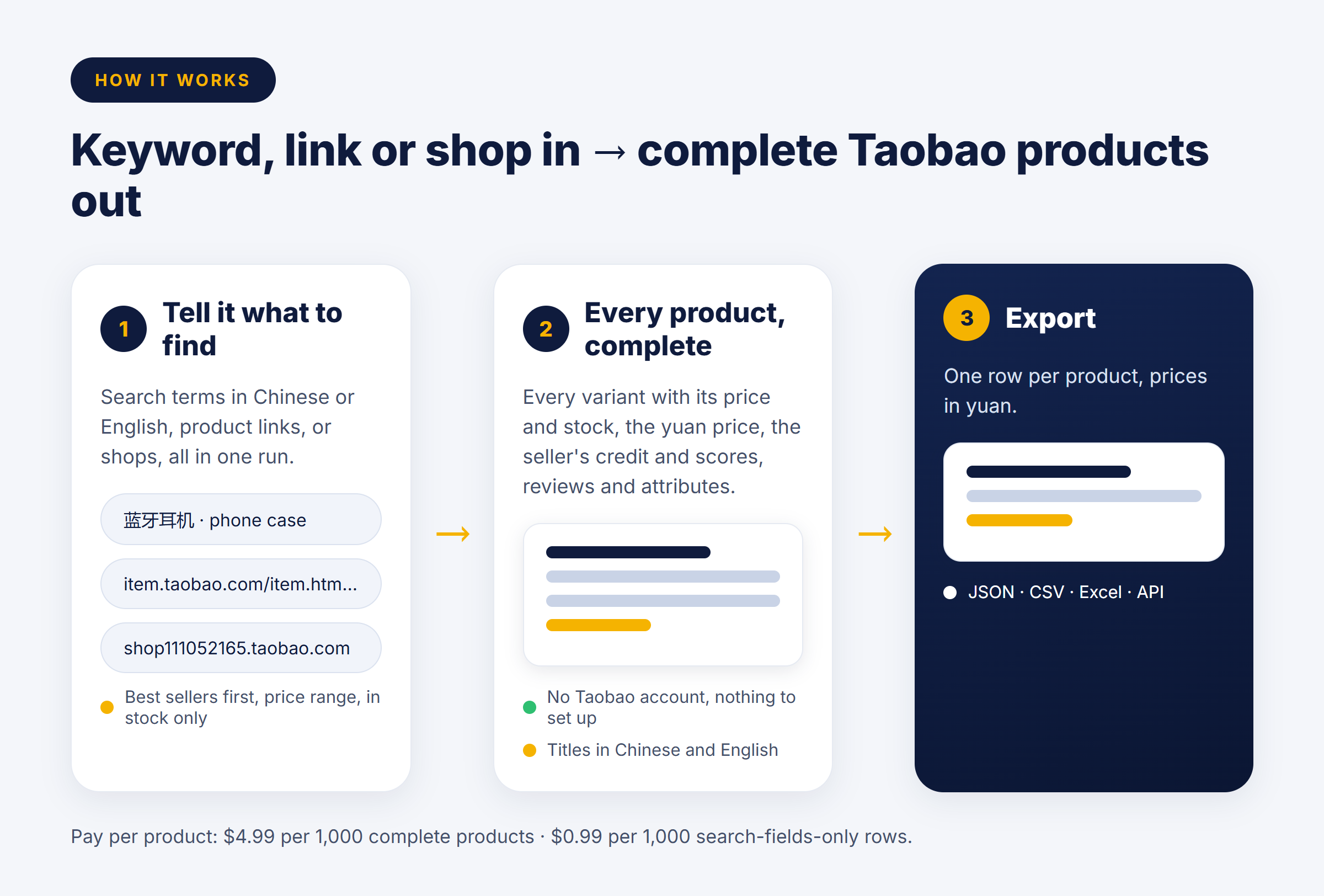
| 📦 What you can extract | ⚙️ Features & integrations |
|---|---|
|
🏷️ **Every variant**: price, stock, photo 💴 **Yuan price**, original price, price range 📦 **Stock**: sold-out and nearly sold-out variants 🏪 **Sellers**: credit level, shop scores, shop age ⭐ **Reviews**: count, positive rate, tags 🧾 **Attributes**, brand, description images 🔤 **Chinese and English** titles and variants |
🔎 **Search** by keyword, link or shop 🏆 **Best sellers first**, price low to high 🎯 **Filters**: price range, Tmall only, in stock 🔄 **Live price and stock check** for trackers ⬇️ **Export data** to JSON, CSV, Excel or XML 🦾 **API access, webhooks**, Node.js & Python 🤖 **LLM-ready data** for MCP, Claude, ChatGPT |
1. [Create](https://console.apify.com/sign-up) a free Apify account.
2. Open **[Taobao & Tmall Scraper](https://console.apify.com/actors/epLJ5mEd0ICW9YC8O)** in Apify Console.
3. Add **search terms**, **product links or ids**, or **shops**, and set **Maximum products**.
4. Click **Save & Start**: 100 complete products take about a minute.
5. Download the dataset as **JSON, CSV, Excel or XML**, or read it through the Apify API.
### ⬇️ Input
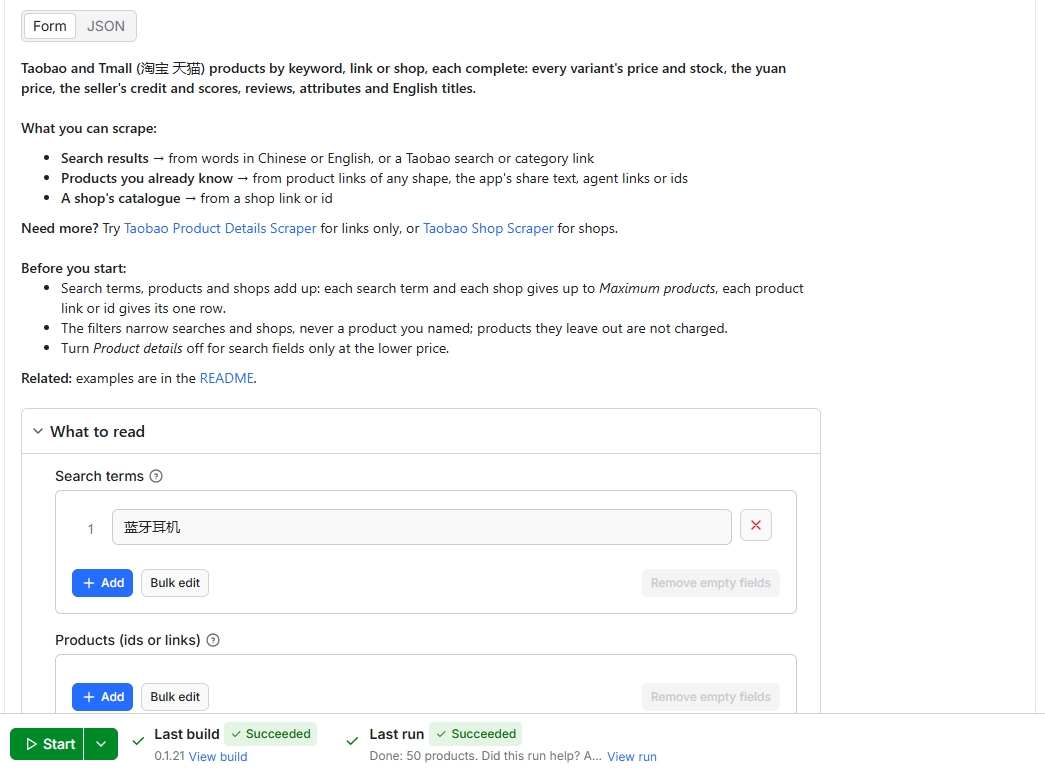
Search terms, products and shops add up: each search term and each shop gives up to **Maximum products**, each product link or id gives its one row. The filters narrow searches and shops, never a product you named.
 | Paste this | And you get |
|---|---|
| A word in Chinese or English: `蓝牙耳机`, `phone case` | Taobao's search, up to 10,000 products |
| A Taobao search or category link | The same search or category |
| A product id or link: `765833709683`, item.taobao.com, detail.tmall.com, Tmall HK, mobile | That product, complete |
| The Taobao app's share text, or a shopping-agent link (CNFans, Mulebuy, Hoobuy, KakoBuy…) | That product, complete |
| A shop link or id: `shop111052165.taobao.com`, `111052165` | The shop's catalogue, up to 10,000 products |
#### 🔎 Search Taobao by keyword
```json
{
"searchTerms": ["蓝牙耳机"],
"maxItems": 100
}
```
#### 🏆 Find best sellers in stock
```json
{
"searchTerms": ["手机壳"],
"sort": "bestSellers",
"inStockOnly": true,
"maxItems": 100
}
```
#### 🔗 Get products by link or id
```json
{
"products": ["https://item.taobao.com/item.htm?id=765833709683", "1079352038299"],
"freshData": true
}
```
#### 🏪 Read a shop's catalogue
```json
{
"shops": ["https://shop111052165.taobao.com"],
"maxItems": 500
}
```
#### 💸 Sweep a category for less
Turn **Product details** off for search fields only (id, titles, price, photo, position) at $0.99 per 1,000.
```json
{
"searchTerms": ["连衣裙"],
"maxItems": 5000,
"details": false
}
```
#### Input fields
| Field | Type | Default | Meaning |
|---|---|---|---|
| Search terms (`searchTerms`) | list | – | Words in Chinese or English, or Taobao search and category links |
| Products (ids or links) (`products`) | list | – | Product links of any shape, the app's share text, agent links, or ids |
| Shops (`shops`) | list | – | Shop links or ids, or a product link for its shop |
| Maximum products (`maxItems`) | number | 500 | Per search term and per shop, up to 10,000 |
| Order (`sort`) | choice | Taobao's order | Taobao's order, best sellers first, lowest or highest price first (search terms) |
| Lowest and highest price (¥) (`minPrice`, `maxPrice`) | number | none | In yuan |
| Tmall only (天猫) (`tmallOnly`) | true or false | false | Only Tmall shops |
| In stock only (`inStockOnly`) | true or false | false | Leave out products whose every variant is sold out |
| Product details (`details`) | true or false | true | Off: search fields only, $0.99 per 1,000 |
| Live price and stock check (`freshData`) | true or false | false | Check each product's price and stock right before saving it, for trackers |
| Minimum products (`minItems`) | number | 0 | Fail the run when fewer products come back (for monitoring) |
### ⬆️ Output
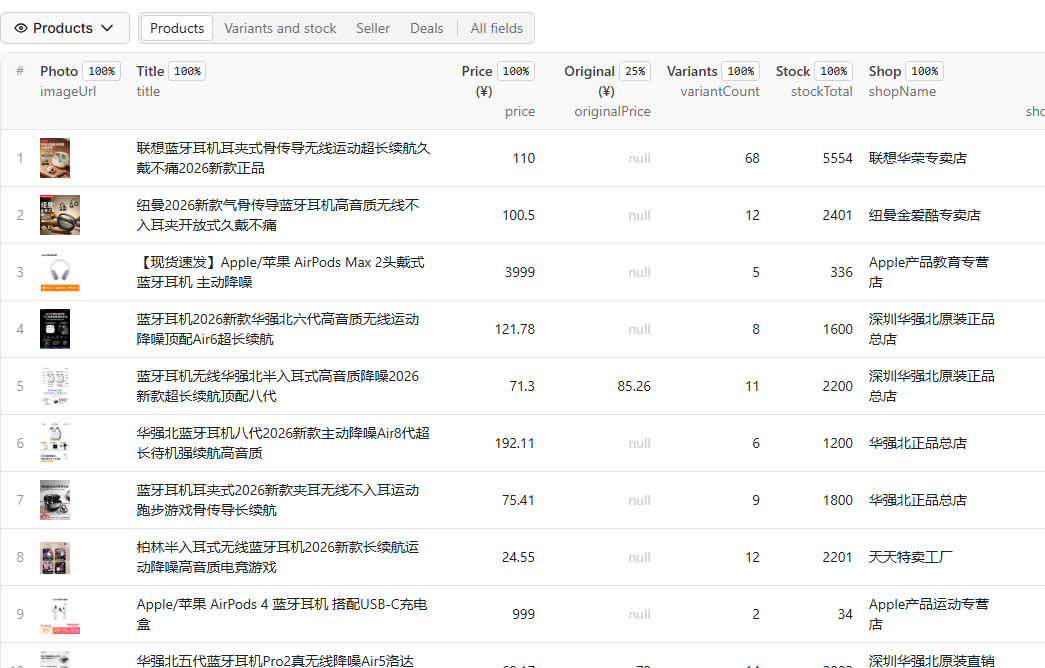 Results land in the run's dataset: view them as a table, download them as JSON, CSV, Excel or XML, or read them through the API. Titles, variant names and options come in Chinese as the seller wrote them and in English; attributes are in English.
#### 📦 Taobao product data sample
A product from a search for 蓝牙耳机 (lists and long text shortened):
```json
{
"itemId": "968678471453",
"url": "https://item.taobao.com/item.htm?id=968678471453",
"platform": "taobao",
"title": "华强北五代蓝牙耳机Pro2真无线降噪Air5洛达2026新款二代超长续航",
"titleEn": "Huaqiangbei Fifth-Generation Bluetooth Headset Pro2 True Wireless Noise-Cancelling Air5 Loda 2026 New Model Second Generation Ultra-Long Battery Life",
"imageUrl": "https://img.alicdn.com/bao/uploaded/i2/2030181314/O1CN0190YKSsZ1ziH1WPjS_!!2030181314.png",
"images": [
"https://img.alicdn.com/bao/uploaded/i2/2030181314/O1CN0190YKSsZ1ziH1WPjS_!!2030181314.png",
"https://img.alicdn.com/bao/uploaded/i3/2030181314/O1CN01X23aCIs7u8J1WPjS_!!2030181314.png"
],
"price": 69.17,
"originalPrice": 78,
"priceRange": {
"min": 69.17,
"max": 95.12
},
"currency": "CNY",
"priceType": "overseas",
"discountLabel": "優惠價",
"inStock": true,
"stockTotal": 2802,
"stockCapped": true,
"soldOutVariants": 0,
"lowStockVariants": 0,
"variantCount": 14,
"variantOptions": [
{
"name": "颜色分类",
"nameEn": "Color Classification",
"values": [
{
"id": "38049783876",
"name": "【品牌补贴】前100名下单补贴15%!数量有限",
"nameEn": "[Brand Subsidy] the First 100 People to Place an Order Will Receive a 15% Subsidy! Quantities Are Limited",
"imageUrl": "https://img.alicdn.com/bao/uploaded/i4/2030181314/O1CN01Pt2h601LZrZ9fHY33_!!2030181314.jpg"
},
{
"id": "44321634394",
"name": "【收藏加购】送豪华四件套★享30天试用★1年质保换新.",
"nameEn": "Add to Favorites & Cart = Free Deluxe 4-Piece Bedding Set★Enjoy a 30-Day Trial★1 Year Warranty for Replacement",
"imageUrl": "https://img.alicdn.com/bao/uploaded/i1/2030181314/O1CN01UNm4Et1LZraFncq8J_!!2030181314.png"
}
]
}
],
"variants": [
{
"skuId": "6117772486958",
"name": "颜色分类:【品牌补贴】前100名下单补贴15%!数量有限",
"nameEn": "Color Classification:[Brand Subsidy] the First 100 People to Place an Order Will Receive a 15% Subsidy! Quantities Are Limited",
"properties": "1627207:38049783876",
"price": 95.12,
"originalPrice": 99.68,
"stock": 200,
"stockCapped": true,
"imageUrl": "https://img.alicdn.com/bao/uploaded/i4/2030181314/O1CN01Pt2h601LZrZ9fHY33_!!2030181314.jpg"
},
{
"skuId": "6117772486961",
"name": "颜色分类:【收藏加购】送豪华四件套★享30天试用★1年质保换新.",
"nameEn": "Color Classification:Add to Favorites & Cart = Free Deluxe 4-Piece Bedding Set★Enjoy a 30-Day Trial★1 Year Warranty for Replacement",
"properties": "1627207:44321634394",
"price": 95.12,
"originalPrice": 99.68,
"stock": 200,
"stockCapped": true,
"imageUrl": "https://img.alicdn.com/bao/uploaded/i1/2030181314/O1CN01UNm4Et1LZraFncq8J_!!2030181314.png"
}
],
"shopId": "109608167",
"shopName": "深圳华强北原装直销总店",
"sellerId": "2030181314",
"sellerType": "C",
"shopUrl": "https://shop109608167.taobao.com",
"shopLogo": "https://img.alicdn.com/imgextra/i1/2030181314/O1CN01gRJxeS1LZrUC1Sv1S_!!2030181314.webp",
"shopCreditLevel": 15,
"shopOpenedAt": "2014-03-21",
"shopItemCount": 5,
"shopNewItemCount": 1,
"shopScores": {
"description": 4.7,
"service": 4.7,
"delivery": 4.7,
"descriptionVsIndustry": "lower",
"serviceVsIndustry": "lower",
"deliveryVsIndustry": "lower"
},
"location": "广东深圳",
"reviewCountText": "5万+",
"reviewCount": 50000,
"positiveRate": 98,
"neutralRate": 2,
"negativeRate": 0,
"positiveReviewCountText": "5万+",
"positiveReviewCount": 50000,
"negativeReviewCountText": "200+",
"negativeReviewCount": 200,
"reviewTags": [
{
"tag": "音质清晰",
"count": 175
},
{
"tag": "佩戴舒适",
"count": 134
},
{
"tag": "重量很轻",
"count": 11
}
],
"latestReview": {
"rating": 5,
"text": "通话清晰无杂音,收货很满意,第三次买了,非常好,",
"date": "2026.11.04 13:54",
"variant": "颜色分类:【绝配版Pro2代】158dB主动降噪★杜比空间音频★同款全功能"
},
"brand": "Fabanmi",
"attributes": [
{
"name": "Function",
"value": "Battery Level Indicator"
},
{
"name": "Color Classification",
"value": "【Hassle-Free Returns】Buy Now and Get Free Return Shipping Insurance + Next-Day Delivery in 100 Cities"
},
{
"name": "Transmission Radius",
"value": "15m"
}
],
"minOrderQuantity": null,
"sellableLanguages": [
"en_US"
],
"categoryId": "50005050",
"rootCategoryId": "50011972",
"categoryPath": [
"影音视听",
"耳机耳放",
"耳机"
],
"descriptionImages": [
"https://img.alicdn.com/imgextra/i4/2030181314/O1CN017jmd371LZraFZUywa_!!2030181314.jpg",
"https://img.alicdn.com/imgextra/i3/2030181314/O1CN01M9zQjv1LZraFZUeAi_!!2030181314.jpg"
],
"sellingPoints": null,
"paymentMethods": [
"蚂蚁花呗",
"集分宝",
"支付宝支付"
],
"shippingFee": 0,
"freeShipping": true,
"areaLimit": false,
"deal": null,
"searchTerm": "蓝牙耳机",
"shopInput": null,
"position": 16,
"details": true,
"scrapedAt": "2026-11-16T12:02:29Z"
}
```
#### Fields
Source: **Taobao** = Taobao's value unchanged. **Derived** = computed by this actor from Taobao's values. Missing values are `null`, never an empty string.
| Field | Source | Meaning |
|---|---|---|
| `itemId` | Taobao | Taobao's numeric item id; never changes |
| `url` | Derived | The product page: item.taobao.com, or detail.tmall.com for Tmall products |
| `platform` | Taobao | `taobao` or `tmall`, when Taobao says which |
| `title`, `titleEn` | Taobao | Title in Chinese as the seller wrote it, and in English |
| `imageUrl`, `images` | Taobao | Main photo and gallery |
| `price` | Taobao | Current price in yuan (CNY), see `priceType` |
| `originalPrice` | Taobao | Crossed-out price in yuan, when the product is discounted |
| `priceRange` | Derived | Lowest and highest variant price `{min, max}` |
| `currency` | Fixed | `CNY` |
| `priceType` | Derived | `yuan` = Taobao's price in yuan; `overseas` = Taobao's overseas price, which includes a currency conversion (~2-3% above the yuan price) |
| `discountLabel` | Taobao | Taobao's price label (优惠价…) |
| `inStock` | Derived | At least one variant can be bought |
| `stockTotal`, `stockCapped` | Derived | Units in stock over all variants; `stockCapped` true when a variant has 200 or more, so the total is a minimum |
| `soldOutVariants`, `lowStockVariants` | Derived | Variants with 0 left, and with 1 to 19 left |
| `variantCount` | Derived | Number of variants (SKUs) |
| `variantOptions` | Taobao | The options a buyer picks from (颜色分类, 尺码…), each value in Chinese and English with its photo |
| `variants` | Taobao | Every variant: `skuId`, `name`, `nameEn`, `properties`, `price`, `originalPrice`, `stock` (exact below 200), `stockCapped`, `imageUrl` |
| `shopId`, `shopName`, `shopUrl`, `shopLogo` | Taobao | The shop |
| `sellerId`, `sellerType` | Taobao | The seller's user id; `B` = Tmall (business), `C` = Taobao (individual) |
| `shopCreditLevel`, `shopOpenedAt` | Taobao | Taobao's seller credit level, and the date the shop opened |
| `shopItemCount`, `shopNewItemCount` | Taobao | Products the shop lists, and new ones listed recently |
| `shopScores` | Taobao | The three shop scores (description, service, delivery, 1 to 5) and how each compares with the industry (`higher`, `same`, `lower`) |
| `location` | Taobao | Where the product ships from (广东深圳…) |
| `reviewCountText`, `reviewCount` | Taobao, Derived | Reviews as Taobao writes it (`3000+`), and as a number (a minimum) |
| `positiveRate`, `neutralRate`, `negativeRate` | Taobao | Share of reviews, in percent (Taobao products; Tmall doesn't publish them) |
| `positiveReviewCountText`, `positiveReviewCount`, `negativeReviewCountText`, `negativeReviewCount` | Taobao, Derived | Positive and negative reviews as Taobao writes them (`7万+`) and as numbers |
| `reviewTags` | Taobao | What reviewers mention most, with counts (`性价比高`, 85) |
| `latestReview` | Taobao | A recent review: rating, text, date, variant bought |
| `brand` | Taobao | Brand |
| `attributes` | Taobao | Product attributes `{name, value}` (model, material, battery…), in English |
| `minOrderQuantity` | Taobao | Minimum quantity per order, when the seller sets one |
| `sellableLanguages` | Taobao | Languages Taobao sells the product in abroad |
| `categoryId`, `rootCategoryId`, `categoryPath` | Taobao | Taobao's category ids and names from the top |
| `descriptionImages` | Taobao | Images of the seller's product description |
| `sellingPoints` | Taobao | The seller's highlight badges |
| `paymentMethods` | Taobao | Payment methods Taobao lists (蚂蚁花呗, 信用卡支付…) |
| `shippingFee`, `freeShipping` | Taobao, Derived | Domestic shipping fee in China in yuan, and whether it is free |
| `areaLimit` | Taobao | Taobao limits where it ships |
| `deal` | Taobao | On Taobao's deal products only: `sales30Days`, `salesToday`, `salesLast2Hours`, `couponPrice` (券后价), `listPrice`, `coupon`, `couponsLeft`, `promotions` |
| `searchTerm`, `shopInput`, `position` | Derived | What found the product, and its position there |
| `details` | Derived | `true` = complete row, `false` = search fields only |
| `scrapedAt` | Derived | When the run read it (UTC) |
#### Run summary
Every run saves a `SUMMARY` record in its key-value store. This one is a 100-product search:
```json
{
"products": 100,
"completeRows": 100,
"searchFieldsOnlyRows": 0,
"rowsWithOverseasPrice": 80,
"leftOutByFilters": 0,
"productIdsNotOnTaobao": [],
"productsToRunAgain": [],
"inputsThatNeedALogin": [],
"taobaoCountPerSearch": {
"蓝牙耳机": 36573
},
"taobaoCountPerShop": {},
"stoppedSources": [],
"durationSec": 53
}
```
`taobaoCountPerSearch` and `taobaoCountPerShop` are Taobao's own counts. `rowsWithOverseasPrice` counts rows priced with Taobao's overseas price (`priceType: overseas`). `productIdsNotOnTaobao` lists ids Taobao no longer has, and `productsToRunAgain` products Taobao did not answer for this time: neither is charged. Set `minItems` to make a short run fail outright.
#### 📝 Notes and limits
- **Stock is exact below 200 per variant.** Above that, Taobao shows 200: `stock` is 200, `stockCapped` is true and `stockTotal` is a minimum. Sold-out (0) and nearly sold-out (1 to 19) variants are exact.
- **Two prices, marked.** `price` is Taobao's yuan price when Taobao shows it (`priceType: yuan`), otherwise Taobao's overseas price, which includes a currency conversion and sits about 2-3% above (`priceType: overseas`). Variant prices are overseas prices.
- **Sales counts and coupon prices (券后价)** are shown to signed-in shoppers only, except on Taobao's deal products, where the `deal` field carries the coupon, the price after it and the sales of the last 30 days. Best sellers first still follows Taobao's own sales ranking.
- **Taobao's own product-page details** (ships-from, category, review counts and tags, latest review, payment methods) are public for part of the products; the other rows have every other field and these are `null`.
- **Review counts are Taobao's rounded text** (`3000+`, `7万+`); the numeric fields are the minimum it means. Tmall doesn't publish a positive rate.
- **A shop's catalogue** is what Taobao lists for it publicly, up to 10,000 products; `taobaoCountPerShop` gives Taobao's own count.
- **Prices move during promotions** (618 in June, Double 11 in November): schedule runs as often as you need a fresh price, with the live check on for trackers.
### What can you do with Taobao data?
#### 🏆 [Find best sellers to resell, with variant stock](https://apify.com/sleepmodesystems/taobao-scraper/examples/taobao-dropshipping-best-sellers-variant-stock)
Shopify, Amazon and TikTok Shop sellers look for products that sell in China, and list only the variants that can be bought.
**Recipe:**
1. Search the product with **Order: best sellers first** and **In stock only**, and a price range if you have one.
2. Keep the variants with `stock` above your order size; `soldOutVariants` shows what is gone.
3. Check the seller's `shopCreditLevel` and `shopScores` before you order.
The 100 best sellers of a search, complete, cost about $0.50.
#### 📈 [Track the price and stock of your products](https://apify.com/sleepmodesystems/taobao-scraper/examples/taobao-tmall-price-stock-tracker)
Resellers and buying agents follow the products they buy: a price change or a sold-out variant costs them an order.
**Recipe:**
1. Paste your products' links or ids and turn on **Live price and stock check**; save it as an Apify task.
2. Schedule it daily, and send each run's dataset to Google Sheets, your database or Slack.
3. Compare `price` and each variant's `stock` by `itemId` and `skuId` with the previous day.
100 products tracked every day for a month cost about $15.
#### 🏪 [Vet a supplier's shop before you order](https://apify.com/sleepmodesystems/taobao-scraper/examples/taobao-supplier-shop-catalogue-seller-scores)
Importers and sourcing agents compare suppliers on what they sell and how they are rated.
**Recipe:**
1. Paste the shops' links or ids, with **Maximum products** set to cover their catalogues.
2. Compare `shopCreditLevel`, `shopOpenedAt`, `shopItemCount` and `shopScores` against their industry.
3. Compare their prices and stock on the products you need.
Two shops of 100 products each, complete, cost about $1.
#### 📊 Map a category's prices
Brands and analysts read a whole category's prices, shops and positions.
**Recipe:**
1. Search the category's words with **Product details** off, for up to 10,000 products a term at $0.99 per 1,000.
2. Group by `price`, `shopName` and `position`, and read Taobao's own count in the summary.
3. Read the products that matter complete, with [Taobao Product Details Scraper](https://apify.com/sleepmodesystems/taobao-product-details-scraper).
### Taobao scrapers compared
| | Taobao & Tmall Scraper | zen-studio (detail) | pizani | scrapesage | tortuga | memo23 |
|---|---|---|---|---|---|---|
| Price per 1,000 complete products | $4.99 | $9.99 | $4.99 | $3 + $6 details | $2 + $2.50 details | $4 + $7 variants |
| Time per complete product | 0.7 s | 3.1 s | one product a run | 2.9 s, no variants | 2.5 s | 13 s |
| Search, links and shops in one run | ✅ | ❌ | ❌ | ✅ | ✅ | ✅ |
| Every variant with its price | ✅ | ✅ | ✅ | ❌ | ❌ | ✅ |
| Stock per variant, sold-out variants | ✅ | ❌ | ❌ | ❌ | ❌ | ❌ |
| Seller credit and shop scores | ✅ | ❌ | ❌ | ✅ | ✅ | partial |
| Titles and variant names in English | ✅ | ❌ | title only | ❌ | ❌ | ❌ |
| Sales counts | deal products only | ✅ | ❌ | ❌ | ❌ | sales order only |
### Want to get other data from Taobao?
You can use the other dedicated Taobao scrapers below for one job each:
| 📦 Taobao Product Details Scraper | 🏪 Taobao Shop Scraper |
蓝牙耳机, 手机壳, phone case. Or paste a Taobao search or category link (s.taobao.com/search?q=…, www.taobao.com/list/category/50005050.htm). Each gives products in Taobao's order, as deep as the catalogue goes: 蓝牙耳机 has ~35,000 listed and a run reads up to 10,000. Up to 100 terms.
## `products` (type: `array`):
Product ids or links, one per line, any shape: 765833709683, https://item.taobao.com/item.htm?id=765833709683, Tmall and Tmall HK links, mobile links, m.tb.cn share text, and shopping-agent links (CNFans, Mulebuy, Hoobuy, KakoBuy…). One complete row each. Up to 10,000.
## `shops` (type: `array`):
Shop links or ids, one per line: https://shop111052165.taobao.com, 111052165, or a product link (that product's shop). The shop's catalogue, up to Maximum products per shop. Up to 100 shops.
## `maxItems` (type: `integer`):
Products per search term and per shop (up to 10,000). A product you named always gives its row.
## `sort` (type: `string`):
Taobao's own orders for search terms: Best sellers first is Taobao's sales ranking. Shops come in the shop's own order.
## `minPrice` (type: `integer`):
Only products from this price, in yuan: 50. On searches and shops.
## `maxPrice` (type: `integer`):
Only products up to this price, in yuan: 300. On searches and shops.
## `tmallOnly` (type: `boolean`):
Only products from Tmall stores. Needs product details.
## `inStockOnly` (type: `boolean`):
Leave out products whose every variant is sold out. Needs product details.
## `details` (type: `boolean`):
On (default): the complete row, every variant with its price and stock, attributes, description images, the seller's scores and credit, review count and tags, and Taobao's own yuan price where Taobao shows it. Off: search and shop rows only (id, titles, price, image, position) at the lower price, for daily trackers.
## `freshData` (type: `boolean`):
Check each product's price and stock with Taobao right before saving it (about 2-3 s more per product), for price and stock trackers.
## `minItems` (type: `integer`):
Fail the run when fewer products come back (for monitoring). 0 = never fail for a small result.
## Actor input object example
```json
{
"searchTerms": [
"蓝牙耳机"
],
"maxItems": 50,
"sort": "relevance",
"tmallOnly": false,
"inStockOnly": false,
"details": true,
"freshData": false,
"minItems": 0
}
```
# Actor output Schema
## `products` (type: `string`):
No description
## `summary` (type: `string`):
No description
# API
You can run this Actor programmatically using our API. Below are code examples in JavaScript, Python, and CLI, as well as the OpenAPI specification and MCP server setup.
## JavaScript example
```javascript
import { ApifyClient } from 'apify-client';
// Initialize the ApifyClient with your Apify API token
// Replace the '