| 📦 What you can extract | ⚙️ Features & integrations |
|---|---|
|
📷 **Posts and carousels** from profiles and hashtags 🎞️ **Reels** with plays, video and audio links 💬 **Comments** from posts or Reels, up to 10,000 each 👤 **Profiles**: bio, followers, related accounts \#️⃣ **Hashtags**: Instagram's summary, related searches, top posts 📍 **Places**: coordinates, address, category 💾 **Downloads**: Reels in up to 1080p, and photos, saved to your storage 📝 **Transcripts** of what's said in Reels |
🔓 **No Instagram login**, so no account to get banned 🔎 **Keyword search** on Google for profiles and hashtags 🔁 **Only new posts** since the last run, for monitoring 📅 **Date filters and scheduling** for recent content ⬇️ **Export data** to JSON, CSV, Excel or HTML 🦾 **API access, webhooks**, Node.js & Python clients 📈 **Spot viral content and creators** by plays, likes and comments |
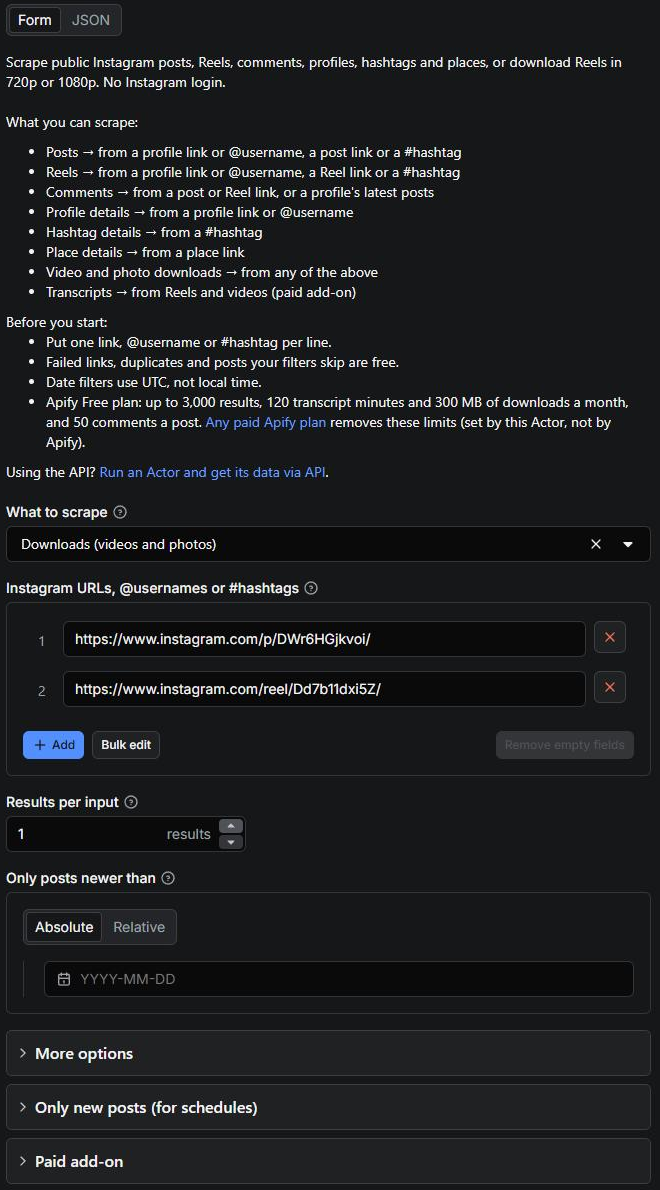
The input type drives what's returned:
| Paste this | And you can get |
|---|---|
| Post or Reel link | That post, its comments, or its download |
| Profile link or `@username` | Its posts, Reels, details, or Reel downloads |
| Hashtag link or `#hashtag` | Its top posts or Reels, or hashtag details |
| Place link | Place details |
| A keyword (Search by keyword) | Profiles or hashtags Google finds for it, then their posts or details |
#### ⬆️ Output
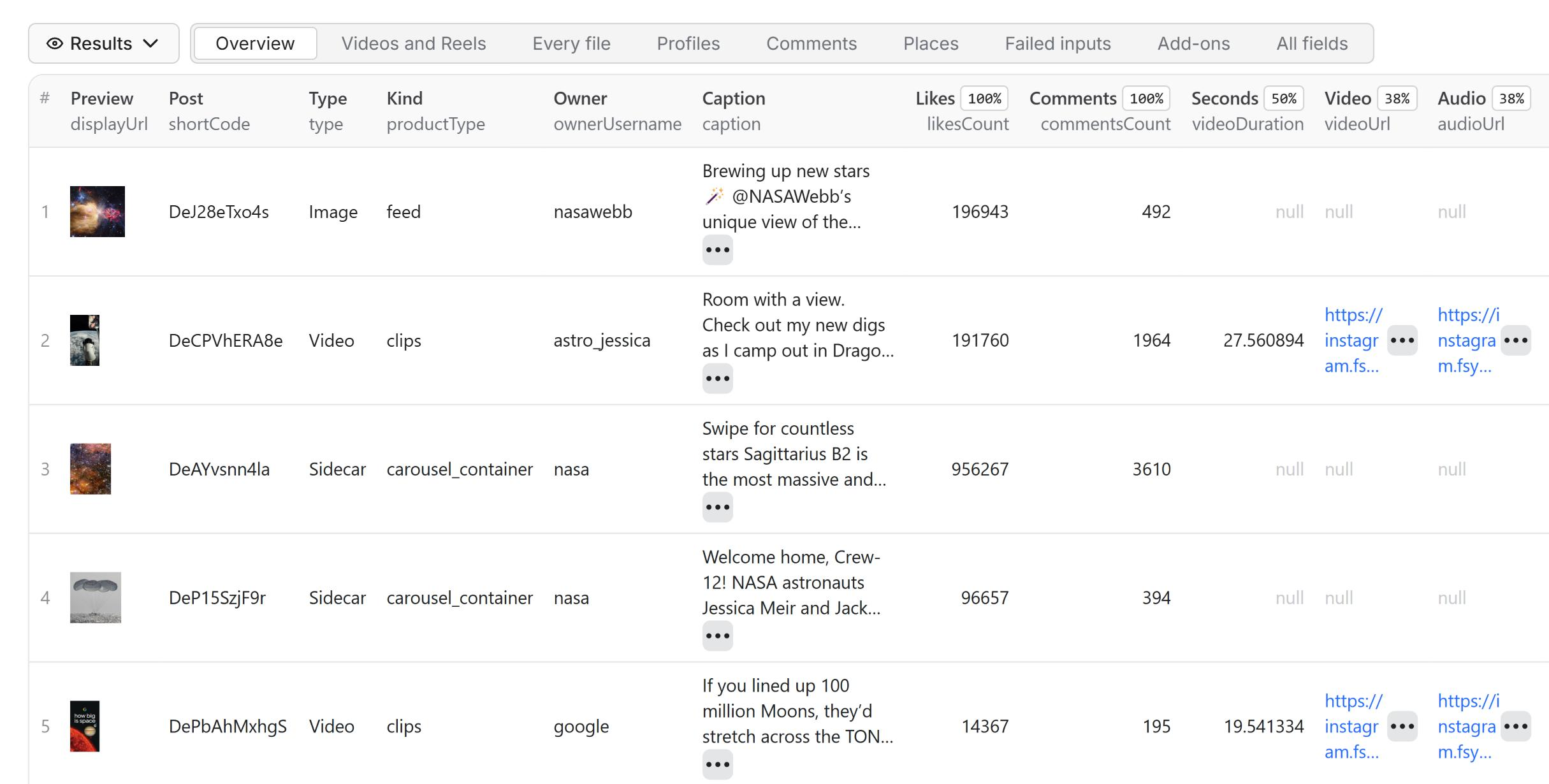 Results land in a dataset in the **Storage** tab. View them as a table, download them in **JSON,
CSV, Excel or HTML**, or get them through the API. Each kind of data has its own fields; samples
below are from real runs.
##### 📸 Instagram post scraper: posts and carousels
Posts and carousels from a profile, hashtag or post link.
**Supported inputs:**
- `https://www.instagram.com/natgeo/` or `@natgeo` (profile)
- `https://www.instagram.com/p/DeSx5enlwm_/` (post)
- `https://www.instagram.com/explore/tags/travel/` or `#travel` (hashtag)
**Posts data sample**
```json
{
"inputUrl": "@natgeo",
"id": "4004482472851474879",
"type": "Sidecar",
"shortCode": "DeSx5enlwm_",
"caption": "Presented by @Rolex. Vultures are part of nature’s cleanup crew, devouring dead animals and preventing the spread of diseases. But now these flying janitors ...",
"hashtags": ["Rolex", "AfricaEarthsWildHome", "PerpetualPlanet"],
"mentions": ["Rolex", "hammond_robin"],
"url": "https://www.instagram.com/p/DeSx5enlwm_/",
"commentsCount": 84,
"likesCount": 42162,
"displayUrl": "https://scontent-iad6-1.cdninstagram.com/.../6567256986_n.jpg",
"images": [
"https://scontent-iad6-1.cdninstagram.com/.../6567256986_n.jpg",
"https://scontent-iad6-1.cdninstagram.com/.../4739047956_n.jpg"
],
"childPosts": [
{
"id": "4004482402856268460",
"type": "Image",
"displayUrl": "https://scontent-iad6-1.cdninstagram.com/.../6567256986_n.jpg",
"dimensionsWidth": 1440,
"dimensionsHeight": 1920
}
],
"timestamp": "2026-10-10T19:00:00.000Z",
"ownerFullName": "National Geographic",
"ownerUsername": "natgeo",
"ownerId": "787132",
"isPinned": false
}
```
##### 🎞️ Instagram Reels scraper
Reels from a profile, its Reels tab, a hashtag or a Reel link.
**Supported inputs:**
- `https://www.instagram.com/natgeo/` (profile)
- `https://www.instagram.com/natgeo/reels/` (Reels tab)
- `https://www.instagram.com/reel/DeUKkHjgMNR/` (single Reel)
- `https://www.instagram.com/explore/tags/travel/` (hashtag)
**Reels data sample** (Detail level Full, view counts on)
```json
{
"inputUrl": "@natgeo",
"id": "4004872431117321041",
"type": "Video",
"productType": "clips",
"shortCode": "DeUKkHjgMNR",
"caption": "Presented by @Rolex. Pangolins are notoriously difficult to rehabilitate and rewild because they need to learn where to forage for food. During their daily w...",
"url": "https://www.instagram.com/p/DeUKkHjgMNR/",
"commentsCount": 353,
"latestComments": [
{
"id": "17887833801622715",
"text": "Pangolin",
"ownerUsername": "example_user",
"timestamp": "2026-10-10T22:03:18.000Z",
"likesCount": 0
}
],
"likesCount": 126199,
"videoPlayCount": 2439975,
"videoViewCount": 917201,
"videoDuration": 14.933333,
"videoUrl": "https://scontent-iad3-1.cdninstagram.com/.../Zux6SPv1T_20.mp4",
"audioUrl": "https://scontent-iad3-1.cdninstagram.com/.../LZ8EMhj18eu0.mp4",
"displayUrl": "https://scontent-iad3-1.cdninstagram.com/.../1460288787_n.jpg",
"musicInfo": {
"artist_name": "natgeo",
"song_name": "Original audio",
"uses_original_audio": true
},
"topics": ["wildlife encounter", "nature photography", "forest floor"],
"timestamp": "2026-10-10T13:14:44.000Z",
"ownerUsername": "natgeo",
"linksExpireAt": "2026-10-12T08:23:29.000Z"
}
```
##### 💬 Instagram comments scraper
Comments from a post or Reel, or from the latest posts of a profile or hashtag.
**Supported inputs:**
- `https://www.instagram.com/p/DeSNiSGgoI-/` (post)
- `https://www.instagram.com/reel/DeUKkHjgMNR/` (Reel)
- `@natgeo` (the comments on its latest posts)
**Comments data sample**
```json
{
"postUrl": "https://www.instagram.com/p/DeSNiSGgoI-/",
"commentUrl": "https://www.instagram.com/p/DeSNiSGgoI-/c/18096108170555915/",
"id": "18096108170555915",
"text": "😍🌳",
"ownerUsername": "example_user",
"timestamp": "2026-10-10T22:09:20.000Z",
"likesCount": 0,
"repliesCount": null
}
```
##### 👤 Instagram profile scraper
Profile metadata: bio, followers, post count, verified status and related accounts.
**Supported inputs:**
- `https://www.instagram.com/natgeo/` or `@natgeo` (profile)
**Profile data sample** (Detail level Full)
```json
{
"inputUrl": "@natgeo",
"id": "787132",
"username": "natgeo",
"url": "https://www.instagram.com/natgeo/",
"fullName": "National Geographic",
"biography": "Step into wonder and find your inner explorer with National Geographic 🌎",
"externalUrl": "http://visitstore.bio/natgeo",
"followersCount": 268415564,
"followsCount": 194,
"postsCount": 32063,
"isBusinessAccount": true,
"private": false,
"verified": true,
"profilePicUrlHD": "https://scontent-iad3-1.cdninstagram.com/.../0972105113_n.jpg",
"relatedProfiles": [
{ "username": "animalplanet", "full_name": "Animal Planet", "is_verified": true },
{ "username": "pbsnature", "full_name": "Nature", "is_verified": true }
],
"latestPosts": [
{
"shortCode": "DdG4RIxIPyf",
"type": "Video",
"timestamp": "2026-09-10T13:00:14.000Z",
"likesCount": 79371,
"commentsCount": 570
}
]
}
```
##### #️⃣ Instagram hashtag scraper
Hashtag metadata: Instagram's summary, related searches and top posts.
**Supported inputs:**
- `https://www.instagram.com/explore/tags/travel/` or `#travel` (hashtag)
**Hashtag details sample**
```json
{
"inputUrl": "#travel",
"name": "travel",
"url": "https://www.instagram.com/explore/tags/travel/",
"description": "The UK Foreign Office currently advises against all but essential travel to parts of Saudi Arabia including Riyadh, while the UAE and Qatar have no...",
"relatedSearches": ["transfer travel", "time travel real", "november travel destinations"],
"topPosts": [
{
"shortCode": "DTfS7SMEk8B",
"type": "Video",
"videoPlayCount": 30210139,
"timestamp": "2026-01-14T11:13:01.000Z"
}
]
}
```
##### 📍 Instagram location scraper: place details
Place metadata: name, category, coordinates and post count.
**Supported inputs:**
- `https://www.instagram.com/explore/locations/213385402/london-united-kingdom/` (place)
**Place details sample**
```json
{
"inputUrl": "https://www.instagram.com/explore/locations/213385402/london-united-kingdom/",
"id": "213385402",
"name": "London, United Kingdom",
"category": "City",
"lat": 51.5141,
"lng": -0.1094,
"postsCount": 106858921
}
```
##### 💾 Instagram Reels downloader
Each post's video or photos saved to your Apify storage, with links that keep working. One download
covers up to 50 MB of a post's files (almost every Reel); each further started 50 MB is one more, up
to 300 MB a post. Videos come in **720p** (one MP4 with sound that plays everywhere), or in **1080p**
with *Download quality: 1080p* (Instagram's best: the full-quality VP9 video joined with its sound)
for one download more, or **Audio only** (just the sound, an .m4a file). Each video keeps its cover
picture too, free. You pay only for what is saved: a 1080p file that can't be made comes in 720p,
without the 1080p charge.
**Supported inputs:**
- `https://www.instagram.com/reel/DdG4RIxIPyf/` (Reel or post, with or without `?igsh=...`)
- `https://www.instagram.com/share/reel/_69O6RoGd` (a link from the app's Share button)
- `https://www.instagram.com/natgeo/reels/` (a profile's Reels)
**Downloads data sample**
```json
{
"addOn": "savedFiles",
"addOnFor": "https://www.instagram.com/p/Dd7b11dxi5Z/",
"shortCode": "Dd7b11dxi5Z",
"downloadedVideo": "https://api.apify.com/v2/key-value-stores/.../records/media-kOEAhsXb1rkmAXm-0-video.mp4?signature=...",
"downloadedCover": "https://api.apify.com/v2/key-value-stores/.../records/media-kOEAhsXb1rkmAXm-0-cover.jpg?signature=...",
"downloadCharges": 1,
"savedFiles": [
{
"index": 0,
"role": "video",
"bytes": 6475431,
"contentType": "video/mp4",
"url": "https://api.apify.com/v2/key-value-stores/.../records/media-kOEAhsXb1rkmAXm-0-video.mp4?signature=..."
},
{
"index": 0,
"role": "cover",
"bytes": 128228,
"contentType": "image/jpeg",
"url": "https://api.apify.com/v2/key-value-stores/.../records/media-kOEAhsXb1rkmAXm-0-cover.jpg?signature=..."
}
]
}
```
##### 🔌 Use it as a Reel downloader API
One HTTP call downloads a list of Reels and answers with every link's result: [`run-sync`](https://docs.apify.com/api/v2/act-run-sync-post) waits for
the run (up to 5 minutes) and returns its `OUTPUT`, whose `downloads` has one entry per link (match
them by `inputUrl`): the saved file, its cover, size, quality and charges, or why it failed. Failed
links are free.
```bash
curl -X POST "https://api.apify.com/v2/acts/socialbeast~instagram-scraper-reels-downloader/run-sync?token=
Results land in a dataset in the **Storage** tab. View them as a table, download them in **JSON,
CSV, Excel or HTML**, or get them through the API. Each kind of data has its own fields; samples
below are from real runs.
##### 📸 Instagram post scraper: posts and carousels
Posts and carousels from a profile, hashtag or post link.
**Supported inputs:**
- `https://www.instagram.com/natgeo/` or `@natgeo` (profile)
- `https://www.instagram.com/p/DeSx5enlwm_/` (post)
- `https://www.instagram.com/explore/tags/travel/` or `#travel` (hashtag)
**Posts data sample**
```json
{
"inputUrl": "@natgeo",
"id": "4004482472851474879",
"type": "Sidecar",
"shortCode": "DeSx5enlwm_",
"caption": "Presented by @Rolex. Vultures are part of nature’s cleanup crew, devouring dead animals and preventing the spread of diseases. But now these flying janitors ...",
"hashtags": ["Rolex", "AfricaEarthsWildHome", "PerpetualPlanet"],
"mentions": ["Rolex", "hammond_robin"],
"url": "https://www.instagram.com/p/DeSx5enlwm_/",
"commentsCount": 84,
"likesCount": 42162,
"displayUrl": "https://scontent-iad6-1.cdninstagram.com/.../6567256986_n.jpg",
"images": [
"https://scontent-iad6-1.cdninstagram.com/.../6567256986_n.jpg",
"https://scontent-iad6-1.cdninstagram.com/.../4739047956_n.jpg"
],
"childPosts": [
{
"id": "4004482402856268460",
"type": "Image",
"displayUrl": "https://scontent-iad6-1.cdninstagram.com/.../6567256986_n.jpg",
"dimensionsWidth": 1440,
"dimensionsHeight": 1920
}
],
"timestamp": "2026-10-10T19:00:00.000Z",
"ownerFullName": "National Geographic",
"ownerUsername": "natgeo",
"ownerId": "787132",
"isPinned": false
}
```
##### 🎞️ Instagram Reels scraper
Reels from a profile, its Reels tab, a hashtag or a Reel link.
**Supported inputs:**
- `https://www.instagram.com/natgeo/` (profile)
- `https://www.instagram.com/natgeo/reels/` (Reels tab)
- `https://www.instagram.com/reel/DeUKkHjgMNR/` (single Reel)
- `https://www.instagram.com/explore/tags/travel/` (hashtag)
**Reels data sample** (Detail level Full, view counts on)
```json
{
"inputUrl": "@natgeo",
"id": "4004872431117321041",
"type": "Video",
"productType": "clips",
"shortCode": "DeUKkHjgMNR",
"caption": "Presented by @Rolex. Pangolins are notoriously difficult to rehabilitate and rewild because they need to learn where to forage for food. During their daily w...",
"url": "https://www.instagram.com/p/DeUKkHjgMNR/",
"commentsCount": 353,
"latestComments": [
{
"id": "17887833801622715",
"text": "Pangolin",
"ownerUsername": "example_user",
"timestamp": "2026-10-10T22:03:18.000Z",
"likesCount": 0
}
],
"likesCount": 126199,
"videoPlayCount": 2439975,
"videoViewCount": 917201,
"videoDuration": 14.933333,
"videoUrl": "https://scontent-iad3-1.cdninstagram.com/.../Zux6SPv1T_20.mp4",
"audioUrl": "https://scontent-iad3-1.cdninstagram.com/.../LZ8EMhj18eu0.mp4",
"displayUrl": "https://scontent-iad3-1.cdninstagram.com/.../1460288787_n.jpg",
"musicInfo": {
"artist_name": "natgeo",
"song_name": "Original audio",
"uses_original_audio": true
},
"topics": ["wildlife encounter", "nature photography", "forest floor"],
"timestamp": "2026-10-10T13:14:44.000Z",
"ownerUsername": "natgeo",
"linksExpireAt": "2026-10-12T08:23:29.000Z"
}
```
##### 💬 Instagram comments scraper
Comments from a post or Reel, or from the latest posts of a profile or hashtag.
**Supported inputs:**
- `https://www.instagram.com/p/DeSNiSGgoI-/` (post)
- `https://www.instagram.com/reel/DeUKkHjgMNR/` (Reel)
- `@natgeo` (the comments on its latest posts)
**Comments data sample**
```json
{
"postUrl": "https://www.instagram.com/p/DeSNiSGgoI-/",
"commentUrl": "https://www.instagram.com/p/DeSNiSGgoI-/c/18096108170555915/",
"id": "18096108170555915",
"text": "😍🌳",
"ownerUsername": "example_user",
"timestamp": "2026-10-10T22:09:20.000Z",
"likesCount": 0,
"repliesCount": null
}
```
##### 👤 Instagram profile scraper
Profile metadata: bio, followers, post count, verified status and related accounts.
**Supported inputs:**
- `https://www.instagram.com/natgeo/` or `@natgeo` (profile)
**Profile data sample** (Detail level Full)
```json
{
"inputUrl": "@natgeo",
"id": "787132",
"username": "natgeo",
"url": "https://www.instagram.com/natgeo/",
"fullName": "National Geographic",
"biography": "Step into wonder and find your inner explorer with National Geographic 🌎",
"externalUrl": "http://visitstore.bio/natgeo",
"followersCount": 268415564,
"followsCount": 194,
"postsCount": 32063,
"isBusinessAccount": true,
"private": false,
"verified": true,
"profilePicUrlHD": "https://scontent-iad3-1.cdninstagram.com/.../0972105113_n.jpg",
"relatedProfiles": [
{ "username": "animalplanet", "full_name": "Animal Planet", "is_verified": true },
{ "username": "pbsnature", "full_name": "Nature", "is_verified": true }
],
"latestPosts": [
{
"shortCode": "DdG4RIxIPyf",
"type": "Video",
"timestamp": "2026-09-10T13:00:14.000Z",
"likesCount": 79371,
"commentsCount": 570
}
]
}
```
##### #️⃣ Instagram hashtag scraper
Hashtag metadata: Instagram's summary, related searches and top posts.
**Supported inputs:**
- `https://www.instagram.com/explore/tags/travel/` or `#travel` (hashtag)
**Hashtag details sample**
```json
{
"inputUrl": "#travel",
"name": "travel",
"url": "https://www.instagram.com/explore/tags/travel/",
"description": "The UK Foreign Office currently advises against all but essential travel to parts of Saudi Arabia including Riyadh, while the UAE and Qatar have no...",
"relatedSearches": ["transfer travel", "time travel real", "november travel destinations"],
"topPosts": [
{
"shortCode": "DTfS7SMEk8B",
"type": "Video",
"videoPlayCount": 30210139,
"timestamp": "2026-01-14T11:13:01.000Z"
}
]
}
```
##### 📍 Instagram location scraper: place details
Place metadata: name, category, coordinates and post count.
**Supported inputs:**
- `https://www.instagram.com/explore/locations/213385402/london-united-kingdom/` (place)
**Place details sample**
```json
{
"inputUrl": "https://www.instagram.com/explore/locations/213385402/london-united-kingdom/",
"id": "213385402",
"name": "London, United Kingdom",
"category": "City",
"lat": 51.5141,
"lng": -0.1094,
"postsCount": 106858921
}
```
##### 💾 Instagram Reels downloader
Each post's video or photos saved to your Apify storage, with links that keep working. One download
covers up to 50 MB of a post's files (almost every Reel); each further started 50 MB is one more, up
to 300 MB a post. Videos come in **720p** (one MP4 with sound that plays everywhere), or in **1080p**
with *Download quality: 1080p* (Instagram's best: the full-quality VP9 video joined with its sound)
for one download more, or **Audio only** (just the sound, an .m4a file). Each video keeps its cover
picture too, free. You pay only for what is saved: a 1080p file that can't be made comes in 720p,
without the 1080p charge.
**Supported inputs:**
- `https://www.instagram.com/reel/DdG4RIxIPyf/` (Reel or post, with or without `?igsh=...`)
- `https://www.instagram.com/share/reel/_69O6RoGd` (a link from the app's Share button)
- `https://www.instagram.com/natgeo/reels/` (a profile's Reels)
**Downloads data sample**
```json
{
"addOn": "savedFiles",
"addOnFor": "https://www.instagram.com/p/Dd7b11dxi5Z/",
"shortCode": "Dd7b11dxi5Z",
"downloadedVideo": "https://api.apify.com/v2/key-value-stores/.../records/media-kOEAhsXb1rkmAXm-0-video.mp4?signature=...",
"downloadedCover": "https://api.apify.com/v2/key-value-stores/.../records/media-kOEAhsXb1rkmAXm-0-cover.jpg?signature=...",
"downloadCharges": 1,
"savedFiles": [
{
"index": 0,
"role": "video",
"bytes": 6475431,
"contentType": "video/mp4",
"url": "https://api.apify.com/v2/key-value-stores/.../records/media-kOEAhsXb1rkmAXm-0-video.mp4?signature=..."
},
{
"index": 0,
"role": "cover",
"bytes": 128228,
"contentType": "image/jpeg",
"url": "https://api.apify.com/v2/key-value-stores/.../records/media-kOEAhsXb1rkmAXm-0-cover.jpg?signature=..."
}
]
}
```
##### 🔌 Use it as a Reel downloader API
One HTTP call downloads a list of Reels and answers with every link's result: [`run-sync`](https://docs.apify.com/api/v2/act-run-sync-post) waits for
the run (up to 5 minutes) and returns its `OUTPUT`, whose `downloads` has one entry per link (match
them by `inputUrl`): the saved file, its cover, size, quality and charges, or why it failed. Failed
links are free.
```bash
curl -X POST "https://api.apify.com/v2/acts/socialbeast~instagram-scraper-reels-downloader/run-sync?token=@natgeo → its latest posts#travel → its top posts/explore/locations/…) → its details and top posts2026-09-01 or a period like 7 days (UTC). Older posts, pinned ones too, are skipped for free. In Comments, older comments are skipped too.
## `search` (type: `string`):
One or more keywords, comma-separated, e.g. nike, adidas. Each is searched on Google for matching Instagram profiles or hashtags, which are then scraped as What to scrape says. Works best with names and brands. Each Google results page read is 5 results.
## `searchType` (type: `string`):
Profiles → accounts Google finds for the keyword. Hashtags → the keyword as a hashtag, then related hashtags Google finds. Places can't be searched by name (Google no longer shows Instagram place links): use place links.
## `searchLimit` (type: `integer`):
How many profiles or hashtags to find for each keyword (1 to 250). For posts per profile or hashtag found, use Results per input.
## `dataDetailLevel` (type: `string`):
Basic (1 result a post) → every post field: video, audio and image links, caption, likes, comment count, plays, music, tags. Full (2 results a post) → adds each post's newest comments and Instagram's topic labels.isPinned either way.
## `includeAltText` (type: `boolean`):
Instagram's image descriptions (alt) for posts from profiles. Free, but makes profiles about a third slower. Left unset: on for Full, off for Basic.
## `includeOwnerRecentPosts` (type: `boolean`):
Adds the account's 12 latest posts (link, type, caption, thumbnail) to every post as ownerRecentPosts. Free; one more page per account.
## `includeViewCounts` (type: `boolean`):
Adds videoViewCount to videos and Reels. Play counts (videoPlayCount) are always included. Free; on unless you turn it off (one more small page per video).
## `onlyNewPosts` (type: `boolean`):
For schedules: each run returns only posts earlier runs didn't, so you pay only for new ones. A profile, hashtag or place with nothing new costs 2 results. The memory is kept in your account (socialbeast-instagram-memory) and holds only hashes. Posts and Reels modes.
## `memoryName` (type: `string`):
Runs with the same name share one memory; a new name starts a new one. Without a name, each saved task has its own.
## `resetMemory` (type: `boolean`):
Forget what the memory has returned and start over. Turn it off again after one run.
## `includeTranscript` (type: `boolean`):
What's said in each Reel or video (up to 5 minutes), with its language and timed parts, in a row after the post. $0.0043 a minute on the Free plan, down to $0.0029 on Business (4 results a minute), charged before each minute. Videos with no speech are free. Needs 1 GB of memory. Free plan: 120 minutes a month.
## `saveMedia` (type: `boolean`):
Accepted so inputs written for earlier versions keep working: saves each post's video or photos to your storage, in the mode and detail level asked, at the Downloads price (one download per started 50 MB of a post's files, up to 300 MB). Pick Downloads in What to scrape instead.
## `username` (type: `array`):
Accepted so inputs written for other post and Reel scrapers work unchanged: usernames or profile links return their posts.
## `directUrls` (type: `array`):
Accepted so inputs written for the most used Instagram scraper work unchanged.
## `links` (type: `array`):
Accepted so inputs written for other Instagram Reels downloaders (a links list of Reel links) work unchanged.
## `includeDownloadedVideo` (type: `boolean`):
Same as saveMedia. Accepted so inputs written for other Reel scrapers work unchanged: saves each post's files at the Downloads price.
## `hashtags` (type: `array`):
Accepted so inputs written for other hashtag scrapers work unchanged.
## `keywordSearch` (type: `boolean`):
Accepted so inputs written for other hashtag scrapers work: treats 'hashtags' entries as search phrases.
## `addParentData` (type: `boolean`):
Accepted so inputs written for the most used Instagram scraper work: adds dataSource (profile, hashtag or place) to posts found through one.
## Actor input object example
```json
{
"resultsType": "posts",
"urls": [
"https://www.instagram.com/p/DWr6HGjkvoi/",
"https://www.instagram.com/reel/DdXP7pggA87/"
],
"resultsLimit": 12,
"searchType": "hashtag",
"searchLimit": 10,
"dataDetailLevel": "basicData",
"downloadQuality": "720p",
"includeOwnerRecentPosts": false,
"includeViewCounts": true,
"onlyNewPosts": false,
"resetMemory": false,
"includeTranscript": false,
"saveMedia": false
}
```
# Actor output Schema
## `posts` (type: `string`):
Posts with direct video, audio and image links, caption, counts, owner, newest comments and carousel slides. Comment rows in Comments mode, summary rows in Details mode, and a free row for each input that failed.
## `summary` (type: `string`):
The OUTPUT record: results returned, failures by error code, duplicates, what was charged, files saved and how long the run took.
## `files` (type: `string`):
Video, photo and audio files copied into the run's storage when Save files to storage is on. Empty otherwise.
# API
You can run this Actor programmatically using our API. Below are code examples in JavaScript, Python, and CLI, as well as the OpenAPI specification and MCP server setup.
## JavaScript example
```javascript
import { ApifyClient } from 'apify-client';
// Initialize the ApifyClient with your Apify API token
// Replace the '