# App Store Reviews Scraper - iOS Review Monitor & Alerts (`sonic_scraper/app-store-review-monitor`) Actor
App Store reviews scraper for iOS apps: export review text, star rating, title, app version, reviewer and date across apps and countries. Filter by stars, date or keyword, and monitor only new reviews on scheduled runs for crash and 1-star alerts. No Apple API key.
- **URL**: https://apify.com/sonic_scraper/app-store-review-monitor.md
- **Developed by:** [Sonic Scraper](https://apify.com/sonic_scraper) (community)
- **Categories:** Developer tools, Marketing, Automation
- **Features:** Limited permissions
- **Stats:** 2 total users, 0 monthly users, 96.6% runs succeeded, 0 bookmarks
- **User rating**: No ratings yet
## Pricing
from $0.40 / 1,000 app reviews
This Actor is paid per event. You are not charged for the Apify platform usage, but only a fixed price for specific events.
Since this Actor supports Apify Store discounts, the price gets lower the higher subscription plan you have.
Learn more: https://docs.apify.com/actors/running/actors-in-store.md#pay-per-event
## What's an Apify Actor?
An Actor is a serverless cloud program that runs on the Apify platform. It has two run modes.
In Batch mode, an Actor accepts a well-defined JSON input, performs an action which can take anything from a few seconds to a few hours,
and optionally produces a well-defined JSON output, datasets with results, or files in key-value store.
In Standby mode, an Actor provides a web server which can be used as a website, API, or an MCP server.
Apify vocabulary and the platform model are defined once, in the agent quickstart at https://apify.com/agents.md.
## How to integrate an Actor?
If asked about integration, you help developers integrate Actors into their projects.
You adapt to their stack and deliver integrations that are safe, well-documented, and production-ready.
Do not guess an integration path. Every one of them is in the agent quickstart at https://apify.com/agents.md: the Apify MCP server, Agent Skills with the Apify CLI, the JavaScript and Python clients, the REST API, and the account-free path for an agent with no human to sign in. It also carries the rule on stating cost before the first paid run.
For examples already wired to this Actor's own input schema, see the [API](#api) section below.
Each client library has reference documentation the quickstart does not restate: [JavaScript/TypeScript](https://docs.apify.com/api/client/js/docs.md) (`npm install apify-client`) and [Python](https://docs.apify.com/api/client/python/docs.md) (`pip install apify-client`).
# README
## App Store Reviews Scraper - iOS Review Monitor & Alerts
Scrape **Apple App Store reviews** for any iOS app in any storefront country and export review text, star rating, title, app version, reviewer name, and date to JSON, CSV, or Excel. Filter by stars, date, or keyword, and turn on **new-review monitoring** to get only reviews you have not seen before on every scheduled run. **No Apple API key, no App Store Connect account.**

*Real output from a verified run, cropped to a few rows and fields.*

*Real output from a default run of App Store Reviews Scraper in Apify Console.*
### What can this App Store reviews scraper do?
- **Many apps and countries in one run** - up to 30 app IDs x 30 storefronts (100 app-country pairs), interleaved so one app does not use up the whole limit.
- **Paste App Store links** - `https://apps.apple.com/us/app/.../id389801252` works; the country in the link is used automatically.
- **Star-rating filter** - for example only 1-2 star reviews for a negative-review feed.
- **Date filter** - only reviews updated on or after a date, e.g. since your last release.
- **Keyword filter** - only reviews whose title or text contains `crash`, `refund`, `subscription`, ...
- **New-review monitor** - remembers review IDs between runs and outputs only new ones; start with a silent baseline so your first alert is not a flood.
- **Spending-safe** - checks your maximum run charge before each saved review and never emits more than you allowed.
### What data can I extract from App Store reviews?
| Field | Description |
| --- | --- |
| `appId`, `appName`, `country` | App and storefront |
| `reviewId` | Apple review ID (use with `appId` + `country` for deduplication) |
| `rating` | 1 to 5 stars |
| `title`, `text` | Review headline and body |
| `version` | App version the review was written for, when Apple provides it |
| `updatedAt` | Apple's review timestamp (UTC) |
| `reviewerName`, `reviewerUrl` | Public reviewer name and profile link, when provided |
| `reviewUrl` | Apple review or app-reviews link |
| `isNew` | `true` when a monitor run finds a review it has not seen |
| `scrapedAt` | Collection timestamp |
Each run also saves a `SUMMARY` (fetched, matched, and output counts per app-country pair, budget stop) and `ERRORS` to the key-value store.
### How much does it cost to scrape App Store reviews?
Pay per review saved: **$0.50 per 1,000 reviews**, with Store discounts down to **$0.40 per 1,000** on higher Apify plans. Plus one tiny start event ($0.00005 per GB). Platform usage is included.
| Reviews saved | Price (standard rate) |
| --- | --- |
| 100 | $0.05 |
| 1,000 | $0.50 |
| 10,000 | $5.00 |
Filtered-out reviews and baseline runs produce no result charges. See the **Pricing** tab for current rates.
### How to scrape App Store reviews
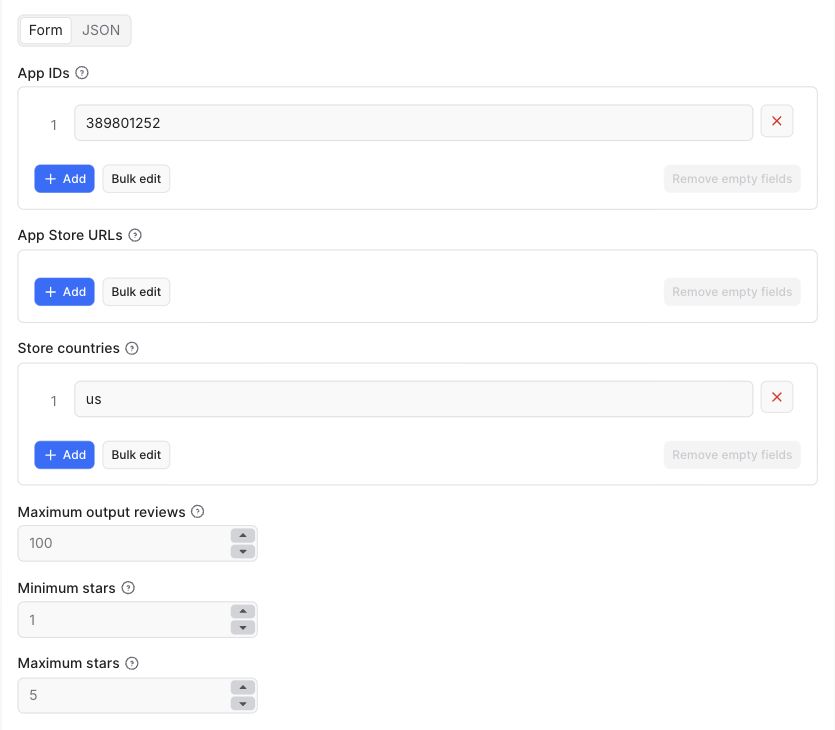
1. Enter one or more **App IDs** (the number after `id` in an App Store URL; `389801252` is Instagram) or paste **App Store URLs**.
2. Choose storefront **Countries** such as `us`, `gb`, `ca`, `au`, `de`.
3. Set **Maximum output reviews** (a global cap across all apps and countries).
4. Optional: star range, **Since date**, **Text contains**.
5. Click **Start**, then export from the Output tab.
 #### Input example: critical reviews from two countries
```json
{
"appIds": ["389801252"],
"countries": ["us", "gb"],
"maxReviews": 100,
"maxRating": 2,
"sinceDate": "2026-09-01"
}
```
#### Input example: compare competitor apps
```json
{
"appIds": ["324684580", "1064216828"],
"countries": ["us", "gb"],
"maxReviews": 400
}
```
#### Input example: scheduled crash-review alert
```json
{
"appIds": ["389801252"],
"countries": ["us"],
"maxRating": 2,
"textContains": "crash",
"onlyNew": true,
"monitorKey": "instagram-us-crashes",
"initialRun": "baseline"
}
```
Save it as a task and schedule it hourly or daily. The first run silently remembers current reviews; later runs output only reviews that monitor has not seen.
### Output example
```json
{
"appId": "389801252",
"appName": "Instagram",
"country": "US",
"reviewId": "11223344556",
"rating": 2,
"title": "Keeps crashing after update",
"text": "Since the last update the app closes when I open messages.",
"updatedAt": "2026-10-20T14:05:00.000Z",
"version": "402.0",
"reviewerName": "example_user",
"reviewerUrl": "https://itunes.apple.com/us/reviews/id000000000",
"reviewUrl": "https://apps.apple.com/us/app/id389801252?see-all=reviews",
"isNew": true,
"scrapedAt": "2026-10-25T12:02:50.000Z"
}
```
Illustrative record, not a real customer review.
### New-review monitoring: how it works
| First-run mode | First run | Later runs |
| --- | --- | --- |
| `emit` (default) | Outputs current matching reviews | Outputs matching reviews not seen before |
| `baseline` | Remembers reviews, outputs nothing | Outputs matching reviews not seen before |
- State is stored in a named key-value store in your Apify account, scoped by `monitorKey`, app, country, and filters. Changing filters starts a new baseline.
- Up to 1,000 recent review IDs are remembered per app-country-filter combination.
- Don't run the same monitor twice at the same time; overlapping runs can emit duplicates.
- To send alerts, connect the task to Slack, email, Google Sheets, Make, Zapier, or n8n and forward only non-empty results.
### Use cases
- **Release QA** - catch 1-2 star reviews mentioning crashes or login problems right after a release.
- **Competitor research** - compare complaints and feature requests across competing apps and countries.
- **Voice of the customer** - export review text with rating and version for tagging or LLM analysis.
- **ASO and product teams** - track rating mix per storefront over time with scheduled exports.
### App Store Reviews API: run it from code
#### Python
```python
from apify_client import ApifyClient
client = ApifyClient("")
run = client.actor("sonic_scraper/app-store-review-monitor").call(run_input={
"appIds": ["389801252"], "countries": ["us"], "maxReviews": 50, "maxRating": 2,
})
for r in client.dataset(run["defaultDatasetId"]).iterate_items():
print(r["rating"], r["title"])
```
#### JavaScript
```javascript
import { ApifyClient } from 'apify-client';
const client = new ApifyClient({ token: process.env.APIFY_TOKEN });
const run = await client.actor('sonic_scraper/app-store-review-monitor').call(
{ appIds: ['389801252'], countries: ['us'], maxReviews: 20, maxRating: 2 },
{ maxTotalChargeUsd: 0.10 },
);
const { items } = await client.dataset(run.defaultDatasetId).listItems();
console.log(items);
```
#### cURL
```bash
curl -X POST "https://api.apify.com/v2/acts/sonic_scraper~app-store-review-monitor/run-sync-get-dataset-items?maxTotalChargeUsd=0.10" \
-H "Authorization: Bearer $APIFY_TOKEN" -H "Content-Type: application/json" \
-d '{"appIds":["389801252"],"countries":["us"],"maxReviews":20,"maxRating":2}'
```
Also callable from AI agents through the Apify MCP server.
### Use with AI agents (MCP)
Connect the Apify MCP server at `https://mcp.apify.com?tools=sonic_scraper/app-store-review-monitor` in Claude Desktop, Cursor, VS Code or any MCP client, and your AI assistant can call this actor as a tool. Example prompt: *"Get the newest 1-star reviews for this iOS app in the US store and summarize the top complaints."*
### FAQ
#### Do I need an Apple developer account or API key?
No. The Actor uses Apple's public customer-review feed and app lookup endpoint. It does not log in or access App Store Connect.
#### How many reviews can I get per app?
Apple's public feed exposes about **500 most recent reviews per app per country** (10 pages of 50). To build a longer history, schedule the monitor and keep your exports. Add more countries to get more reviews for the same app.
#### Why did I get fewer reviews than `maxReviews`?
The feed window is exhausted, filters removed reviews, the storefront has few written reviews, or your run charge limit was reached. `SUMMARY` shows fetched, matched, and output counts per source.
#### Does it scrape Google Play reviews?
No, this Actor is Apple App Store only.
#### Does it include sentiment analysis?
No. Use the star filter, keyword filter, or your own analysis tool on the exported text.
#### Can it reply to reviews?
No. It only reads public reviews.
#### Is it legal to scrape App Store reviews?
The reviews are publicly visible. Use the data responsibly, respect Apple's terms, and avoid republishing personal information.
### Related Actors
- [Reddit Lead Finder & Sentiment Monitor](https://apify.com/sonic_scraper/reddit-lead-finder-sentiment-monitor) - track what users say about your app on Reddit.
- [YouTube Comments Scraper](https://apify.com/sonic_scraper/youtube-comments-scraper-api) - feedback from video comments.
- [Facebook Ads Library Scraper](https://apify.com/sonic_scraper/meta-ads-library-scraper-no-login) - see how competing apps advertise.
# Actor input Schema
## `appIds` (type: `array`):
Numeric IDs from Apple App Store URLs. Use this field or App Store URLs below.
## `appUrls` (type: `array`):
Optional apps.apple.com links. Each URL uses its own country; numeric App IDs use the Store countries field below.
## `countries` (type: `array`):
Two-letter App Store country codes, for example us, gb, ca, au. Reviews differ by country.
## `maxReviews` (type: `integer`):
Global result limit. Apple exposes at most about 500 recent reviews per app and country through its public feed.
## `minRating` (type: `integer`):
Lowest star rating to include, from 1 to 5.
## `maxRating` (type: `integer`):
Set to 1 or 2 for negative-review alerts.
## `sinceDate` (type: `string`):
Optional inclusive date in YYYY-MM-DD. Apple supplies an updated timestamp, which may differ from original publication time.
## `textContains` (type: `string`):
Optional case-insensitive match in title or review text, for example crash or subscription.
## `onlyNew` (type: `boolean`):
Remember review IDs across runs using a named key-value store in your Apify account. Save as a task and schedule it for alerts.
## `monitorKey` (type: `string`):
Use a stable, unique name for each independent monitoring task.
## `initialRun` (type: `string`):
Emit current matching reviews, or silently create a baseline and only output later additions.
## Actor input object example
```json
{
"appIds": [
"389801252"
],
"countries": [
"us"
],
"maxReviews": 100,
"minRating": 1,
"maxRating": 5,
"onlyNew": false,
"monitorKey": "default",
"initialRun": "emit"
}
```
# Actor output Schema
## `reviews` (type: `string`):
No description
## `summary` (type: `string`):
No description
## `errors` (type: `string`):
No description
# API
You can run this Actor programmatically using our API. Below are code examples in JavaScript, Python, and CLI, as well as the OpenAPI specification and MCP server setup.
## JavaScript example
```javascript
import { ApifyClient } from 'apify-client';
// Initialize the ApifyClient with your Apify API token
// Replace the '' with your token
const client = new ApifyClient({
token: '',
});
// Prepare Actor input
const input = {
"appIds": [
"389801252"
],
"countries": [
"us"
]
};
// Run the Actor and wait for it to finish
const run = await client.actor("sonic_scraper/app-store-review-monitor").call(input);
// Fetch and print Actor results from the run's dataset (if any)
console.log('Results from dataset');
console.log(`💾 Check your data here: https://console.apify.com/storage/datasets/${run.defaultDatasetId}`);
const { items } = await client.dataset(run.defaultDatasetId).listItems();
items.forEach((item) => {
console.dir(item);
});
// 📚 Want to learn more 📖? Go to → https://docs.apify.com/api/client/js/docs
```
## Python example
```python
from apify_client import ApifyClient
# Initialize the ApifyClient with your Apify API token
# Replace '' with your token.
client = ApifyClient("")
# Prepare the Actor input
run_input = {
"appIds": ["389801252"],
"countries": ["us"],
}
# Run the Actor and wait for it to finish
run = client.actor("sonic_scraper/app-store-review-monitor").call(run_input=run_input)
# Fetch and print Actor results from the run's dataset (if there are any)
print(f"💾 Check your data here: https://console.apify.com/storage/datasets/{run.default_dataset_id}")
for item in client.dataset(run.default_dataset_id).iterate_items():
print(item)
# 📚 Want to learn more 📖? Go to → https://docs.apify.com/api/client/python/docs/quick-start
```
## CLI example
```bash
echo '{
"appIds": [
"389801252"
],
"countries": [
"us"
]
}' |
apify call sonic_scraper/app-store-review-monitor --silent --output-dataset
```
## MCP server setup
```json
{
"mcpServers": {
"apify": {
"type": "http",
"url": "https://mcp.apify.com/?tools=fetch-actor-details,sonic_scraper/app-store-review-monitor"
}
}
}
```
The hosted server signs you in with OAuth on first connect, so no API token belongs in this config. Clients without OAuth support can send an `Authorization: Bearer ` header instead, using a token from API & Integrations in Apify Console (https://console.apify.com/settings/integrations).
## OpenAPI specification
Download the OpenAPI definition: https://api.apify.com/v2/actors/PNhhcOrhFW3rdRU7A/builds/3yt1lGDj6fNmB9XIG/openapi.json