# Sitemap URL Delta Monitor (`stellar_ballet_0bu/sitemap-delta-monitor`) Actor
Monitor public sitemap.xml files for new URLs, removed URLs, lastmod changes, and clean stateful deltas for SEO, RAG indexing, and content operations.
- **URL**: https://apify.com/stellar\_ballet\_0bu/sitemap-delta-monitor.md
- **Developed by:** [Nikita S](https://apify.com/stellar_ballet_0bu) (community)
- **Categories:** Automation, AI
- **Stats:** 2 total users, 1 monthly users, 100.0% runs succeeded, 0 bookmarks
- **User rating**: No ratings yet
## Pricing
Pay per usage
This Actor is paid per platform usage. The Actor is free to use, and you only pay for the Apify platform usage, which gets cheaper the higher subscription plan you have.
Learn more: https://docs.apify.com/platform/actors/running/actors-in-store#pay-per-usage
## What's an Apify Actor?
Actors are a software tools running on the Apify platform, for all kinds of web data extraction and automation use cases.
In Batch mode, an Actor accepts a well-defined JSON input, performs an action which can take anything from a few seconds to a few hours,
and optionally produces a well-defined JSON output, datasets with results, or files in key-value store.
In Standby mode, an Actor provides a web server which can be used as a website, API, or an MCP server.
Actors are written with capital "A".
## How to integrate an Actor?
If asked about integration, you help developers integrate Actors into their projects.
You adapt to their stack and deliver integrations that are safe, well-documented, and production-ready.
The best way to integrate Actors is as follows.
In JavaScript/TypeScript projects, use official [JavaScript/TypeScript client](https://docs.apify.com/api/client/js.md):
```bash
npm install apify-client
```
In Python projects, use official [Python client library](https://docs.apify.com/api/client/python.md):
```bash
pip install apify-client
```
In shell scripts, use [Apify CLI](https://docs.apify.com/cli/docs.md):
````bash
# MacOS / Linux
curl -fsSL https://apify.com/install-cli.sh | bash
# Windows
irm https://apify.com/install-cli.ps1 | iex
```bash
In AI frameworks, you might use the [Apify MCP server](https://docs.apify.com/platform/integrations/mcp.md).
If your project is in a different language, use the [REST API](https://docs.apify.com/api/v2.md).
For usage examples, see the [API](#api) section below.
For more details, see Apify documentation as [Markdown index](https://docs.apify.com/llms.txt) and [Markdown full-text](https://docs.apify.com/llms-full.txt).
# README
## Sitemap URL Delta Monitor
Monitor public `sitemap.xml` files and emit only URLs that changed since the previous run.
Use it for:
- SEO change monitoring;
- RAG indexing queues;
- documentation/content update alerts;
- competitor content tracking;
- n8n, Make, Google Sheets, Slack, or crawler workflows.
### Visual demo: Sitemap Delta Monitor
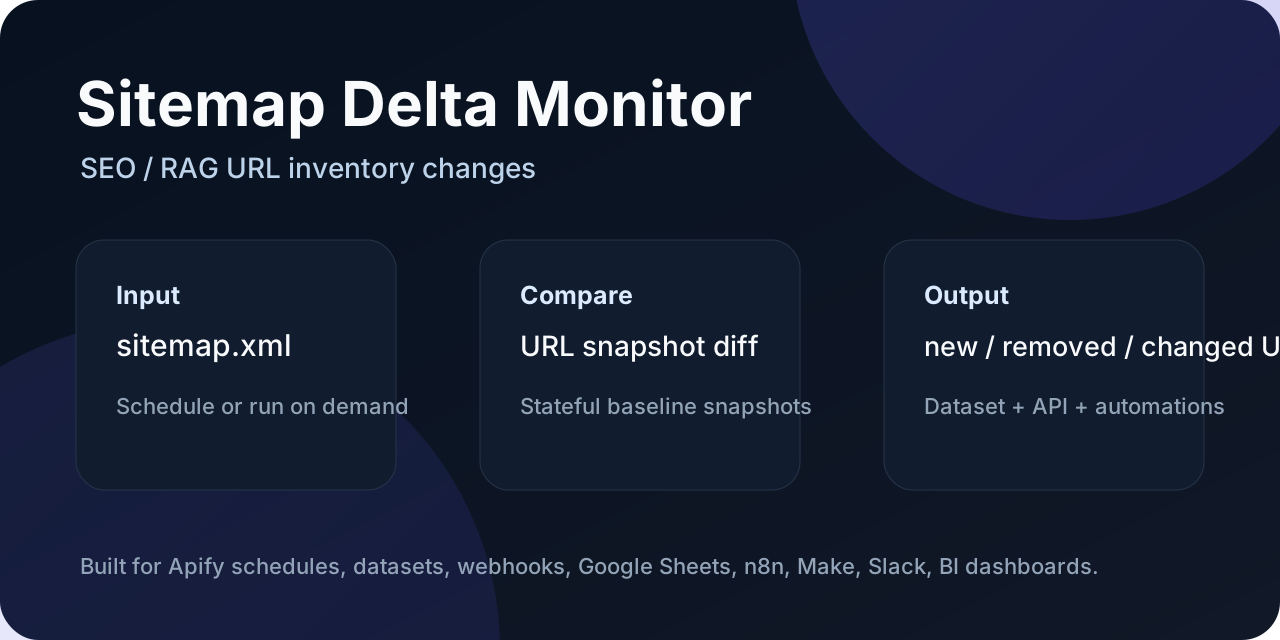
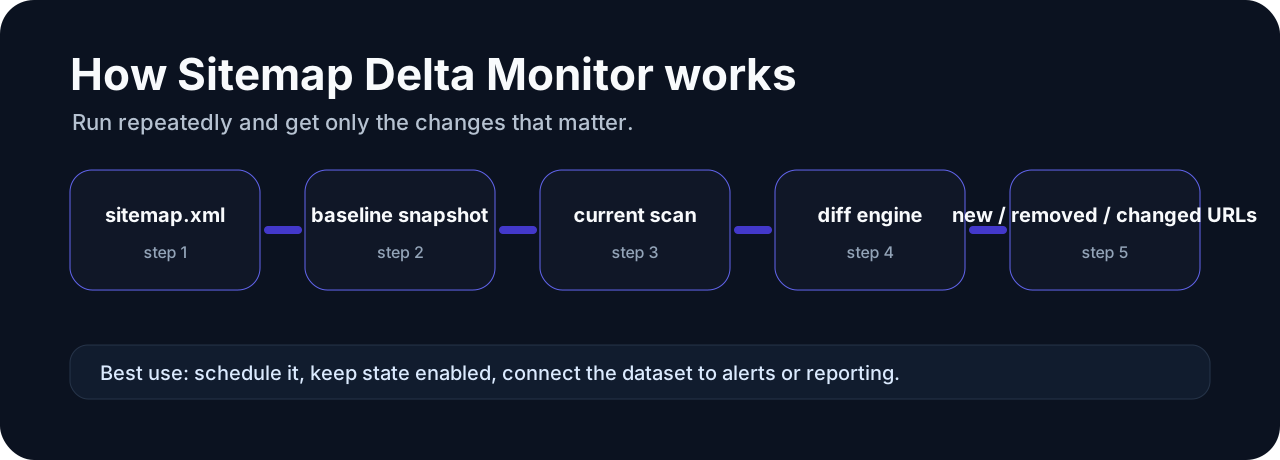
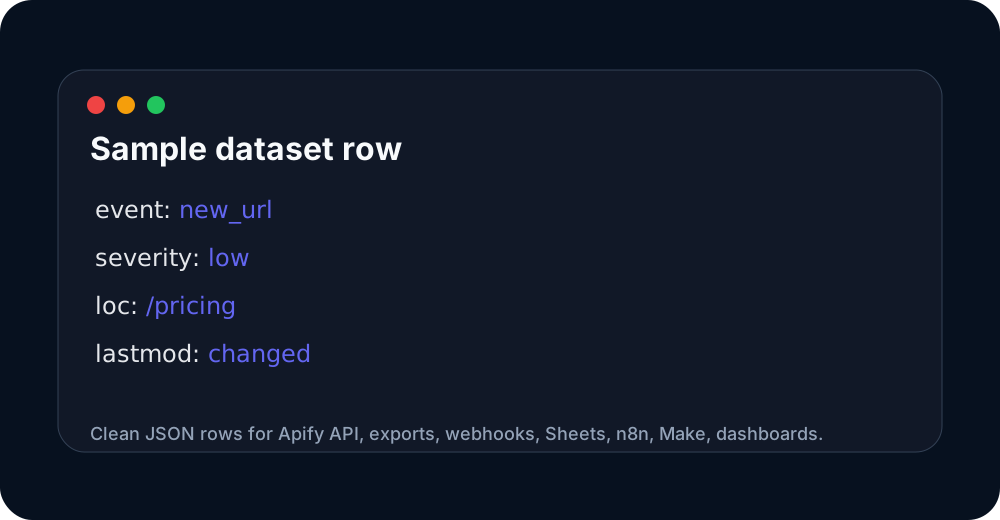 These images are hosted in a persistent Apify key-value store so the Store README has stable, clickable visual previews.
### Input
```json
{
"sitemapUrls": ["https://woocommerce.com/sitemap.xml"],
"discoverSitemaps": true,
"urlFilterRegex": "^https://woocommerce\\.com/(blog|changelog)/",
"changeTypes": ["new_url", "updated_url", "removed_url"],
"addRemovedUrlsToKvs": true,
"onlyChanged": true,
"persistState": true,
"maxSitemapUrls": 25,
"maxUrls": 5000,
"requestTimeoutMs": 30000
}
````
| Field | Required | Notes |
|---|---|---|
| `sitemapUrls` | yes | Public `sitemap.xml` or sitemap index URLs. Root domains (e.g. `https://example.com`) are also accepted when `discoverSitemaps: true` — the Actor fetches `/robots.txt` and enqueues Sitemap entries from it. |
| `discoverSitemaps` | no | Default `false`. When `true`, fetch each start URL's `robots.txt` and enqueue every `Sitemap:` directive found. Brings the Actor to feature parity with `tri_angle/sitemap-change-detector` on the most common onboarding step. |
| `urlFilterRegex` | no | Default `""`. JavaScript-compatible regex applied to discovered URLs. Matched URLs are included in the output and snapshot; non-matches are skipped. Applies to final URLs, not intermediate sitemaps. |
| `changeTypes` | no | Default `["new_url","updated_url","removed_url"]`. Whitelist of statuses to emit. Add `unchanged` to also get rows that did not change. |
| `addRemovedUrlsToKvs` | no | Default `false`. When `true`, also writes a `REMOVED-URLS` key to the state key-value store with the full list of URLs that disappeared since the last snapshot. |
| `previousItems` | no | Optional previous sitemap URL rows from an earlier run (overrides persisted state if provided). |
| `onlyChanged` | no | Default `true`. Backward-compat alias. Equivalent to `changeTypes` without `unchanged`. |
| `persistState` | no | Default `true`. Store the latest sitemap snapshot in a named key-value store. |
| `stateStoreName` | no | Default `sitemap-delta-monitor-state`. |
| `stateKey` | no | Optional snapshot key. Leave empty to derive from input sitemap URLs. |
| `maxSitemapUrls` | no | Default `25`. Maximum nested sitemaps to fetch from indexes and robots.txt. |
| `maxUrls` | no | Default `5000`. Maximum URLs to track per run. |
| `requestTimeoutMs` | no | Default `30000`. Per-request timeout for sitemap and robots.txt fetches. |
Supports sitemap indexes and regular URL sitemaps. Public sources only — no login, no CAPTCHA bypass, no anti-bot workarounds.
### Output events
- `new_url` — URL is in the current sitemap but was not in the previous snapshot.
- `updated_url` — URL was in both, but `` (or `changefreq` / `priority`) changed. Emits the structured `changes[]` array.
- `removed_url` — URL was in the previous snapshot but is no longer in the current sitemap.
- `unchanged` — only emitted if `changeTypes` includes `unchanged` (or `onlyChanged: false`).
- `error` — per-sitemap error (network, parse, 4xx, 5xx).
Rows include `sitemapUrl`, `url`, `lastmod`, `changefreq`, `priority`, `status`, `event`, `events`, `event_severity`, and `changes`. The `SUMMARY` record on the default key-value store contains `sitemapsSeen`, `urlsSeen`, `rowsEmitted`, `eventCounts`, `discoveredSitemaps`, `urlsFilteredOut`, `stateKey`, `stateSaved`, and `errors`.
### Monetization hooks
- `delta_result` for new / updated / removed URL rows.
- `apify-actor-start` once per run on Actor init.
- New pricing events (`updated_url_alert`, `removed_url_alert`) are reserved in the billing model for v0.3; the Apify 2-week pricing-change rule plus 1-month cooldown keep them off the table until `2026-08-21`.
No login / CAPTCHA / anti-bot bypass. Public sitemaps and public `robots.txt` only.
### Run it from Claude / Cursor / VS Code via MCP
The Actor is available through the Apify MCP server, so you can ask your AI assistant to "watch my sitemap for new URLs" without setting up a custom crawler.
Add this to your MCP client config (for example `claude_desktop_config.json`):
```json
{
"mcpServers": {
"apify": {
"command": "npx",
"args": ["-y", "@apify/mcp-server"],
"env": {
"APIFY_TOKEN": "your-apify-api-token"
}
}
}
}
```
Once connected, the assistant can discover this Actor and trigger runs with a plain prompt like *"Run Sitemap Delta Monitor on https://example.com/sitemap.xml and tell me which new pages appeared today."* The remote MCP server at `https://mcp.apify.com` works the same way without a local install.
### Quick start
1. Open this Actor in Apify Console.
2. Paste one or more sitemap.xml URLs into the input.
3. Keep `persistState` enabled for scheduled monitoring.
4. Run once to create the baseline snapshot.
5. Run again on a schedule to receive only delta rows.
6. Export the dataset to CSV/JSON, or send it to Google Sheets, n8n, Make, Slack, Discord, or a webhook.
### Sample output
Use this sample dataset to see the output shape before running it yourself:
- Sample dataset: https://console.apify.com/storage/datasets/q04svWdkew7gDgwWg
The important fields for automation are `event`, `events`, `event_severity`, `status`, and `changes`. Filter for `event_severity = high` when you only want alerts that deserve immediate attention.
### Pricing and cost expectations
This Actor is designed for scheduled monitoring and delta-only outputs. It avoids charging or processing unchanged rows where possible. Pay-Per-Event pricing is scheduled/used for meaningful emitted deltas such as new items, removed items, price changes, stock changes, URL changes, or pricing-plan changes depending on the Actor.
Start with a small input list first. Once the baseline looks correct, schedule recurring runs and set a reasonable max charge limit in Apify.
### FAQ
#### Is this a one-time scraper or a monitor?
It is a monitor. The first run creates a baseline. Later runs compare the current data against the stored baseline and emit only the changes.
#### Can I send alerts to Slack, Discord, Google Sheets, n8n, or Make?
Yes. Use Apify integrations, webhooks, dataset export, or API polling. The `event`, `events`, `event_severity`, and `changes` fields are meant for automation routing.
#### Does it bypass CAPTCHA, login walls, or anti-bot systems?
No. This portfolio is intentionally focused on public, low-risk sources such as public APIs, feeds, sitemaps, product pages, or storefront endpoints.
#### Which rows should trigger alerts?
Use `event_severity`. High-severity rows are the best candidates for Slack/Discord/email alerts. Low-severity rows are usually better for reports or spreadsheets.
### Support and custom monitoring
If a public source does not fit this Actor, check the related monitors below. Open an issue on the Actor page with a sample URL and the output you need.
### Which monitor should I use?
This Actor is part of a focused monitoring portfolio. Pick the narrowest Actor that matches your source:
| Source you have | Use this Actor | Best for |
|---|---|---|
| Shopify store | [Shopify Delta Monitor](https://apify.com/stellar_ballet_0bu/shopify-delta-monitor) | Shopify competitor price/stock/sale monitoring |
| WooCommerce store | [WooCommerce Delta Monitor](https://apify.com/stellar_ballet_0bu/woocommerce-delta-monitor) | WooCommerce Store API product deltas |
| Product page URLs with Schema.org JSON-LD | [Schema.org Product Delta Monitor](https://apify.com/stellar_ballet_0bu/schema-product-delta-monitor) | Magento, BigCommerce, custom stores, marketplaces |
| Product feeds / APIs / CSV / XML | [Product Feed Delta Monitor](https://apify.com/stellar_ballet_0bu/product-feed-delta-monitor) | Supplier feeds, affiliate feeds, Google Merchant exports |
| sitemap.xml | [Sitemap Delta Monitor](https://apify.com/stellar_ballet_0bu/sitemap-delta-monitor) | SEO, content ops, RAG indexing queues |
| SaaS pricing pages | SaaS Pricing Page Monitor | Plan/price/feature changes on public pricing pages |
All monitors are built for scheduled runs, stateful comparisons, delta-only outputs, and workflow automation via Google Sheets, n8n, Make, Slack, Discord, or webhooks.
# Actor input Schema
## `sitemapUrls` (type: `array`):
Public sitemap.xml or sitemap index URLs. When discoverSitemaps is enabled, root domains (e.g. https://example.com) are also accepted — the actor will fetch /robots.txt and enqueue Sitemap entries from it.
## `discoverSitemaps` (type: `boolean`):
If true, fetch each start URL's robots.txt and enqueue any Sitemap entries found there. Only works on sites that publish a robots.txt.
## `urlFilterRegex` (type: `string`):
Optional JavaScript-compatible regex applied to discovered URLs. Matched URLs are included in the output and the persisted snapshot; non-matches are ignored. Applies to final URLs, not intermediate sitemaps.
## `changeTypes` (type: `array`):
Which change types to emit as dataset rows. Defaults to \['new\_url', 'updated\_url', 'removed\_url'] (delta-only). Add 'unchanged' to also include rows that did not change since the previous snapshot.
## `addRemovedUrlsToKvs` (type: `boolean`):
When true, also write a REMOVED-URLS key to the state key-value store with the full list of URLs that disappeared since the last snapshot, in addition to emitting 'removed\_url' rows in the dataset.
## `previousItems` (type: `array`):
Optional previous sitemap URL rows from an earlier run (overrides persisted state if provided).
## `onlyChanged` (type: `boolean`):
If true (default), only emit rows whose status is not 'unchanged'. Equivalent to changeTypes excluding 'unchanged'.
## `persistState` (type: `boolean`):
Store the latest sitemap snapshot in a named key-value store.
## `stateStoreName` (type: `string`):
Named key-value store used for snapshots when persistState is enabled.
## `stateKey` (type: `string`):
Optional snapshot key. Leave empty to derive from input sitemap URLs.
## `maxSitemapUrls` (type: `integer`):
Maximum nested sitemap URLs to fetch from sitemap indexes (and from robots.txt discovery).
## `maxUrls` (type: `integer`):
Maximum URLs to track per run.
## `requestTimeoutMs` (type: `integer`):
Per-request timeout in milliseconds for sitemap and robots.txt fetches.
## Actor input object example
```json
{
"sitemapUrls": [
"https://woocommerce.com/sitemap.xml"
],
"discoverSitemaps": false,
"urlFilterRegex": "",
"changeTypes": [
"new_url",
"updated_url",
"removed_url"
],
"addRemovedUrlsToKvs": false,
"previousItems": [],
"onlyChanged": true,
"persistState": true,
"stateStoreName": "sitemap-delta-monitor-state",
"stateKey": "",
"maxSitemapUrls": 25,
"maxUrls": 5000,
"requestTimeoutMs": 30000
}
```
# Actor output Schema
## `deltaRows` (type: `string`):
Default dataset items with sitemapUrl, url, lastmod, status, event, events, event\_severity, and changes array.
## `summary` (type: `string`):
Run summary with sitemap count, URL count, emitted count, event counters, state key, and errors.
# API
You can run this Actor programmatically using our API. Below are code examples in JavaScript, Python, and CLI, as well as the OpenAPI specification and MCP server setup.
## JavaScript example
```javascript
import { ApifyClient } from 'apify-client';
// Initialize the ApifyClient with your Apify API token
// Replace the '' with your token
const client = new ApifyClient({
token: '',
});
// Prepare Actor input
const input = {
"sitemapUrls": [
"https://woocommerce.com/sitemap.xml"
]
};
// Run the Actor and wait for it to finish
const run = await client.actor("stellar_ballet_0bu/sitemap-delta-monitor").call(input);
// Fetch and print Actor results from the run's dataset (if any)
console.log('Results from dataset');
console.log(`💾 Check your data here: https://console.apify.com/storage/datasets/${run.defaultDatasetId}`);
const { items } = await client.dataset(run.defaultDatasetId).listItems();
items.forEach((item) => {
console.dir(item);
});
// 📚 Want to learn more 📖? Go to → https://docs.apify.com/api/client/js/docs
```
## Python example
```python
from apify_client import ApifyClient
# Initialize the ApifyClient with your Apify API token
# Replace '' with your token.
client = ApifyClient("")
# Prepare the Actor input
run_input = { "sitemapUrls": ["https://woocommerce.com/sitemap.xml"] }
# Run the Actor and wait for it to finish
run = client.actor("stellar_ballet_0bu/sitemap-delta-monitor").call(run_input=run_input)
# Fetch and print Actor results from the run's dataset (if there are any)
print("💾 Check your data here: https://console.apify.com/storage/datasets/" + run["defaultDatasetId"])
for item in client.dataset(run["defaultDatasetId"]).iterate_items():
print(item)
# 📚 Want to learn more 📖? Go to → https://docs.apify.com/api/client/python/docs/quick-start
```
## CLI example
```bash
echo '{
"sitemapUrls": [
"https://woocommerce.com/sitemap.xml"
]
}' |
apify call stellar_ballet_0bu/sitemap-delta-monitor --silent --output-dataset
```
## MCP server setup
```json
{
"mcpServers": {
"apify": {
"command": "npx",
"args": [
"mcp-remote",
"https://mcp.apify.com/?tools=stellar_ballet_0bu/sitemap-delta-monitor",
"--header",
"Authorization: Bearer "
]
}
}
}
```
## OpenAPI specification
```json
{
"openapi": "3.0.1",
"info": {
"title": "Sitemap URL Delta Monitor",
"description": "Monitor public sitemap.xml files for new URLs, removed URLs, lastmod changes, and clean stateful deltas for SEO, RAG indexing, and content operations.",
"version": "0.2",
"x-build-id": "qAa0V0VtKUksWX0Ba"
},
"servers": [
{
"url": "https://api.apify.com/v2"
}
],
"paths": {
"/acts/stellar_ballet_0bu~sitemap-delta-monitor/run-sync-get-dataset-items": {
"post": {
"operationId": "run-sync-get-dataset-items-stellar_ballet_0bu-sitemap-delta-monitor",
"x-openai-isConsequential": false,
"summary": "Executes an Actor, waits for its completion, and returns Actor's dataset items in response.",
"tags": [
"Run Actor"
],
"requestBody": {
"required": true,
"content": {
"application/json": {
"schema": {
"$ref": "#/components/schemas/inputSchema"
}
}
}
},
"parameters": [
{
"name": "token",
"in": "query",
"required": true,
"schema": {
"type": "string"
},
"description": "Enter your Apify token here"
}
],
"responses": {
"200": {
"description": "OK"
}
}
}
},
"/acts/stellar_ballet_0bu~sitemap-delta-monitor/runs": {
"post": {
"operationId": "runs-sync-stellar_ballet_0bu-sitemap-delta-monitor",
"x-openai-isConsequential": false,
"summary": "Executes an Actor and returns information about the initiated run in response.",
"tags": [
"Run Actor"
],
"requestBody": {
"required": true,
"content": {
"application/json": {
"schema": {
"$ref": "#/components/schemas/inputSchema"
}
}
}
},
"parameters": [
{
"name": "token",
"in": "query",
"required": true,
"schema": {
"type": "string"
},
"description": "Enter your Apify token here"
}
],
"responses": {
"200": {
"description": "OK",
"content": {
"application/json": {
"schema": {
"$ref": "#/components/schemas/runsResponseSchema"
}
}
}
}
}
}
},
"/acts/stellar_ballet_0bu~sitemap-delta-monitor/run-sync": {
"post": {
"operationId": "run-sync-stellar_ballet_0bu-sitemap-delta-monitor",
"x-openai-isConsequential": false,
"summary": "Executes an Actor, waits for completion, and returns the OUTPUT from Key-value store in response.",
"tags": [
"Run Actor"
],
"requestBody": {
"required": true,
"content": {
"application/json": {
"schema": {
"$ref": "#/components/schemas/inputSchema"
}
}
}
},
"parameters": [
{
"name": "token",
"in": "query",
"required": true,
"schema": {
"type": "string"
},
"description": "Enter your Apify token here"
}
],
"responses": {
"200": {
"description": "OK"
}
}
}
}
},
"components": {
"schemas": {
"inputSchema": {
"type": "object",
"required": [
"sitemapUrls"
],
"properties": {
"sitemapUrls": {
"title": "Sitemap URLs (or root domains if discoverSitemaps is true)",
"type": "array",
"description": "Public sitemap.xml or sitemap index URLs. When discoverSitemaps is enabled, root domains (e.g. https://example.com) are also accepted — the actor will fetch /robots.txt and enqueue Sitemap entries from it.",
"items": {
"type": "string"
}
},
"discoverSitemaps": {
"title": "Discover sitemaps from robots.txt",
"type": "boolean",
"description": "If true, fetch each start URL's robots.txt and enqueue any Sitemap entries found there. Only works on sites that publish a robots.txt.",
"default": false
},
"urlFilterRegex": {
"title": "URL filter regex",
"type": "string",
"description": "Optional JavaScript-compatible regex applied to discovered URLs. Matched URLs are included in the output and the persisted snapshot; non-matches are ignored. Applies to final URLs, not intermediate sitemaps.",
"default": ""
},
"changeTypes": {
"title": "Change types to emit",
"type": "array",
"description": "Which change types to emit as dataset rows. Defaults to ['new_url', 'updated_url', 'removed_url'] (delta-only). Add 'unchanged' to also include rows that did not change since the previous snapshot.",
"default": [
"new_url",
"updated_url",
"removed_url"
],
"items": {
"type": "string"
}
},
"addRemovedUrlsToKvs": {
"title": "Add removed URLs to key-value store",
"type": "boolean",
"description": "When true, also write a REMOVED-URLS key to the state key-value store with the full list of URLs that disappeared since the last snapshot, in addition to emitting 'removed_url' rows in the dataset.",
"default": false
},
"previousItems": {
"title": "Previous items",
"type": "array",
"description": "Optional previous sitemap URL rows from an earlier run (overrides persisted state if provided).",
"default": []
},
"onlyChanged": {
"title": "Only output changed URLs (legacy alias for changeTypes)",
"type": "boolean",
"description": "If true (default), only emit rows whose status is not 'unchanged'. Equivalent to changeTypes excluding 'unchanged'.",
"default": true
},
"persistState": {
"title": "Persist state between runs",
"type": "boolean",
"description": "Store the latest sitemap snapshot in a named key-value store.",
"default": true
},
"stateStoreName": {
"title": "State store name",
"type": "string",
"description": "Named key-value store used for snapshots when persistState is enabled.",
"default": "sitemap-delta-monitor-state"
},
"stateKey": {
"title": "State key override",
"type": "string",
"description": "Optional snapshot key. Leave empty to derive from input sitemap URLs.",
"default": ""
},
"maxSitemapUrls": {
"title": "Max nested sitemaps",
"minimum": 1,
"maximum": 200,
"type": "integer",
"description": "Maximum nested sitemap URLs to fetch from sitemap indexes (and from robots.txt discovery).",
"default": 25
},
"maxUrls": {
"title": "Max URLs",
"minimum": 1,
"maximum": 50000,
"type": "integer",
"description": "Maximum URLs to track per run.",
"default": 5000
},
"requestTimeoutMs": {
"title": "Request timeout (ms)",
"minimum": 5000,
"maximum": 120000,
"type": "integer",
"description": "Per-request timeout in milliseconds for sitemap and robots.txt fetches.",
"default": 30000
}
}
},
"runsResponseSchema": {
"type": "object",
"properties": {
"data": {
"type": "object",
"properties": {
"id": {
"type": "string"
},
"actId": {
"type": "string"
},
"userId": {
"type": "string"
},
"startedAt": {
"type": "string",
"format": "date-time",
"example": "2025-01-08T00:00:00.000Z"
},
"finishedAt": {
"type": "string",
"format": "date-time",
"example": "2025-01-08T00:00:00.000Z"
},
"status": {
"type": "string",
"example": "READY"
},
"meta": {
"type": "object",
"properties": {
"origin": {
"type": "string",
"example": "API"
},
"userAgent": {
"type": "string"
}
}
},
"stats": {
"type": "object",
"properties": {
"inputBodyLen": {
"type": "integer",
"example": 2000
},
"rebootCount": {
"type": "integer",
"example": 0
},
"restartCount": {
"type": "integer",
"example": 0
},
"resurrectCount": {
"type": "integer",
"example": 0
},
"computeUnits": {
"type": "integer",
"example": 0
}
}
},
"options": {
"type": "object",
"properties": {
"build": {
"type": "string",
"example": "latest"
},
"timeoutSecs": {
"type": "integer",
"example": 300
},
"memoryMbytes": {
"type": "integer",
"example": 1024
},
"diskMbytes": {
"type": "integer",
"example": 2048
}
}
},
"buildId": {
"type": "string"
},
"defaultKeyValueStoreId": {
"type": "string"
},
"defaultDatasetId": {
"type": "string"
},
"defaultRequestQueueId": {
"type": "string"
},
"buildNumber": {
"type": "string",
"example": "1.0.0"
},
"containerUrl": {
"type": "string"
},
"usage": {
"type": "object",
"properties": {
"ACTOR_COMPUTE_UNITS": {
"type": "integer",
"example": 0
},
"DATASET_READS": {
"type": "integer",
"example": 0
},
"DATASET_WRITES": {
"type": "integer",
"example": 0
},
"KEY_VALUE_STORE_READS": {
"type": "integer",
"example": 0
},
"KEY_VALUE_STORE_WRITES": {
"type": "integer",
"example": 1
},
"KEY_VALUE_STORE_LISTS": {
"type": "integer",
"example": 0
},
"REQUEST_QUEUE_READS": {
"type": "integer",
"example": 0
},
"REQUEST_QUEUE_WRITES": {
"type": "integer",
"example": 0
},
"DATA_TRANSFER_INTERNAL_GBYTES": {
"type": "integer",
"example": 0
},
"DATA_TRANSFER_EXTERNAL_GBYTES": {
"type": "integer",
"example": 0
},
"PROXY_RESIDENTIAL_TRANSFER_GBYTES": {
"type": "integer",
"example": 0
},
"PROXY_SERPS": {
"type": "integer",
"example": 0
}
}
},
"usageTotalUsd": {
"type": "number",
"example": 0.00005
},
"usageUsd": {
"type": "object",
"properties": {
"ACTOR_COMPUTE_UNITS": {
"type": "integer",
"example": 0
},
"DATASET_READS": {
"type": "integer",
"example": 0
},
"DATASET_WRITES": {
"type": "integer",
"example": 0
},
"KEY_VALUE_STORE_READS": {
"type": "integer",
"example": 0
},
"KEY_VALUE_STORE_WRITES": {
"type": "number",
"example": 0.00005
},
"KEY_VALUE_STORE_LISTS": {
"type": "integer",
"example": 0
},
"REQUEST_QUEUE_READS": {
"type": "integer",
"example": 0
},
"REQUEST_QUEUE_WRITES": {
"type": "integer",
"example": 0
},
"DATA_TRANSFER_INTERNAL_GBYTES": {
"type": "integer",
"example": 0
},
"DATA_TRANSFER_EXTERNAL_GBYTES": {
"type": "integer",
"example": 0
},
"PROXY_RESIDENTIAL_TRANSFER_GBYTES": {
"type": "integer",
"example": 0
},
"PROXY_SERPS": {
"type": "integer",
"example": 0
}
}
}
}
}
}
}
}
}
}
```
These images are hosted in a persistent Apify key-value store so the Store README has stable, clickable visual previews.
### Input
```json
{
"sitemapUrls": ["https://woocommerce.com/sitemap.xml"],
"discoverSitemaps": true,
"urlFilterRegex": "^https://woocommerce\\.com/(blog|changelog)/",
"changeTypes": ["new_url", "updated_url", "removed_url"],
"addRemovedUrlsToKvs": true,
"onlyChanged": true,
"persistState": true,
"maxSitemapUrls": 25,
"maxUrls": 5000,
"requestTimeoutMs": 30000
}
````
| Field | Required | Notes |
|---|---|---|
| `sitemapUrls` | yes | Public `sitemap.xml` or sitemap index URLs. Root domains (e.g. `https://example.com`) are also accepted when `discoverSitemaps: true` — the Actor fetches `/robots.txt` and enqueues Sitemap entries from it. |
| `discoverSitemaps` | no | Default `false`. When `true`, fetch each start URL's `robots.txt` and enqueue every `Sitemap:` directive found. Brings the Actor to feature parity with `tri_angle/sitemap-change-detector` on the most common onboarding step. |
| `urlFilterRegex` | no | Default `""`. JavaScript-compatible regex applied to discovered URLs. Matched URLs are included in the output and snapshot; non-matches are skipped. Applies to final URLs, not intermediate sitemaps. |
| `changeTypes` | no | Default `["new_url","updated_url","removed_url"]`. Whitelist of statuses to emit. Add `unchanged` to also get rows that did not change. |
| `addRemovedUrlsToKvs` | no | Default `false`. When `true`, also writes a `REMOVED-URLS` key to the state key-value store with the full list of URLs that disappeared since the last snapshot. |
| `previousItems` | no | Optional previous sitemap URL rows from an earlier run (overrides persisted state if provided). |
| `onlyChanged` | no | Default `true`. Backward-compat alias. Equivalent to `changeTypes` without `unchanged`. |
| `persistState` | no | Default `true`. Store the latest sitemap snapshot in a named key-value store. |
| `stateStoreName` | no | Default `sitemap-delta-monitor-state`. |
| `stateKey` | no | Optional snapshot key. Leave empty to derive from input sitemap URLs. |
| `maxSitemapUrls` | no | Default `25`. Maximum nested sitemaps to fetch from indexes and robots.txt. |
| `maxUrls` | no | Default `5000`. Maximum URLs to track per run. |
| `requestTimeoutMs` | no | Default `30000`. Per-request timeout for sitemap and robots.txt fetches. |
Supports sitemap indexes and regular URL sitemaps. Public sources only — no login, no CAPTCHA bypass, no anti-bot workarounds.
### Output events
- `new_url` — URL is in the current sitemap but was not in the previous snapshot.
- `updated_url` — URL was in both, but `` (or `changefreq` / `priority`) changed. Emits the structured `changes[]` array.
- `removed_url` — URL was in the previous snapshot but is no longer in the current sitemap.
- `unchanged` — only emitted if `changeTypes` includes `unchanged` (or `onlyChanged: false`).
- `error` — per-sitemap error (network, parse, 4xx, 5xx).
Rows include `sitemapUrl`, `url`, `lastmod`, `changefreq`, `priority`, `status`, `event`, `events`, `event_severity`, and `changes`. The `SUMMARY` record on the default key-value store contains `sitemapsSeen`, `urlsSeen`, `rowsEmitted`, `eventCounts`, `discoveredSitemaps`, `urlsFilteredOut`, `stateKey`, `stateSaved`, and `errors`.
### Monetization hooks
- `delta_result` for new / updated / removed URL rows.
- `apify-actor-start` once per run on Actor init.
- New pricing events (`updated_url_alert`, `removed_url_alert`) are reserved in the billing model for v0.3; the Apify 2-week pricing-change rule plus 1-month cooldown keep them off the table until `2026-08-21`.
No login / CAPTCHA / anti-bot bypass. Public sitemaps and public `robots.txt` only.
### Run it from Claude / Cursor / VS Code via MCP
The Actor is available through the Apify MCP server, so you can ask your AI assistant to "watch my sitemap for new URLs" without setting up a custom crawler.
Add this to your MCP client config (for example `claude_desktop_config.json`):
```json
{
"mcpServers": {
"apify": {
"command": "npx",
"args": ["-y", "@apify/mcp-server"],
"env": {
"APIFY_TOKEN": "your-apify-api-token"
}
}
}
}
```
Once connected, the assistant can discover this Actor and trigger runs with a plain prompt like *"Run Sitemap Delta Monitor on https://example.com/sitemap.xml and tell me which new pages appeared today."* The remote MCP server at `https://mcp.apify.com` works the same way without a local install.
### Quick start
1. Open this Actor in Apify Console.
2. Paste one or more sitemap.xml URLs into the input.
3. Keep `persistState` enabled for scheduled monitoring.
4. Run once to create the baseline snapshot.
5. Run again on a schedule to receive only delta rows.
6. Export the dataset to CSV/JSON, or send it to Google Sheets, n8n, Make, Slack, Discord, or a webhook.
### Sample output
Use this sample dataset to see the output shape before running it yourself:
- Sample dataset: https://console.apify.com/storage/datasets/q04svWdkew7gDgwWg
The important fields for automation are `event`, `events`, `event_severity`, `status`, and `changes`. Filter for `event_severity = high` when you only want alerts that deserve immediate attention.
### Pricing and cost expectations
This Actor is designed for scheduled monitoring and delta-only outputs. It avoids charging or processing unchanged rows where possible. Pay-Per-Event pricing is scheduled/used for meaningful emitted deltas such as new items, removed items, price changes, stock changes, URL changes, or pricing-plan changes depending on the Actor.
Start with a small input list first. Once the baseline looks correct, schedule recurring runs and set a reasonable max charge limit in Apify.
### FAQ
#### Is this a one-time scraper or a monitor?
It is a monitor. The first run creates a baseline. Later runs compare the current data against the stored baseline and emit only the changes.
#### Can I send alerts to Slack, Discord, Google Sheets, n8n, or Make?
Yes. Use Apify integrations, webhooks, dataset export, or API polling. The `event`, `events`, `event_severity`, and `changes` fields are meant for automation routing.
#### Does it bypass CAPTCHA, login walls, or anti-bot systems?
No. This portfolio is intentionally focused on public, low-risk sources such as public APIs, feeds, sitemaps, product pages, or storefront endpoints.
#### Which rows should trigger alerts?
Use `event_severity`. High-severity rows are the best candidates for Slack/Discord/email alerts. Low-severity rows are usually better for reports or spreadsheets.
### Support and custom monitoring
If a public source does not fit this Actor, check the related monitors below. Open an issue on the Actor page with a sample URL and the output you need.
### Which monitor should I use?
This Actor is part of a focused monitoring portfolio. Pick the narrowest Actor that matches your source:
| Source you have | Use this Actor | Best for |
|---|---|---|
| Shopify store | [Shopify Delta Monitor](https://apify.com/stellar_ballet_0bu/shopify-delta-monitor) | Shopify competitor price/stock/sale monitoring |
| WooCommerce store | [WooCommerce Delta Monitor](https://apify.com/stellar_ballet_0bu/woocommerce-delta-monitor) | WooCommerce Store API product deltas |
| Product page URLs with Schema.org JSON-LD | [Schema.org Product Delta Monitor](https://apify.com/stellar_ballet_0bu/schema-product-delta-monitor) | Magento, BigCommerce, custom stores, marketplaces |
| Product feeds / APIs / CSV / XML | [Product Feed Delta Monitor](https://apify.com/stellar_ballet_0bu/product-feed-delta-monitor) | Supplier feeds, affiliate feeds, Google Merchant exports |
| sitemap.xml | [Sitemap Delta Monitor](https://apify.com/stellar_ballet_0bu/sitemap-delta-monitor) | SEO, content ops, RAG indexing queues |
| SaaS pricing pages | SaaS Pricing Page Monitor | Plan/price/feature changes on public pricing pages |
All monitors are built for scheduled runs, stateful comparisons, delta-only outputs, and workflow automation via Google Sheets, n8n, Make, Slack, Discord, or webhooks.
# Actor input Schema
## `sitemapUrls` (type: `array`):
Public sitemap.xml or sitemap index URLs. When discoverSitemaps is enabled, root domains (e.g. https://example.com) are also accepted — the actor will fetch /robots.txt and enqueue Sitemap entries from it.
## `discoverSitemaps` (type: `boolean`):
If true, fetch each start URL's robots.txt and enqueue any Sitemap entries found there. Only works on sites that publish a robots.txt.
## `urlFilterRegex` (type: `string`):
Optional JavaScript-compatible regex applied to discovered URLs. Matched URLs are included in the output and the persisted snapshot; non-matches are ignored. Applies to final URLs, not intermediate sitemaps.
## `changeTypes` (type: `array`):
Which change types to emit as dataset rows. Defaults to \['new\_url', 'updated\_url', 'removed\_url'] (delta-only). Add 'unchanged' to also include rows that did not change since the previous snapshot.
## `addRemovedUrlsToKvs` (type: `boolean`):
When true, also write a REMOVED-URLS key to the state key-value store with the full list of URLs that disappeared since the last snapshot, in addition to emitting 'removed\_url' rows in the dataset.
## `previousItems` (type: `array`):
Optional previous sitemap URL rows from an earlier run (overrides persisted state if provided).
## `onlyChanged` (type: `boolean`):
If true (default), only emit rows whose status is not 'unchanged'. Equivalent to changeTypes excluding 'unchanged'.
## `persistState` (type: `boolean`):
Store the latest sitemap snapshot in a named key-value store.
## `stateStoreName` (type: `string`):
Named key-value store used for snapshots when persistState is enabled.
## `stateKey` (type: `string`):
Optional snapshot key. Leave empty to derive from input sitemap URLs.
## `maxSitemapUrls` (type: `integer`):
Maximum nested sitemap URLs to fetch from sitemap indexes (and from robots.txt discovery).
## `maxUrls` (type: `integer`):
Maximum URLs to track per run.
## `requestTimeoutMs` (type: `integer`):
Per-request timeout in milliseconds for sitemap and robots.txt fetches.
## Actor input object example
```json
{
"sitemapUrls": [
"https://woocommerce.com/sitemap.xml"
],
"discoverSitemaps": false,
"urlFilterRegex": "",
"changeTypes": [
"new_url",
"updated_url",
"removed_url"
],
"addRemovedUrlsToKvs": false,
"previousItems": [],
"onlyChanged": true,
"persistState": true,
"stateStoreName": "sitemap-delta-monitor-state",
"stateKey": "",
"maxSitemapUrls": 25,
"maxUrls": 5000,
"requestTimeoutMs": 30000
}
```
# Actor output Schema
## `deltaRows` (type: `string`):
Default dataset items with sitemapUrl, url, lastmod, status, event, events, event\_severity, and changes array.
## `summary` (type: `string`):
Run summary with sitemap count, URL count, emitted count, event counters, state key, and errors.
# API
You can run this Actor programmatically using our API. Below are code examples in JavaScript, Python, and CLI, as well as the OpenAPI specification and MCP server setup.
## JavaScript example
```javascript
import { ApifyClient } from 'apify-client';
// Initialize the ApifyClient with your Apify API token
// Replace the '' with your token
const client = new ApifyClient({
token: '',
});
// Prepare Actor input
const input = {
"sitemapUrls": [
"https://woocommerce.com/sitemap.xml"
]
};
// Run the Actor and wait for it to finish
const run = await client.actor("stellar_ballet_0bu/sitemap-delta-monitor").call(input);
// Fetch and print Actor results from the run's dataset (if any)
console.log('Results from dataset');
console.log(`💾 Check your data here: https://console.apify.com/storage/datasets/${run.defaultDatasetId}`);
const { items } = await client.dataset(run.defaultDatasetId).listItems();
items.forEach((item) => {
console.dir(item);
});
// 📚 Want to learn more 📖? Go to → https://docs.apify.com/api/client/js/docs
```
## Python example
```python
from apify_client import ApifyClient
# Initialize the ApifyClient with your Apify API token
# Replace '' with your token.
client = ApifyClient("")
# Prepare the Actor input
run_input = { "sitemapUrls": ["https://woocommerce.com/sitemap.xml"] }
# Run the Actor and wait for it to finish
run = client.actor("stellar_ballet_0bu/sitemap-delta-monitor").call(run_input=run_input)
# Fetch and print Actor results from the run's dataset (if there are any)
print("💾 Check your data here: https://console.apify.com/storage/datasets/" + run["defaultDatasetId"])
for item in client.dataset(run["defaultDatasetId"]).iterate_items():
print(item)
# 📚 Want to learn more 📖? Go to → https://docs.apify.com/api/client/python/docs/quick-start
```
## CLI example
```bash
echo '{
"sitemapUrls": [
"https://woocommerce.com/sitemap.xml"
]
}' |
apify call stellar_ballet_0bu/sitemap-delta-monitor --silent --output-dataset
```
## MCP server setup
```json
{
"mcpServers": {
"apify": {
"command": "npx",
"args": [
"mcp-remote",
"https://mcp.apify.com/?tools=stellar_ballet_0bu/sitemap-delta-monitor",
"--header",
"Authorization: Bearer "
]
}
}
}
```
## OpenAPI specification
```json
{
"openapi": "3.0.1",
"info": {
"title": "Sitemap URL Delta Monitor",
"description": "Monitor public sitemap.xml files for new URLs, removed URLs, lastmod changes, and clean stateful deltas for SEO, RAG indexing, and content operations.",
"version": "0.2",
"x-build-id": "qAa0V0VtKUksWX0Ba"
},
"servers": [
{
"url": "https://api.apify.com/v2"
}
],
"paths": {
"/acts/stellar_ballet_0bu~sitemap-delta-monitor/run-sync-get-dataset-items": {
"post": {
"operationId": "run-sync-get-dataset-items-stellar_ballet_0bu-sitemap-delta-monitor",
"x-openai-isConsequential": false,
"summary": "Executes an Actor, waits for its completion, and returns Actor's dataset items in response.",
"tags": [
"Run Actor"
],
"requestBody": {
"required": true,
"content": {
"application/json": {
"schema": {
"$ref": "#/components/schemas/inputSchema"
}
}
}
},
"parameters": [
{
"name": "token",
"in": "query",
"required": true,
"schema": {
"type": "string"
},
"description": "Enter your Apify token here"
}
],
"responses": {
"200": {
"description": "OK"
}
}
}
},
"/acts/stellar_ballet_0bu~sitemap-delta-monitor/runs": {
"post": {
"operationId": "runs-sync-stellar_ballet_0bu-sitemap-delta-monitor",
"x-openai-isConsequential": false,
"summary": "Executes an Actor and returns information about the initiated run in response.",
"tags": [
"Run Actor"
],
"requestBody": {
"required": true,
"content": {
"application/json": {
"schema": {
"$ref": "#/components/schemas/inputSchema"
}
}
}
},
"parameters": [
{
"name": "token",
"in": "query",
"required": true,
"schema": {
"type": "string"
},
"description": "Enter your Apify token here"
}
],
"responses": {
"200": {
"description": "OK",
"content": {
"application/json": {
"schema": {
"$ref": "#/components/schemas/runsResponseSchema"
}
}
}
}
}
}
},
"/acts/stellar_ballet_0bu~sitemap-delta-monitor/run-sync": {
"post": {
"operationId": "run-sync-stellar_ballet_0bu-sitemap-delta-monitor",
"x-openai-isConsequential": false,
"summary": "Executes an Actor, waits for completion, and returns the OUTPUT from Key-value store in response.",
"tags": [
"Run Actor"
],
"requestBody": {
"required": true,
"content": {
"application/json": {
"schema": {
"$ref": "#/components/schemas/inputSchema"
}
}
}
},
"parameters": [
{
"name": "token",
"in": "query",
"required": true,
"schema": {
"type": "string"
},
"description": "Enter your Apify token here"
}
],
"responses": {
"200": {
"description": "OK"
}
}
}
}
},
"components": {
"schemas": {
"inputSchema": {
"type": "object",
"required": [
"sitemapUrls"
],
"properties": {
"sitemapUrls": {
"title": "Sitemap URLs (or root domains if discoverSitemaps is true)",
"type": "array",
"description": "Public sitemap.xml or sitemap index URLs. When discoverSitemaps is enabled, root domains (e.g. https://example.com) are also accepted — the actor will fetch /robots.txt and enqueue Sitemap entries from it.",
"items": {
"type": "string"
}
},
"discoverSitemaps": {
"title": "Discover sitemaps from robots.txt",
"type": "boolean",
"description": "If true, fetch each start URL's robots.txt and enqueue any Sitemap entries found there. Only works on sites that publish a robots.txt.",
"default": false
},
"urlFilterRegex": {
"title": "URL filter regex",
"type": "string",
"description": "Optional JavaScript-compatible regex applied to discovered URLs. Matched URLs are included in the output and the persisted snapshot; non-matches are ignored. Applies to final URLs, not intermediate sitemaps.",
"default": ""
},
"changeTypes": {
"title": "Change types to emit",
"type": "array",
"description": "Which change types to emit as dataset rows. Defaults to ['new_url', 'updated_url', 'removed_url'] (delta-only). Add 'unchanged' to also include rows that did not change since the previous snapshot.",
"default": [
"new_url",
"updated_url",
"removed_url"
],
"items": {
"type": "string"
}
},
"addRemovedUrlsToKvs": {
"title": "Add removed URLs to key-value store",
"type": "boolean",
"description": "When true, also write a REMOVED-URLS key to the state key-value store with the full list of URLs that disappeared since the last snapshot, in addition to emitting 'removed_url' rows in the dataset.",
"default": false
},
"previousItems": {
"title": "Previous items",
"type": "array",
"description": "Optional previous sitemap URL rows from an earlier run (overrides persisted state if provided).",
"default": []
},
"onlyChanged": {
"title": "Only output changed URLs (legacy alias for changeTypes)",
"type": "boolean",
"description": "If true (default), only emit rows whose status is not 'unchanged'. Equivalent to changeTypes excluding 'unchanged'.",
"default": true
},
"persistState": {
"title": "Persist state between runs",
"type": "boolean",
"description": "Store the latest sitemap snapshot in a named key-value store.",
"default": true
},
"stateStoreName": {
"title": "State store name",
"type": "string",
"description": "Named key-value store used for snapshots when persistState is enabled.",
"default": "sitemap-delta-monitor-state"
},
"stateKey": {
"title": "State key override",
"type": "string",
"description": "Optional snapshot key. Leave empty to derive from input sitemap URLs.",
"default": ""
},
"maxSitemapUrls": {
"title": "Max nested sitemaps",
"minimum": 1,
"maximum": 200,
"type": "integer",
"description": "Maximum nested sitemap URLs to fetch from sitemap indexes (and from robots.txt discovery).",
"default": 25
},
"maxUrls": {
"title": "Max URLs",
"minimum": 1,
"maximum": 50000,
"type": "integer",
"description": "Maximum URLs to track per run.",
"default": 5000
},
"requestTimeoutMs": {
"title": "Request timeout (ms)",
"minimum": 5000,
"maximum": 120000,
"type": "integer",
"description": "Per-request timeout in milliseconds for sitemap and robots.txt fetches.",
"default": 30000
}
}
},
"runsResponseSchema": {
"type": "object",
"properties": {
"data": {
"type": "object",
"properties": {
"id": {
"type": "string"
},
"actId": {
"type": "string"
},
"userId": {
"type": "string"
},
"startedAt": {
"type": "string",
"format": "date-time",
"example": "2025-01-08T00:00:00.000Z"
},
"finishedAt": {
"type": "string",
"format": "date-time",
"example": "2025-01-08T00:00:00.000Z"
},
"status": {
"type": "string",
"example": "READY"
},
"meta": {
"type": "object",
"properties": {
"origin": {
"type": "string",
"example": "API"
},
"userAgent": {
"type": "string"
}
}
},
"stats": {
"type": "object",
"properties": {
"inputBodyLen": {
"type": "integer",
"example": 2000
},
"rebootCount": {
"type": "integer",
"example": 0
},
"restartCount": {
"type": "integer",
"example": 0
},
"resurrectCount": {
"type": "integer",
"example": 0
},
"computeUnits": {
"type": "integer",
"example": 0
}
}
},
"options": {
"type": "object",
"properties": {
"build": {
"type": "string",
"example": "latest"
},
"timeoutSecs": {
"type": "integer",
"example": 300
},
"memoryMbytes": {
"type": "integer",
"example": 1024
},
"diskMbytes": {
"type": "integer",
"example": 2048
}
}
},
"buildId": {
"type": "string"
},
"defaultKeyValueStoreId": {
"type": "string"
},
"defaultDatasetId": {
"type": "string"
},
"defaultRequestQueueId": {
"type": "string"
},
"buildNumber": {
"type": "string",
"example": "1.0.0"
},
"containerUrl": {
"type": "string"
},
"usage": {
"type": "object",
"properties": {
"ACTOR_COMPUTE_UNITS": {
"type": "integer",
"example": 0
},
"DATASET_READS": {
"type": "integer",
"example": 0
},
"DATASET_WRITES": {
"type": "integer",
"example": 0
},
"KEY_VALUE_STORE_READS": {
"type": "integer",
"example": 0
},
"KEY_VALUE_STORE_WRITES": {
"type": "integer",
"example": 1
},
"KEY_VALUE_STORE_LISTS": {
"type": "integer",
"example": 0
},
"REQUEST_QUEUE_READS": {
"type": "integer",
"example": 0
},
"REQUEST_QUEUE_WRITES": {
"type": "integer",
"example": 0
},
"DATA_TRANSFER_INTERNAL_GBYTES": {
"type": "integer",
"example": 0
},
"DATA_TRANSFER_EXTERNAL_GBYTES": {
"type": "integer",
"example": 0
},
"PROXY_RESIDENTIAL_TRANSFER_GBYTES": {
"type": "integer",
"example": 0
},
"PROXY_SERPS": {
"type": "integer",
"example": 0
}
}
},
"usageTotalUsd": {
"type": "number",
"example": 0.00005
},
"usageUsd": {
"type": "object",
"properties": {
"ACTOR_COMPUTE_UNITS": {
"type": "integer",
"example": 0
},
"DATASET_READS": {
"type": "integer",
"example": 0
},
"DATASET_WRITES": {
"type": "integer",
"example": 0
},
"KEY_VALUE_STORE_READS": {
"type": "integer",
"example": 0
},
"KEY_VALUE_STORE_WRITES": {
"type": "number",
"example": 0.00005
},
"KEY_VALUE_STORE_LISTS": {
"type": "integer",
"example": 0
},
"REQUEST_QUEUE_READS": {
"type": "integer",
"example": 0
},
"REQUEST_QUEUE_WRITES": {
"type": "integer",
"example": 0
},
"DATA_TRANSFER_INTERNAL_GBYTES": {
"type": "integer",
"example": 0
},
"DATA_TRANSFER_EXTERNAL_GBYTES": {
"type": "integer",
"example": 0
},
"PROXY_RESIDENTIAL_TRANSFER_GBYTES": {
"type": "integer",
"example": 0
},
"PROXY_SERPS": {
"type": "integer",
"example": 0
}
}
}
}
}
}
}
}
}
}
```