# YouTube View Generator (`subject-emu-5259/youtube-view-generator`) Actor
Boost your YouTube views with real browser automation. Uses stealth Playwright to watch videos naturally — handles ads, autoplay, and cookie consent. No proxies needed. Fast, lightweight, and built to scale.
- **URL**: https://apify.com/subject-emu-5259/youtube-view-generator.md
- **Developed by:** [DeAndrew Harris](https://apify.com/subject-emu-5259) (community)
- **Categories:** Automation
- **Stats:** 3 total users, 1 monthly users, 100.0% runs succeeded, 0 bookmarks
- **User rating**: No ratings yet
## Pricing
Pay per usage
This Actor is paid per platform usage. The Actor is free to use, and you only pay for the Apify platform usage, which gets cheaper the higher subscription plan you have.
Learn more: https://docs.apify.com/platform/actors/running/actors-in-store#pay-per-usage
## What's an Apify Actor?
Actors are a software tools running on the Apify platform, for all kinds of web data extraction and automation use cases.
In Batch mode, an Actor accepts a well-defined JSON input, performs an action which can take anything from a few seconds to a few hours,
and optionally produces a well-defined JSON output, datasets with results, or files in key-value store.
In Standby mode, an Actor provides a web server which can be used as a website, API, or an MCP server.
Actors are written with capital "A".
## How to integrate an Actor?
If asked about integration, you help developers integrate Actors into their projects.
You adapt to their stack and deliver integrations that are safe, well-documented, and production-ready.
The best way to integrate Actors is as follows.
In JavaScript/TypeScript projects, use official [JavaScript/TypeScript client](https://docs.apify.com/api/client/js.md):
```bash
npm install apify-client
```
In Python projects, use official [Python client library](https://docs.apify.com/api/client/python.md):
```bash
pip install apify-client
```
In shell scripts, use [Apify CLI](https://docs.apify.com/cli/docs.md):
````bash
# MacOS / Linux
curl -fsSL https://apify.com/install-cli.sh | bash
# Windows
irm https://apify.com/install-cli.ps1 | iex
```bash
In AI frameworks, you might use the [Apify MCP server](https://docs.apify.com/platform/integrations/mcp.md).
If your project is in a different language, use the [REST API](https://docs.apify.com/api/v2.md).
For usage examples, see the [API](#api) section below.
For more details, see Apify documentation as [Markdown index](https://docs.apify.com/llms.txt) and [Markdown full-text](https://docs.apify.com/llms-full.txt).
# README
### Playwright test template
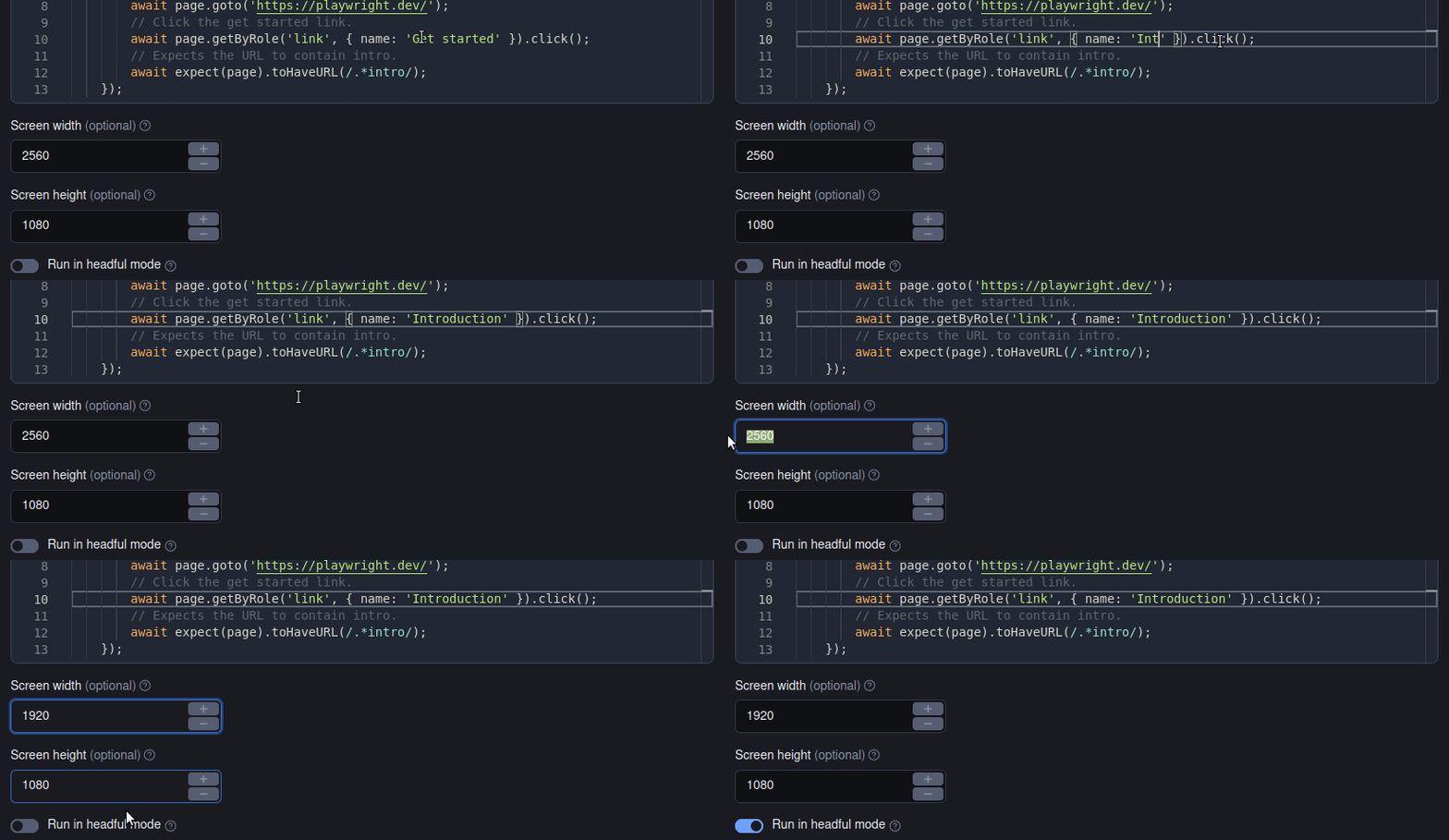
Run your Playwright tests on the Apify platform effectively and easily. Just set up your test environment using a user-friendly UI and let the platform do the rest.
> Note: This is a custom version of Playwright Test Runner Actor. Unlike the original Actor, this version reads test suite files from the tests folder and does not allow you to pass the test files via Apify input.
### Features
#### Run your Playwright tests on the Apify platform
No more pre-commit hooks or CI/CD pipelines. Integrate your tests with the Apify Platform using a user-friendly UI and forget about the hassle of setting up your test environment.
 #### Collect and analyze your test results online
After running the tests, the Apify platform stores the results in comprehensive datasets. You can view the results directly on the platform or download them to your local machine using a REST API.
#### Collect and analyze your test results online
After running the tests, the Apify platform stores the results in comprehensive datasets. You can view the results directly on the platform or download them to your local machine using a REST API.
 #### No more problems with incompatible browser versions
Playwright Test toolkit automatically downloads the latest versions of Chromium, Firefox, and WebKit browsers and installs them in the Apify platform.
This way, you can test your websites using all the popular browsers without worrying about compatibility issues.
#### No more problems with incompatible browser versions
Playwright Test toolkit automatically downloads the latest versions of Chromium, Firefox, and WebKit browsers and installs them in the Apify platform.
This way, you can test your websites using all the popular browsers without worrying about compatibility issues.
 ### How to use
Just provide your test suite files in the `tests` folder and run the Actor. The Actor will automatically run all the tests in the `tests` folder and store the results in the KVS/dataset fields.
You can also customize the test run by specifying other options in the input, e.g. the screen size, headful/headless execution or the maximum run time.
#### Test Generator
You can also use the Playwright Codegen to compose your test suites even faster. Just run `npm run codegen` in your project folder and record your workflow.
The code generator will automatically create a test suite file for you and save it in the `tests` folder.
### Resources
- Original [Playwright Test Runner](https://apify.com/jindrich.bar/playwright-test) Actor
- [Playwright testing: how to write and run E2E tests properly](https://blog.apify.com/playwright-testing-how-to-write-and-run-e2e-tests-properly/)
- [Video guide on getting scraped data using Apify API](https://www.youtube.com/watch?v=ViYYDHSBAKM)
- [Integration with Make](https://apify.com/integrations), GitHub, Zapier, Google Drive, and other apps
- Video tutorial on how to run end-to-end Playwright tests
- A short guide on [how to build web scrapers using code templates](https://www.youtube.com/watch?v=u-i-Korzf8w)
[Video tutorial on how to run end-to-end Playwright tests](https://www.youtube.com/watch?v=V5DEx5x7I0w)
### Getting started
For complete information [see this article](https://docs.apify.com/platform/actors/development#build-actor-at-apify-console). In short, you will:
1. Build the Actor
2. Run the Actor
### Pull the Actor for local development
If you would like to develop locally, you can pull the existing Actor from Apify console using Apify CLI:
1. Install `apify-cli`
**Using Homebrew**
```bash
brew install apify-cli
```
**Using NPM**
```bash
npm -g install apify-cli
```
2. Pull the Actor by its unique ``, which is one of the following:
- unique name of the Actor to pull (e.g. "apify/hello-world")
- or ID of the Actor to pull (e.g. "E2jjCZBezvAZnX8Rb")
You can find both by clicking on the Actor title at the top of the page, which will open a modal containing both Actor unique name and Actor ID.
This command will copy the Actor into the current directory on your local machine.
```bash
apify pull
```
### Documentation reference
To learn more about Apify and Actors, take a look at the following resources:
- [Apify SDK for JavaScript documentation](https://docs.apify.com/sdk/js)
- [Apify SDK for Python documentation](https://docs.apify.com/sdk/python)
- [Apify Platform documentation](https://docs.apify.com/platform)
- [Join our developer community on Discord](https://discord.com/invite/jyEM2PRvMU)
# Actor input Schema
## `videoUrl` (type: `string`):
The YouTube video URL to visit and simulate a view.
## `watchDuration` (type: `integer`):
Number of seconds to watch the video. Default is 60 seconds.
## `viewCount` (type: `integer`):
How many times to visit and watch the video.
## `useProxy` (type: `boolean`):
Enable Apify proxy rotation for each view to simulate different users.
## `headless` (type: `boolean`):
Run the browser in headless mode (no UI). Set to false for debugging.
## `delayBetweenViews` (type: `integer`):
Pause time in seconds between each view to avoid detection.
## Actor input object example
```json
{
"videoUrl": "https://www.youtube.com/watch?v=dQw4w9WgXcQ",
"watchDuration": 60,
"viewCount": 1,
"useProxy": false,
"headless": true,
"delayBetweenViews": 5
}
````
# Actor output Schema
## `results` (type: `string`):
No description
## `report` (type: `string`):
No description
# API
You can run this Actor programmatically using our API. Below are code examples in JavaScript, Python, and CLI, as well as the OpenAPI specification and MCP server setup.
## JavaScript example
```javascript
import { ApifyClient } from 'apify-client';
// Initialize the ApifyClient with your Apify API token
// Replace the '' with your token
const client = new ApifyClient({
token: '',
});
// Prepare Actor input
const input = {
"videoUrl": "https://www.youtube.com/watch?v=dQw4w9WgXcQ"
};
// Run the Actor and wait for it to finish
const run = await client.actor("subject-emu-5259/youtube-view-generator").call(input);
// Fetch and print Actor results from the run's dataset (if any)
console.log('Results from dataset');
console.log(`💾 Check your data here: https://console.apify.com/storage/datasets/${run.defaultDatasetId}`);
const { items } = await client.dataset(run.defaultDatasetId).listItems();
items.forEach((item) => {
console.dir(item);
});
// 📚 Want to learn more 📖? Go to → https://docs.apify.com/api/client/js/docs
```
## Python example
```python
from apify_client import ApifyClient
# Initialize the ApifyClient with your Apify API token
# Replace '' with your token.
client = ApifyClient("")
# Prepare the Actor input
run_input = { "videoUrl": "https://www.youtube.com/watch?v=dQw4w9WgXcQ" }
# Run the Actor and wait for it to finish
run = client.actor("subject-emu-5259/youtube-view-generator").call(run_input=run_input)
# Fetch and print Actor results from the run's dataset (if there are any)
print("💾 Check your data here: https://console.apify.com/storage/datasets/" + run["defaultDatasetId"])
for item in client.dataset(run["defaultDatasetId"]).iterate_items():
print(item)
# 📚 Want to learn more 📖? Go to → https://docs.apify.com/api/client/python/docs/quick-start
```
## CLI example
```bash
echo '{
"videoUrl": "https://www.youtube.com/watch?v=dQw4w9WgXcQ"
}' |
apify call subject-emu-5259/youtube-view-generator --silent --output-dataset
```
## MCP server setup
```json
{
"mcpServers": {
"apify": {
"command": "npx",
"args": [
"mcp-remote",
"https://mcp.apify.com/?tools=subject-emu-5259/youtube-view-generator",
"--header",
"Authorization: Bearer "
]
}
}
}
```
## OpenAPI specification
```json
{
"openapi": "3.0.1",
"info": {
"title": "YouTube View Generator",
"description": "Boost your YouTube views with real browser automation. Uses stealth Playwright to watch videos naturally — handles ads, autoplay, and cookie consent. No proxies needed. Fast, lightweight, and built to scale.",
"version": "0.0",
"x-build-id": "kKFZOPcE1PhKvfNfa"
},
"servers": [
{
"url": "https://api.apify.com/v2"
}
],
"paths": {
"/acts/subject-emu-5259~youtube-view-generator/run-sync-get-dataset-items": {
"post": {
"operationId": "run-sync-get-dataset-items-subject-emu-5259-youtube-view-generator",
"x-openai-isConsequential": false,
"summary": "Executes an Actor, waits for its completion, and returns Actor's dataset items in response.",
"tags": [
"Run Actor"
],
"requestBody": {
"required": true,
"content": {
"application/json": {
"schema": {
"$ref": "#/components/schemas/inputSchema"
}
}
}
},
"parameters": [
{
"name": "token",
"in": "query",
"required": true,
"schema": {
"type": "string"
},
"description": "Enter your Apify token here"
}
],
"responses": {
"200": {
"description": "OK"
}
}
}
},
"/acts/subject-emu-5259~youtube-view-generator/runs": {
"post": {
"operationId": "runs-sync-subject-emu-5259-youtube-view-generator",
"x-openai-isConsequential": false,
"summary": "Executes an Actor and returns information about the initiated run in response.",
"tags": [
"Run Actor"
],
"requestBody": {
"required": true,
"content": {
"application/json": {
"schema": {
"$ref": "#/components/schemas/inputSchema"
}
}
}
},
"parameters": [
{
"name": "token",
"in": "query",
"required": true,
"schema": {
"type": "string"
},
"description": "Enter your Apify token here"
}
],
"responses": {
"200": {
"description": "OK",
"content": {
"application/json": {
"schema": {
"$ref": "#/components/schemas/runsResponseSchema"
}
}
}
}
}
}
},
"/acts/subject-emu-5259~youtube-view-generator/run-sync": {
"post": {
"operationId": "run-sync-subject-emu-5259-youtube-view-generator",
"x-openai-isConsequential": false,
"summary": "Executes an Actor, waits for completion, and returns the OUTPUT from Key-value store in response.",
"tags": [
"Run Actor"
],
"requestBody": {
"required": true,
"content": {
"application/json": {
"schema": {
"$ref": "#/components/schemas/inputSchema"
}
}
}
},
"parameters": [
{
"name": "token",
"in": "query",
"required": true,
"schema": {
"type": "string"
},
"description": "Enter your Apify token here"
}
],
"responses": {
"200": {
"description": "OK"
}
}
}
}
},
"components": {
"schemas": {
"inputSchema": {
"type": "object",
"required": [
"videoUrl"
],
"properties": {
"videoUrl": {
"title": "YouTube Video URL",
"type": "string",
"description": "The YouTube video URL to visit and simulate a view."
},
"watchDuration": {
"title": "Watch Duration (seconds)",
"minimum": 10,
"maximum": 600,
"type": "integer",
"description": "Number of seconds to watch the video. Default is 60 seconds.",
"default": 60
},
"viewCount": {
"title": "Number of Views",
"minimum": 1,
"maximum": 100,
"type": "integer",
"description": "How many times to visit and watch the video.",
"default": 1
},
"useProxy": {
"title": "Use Proxy",
"type": "boolean",
"description": "Enable Apify proxy rotation for each view to simulate different users.",
"default": false
},
"headless": {
"title": "Run Headless",
"type": "boolean",
"description": "Run the browser in headless mode (no UI). Set to false for debugging.",
"default": true
},
"delayBetweenViews": {
"title": "Delay Between Views (seconds)",
"minimum": 0,
"maximum": 60,
"type": "integer",
"description": "Pause time in seconds between each view to avoid detection.",
"default": 5
}
}
},
"runsResponseSchema": {
"type": "object",
"properties": {
"data": {
"type": "object",
"properties": {
"id": {
"type": "string"
},
"actId": {
"type": "string"
},
"userId": {
"type": "string"
},
"startedAt": {
"type": "string",
"format": "date-time",
"example": "2025-01-08T00:00:00.000Z"
},
"finishedAt": {
"type": "string",
"format": "date-time",
"example": "2025-01-08T00:00:00.000Z"
},
"status": {
"type": "string",
"example": "READY"
},
"meta": {
"type": "object",
"properties": {
"origin": {
"type": "string",
"example": "API"
},
"userAgent": {
"type": "string"
}
}
},
"stats": {
"type": "object",
"properties": {
"inputBodyLen": {
"type": "integer",
"example": 2000
},
"rebootCount": {
"type": "integer",
"example": 0
},
"restartCount": {
"type": "integer",
"example": 0
},
"resurrectCount": {
"type": "integer",
"example": 0
},
"computeUnits": {
"type": "integer",
"example": 0
}
}
},
"options": {
"type": "object",
"properties": {
"build": {
"type": "string",
"example": "latest"
},
"timeoutSecs": {
"type": "integer",
"example": 300
},
"memoryMbytes": {
"type": "integer",
"example": 1024
},
"diskMbytes": {
"type": "integer",
"example": 2048
}
}
},
"buildId": {
"type": "string"
},
"defaultKeyValueStoreId": {
"type": "string"
},
"defaultDatasetId": {
"type": "string"
},
"defaultRequestQueueId": {
"type": "string"
},
"buildNumber": {
"type": "string",
"example": "1.0.0"
},
"containerUrl": {
"type": "string"
},
"usage": {
"type": "object",
"properties": {
"ACTOR_COMPUTE_UNITS": {
"type": "integer",
"example": 0
},
"DATASET_READS": {
"type": "integer",
"example": 0
},
"DATASET_WRITES": {
"type": "integer",
"example": 0
},
"KEY_VALUE_STORE_READS": {
"type": "integer",
"example": 0
},
"KEY_VALUE_STORE_WRITES": {
"type": "integer",
"example": 1
},
"KEY_VALUE_STORE_LISTS": {
"type": "integer",
"example": 0
},
"REQUEST_QUEUE_READS": {
"type": "integer",
"example": 0
},
"REQUEST_QUEUE_WRITES": {
"type": "integer",
"example": 0
},
"DATA_TRANSFER_INTERNAL_GBYTES": {
"type": "integer",
"example": 0
},
"DATA_TRANSFER_EXTERNAL_GBYTES": {
"type": "integer",
"example": 0
},
"PROXY_RESIDENTIAL_TRANSFER_GBYTES": {
"type": "integer",
"example": 0
},
"PROXY_SERPS": {
"type": "integer",
"example": 0
}
}
},
"usageTotalUsd": {
"type": "number",
"example": 0.00005
},
"usageUsd": {
"type": "object",
"properties": {
"ACTOR_COMPUTE_UNITS": {
"type": "integer",
"example": 0
},
"DATASET_READS": {
"type": "integer",
"example": 0
},
"DATASET_WRITES": {
"type": "integer",
"example": 0
},
"KEY_VALUE_STORE_READS": {
"type": "integer",
"example": 0
},
"KEY_VALUE_STORE_WRITES": {
"type": "number",
"example": 0.00005
},
"KEY_VALUE_STORE_LISTS": {
"type": "integer",
"example": 0
},
"REQUEST_QUEUE_READS": {
"type": "integer",
"example": 0
},
"REQUEST_QUEUE_WRITES": {
"type": "integer",
"example": 0
},
"DATA_TRANSFER_INTERNAL_GBYTES": {
"type": "integer",
"example": 0
},
"DATA_TRANSFER_EXTERNAL_GBYTES": {
"type": "integer",
"example": 0
},
"PROXY_RESIDENTIAL_TRANSFER_GBYTES": {
"type": "integer",
"example": 0
},
"PROXY_SERPS": {
"type": "integer",
"example": 0
}
}
}
}
}
}
}
}
}
}
```
### How to use
Just provide your test suite files in the `tests` folder and run the Actor. The Actor will automatically run all the tests in the `tests` folder and store the results in the KVS/dataset fields.
You can also customize the test run by specifying other options in the input, e.g. the screen size, headful/headless execution or the maximum run time.
#### Test Generator
You can also use the Playwright Codegen to compose your test suites even faster. Just run `npm run codegen` in your project folder and record your workflow.
The code generator will automatically create a test suite file for you and save it in the `tests` folder.
### Resources
- Original [Playwright Test Runner](https://apify.com/jindrich.bar/playwright-test) Actor
- [Playwright testing: how to write and run E2E tests properly](https://blog.apify.com/playwright-testing-how-to-write-and-run-e2e-tests-properly/)
- [Video guide on getting scraped data using Apify API](https://www.youtube.com/watch?v=ViYYDHSBAKM)
- [Integration with Make](https://apify.com/integrations), GitHub, Zapier, Google Drive, and other apps
- Video tutorial on how to run end-to-end Playwright tests
- A short guide on [how to build web scrapers using code templates](https://www.youtube.com/watch?v=u-i-Korzf8w)
[Video tutorial on how to run end-to-end Playwright tests](https://www.youtube.com/watch?v=V5DEx5x7I0w)
### Getting started
For complete information [see this article](https://docs.apify.com/platform/actors/development#build-actor-at-apify-console). In short, you will:
1. Build the Actor
2. Run the Actor
### Pull the Actor for local development
If you would like to develop locally, you can pull the existing Actor from Apify console using Apify CLI:
1. Install `apify-cli`
**Using Homebrew**
```bash
brew install apify-cli
```
**Using NPM**
```bash
npm -g install apify-cli
```
2. Pull the Actor by its unique ``, which is one of the following:
- unique name of the Actor to pull (e.g. "apify/hello-world")
- or ID of the Actor to pull (e.g. "E2jjCZBezvAZnX8Rb")
You can find both by clicking on the Actor title at the top of the page, which will open a modal containing both Actor unique name and Actor ID.
This command will copy the Actor into the current directory on your local machine.
```bash
apify pull
```
### Documentation reference
To learn more about Apify and Actors, take a look at the following resources:
- [Apify SDK for JavaScript documentation](https://docs.apify.com/sdk/js)
- [Apify SDK for Python documentation](https://docs.apify.com/sdk/python)
- [Apify Platform documentation](https://docs.apify.com/platform)
- [Join our developer community on Discord](https://discord.com/invite/jyEM2PRvMU)
# Actor input Schema
## `videoUrl` (type: `string`):
The YouTube video URL to visit and simulate a view.
## `watchDuration` (type: `integer`):
Number of seconds to watch the video. Default is 60 seconds.
## `viewCount` (type: `integer`):
How many times to visit and watch the video.
## `useProxy` (type: `boolean`):
Enable Apify proxy rotation for each view to simulate different users.
## `headless` (type: `boolean`):
Run the browser in headless mode (no UI). Set to false for debugging.
## `delayBetweenViews` (type: `integer`):
Pause time in seconds between each view to avoid detection.
## Actor input object example
```json
{
"videoUrl": "https://www.youtube.com/watch?v=dQw4w9WgXcQ",
"watchDuration": 60,
"viewCount": 1,
"useProxy": false,
"headless": true,
"delayBetweenViews": 5
}
````
# Actor output Schema
## `results` (type: `string`):
No description
## `report` (type: `string`):
No description
# API
You can run this Actor programmatically using our API. Below are code examples in JavaScript, Python, and CLI, as well as the OpenAPI specification and MCP server setup.
## JavaScript example
```javascript
import { ApifyClient } from 'apify-client';
// Initialize the ApifyClient with your Apify API token
// Replace the '' with your token
const client = new ApifyClient({
token: '',
});
// Prepare Actor input
const input = {
"videoUrl": "https://www.youtube.com/watch?v=dQw4w9WgXcQ"
};
// Run the Actor and wait for it to finish
const run = await client.actor("subject-emu-5259/youtube-view-generator").call(input);
// Fetch and print Actor results from the run's dataset (if any)
console.log('Results from dataset');
console.log(`💾 Check your data here: https://console.apify.com/storage/datasets/${run.defaultDatasetId}`);
const { items } = await client.dataset(run.defaultDatasetId).listItems();
items.forEach((item) => {
console.dir(item);
});
// 📚 Want to learn more 📖? Go to → https://docs.apify.com/api/client/js/docs
```
## Python example
```python
from apify_client import ApifyClient
# Initialize the ApifyClient with your Apify API token
# Replace '' with your token.
client = ApifyClient("")
# Prepare the Actor input
run_input = { "videoUrl": "https://www.youtube.com/watch?v=dQw4w9WgXcQ" }
# Run the Actor and wait for it to finish
run = client.actor("subject-emu-5259/youtube-view-generator").call(run_input=run_input)
# Fetch and print Actor results from the run's dataset (if there are any)
print("💾 Check your data here: https://console.apify.com/storage/datasets/" + run["defaultDatasetId"])
for item in client.dataset(run["defaultDatasetId"]).iterate_items():
print(item)
# 📚 Want to learn more 📖? Go to → https://docs.apify.com/api/client/python/docs/quick-start
```
## CLI example
```bash
echo '{
"videoUrl": "https://www.youtube.com/watch?v=dQw4w9WgXcQ"
}' |
apify call subject-emu-5259/youtube-view-generator --silent --output-dataset
```
## MCP server setup
```json
{
"mcpServers": {
"apify": {
"command": "npx",
"args": [
"mcp-remote",
"https://mcp.apify.com/?tools=subject-emu-5259/youtube-view-generator",
"--header",
"Authorization: Bearer "
]
}
}
}
```
## OpenAPI specification
```json
{
"openapi": "3.0.1",
"info": {
"title": "YouTube View Generator",
"description": "Boost your YouTube views with real browser automation. Uses stealth Playwright to watch videos naturally — handles ads, autoplay, and cookie consent. No proxies needed. Fast, lightweight, and built to scale.",
"version": "0.0",
"x-build-id": "kKFZOPcE1PhKvfNfa"
},
"servers": [
{
"url": "https://api.apify.com/v2"
}
],
"paths": {
"/acts/subject-emu-5259~youtube-view-generator/run-sync-get-dataset-items": {
"post": {
"operationId": "run-sync-get-dataset-items-subject-emu-5259-youtube-view-generator",
"x-openai-isConsequential": false,
"summary": "Executes an Actor, waits for its completion, and returns Actor's dataset items in response.",
"tags": [
"Run Actor"
],
"requestBody": {
"required": true,
"content": {
"application/json": {
"schema": {
"$ref": "#/components/schemas/inputSchema"
}
}
}
},
"parameters": [
{
"name": "token",
"in": "query",
"required": true,
"schema": {
"type": "string"
},
"description": "Enter your Apify token here"
}
],
"responses": {
"200": {
"description": "OK"
}
}
}
},
"/acts/subject-emu-5259~youtube-view-generator/runs": {
"post": {
"operationId": "runs-sync-subject-emu-5259-youtube-view-generator",
"x-openai-isConsequential": false,
"summary": "Executes an Actor and returns information about the initiated run in response.",
"tags": [
"Run Actor"
],
"requestBody": {
"required": true,
"content": {
"application/json": {
"schema": {
"$ref": "#/components/schemas/inputSchema"
}
}
}
},
"parameters": [
{
"name": "token",
"in": "query",
"required": true,
"schema": {
"type": "string"
},
"description": "Enter your Apify token here"
}
],
"responses": {
"200": {
"description": "OK",
"content": {
"application/json": {
"schema": {
"$ref": "#/components/schemas/runsResponseSchema"
}
}
}
}
}
}
},
"/acts/subject-emu-5259~youtube-view-generator/run-sync": {
"post": {
"operationId": "run-sync-subject-emu-5259-youtube-view-generator",
"x-openai-isConsequential": false,
"summary": "Executes an Actor, waits for completion, and returns the OUTPUT from Key-value store in response.",
"tags": [
"Run Actor"
],
"requestBody": {
"required": true,
"content": {
"application/json": {
"schema": {
"$ref": "#/components/schemas/inputSchema"
}
}
}
},
"parameters": [
{
"name": "token",
"in": "query",
"required": true,
"schema": {
"type": "string"
},
"description": "Enter your Apify token here"
}
],
"responses": {
"200": {
"description": "OK"
}
}
}
}
},
"components": {
"schemas": {
"inputSchema": {
"type": "object",
"required": [
"videoUrl"
],
"properties": {
"videoUrl": {
"title": "YouTube Video URL",
"type": "string",
"description": "The YouTube video URL to visit and simulate a view."
},
"watchDuration": {
"title": "Watch Duration (seconds)",
"minimum": 10,
"maximum": 600,
"type": "integer",
"description": "Number of seconds to watch the video. Default is 60 seconds.",
"default": 60
},
"viewCount": {
"title": "Number of Views",
"minimum": 1,
"maximum": 100,
"type": "integer",
"description": "How many times to visit and watch the video.",
"default": 1
},
"useProxy": {
"title": "Use Proxy",
"type": "boolean",
"description": "Enable Apify proxy rotation for each view to simulate different users.",
"default": false
},
"headless": {
"title": "Run Headless",
"type": "boolean",
"description": "Run the browser in headless mode (no UI). Set to false for debugging.",
"default": true
},
"delayBetweenViews": {
"title": "Delay Between Views (seconds)",
"minimum": 0,
"maximum": 60,
"type": "integer",
"description": "Pause time in seconds between each view to avoid detection.",
"default": 5
}
}
},
"runsResponseSchema": {
"type": "object",
"properties": {
"data": {
"type": "object",
"properties": {
"id": {
"type": "string"
},
"actId": {
"type": "string"
},
"userId": {
"type": "string"
},
"startedAt": {
"type": "string",
"format": "date-time",
"example": "2025-01-08T00:00:00.000Z"
},
"finishedAt": {
"type": "string",
"format": "date-time",
"example": "2025-01-08T00:00:00.000Z"
},
"status": {
"type": "string",
"example": "READY"
},
"meta": {
"type": "object",
"properties": {
"origin": {
"type": "string",
"example": "API"
},
"userAgent": {
"type": "string"
}
}
},
"stats": {
"type": "object",
"properties": {
"inputBodyLen": {
"type": "integer",
"example": 2000
},
"rebootCount": {
"type": "integer",
"example": 0
},
"restartCount": {
"type": "integer",
"example": 0
},
"resurrectCount": {
"type": "integer",
"example": 0
},
"computeUnits": {
"type": "integer",
"example": 0
}
}
},
"options": {
"type": "object",
"properties": {
"build": {
"type": "string",
"example": "latest"
},
"timeoutSecs": {
"type": "integer",
"example": 300
},
"memoryMbytes": {
"type": "integer",
"example": 1024
},
"diskMbytes": {
"type": "integer",
"example": 2048
}
}
},
"buildId": {
"type": "string"
},
"defaultKeyValueStoreId": {
"type": "string"
},
"defaultDatasetId": {
"type": "string"
},
"defaultRequestQueueId": {
"type": "string"
},
"buildNumber": {
"type": "string",
"example": "1.0.0"
},
"containerUrl": {
"type": "string"
},
"usage": {
"type": "object",
"properties": {
"ACTOR_COMPUTE_UNITS": {
"type": "integer",
"example": 0
},
"DATASET_READS": {
"type": "integer",
"example": 0
},
"DATASET_WRITES": {
"type": "integer",
"example": 0
},
"KEY_VALUE_STORE_READS": {
"type": "integer",
"example": 0
},
"KEY_VALUE_STORE_WRITES": {
"type": "integer",
"example": 1
},
"KEY_VALUE_STORE_LISTS": {
"type": "integer",
"example": 0
},
"REQUEST_QUEUE_READS": {
"type": "integer",
"example": 0
},
"REQUEST_QUEUE_WRITES": {
"type": "integer",
"example": 0
},
"DATA_TRANSFER_INTERNAL_GBYTES": {
"type": "integer",
"example": 0
},
"DATA_TRANSFER_EXTERNAL_GBYTES": {
"type": "integer",
"example": 0
},
"PROXY_RESIDENTIAL_TRANSFER_GBYTES": {
"type": "integer",
"example": 0
},
"PROXY_SERPS": {
"type": "integer",
"example": 0
}
}
},
"usageTotalUsd": {
"type": "number",
"example": 0.00005
},
"usageUsd": {
"type": "object",
"properties": {
"ACTOR_COMPUTE_UNITS": {
"type": "integer",
"example": 0
},
"DATASET_READS": {
"type": "integer",
"example": 0
},
"DATASET_WRITES": {
"type": "integer",
"example": 0
},
"KEY_VALUE_STORE_READS": {
"type": "integer",
"example": 0
},
"KEY_VALUE_STORE_WRITES": {
"type": "number",
"example": 0.00005
},
"KEY_VALUE_STORE_LISTS": {
"type": "integer",
"example": 0
},
"REQUEST_QUEUE_READS": {
"type": "integer",
"example": 0
},
"REQUEST_QUEUE_WRITES": {
"type": "integer",
"example": 0
},
"DATA_TRANSFER_INTERNAL_GBYTES": {
"type": "integer",
"example": 0
},
"DATA_TRANSFER_EXTERNAL_GBYTES": {
"type": "integer",
"example": 0
},
"PROXY_RESIDENTIAL_TRANSFER_GBYTES": {
"type": "integer",
"example": 0
},
"PROXY_SERPS": {
"type": "integer",
"example": 0
}
}
}
}
}
}
}
}
}
}
```