# Entity SEO API - Google Knowledge Graph for Any URL (`thodor/entity-seo-api`) Actor
See what Google thinks your pages are about. Entity SEO & entity extraction API: Google Knowledge Graph entities + 0-100 scores for any URL. Free to try.
- **URL**: https://apify.com/thodor/entity-seo-api.md
- **Developed by:** [Thodor](https://apify.com/thodor) (community)
- **Categories:** SEO tools, Lead generation, AI
- **Stats:** 2 total users, 1 monthly users, 100.0% runs succeeded, 0 bookmarks
- **User rating**: No ratings yet
## Pricing
from $19.90 / 1,000 results
This Actor is paid per event. You are not charged for the Apify platform usage, but only a fixed price for specific events.
Since this Actor supports Apify Store discounts, the price gets lower the higher subscription plan you have.
Learn more: https://docs.apify.com/platform/actors/running/actors-in-store#pay-per-event
## What's an Apify Actor?
Actors are web data automations that power AI and operations. They run on the Apify platform to scrape websites, process data, connect APIs, and automate workflows.
In Batch mode, an Actor accepts a well-defined JSON input, performs an action which can take anything from a few seconds to a few hours,
and optionally produces a well-defined JSON output, datasets with results, or files in key-value store.
In Standby mode, an Actor provides a web server which can be used as a website, API, or an MCP server.
Actors are written with capital "A".
## How to integrate an Actor?
If asked about integration, you help developers integrate Actors into their projects.
You adapt to their stack and deliver integrations that are safe, well-documented, and production-ready.
The best way to integrate Actors is as follows.
- **AI agents and MCP clients** — the [Apify MCP server](https://docs.apify.com/integrations/mcp.md) at `https://mcp.apify.com` (remote, streamable HTTP, OAuth on first use).
- **Agentic workflows and local Actor development** — [Agent Skills](https://apify.com/.well-known/agent-skills/index.json) with the [Apify CLI](https://docs.apify.com/cli/docs.md): `npm install -g apify-cli`, then `apify login`.
- **JavaScript/TypeScript projects** — the official [JS/TS client](https://docs.apify.com/api/client/js/docs.md): `npm install apify-client`.
- **Python projects** — the official [Python client](https://docs.apify.com/api/client/python/docs.md): `pip install apify-client`.
- **Any other language** — the [REST API](https://docs.apify.com/api/v2.md).
For usage examples, see the [API](#api) section below.
For more details, see Apify documentation as [Markdown index](https://docs.apify.com/llms.txt) and [Markdown full-text](https://docs.apify.com/llms-full.txt).
# README
### What does the Entity SEO API do?
The **Entity SEO API** is an entity extraction API: give it any URL and it returns the **Google Knowledge Graph entities** Google associates with that page, each scored 0–100 and resolved to a human-readable name. It's Google's own read of the live page, not a re-analysis of text you paste in.
Real output from two pages competing for "tiktok comments scraper", one ranking #1 and one #6 (abridged, July 2026):
| Entity Google credits | Page ranking #1 | Page ranking #6 |
|---|---|---|
| web scraping | 60 | 65 |
| TikTok | 57 | 63 |
| data | 53 | 50 |
| **application programming interface** | **63** | **15** |
| **web crawler** | **37** | not credited |
| video recording | 38 | 58 |
| JSON | not credited | 19 |
| `/g/11fy265933` *(no public name, see FAQ)* | 26 | 36 |
How to read it:
- 🔍 **Both pages get credit for the basics**: web scraping, TikTok, data. Google understood what these pages are.
- 🆚 **The gap is the content brief.** The #1 page scores 63 on *API* and 37 on *web crawler*; the #6 page scores 15 and nothing. Own the #6 page? Those two rows are what to add. No claim that this is why #1 wins, but it's what you can measure.
- ⏱️ **Scores move on recrawl.** Close the gap, re-run: shifted scores mean Google understood your edit, usually weeks before a rank tracker reacts.
- 📡 **Any entities at all mean Google has crawled and classified the page.** Daily runs show within a day when a new page gets picked up or an edit sinks in.
- 🧩 **Not a keyword tool.** It shows what Google credits, not what people search. Pick targets with keyword research; check them here.
Each URL returns ranked entities with stable Knowledge Graph IDs, scores, names and descriptions, plus the page's hero image and "about this site" link when Google has them. Plain JSON. Run it from the [Apify Console](https://console.apify.com/), the [Apify API](https://docs.apify.com/api/v2), or n8n, Zapier and Make. Or put it on an [Apify Schedule](https://docs.apify.com/platform/schedules): a daily cron on your key pages is a running entity and indexation monitor, so you know the day Google's read of a page shifts.
### How do you find the entities Google associates with a page?
Send URLs, get ranked lists like the table above. 100 means the entity is the page's main subject; lower scores are supporting topics. What's missing tells you as much as what's there.
IDs like `/m/053_d` are resolved to names and descriptions through Wikidata: `Marie Curie (Polish-French physicist and chemist)` instead of an opaque code. IDs with no public mapping come back bare, with their score. Those are internal Google entities with no public name anywhere, so there is nothing to resolve them against. You can still infer what one means from the named entities around it, or by checking which competing pages carry the same ID.
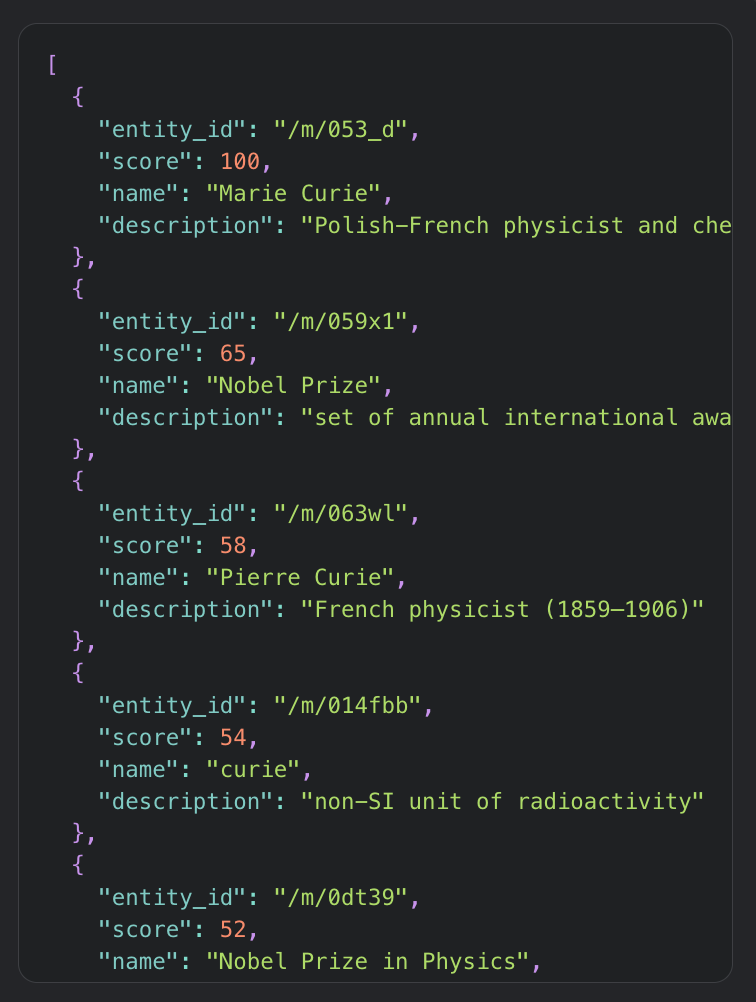 #### What are Knowledge Graph entities and confidence scores?
An entity is a thing Google recognizes (person, product, organization, place, concept) with an ID that stays stable across languages and phrasings: Marie Curie is `/m/053_d` whether a page writes "Marie Curie", "Madame Curie" or "Maria Skłodowska". Google's model of a page is a set of these entities scored 0–100. Entity SEO means getting the entities you need onto that list with high scores, not just optimizing keyword strings.
### How is this different from Google Cloud Natural Language API?
Cloud Natural Language extracts entities from text you supply and scores their relative salience. This API takes a URL and returns Google's own page-level entities with a 0–100 confidence score. An NLP model can only tell you what your text says; your text can be fine while Google's model of the page is not.
- **URL in, not text in.** Nothing to crawl, clean or truncate first.
- **Google's own page-level entities.** How Google classifies the live page, not how a model scores a block of text you extracted.
- **A 0–100 confidence score.** Comparable across pages and trackable over time, instead of relative salience.
| | **Entity SEO API** (this actor) | Google Cloud Natural Language API | TextRazor | InLinks / WordLift |
|---|---|---|---|---|
| Input | **A URL** | Text you supply | Text or URL | URL / your CMS |
| Entities from | **Google's own page understanding** | Google NLP run on your text | TextRazor's model | Their own model |
| Score | **0–100 confidence** | Salience (relative) | Relevance | Varies |
| Entity IDs | Google KG / Freebase, resolved to names | MID / Wikipedia for some | Wikidata / DBpedia | Wikidata |
| Hero image + about-this-site | **Yes** | No | No | No |
| Pricing model | **Pay per URL, no subscription** | Usage-based; you crawl (~$0.005/URL) | From ~$200/mo | ~$39–49/mo |
| Built for | **Entity SEO / semantic SEO** | General NLP | General NLP | SEO platform |
Use those tools to extract entities from text you already hold. Use this one to see how Google reads a URL.
### Why use the Entity SEO API?
- **Any URL, including ones you don't own.** Your pages, a competitor's, or every result on a SERP.
- **Names, not codes.** IDs resolved via Wikidata, no lookup step.
- **Built for batches.** URLs run in parallel, one JSON record each. A 50-page site section is one run.
### What you get, and what you don't
A page has three layers: what it says, what it ranks for, and in between, what Google understood. This API measures the middle layer, nothing else.
**You are getting:**
- **Google's interpretation, not a re-analysis of your text.** From a real run: a page with "Exporter" in its headline scored 3/100 for *export*. The title tag hadn't caught up with the copy, and no text-analysis tool would have caught it.
- **Competitor gaps.** A scored list of concepts Google credits them for and not you.
- **A pre-ranking feedback signal.** Scores update on recrawl, usually well before rankings. Edit, re-run, and you know whether the change registered.
**You are not getting:**
- **Keyword or demand data.** It reports what Google credits, not what people search. Pick targets with keyword research; verify them here.
- **A name for every entity.** Some IDs have no public name anywhere and come back bare, occasionally high-scoring ones. The LLM trick in the FAQ resolves most.
- **Page-level signal from a single URL.** Site-level entities (your platform, brand, domain) score high on every page. Run three URLs (yours, a competitor's, a sibling from your own site) to tell page topics from site background.
- **A fix for off-page problems.** If the blocker is page type, authority or backlinks, a perfect entity profile won't rank the page.
- **Entities for brand-new or thin pages.** An empty list means Google has no model of that URL yet. An answer, not an error.
### How to use the Entity SEO API
1. Open the actor in the [Apify Console](https://console.apify.com/).
2. Paste one or more page URLs into the **URLs** field.
3. Click **Start**, then download the dataset as JSON, CSV, Excel, or HTML.
#### Entity extraction API example in Python
```python
from apify_client import ApifyClient
client = ApifyClient("")
run = client.actor("thodor/entity-seo-api").call(run_input={
"urls": [
"https://en.wikipedia.org/wiki/Marie_Curie",
"https://www.nike.com/",
],
})
for item in client.dataset(run["defaultDatasetId"]).iterate_items():
print(item["url"], item["entity_count"], "entities")
for e in item["entities"][:5]:
print(f' {e["score"]:>3} {e.get("name") or e["entity_id"]}')
```
#### Entity extraction API example in JavaScript
```javascript
import { ApifyClient } from 'apify-client';
const client = new ApifyClient({ token: '' });
const run = await client.actor('thodor/entity-seo-api').call({
urls: ['https://en.wikipedia.org/wiki/Marie_Curie'],
});
const { items } = await client.dataset(run.defaultDatasetId).listItems();
items.forEach((i) => {
console.log(i.url, i.entity_count);
i.entities.slice(0, 5).forEach((e) => console.log(e.score, e.name || e.entity_id));
});
```
### Input
| Field | Type | Required | Description |
|---|---|---|---|
| `urls` | array of URLs | yes | The page URLs to analyze |
That's the whole input. Bare domains work: https:// is assumed when the scheme is missing. Name resolution, hero image and about-this-site link are always included.
### Output
Download as JSON, HTML, CSV or Excel, or read it as a spreadsheet in the Apify Console. One record per successfully analyzed URL. Failed URLs are never charged and never appear in the dataset; they're logged and saved with reasons to the `FAILURES` record in the run's key-value store.

```json
{
"url": "https://en.wikipedia.org/wiki/Marie_Curie",
"entity_count": 34,
"entities": [
{ "entity_id": "/m/053_d", "score": 100, "name": "Marie Curie", "description": "Polish-French physicist and chemist (1867–1934)" },
{ "entity_id": "/m/059x1", "score": 65, "name": "Nobel Prize", "description": "set of annual international awards" },
{ "entity_id": "/m/063wl", "score": 58, "name": "Pierre Curie", "description": "French physicist (1859–1906)" }
],
"hero_image": "https://encrypted-tbn2.gstatic.com/images?q=tbn:ANd9Gc...",
"about_this_site": "https://www.google.com/search?q=About+https://en.wikipedia.org/wiki/Marie_Curie&tbm=ilp"
}
```
#### Data fields
| Field | Description |
|---|---|
| `url` | The URL that was analyzed |
| `entity_count` | Number of entities returned for the page |
| `entities[]` | Ranked entities, highest confidence first |
| `entities[].entity_id` | Google Knowledge Graph / Freebase ID (e.g. `/m/053_d`) |
| `entities[].score` | Confidence from 0 to 100 |
| `entities[].name` | Human-readable name via Wikidata (`null` for the few IDs with no public mapping) |
| `entities[].description` | Short description, when a public mapping exists |
| `hero_image` | The page's hero image, when Google has one |
| `about_this_site` | Google's "about this site" link, when available |
### Use cases for entity SEO and semantic SEO
**Entity SEO audit.** Run your URL. If your target entity isn't near the top, or is missing, Google isn't convinced your page is about it. That's where the next edit goes.
**Competitor content-gap analysis.** Run both pages, compare lists. The table at the top is this exact analysis on two live pages: it turned "their page is somehow stronger" into "they score 63 on API, we score 15".
**Semantic content optimization.** Scores tell you what to strengthen and what to prune. The #6 page above scores 15 on *API*: if developers are its audience, it needs a visible API section. It also gets *music* at 21, which on a data tool is drift worth cleaning up.
**Topical authority mapping.** Run a whole site section and aggregate the entities: a map of the topics Google actually associates with your site, ready for a topical authority or content-cluster strategy.
**Structured data and schema entity sourcing.** The Knowledge Graph IDs are ready-made `sameAs` targets and schema entity references.
**Entity score tracking.** Schedule the actor and re-run after significant edits. Scores update on recrawl, usually well before rankings move: if the work is landing, your target entity climbs while your rank tracker is still flat.
**Indexation and reprocessing monitoring.** Any entities at all prove Google has crawled and classified the page (a `site:` query only proves inclusion). Run daily: the day an empty list turns into entities is the day Google first classified the page, give or take 24 hours, and the day the profile shifts is the day a recrawl landed. See the FAQ for the limits; the signal only works in one direction.
### How to run a competitor content-gap analysis
Submit both pages in one run and diff on `entity_id`. The table at the top is this analysis: *API* (63 vs 15) and *web crawler* (37 vs nothing) are the trailing page's gap, and its content brief.
On the same platform as your competitor (a marketplace, a store)? Add a sibling page from it. Entities scoring high on every page of the domain are site background; ignore them.
The whole analysis is a short script:
```python
from apify_client import ApifyClient
client = ApifyClient("")
run = client.actor("thodor/entity-seo-api").call(run_input={
"urls": ["https://your-site.com/guide", "https://competitor.com/guide"],
})
pages = {i["url"]: i for i in client.dataset(run["defaultDatasetId"]).iterate_items()}
yours = pages["https://your-site.com/guide"]["entities"]
theirs = pages["https://competitor.com/guide"]["entities"]
covered = {e["entity_id"] for e in yours}
for e in theirs:
if e["entity_id"] not in covered:
print(f'{e["score"]:>3} {e.get("name") or e["entity_id"]}')
```
To turn the gap into an update brief, paste the gap list and your draft into an LLM and ask which sections to add or expand. The scores tell it what to prioritize.
### Entity SEO for AI Overviews and LLM visibility
AI Overviews, ChatGPT and Perplexity cite pages for what they're about at the entity level. So the check is simple: does Google credit your pages for your brand, your products, your core topics? If not, a citation is unlikely however good the writing.
### Tips and advanced options
- **Run your page and a competitor's together** for comparable lists in one pass.
- **Add a sibling page from your own site as a baseline.** Entities scoring high on both of your pages are site-level, not page topics. Subtract them.
- **Diff on `entity_id`, not names.** The ID is stable across languages and phrasings.
- **Schedule it daily.** Google's cache refreshes about once a day; running more often just returns the cached model. Use [Apify Schedules](https://docs.apify.com/platform/schedules) and [Webhooks](https://docs.apify.com/platform/integrations/webhooks).
### How much does the Entity SEO API cost?
You pay per URL analyzed. No subscription, no monthly minimum, and failed URLs are not charged. Apify's free plan includes $5 of platform credit every month, enough to trial comfortably; see the **Pricing** tab for rates.
### FAQ
**Is the Entity SEO API free to try?** Yes, no credit card required. Apify's free plan includes $5 of monthly credit, enough for several hundred URLs.
**What is entity SEO?** Optimizing the things (entities) a page is about rather than only the keywords on it. Google understands pages as collections of entities, so being credited for the right ones with high confidence is how you rank for a topic rather than a single phrase.
**Where do the entities come from?** They're the Knowledge Graph entities Google associates with the page you submit, with Google's own 0–100 score for each. Google's classification of the URL, not a third-party re-analysis of the text.
**How is this different from the Google Cloud Natural Language API?** Cloud NLP extracts entities from text you supply and returns relative salience. This API takes a URL and returns Google's page-level entities with a comparable 0–100 score. See the table above.
**What do the entity IDs mean?** Stable Google Knowledge Graph / Freebase identifiers (like `/m/053_d`), mapped to names and descriptions via Wikidata.
**Why do some entities come back without a name?** Some IDs have no public name or Wikidata mapping; those come back bare with their score. A trick: give the IDs and the page text to an LLM and ask what each likely refers to.
**Why does a page return no entities?** Google doesn't associate entities with every URL; new, thin or low-authority pages often have none yet. An empty list means the request succeeded and Google has no classification for that URL. Outright failures are different: not charged, not in the dataset, listed with reasons in the `FAILURES` record. Input that can't be a URL at all is rejected up front the same way: skipped without charge and listed in `FAILURES`. Bare domains are fine; https:// is assumed.
**Can this tell me when Google indexed my page?** Not directly, the response carries no crawl or index date. But entities at all prove Google has crawled and classified the page, and a daily schedule turns that into a monitor: the run where an empty list becomes entities brackets first classification to within a day, and the run where the profile shifts brackets a recrawl. Two limits. The serving cache refreshes about once a day, so resolution is one day at best. And the signal is one-directional: a changed profile proves reprocessing, an unchanged one proves nothing, since a recrawl can land on the same classification.
**Does this tell me which keywords to target?** No. It reports what Google credits a page for, not what people search for. Pick targets with keyword research; use this to check whether Google's model matches, and to verify after a recrawl that edits registered.
**Why do the same high-scoring entities appear on every page of my site?** Your brand, platform or domain as Google knows it. Real, but background. Include a sibling page from your site and discount whatever both share.
**Can I compare two pages?** Yes. Submit both URLs in one run and diff the lists. That's the recommended competitor gap workflow.
**Is this legal?** The API returns publicly available entity classifications for URLs you choose to analyze; it does not extract private data. As with any SEO tooling, use the output to inform your own content decisions.
# Actor input Schema
## `urls` (type: `array`):
The page URLs to analyze. For each URL you get the ranked Knowledge Graph entities Google associates with the page, each with a 0-100 confidence score. Bare domains work: https:// is assumed when the scheme is missing.
## Actor input object example
```json
{
"urls": [
"https://en.wikipedia.org/wiki/Marie_Curie"
]
}
```
# Actor output Schema
## `results` (type: `string`):
No description
# API
You can run this Actor programmatically using our API. Below are code examples in JavaScript, Python, and CLI, as well as the OpenAPI specification and MCP server setup.
## JavaScript example
```javascript
import { ApifyClient } from 'apify-client';
// Initialize the ApifyClient with your Apify API token
// Replace the '' with your token
const client = new ApifyClient({
token: '',
});
// Prepare Actor input
const input = {
"urls": [
"https://en.wikipedia.org/wiki/Marie_Curie"
]
};
// Run the Actor and wait for it to finish
const run = await client.actor("thodor/entity-seo-api").call(input);
// Fetch and print Actor results from the run's dataset (if any)
console.log('Results from dataset');
console.log(`💾 Check your data here: https://console.apify.com/storage/datasets/${run.defaultDatasetId}`);
const { items } = await client.dataset(run.defaultDatasetId).listItems();
items.forEach((item) => {
console.dir(item);
});
// 📚 Want to learn more 📖? Go to → https://docs.apify.com/api/client/js/docs
```
## Python example
```python
from apify_client import ApifyClient
# Initialize the ApifyClient with your Apify API token
# Replace '' with your token.
client = ApifyClient("")
# Prepare the Actor input
run_input = { "urls": ["https://en.wikipedia.org/wiki/Marie_Curie"] }
# Run the Actor and wait for it to finish
run = client.actor("thodor/entity-seo-api").call(run_input=run_input)
# Fetch and print Actor results from the run's dataset (if there are any)
print("💾 Check your data here: https://console.apify.com/storage/datasets/" + run["defaultDatasetId"])
for item in client.dataset(run["defaultDatasetId"]).iterate_items():
print(item)
# 📚 Want to learn more 📖? Go to → https://docs.apify.com/api/client/python/docs/quick-start
```
## CLI example
```bash
echo '{
"urls": [
"https://en.wikipedia.org/wiki/Marie_Curie"
]
}' |
apify call thodor/entity-seo-api --silent --output-dataset
```
## MCP server setup
```json
{
"mcpServers": {
"apify": {
"command": "npx",
"args": [
"mcp-remote",
"https://mcp.apify.com/?tools=thodor/entity-seo-api",
"--header",
"Authorization: Bearer "
]
}
}
}
```
## OpenAPI specification
Download the OpenAPI definition: https://api.apify.com/v2/acts/EJWI6K70hv3VyAHvp/builds/MSmxd08ubeFUWd4rc/openapi.json
#### What are Knowledge Graph entities and confidence scores?
An entity is a thing Google recognizes (person, product, organization, place, concept) with an ID that stays stable across languages and phrasings: Marie Curie is `/m/053_d` whether a page writes "Marie Curie", "Madame Curie" or "Maria Skłodowska". Google's model of a page is a set of these entities scored 0–100. Entity SEO means getting the entities you need onto that list with high scores, not just optimizing keyword strings.
### How is this different from Google Cloud Natural Language API?
Cloud Natural Language extracts entities from text you supply and scores their relative salience. This API takes a URL and returns Google's own page-level entities with a 0–100 confidence score. An NLP model can only tell you what your text says; your text can be fine while Google's model of the page is not.
- **URL in, not text in.** Nothing to crawl, clean or truncate first.
- **Google's own page-level entities.** How Google classifies the live page, not how a model scores a block of text you extracted.
- **A 0–100 confidence score.** Comparable across pages and trackable over time, instead of relative salience.
| | **Entity SEO API** (this actor) | Google Cloud Natural Language API | TextRazor | InLinks / WordLift |
|---|---|---|---|---|
| Input | **A URL** | Text you supply | Text or URL | URL / your CMS |
| Entities from | **Google's own page understanding** | Google NLP run on your text | TextRazor's model | Their own model |
| Score | **0–100 confidence** | Salience (relative) | Relevance | Varies |
| Entity IDs | Google KG / Freebase, resolved to names | MID / Wikipedia for some | Wikidata / DBpedia | Wikidata |
| Hero image + about-this-site | **Yes** | No | No | No |
| Pricing model | **Pay per URL, no subscription** | Usage-based; you crawl (~$0.005/URL) | From ~$200/mo | ~$39–49/mo |
| Built for | **Entity SEO / semantic SEO** | General NLP | General NLP | SEO platform |
Use those tools to extract entities from text you already hold. Use this one to see how Google reads a URL.
### Why use the Entity SEO API?
- **Any URL, including ones you don't own.** Your pages, a competitor's, or every result on a SERP.
- **Names, not codes.** IDs resolved via Wikidata, no lookup step.
- **Built for batches.** URLs run in parallel, one JSON record each. A 50-page site section is one run.
### What you get, and what you don't
A page has three layers: what it says, what it ranks for, and in between, what Google understood. This API measures the middle layer, nothing else.
**You are getting:**
- **Google's interpretation, not a re-analysis of your text.** From a real run: a page with "Exporter" in its headline scored 3/100 for *export*. The title tag hadn't caught up with the copy, and no text-analysis tool would have caught it.
- **Competitor gaps.** A scored list of concepts Google credits them for and not you.
- **A pre-ranking feedback signal.** Scores update on recrawl, usually well before rankings. Edit, re-run, and you know whether the change registered.
**You are not getting:**
- **Keyword or demand data.** It reports what Google credits, not what people search. Pick targets with keyword research; verify them here.
- **A name for every entity.** Some IDs have no public name anywhere and come back bare, occasionally high-scoring ones. The LLM trick in the FAQ resolves most.
- **Page-level signal from a single URL.** Site-level entities (your platform, brand, domain) score high on every page. Run three URLs (yours, a competitor's, a sibling from your own site) to tell page topics from site background.
- **A fix for off-page problems.** If the blocker is page type, authority or backlinks, a perfect entity profile won't rank the page.
- **Entities for brand-new or thin pages.** An empty list means Google has no model of that URL yet. An answer, not an error.
### How to use the Entity SEO API
1. Open the actor in the [Apify Console](https://console.apify.com/).
2. Paste one or more page URLs into the **URLs** field.
3. Click **Start**, then download the dataset as JSON, CSV, Excel, or HTML.
#### Entity extraction API example in Python
```python
from apify_client import ApifyClient
client = ApifyClient("")
run = client.actor("thodor/entity-seo-api").call(run_input={
"urls": [
"https://en.wikipedia.org/wiki/Marie_Curie",
"https://www.nike.com/",
],
})
for item in client.dataset(run["defaultDatasetId"]).iterate_items():
print(item["url"], item["entity_count"], "entities")
for e in item["entities"][:5]:
print(f' {e["score"]:>3} {e.get("name") or e["entity_id"]}')
```
#### Entity extraction API example in JavaScript
```javascript
import { ApifyClient } from 'apify-client';
const client = new ApifyClient({ token: '' });
const run = await client.actor('thodor/entity-seo-api').call({
urls: ['https://en.wikipedia.org/wiki/Marie_Curie'],
});
const { items } = await client.dataset(run.defaultDatasetId).listItems();
items.forEach((i) => {
console.log(i.url, i.entity_count);
i.entities.slice(0, 5).forEach((e) => console.log(e.score, e.name || e.entity_id));
});
```
### Input
| Field | Type | Required | Description |
|---|---|---|---|
| `urls` | array of URLs | yes | The page URLs to analyze |
That's the whole input. Bare domains work: https:// is assumed when the scheme is missing. Name resolution, hero image and about-this-site link are always included.
### Output
Download as JSON, HTML, CSV or Excel, or read it as a spreadsheet in the Apify Console. One record per successfully analyzed URL. Failed URLs are never charged and never appear in the dataset; they're logged and saved with reasons to the `FAILURES` record in the run's key-value store.

```json
{
"url": "https://en.wikipedia.org/wiki/Marie_Curie",
"entity_count": 34,
"entities": [
{ "entity_id": "/m/053_d", "score": 100, "name": "Marie Curie", "description": "Polish-French physicist and chemist (1867–1934)" },
{ "entity_id": "/m/059x1", "score": 65, "name": "Nobel Prize", "description": "set of annual international awards" },
{ "entity_id": "/m/063wl", "score": 58, "name": "Pierre Curie", "description": "French physicist (1859–1906)" }
],
"hero_image": "https://encrypted-tbn2.gstatic.com/images?q=tbn:ANd9Gc...",
"about_this_site": "https://www.google.com/search?q=About+https://en.wikipedia.org/wiki/Marie_Curie&tbm=ilp"
}
```
#### Data fields
| Field | Description |
|---|---|
| `url` | The URL that was analyzed |
| `entity_count` | Number of entities returned for the page |
| `entities[]` | Ranked entities, highest confidence first |
| `entities[].entity_id` | Google Knowledge Graph / Freebase ID (e.g. `/m/053_d`) |
| `entities[].score` | Confidence from 0 to 100 |
| `entities[].name` | Human-readable name via Wikidata (`null` for the few IDs with no public mapping) |
| `entities[].description` | Short description, when a public mapping exists |
| `hero_image` | The page's hero image, when Google has one |
| `about_this_site` | Google's "about this site" link, when available |
### Use cases for entity SEO and semantic SEO
**Entity SEO audit.** Run your URL. If your target entity isn't near the top, or is missing, Google isn't convinced your page is about it. That's where the next edit goes.
**Competitor content-gap analysis.** Run both pages, compare lists. The table at the top is this exact analysis on two live pages: it turned "their page is somehow stronger" into "they score 63 on API, we score 15".
**Semantic content optimization.** Scores tell you what to strengthen and what to prune. The #6 page above scores 15 on *API*: if developers are its audience, it needs a visible API section. It also gets *music* at 21, which on a data tool is drift worth cleaning up.
**Topical authority mapping.** Run a whole site section and aggregate the entities: a map of the topics Google actually associates with your site, ready for a topical authority or content-cluster strategy.
**Structured data and schema entity sourcing.** The Knowledge Graph IDs are ready-made `sameAs` targets and schema entity references.
**Entity score tracking.** Schedule the actor and re-run after significant edits. Scores update on recrawl, usually well before rankings move: if the work is landing, your target entity climbs while your rank tracker is still flat.
**Indexation and reprocessing monitoring.** Any entities at all prove Google has crawled and classified the page (a `site:` query only proves inclusion). Run daily: the day an empty list turns into entities is the day Google first classified the page, give or take 24 hours, and the day the profile shifts is the day a recrawl landed. See the FAQ for the limits; the signal only works in one direction.
### How to run a competitor content-gap analysis
Submit both pages in one run and diff on `entity_id`. The table at the top is this analysis: *API* (63 vs 15) and *web crawler* (37 vs nothing) are the trailing page's gap, and its content brief.
On the same platform as your competitor (a marketplace, a store)? Add a sibling page from it. Entities scoring high on every page of the domain are site background; ignore them.
The whole analysis is a short script:
```python
from apify_client import ApifyClient
client = ApifyClient("")
run = client.actor("thodor/entity-seo-api").call(run_input={
"urls": ["https://your-site.com/guide", "https://competitor.com/guide"],
})
pages = {i["url"]: i for i in client.dataset(run["defaultDatasetId"]).iterate_items()}
yours = pages["https://your-site.com/guide"]["entities"]
theirs = pages["https://competitor.com/guide"]["entities"]
covered = {e["entity_id"] for e in yours}
for e in theirs:
if e["entity_id"] not in covered:
print(f'{e["score"]:>3} {e.get("name") or e["entity_id"]}')
```
To turn the gap into an update brief, paste the gap list and your draft into an LLM and ask which sections to add or expand. The scores tell it what to prioritize.
### Entity SEO for AI Overviews and LLM visibility
AI Overviews, ChatGPT and Perplexity cite pages for what they're about at the entity level. So the check is simple: does Google credit your pages for your brand, your products, your core topics? If not, a citation is unlikely however good the writing.
### Tips and advanced options
- **Run your page and a competitor's together** for comparable lists in one pass.
- **Add a sibling page from your own site as a baseline.** Entities scoring high on both of your pages are site-level, not page topics. Subtract them.
- **Diff on `entity_id`, not names.** The ID is stable across languages and phrasings.
- **Schedule it daily.** Google's cache refreshes about once a day; running more often just returns the cached model. Use [Apify Schedules](https://docs.apify.com/platform/schedules) and [Webhooks](https://docs.apify.com/platform/integrations/webhooks).
### How much does the Entity SEO API cost?
You pay per URL analyzed. No subscription, no monthly minimum, and failed URLs are not charged. Apify's free plan includes $5 of platform credit every month, enough to trial comfortably; see the **Pricing** tab for rates.
### FAQ
**Is the Entity SEO API free to try?** Yes, no credit card required. Apify's free plan includes $5 of monthly credit, enough for several hundred URLs.
**What is entity SEO?** Optimizing the things (entities) a page is about rather than only the keywords on it. Google understands pages as collections of entities, so being credited for the right ones with high confidence is how you rank for a topic rather than a single phrase.
**Where do the entities come from?** They're the Knowledge Graph entities Google associates with the page you submit, with Google's own 0–100 score for each. Google's classification of the URL, not a third-party re-analysis of the text.
**How is this different from the Google Cloud Natural Language API?** Cloud NLP extracts entities from text you supply and returns relative salience. This API takes a URL and returns Google's page-level entities with a comparable 0–100 score. See the table above.
**What do the entity IDs mean?** Stable Google Knowledge Graph / Freebase identifiers (like `/m/053_d`), mapped to names and descriptions via Wikidata.
**Why do some entities come back without a name?** Some IDs have no public name or Wikidata mapping; those come back bare with their score. A trick: give the IDs and the page text to an LLM and ask what each likely refers to.
**Why does a page return no entities?** Google doesn't associate entities with every URL; new, thin or low-authority pages often have none yet. An empty list means the request succeeded and Google has no classification for that URL. Outright failures are different: not charged, not in the dataset, listed with reasons in the `FAILURES` record. Input that can't be a URL at all is rejected up front the same way: skipped without charge and listed in `FAILURES`. Bare domains are fine; https:// is assumed.
**Can this tell me when Google indexed my page?** Not directly, the response carries no crawl or index date. But entities at all prove Google has crawled and classified the page, and a daily schedule turns that into a monitor: the run where an empty list becomes entities brackets first classification to within a day, and the run where the profile shifts brackets a recrawl. Two limits. The serving cache refreshes about once a day, so resolution is one day at best. And the signal is one-directional: a changed profile proves reprocessing, an unchanged one proves nothing, since a recrawl can land on the same classification.
**Does this tell me which keywords to target?** No. It reports what Google credits a page for, not what people search for. Pick targets with keyword research; use this to check whether Google's model matches, and to verify after a recrawl that edits registered.
**Why do the same high-scoring entities appear on every page of my site?** Your brand, platform or domain as Google knows it. Real, but background. Include a sibling page from your site and discount whatever both share.
**Can I compare two pages?** Yes. Submit both URLs in one run and diff the lists. That's the recommended competitor gap workflow.
**Is this legal?** The API returns publicly available entity classifications for URLs you choose to analyze; it does not extract private data. As with any SEO tooling, use the output to inform your own content decisions.
# Actor input Schema
## `urls` (type: `array`):
The page URLs to analyze. For each URL you get the ranked Knowledge Graph entities Google associates with the page, each with a 0-100 confidence score. Bare domains work: https:// is assumed when the scheme is missing.
## Actor input object example
```json
{
"urls": [
"https://en.wikipedia.org/wiki/Marie_Curie"
]
}
```
# Actor output Schema
## `results` (type: `string`):
No description
# API
You can run this Actor programmatically using our API. Below are code examples in JavaScript, Python, and CLI, as well as the OpenAPI specification and MCP server setup.
## JavaScript example
```javascript
import { ApifyClient } from 'apify-client';
// Initialize the ApifyClient with your Apify API token
// Replace the '' with your token
const client = new ApifyClient({
token: '',
});
// Prepare Actor input
const input = {
"urls": [
"https://en.wikipedia.org/wiki/Marie_Curie"
]
};
// Run the Actor and wait for it to finish
const run = await client.actor("thodor/entity-seo-api").call(input);
// Fetch and print Actor results from the run's dataset (if any)
console.log('Results from dataset');
console.log(`💾 Check your data here: https://console.apify.com/storage/datasets/${run.defaultDatasetId}`);
const { items } = await client.dataset(run.defaultDatasetId).listItems();
items.forEach((item) => {
console.dir(item);
});
// 📚 Want to learn more 📖? Go to → https://docs.apify.com/api/client/js/docs
```
## Python example
```python
from apify_client import ApifyClient
# Initialize the ApifyClient with your Apify API token
# Replace '' with your token.
client = ApifyClient("")
# Prepare the Actor input
run_input = { "urls": ["https://en.wikipedia.org/wiki/Marie_Curie"] }
# Run the Actor and wait for it to finish
run = client.actor("thodor/entity-seo-api").call(run_input=run_input)
# Fetch and print Actor results from the run's dataset (if there are any)
print("💾 Check your data here: https://console.apify.com/storage/datasets/" + run["defaultDatasetId"])
for item in client.dataset(run["defaultDatasetId"]).iterate_items():
print(item)
# 📚 Want to learn more 📖? Go to → https://docs.apify.com/api/client/python/docs/quick-start
```
## CLI example
```bash
echo '{
"urls": [
"https://en.wikipedia.org/wiki/Marie_Curie"
]
}' |
apify call thodor/entity-seo-api --silent --output-dataset
```
## MCP server setup
```json
{
"mcpServers": {
"apify": {
"command": "npx",
"args": [
"mcp-remote",
"https://mcp.apify.com/?tools=thodor/entity-seo-api",
"--header",
"Authorization: Bearer "
]
}
}
}
```
## OpenAPI specification
Download the OpenAPI definition: https://api.apify.com/v2/acts/EJWI6K70hv3VyAHvp/builds/MSmxd08ubeFUWd4rc/openapi.json