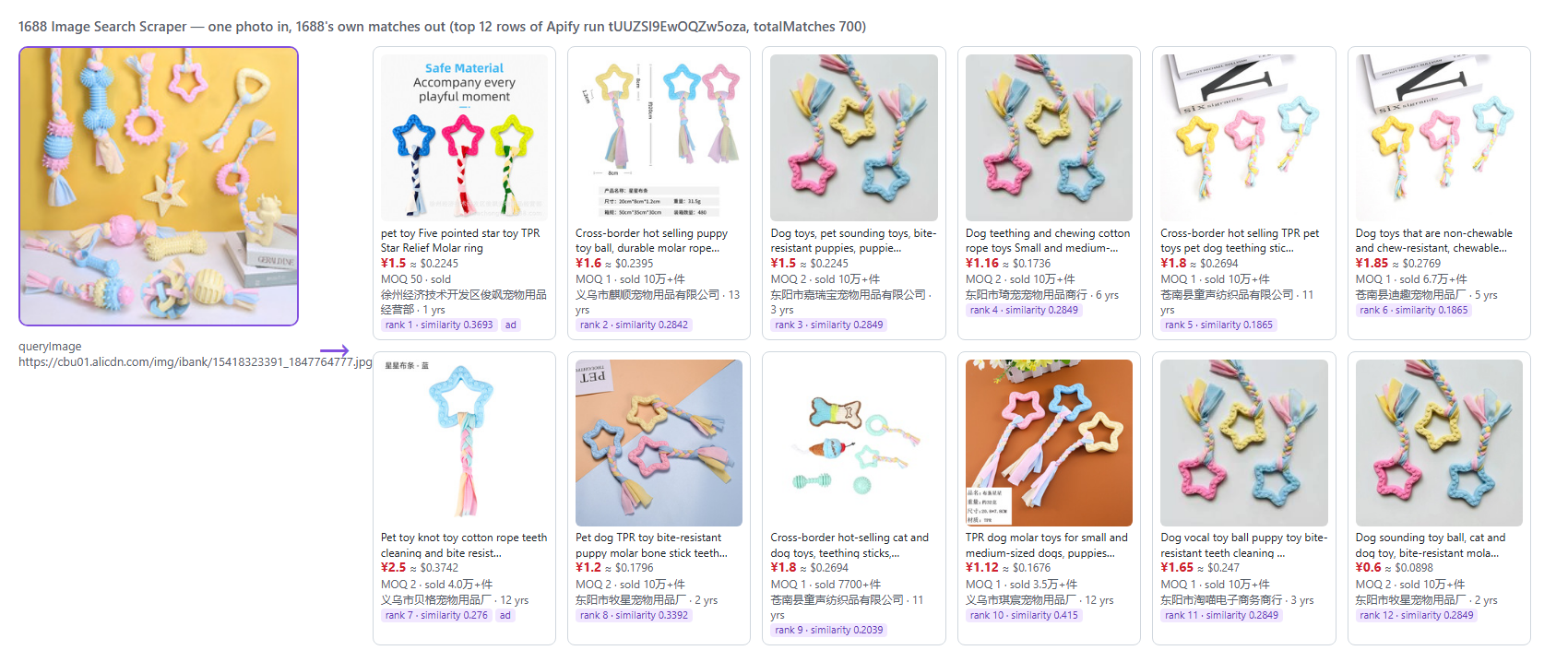
 - 🖼️ **Any photo:** image URLs from any site, base64 photos for API and ERP callers, a file upload, a 1688 image-search link, or 1688 offer links to find look-alikes of.
- 🔍 **1688's own image search:** the same matches a buyer sees on 1688.com, in 1688's order, 60 per page, about 700 per photo.
- 🏭 **Supplier on every row:** company, years on 1688, province and city, manufacturer or wholesaler, inspection badges, service score.
- 📋 **Offer-page details (optional):** price tiers, SKUs with price and stock, specs, weight and size, shipping, rating, dropship stats, landed cost.
- 🌐 **English titles and attributes, USD prices**, free.
- 🔁 **Monitor mode:** only the matches you have not seen yet, for scheduled runs.
- 🔓 **No login, no cookies, no Chinese phone number.**
### What data can you get from 1688 image search?
| | | |
|---|---|---|
| 🖼️ Query photo `queryImage` | 🥇 Rank `rank` | 🎯 Similarity `similarityScore` |
| 🆔 Offer id `offerId` | 🏷️ Title + English `title`, `titleEn` | 🔗 Offer link `detailUrl` |
| 💴 Price `price` (CNY) | 💵 Price `priceUsd` | 📦 MOQ `minOrderQuantity` + `unit` |
| 📈 Units sold `soldCount` | 🧾 Orders `bookedCount` | 🔁 Repeat buyers `offerRepurchaseRate` |
| 🧩 Attributes `attributes` (+ English) | 🏅 Ranking badges `rankingBadges` | 🎁 Promotions `promotions` |
| 🏭 Supplier `supplier.companyName` | 📅 Years on 1688 `supplier.yearsOnPlatform` | 📍 Province / city |
| 🏗️ Manufacturer or wholesaler `supplier.bizTypeEn` | ✅ Inspection badges | ⭐ Service score `supplier.compositeScore` |
| 📊 Price tiers `quantityPrices` (details) | 🧮 SKUs with stock `skuDetails` (details) | ⚖️ Weight and size (details) |
| 🚚 Shipping and dispatch time (details) | 🛒 Dropship stats `dropship` (details) | 🌍 Landed cost `estLandedCostUsd` (details) |
### How to scrape 1688 by image with 1688 Image Search Scraper
1. [Create a free Apify account](https://console.apify.com/sign-up): $5 of monthly credit, no card needed.
2. Open [1688 Image Search Scraper](https://apify.com/TopApi/1688-image-search-scraper) and click **Try for free**.
3. Paste one or more photo links into **Image URLs** (or upload a photo).
4. Pick how many matches you want per photo, and any filters.
5. Click **Start**. Two photos with 20 matches each finish in about 7 seconds.
6. Download the matches as JSON, CSV, Excel or HTML, or read them through the API.
### ⬇️ Input
| Parameter | Type | Description |
|---|---|---|
| **What to search** | | Use any mix; each photo is its own search. At least one is needed (an empty input searches a sample photo). |
| `imageUrls` | array | Photo links from anywhere (JPG, PNG, WebP, GIF), or 1688 image-search links. |
| `imageFile` | string | A photo uploaded from your computer. |
| `imagesBase64` | array | Photos as base64 strings or data URIs. |
| `similarToOffers` | array | 1688 offer links or ids: the offer's main photo is searched. |
| **Filters (applied by 1688)** | | |
| `sortBy` | string | `relevance` (default, 1688's best match), `bestSelling`, `priceAsc`, `priceDesc`. |
| `priceMin`, `priceMax` | number | Price range in CNY. |
| `provinces` | array | Supplier provinces in English or Chinese, e.g. `Guangdong`, `浙江`. |
| `verifiedFactoryOnly` | boolean | Only suppliers 1688 certified as real factories (真实工厂认证). |
| `dropshippingOnly` | boolean | Only offers that ship one piece to your customer (一件代发). |
| `freeShippingOnly` | boolean | Only offers with free shipping inside China (包邮). |
| **Refine results (checked before any charge)** | | |
| `supplierType` | string | `any` (default), `manufacturer`, `wholesaler`. |
| `inspectedFactoryOnly` | boolean | Only suppliers with an on-site factory inspection. |
| `minSupplierYears` | integer | Minimum years on 1688. |
| `maxMoq` | integer | Highest minimum order you accept. |
| `minSimilarity` | number | Lowest similarity score you accept, e.g. `0.3`. |
| `excludeAds` | boolean | Leave out sponsored offers. |
| `onePerSupplier` | boolean | Only the best-ranked offer of each supplier, per photo. |
| **Extra data** | | |
| `includeDetails` | boolean | Read each match's offer page (charged per page read). Default `false`. |
| `includeSkuDetails` | boolean | SKU matrix in details. Default `true`. |
| `includeDescription`, `includeDescriptionHtml` | boolean | The seller's long description (text + images, or raw HTML). |
| `translateTitles` | boolean | English titles, attributes and specs. Default `true`. |
| `targetMarket` | string | `US`, `EU`, `UK`, `AU`, `global` for a landed cost estimate; `none` by default. |
| `usdPerCny`, `shippingUsdPerKg` | number | Your exchange rate and freight rate (defaults: today's published rate; 9-11 USD/kg). |
| **Monitoring** | | |
| `monitorMode` | boolean | Deliver only matches not delivered for the same photo before. |
| `monitorStoreName` | string | The named store that remembers them. |
| **Output** | | |
| `maxResultsPerImage` | integer | Matches per photo, 1-720. Default `60`. |
| `maxImages` | integer | Search at most this many photos. |
| `maxItems` | integer | Hard ceiling on rows for the whole run. |
| `compact` | boolean | Core fields only, for spreadsheets and AI pipelines. |
| **Advanced** | | `proxyConfiguration`, `detailProxyConfiguration`, `maxConcurrency` (offer pages in parallel, default 10). |
#### Input JSON
```json
{
"imageUrls": [
"https://cbu01.alicdn.com/img/ibank/O1CN01Xpr968aWheJ3thOC_!!2212762542575-0-cib.jpg",
"https://m.media-amazon.com/images/I/61Cev2aFG5L._AC_SX695_.jpg"
],
"maxResultsPerImage": 60,
"supplierType": "manufacturer",
"excludeAds": true
}
```
#### Use a clean product photo
1688 matches the main object in the photo and reports the region it matched in `matchedRegion`. A product on a plain background matches best; a lifestyle photo with several objects matches whatever 1688 picks as the main one. Crop the photo to the product when you can.
#### Photos from any site work
Photos on Alibaba's own CDN (alicdn.com, aliexpress-media.com) are passed to 1688 by address. Any other photo is downloaded, turned into a 360-pixel JPEG the way 1688's own upload button does it, and uploaded to 1688's image search. JPG, PNG, WebP and GIF all work; RUN_SUMMARY shows how each photo was searched (`via`: address, upload, offerImage).
#### Ask for 60 per photo, not 700, unless you need depth
1688 ranks by visual similarity mixed with sales and sponsored placement, and the closest matches come first. Deep requests work (1688 pages one sort order 12 pages deep; the actor then walks the other sort orders for more distinct offers), but most sourcing work uses the first 20-60.
### ⬆️ Output
- 🖼️ **Any photo:** image URLs from any site, base64 photos for API and ERP callers, a file upload, a 1688 image-search link, or 1688 offer links to find look-alikes of.
- 🔍 **1688's own image search:** the same matches a buyer sees on 1688.com, in 1688's order, 60 per page, about 700 per photo.
- 🏭 **Supplier on every row:** company, years on 1688, province and city, manufacturer or wholesaler, inspection badges, service score.
- 📋 **Offer-page details (optional):** price tiers, SKUs with price and stock, specs, weight and size, shipping, rating, dropship stats, landed cost.
- 🌐 **English titles and attributes, USD prices**, free.
- 🔁 **Monitor mode:** only the matches you have not seen yet, for scheduled runs.
- 🔓 **No login, no cookies, no Chinese phone number.**
### What data can you get from 1688 image search?
| | | |
|---|---|---|
| 🖼️ Query photo `queryImage` | 🥇 Rank `rank` | 🎯 Similarity `similarityScore` |
| 🆔 Offer id `offerId` | 🏷️ Title + English `title`, `titleEn` | 🔗 Offer link `detailUrl` |
| 💴 Price `price` (CNY) | 💵 Price `priceUsd` | 📦 MOQ `minOrderQuantity` + `unit` |
| 📈 Units sold `soldCount` | 🧾 Orders `bookedCount` | 🔁 Repeat buyers `offerRepurchaseRate` |
| 🧩 Attributes `attributes` (+ English) | 🏅 Ranking badges `rankingBadges` | 🎁 Promotions `promotions` |
| 🏭 Supplier `supplier.companyName` | 📅 Years on 1688 `supplier.yearsOnPlatform` | 📍 Province / city |
| 🏗️ Manufacturer or wholesaler `supplier.bizTypeEn` | ✅ Inspection badges | ⭐ Service score `supplier.compositeScore` |
| 📊 Price tiers `quantityPrices` (details) | 🧮 SKUs with stock `skuDetails` (details) | ⚖️ Weight and size (details) |
| 🚚 Shipping and dispatch time (details) | 🛒 Dropship stats `dropship` (details) | 🌍 Landed cost `estLandedCostUsd` (details) |
### How to scrape 1688 by image with 1688 Image Search Scraper
1. [Create a free Apify account](https://console.apify.com/sign-up): $5 of monthly credit, no card needed.
2. Open [1688 Image Search Scraper](https://apify.com/TopApi/1688-image-search-scraper) and click **Try for free**.
3. Paste one or more photo links into **Image URLs** (or upload a photo).
4. Pick how many matches you want per photo, and any filters.
5. Click **Start**. Two photos with 20 matches each finish in about 7 seconds.
6. Download the matches as JSON, CSV, Excel or HTML, or read them through the API.
### ⬇️ Input
| Parameter | Type | Description |
|---|---|---|
| **What to search** | | Use any mix; each photo is its own search. At least one is needed (an empty input searches a sample photo). |
| `imageUrls` | array | Photo links from anywhere (JPG, PNG, WebP, GIF), or 1688 image-search links. |
| `imageFile` | string | A photo uploaded from your computer. |
| `imagesBase64` | array | Photos as base64 strings or data URIs. |
| `similarToOffers` | array | 1688 offer links or ids: the offer's main photo is searched. |
| **Filters (applied by 1688)** | | |
| `sortBy` | string | `relevance` (default, 1688's best match), `bestSelling`, `priceAsc`, `priceDesc`. |
| `priceMin`, `priceMax` | number | Price range in CNY. |
| `provinces` | array | Supplier provinces in English or Chinese, e.g. `Guangdong`, `浙江`. |
| `verifiedFactoryOnly` | boolean | Only suppliers 1688 certified as real factories (真实工厂认证). |
| `dropshippingOnly` | boolean | Only offers that ship one piece to your customer (一件代发). |
| `freeShippingOnly` | boolean | Only offers with free shipping inside China (包邮). |
| **Refine results (checked before any charge)** | | |
| `supplierType` | string | `any` (default), `manufacturer`, `wholesaler`. |
| `inspectedFactoryOnly` | boolean | Only suppliers with an on-site factory inspection. |
| `minSupplierYears` | integer | Minimum years on 1688. |
| `maxMoq` | integer | Highest minimum order you accept. |
| `minSimilarity` | number | Lowest similarity score you accept, e.g. `0.3`. |
| `excludeAds` | boolean | Leave out sponsored offers. |
| `onePerSupplier` | boolean | Only the best-ranked offer of each supplier, per photo. |
| **Extra data** | | |
| `includeDetails` | boolean | Read each match's offer page (charged per page read). Default `false`. |
| `includeSkuDetails` | boolean | SKU matrix in details. Default `true`. |
| `includeDescription`, `includeDescriptionHtml` | boolean | The seller's long description (text + images, or raw HTML). |
| `translateTitles` | boolean | English titles, attributes and specs. Default `true`. |
| `targetMarket` | string | `US`, `EU`, `UK`, `AU`, `global` for a landed cost estimate; `none` by default. |
| `usdPerCny`, `shippingUsdPerKg` | number | Your exchange rate and freight rate (defaults: today's published rate; 9-11 USD/kg). |
| **Monitoring** | | |
| `monitorMode` | boolean | Deliver only matches not delivered for the same photo before. |
| `monitorStoreName` | string | The named store that remembers them. |
| **Output** | | |
| `maxResultsPerImage` | integer | Matches per photo, 1-720. Default `60`. |
| `maxImages` | integer | Search at most this many photos. |
| `maxItems` | integer | Hard ceiling on rows for the whole run. |
| `compact` | boolean | Core fields only, for spreadsheets and AI pipelines. |
| **Advanced** | | `proxyConfiguration`, `detailProxyConfiguration`, `maxConcurrency` (offer pages in parallel, default 10). |
#### Input JSON
```json
{
"imageUrls": [
"https://cbu01.alicdn.com/img/ibank/O1CN01Xpr968aWheJ3thOC_!!2212762542575-0-cib.jpg",
"https://m.media-amazon.com/images/I/61Cev2aFG5L._AC_SX695_.jpg"
],
"maxResultsPerImage": 60,
"supplierType": "manufacturer",
"excludeAds": true
}
```
#### Use a clean product photo
1688 matches the main object in the photo and reports the region it matched in `matchedRegion`. A product on a plain background matches best; a lifestyle photo with several objects matches whatever 1688 picks as the main one. Crop the photo to the product when you can.
#### Photos from any site work
Photos on Alibaba's own CDN (alicdn.com, aliexpress-media.com) are passed to 1688 by address. Any other photo is downloaded, turned into a 360-pixel JPEG the way 1688's own upload button does it, and uploaded to 1688's image search. JPG, PNG, WebP and GIF all work; RUN_SUMMARY shows how each photo was searched (`via`: address, upload, offerImage).
#### Ask for 60 per photo, not 700, unless you need depth
1688 ranks by visual similarity mixed with sales and sponsored placement, and the closest matches come first. Deep requests work (1688 pages one sort order 12 pages deep; the actor then walks the other sort orders for more distinct offers), but most sourcing work uses the first 20-60.
### ⬆️ Output
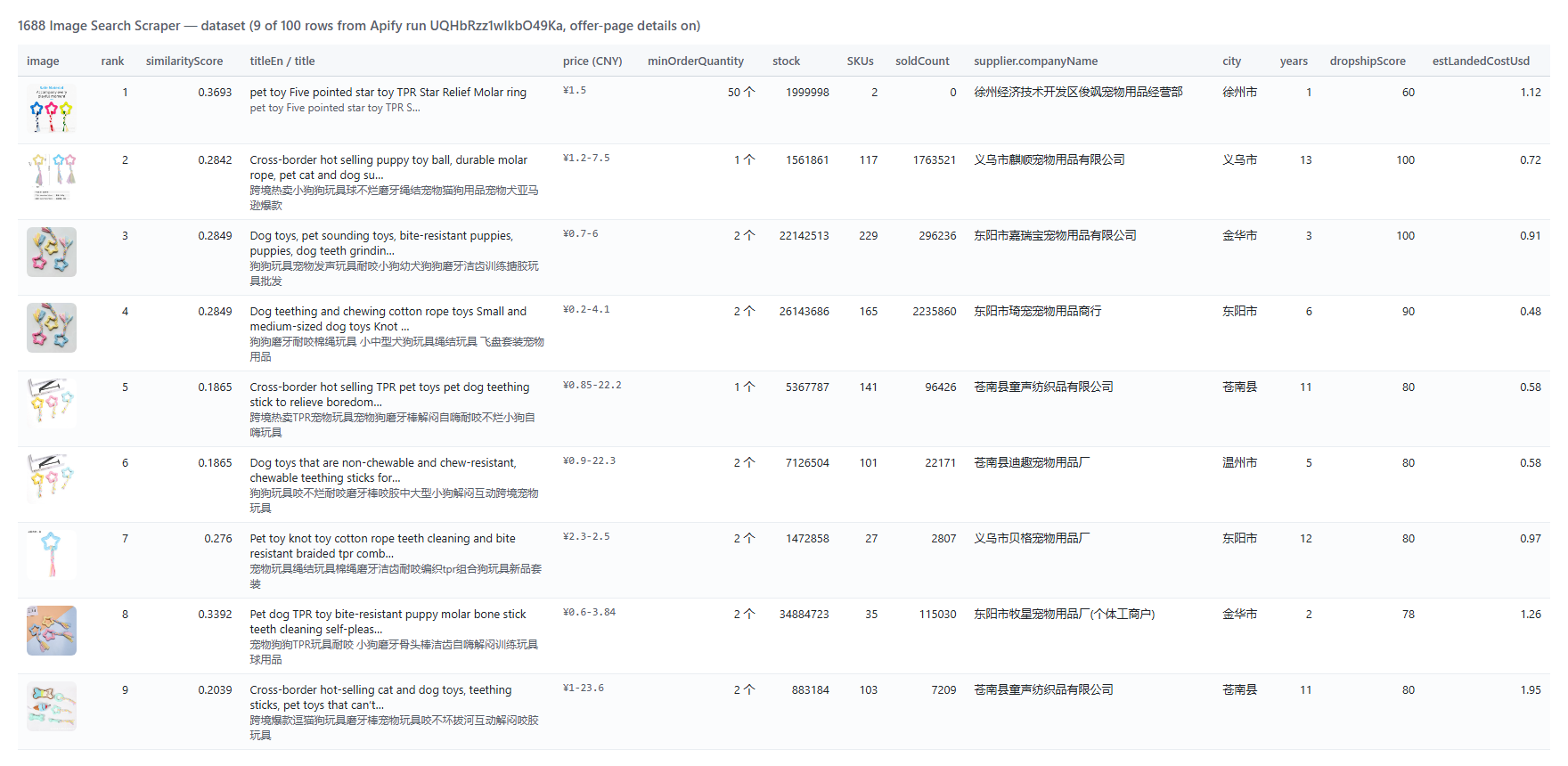 One row per offer matched to a photo. A real row from run `tUUZSl9EwOQZw5oza` (supplier trimmed):
```json
{
"queryImage": "https://cbu01.alicdn.com/img/ibank/O1CN01gQo0hx2LY27U4AagC_!!3937219703-0-C2M.jpg",
"rank": 2,
"similarityScore": 0.0862,
"totalMatches": 698,
"offerId": "1084972240372",
"title": "金标杜比音质骨传导蓝牙耳机耳夹式降噪耳机2025新款蓝牙无线耳机",
"titleEn": "Gold label Dolby sound quality bone conduction Bluetooth headset ear clip noise reduction headset 2025 new Bluetooth wireless headset",
"detailUrl": "https://detail.1688.com/offer/1084972240372.html",
"price": 28.8,
"priceUsd": 4.3107,
"minOrderQuantity": 1,
"unit": "件",
"soldCount": 19,
"bookedCount": 16,
"offerRepurchaseRate": 51,
"attributes": [{ "name": "芯片类型", "value": "中科蓝讯" }, { "name": "材质", "value": "PC+ABS" }],
"supplier": { "companyName": "深圳市龙华区新之叶电子商行", "yearsOnPlatform": 11, "bizTypeEn": "manufacturer", "province": "广东", "city": "深圳市", "businessInspection": true, "compositeScore": 4 }
}
```
With `includeDetails`, the same row also carries `quantityPrices`, `stock`, `totalSold`, `skuDetails` (every SKU's attributes, price, stock, image), `images`, `videoUrl`, `specs` + `specsEn`, `unitWeightKg`, `packageDimensions`, `shipping`, `services`, `rating`, `dropship`, `dropshipScore`, `estLandedCostUsd` and more supplier fields (`followers`, `fulfillmentRate`, `serviceScore`, `buyerRepeatRate3m`, `contactPageUrl`).
#### Fields
Fill rates from real runs: 300 matches for 5 photos (`tUUZSl9EwOQZw5oza`) and 100 matches with offer-page details (`UQHbRzz1wIkbO49Ka`).
| Field | Meaning | Filled |
|---|---|---|
| `rank`, `similarityScore`, `totalMatches` | 1688's order, its visual score, its match count | 100% |
| `offerId`, `title`, `titleEn`, `detailUrl`, `image` | the offer | 100% |
| `price`, `priceUsd`, `minOrderQuantity`, `unit` | price and MOQ from the match card | 100% |
| `soldCount`, `bookedCount`, `offerRepurchaseRate` | units sold, orders, repeat-buyer rate | 100% |
| `attributes` (+ `attributesEn`) | key attributes 1688 shows on the card | 78% |
| `promotions` / `rankingBadges` / `priceAdvantage` | when 1688 shows them | 50% / 8% / 14% |
| `supplier.companyName`, `yearsOnPlatform`, `compositeScore` | supplier basics | 100% |
| `supplier.bizType` (manufacturer / wholesaler) | as the card prints it | 75% |
| `supplier.province`, `city` | supplier location | 84% (99% with details) |
| `quantityPrices` | price tiers (details; offers priced per SKU have none) | 28% |
| `skuDetails`, `stock`, `specs`, `images`, `shipping` | offer page (details) | 97% |
| `rating` | review summary (details) | 88% |
| `dropship`, `dropshipScore`, `estLandedCostUsd` | dropship stats, score, landed cost (details) | 97% |
| `videoUrl` / `unitWeightKg` | when the seller adds them (details) | 67% / 38% |
### How can I use 1688 image search data?
- 🛍️ **Dropshippers and Amazon sellers:** find the 1688 source of a winning product and its factory price.
- 🕵️ **Sourcing agents:** turn a client's photo into a shortlist of factories (`onePerSupplier`, `supplierType: manufacturer`).
- 💰 **Margin checks:** compare `priceUsd` or `estLandedCostUsd` with your selling price.
- 🏷️ **Brand protection:** find where copies of your product are sold wholesale, and watch for new ones with monitor mode.
- 📊 **Market research:** units sold and repeat-buyer rates of look-alike designs.
- 🤖 **AI agents:** give an agent a photo and get structured supplier rows back through MCP.
### How much does it cost to scrape 1688 by image?
Pay per result. No start fee, nothing per photo, and matches removed by your filters are never charged.
| Event | Price | Per 1,000 |
|---|---|---|
| Image match (`match`) | $0.0002 | $0.20 |
| Offer-page details (`product-details`), only with details on | $0.0027 | $2.70 |
| Run | Matches | Cost |
|---|---|---|
| 1 photo, 20 matches | 20 | $0.004 |
| 5 photos, 60 matches each | 300 | $0.06 |
| 10 photos, 100 matches each | 1,000 | $0.20 |
| 2 photos, 50 matches each, with offer-page details | 100 | $0.29 |
Offer pages 1688 does not serve (its slider check) are delivered without details and not charged as details. The free Apify plan's $5 monthly credit covers about 25,000 matches.
### Integrations, API, scheduling & MCP
- **Schedules:** run the same photos daily or weekly in the Apify Console and turn on `monitorMode` so each run delivers only new matches.
- **Webhooks:** call your endpoint when a run finishes.
- **No-code:** Make, Zapier, n8n, Google Sheets, Airtable and Slack via [Apify integrations](https://docs.apify.com/integrations).
- **API:** start runs and read datasets with `apify-client` for [Node.js](https://apify.com/TopApi/1688-image-search-scraper/api/javascript) or [Python](https://apify.com/TopApi/1688-image-search-scraper/api/python); send photos as base64 when you hold the bytes.
- **MCP / AI agents:** connect Claude, Cursor or any MCP client through the [MCP tab](https://apify.com/TopApi/1688-image-search-scraper/api/mcp); `compact` keeps rows small.
### More scrapers for product sourcing
One row per offer matched to a photo. A real row from run `tUUZSl9EwOQZw5oza` (supplier trimmed):
```json
{
"queryImage": "https://cbu01.alicdn.com/img/ibank/O1CN01gQo0hx2LY27U4AagC_!!3937219703-0-C2M.jpg",
"rank": 2,
"similarityScore": 0.0862,
"totalMatches": 698,
"offerId": "1084972240372",
"title": "金标杜比音质骨传导蓝牙耳机耳夹式降噪耳机2025新款蓝牙无线耳机",
"titleEn": "Gold label Dolby sound quality bone conduction Bluetooth headset ear clip noise reduction headset 2025 new Bluetooth wireless headset",
"detailUrl": "https://detail.1688.com/offer/1084972240372.html",
"price": 28.8,
"priceUsd": 4.3107,
"minOrderQuantity": 1,
"unit": "件",
"soldCount": 19,
"bookedCount": 16,
"offerRepurchaseRate": 51,
"attributes": [{ "name": "芯片类型", "value": "中科蓝讯" }, { "name": "材质", "value": "PC+ABS" }],
"supplier": { "companyName": "深圳市龙华区新之叶电子商行", "yearsOnPlatform": 11, "bizTypeEn": "manufacturer", "province": "广东", "city": "深圳市", "businessInspection": true, "compositeScore": 4 }
}
```
With `includeDetails`, the same row also carries `quantityPrices`, `stock`, `totalSold`, `skuDetails` (every SKU's attributes, price, stock, image), `images`, `videoUrl`, `specs` + `specsEn`, `unitWeightKg`, `packageDimensions`, `shipping`, `services`, `rating`, `dropship`, `dropshipScore`, `estLandedCostUsd` and more supplier fields (`followers`, `fulfillmentRate`, `serviceScore`, `buyerRepeatRate3m`, `contactPageUrl`).
#### Fields
Fill rates from real runs: 300 matches for 5 photos (`tUUZSl9EwOQZw5oza`) and 100 matches with offer-page details (`UQHbRzz1wIkbO49Ka`).
| Field | Meaning | Filled |
|---|---|---|
| `rank`, `similarityScore`, `totalMatches` | 1688's order, its visual score, its match count | 100% |
| `offerId`, `title`, `titleEn`, `detailUrl`, `image` | the offer | 100% |
| `price`, `priceUsd`, `minOrderQuantity`, `unit` | price and MOQ from the match card | 100% |
| `soldCount`, `bookedCount`, `offerRepurchaseRate` | units sold, orders, repeat-buyer rate | 100% |
| `attributes` (+ `attributesEn`) | key attributes 1688 shows on the card | 78% |
| `promotions` / `rankingBadges` / `priceAdvantage` | when 1688 shows them | 50% / 8% / 14% |
| `supplier.companyName`, `yearsOnPlatform`, `compositeScore` | supplier basics | 100% |
| `supplier.bizType` (manufacturer / wholesaler) | as the card prints it | 75% |
| `supplier.province`, `city` | supplier location | 84% (99% with details) |
| `quantityPrices` | price tiers (details; offers priced per SKU have none) | 28% |
| `skuDetails`, `stock`, `specs`, `images`, `shipping` | offer page (details) | 97% |
| `rating` | review summary (details) | 88% |
| `dropship`, `dropshipScore`, `estLandedCostUsd` | dropship stats, score, landed cost (details) | 97% |
| `videoUrl` / `unitWeightKg` | when the seller adds them (details) | 67% / 38% |
### How can I use 1688 image search data?
- 🛍️ **Dropshippers and Amazon sellers:** find the 1688 source of a winning product and its factory price.
- 🕵️ **Sourcing agents:** turn a client's photo into a shortlist of factories (`onePerSupplier`, `supplierType: manufacturer`).
- 💰 **Margin checks:** compare `priceUsd` or `estLandedCostUsd` with your selling price.
- 🏷️ **Brand protection:** find where copies of your product are sold wholesale, and watch for new ones with monitor mode.
- 📊 **Market research:** units sold and repeat-buyer rates of look-alike designs.
- 🤖 **AI agents:** give an agent a photo and get structured supplier rows back through MCP.
### How much does it cost to scrape 1688 by image?
Pay per result. No start fee, nothing per photo, and matches removed by your filters are never charged.
| Event | Price | Per 1,000 |
|---|---|---|
| Image match (`match`) | $0.0002 | $0.20 |
| Offer-page details (`product-details`), only with details on | $0.0027 | $2.70 |
| Run | Matches | Cost |
|---|---|---|
| 1 photo, 20 matches | 20 | $0.004 |
| 5 photos, 60 matches each | 300 | $0.06 |
| 10 photos, 100 matches each | 1,000 | $0.20 |
| 2 photos, 50 matches each, with offer-page details | 100 | $0.29 |
Offer pages 1688 does not serve (its slider check) are delivered without details and not charged as details. The free Apify plan's $5 monthly credit covers about 25,000 matches.
### Integrations, API, scheduling & MCP
- **Schedules:** run the same photos daily or weekly in the Apify Console and turn on `monitorMode` so each run delivers only new matches.
- **Webhooks:** call your endpoint when a run finishes.
- **No-code:** Make, Zapier, n8n, Google Sheets, Airtable and Slack via [Apify integrations](https://docs.apify.com/integrations).
- **API:** start runs and read datasets with `apify-client` for [Node.js](https://apify.com/TopApi/1688-image-search-scraper/api/javascript) or [Python](https://apify.com/TopApi/1688-image-search-scraper/api/python); send photos as base64 when you hold the bytes.
- **MCP / AI agents:** connect Claude, Cursor or any MCP client through the [MCP tab](https://apify.com/TopApi/1688-image-search-scraper/api/mcp); `compact` keeps rows small.
### More scrapers for product sourcing
| 🏭 1688.com Wholesale Scraper — 1688 offers by keyword or offer id | 🛒 Taobao & Tmall Product Scraper — Chinese retail prices | 🎵 TikTok Scraper — products trending on TikTok |
| 📢 TikTok Ads Library Scraper — products other sellers advertise | ™️ USPTO Trademark Scraper — check a brand before you import | 🧭 All TopApi actors |