🏢 Property name and link (propertyName, url) | 📍 Full address, city, state, ZIP, county, neighborhood | 🧭 Latitude and longitude |
💲 Rent range and rent per bed type (rentByBedType) | 🧾 Total monthly price and base rent | 🛏️ Beds, baths and square feet |
| ☎️ Leasing phone and property website | 🏷️ Management company and logo | 🎁 Move-in specials with end date |
📐 Floor plans (models) | 🚪 Available units with price and date (units) | 💵 Every published fee (fees) |
| 🐾 Pet policy and pet fees | 🚗 Parking types and fees | ✨ Community and interior amenities |
| 🏫 Assigned and nearby schools with ratings | 🕘 Office hours and languages | 🏗️ Year built, units, stories |
| ⭐ Renter rating and review count | 💬 Reviews with the property's response | 📷 Photo gallery with captions |
| 🚶 Walk, transit, drive, bike and sound scores | 🚇 Nearby transit, airports and points of interest | 🔁 Change type and previous rent (monitor mode) |
On a 100-property test run in Denver with details on, 100% of rows had a phone, coordinates, rent, floor plans, office hours and schools; 98% a property website and a pet policy; 97% at least one available unit (2,997 units in total).
### How to scrape Apartments.com with Apartments.com Scraper
1. [Create a free Apify account](https://console.apify.com/sign-up): $5 of monthly credit, no card needed.
2. Open [Apartments.com Scraper](https://apify.com/TopApi/apartments-com-scraper) and click **Try for free**.
3. Type a location into **Location** (or paste Apartments.com links) and set **Max properties**.
4. Add filters if you need them, and turn on **Property details** for floor plans, units and fees.
5. Click **Start**. Rows stream into the dataset as they are found.
6. Open the **Storage** tab and **Export** as JSON, CSV or Excel, or let a schedule run it for you.
### ⬇️ Input
| Parameter | Type | Description |
|---|---|---|
| **🔍 What to scrape** | | Use any combination; nothing given = a 20-property sample for Austin, TX |
| `search` | String | A city, ZIP, neighborhood, university, address or property name, e.g. `"Austin, TX"`, `"78704"`, `"Toronto, ON"` |
| `locations` | List | More locations, one per line; each gets the same filters |
| `startUrls` | List | Apartments.com search links (their filters are kept) or property links |
| `listingKeys` | List | The 7-character key at the end of a property URL, e.g. `303djxe` |
| `latitude`, `longitude`, `radiusMiles` | Number | Search a square around a point (radius default 2 miles) |
| **🎯 Filters** (applied by Apartments.com) | | |
| `minPrice`, `maxPrice` | Integer | Monthly rent range |
| `minBeds`, `maxBeds`, `minBaths` | Integer | 0 = studio |
| `minSqft`, `maxSqft` | Integer | Unit size |
| `propertyTypes` | Select | Apartments, houses, condos, townhomes |
| `petPolicy` | Select | Pet friendly, dog friendly, cat friendly, dogs and cats |
| `amenities` | Select | 33 of the site's amenity filters (washer & dryer, pool, parking, EV charging…) |
| `keywords` | String | Free text the site matches, e.g. `"rooftop pool"` |
| `minRating` | Select | 4+ or 5 stars |
| `lifestyle` | Select | Student, senior, military, corporate |
| `shortTerm`, `moveInDate` | Select / Date | Short-term lease length; available by a date |
| `listingOptions` | Select | New listings, for rent by owner, rooms for rent, online applications, 3D tour… |
| `hasMoveInSpecials`, `incomeRestricted` | Boolean | Specials only; income-restricted housing only |
| `sortBy` | Select | Best match, rent low/high, last updated, virtual tour, video |
| **✂️ Refine results** | | |
| `withPhoneOnly`, `withSpecialsOnly` | Boolean | Keep only rows with a phone / a special |
| `minReviewRating` | Number | Exact rating floor, e.g. 4.3 |
| `updatedWithinDays` | Integer | Only listings updated in the last N days |
| `excludeKeywords` | List | Skip names, addresses or descriptions containing these words |
| **➕ Extra data** | | |
| `includeDetails` | Boolean | The property record (floor plans, units, fees, pets, parking, amenities, schools, hours) - charged as **property-details** at $0.0009 per row that gets it |
| `includeReviews`, `maxReviewsPerProperty` | Boolean / Integer | Reviews with the property's response (needs details, free) |
| `includeVisuals`, `maxPhotos` | Boolean / Integer | Photo gallery (needs details, free) |
| `includeInteriorAmenities` | Boolean | Interior amenities per floor plan and unit (needs details, free) |
| `includeWalkScore` | Boolean | Walk, transit, drive, bike and sound scores, transit and nearby places (needs details, free) |
| **🔁 Monitoring** | | |
| `monitorMode`, `monitorStoreName`, `includeUnchanged` | Boolean / String | Only new and changed properties since the last run; pairs with a daily schedule |
| **📦 Output** | | |
| `maxItems` | Integer | Default `100`, prefill `20`; `0` = no limit |
| `maxResultsPerSearch` | Integer | Cap per location or link |
| `maximizeCoverage` | Boolean | Split searches above the site's 700-property cap into rent bands |
| `removeDuplicates`, `compact`, `includeRawData` | Boolean | One row per property; core fields only for AI agents; the raw property record |
| **⚙️ Advanced** | | |
| `maxConcurrency`, `proxyConfiguration` | Integer / Object | Parallel property reads (6); Apify proxy by default |
#### Input JSON
```json
{
"search": "Denver, CO",
"maxPrice": 2500,
"minBeds": 1,
"petPolicy": "dogs",
"includeDetails": true,
"includeReviews": true,
"maxItems": 100
}
```
#### Put the place in Location and the rest in filters
Apartments.com reads the location box like its own search bar: `"78704"`, `"Capitol Hill, Seattle"` and `"University of Texas at Austin"` all resolve. An exact street address of a property returns that one property. Plain-English requests such as `"2 bedroom pet friendly austin under 2000"` also work, but the filter fields are exact, so prefer **Location:** `Austin, TX` + **Min bedrooms** `2` + **Max rent** `2000`.
#### Paste a search link to keep the site's own filters
Set the filters on apartments.com, copy the address bar (for example `https://www.apartments.com/houses/seattle-wa/2-bedrooms-under-3000/`) and paste it into **Apartments.com links**. Filters you also set in the form are added on top.
#### Turn on details only when you need units and fees
Search rows already carry name, address, coordinates, rent by bed type, beds, baths, phone, specials and amenity highlights. **Property details** reads each property's record (two extra requests per property): 100 properties took 92 seconds instead of 10.
### ⬆️ Output
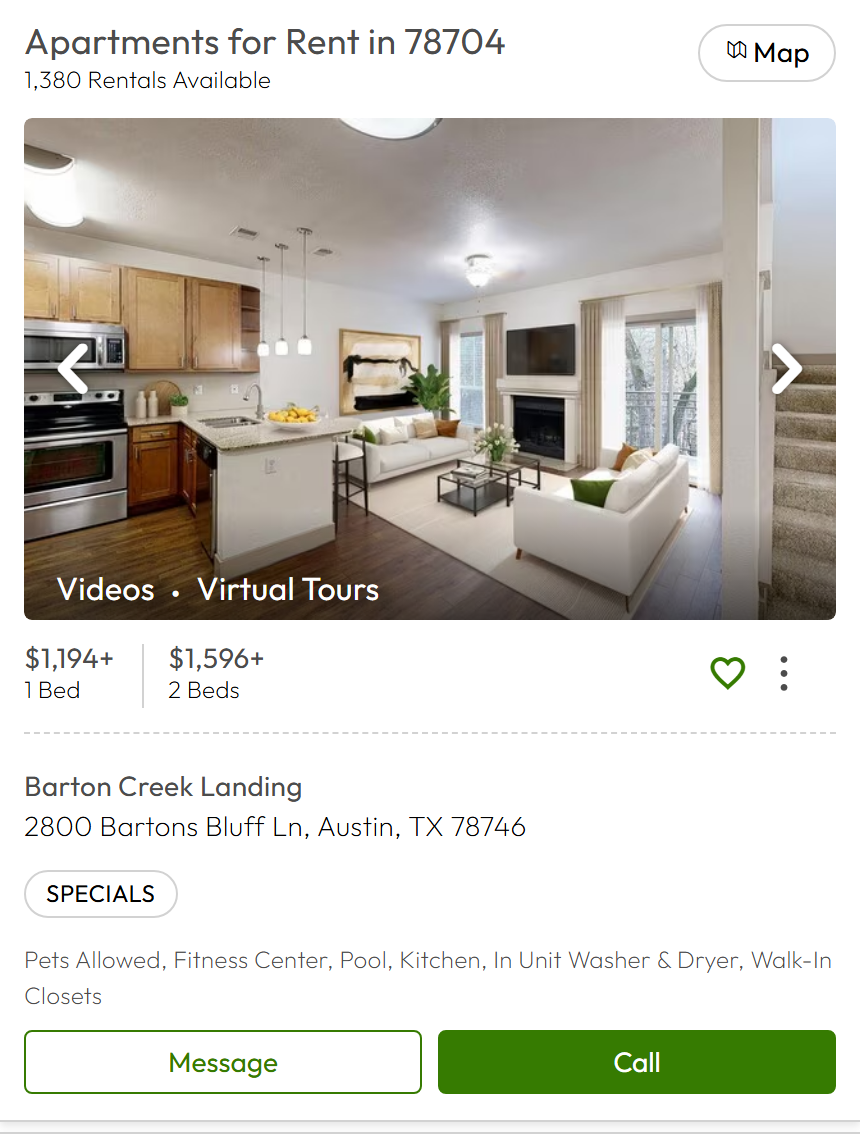
Every property becomes one dataset item. Here is the table view of a run for `Denver, CO` with details on:
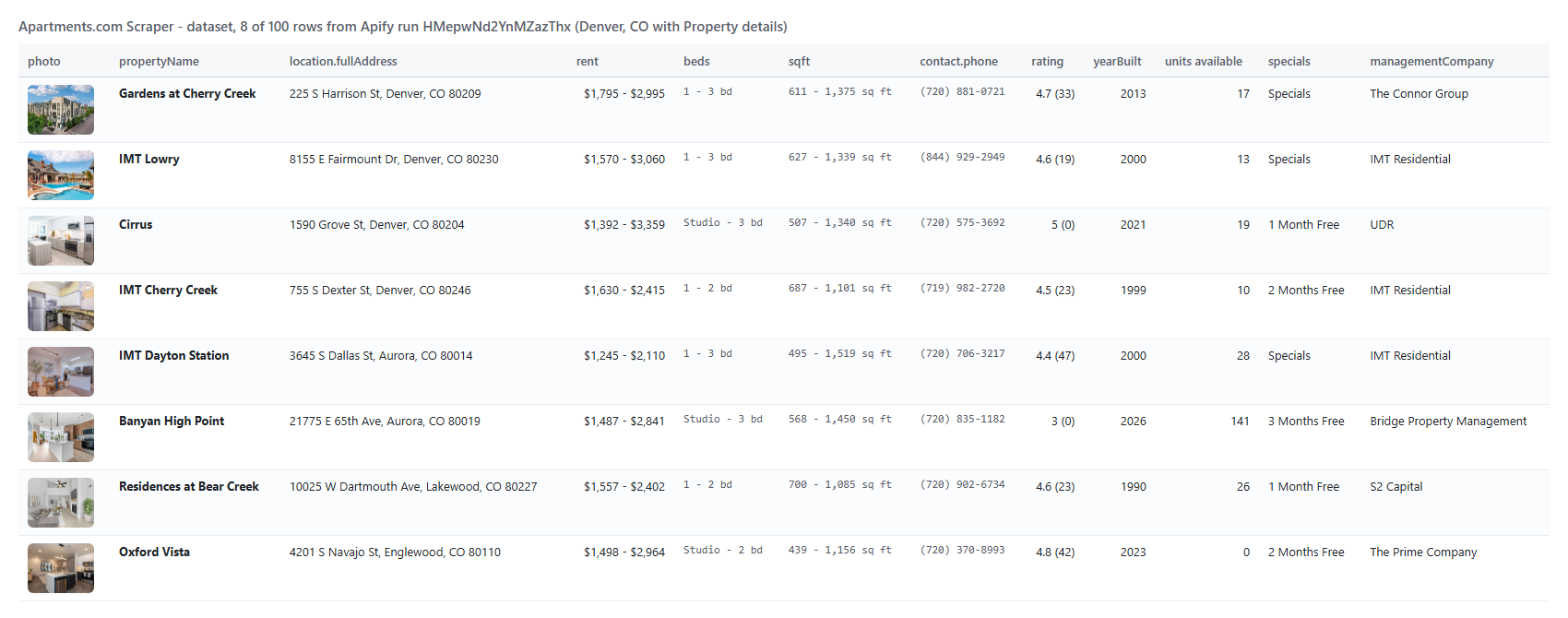 The same row as JSON (shortened):
```json
{
"id": "wglzxkk",
"propertyName": "Gardens at Cherry Creek",
"url": "https://www.apartments.com/gardens-at-cherry-creek-denver-co/wglzxkk/",
"lastUpdated": "2026-10-20T20:56:51.173Z",
"propertyType": "Apartment",
"location": { "fullAddress": "225 S Harrison St, Denver, CO 80209", "county": "Denver", "neighborhood": "Cherry Creek" },
"coordinates": { "latitude": 39.71253, "longitude": -104.94211 },
"rating": 4.7,
"reviewCount": 33,
"rent": { "min": 1795, "max": 2995, "currency": "USD" },
"rentByBedType": [{ "beds": "1 Bed", "price": "$1,910+", "priceMin": 1910, "isStartingAt": true }],
"beds": "1 - 3 bd", "baths": "1 - 2 ba", "sqft": "611 - 1,375 sq ft",
"contact": { "name": "The Connor Group", "phone": "(720) 881-0721", "website": "https://gardensatcherrycreek.com/?utm_source=apartments" },
"yearBuilt": 2013, "unitCount": 191, "availableUnitCount": 17,
"units": [{ "unitNumber": "B124", "modelName": "Sunflower", "beds": 1, "baths": 1, "sqft": 778, "rent": 1795, "availableDate": "2026-09-11" }],
"fees": [{ "category": "One-time", "name": "Application", "value": "$28", "required": true }],
"detailStatus": "ok"
}
```
#### Fields
Fill measured on two runs: 100 search rows (Chicago, details off) and 100 rows with details (Denver).
| Field | Type | What it is | Fill |
|---|---|---|---|
| `id`, `propertyName`, `url` | string | Listing key, name (the address for a house), page link | 100% |
| `location` | object | fullAddress, streetAddress, city, state, postalCode, county, neighborhood, countryCode | 100% (neighborhood 85%, county with details) |
| `coordinates` | object | latitude, longitude | 100% |
| `rent`, `rentText`, `rentByBedType` | object / string / array | Rent range, the text shown, starting rent per bed type | 99-100% |
| `baseRentByBedType`, `requiredMonthlyFees` | array / number | Base rent when the shown price includes fees | 67% (where the site shows total monthly price) |
| `beds`, `baths` (+ numeric min / max) | string | Bed and bath ranges | 100% |
| `contact` | object | name (management company), phone, phones, website, logo, languages | phone 100%; website 98% with details |
| `specials`, `hasSpecials` | object / boolean | Move-in special: title, description, end date | 42% of search rows |
| `amenityHighlights`, `photo`, `photoCount`, `has3DTour`, `hasVideo`, `tier`, `position` | mixed | What the search row shows | 83-100% |
| `lastUpdated`, `propertyType`, `rating`, `ratings`, `reviewCount` | mixed | From the property record | 100% with details |
| `description`, `leaseTerms`, `yearBuilt`, `unitCount`, `stories`, `sqft` | mixed | Property facts | 76-100% with details |
| `models` | array | Floor plans: name, beds, baths, sqft, rent range, total monthly price, available and total units | 100% with details |
| `units` | array | Available units: unit number, floor plan, beds, baths, sqft, rent, deposit, move-in date, lease terms | 97% with details |
| `fees`, `petPolicy`, `parking` | array | Every published fee; pets with their fees; parking types and fees | 99% / 98% / 79% with details |
| `amenities`, `uniqueFeatures` | object / array | Community and interior amenities, grouped as the site groups them | 97-100% with details |
| `schools`, `officeHours`, `managementCompany` | array / object | Schools with rating and district; hours per weekday; manager | 100% with details |
| `reviews`, `photos` | array | With the Reviews / Photos options | 100% of properties that have reviews (25 of 30); photos 30 of 30 |
| `scores`, `soundScore`, `transit`, `pointsOfInterest`, `faq` | mixed | With the scores option | sound score 30 of 30; walk/transit/drive/bike, transit, places, FAQ 18 of 30 (see Limits) |
| `detailStatus` | string | ok, not requested, not found, blocked, unreachable | 100% |
| `changeType`, `previousRent`, `rentDelta`, `rentDeltaPct`, `firstSeenAt` | mixed | Monitor mode only | - |
### How can I use Apartments.com data?
- 📊 **Rental market analysts:** track asking rents per bed type, specials and vacancy (available units) across cities and ZIP codes
- 🏢 **Property managers and owners:** benchmark your property's rent, fees and amenities against every competitor within a mile
- 🧳 **Relocation and corporate housing teams:** shortlist pet-friendly, furnished or short-term units with move-in dates and phones
- 🏦 **Investors and lenders:** feed unit-level rent rolls, year built and unit counts into underwriting models
- 🧑💻 **Proptech and listing apps:** keep a property database fresh with coordinates, floor plans and photos
- 🤖 **AI and research teams:** give an agent current rents with `compact` rows, or train models on descriptions and reviews
- 📈 **Everyone above:** run it daily in monitor mode and get only new listings and rent changes
### How much does it cost to scrape Apartments.com?
Apartments.com Scraper is pay-per-result with no start fee: **$0.89 per 1,000 properties**, plus **$0.90 per 1,000 properties that get Property details**. A property with details costs $0.00179. Rows that are filtered out, duplicates, unchanged monitor rows and listings that could not be read are not charged.
| Properties | Search rows | With Property details |
|---:|---:|---:|
| 10 | $0.0089 | $0.0179 |
| 100 | $0.089 | $0.179 |
| 1,000 | $0.89 | $1.79 |
| 10,000 | $8.90 | $17.90 |
There is nothing else to pay: Apify platform usage is included in these prices. A 100-property search took 10 seconds; 100 properties with details took 92 seconds on 256 MB.
### Integrations, API, scheduling & MCP
- **Schedules:** run Apartments.com Scraper daily or weekly from the **Schedules** tab; with **Monitor mode** each run returns only new properties and rent or specials changes.
- **Webhooks:** call a URL when a run finishes, to load the rows into your database or CRM.
- **No-code:** Make, Zapier, n8n, Google Sheets, Airtable and Slack through [Apify integrations](https://docs.apify.com/integrations).
- **API:** start runs and read datasets from Node.js or Python with `apify-client`: code on the [API tab](https://apify.com/TopApi/apartments-com-scraper/api/python) and in the [Apify API reference](https://docs.apify.com/api/v2).
- **MCP / AI agents:** connect Claude, Cursor or any MCP client through the [MCP tab](https://apify.com/TopApi/apartments-com-scraper/api/mcp) and ask for rentals in plain language; `compact: true` keeps answers short.
### More real estate and local data scrapers
The same row as JSON (shortened):
```json
{
"id": "wglzxkk",
"propertyName": "Gardens at Cherry Creek",
"url": "https://www.apartments.com/gardens-at-cherry-creek-denver-co/wglzxkk/",
"lastUpdated": "2026-10-20T20:56:51.173Z",
"propertyType": "Apartment",
"location": { "fullAddress": "225 S Harrison St, Denver, CO 80209", "county": "Denver", "neighborhood": "Cherry Creek" },
"coordinates": { "latitude": 39.71253, "longitude": -104.94211 },
"rating": 4.7,
"reviewCount": 33,
"rent": { "min": 1795, "max": 2995, "currency": "USD" },
"rentByBedType": [{ "beds": "1 Bed", "price": "$1,910+", "priceMin": 1910, "isStartingAt": true }],
"beds": "1 - 3 bd", "baths": "1 - 2 ba", "sqft": "611 - 1,375 sq ft",
"contact": { "name": "The Connor Group", "phone": "(720) 881-0721", "website": "https://gardensatcherrycreek.com/?utm_source=apartments" },
"yearBuilt": 2013, "unitCount": 191, "availableUnitCount": 17,
"units": [{ "unitNumber": "B124", "modelName": "Sunflower", "beds": 1, "baths": 1, "sqft": 778, "rent": 1795, "availableDate": "2026-09-11" }],
"fees": [{ "category": "One-time", "name": "Application", "value": "$28", "required": true }],
"detailStatus": "ok"
}
```
#### Fields
Fill measured on two runs: 100 search rows (Chicago, details off) and 100 rows with details (Denver).
| Field | Type | What it is | Fill |
|---|---|---|---|
| `id`, `propertyName`, `url` | string | Listing key, name (the address for a house), page link | 100% |
| `location` | object | fullAddress, streetAddress, city, state, postalCode, county, neighborhood, countryCode | 100% (neighborhood 85%, county with details) |
| `coordinates` | object | latitude, longitude | 100% |
| `rent`, `rentText`, `rentByBedType` | object / string / array | Rent range, the text shown, starting rent per bed type | 99-100% |
| `baseRentByBedType`, `requiredMonthlyFees` | array / number | Base rent when the shown price includes fees | 67% (where the site shows total monthly price) |
| `beds`, `baths` (+ numeric min / max) | string | Bed and bath ranges | 100% |
| `contact` | object | name (management company), phone, phones, website, logo, languages | phone 100%; website 98% with details |
| `specials`, `hasSpecials` | object / boolean | Move-in special: title, description, end date | 42% of search rows |
| `amenityHighlights`, `photo`, `photoCount`, `has3DTour`, `hasVideo`, `tier`, `position` | mixed | What the search row shows | 83-100% |
| `lastUpdated`, `propertyType`, `rating`, `ratings`, `reviewCount` | mixed | From the property record | 100% with details |
| `description`, `leaseTerms`, `yearBuilt`, `unitCount`, `stories`, `sqft` | mixed | Property facts | 76-100% with details |
| `models` | array | Floor plans: name, beds, baths, sqft, rent range, total monthly price, available and total units | 100% with details |
| `units` | array | Available units: unit number, floor plan, beds, baths, sqft, rent, deposit, move-in date, lease terms | 97% with details |
| `fees`, `petPolicy`, `parking` | array | Every published fee; pets with their fees; parking types and fees | 99% / 98% / 79% with details |
| `amenities`, `uniqueFeatures` | object / array | Community and interior amenities, grouped as the site groups them | 97-100% with details |
| `schools`, `officeHours`, `managementCompany` | array / object | Schools with rating and district; hours per weekday; manager | 100% with details |
| `reviews`, `photos` | array | With the Reviews / Photos options | 100% of properties that have reviews (25 of 30); photos 30 of 30 |
| `scores`, `soundScore`, `transit`, `pointsOfInterest`, `faq` | mixed | With the scores option | sound score 30 of 30; walk/transit/drive/bike, transit, places, FAQ 18 of 30 (see Limits) |
| `detailStatus` | string | ok, not requested, not found, blocked, unreachable | 100% |
| `changeType`, `previousRent`, `rentDelta`, `rentDeltaPct`, `firstSeenAt` | mixed | Monitor mode only | - |
### How can I use Apartments.com data?
- 📊 **Rental market analysts:** track asking rents per bed type, specials and vacancy (available units) across cities and ZIP codes
- 🏢 **Property managers and owners:** benchmark your property's rent, fees and amenities against every competitor within a mile
- 🧳 **Relocation and corporate housing teams:** shortlist pet-friendly, furnished or short-term units with move-in dates and phones
- 🏦 **Investors and lenders:** feed unit-level rent rolls, year built and unit counts into underwriting models
- 🧑💻 **Proptech and listing apps:** keep a property database fresh with coordinates, floor plans and photos
- 🤖 **AI and research teams:** give an agent current rents with `compact` rows, or train models on descriptions and reviews
- 📈 **Everyone above:** run it daily in monitor mode and get only new listings and rent changes
### How much does it cost to scrape Apartments.com?
Apartments.com Scraper is pay-per-result with no start fee: **$0.89 per 1,000 properties**, plus **$0.90 per 1,000 properties that get Property details**. A property with details costs $0.00179. Rows that are filtered out, duplicates, unchanged monitor rows and listings that could not be read are not charged.
| Properties | Search rows | With Property details |
|---:|---:|---:|
| 10 | $0.0089 | $0.0179 |
| 100 | $0.089 | $0.179 |
| 1,000 | $0.89 | $1.79 |
| 10,000 | $8.90 | $17.90 |
There is nothing else to pay: Apify platform usage is included in these prices. A 100-property search took 10 seconds; 100 properties with details took 92 seconds on 256 MB.
### Integrations, API, scheduling & MCP
- **Schedules:** run Apartments.com Scraper daily or weekly from the **Schedules** tab; with **Monitor mode** each run returns only new properties and rent or specials changes.
- **Webhooks:** call a URL when a run finishes, to load the rows into your database or CRM.
- **No-code:** Make, Zapier, n8n, Google Sheets, Airtable and Slack through [Apify integrations](https://docs.apify.com/integrations).
- **API:** start runs and read datasets from Node.js or Python with `apify-client`: code on the [API tab](https://apify.com/TopApi/apartments-com-scraper/api/python) and in the [Apify API reference](https://docs.apify.com/api/v2).
- **MCP / AI agents:** connect Claude, Cursor or any MCP client through the [MCP tab](https://apify.com/TopApi/apartments-com-scraper/api/mcp) and ask for rentals in plain language; `compact: true` keeps answers short.
### More real estate and local data scrapers