| 🏷️ Name and local-language name |
☎️ Phone, formatted phone, other phones, fax |
🌐 Website and website type |
| 📍 Full address, street, city, state, postcode, country |
🧭 Latitude, longitude, time zone |
🗂️ Category, category list and Apple category path |
| ⭐ Rating with source and scale (`rating`), 0-5 value (`ratingOutOf5`) |
💬 Review count and up to 3 review snippets |
💲 Price level |
| 🕒 Weekly hours, open now, service hours |
♿ Amenities (Apple Pay, wheelchair access, Wi-Fi…) |
📷 Photos with caption, author and source |
| 🔗 Quick links (order, book, menu) |
🏢 Claim link and unclaimed flag |
📰 Editorial notes, awards, guides it appears in |
| ⚡ EV charger connectors and power |
🚉 Transit lines, departures and service alerts |
🥾 Trails at a trailhead with their length |
| 📧 Emails and social profiles (optional add-on) |
🚩 Lead tags and listing completeness score |
🔎 Search term, area and rank that found the place |
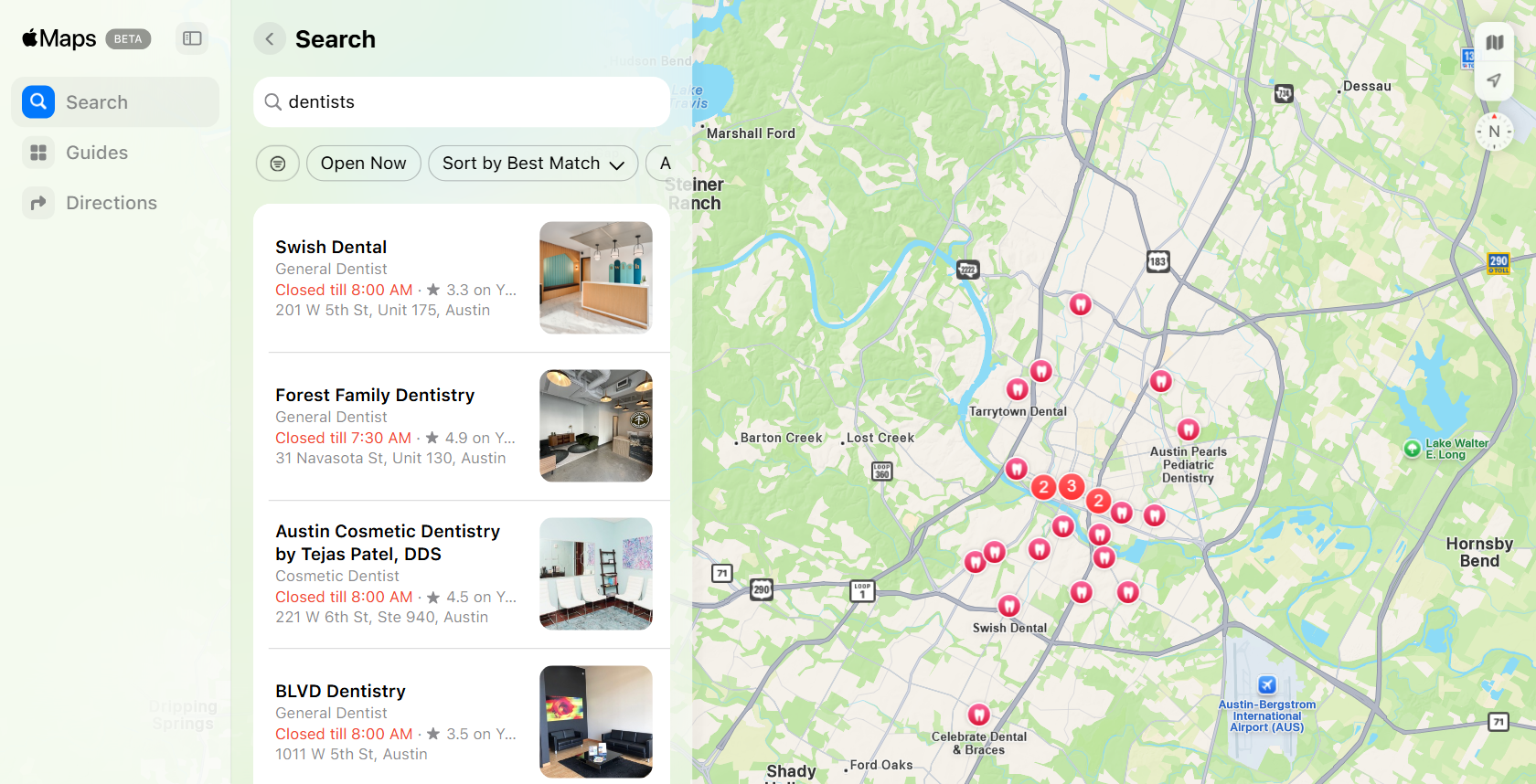
On two 25-place test runs (dentists in Austin) every row had a phone, a website, a rating, review snippets and opening hours, 96% had amenities and photos, and 64-72% were listings the business has not claimed on Apple Business Connect.
### How to scrape Apple Maps with Apple Maps Scraper
1. [Create a free Apify account](https://console.apify.com/sign-up) — $5 of monthly credit, no card needed.
2. Open [Apple Maps Scraper](https://apify.com/TopApi/apple-maps-scraper) and click **Try for free**.
3. Type what you are looking for into **Search terms** (e.g. `dentists`) and where into **Location** (e.g. `Austin, TX`), or paste Apple Maps links.
4. Set **Max places per search** and click **Start**. Places stream into the dataset as they are found.
5. Open the **Storage** tab and **Export** as JSON, CSV or Excel, or let a schedule run it for you.
### ⬇️ Input
| Parameter | Type | Description |
|---|---|---|
| **🔍 What to scrape** | | |
| `searchQueries` | List | What to look for, e.g. `dentists`, `coffee shop`, `EV charging station`. A term can carry its own place (`dentists austin tx`). API callers may also pass `{"query": "…", "location": "…", "maxResults": 30}` objects. |
| `location` / `locations` | Text / List | City, neighborhood, postcode, address, state or country, e.g. `Austin, TX`, `Shibuya, Tokyo`, `78701`. |
| `latitude`, `longitude`, `radiusKm` | Number | Search around an exact point; radius default 5 km. |
| `boundingBox` | JSON | An exact area: `{"northLat": 30.37, "eastLng": -97.64, "southLat": 30.17, "westLng": -97.84}`. |
| `startUrls`, `placeUrls`, `searchUrls`, `guideUrls` | List | Apple Maps place links (`?place-id=I…`, `?auid=…`), bare place ids, search links (`/search?query=…¢er=…&span=…`), guide links (`/guides?curated=…`), address links and `maps.apple` short links. |
| **🎯 Filters** (applied by Apple Maps) | | |
| `countryCode` | Text | Country Apple ranks for. Default `US`. |
| `language` | Text | Names, categories and addresses in this language. Default `en-US`. |
| `sortBy` | Select | `relevance` (default), `distance` or `rating`. |
| `openNow` | Boolean | Only places open at run time, in their own time zone. |
| `toggles` | List | Apple's own filter bar, e.g. `ACCEPTS_APPLE_PAY`, `WHEELCHAIR_ACCESSIBLE`. |
| **✂️ Refine results** | | |
| `minRating` | Select | 3, 3.5, 4 or 4.5 stars (Apple's 0-100 scores are converted). |
| `hasPhone`, `hasWebsite`, `hasEmail` | Boolean | Keep only places with a phone, a website or an email. |
| `skipClosedPlaces`, `categoryFilterWords`, `openAt` | Boolean / List / Text | Leave out closed places, keep only some categories, keep places open at a given time. |
| **➕ Extra data** | | |
| `includeNearbyPlaces` | Boolean | Also collect the matching places Apple shows as dots around each search. |
| `includeGuides` | Boolean | Also return the Apple Maps guides each search shows — **guide** event. |
| `maxPhotos` | Integer | Photos per place. Default 5. |
| `enrichContacts`, `maxWebsitePages` | Boolean / Integer | Read each place's website for emails and social profiles — **contact-details** event. |
| **🔁 Monitoring** | | |
| `monitorMode`, `monitorChanges`, `monitorStoreName` | Boolean / Text | Only places not delivered before, plus changed ones with their previous rating, review count, hours, phone and website and the list of what changed. |
| **📦 Output** | | |
| `maxResults` | Integer | Places per search term per area. Default 50; `0` = everything the area gives. |
| `maxItems`, `maxRunSeconds`, `compact` | Integer / Boolean | Total cap, time limit, core fields only for AI agents. |
| **🗺️ Area coverage** | | |
| `adaptiveGrid`, `cellSizeMeters`, `minCellSizeMeters`, `saturationThreshold`, `maxGridDepth`, `maxCells` | | How a big area is split once Apple's answer is full. |
| `queryExpansions` | JSON | Extra spellings searched with a term, e.g. `{"cafe": ["coffee shop"]}`; places are de-duplicated across variants. |
| **⚙️ Advanced** | | |
| `proxyConfiguration`, `maxConcurrency` | | Direct requests by default; the run moves to the Apify proxy if Apple refuses or answers very slowly, then to RESIDENTIAL if the proxy keeps failing. |
#### Input JSON
```json
{
"searchQueries": ["dentists", "orthodontist"],
"location": "Austin, TX",
"maxResults": 200,
"hasPhone": true,
"minRating": "4"
}
```
#### Put only the business type in the search term
**Do:** `searchQueries: ["coffee shop"]` with `location: "Brooklyn, NY"`. **Don't:** a one-word term in another language on its own — Apple Maps sometimes reads it as a place name (on a test, `ramen` with a Japanese locale matched a village called Ramen). Use the term buyers would type in that country (`ラーメン`) or add a category word; places Apple returns far outside your area are dropped and never charged.
#### Ask for more than 55 when you want the whole area
One Apple Maps answer holds 25 places for a neighborhood-sized view and 55 for a city-sized one. Set `maxResults` higher (or `0`) and Apple Maps Scraper keeps splitting the area into quarters while the answers are full. Split by city or neighborhood with `locations` when you want the rows grouped by area.
### ⬆️ Output
Every place becomes one dataset item. Here is the table view of a run for `dentists` in `Austin, TX`:
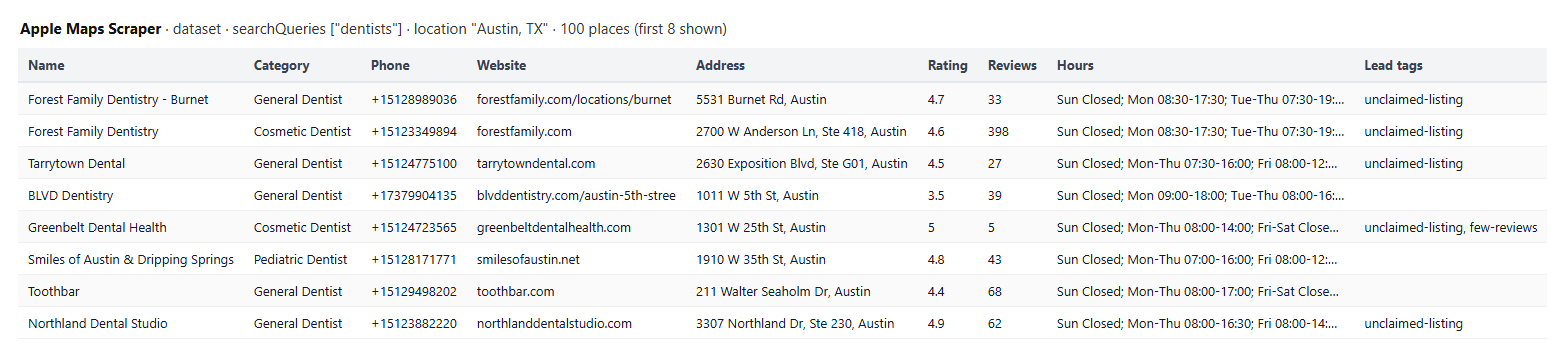 The first row of that run, shortened:
```json
{
"placeId": "17417784224305572481",
"placeIdHex": "IF1B86677F822EA81",
"name": "Forest Family Dentistry - Burnet",
"displayCategory": "General Dentist",
"categories": ["General Dentist", "Dentistry", "Dental Clinic", "Dentist", "Orthodontist", "Cosmetic Dentist"],
"phone": "+15128989036",
"phoneFormatted": "+1 (512) 898-9036",
"website": "https://www.forestfamily.com/locations/burnet",
"address": { "full": "5531 Burnet Rd, Austin, TX 78756, United States", "street": "5531 Burnet Rd", "city": "Austin", "stateCode": "TX", "postalCode": "78756", "countryCode": "US" },
"latitude": 30.3315041,
"longitude": -97.7398574,
"timezone": "America/Chicago",
"rating": { "provider": "Yelp", "ratingType": "USER_RATING", "score": 4.7, "maxScore": 5, "reviewCount": 33 },
"ratingOutOf5": 4.7,
"openingHoursText": "Sun Closed; Mon 08:30-17:30; Tue-Thu 07:30-19:30; Fri 08:30-17:30; Sat 09:00-14:00",
"isClaimable": true,
"opportunityTags": ["unclaimed-listing"],
"listingCompletenessScore": 86,
"appleUrl": "https://maps.apple.com/place?auid=17417784224305572481",
"searchQuery": "dentists",
"searchLocation": "Austin, TX",
"searchRank": 1
}
```
#### Fields
| Field | Type | What it is | Fill on the 25-place tests |
|---|---|---|---|
| `placeId` / `placeIdHex` | string | Apple's place id (muid) and its `I…` form | 100% |
| `name`, `displayCategory`, `categories` | string / array | Name and Apple's categories | 100% |
| `phone`, `phoneFormatted`, `altPhones` | string / array | E.164 phone, display phone, other numbers | 100% / 100% / 40-52% |
| `website`, `websiteType` | string | Website and whether it is the business's own | 100% |
| `address` | object | Full and structured address | 100% |
| `latitude`, `longitude`, `location`, `timezone` | number / string | Coordinates and time zone | 100% |
| `rating`, `ratingOutOf5`, `reviewCount` | object / number | Rating with source and scale, 0-5 value, count | 100% |
| `reviews` | array | Up to 3 review snippets (text, rating, date, source link) | 100% |
| `hours`, `openNow`, `openingHoursText` | object / boolean / string | Weekly hours, open at run time | 100% |
| `amenities` | array | Amenities Apple lists | 96% |
| `photos`, `coverPhoto` | array / object | Photo URLs with caption, author, source, date | 96% / 12-16% |
| `description`, `editorial`, `accolades`, `featuredIn` | string / array | About text, editorial notes, awards, guides | 12% / where Apple has them |
| `quickLinks`, `actionData` | array | Order, book, menu links | 4% |
| `claimUrl`, `isClaimable` | string / boolean | Claim link; `true` = not claimed yet | 100% / 64-72% true |
| `hasPhone`, `hasWebsite`, `missingFields`, `listingCompletenessScore`, `opportunityTags` | | Lead flags computed from the row | 100% |
| `evCharger`, `transit`, `trails`, `venue`, `capacity`, `localName` | | Category-specific detail (chargers, stations, trailheads, malls, stadiums, non-English names) | where the place has it |
| `emails`, `primaryBusinessEmail`, `emailEvidence`, `socials` | | Website contacts (add-on) | where found |
| `searchQuery`, `searchLocation`, `matchedLocation`, `searchRank`, `sourceGuide` | | What found the place and where it ranked | 100% for searches |
| `monitorStatus`, `previousStats` | string / object | Monitor mode: `new` or `changed`; a changed place gets its previous rating, review count, hours status, opening hours, phone and website, and `changedFields` | monitor runs |
Guide rows (with **Include guides**) carry `type: "guide"`, `guideId`, `title`, `publisher`, `placeCount`, `url` and `appleUrl`.
### How can I use Apple Maps data?
- 🎯 **Sales and lead-generation teams** — build call lists of local businesses with a phone, a website and a rating, filtered by category and area.
- 🏢 **Local-SEO and listing agencies** — find businesses whose Apple Maps listing is unclaimed, has no website or misses hours and photos (`opportunityTags`, `listingCompletenessScore`).
- 📊 **Market researchers** — count and map competitors per neighborhood with categories, ratings and price levels.
- 🗺️ **Data and GIS teams** — coordinates, structured addresses and time zones for every place in a city.
- 🔁 **Monitoring** — run weekly to catch new businesses in an area and changes to ratings, hours, phones and websites.
- 🤖 **AI agents** — call it over MCP with `compact: true` to answer "find 20 vegan restaurants in Lisbon open now".
### How much does it cost to scrape Apple Maps?
Apple Maps Scraper is pay-per-result: **$3.10 per 1,000 places** ($0.0031 per place), no start fee.
| Places | Cost |
|---:|---:|
| 10 | $0.031 |
| 100 | $0.31 |
| 1,000 | $3.10 |
| 10,000 | $31.00 |
Optional add-ons: **website contacts** $0.0014 per place where the website gave at least one email or social profile (nothing when none is found); **guide rows** $0.0028 per guide. Photos, review snippets, hours and amenities are included in the place price. Filtered-out places are not stored and not billed. Set a maximum spend on the run and it stops when the limit is reached; the places delivered so far are kept.
There is nothing else to pay: Apify platform usage is included in these prices. On the default 1,024 MB a 25-place search took 3-4 seconds on two test runs; larger searches take one more Apple answer for each split area.
### Integrations, API, scheduling & MCP
- **Schedules:** run Apple Maps Scraper daily or weekly from the **Schedules** tab; with `monitorMode` each run returns only new or changed places.
- **Webhooks:** call a URL when a run finishes to push places to your CRM, Slack or a sheet.
- **No-code:** Make, Zapier, n8n, Google Sheets, Airtable and Slack via [Apify integrations](https://docs.apify.com/integrations).
- **API:** start runs and read datasets from Node.js or Python with `apify-client` — code on the [API tab](https://apify.com/TopApi/apple-maps-scraper/api/python).
- **MCP / AI agents:** connect Claude, Cursor or any MCP client through the [MCP tab](https://apify.com/TopApi/apple-maps-scraper/api/mcp).
### More local-business scrapers
The first row of that run, shortened:
```json
{
"placeId": "17417784224305572481",
"placeIdHex": "IF1B86677F822EA81",
"name": "Forest Family Dentistry - Burnet",
"displayCategory": "General Dentist",
"categories": ["General Dentist", "Dentistry", "Dental Clinic", "Dentist", "Orthodontist", "Cosmetic Dentist"],
"phone": "+15128989036",
"phoneFormatted": "+1 (512) 898-9036",
"website": "https://www.forestfamily.com/locations/burnet",
"address": { "full": "5531 Burnet Rd, Austin, TX 78756, United States", "street": "5531 Burnet Rd", "city": "Austin", "stateCode": "TX", "postalCode": "78756", "countryCode": "US" },
"latitude": 30.3315041,
"longitude": -97.7398574,
"timezone": "America/Chicago",
"rating": { "provider": "Yelp", "ratingType": "USER_RATING", "score": 4.7, "maxScore": 5, "reviewCount": 33 },
"ratingOutOf5": 4.7,
"openingHoursText": "Sun Closed; Mon 08:30-17:30; Tue-Thu 07:30-19:30; Fri 08:30-17:30; Sat 09:00-14:00",
"isClaimable": true,
"opportunityTags": ["unclaimed-listing"],
"listingCompletenessScore": 86,
"appleUrl": "https://maps.apple.com/place?auid=17417784224305572481",
"searchQuery": "dentists",
"searchLocation": "Austin, TX",
"searchRank": 1
}
```
#### Fields
| Field | Type | What it is | Fill on the 25-place tests |
|---|---|---|---|
| `placeId` / `placeIdHex` | string | Apple's place id (muid) and its `I…` form | 100% |
| `name`, `displayCategory`, `categories` | string / array | Name and Apple's categories | 100% |
| `phone`, `phoneFormatted`, `altPhones` | string / array | E.164 phone, display phone, other numbers | 100% / 100% / 40-52% |
| `website`, `websiteType` | string | Website and whether it is the business's own | 100% |
| `address` | object | Full and structured address | 100% |
| `latitude`, `longitude`, `location`, `timezone` | number / string | Coordinates and time zone | 100% |
| `rating`, `ratingOutOf5`, `reviewCount` | object / number | Rating with source and scale, 0-5 value, count | 100% |
| `reviews` | array | Up to 3 review snippets (text, rating, date, source link) | 100% |
| `hours`, `openNow`, `openingHoursText` | object / boolean / string | Weekly hours, open at run time | 100% |
| `amenities` | array | Amenities Apple lists | 96% |
| `photos`, `coverPhoto` | array / object | Photo URLs with caption, author, source, date | 96% / 12-16% |
| `description`, `editorial`, `accolades`, `featuredIn` | string / array | About text, editorial notes, awards, guides | 12% / where Apple has them |
| `quickLinks`, `actionData` | array | Order, book, menu links | 4% |
| `claimUrl`, `isClaimable` | string / boolean | Claim link; `true` = not claimed yet | 100% / 64-72% true |
| `hasPhone`, `hasWebsite`, `missingFields`, `listingCompletenessScore`, `opportunityTags` | | Lead flags computed from the row | 100% |
| `evCharger`, `transit`, `trails`, `venue`, `capacity`, `localName` | | Category-specific detail (chargers, stations, trailheads, malls, stadiums, non-English names) | where the place has it |
| `emails`, `primaryBusinessEmail`, `emailEvidence`, `socials` | | Website contacts (add-on) | where found |
| `searchQuery`, `searchLocation`, `matchedLocation`, `searchRank`, `sourceGuide` | | What found the place and where it ranked | 100% for searches |
| `monitorStatus`, `previousStats` | string / object | Monitor mode: `new` or `changed`; a changed place gets its previous rating, review count, hours status, opening hours, phone and website, and `changedFields` | monitor runs |
Guide rows (with **Include guides**) carry `type: "guide"`, `guideId`, `title`, `publisher`, `placeCount`, `url` and `appleUrl`.
### How can I use Apple Maps data?
- 🎯 **Sales and lead-generation teams** — build call lists of local businesses with a phone, a website and a rating, filtered by category and area.
- 🏢 **Local-SEO and listing agencies** — find businesses whose Apple Maps listing is unclaimed, has no website or misses hours and photos (`opportunityTags`, `listingCompletenessScore`).
- 📊 **Market researchers** — count and map competitors per neighborhood with categories, ratings and price levels.
- 🗺️ **Data and GIS teams** — coordinates, structured addresses and time zones for every place in a city.
- 🔁 **Monitoring** — run weekly to catch new businesses in an area and changes to ratings, hours, phones and websites.
- 🤖 **AI agents** — call it over MCP with `compact: true` to answer "find 20 vegan restaurants in Lisbon open now".
### How much does it cost to scrape Apple Maps?
Apple Maps Scraper is pay-per-result: **$3.10 per 1,000 places** ($0.0031 per place), no start fee.
| Places | Cost |
|---:|---:|
| 10 | $0.031 |
| 100 | $0.31 |
| 1,000 | $3.10 |
| 10,000 | $31.00 |
Optional add-ons: **website contacts** $0.0014 per place where the website gave at least one email or social profile (nothing when none is found); **guide rows** $0.0028 per guide. Photos, review snippets, hours and amenities are included in the place price. Filtered-out places are not stored and not billed. Set a maximum spend on the run and it stops when the limit is reached; the places delivered so far are kept.
There is nothing else to pay: Apify platform usage is included in these prices. On the default 1,024 MB a 25-place search took 3-4 seconds on two test runs; larger searches take one more Apple answer for each split area.
### Integrations, API, scheduling & MCP
- **Schedules:** run Apple Maps Scraper daily or weekly from the **Schedules** tab; with `monitorMode` each run returns only new or changed places.
- **Webhooks:** call a URL when a run finishes to push places to your CRM, Slack or a sheet.
- **No-code:** Make, Zapier, n8n, Google Sheets, Airtable and Slack via [Apify integrations](https://docs.apify.com/integrations).
- **API:** start runs and read datasets from Node.js or Python with `apify-client` — code on the [API tab](https://apify.com/TopApi/apple-maps-scraper/api/python).
- **MCP / AI agents:** connect Claude, Cursor or any MCP client through the [MCP tab](https://apify.com/TopApi/apple-maps-scraper/api/mcp).
### More local-business scrapers