# Bluesky Scraper - Posts, Profiles, Followers & Search (`topapi/bluesky-scraper`) Actor

Scrape Bluesky posts by keyword, hashtag or account, plus replies, quotes, custom feeds, lists, followers, likers, profiles, starter packs and trends. Date, language and engagement filters, deep search and a monitor for new posts. No login. $0.018 per 1,000 posts.

- **URL**: https://apify.com/topapi/bluesky-scraper.md
- **Developed by:** [Top Api](https://apify.com/topapi) (community)
- **Categories:** Social media, Marketing, Lead generation
- **Stats:** 3 total users, 2 monthly users, 100.0% runs succeeded, 0 bookmarks
- **User rating**: No ratings yet

## Pricing

from $0.02 / 1,000 posts

This Actor is paid per event. You are not charged for the Apify platform usage, but only a fixed price for specific events.

Learn more: https://docs.apify.com/actors/running/actors-in-store.md#pay-per-event

## What's an Apify Actor?

An Actor is a serverless cloud program that runs on the Apify platform. It has two run modes.
In Batch mode, an Actor accepts a well-defined JSON input, performs an action which can take anything from a few seconds to a few hours,
and optionally produces a well-defined JSON output, datasets with results, or files in key-value store.
In Standby mode, an Actor provides a web server which can be used as a website, API, or an MCP server.

Apify vocabulary and the platform model are defined once, in the agent quickstart at https://apify.com/agents.md.

## How to integrate an Actor?

If asked about integration, you help developers integrate Actors into their projects.
You adapt to their stack and deliver integrations that are safe, well-documented, and production-ready.

Do not guess an integration path. Every one of them is in the agent quickstart at https://apify.com/agents.md: the Apify MCP server, Agent Skills with the Apify CLI, the JavaScript and Python clients, the REST API, and the account-free path for an agent with no human to sign in. It also carries the rule on stating cost before the first paid run.

For examples already wired to this Actor's own input schema, see the [API](#api) section below.

Each client library has reference documentation the quickstart does not restate: [JavaScript/TypeScript](https://docs.apify.com/api/client/js/docs.md) (`npm install apify-client`) and [Python](https://docs.apify.com/api/client/python/docs.md) (`pip install apify-client`).

# README

### What does Bluesky Scraper do?

**Bluesky Scraper** extracts Bluesky posts, replies, profiles and account lists from [bsky.app](https://bsky.app) and turns keywords, hashtags, handles and URLs into structured rows. A row is one post (text, author, likes, reposts, replies, quotes, links, media), one profile (followers, following, posts, bio, links) or one account in a list (a follower, a liker, a list member). It is built for social listening teams, researchers, marketers and data engineers who need Bluesky data on a schedule, as JSON or CSV, without a login.

Bluesky Scraper - bsky.app Scraper - Bluesky API - AT Protocol Scraper - Bluesky Posts Scraper - Bluesky Followers Scraper

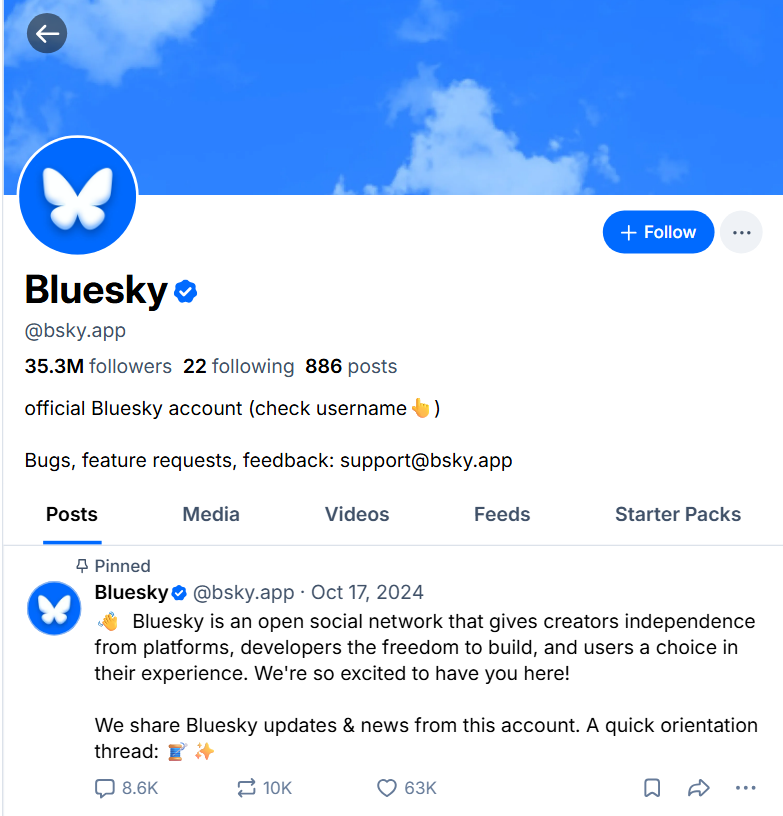
<a href="https://console.apify.com/actors/xFgjRZcuL4Tcy5e7i"><img src="https://api.apify.com/v2/key-value-stores/qNQ9zP0xaj2yxGeMY/records/bluesky-scraper-source.png" alt="Bluesky Scraper - the public bsky.app profile and posts it turns into rows" style="width:70%"></a>

- **Search posts by keyword or hashtag:** latest or top, with date, language, author, mentions, linked domain and hashtag filters, and Bluesky's search operators (`from:`, `lang:`, `#tag`).
- **Past the 100-post search page:** a latest-first search keeps going back in time with Bluesky's own date filter. A run measured 1,000 posts for "news" in 8.7 seconds.
- **Every account feed:** an account's posts, replies, media or video posts and reposts back to its first post, plus its profile row.
- **Threads, quotes, likers and reposters** of any post, and **followers / following** of any account, with full profile counts on request.
- **Custom feeds, lists, starter packs and trending topics.**
- **No login, cookies or Bluesky app password:** paste handles, keywords or bsky.app URLs.
- **Only new rows on a schedule:** monitor mode returns what is new since the last run. A run with nothing new is not charged.
- **Export anywhere:** JSON, CSV, Excel, XML; schedules, webhooks, Make, Zapier, n8n, Google Sheets; the Apify API and MCP for AI agents.

### What data can you get from Bluesky?

<table>
<tr><td>📝 Post text (<code>text</code>)</td><td>🔗 Post URL and AT URI</td><td>📅 Created and indexed time</td></tr>
<tr><td>👤 Author handle, name, avatar, DID</td><td>❤️ Likes, 🔁 reposts, 💬 replies, 🗨️ quotes, 🔖 bookmarks</td><td>🌍 Languages</td></tr>
<tr><td>#️⃣ Hashtags, @mentions, links</td><td>🖼️ Images (full size + alt text), 🎬 video playlist</td><td>📰 Link card: URL, title, description</td></tr>
<tr><td>↩️ Reply parent and root, thread depth</td><td>🔁 Reposted by, repost time, 📌 pinned</td><td>🗨️ Quoted post: URL, text, author</td></tr>
<tr><td>👥 Followers, following, posts count</td><td>🪪 Bio, banner, website, pronouns</td><td>✅ Verified, trusted verifier</td></tr>
<tr><td>📧 Emails, ☎️ phones and links written in bios</td><td>📋 Lists, feeds, starter packs per account</td><td>📨 Accepts DMs</td></tr>
<tr><td>📦 Starter packs: members, joins, creator</td><td>📈 Trending topics: category, post count, status</td><td>🙂 Sentiment, 🏷️ content category (optional)</td></tr>
</table>

Measured on 2,307 real posts: text 99%, languages 81%, an embed 61% (link cards 27%, images 20%, video 5%, quoted posts 11%), links 37%, hashtags 11%. On 111 profiles: bio 92%, banner 81%, pinned post 39%, links in the bio 33%, verified 21%, an email in the bio 1%.

### How to scrape Bluesky with Bluesky Scraper

1. [Create a free Apify account](https://console.apify.com/sign-up). It comes with $5 of monthly credit and needs no card.
2. Open [Bluesky Scraper](https://apify.com/TopApi/bluesky-scraper) and click **Try for free**.
3. Paste keywords into **Search queries** and/or handles into **Accounts**, or pick a **Mode** (followers, likers, profiles, threads…).
4. Set **Max results per input** and click **Start**. Rows appear in the dataset as they are found.
5. Open **Storage** and **Export** as JSON, CSV or Excel, or add a schedule so it runs by itself.

### ⬇️ Input

#### What to scrape

| Parameter | Type | Description |
|---|---|---|
| `mode` | select | `auto` (default): queries give posts, accounts give their posts, URLs give what they are. Or `searchPosts`, `authorFeed`, `profiles`, `followers`, `follows`, `searchPeople`, `postDetails`, `thread`, `quotes`, `likers`, `reposters`, `feed`, `list`, `starterPacks`, `trending` |
| `searchQueries` | list | Keywords, phrases, `#hashtags`, `from:handle`, or bsky.app/search URLs. Also the topics for people and starter pack search |
| `handles` | list | Handles, DIDs or profile URLs (`bsky.app`, `@jay.bsky.team`, `https://bsky.app/profile/nytimes.com`) |
| `postUrls` | list | Post URLs or AT URIs, for posts by URL, replies, quotes, likers, reposters |
| `feedUrls` | list | Custom feed URLs or AT URIs; `whats-hot` = Discover |
| `listUrls` | list | List URLs, starter pack URLs (`/starter-pack/` or `/start/`) or go.bsky.app short links |
| `startUrls` | URL list | Any mix of bsky.app URLs, or a text file of URLs |

#### Filters (sent to Bluesky)

| Parameter | Type | Description |
|---|---|---|
| `sort` | select | `latest` (default, can go past 100 per query) or `top` (Bluesky's best 100 per query) |
| `dateFrom` / `dateTo` | text | `2026-10-01`, an ISO time, or `7 days` / `12 hours`. `dateTo` with a bare date includes that whole day (UTC) |
| `language` | text | `en`, `de`, `ja`… |
| `fromAuthor`, `mentionsAuthor`, `hashtags`, `domain`, `exactUrl` | text / list | Bluesky's search filters. `fromAuthor` on its own returns all of that account's own posts |
| `authorFeedFilter` | select | Posts and replies (default), no replies, the account's own threads, media, video |
| `includePins` | boolean | Add each account's pinned post first |
| `listContent` | select | For lists: `members` (default), `posts` or `both` |

#### Refine results (applied before anything is charged)

`includeReplies` and `includeReposts` (both default on), `onlyMedia`, `minLikes`, `minReposts`, `minReplies`, `minQuotes`, `filterKeywords` (must contain any), `excludeKeywords`, `strictKeywordMatch` (whole words), `minAuthorFollowers`, `skipAdultContent`, and `respectOptOut` (default on, see below).

#### Extra data

| Parameter | Charged as | What it adds |
|---|---|---|
| `includeProfile` | profile | One profile row per account in an account feed |
| `scrapeComments` + `maxComments`, `threadDepth`, `replySort` | post | The replies of every post found, as `kind: "comment"` rows with `commentDepth` and `sourcePost*` |
| `includeRootPost`, `includeThreadParents` | post | The post itself, and the posts above a reply |
| `includeProfileDetails` | profile | Follower / following / post counts on followers, likers, reposters and list members |
| `includeAuthorStats`, `includeLatestPost`, `sentiment_analysis`, `content_analysis` | free | Author counts on posts; latest post on profiles; `sentiment_score` / `sentiment_label`; `content_category_*` |
| `includeMembers` + `maxMembersPerPack` | free | The member list inside each starter pack row |
| `includeTrendPosts` + `maxPostsPerTrend` | post | Posts from each trending topic's feed |

#### Monitoring, output and advanced

`monitorMode` + `monitorStoreName`; `maxItems` (whole run), `maxItemsPerInput` (default 100), `dedupe` (one row per post, default on), `compact` (core fields for AI agents), `includeRaw` (the full AT Protocol record); `proxyConfiguration` (leave off: the actor connects directly and moves to Apify Proxy by itself only if Bluesky refuses a request) and `maxConcurrency` (default 4).

#### Input JSON

```json
{
  "searchQueries": ["web scraping", "#opensource"],
  "handles": ["bsky.app", "nytimes.com"],
  "sort": "latest",
  "dateFrom": "7 days",
  "language": "en",
  "minLikes": 5,
  "maxItemsPerInput": 200,
  "maxItems": 1000
}
```

#### Accounts that opted out of signed-out viewing are skipped

Bluesky lets an account ask apps not to show its content to people who are not signed in (the `!no-unauthenticated` label). Bluesky Scraper reads Bluesky signed-out, so with `respectOptOut` on (the default) it leaves those accounts' posts, replies and profiles out and never charges for them. A quoted post from such an account keeps only its URL. In our runs this was 7-8% of the posts in a keyword search. `RUN_SUMMARY` counts every skipped row.

#### Use a latest-first search to get more than 100 posts

Bluesky serves signed-out search one page of up to 100 posts per query. With `sort: "latest"` and a real keyword in the query, the actor asks again for posts older than the oldest one it has, with Bluesky's documented date filter, until it has `maxItemsPerInput` posts or reaches `dateFrom`. `top`, and searches made only of filters (`*`, `from:`, `#tag` with no keyword), stay at one page per query. If Bluesky ever refuses one of those deeper requests, that query stops there, the run reports it as `partial`, and no other connection is tried for it.

#### Pick the mode before you paste

In `auto` mode an account gives its posts. To get its **followers**, **profile** or **starter packs**, pick that mode; to get a post's **replies**, **quotes**, **likers** or **reposters**, pick that mode and paste the post URL.

### ⬆️ Output

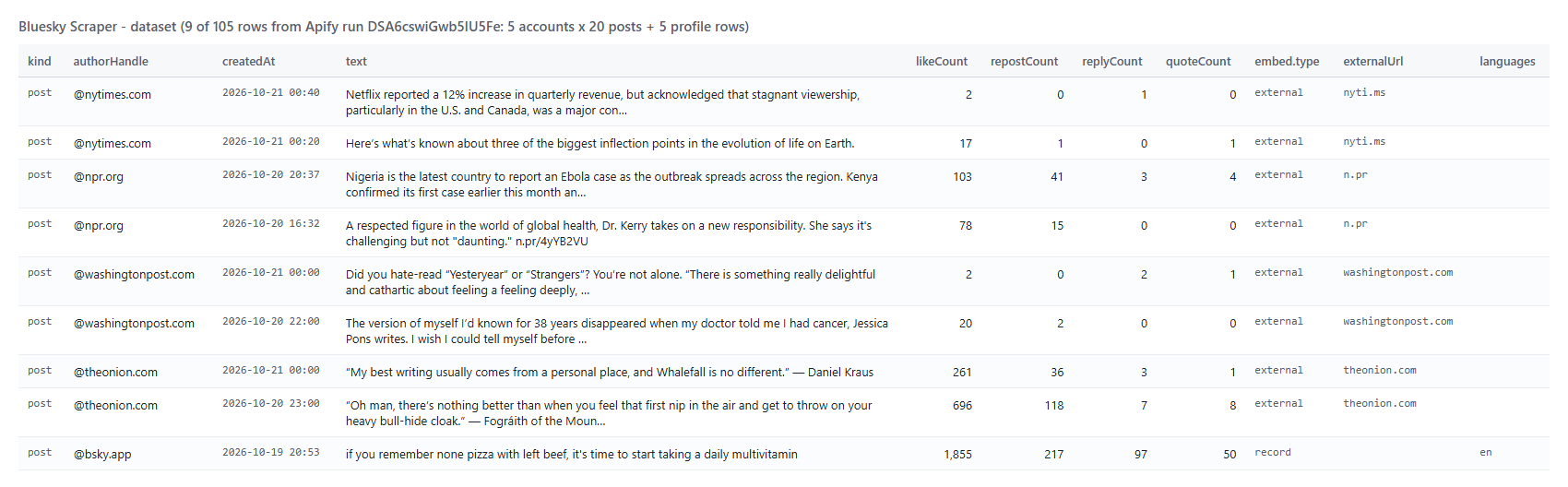
<a href="https://console.apify.com/actors/xFgjRZcuL4Tcy5e7i"><img src="https://api.apify.com/v2/key-value-stores/qNQ9zP0xaj2yxGeMY/records/bluesky-scraper-output.png" alt="Bluesky Scraper dataset - Bluesky posts with likes, reposts, replies and links" style="width:70%"></a>

Every row has `kind`: `post`, `comment` (a reply), `profile`, `follower`, `following`, `liker`, `reposter`, `member`, `starterPack`, `trend` or `error` (free). The dataset has a view for each: Posts, Profiles, Accounts, Starter packs, Trends.

A real row from run `xhmQcOaebeLEAkufi` (search "web scraping"; excerpt):

```json
{
  "kind": "post",
  "id": "3myd7qy2b2c2f",
  "url": "https://bsky.app/profile/cranberriesfeed.bsky.social/post/3myd7qy2b2c2f",
  "query": "web scraping",
  "text": "New CRAN package climabr with initial version 0.1.0\n#rstats\nhttps://cran.r-project.org/package=climabr",
  "createdAt": "2026-10-20T18:02:07.000Z",
  "authorHandle": "cranberriesfeed.bsky.social",
  "authorName": "CRAN Package Updates Bot",
  "likeCount": 0, "repostCount": 0, "replyCount": 0, "quoteCount": 0, "bookmarkCount": 0,
  "hashtags": ["rstats"],
  "links": ["https://cran.r-project.org/package=climabr"],
  "embed": { "type": "external", "uri": "https://cran.r-project.org/package=climabr", "title": "CRAN: Package climabr" },
  "isReply": false, "isRepost": false, "isQuote": false
}
```

A profile row carries `handle`, `displayName`, `description`, `followersCount`, `followsCount`, `postsCount`, `createdAt`, `verified`, `listsCount`, `feedsCount`, `starterPacksCount`, `acceptsDMs`, `pinnedPostUrl`, `website`, `emails`, `phones`, `bioLinks` (the leader's `authorHandle` / `authorName` / `text` names too). In monitor mode a changed profile also has `changedFields`, `previous` and `followersDelta` / `followsDelta` / `postsDelta`. An account row adds `subjectHandle` / `subjectUrl` (whose follower, which post's liker) and `actionAt` (when the like happened).

### Use cases

- 📣 **Brand and keyword monitoring:** a monitor on your brand, product or hashtag delivers new mentions every hour.
- 🗞️ **Newsrooms and researchers:** archive an account's posts and replies, or every post on a topic between two dates.
- 🎯 **Influencer discovery:** search people, then pull follower counts, bios and the links and emails written in them.
- 📊 **Audience analysis:** followers, likers and reposters of a post or account, with their own counts.
- 🧵 **Conversation analysis:** full reply threads with depth, sentiment and content category.
- 🤖 **AI and RAG pipelines:** compact rows of public posts for agents through the API or MCP.

### How much does it cost to scrape Bluesky?

Bluesky Scraper charges per row delivered after your filters. There is no start fee:

| Row | Price |
|---|---|
| Post or reply | $0.000018 ($0.018 per 1,000) |
| Profile | $0.000027 |
| Account in a list (follower, following, liker, reposter, member) | $0.000027 |
| Starter pack | $0.000027 |
| Trending topic | $0.0009 |

| Run | Rows | Cost |
|---|---|---|
| 100 posts from 5 accounts + 5 profiles | 105 | $0.0019 |
| 1,000 posts for one search | 1,000 | $0.018 |
| 2,000 followers with full profiles | 2,000 | $0.054 |

There is nothing else to pay: Apify platform usage is included in these prices. Error rows, opted-out accounts, filtered rows and monitor runs with nothing new are free.

### Integrations, API, scheduling and MCP

- **Schedule** a monitor run hourly or daily in Apify Schedules; with `monitorMode` each run returns only what is new.
- **Webhooks** send the dataset to your endpoint when a run finishes; **Make, Zapier, n8n, Google Sheets, Slack** connect in a few clicks.
- **API:** start runs and read datasets from [Python](https://apify.com/TopApi/bluesky-scraper/api/python) or [JavaScript](https://apify.com/TopApi/bluesky-scraper/api/javascript) with `apify-client`.
- **MCP:** let Claude, Cursor or any MCP client call Bluesky Scraper through the [Apify MCP server](https://apify.com/TopApi/bluesky-scraper/api/mcp).

```json
{ "searchQueries": ["yourbrand", "#yourbrand"], "monitorMode": true, "monitorStoreName": "yourbrand-bluesky", "maxItemsPerInput": 500 }
```

### More social media scrapers

<table>
<tr><td>🟦 <a href="https://apify.com/TopApi/truth-social-scraper">Truth Social Scraper</a><br>Posts, replies and profiles</td><td>🐦 <a href="https://apify.com/TopApi/x-profile-scraper">Twitter Profile Scraper</a><br>X followers, bio and verified badge</td><td>📸 <a href="https://apify.com/TopApi/instagram-scraper">Instagram Scraper</a><br>Posts, reels, hashtags and profiles</td></tr>
<tr><td>🎵 <a href="https://apify.com/TopApi/tiktok-scraper">TikTok Scraper</a><br>Videos, hashtags and profiles</td><td>🔎 <a href="https://apify.com/TopApi/facebook-search-posts-scraper">Facebook Search Posts Scraper</a><br>Keyword, date and location</td><td>📰 <a href="https://apify.com/TopApi/facebook-page-posts-scraper">Facebook Posts Scraper</a><br>Page posts and reactions</td></tr>
<tr><td>🇨🇳 <a href="https://apify.com/TopApi/weibo-scraper">Weibo Scraper</a><br>Posts, search, comments</td><td>▶️ <a href="https://apify.com/TopApi/youtube-shorts-scraper">YouTube Shorts Scraper</a><br>Views, channels and transcripts</td><td>👤 <a href="https://apify.com/TopApi">All TopApi actors</a></td></tr>
</table>

### Limits and empty runs

- **Search:** up to 100 posts per query for `top` and for filter-only searches; a latest-first keyword search goes further (60 pages, about 5,850 posts per query, in our tests).
- **Very large threads:** Bluesky's public thread view returns part of a big conversation. A post with 687 replies gave 336 (194 direct replies plus nested ones).
- **Follower lists** page through Bluesky's own list, 100 at a time; 2,000 followers with full profiles took 38 seconds.
- **Signed-out only:** private data (DMs, someone's own likes list, "known followers") is not available.
- **An empty run** means Bluesky has nothing matching (or, in monitor mode, nothing new). Nothing is charged; `RUN_SUMMARY` says why for each input.

### FAQ

#### How much does Bluesky Scraper cost?

$0.018 per 1,000 posts, $0.027 per 1,000 profiles or list accounts, with no start fee. Platform usage is included.

#### How many posts can Bluesky Scraper get for a search?

One page (up to 100) per query for `top`; with `latest` it walks back in time, and our test run collected 1,000 posts for "news" in 8.7 seconds.

#### Can I monitor Bluesky with Bluesky Scraper on a schedule?

Yes. Turn on `monitorMode`, give each watch its own `monitorStoreName` and schedule the actor. Each run returns only posts, accounts or profile changes that are new since the last run, and a run with nothing new is not charged.

#### Do I need a Bluesky account or app password for Bluesky Scraper?

No. Bluesky Scraper reads Bluesky's public AppView signed-out. It never asks for a login, cookie or app password.

#### Can Bluesky Scraper get followers, likers and reposters?

Yes: `mode: "followers"` / `"follows"` with handles, and `mode: "likers"` / `"reposters"` with post URLs. Turn on `includeProfileDetails` for each account's own follower and post counts.

#### Can I use Bluesky Scraper with the Apify API or MCP?

Yes. Every run can be started and read through the Apify API (Python, JavaScript, HTTP) and through the Apify MCP server for AI agents.

#### Why are some accounts missing from Bluesky Scraper results?

Accounts that ask apps not to show them to signed-out viewers are skipped while `respectOptOut` is on, and are never charged. Blocked, deleted or deactivated accounts are not returned by Bluesky.

#### Why did my Bluesky Scraper run return no results?

Usually the filters exclude everything (dates, language, minimum likes), or monitor mode found nothing new. Check `RUN_SUMMARY` for each input's read, filtered and skipped counts. Nothing is charged for an empty run.

#### Is it legal to scrape Bluesky?

Bluesky Scraper collects only data that Bluesky publishes to anyone who is not signed in, and leaves out accounts that opted out of signed-out viewing. You are responsible for how you use the data, including any personal data in it.

#### Your feedback

Found a bug or need a field? Open an issue on the [Issues tab](https://apify.com/TopApi/bluesky-scraper/issues/open) and we will look at it quickly.

# Actor input Schema

## `mode` (type: `string`):

What to collect. Automatic: search queries give posts, handles give each account's posts, post/feed/list/starter pack URLs give their content.

## `searchQueries` (type: `array`):

Keywords or phrases, e.g. "web scraping", "climate change", "#art", "from:nytimes.com", or a bsky.app/search URL. Each query is searched separately. Also the topics for people and starter pack search.

## `handles` (type: `array`):

Handles, DIDs or profile URLs, e.g. "bsky.app", "@jay.bsky.team", "did:plc:z72i7hdynmk6r22z27h6tvur", "https://bsky.app/profile/nytimes.com".

## `postUrls` (type: `array`):

Post URLs or AT URIs, e.g. "https://bsky.app/profile/bsky.app/post/3mtcnex43tk24". Used for posts by URL, replies, quotes, likers and reposters.

## `feedUrls` (type: `array`):

Feed URLs or AT URIs, e.g. "https://bsky.app/profile/bsky.app/feed/whats-hot", or "whats-hot" for Discover.

## `listUrls` (type: `array`):

List URLs ("https://bsky.app/profile/bsky.app/lists/3lvpca43j5z26"), starter pack URLs ("https://bsky.app/starter-pack/<handle>/<id>") or go.bsky.app short links.

## `startUrls` (type: `array`):

Any mix of bsky.app URLs (search, hashtag, profile, post, feed, list, starter pack) or a link to a text file with one URL per line. Each is routed by what it is.

## `sort` (type: `string`):

Latest walks back through time for as many posts as you ask for. Top returns Bluesky's best 100 for each query.

## `dateFrom` (type: `string`):

Only posts on or after this date: "2026-10-01", an ISO time, or relative like "7 days" or "12 hours". Empty = no lower bound.

## `dateTo` (type: `string`):

Only posts before the end of this date: "2026-10-15" includes all of 15 October (UTC). Also an ISO time or "2 days". Ignored in monitor mode for search.

## `language` (type: `string`):

Two-letter language code, e.g. "en", "de", "ja". Search sends it to Bluesky; for feeds, posts that declare another language are left out.

## `fromAuthor` (type: `string`):

Search only posts by this handle, e.g. "nytimes.com". On its own (no keyword) it returns all of that account's own posts.

## `mentionsAuthor` (type: `string`):

Search only posts that mention this handle, e.g. "bsky.app".

## `hashtags` (type: `array`):

Search only posts with all of these hashtags (no #), e.g. "art". On their own they search the hashtag.

## `domain` (type: `string`):

Search only posts linking to this domain, e.g. "nytimes.com".

## `exactUrl` (type: `string`):

Search only posts that link to this exact URL.

## `authorFeedFilter` (type: `string`):

Which of an account's posts to read (Bluesky's own profile tabs). Reposts are included unless you switch them off below.

## `includePins` (type: `boolean`):

Also return each account's pinned post first (isPinned: true), even when it is older than your date window.

## `listContent` (type: `string`):

For list URLs: the accounts on the list, the list's feed of posts, or both.

## `includeReplies` (type: `boolean`):

Keep posts that reply to another post. Switch off for top-level posts only.

## `includeReposts` (type: `boolean`):

Keep posts an account reposted (isRepost, repostedByHandle). Switch off for the account's own posts only.

## `onlyMedia` (type: `boolean`):

Keep only posts with an image, gallery or video.

## `minLikes` (type: `integer`):

Keep posts with at least this many likes. 0 = no minimum.

## `minReposts` (type: `integer`):

Keep posts with at least this many reposts.

## `minReplies` (type: `integer`):

Keep posts with at least this many replies.

## `minQuotes` (type: `integer`):

Keep posts quoted at least this many times.

## `filterKeywords` (type: `array`):

Keep posts whose text, link card or hashtags contain at least one of these words, e.g. "launch", "pricing".

## `excludeKeywords` (type: `array`):

Drop posts containing any of these words.

## `strictKeywordMatch` (type: `boolean`):

Match the two keyword lists as whole words ("ai" will not match "said").

## `minAuthorFollowers` (type: `integer`):

Keep posts whose author has at least this many followers (looks each author up once).

## `respectOptOut` (type: `boolean`):

On: posts and profiles of accounts that ask apps not to show them to signed-out visitors (Bluesky label !no-unauthenticated) are left out and never charged.

## `skipAdultContent` (type: `boolean`):

Drop posts (or authors) labelled porn, sexual, nudity or graphic media.

## `includeProfile` (type: `boolean`):

With account feeds: one profile row per account (followers, posts, bio, links), charged as a profile.

## `scrapeComments` (type: `boolean`):

For every post found by search, feeds or URLs that has replies: its replies as kind "comment" rows (charged as posts).

## `maxComments` (type: `integer`):

Cap on replies collected per post (default 100). In Replies mode it replaces Max results per input.

## `threadDepth` (type: `integer`):

How many levels of replies to follow (1 = direct replies only). Default 6.

## `replySort` (type: `string`):

Order of replies within each level.

## `includeRootPost` (type: `boolean`):

In Replies mode, also return the post the replies answer.

## `includeThreadParents` (type: `boolean`):

For a post that is itself a reply: also return the posts above it (negative commentDepth).

## `includeProfileDetails` (type: `boolean`):

Followers, following, likers, reposters and list members with follower / following / post counts. Each row is then charged as a profile.

## `includeAuthorStats` (type: `boolean`):

Add authorFollowersCount, authorFollowsCount and authorPostsCount to every post (free).

## `includeLatestPost` (type: `boolean`):

Profile rows get latestPostAt, latestPostText and latestPostUrl (free).

## `includeMembers` (type: `boolean`):

Starter pack rows include the full member list (handle, name, avatar, bio), up to Max members per pack.

## `maxMembersPerPack` (type: `integer`):

Default 150 (Bluesky's starter pack limit).

## `includeTrendPosts` (type: `boolean`):

In Trending mode, also return posts from each trend's feed (charged as posts).

## `maxPostsPerTrend` (type: `integer`):

Default 25.

## `sentiment_analysis` (type: `boolean`):

Add sentiment_score and sentiment_label (positive / neutral / negative) to posts and replies, from an English word list (free).

## `content_analysis` (type: `boolean`):

Add content_category_label, \_path, \_confidence and \_match_type from keywords and hashtags (free).

## `monitorMode` (type: `boolean`):

Remembers what earlier runs delivered (per query, account, post or list) and returns only new rows; profiles only when a count or field changed. A run with nothing new is not charged. Pairs with a schedule.

## `monitorStoreName` (type: `string`):

Name of the key-value store that keeps the memory. Use a different name for each separate watch.

## `maxItems` (type: `integer`):

Stop the whole run after this many rows. 0 or empty = no total cap.

## `maxItemsPerInput` (type: `integer`):

Rows per query, account, post, feed or list (default 100). A latest-first search can go far past Bluesky's 100-per-page; account feeds go back to the first post.

## `dedupe` (type: `boolean`):

When two inputs find the same post, return it once (with the first query that found it).

## `compact` (type: `boolean`):

Core fields only (text, author, counts, links, dates) - small rows for AI agents and MCP.

## `includeRaw` (type: `boolean`):

Add the full AT Protocol record Bluesky returned, as `raw`.

## `proxyConfiguration` (type: `object`):

Leave off: the actor connects directly and switches to Apify Proxy by itself only if Bluesky refuses a request. Pick a proxy to send every request through it.

## `maxConcurrency` (type: `integer`):

How many inputs are read at the same time (default 4). Search requests are paced to at most 4 per second either way.

## Actor input object example

```json
{
  "mode": "auto",
  "searchQueries": [
    "web scraping"
  ],
  "handles": [
    "bsky.app"
  ],
  "sort": "latest",
  "authorFeedFilter": "posts_with_replies",
  "includePins": false,
  "listContent": "members",
  "includeReplies": true,
  "includeReposts": true,
  "onlyMedia": false,
  "strictKeywordMatch": false,
  "respectOptOut": true,
  "skipAdultContent": false,
  "includeProfile": false,
  "scrapeComments": false,
  "replySort": "likes",
  "includeRootPost": false,
  "includeThreadParents": false,
  "includeProfileDetails": false,
  "includeAuthorStats": false,
  "includeLatestPost": false,
  "includeMembers": false,
  "includeTrendPosts": false,
  "sentiment_analysis": false,
  "content_analysis": false,
  "monitorMode": false,
  "monitorStoreName": "bluesky-monitor",
  "maxItems": 50,
  "maxItemsPerInput": 25,
  "dedupe": true,
  "compact": false,
  "includeRaw": false,
  "proxyConfiguration": {
    "useApifyProxy": false
  },
  "maxConcurrency": 4
}
```

# Actor output Schema

## `results` (type: `string`):

One item per post, reply, profile, account, starter pack or trend (field `kind`); error rows are free.

## `summary` (type: `string`):

Per-input counts (pages, read, delivered, filtered, skipped opt-outs, cuts) and the connection used. Monitor runs write it only when an input could not be read (the run log always has it).

# API

You can run this Actor programmatically using our API. Below are code examples in JavaScript, Python, and CLI, as well as the OpenAPI specification and MCP server setup.

## JavaScript example

```javascript
import { ApifyClient } from 'apify-client';

// Initialize the ApifyClient with your Apify API token
// Replace the '<YOUR_API_TOKEN>' with your token
const client = new ApifyClient({
    token: '<YOUR_API_TOKEN>',
});

// Prepare Actor input
const input = {
    "searchQueries": [
        "web scraping"
    ],
    "handles": [
        "bsky.app"
    ],
    "maxItems": 50,
    "maxItemsPerInput": 25
};

// Run the Actor and wait for it to finish
const run = await client.actor("topapi/bluesky-scraper").call(input);

// Fetch and print Actor results from the run's dataset (if any)
console.log('Results from dataset');
console.log(`💾 Check your data here: https://console.apify.com/storage/datasets/${run.defaultDatasetId}`);
const { items } = await client.dataset(run.defaultDatasetId).listItems();
items.forEach((item) => {
    console.dir(item);
});

// 📚 Want to learn more 📖? Go to → https://docs.apify.com/api/client/js/docs

```

## Python example

```python
from apify_client import ApifyClient

# Initialize the ApifyClient with your Apify API token
# Replace '<YOUR_API_TOKEN>' with your token.
client = ApifyClient("<YOUR_API_TOKEN>")

# Prepare the Actor input
run_input = {
    "searchQueries": ["web scraping"],
    "handles": ["bsky.app"],
    "maxItems": 50,
    "maxItemsPerInput": 25,
}

# Run the Actor and wait for it to finish
run = client.actor("topapi/bluesky-scraper").call(run_input=run_input)

# Fetch and print Actor results from the run's dataset (if there are any)
print(f"💾 Check your data here: https://console.apify.com/storage/datasets/{run.default_dataset_id}")
for item in client.dataset(run.default_dataset_id).iterate_items():
    print(item)

# 📚 Want to learn more 📖? Go to → https://docs.apify.com/api/client/python/docs/quick-start

```

## CLI example

```bash
echo '{
  "searchQueries": [
    "web scraping"
  ],
  "handles": [
    "bsky.app"
  ],
  "maxItems": 50,
  "maxItemsPerInput": 25
}' |
apify call topapi/bluesky-scraper --silent --output-dataset

```

## MCP server setup

```json
{
    "mcpServers": {
        "apify": {
            "type": "http",
            "url": "https://mcp.apify.com/?tools=fetch-actor-details,topapi/bluesky-scraper"
        }
    }
}
```

The hosted server signs you in with OAuth on first connect, so no API token belongs in this config. Clients without OAuth support can send an `Authorization: Bearer <APIFY_API_TOKEN>` header instead, using a token from API & Integrations in Apify Console (https://console.apify.com/settings/integrations).

## OpenAPI specification

Download the OpenAPI definition: https://api.apify.com/v2/actors/xFgjRZcuL4Tcy5e7i/builds/09oAhm9Nyed3M3dGo/openapi.json