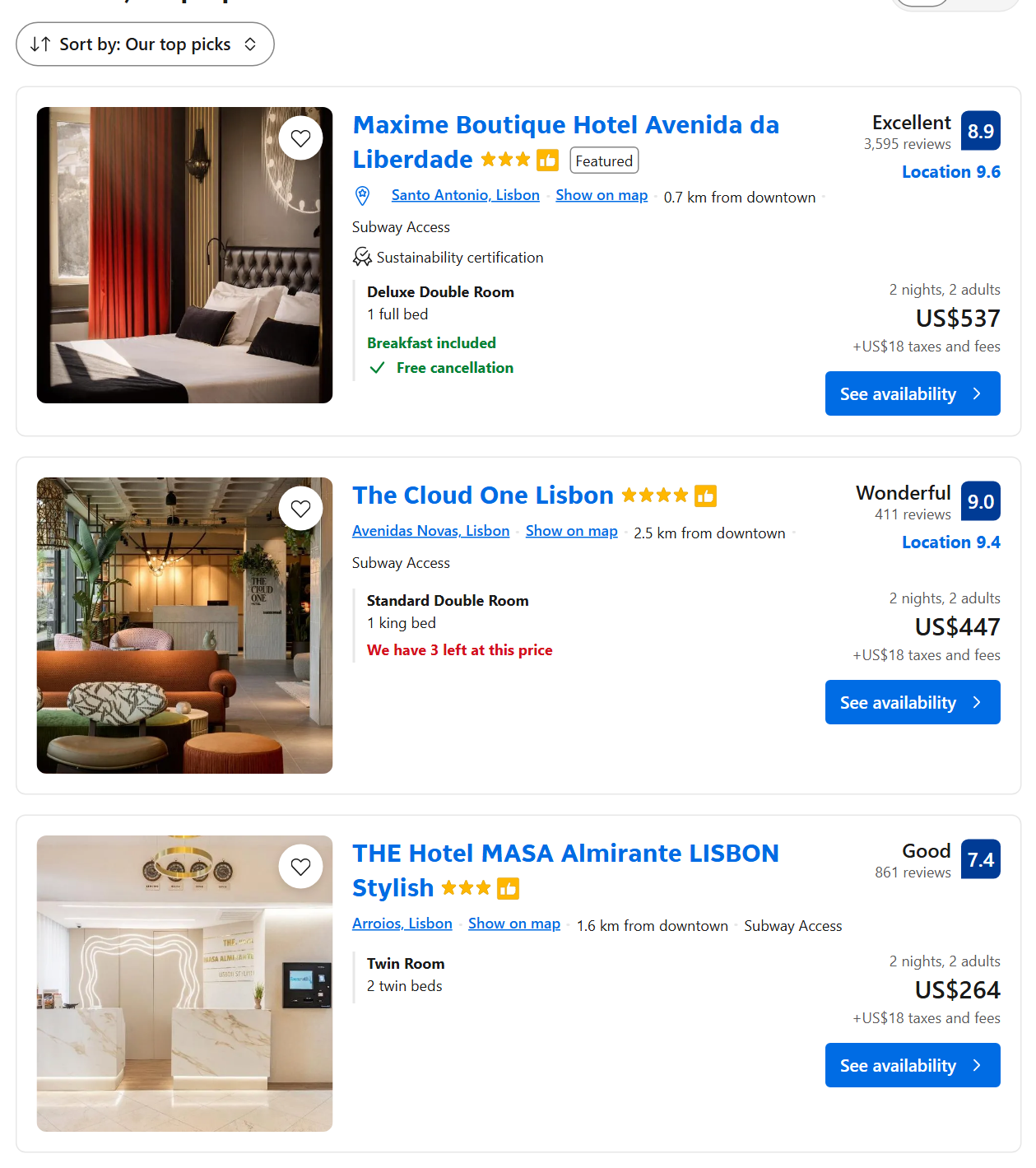
🏨 Name, URL and hotel id (hotelId) |
🏷️ Property type (type) |
⭐ Star class (stars) |
💯 Guest score and label (rating) |
💬 Review count (reviews) |
📍 Location sub-score (secondaryRating) |
💲 Total price for the stay (price) |
🌙 Price per night (pricePerNight) |
🔻 Price before discount, discount % |
| 🧾 Taxes and fees not included |
💱 Price in the hotel's currency |
📅 Check-in / check-out dates, nights, guests |
| 🗺️ Latitude and longitude |
🏙️ Street, city, district |
🚇 Distance from centre, public transport, beach |
| 🛏️ Room name, beds, bedrooms, area |
✅ Free cancellation (and until when) |
🍳 Breakfast / meal plan |
| ⏳ Rooms left at this price |
🌿 Sustainability certifications |
🖼️ Main photo and thumbnail |
On a 100-property Lisbon run (run `m9dgqSQnjJSUChuc2`) name, URL, price, score, review count and coordinates were filled on 100% of rows and the star class on 86% (apartments and homes often have none).
### How to scrape Booking.com with Booking.com Hotels Scraper
1. [Create a free Apify account](https://console.apify.com/sign-up) — $5 of monthly credit, no card needed.
2. Open [Booking.com Hotels Scraper](https://apify.com/TopApi/booking-hotels-scraper) and click **Try for free**.
3. Type a **Destination** (or paste Booking.com URLs), pick your **Check-in** and **Check-out** dates and set **Max properties**.
4. Click **Start**. Properties stream into the dataset as they are found.
5. Open the **Storage** tab and **Export** as JSON, CSV or Excel — or let a schedule run it for you.
### ⬇️ Input
| Parameter | Type | Description |
|---|---|---|
| **🔍 What to scrape** | | |
| `search` | String | A city, region, district, landmark or airport, e.g. `Lisbon`, `Tuscany`, `Eiffel Tower`. |
| `searches` | List | More destinations, one per line. |
| `startUrls` | List | Booking.com search-result URLs (dates, guests, filters and sort are read from the URL) and hotel page URLs. |
| `hotelIds` | List | Booking.com property ids, e.g. `4045490`. |
| `destinationId` + `destinationType` | String | Booking.com `dest_id` and its type (CITY, REGION, DISTRICT, LANDMARK, AIRPORT, COUNTRY). |
| `latitude` + `longitude` | Number | Search around a point. |
| **🎯 Filters** (applied by Booking.com) | | |
| `checkIn` / `checkOut` | String | `YYYY-MM-DD` or relative (`30 days`, `2 weeks`). Default: 30 days from today, 2 nights. |
| `flexWindow` | Select | Also search stays starting ± 1, 2, 3 or 7 days; each property keeps its cheapest stay. |
| `adults`, `children`, `childrenAges`, `rooms` | Integer / List | Guests and rooms. Default: 2 adults, 1 room. |
| `currency`, `language` | Select | e.g. `USD`, `EUR`; `en-us`, `de`. Default: USD, en-us. |
| `propertyTypes` | Multi-select | Hotels, Apartments, Vacation Homes, Guesthouses, Hostels, Villas, Resorts… |
| `starRatings` | Multi-select | 1-5 stars, or unrated only. |
| `minScore` | Select | 6+, 7+, 8+, 9+ (Booking's filter) or any value such as `8.4`. |
| `minPrice` / `maxPrice` | Integer | Price per night in the selected currency. |
| `freeCancellationOnly`, `breakfastIncluded`, `mealPlans`, `facilities`, `distanceFromCentre`, `onlyAvailable` | Boolean / Select | Booking.com's own filters. |
| `rawFilters` | String | Any `nflt` value from a Booking.com URL, e.g. `roomfacility=11`. |
| `sortBy` | Select | popularity (Our top picks), price, price_from_high_to_low, review_score_and_price, bayesian_review_score, class, class_asc, distance_from_search, upsort_bh. Default: popularity. |
| `travelPurpose` | Select | Leisure or business. |
| **✂️ Refine results** | | |
| `minReviews` | Integer | Keep properties with at least this many reviews. |
| `radiusKm`, `swLat`/`swLon`/`neLat`/`neLon` | Number | Keep properties within a radius of the point or inside a box. |
| **➕ Extra data** (paid add-ons) | | |
| `extractAdditionalHotelData` | Boolean | Hotel details — charged as **hotel-details** per property that gets them. |
| `includeReviews` + `maxReviewsPerHotel`, `reviewsSortBy`, `reviewsGuestType`, `reviewsLanguage` | Boolean / Integer / Select | Guest reviews, up to 100 per property — charged as **review** per review. |
| `stripPersonalData` | Boolean | On by default: reviewer first names (`guestName`) are left empty; country, traveler type and stay details are kept. Turn off only if you have a lawful basis to process names. |
| `includeCalendar` + `calendarDays` | Boolean / Integer | Day-by-day availability and price from check-in, up to 365 days — charged as **calendar-day** per day. |
| `maxHotelsToEnrich` | Integer | Add-ons for the first N properties only. |
| **🔁 Monitoring** | | |
| `monitorMode`, `monitorStoreName`, `monitorPriceDrops` | Boolean / String | Only properties not delivered before, plus price drops. Pair with a daily schedule. |
| **📦 Output** | | |
| `maxItems` | Integer | Default `100`; `0` = everything (above 1,000 the search is split by price). |
| `maxItemsPerSearch` | Integer | Cap per destination or URL. |
| `compact` | Boolean | Core fields only, sized for AI agents and MCP. |
 #### Input JSON
```json
{
"search": "Lisbon",
"checkIn": "2026-11-20",
"checkOut": "2026-11-23",
"adults": 2,
"propertyTypes": ["204"],
"minScore": "8",
"sortBy": "price",
"maxItems": 200
}
```
#### Set your dates before anything else
Booking.com prices only exist for concrete dates and guests, so every price in the output is for the stay you set. Leave the dates empty and the actor searches a 2-night stay 30 days from today. **Do:** `"checkIn": "2026-11-20", "checkOut": "2026-11-23"` · **Don't:** a check-out before the check-in (the actor then keeps the 2-night default).
#### Paste a Booking.com URL to reuse your own search
Run a search on Booking.com with the filters you want, copy the address bar and paste it into **Booking.com URLs**. The destination, dates, guests, filters (`nflt`) and sort order are read from the URL. Hotel page URLs (`/hotel/gb/royal-national.html`) return that one property with its price.
#### Use a fixed sort order for monitors
"Our top picks" is ordered differently from one request to the next, so a monitor watching the first 50 properties should sort by price or distance. In monitor mode **Max properties** sets how much of the search is watched; an unchanged search returns nothing.
### ⬆️ Output
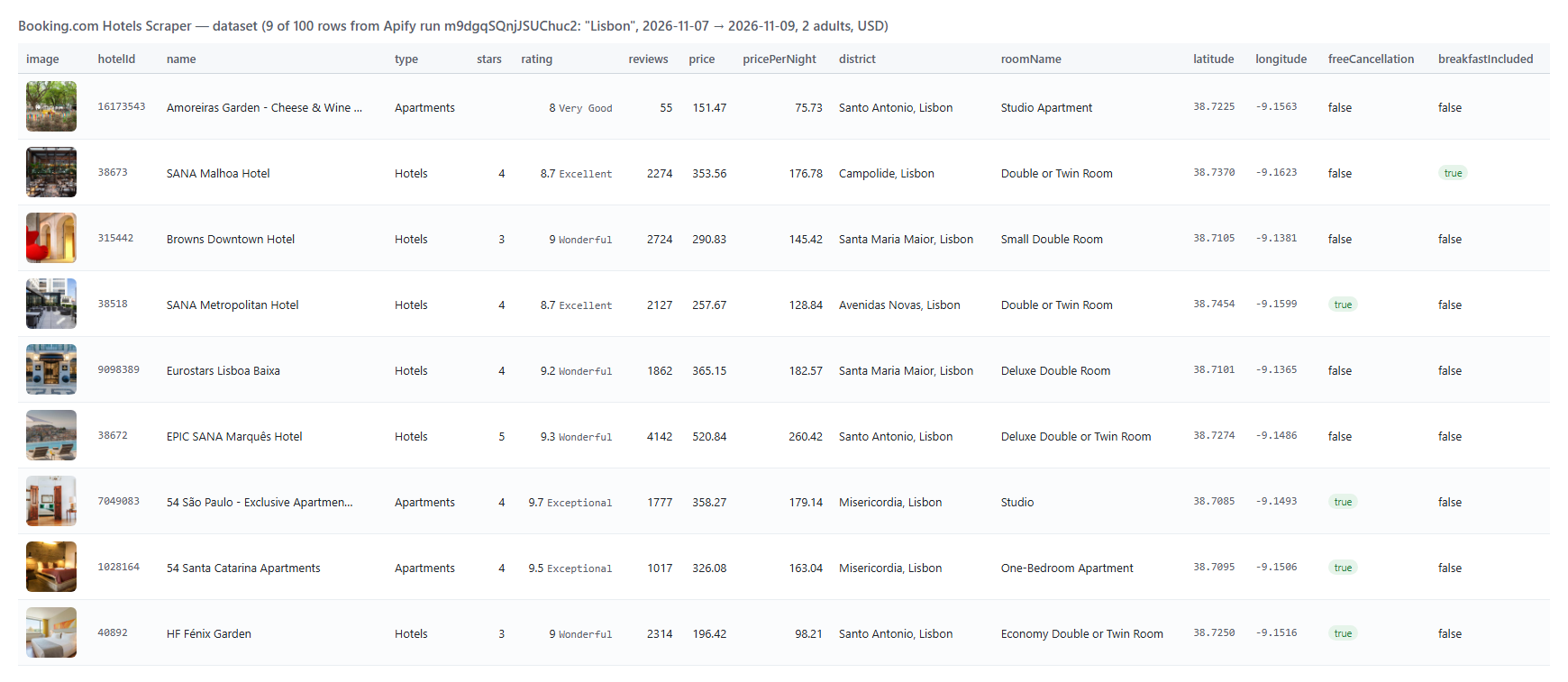
Every property becomes one dataset item. Here is the start of a real row from run `m9dgqSQnjJSUChuc2` (Lisbon, 2 adults, 2 nights):
```json
{
"hotelId": 38673,
"name": "SANA Malhoa Hotel",
"url": "https://www.booking.com/hotel/pt/sanamalhoahotellisbon.html",
"type": "Hotels",
"stars": 4,
"rating": 8.7,
"ratingLabel": "Excellent",
"reviews": 2274,
"price": 353.56,
"pricePerNight": 176.78,
"currency": "USD",
"checkinDate": "2026-11-07",
"checkoutDate": "2026-11-09",
"latitude": 38.7370423066105,
"longitude": -9.16234016418457,
"district": "Campolide, Lisbon",
"roomName": "Double or Twin Room",
"breakfastIncluded": true,
"freeCancellation": false
}
```
With **Hotel details** on, each row also carries `description`, `address.full`, `checkIn` / `checkOut` times, `facilities` (grouped), `popularFacilities`, `categoryReviews` (staff, facilities, cleanliness, comfort, value, location, WiFi), `rooms` (every room with beds, size, persons, features, photos and all `rates` with price, meal plan, cancellation and prepayment policy, rooms available), `cheapestRate`, `houseRules`, `childPolicy`, `spokenLanguages`, `images` (gallery), `surroundings` (attractions, restaurants, transport, airports, beaches), `faq`, `questionsAndAnswers` and `operator` (the company running the property, when Booking.com lists one).
#### Fields
| Field | Type | What it is | Fill on test run |
|---|---|---|---|
| `hotelId`, `name`, `url`, `urlWithDates` | number / string | Property id, name and Booking.com page | 100% |
| `type`, `propertyTypeId` | string / number | Booking's property type | 100% |
| `stars` | number | Star class | 86% |
| `rating`, `ratingLabel`, `reviews` | number / string | Guest score (1-10), its label, review count | 100% |
| `secondaryRating`, `secondaryRatingLabel` | number / string | Highlighted sub-score (usually Location) | 64% |
| `price`, `priceText`, `currency` | number / string | Total for the stay | 100% |
| `pricePerNight`, `averagePricePerNight` | number | Total ÷ nights; Booking's own nightly average | 100% |
| `priceBeforeDiscount`, `discountPercent`, `discounts` | number / array | Discounted stays | 44% |
| `taxesAndFees` | number | Taxes and fees on top of the price | 100% |
| `priceHotelCurrency`, `hotelCurrency` | number / string | Price in the property's currency | 100% |
| `latitude`, `longitude`, `location` | number | Coordinates | 100% |
| `address`, `city`, `countryCode`, `district` | object / string | Address parts | 100% |
| `distanceFromCentre`, `publicTransport` | string | Distance texts | 100% / 82% |
| `roomName`, `roomBeds`, `bedsCount` | string / array / number | The room the price is for | 100% |
| `freeCancellation`, `freeCancellationUntil` | boolean / string | Cancellation | 100% / 59% |
| `breakfastIncluded`, `mealPlan` | boolean / string | Meals | 100% / 25% |
| `roomsLeft` | number | "We have 3 left at this price" | 72% |
| `isPreferred`, `isGeniusDeal`, `isSustainable`, `isNew`, `isSponsored` | boolean | Booking's badges | 100% |
| `image`, `thumbnail` | string | Main photo | 100% |
On a 100-property Barcelona run with hotel details (run `uC62VfCYEfWLwAy6K`) every row had a description, facilities, sub-scores, FAQ and house rules; the 100 properties listed 671 rooms with 1,767 priced rates, each rate with its cancellation policy; 92% had operator details and the gallery averaged 50 photos.
### How can I use Booking.com hotel data?
- 🏨 **Hotels and revenue managers** — track competitor prices for your dates, room types and cancellation terms
- 📊 **Market researchers** — count properties, types and price levels per city or district
- 🧭 **Travel startups and OTAs** — fill a hotel database with coordinates, photos, scores and amenities
- 🏘️ **Short-term rental analysts** — compare apartments and homes by bedrooms, area and nightly price
- 🤖 **AI and data teams** — feed compact rows to an LLM or a pricing model
- 📈 **Investors and tourism boards** — run it on a schedule and follow prices and new openings week over week
### How much does it cost to scrape Booking.com?
Booking.com Hotels Scraper is pay-per-result: **$0.95 per 1,000 properties**, no start fee. You pay only for the properties written to the dataset.
| Properties | Cost |
|---:|---:|
| 10 | $0.0095 |
| 100 | $0.095 |
| 1,000 | $0.95 |
| 10,000 | $9.50 |
Add-ons are charged only on properties delivered with them:
| Add-on | Price | Example |
|---|---|---|
| Hotel details (`hotel-details`) | $0.00095 per property | 100 properties with details = $0.095 + $0.095 = $0.19 |
| Guest reviews (`review`) | $0.000047 per review | 10 reviews on 100 properties = $0.047 |
| Price calendar (`calendar-day`) | $0.00047 per day | 30 days on 10 properties = $0.141 |
There is nothing else to pay: Apify platform usage is included in these prices. Measured on 256 MB: 25 properties in 6 s, 100 properties in 14 s, 100 properties with hotel details in 64 s.
### Integrations, API, scheduling & MCP
- **Schedules:** run Booking.com Hotels Scraper daily or weekly from the **Schedules** tab; turn on monitor mode to get only new properties and price drops.
- **Webhooks:** fire a URL when a run finishes — push rows to your database, Slack or a sheet.
- **No-code:** Make, Zapier, n8n, Google Sheets, Airtable, Slack via [Apify integrations](https://docs.apify.com/integrations).
- **API:** call it from Node.js or Python with `apify-client` — code on the [API tab](https://apify.com/TopApi/booking-hotels-scraper/api/python) and the [Apify API reference](https://docs.apify.com/api/v2).
- **MCP / AI agents:** connect Claude, Cursor or any MCP client through the [MCP tab](https://apify.com/TopApi/booking-hotels-scraper/api/mcp) and ask for Booking.com hotels in plain language.
### More scrapers from TopApi
#### Input JSON
```json
{
"search": "Lisbon",
"checkIn": "2026-11-20",
"checkOut": "2026-11-23",
"adults": 2,
"propertyTypes": ["204"],
"minScore": "8",
"sortBy": "price",
"maxItems": 200
}
```
#### Set your dates before anything else
Booking.com prices only exist for concrete dates and guests, so every price in the output is for the stay you set. Leave the dates empty and the actor searches a 2-night stay 30 days from today. **Do:** `"checkIn": "2026-11-20", "checkOut": "2026-11-23"` · **Don't:** a check-out before the check-in (the actor then keeps the 2-night default).
#### Paste a Booking.com URL to reuse your own search
Run a search on Booking.com with the filters you want, copy the address bar and paste it into **Booking.com URLs**. The destination, dates, guests, filters (`nflt`) and sort order are read from the URL. Hotel page URLs (`/hotel/gb/royal-national.html`) return that one property with its price.
#### Use a fixed sort order for monitors
"Our top picks" is ordered differently from one request to the next, so a monitor watching the first 50 properties should sort by price or distance. In monitor mode **Max properties** sets how much of the search is watched; an unchanged search returns nothing.
### ⬆️ Output
Every property becomes one dataset item. Here is the start of a real row from run `m9dgqSQnjJSUChuc2` (Lisbon, 2 adults, 2 nights):
```json
{
"hotelId": 38673,
"name": "SANA Malhoa Hotel",
"url": "https://www.booking.com/hotel/pt/sanamalhoahotellisbon.html",
"type": "Hotels",
"stars": 4,
"rating": 8.7,
"ratingLabel": "Excellent",
"reviews": 2274,
"price": 353.56,
"pricePerNight": 176.78,
"currency": "USD",
"checkinDate": "2026-11-07",
"checkoutDate": "2026-11-09",
"latitude": 38.7370423066105,
"longitude": -9.16234016418457,
"district": "Campolide, Lisbon",
"roomName": "Double or Twin Room",
"breakfastIncluded": true,
"freeCancellation": false
}
```
With **Hotel details** on, each row also carries `description`, `address.full`, `checkIn` / `checkOut` times, `facilities` (grouped), `popularFacilities`, `categoryReviews` (staff, facilities, cleanliness, comfort, value, location, WiFi), `rooms` (every room with beds, size, persons, features, photos and all `rates` with price, meal plan, cancellation and prepayment policy, rooms available), `cheapestRate`, `houseRules`, `childPolicy`, `spokenLanguages`, `images` (gallery), `surroundings` (attractions, restaurants, transport, airports, beaches), `faq`, `questionsAndAnswers` and `operator` (the company running the property, when Booking.com lists one).
#### Fields
| Field | Type | What it is | Fill on test run |
|---|---|---|---|
| `hotelId`, `name`, `url`, `urlWithDates` | number / string | Property id, name and Booking.com page | 100% |
| `type`, `propertyTypeId` | string / number | Booking's property type | 100% |
| `stars` | number | Star class | 86% |
| `rating`, `ratingLabel`, `reviews` | number / string | Guest score (1-10), its label, review count | 100% |
| `secondaryRating`, `secondaryRatingLabel` | number / string | Highlighted sub-score (usually Location) | 64% |
| `price`, `priceText`, `currency` | number / string | Total for the stay | 100% |
| `pricePerNight`, `averagePricePerNight` | number | Total ÷ nights; Booking's own nightly average | 100% |
| `priceBeforeDiscount`, `discountPercent`, `discounts` | number / array | Discounted stays | 44% |
| `taxesAndFees` | number | Taxes and fees on top of the price | 100% |
| `priceHotelCurrency`, `hotelCurrency` | number / string | Price in the property's currency | 100% |
| `latitude`, `longitude`, `location` | number | Coordinates | 100% |
| `address`, `city`, `countryCode`, `district` | object / string | Address parts | 100% |
| `distanceFromCentre`, `publicTransport` | string | Distance texts | 100% / 82% |
| `roomName`, `roomBeds`, `bedsCount` | string / array / number | The room the price is for | 100% |
| `freeCancellation`, `freeCancellationUntil` | boolean / string | Cancellation | 100% / 59% |
| `breakfastIncluded`, `mealPlan` | boolean / string | Meals | 100% / 25% |
| `roomsLeft` | number | "We have 3 left at this price" | 72% |
| `isPreferred`, `isGeniusDeal`, `isSustainable`, `isNew`, `isSponsored` | boolean | Booking's badges | 100% |
| `image`, `thumbnail` | string | Main photo | 100% |
On a 100-property Barcelona run with hotel details (run `uC62VfCYEfWLwAy6K`) every row had a description, facilities, sub-scores, FAQ and house rules; the 100 properties listed 671 rooms with 1,767 priced rates, each rate with its cancellation policy; 92% had operator details and the gallery averaged 50 photos.
### How can I use Booking.com hotel data?
- 🏨 **Hotels and revenue managers** — track competitor prices for your dates, room types and cancellation terms
- 📊 **Market researchers** — count properties, types and price levels per city or district
- 🧭 **Travel startups and OTAs** — fill a hotel database with coordinates, photos, scores and amenities
- 🏘️ **Short-term rental analysts** — compare apartments and homes by bedrooms, area and nightly price
- 🤖 **AI and data teams** — feed compact rows to an LLM or a pricing model
- 📈 **Investors and tourism boards** — run it on a schedule and follow prices and new openings week over week
### How much does it cost to scrape Booking.com?
Booking.com Hotels Scraper is pay-per-result: **$0.95 per 1,000 properties**, no start fee. You pay only for the properties written to the dataset.
| Properties | Cost |
|---:|---:|
| 10 | $0.0095 |
| 100 | $0.095 |
| 1,000 | $0.95 |
| 10,000 | $9.50 |
Add-ons are charged only on properties delivered with them:
| Add-on | Price | Example |
|---|---|---|
| Hotel details (`hotel-details`) | $0.00095 per property | 100 properties with details = $0.095 + $0.095 = $0.19 |
| Guest reviews (`review`) | $0.000047 per review | 10 reviews on 100 properties = $0.047 |
| Price calendar (`calendar-day`) | $0.00047 per day | 30 days on 10 properties = $0.141 |
There is nothing else to pay: Apify platform usage is included in these prices. Measured on 256 MB: 25 properties in 6 s, 100 properties in 14 s, 100 properties with hotel details in 64 s.
### Integrations, API, scheduling & MCP
- **Schedules:** run Booking.com Hotels Scraper daily or weekly from the **Schedules** tab; turn on monitor mode to get only new properties and price drops.
- **Webhooks:** fire a URL when a run finishes — push rows to your database, Slack or a sheet.
- **No-code:** Make, Zapier, n8n, Google Sheets, Airtable, Slack via [Apify integrations](https://docs.apify.com/integrations).
- **API:** call it from Node.js or Python with `apify-client` — code on the [API tab](https://apify.com/TopApi/booking-hotels-scraper/api/python) and the [Apify API reference](https://docs.apify.com/api/v2).
- **MCP / AI agents:** connect Claude, Cursor or any MCP client through the [MCP tab](https://apify.com/TopApi/booking-hotels-scraper/api/mcp) and ask for Booking.com hotels in plain language.
### More scrapers from TopApi