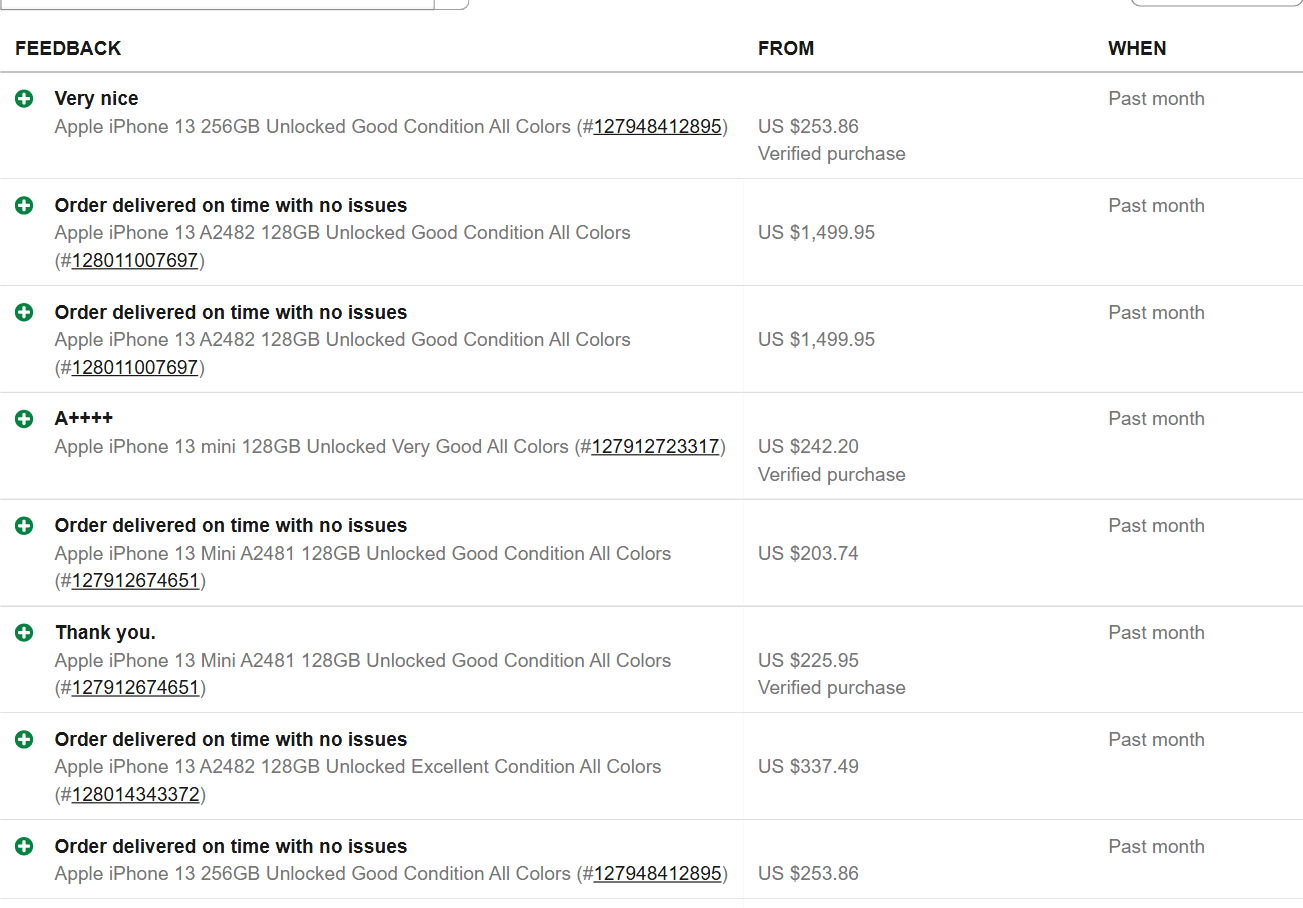
 - **Real sold prices:** one row per completed order, with the price paid, currency, title, item number, seller and sale period
- **Keyword, seller or item link:** find who sells a keyword now and read their sales, read named sellers directly, or check what one listing sold for
- **Exact end time and listing details:** turn on Item details for the final price, end time, bids, shipping, condition, location, category and item specifics
- **13 eBay sites:** US, UK, Germany, France, Italy, Spain, Canada, Australia, Austria, Switzerland, Ireland, Netherlands and Poland, in each site's currency
- **Monitor mode:** scheduled runs deliver only sales earlier runs did not, and re-read auctions they saw ending
- **Price summary:** count, median and percentiles per search in a free SUMMARY record
- **No eBay account, cookies or API key**
- **Export anywhere:** JSON, CSV, Excel; schedules, webhooks, Make, Zapier, n8n, Google Sheets; the Apify API and MCP server
### What data can you get from eBay sold listings?
- **Real sold prices:** one row per completed order, with the price paid, currency, title, item number, seller and sale period
- **Keyword, seller or item link:** find who sells a keyword now and read their sales, read named sellers directly, or check what one listing sold for
- **Exact end time and listing details:** turn on Item details for the final price, end time, bids, shipping, condition, location, category and item specifics
- **13 eBay sites:** US, UK, Germany, France, Italy, Spain, Canada, Australia, Austria, Switzerland, Ireland, Netherlands and Poland, in each site's currency
- **Monitor mode:** scheduled runs deliver only sales earlier runs did not, and re-read auctions they saw ending
- **Price summary:** count, median and percentiles per search in a free SUMMARY record
- **No eBay account, cookies or API key**
- **Export anywhere:** JSON, CSV, Excel; schedules, webhooks, Make, Zapier, n8n, Google Sheets; the Apify API and MCP server
### What data can you get from eBay sold listings?
💲 Sold price (soldPrice) | 💱 Currency | 🔢 Units and unit price (quantity, unitPrice) |
📅 Sale period (soldPeriod) | ⏱️ Exact end time (endedAt) | 📝 Title |
| 🔗 Item number and link | 👤 Seller | ⭐ Seller score and positive % |
| 🔨 Bids and how it sold (auction, Buy It Now, best offer) | 🚚 Shipping price and type | 🧾 Total (price + shipping) |
| 🏷️ Condition and condition id | 📍 Item location | 🗂️ Category and breadcrumbs |
| 📋 Item specifics (brand, model, storage ...) | 🖼️ Images (500 and 1600 px) | 💬 Buyer rating and comment |
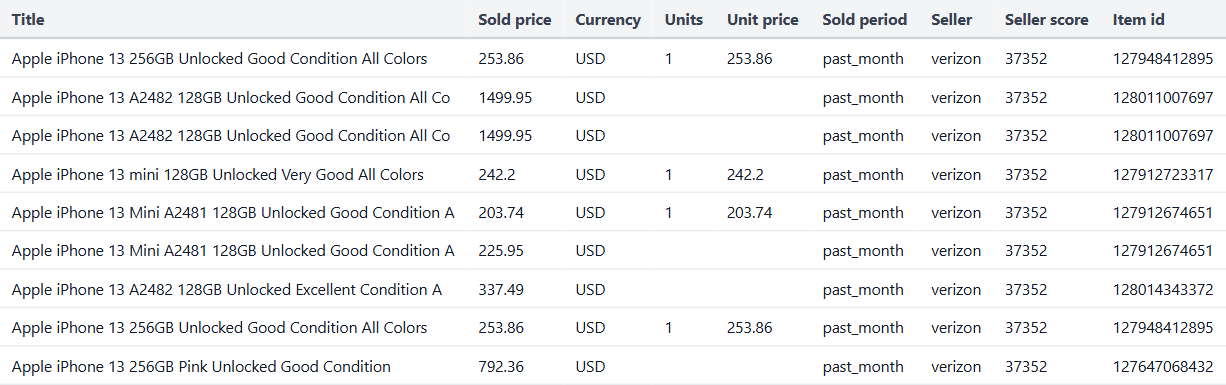 A row from that run:
```json
{
"keyword": "iphone 13",
"itemId": "127948412895",
"url": "https://www.ebay.com/itm/127948412895",
"title": "Apple iPhone 13 256GB Unlocked Good Condition All Colors",
"soldPrice": 253.86,
"soldCurrency": "USD",
"quantity": 1,
"unitPrice": 253.86,
"soldPeriod": "past_month",
"sellerUsername": "verizon",
"sellerFeedbackScore": 37351,
"sellerPositivePercent": 99.5,
"feedbackRating": "positive",
"verifiedPurchase": true,
"source": "seller_feedback",
"marketplace": "ebay.com"
}
```
An ended auction read from its own page (an item link):
```json
{
"itemId": "318800612903",
"title": "SEALED - Pokemon TCG Lucario VSTAR SWSH291 Black Star Promo Crown Zenith NM/M",
"soldPrice": 15.5,
"soldCurrency": "USD",
"endedAt": "2026-09-05T22:30:01.000Z",
"listingType": "auction",
"bidCount": 6,
"condition": "Ungraded - Near mint or better",
"shippingPrice": 1.87,
"totalPrice": 17.37,
"itemLocation": "Jersey City, New Jersey, United States",
"category": "Single Cards",
"source": "item_page"
}
```
#### Fields
| Field | What it is | Filled on test runs |
|---|---|---|
| `soldPrice`, `soldCurrency` | Price the buyer paid for the order (no shipping), currency | 100% |
| `quantity`, `unitPrice` | Units in the order and price per unit, when the total shows it | 44% (22 of 50) |
| `soldPeriod` | `past_month`, `past_6_months`, `past_year`, `more_than_a_year` | 100% of feedback rows |
| `endedAt` | Exact end time of a single-quantity listing that sold | item links and tracked auctions; 2% of an iPhone run with item details (most iPhone sales are multi-quantity listings) |
| `itemId`, `itemNumber`, `url`, `title` | The listing | 100% |
| `sellerUsername`, `sellerFeedbackScore`, `sellerPositivePercent` | The seller | 100% |
| `feedbackId` | eBay's id of the sale's feedback entry (unique per sale) | 100% of feedback rows |
| `feedbackRating`, `feedbackText`, `verifiedPurchase`, `automatedFeedback` | What the buyer said (no buyer names) | 100% of feedback rows |
| `listingType`, `buyingFormat`, `bidCount` | How it sold | 99% with item details |
| `shippingPrice`, `shippingType`, `totalPrice` | Shipping and total | 99% with item details |
| `condition`, `conditionId`, `itemLocation` | Item condition and location | 99% with item details |
| `categoryId`, `category`, `categoryPath`, `itemSpecifics`, `productDetails` | Category and specifics | 99% with item details |
| `thumbnailUrl`, `fullResThumbnailUrl`, `images`, `quantitySold` | Images; units sold on a multi-quantity listing | 99% / 97% with item details |
| `source` | `seller_feedback`, `item_page` or `ended_listing` | 100% |
### How can I use eBay sold listings data?
- 💰 **Resellers and flippers:** price what you list from what the same item actually sold for
- 🃏 **Collectibles dealers:** follow sold prices of cards, coins and sets, and catch auctions as they end
- 📈 **Pricing tools and apps:** feed comps by keyword or item number into your own product through the API
- 🏪 **Sellers:** watch what competing sellers sell, at what price, and how fast
- 🔍 **Market research:** compare demand across conditions, models and eBay sites
- 🤖 **AI agents:** ask for comps through the MCP server and get compact rows back
### How much does it cost to scrape eBay sold listings?
Pay per event, no start fee:
| | Price |
|---|---|
| Sold listing (each row) | **$0.00099** ($0.99 per 1,000) |
| Item details (only with Item details on, per row that gets them) | $0.0013 |
| Run | Cost |
|---|---|
| 10 sold listings | $0.0099 |
| 100 sold listings | $0.099 |
| 1,000 sold listings | $0.99 |
| 100 sold listings with item details | $0.229 |
Sales a filter removes, private-listing sales and runs that find nothing are not charged. There is nothing else to pay: Apify platform usage is included in these prices. A 50-sale test run finished in 34-80 seconds; 991 sales from 26 sellers took 5 minutes 41 seconds.
### Integrations, API, scheduling & MCP
- **Schedules:** run daily with Monitor mode on to receive only new sales.
- **Webhooks:** get a call when a run finishes.
- **Make, Zapier, n8n, Google Sheets, Slack:** connect from the actor's Integrations tab.
- **API:** call the actor from [Python](https://apify.com/TopApi/ebay-sold-listings-scraper/api/python) or [JavaScript](https://apify.com/TopApi/ebay-sold-listings-scraper/api/javascript) and read the dataset.
- **MCP:** use it from Claude, Cursor and other AI tools through the [Apify MCP server](https://apify.com/TopApi/ebay-sold-listings-scraper/api/mcp).
### More marketplace scrapers from TopApi
- [Facebook Marketplace Scraper](https://apify.com/TopApi/facebook-marketplace-scraper): local listings, prices and price drops
- [SHEIN Product Scraper](https://apify.com/TopApi/shein-product-scraper): prices, discounts and ratings
- [1688.com Wholesale Scraper](https://apify.com/TopApi/alibaba-1688-scraper): wholesale prices, MOQ and suppliers for sourcing
- [Zillow Scraper](https://apify.com/TopApi/zillow-scraper): listings, sold homes and price history
- [Trustpilot Reviews Scraper](https://apify.com/TopApi/trustpilot-reviews-scraper): store and brand reviews
See every actor on the [TopApi profile](https://apify.com/TopApi).
### Limits & empty runs
- **Sellers who list it now:** keyword runs read the sellers on eBay's live search (20 by default); raise `maxSellersPerSearch` for more. After 5 sellers in a row with no matching sale, the rest of that keyword's sellers are skipped.
- **eBay's human check:** if eBay asks for a human check on a seller-feedback page, the run stops reading feedback, keeps what it delivered, and says so in its status message. The check is never answered. In our tests, a 991-sale run read 28 feedback pages before one appeared; a niche keyword once stopped after its first page.
- **Private listings:** eBay hides the title, item and price of private-listing sales; they are skipped (14% of the rows read on one iPhone run).
- **Feedback timing:** a sale shows up once the order completes and feedback (or eBay's automated feedback) is left.
- **Proof-of-work sites:** for ebay.co.uk, .ca, .ie, .at and .ch, sellers are found through ebay.com's search filtered to items located in that country, and their sales are read on the local site.
- **Never charged:** filtered sales, private-listing sales, and runs that deliver nothing.
### FAQ
#### How much does eBay Sold Listings Scraper cost?
$0.00099 per sold listing ($0.99 per 1,000) and $0.0013 per row with item details. There is no start fee, and a run that finds nothing costs nothing for results.
#### How many sold listings can eBay Sold Listings Scraper return?
As many as the sellers of your keyword have sold in your date window: 991 sales came from 26 sellers of "iphone 13" in one run. Niche keywords return fewer, since fewer sellers list them.
#### Does eBay Sold Listings Scraper give the exact sold date?
For a single-quantity listing, yes: turn on Item details, paste the item link, or use Monitor mode to track ending auctions (`endedAt`). For sales from a seller's feedback, eBay shows only the period: past month, past 6 months or past year.
#### Can eBay Sold Listings Scraper run on a schedule?
Yes. Turn on Monitor mode and add a daily schedule: each run delivers only sales the earlier runs did not. A poll with nothing new cost $0.00028 of platform usage in our test, and you pay nothing for it.
#### Can I use eBay Sold Listings Scraper with the Apify API?
Yes, from any language through the Apify API, with ready clients for [Python](https://apify.com/TopApi/ebay-sold-listings-scraper/api/python) and [JavaScript](https://apify.com/TopApi/ebay-sold-listings-scraper/api/javascript).
#### Can AI agents use eBay Sold Listings Scraper through MCP?
Yes. Add it to the [Apify MCP server](https://apify.com/TopApi/ebay-sold-listings-scraper/api/mcp) and set `compact` for 18-field rows.
#### Do I need an eBay account, cookies or an API key?
No. The actor reads only pages eBay shows to any signed-out visitor.
#### Why did eBay Sold Listings Scraper return fewer sales than I asked for?
The sellers of the keyword sold fewer in your window, your filters removed some, or eBay showed its human check on feedback pages (the status message says which). Widen `daysToScrape`, add sellers, or try a broader keyword.
#### Does eBay Sold Listings Scraper show what a listing with many units sold for?
Yes: paste the item link. The actor reads the seller's feedback for that item number and returns each sale (19 sales of one iPhone listing in our test).
#### Your feedback
Found a bug or need a field? Open an issue on the [Issues tab](https://apify.com/TopApi/ebay-sold-listings-scraper/issues/open). We read every one.
*Unofficial tool, not affiliated with or endorsed by eBay Inc. It reads pages eBay shows to any signed-out visitor.*
# Actor input Schema
## `keywords` (type: `array`):
What was sold, as you would search it on eBay. One search per keyword, e.g. "iphone 13", "rtx 4080", "lego 42115". Each row says which keyword found it.
## `startUrls` (type: `array`):
eBay search URLs (/sch/i.html?\_nkw=... - the keyword and filters are read from the URL), seller feedback or /usr/ links, or item links (/itm/...).
## `sellers` (type: `array`):
eBay usernames whose sales you want, e.g. "gadget-solutions". With keywords, only those sellers' sales of each keyword; without, all their recent sales.
## `itemUrls` (type: `array`):
What did this listing sell for? Item URLs or ids, e.g. "https://www.ebay.com/itm/318800612903" or "318800612903". Ended auctions give the final price and end time; multi-quantity listings give each sale.
## `ebaySite` (type: `string`):
Which eBay marketplace to read. Prices come in that site's currency.
## `categoryId` (type: `string`):
eBay category id for the keyword search, e.g. "9355" (Cell Phones & Smartphones). Empty or "0" = all categories.
## `subcategoryId` (type: `string`):
A subcategory id; overrides Category id when set.
## `itemCondition` (type: `string`):
Only sellers listing this condition for the keyword.
## `conditionId` (type: `integer`):
An exact eBay condition id instead (1000 new, 1500 open box, 2000-2500 refurbished, 3000 used, 7000 for parts).
## `buyingFormat` (type: `string`):
Only sellers listing the keyword in this format.
## `itemLocation` (type: `string`):
Where the listed items are located, as on eBay's search.
## `aspectFilter` (type: `object`):
eBay aspect filters for the keyword search, e.g. {"Brand": "Apple", "Storage Capacity": "128 GB"}. Use the site's language (ebay.de: "Marke").
## `daysToScrape` (type: `integer`):
Sales from the last N days. eBay dates a sale as Past month / Past 6 months / Past year, so 30 keeps the past month, 180 adds 6 months, 365 the year, 0 = everything (up to 5 years).
## `minPrice` (type: `number`):
Drop sales below this price (site currency). Also narrows the keyword search.
## `maxPrice` (type: `number`):
Drop sales above this price (site currency). Also narrows the keyword search.
## `titleMustMatchQuery` (type: `boolean`):
Keep only sales whose title has every word of the keyword (4+ word keywords allow one miss). Turn off to keep parts and accessories the seller sold too.
## `excludeKeywords` (type: `array`):
Drop sales whose title has any of these words, e.g. "case", "screen", "for parts".
## `excludeSellers` (type: `array`):
eBay usernames whose sales are skipped.
## `dedupeItemIds` (type: `boolean`):
A multi-quantity listing can sell many times; on = only its newest sale. Off = one row per sale (the default).
## `includeAutomatedFeedback` (type: `boolean`):
eBay leaves automated feedback when an order completes without buyer feedback. These are real sales; off drops them.
## `includeItemDetails` (type: `boolean`):
Open each sold listing's page for its exact end time (single-quantity listings), final bids, format, shipping, condition, location, category and item specifics. Charged as item-details per row that gets them.
## `includeDescription` (type: `boolean`):
With item details on, also read the seller's description (first 5,000 characters). No extra charge.
## `monitorMode` (type: `boolean`):
Deliver only sales earlier runs did not deliver, per search. Pairs with a daily schedule. Also re-reads auctions it saw ending, for their exact final price.
## `monitorStoreName` (type: `string`):
Named key-value store that remembers delivered sales. Use a different name per schedule.
## `trackEndingAuctions` (type: `boolean`):
In monitor mode, remember auctions with bids that end within 24 hours and deliver their final price on the next run.
## `resetMonitorState` (type: `boolean`):
Forget what earlier runs delivered for these searches (the next run delivers everything again).
## `maxItems` (type: `integer`):
Most rows this run delivers, across all searches. 0 = no limit (the run ends when the sellers' sales run out, at your spending limit or at the run timeout).
## `maxItemsPerSearch` (type: `integer`):
Most rows per keyword, seller or item. 0 = no per-search limit.
## `maxSellersPerSearch` (type: `integer`):
How many of the sellers listing the keyword to read, most listings first. More sellers = more sales, slower run.
## `maxRowsPerSeller` (type: `integer`):
Most sales taken from one seller per search, so one big seller does not fill the run. 0 = no limit.
## `includeSummary` (type: `boolean`):
Write count, min, median, percentiles and max of the sold prices per search to the SUMMARY record. Free.
## `compact` (type: `boolean`):
Core fields only (18), sized for AI agents and MCP.
## `proxyConfiguration` (type: `object`):
Default: Apify datacenter sessions first, residential in the site's country next. Choose groups here to use your own instead.
## `maxConcurrency` (type: `integer`):
Seller pages read at the same time (each on its own paced session). 2 is the measured sweet spot; more draws eBay's human check sooner.
## Actor input object example
```json
{
"keywords": [
"iphone 13"
],
"ebaySite": "ebay.com",
"itemCondition": "any",
"buyingFormat": "all",
"itemLocation": "default",
"daysToScrape": 30,
"titleMustMatchQuery": true,
"dedupeItemIds": false,
"includeAutomatedFeedback": true,
"includeItemDetails": false,
"includeDescription": false,
"monitorMode": false,
"monitorStoreName": "ebay-sold-listings-monitor",
"trackEndingAuctions": true,
"resetMonitorState": false,
"maxItems": 50,
"maxSellersPerSearch": 20,
"maxRowsPerSeller": 50,
"includeSummary": true,
"compact": false,
"proxyConfiguration": {
"useApifyProxy": true
},
"maxConcurrency": 2
}
```
# Actor output Schema
## `results` (type: `string`):
One item per completed eBay sale: sold price, currency, period or exact end time, title, item id, seller, and item details when requested.
## `summary` (type: `string`):
Per search and currency: count, min, 10th/25th percentile, median, 75th/90th percentile, max and mean of the sold prices delivered.
## `runSummary` (type: `string`):
Per-search counts (sellers found and read), rows skipped by each filter, items not sold, and eBay's answers per page type.
# API
You can run this Actor programmatically using our API. Below are code examples in JavaScript, Python, and CLI, as well as the OpenAPI specification and MCP server setup.
## JavaScript example
```javascript
import { ApifyClient } from 'apify-client';
// Initialize the ApifyClient with your Apify API token
// Replace the '
A row from that run:
```json
{
"keyword": "iphone 13",
"itemId": "127948412895",
"url": "https://www.ebay.com/itm/127948412895",
"title": "Apple iPhone 13 256GB Unlocked Good Condition All Colors",
"soldPrice": 253.86,
"soldCurrency": "USD",
"quantity": 1,
"unitPrice": 253.86,
"soldPeriod": "past_month",
"sellerUsername": "verizon",
"sellerFeedbackScore": 37351,
"sellerPositivePercent": 99.5,
"feedbackRating": "positive",
"verifiedPurchase": true,
"source": "seller_feedback",
"marketplace": "ebay.com"
}
```
An ended auction read from its own page (an item link):
```json
{
"itemId": "318800612903",
"title": "SEALED - Pokemon TCG Lucario VSTAR SWSH291 Black Star Promo Crown Zenith NM/M",
"soldPrice": 15.5,
"soldCurrency": "USD",
"endedAt": "2026-09-05T22:30:01.000Z",
"listingType": "auction",
"bidCount": 6,
"condition": "Ungraded - Near mint or better",
"shippingPrice": 1.87,
"totalPrice": 17.37,
"itemLocation": "Jersey City, New Jersey, United States",
"category": "Single Cards",
"source": "item_page"
}
```
#### Fields
| Field | What it is | Filled on test runs |
|---|---|---|
| `soldPrice`, `soldCurrency` | Price the buyer paid for the order (no shipping), currency | 100% |
| `quantity`, `unitPrice` | Units in the order and price per unit, when the total shows it | 44% (22 of 50) |
| `soldPeriod` | `past_month`, `past_6_months`, `past_year`, `more_than_a_year` | 100% of feedback rows |
| `endedAt` | Exact end time of a single-quantity listing that sold | item links and tracked auctions; 2% of an iPhone run with item details (most iPhone sales are multi-quantity listings) |
| `itemId`, `itemNumber`, `url`, `title` | The listing | 100% |
| `sellerUsername`, `sellerFeedbackScore`, `sellerPositivePercent` | The seller | 100% |
| `feedbackId` | eBay's id of the sale's feedback entry (unique per sale) | 100% of feedback rows |
| `feedbackRating`, `feedbackText`, `verifiedPurchase`, `automatedFeedback` | What the buyer said (no buyer names) | 100% of feedback rows |
| `listingType`, `buyingFormat`, `bidCount` | How it sold | 99% with item details |
| `shippingPrice`, `shippingType`, `totalPrice` | Shipping and total | 99% with item details |
| `condition`, `conditionId`, `itemLocation` | Item condition and location | 99% with item details |
| `categoryId`, `category`, `categoryPath`, `itemSpecifics`, `productDetails` | Category and specifics | 99% with item details |
| `thumbnailUrl`, `fullResThumbnailUrl`, `images`, `quantitySold` | Images; units sold on a multi-quantity listing | 99% / 97% with item details |
| `source` | `seller_feedback`, `item_page` or `ended_listing` | 100% |
### How can I use eBay sold listings data?
- 💰 **Resellers and flippers:** price what you list from what the same item actually sold for
- 🃏 **Collectibles dealers:** follow sold prices of cards, coins and sets, and catch auctions as they end
- 📈 **Pricing tools and apps:** feed comps by keyword or item number into your own product through the API
- 🏪 **Sellers:** watch what competing sellers sell, at what price, and how fast
- 🔍 **Market research:** compare demand across conditions, models and eBay sites
- 🤖 **AI agents:** ask for comps through the MCP server and get compact rows back
### How much does it cost to scrape eBay sold listings?
Pay per event, no start fee:
| | Price |
|---|---|
| Sold listing (each row) | **$0.00099** ($0.99 per 1,000) |
| Item details (only with Item details on, per row that gets them) | $0.0013 |
| Run | Cost |
|---|---|
| 10 sold listings | $0.0099 |
| 100 sold listings | $0.099 |
| 1,000 sold listings | $0.99 |
| 100 sold listings with item details | $0.229 |
Sales a filter removes, private-listing sales and runs that find nothing are not charged. There is nothing else to pay: Apify platform usage is included in these prices. A 50-sale test run finished in 34-80 seconds; 991 sales from 26 sellers took 5 minutes 41 seconds.
### Integrations, API, scheduling & MCP
- **Schedules:** run daily with Monitor mode on to receive only new sales.
- **Webhooks:** get a call when a run finishes.
- **Make, Zapier, n8n, Google Sheets, Slack:** connect from the actor's Integrations tab.
- **API:** call the actor from [Python](https://apify.com/TopApi/ebay-sold-listings-scraper/api/python) or [JavaScript](https://apify.com/TopApi/ebay-sold-listings-scraper/api/javascript) and read the dataset.
- **MCP:** use it from Claude, Cursor and other AI tools through the [Apify MCP server](https://apify.com/TopApi/ebay-sold-listings-scraper/api/mcp).
### More marketplace scrapers from TopApi
- [Facebook Marketplace Scraper](https://apify.com/TopApi/facebook-marketplace-scraper): local listings, prices and price drops
- [SHEIN Product Scraper](https://apify.com/TopApi/shein-product-scraper): prices, discounts and ratings
- [1688.com Wholesale Scraper](https://apify.com/TopApi/alibaba-1688-scraper): wholesale prices, MOQ and suppliers for sourcing
- [Zillow Scraper](https://apify.com/TopApi/zillow-scraper): listings, sold homes and price history
- [Trustpilot Reviews Scraper](https://apify.com/TopApi/trustpilot-reviews-scraper): store and brand reviews
See every actor on the [TopApi profile](https://apify.com/TopApi).
### Limits & empty runs
- **Sellers who list it now:** keyword runs read the sellers on eBay's live search (20 by default); raise `maxSellersPerSearch` for more. After 5 sellers in a row with no matching sale, the rest of that keyword's sellers are skipped.
- **eBay's human check:** if eBay asks for a human check on a seller-feedback page, the run stops reading feedback, keeps what it delivered, and says so in its status message. The check is never answered. In our tests, a 991-sale run read 28 feedback pages before one appeared; a niche keyword once stopped after its first page.
- **Private listings:** eBay hides the title, item and price of private-listing sales; they are skipped (14% of the rows read on one iPhone run).
- **Feedback timing:** a sale shows up once the order completes and feedback (or eBay's automated feedback) is left.
- **Proof-of-work sites:** for ebay.co.uk, .ca, .ie, .at and .ch, sellers are found through ebay.com's search filtered to items located in that country, and their sales are read on the local site.
- **Never charged:** filtered sales, private-listing sales, and runs that deliver nothing.
### FAQ
#### How much does eBay Sold Listings Scraper cost?
$0.00099 per sold listing ($0.99 per 1,000) and $0.0013 per row with item details. There is no start fee, and a run that finds nothing costs nothing for results.
#### How many sold listings can eBay Sold Listings Scraper return?
As many as the sellers of your keyword have sold in your date window: 991 sales came from 26 sellers of "iphone 13" in one run. Niche keywords return fewer, since fewer sellers list them.
#### Does eBay Sold Listings Scraper give the exact sold date?
For a single-quantity listing, yes: turn on Item details, paste the item link, or use Monitor mode to track ending auctions (`endedAt`). For sales from a seller's feedback, eBay shows only the period: past month, past 6 months or past year.
#### Can eBay Sold Listings Scraper run on a schedule?
Yes. Turn on Monitor mode and add a daily schedule: each run delivers only sales the earlier runs did not. A poll with nothing new cost $0.00028 of platform usage in our test, and you pay nothing for it.
#### Can I use eBay Sold Listings Scraper with the Apify API?
Yes, from any language through the Apify API, with ready clients for [Python](https://apify.com/TopApi/ebay-sold-listings-scraper/api/python) and [JavaScript](https://apify.com/TopApi/ebay-sold-listings-scraper/api/javascript).
#### Can AI agents use eBay Sold Listings Scraper through MCP?
Yes. Add it to the [Apify MCP server](https://apify.com/TopApi/ebay-sold-listings-scraper/api/mcp) and set `compact` for 18-field rows.
#### Do I need an eBay account, cookies or an API key?
No. The actor reads only pages eBay shows to any signed-out visitor.
#### Why did eBay Sold Listings Scraper return fewer sales than I asked for?
The sellers of the keyword sold fewer in your window, your filters removed some, or eBay showed its human check on feedback pages (the status message says which). Widen `daysToScrape`, add sellers, or try a broader keyword.
#### Does eBay Sold Listings Scraper show what a listing with many units sold for?
Yes: paste the item link. The actor reads the seller's feedback for that item number and returns each sale (19 sales of one iPhone listing in our test).
#### Your feedback
Found a bug or need a field? Open an issue on the [Issues tab](https://apify.com/TopApi/ebay-sold-listings-scraper/issues/open). We read every one.
*Unofficial tool, not affiliated with or endorsed by eBay Inc. It reads pages eBay shows to any signed-out visitor.*
# Actor input Schema
## `keywords` (type: `array`):
What was sold, as you would search it on eBay. One search per keyword, e.g. "iphone 13", "rtx 4080", "lego 42115". Each row says which keyword found it.
## `startUrls` (type: `array`):
eBay search URLs (/sch/i.html?\_nkw=... - the keyword and filters are read from the URL), seller feedback or /usr/ links, or item links (/itm/...).
## `sellers` (type: `array`):
eBay usernames whose sales you want, e.g. "gadget-solutions". With keywords, only those sellers' sales of each keyword; without, all their recent sales.
## `itemUrls` (type: `array`):
What did this listing sell for? Item URLs or ids, e.g. "https://www.ebay.com/itm/318800612903" or "318800612903". Ended auctions give the final price and end time; multi-quantity listings give each sale.
## `ebaySite` (type: `string`):
Which eBay marketplace to read. Prices come in that site's currency.
## `categoryId` (type: `string`):
eBay category id for the keyword search, e.g. "9355" (Cell Phones & Smartphones). Empty or "0" = all categories.
## `subcategoryId` (type: `string`):
A subcategory id; overrides Category id when set.
## `itemCondition` (type: `string`):
Only sellers listing this condition for the keyword.
## `conditionId` (type: `integer`):
An exact eBay condition id instead (1000 new, 1500 open box, 2000-2500 refurbished, 3000 used, 7000 for parts).
## `buyingFormat` (type: `string`):
Only sellers listing the keyword in this format.
## `itemLocation` (type: `string`):
Where the listed items are located, as on eBay's search.
## `aspectFilter` (type: `object`):
eBay aspect filters for the keyword search, e.g. {"Brand": "Apple", "Storage Capacity": "128 GB"}. Use the site's language (ebay.de: "Marke").
## `daysToScrape` (type: `integer`):
Sales from the last N days. eBay dates a sale as Past month / Past 6 months / Past year, so 30 keeps the past month, 180 adds 6 months, 365 the year, 0 = everything (up to 5 years).
## `minPrice` (type: `number`):
Drop sales below this price (site currency). Also narrows the keyword search.
## `maxPrice` (type: `number`):
Drop sales above this price (site currency). Also narrows the keyword search.
## `titleMustMatchQuery` (type: `boolean`):
Keep only sales whose title has every word of the keyword (4+ word keywords allow one miss). Turn off to keep parts and accessories the seller sold too.
## `excludeKeywords` (type: `array`):
Drop sales whose title has any of these words, e.g. "case", "screen", "for parts".
## `excludeSellers` (type: `array`):
eBay usernames whose sales are skipped.
## `dedupeItemIds` (type: `boolean`):
A multi-quantity listing can sell many times; on = only its newest sale. Off = one row per sale (the default).
## `includeAutomatedFeedback` (type: `boolean`):
eBay leaves automated feedback when an order completes without buyer feedback. These are real sales; off drops them.
## `includeItemDetails` (type: `boolean`):
Open each sold listing's page for its exact end time (single-quantity listings), final bids, format, shipping, condition, location, category and item specifics. Charged as item-details per row that gets them.
## `includeDescription` (type: `boolean`):
With item details on, also read the seller's description (first 5,000 characters). No extra charge.
## `monitorMode` (type: `boolean`):
Deliver only sales earlier runs did not deliver, per search. Pairs with a daily schedule. Also re-reads auctions it saw ending, for their exact final price.
## `monitorStoreName` (type: `string`):
Named key-value store that remembers delivered sales. Use a different name per schedule.
## `trackEndingAuctions` (type: `boolean`):
In monitor mode, remember auctions with bids that end within 24 hours and deliver their final price on the next run.
## `resetMonitorState` (type: `boolean`):
Forget what earlier runs delivered for these searches (the next run delivers everything again).
## `maxItems` (type: `integer`):
Most rows this run delivers, across all searches. 0 = no limit (the run ends when the sellers' sales run out, at your spending limit or at the run timeout).
## `maxItemsPerSearch` (type: `integer`):
Most rows per keyword, seller or item. 0 = no per-search limit.
## `maxSellersPerSearch` (type: `integer`):
How many of the sellers listing the keyword to read, most listings first. More sellers = more sales, slower run.
## `maxRowsPerSeller` (type: `integer`):
Most sales taken from one seller per search, so one big seller does not fill the run. 0 = no limit.
## `includeSummary` (type: `boolean`):
Write count, min, median, percentiles and max of the sold prices per search to the SUMMARY record. Free.
## `compact` (type: `boolean`):
Core fields only (18), sized for AI agents and MCP.
## `proxyConfiguration` (type: `object`):
Default: Apify datacenter sessions first, residential in the site's country next. Choose groups here to use your own instead.
## `maxConcurrency` (type: `integer`):
Seller pages read at the same time (each on its own paced session). 2 is the measured sweet spot; more draws eBay's human check sooner.
## Actor input object example
```json
{
"keywords": [
"iphone 13"
],
"ebaySite": "ebay.com",
"itemCondition": "any",
"buyingFormat": "all",
"itemLocation": "default",
"daysToScrape": 30,
"titleMustMatchQuery": true,
"dedupeItemIds": false,
"includeAutomatedFeedback": true,
"includeItemDetails": false,
"includeDescription": false,
"monitorMode": false,
"monitorStoreName": "ebay-sold-listings-monitor",
"trackEndingAuctions": true,
"resetMonitorState": false,
"maxItems": 50,
"maxSellersPerSearch": 20,
"maxRowsPerSeller": 50,
"includeSummary": true,
"compact": false,
"proxyConfiguration": {
"useApifyProxy": true
},
"maxConcurrency": 2
}
```
# Actor output Schema
## `results` (type: `string`):
One item per completed eBay sale: sold price, currency, period or exact end time, title, item id, seller, and item details when requested.
## `summary` (type: `string`):
Per search and currency: count, min, 10th/25th percentile, median, 75th/90th percentile, max and mean of the sold prices delivered.
## `runSummary` (type: `string`):
Per-search counts (sellers found and read), rows skipped by each filter, items not sold, and eBay's answers per page type.
# API
You can run this Actor programmatically using our API. Below are code examples in JavaScript, Python, and CLI, as well as the OpenAPI specification and MCP server setup.
## JavaScript example
```javascript
import { ApifyClient } from 'apify-client';
// Initialize the ApifyClient with your Apify API token
// Replace the '