# E-commerce Product Scraper - Prices, Stock, GTIN & Variants (`topapi/ecommerce-product-scraper`) Actor

Scrape products from any online store for $0.45 per 1,000: price, sale price, currency, stock, brand, SKU, GTIN, images, rating, variants and breadcrumbs. Product, category, collection and search pages; Shopify, WooCommerce, VTEX and any schema.org store. Price monitor.

- **URL**: https://apify.com/topapi/ecommerce-product-scraper.md
- **Developed by:** [Top Api](https://apify.com/topapi) (community)
- **Categories:** E-commerce, Automation, Developer tools
- **Security:** Limited permissions
- **Stats:** 2 total users, 1 monthly users, 100.0% runs succeeded, 0 bookmarks
- **User rating**: No ratings yet

## Pricing

from $0.45 / 1,000 product scrapeds

This Actor is paid per event. You are not charged for the Apify platform usage, but only a fixed price for specific events.

Learn more: https://docs.apify.com/actors/running/actors-in-store.md#pay-per-event

## What's an Apify Actor?

An Actor is a serverless cloud program that runs on the Apify platform. It has two run modes.
In Batch mode, an Actor accepts a well-defined JSON input, performs an action which can take anything from a few seconds to a few hours,
and optionally produces a well-defined JSON output, datasets with results, or files in key-value store.
In Standby mode, an Actor provides a web server which can be used as a website, API, or an MCP server.

Apify vocabulary and the platform model are defined once, in the agent quickstart at https://apify.com/agents.md.

## How to integrate an Actor?

If asked about integration, you help developers integrate Actors into their projects.
You adapt to their stack and deliver integrations that are safe, well-documented, and production-ready.

Do not guess an integration path. Every one of them is in the agent quickstart at https://apify.com/agents.md: the Apify MCP server, Agent Skills with the Apify CLI, the JavaScript and Python clients, the REST API, and the account-free path for an agent with no human to sign in. It also carries the rule on stating cost before the first paid run.

For examples already wired to this Actor's own input schema, see the [API](#api) section below.

Each client library has reference documentation the quickstart does not restate: [JavaScript/TypeScript](https://docs.apify.com/api/client/js/docs.md) (`npm install apify-client`) and [Python](https://docs.apify.com/api/client/python/docs.md) (`pip install apify-client`).

# README

### What does E-commerce Product Scraper do?

**E-commerce Product Scraper** turns any online-store URL into clean product rows: name, price, sale price, currency, stock, brand, SKU, GTIN, MPN, images, rating, review count, variants, category and where the product came from. Paste a product page, a category or collection page, a search page or a store home page, or search inside any store by keyword. One row per product, from as many stores as you like in one run.

E-commerce product scraper - product data scraper - price scraper - online store product extractor - Shopify / WooCommerce product export

- 🛒 **Any store** - reads the product data the store publishes for search engines (schema.org JSON-LD, microdata, RDFa, OpenGraph product tags), so independent shops, brand sites and big retailers all work the same way.
- ⚡ **Store platforms read natively** - Shopify, WooCommerce and VTEX stores are read through their own open product feeds: full variant lists with SKU, barcode, price, compare-at price and stock, 100-250 products per request.
- 🏷️ **Variants and identifiers** - every size and colour with its own SKU, GTIN, price, stock and image; or one row per variant.
- 📉 **Price and stock monitor** - schedule it and get only new products, or products whose price, sale price or stock changed, with the previous values.
- 🚚 **Shipping and returns** - shipping cost, delivery days and return policy when the store publishes them.
- 🔓 **No login, no cookies, no API key** - public store pages only.
- 🔌 **Export and integrate** - JSON, CSV, Excel, API, webhooks, Make, Zapier, n8n, MCP for AI agents.

### What data can you get from an online store?

<table>
<tr><td>🏷️ Name <code>name</code></td><td>💲 Price <code>price</code></td><td>🔖 Original price <code>originalPrice</code></td></tr>
<tr><td>📉 Discount % <code>discountPercent</code></td><td>💱 Currency <code>currency</code></td><td>📦 Stock <code>availability</code> / <code>inStock</code></td></tr>
<tr><td>🏢 Brand <code>brand</code></td><td>🔢 SKU <code>sku</code></td><td>📇 GTIN / EAN / UPC <code>gtin</code></td></tr>
<tr><td>🔩 MPN <code>mpn</code></td><td>🆔 Store product id <code>productId</code></td><td>🖼️ Images <code>image</code> / <code>images</code></td></tr>
<tr><td>⭐ Rating <code>rating</code></td><td>💬 Review count <code>reviewCount</code></td><td>🧭 Category / breadcrumbs</td></tr>
<tr><td>🎨 Variants (size, colour...) <code>variants</code></td><td>📝 Description <code>description</code></td><td>📋 Specifications <code>specifications</code></td></tr>
<tr><td>🚚 Shipping cost and days <code>shippingCost</code></td><td>↩️ Return policy <code>returnsPolicy</code></td><td>💳 Installments <code>paymentPlans</code></td></tr>
<tr><td>🏪 Seller <code>seller</code></td><td>🧱 Store platform <code>platform</code></td><td>🔗 URL, store, source page</td></tr>
</table>

### How to scrape product data with E-commerce Product Scraper

1. [Create a free Apify account](https://console.apify.com/sign-up) (it comes with monthly platform credit).
2. Open **E-commerce Product Scraper** and paste store URLs under **Start URLs**: product pages, category or collection pages, search pages or home pages.
3. Or type a **Keyword** and the **Stores to search in** (e.g. `backpack` in `bergfreunde.eu`, `nalgene.com`).
4. Set **Total maximum products** and any filters (in stock only, price range, discounted only).
5. Click **Start**, then download the products as JSON, CSV or Excel, or read them through the API.

### ⬇️ Input

| Parameter | Type | Description |
|---|---|---|
| `startUrls` | array | Any store URL: product, category / collection, search or home page. Type detected automatically. Prefilled. |
| `detailsUrls` | array | URLs you know are single product pages. |
| `listingUrls` | array | URLs you know are category, collection or search pages; pagination is followed. |
| `keyword` / `keywords` | string / list | Search terms, searched inside every store in `storeUrls` with the store's own search. |
| `storeUrls` | list | Stores for the keyword search (domains or URLs). Empty = the stores of your Start URLs. |
| `maxListingPages` | integer | Listing pages to follow per URL. Default 20. |
| `onlyInStock`, `onlyOnSale`, `minPrice`, `maxPrice`, `onlyWithGtin` | filters | Applied before a product is saved; removed products are not charged. |
| `updatedSince` | date | Skip products the store says were last updated earlier (`2026-10-01` or `7 days`). Shopify stores publish this date. |
| `urlIncludePatterns` / `urlExcludePatterns` | list | Keep / skip product URLs containing a text or regular expression. |
| `scrapeProductDetails` | boolean | Open each listed product for what only its page has (rating, GTIN, breadcrumbs, shipping). Default on. |
| `includeVariants`, `additionalProperties`, `includeReviews`, `includeDescription` | booleans | What each row carries. |
| `monitorMode`, `monitorChanges`, `monitorStoreName` | monitoring | Only new products, plus price / stock changes, remembered in a named store. |
| `maxProductResults` | integer | Products per run (0 = no limit). Default 50, prefilled 20. |
| `maxResultsPerUrl` | integer | Cap per start URL or keyword-and-store search, so one big catalogue does not use up the total. |
| `compact`, `splitVariants`, `descriptionMaxLength` | output | Core fields only; one row per variant; shorter descriptions. |
| `proxyConfiguration`, `useResidentialFallback`, `useUnblockerFallback` | network | Default: direct, then datacenter, residential and Unblocker only for a store that refuses. |
| `maxConcurrency`, `maxConcurrencyPerStore`, `requestTimeoutSecs`, `maxRunSeconds` | speed | Parallel pages overall (8) and per store (4). |

#### Input JSON

```json
{
  "startUrls": [
    { "url": "https://www.allbirds.com/collections/mens" },
    { "url": "https://www.ikea.com/us/en/cat/bookcases-shelving-units-st002/" },
    { "url": "https://www.bergfreunde.eu/stoic-nijakst-ii-backpack-18-walking-backpack/" }
  ],
  "keyword": "bottle",
  "storeUrls": ["nalgene.com"],
  "onlyInStock": true,
  "maxResultsPerUrl": 25,
  "maxProductResults": 100
}
```

#### Paste the page that lists the products you want

A collection, category or search page gives you every product it lists, page after page. A store's home page reads its whole catalogue on Shopify and WooCommerce stores; on other stores it reads the products the home page links to. A product page gives that one product.

#### Use maxResultsPerUrl when you mix stores

Products are collected from all your URLs at once and the run stops at **Total maximum products**. A fast store can fill that total before a slow one starts; set `maxResultsPerUrl` to give each URL its own share.

### ⬆️ Output
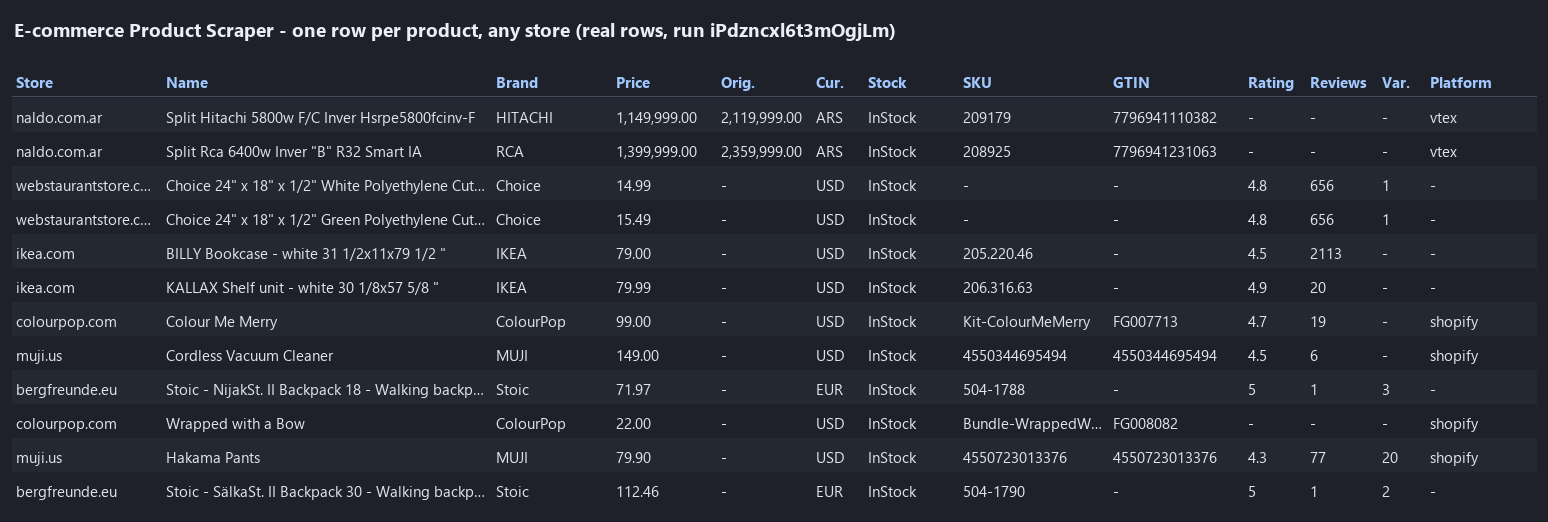
<a href="https://console.apify.com/actors/cYy3xGj0rHwSo93YR"><img src="https://api.apify.com/v2/key-value-stores/qNQ9zP0xaj2yxGeMY/records/ecommerce-product-scraper-output.png" alt="E-commerce Product Scraper output - product rows from seven stores with price, stock, SKU, GTIN and rating" style="width:70%"></a>

A real row (bergfreunde.eu, run `08Re5Qwm1rV0nMnRc`, trimmed):

```json
{
  "url": "https://www.bergfreunde.eu/stoic-nijakst-ii-backpack-18-walking-backpack/",
  "name": "Stoic - NijakSt. II Backpack 18 - Walking backpack",
  "brand": "Stoic",
  "price": 71.97,
  "currency": "EUR",
  "availability": "InStock",
  "inStock": true,
  "sku": "504-1788",
  "rating": 5,
  "reviewCount": 1,
  "category": "Outdoor equipment > Backpacks > Walking backpacks",
  "variantCount": 3,
  "shippingCost": { "amount": 4.45, "currency": "EUR", "destination": "AT" },
  "deliveryTime": { "handlingDaysMin": 1, "handlingDaysMax": 1, "transitDaysMin": 1, "transitDaysMax": 2 },
  "returnsPolicy": { "category": "MerchantReturnFiniteReturnWindow", "days": 100, "fees": "FreeReturn", "method": "ReturnByMail" },
  "marketplace": "bergfreunde.eu",
  "detailStatus": "detail-page",
  "extractionMethod": "json-ld",
  "fetchedVia": "direct"
}
```

#### Fields

Fill rates from a 93-product run across seven stores (IKEA, Bergfreunde, ColourPop, WebstaurantStore, Naldo, Nalgene, MUJI; run `iPdzncxl6t3mOgjLm`). A field is filled when the store publishes it.

| Field | Meaning | Filled |
|---|---|---:|
| `url`, `name`, `price`, `currency`, `availability`, `inStock`, `image`, `images`, `brand`, `category` | The product and its offer | 100% |
| `offers` | The same offer in the schema.org shape (`price`, `priceCurrency`, `availability`...) | 100% |
| `sku` | Store SKU | 84% |
| `breadcrumbs` | The page's breadcrumb trail | 68% |
| `productId` | Shopify / WooCommerce / VTEX / schema.org product id | 68% |
| `rating`, `reviewCount` | Average rating and number of reviews | 67% |
| `mpn` | Manufacturer part number | 54% |
| `gtin` | GTIN / EAN / UPC (8-14 digits) on the product; variants carry their own | 45% |
| `variants`, `variantCount` | Sizes, colours, options with SKU, GTIN, price, stock, image | 45% |
| `seller`, `condition` | Seller and condition named in the offer | 48-49% |
| `returnsPolicy` | Return window, fees, method | 32% |
| `specifications`, `categories` | Specification table; platform categories | 32% |
| `productType`, `tags`, `createdAt`, `publishedAt`, `updatedAt`, `handle` | Shopify / WooCommerce catalogue data | 16-35% |
| `originalPrice`, `discountPercent` | Price before the discount, when discounted | 19% |
| `shipping`, `shippingCost`, `deliveryTime` | Shipping offers from the page | 16% |
| `paymentPlans`, `paymentMethods`, `warranty` | Installments and warranty (VTEX stores) | 16% |
| `platform`, `marketplace`, `inputUrl`, `sourceUrl`, `keyword` | Where the product came from | - |
| `detailStatus`, `extractionMethod`, `fetchedVia` | How it was read: platform feed or page, which sources, which route | 100% |
| `monitorStatus`, `previousPrice`, `previousAvailability`, `priceChange`, `changedFields`, `firstSeenAt` | Monitor mode only | - |

The run summary (key-value store record `RUN_SUMMARY`) lists, per input, how many products were found and delivered, the platform and method used, and every page not read with the reason (not found, refused, no product data).

### How can I use online store product data?

- 💲 **Pricing teams** - track competitors' prices, discounts and stock across many stores in one scheduled run, with only the changes delivered.
- 🛍️ **Marketplaces and comparison sites** - fill a catalogue with GTINs, brands, images and variants from brand stores.
- 📦 **Brands and distributors** - check how resellers list, price and stock your products (MAP monitoring).
- 🔎 **Market researchers** - pull whole categories with ratings and review counts to size a niche.
- 🤖 **AI and agent builders** - feed clean product rows (`compact` mode) to an LLM or a shopping assistant.
- 📈 **Dropshippers and buyers** - watch a supplier's catalogue for new products and stock changes.

### How much does it cost to scrape products?

E-commerce Product Scraper is pay-per-result: **$0.45 per 1,000 products**, no start fee and no fee per listing page. Pages without product data, products your filters remove, duplicates and unchanged monitor products are not charged.

| Products | Cost |
|---:|---:|
| 100 | $0.045 |
| 1,000 | $0.45 |
| 10,000 | $4.50 |
| 100,000 | $45.00 |

Two surcharges apply only to products from stores that refuse normal requests, because those pages go through paid proxies: **+$7.60 per 1,000** for products read through the residential proxy and **+$6.20 per 1,000** for products read through the Unblocker. Every row's `fetchedVia` field says which route read it. Measured speed on the default 512 MB: 93 products from seven stores in 23 s; 1,000 products from one Shopify store in 8 minutes.

### Integrations, API, scheduling & MCP

- **Schedules:** run E-commerce Product Scraper daily or hourly from the **Schedules** tab; turn on **Monitor mode** to get only new products and price or stock changes.
- **Webhooks:** call a URL when a run finishes to push products to your database, Slack or a sheet.
- **No-code:** Make, Zapier, n8n, Google Sheets, Airtable via [Apify integrations](https://docs.apify.com/integrations).
- **API:** start runs and read products with `apify-client` - code on the [API tab](https://apify.com/TopApi/ecommerce-product-scraper/api/python) and the [Apify API reference](https://docs.apify.com/api/v2).
- **MCP / AI agents:** connect Claude, Cursor or any MCP client through the [MCP tab](https://apify.com/TopApi/ecommerce-product-scraper/api/mcp) and ask for products from a store in plain language.

### More e-commerce scrapers

<table>
<tr>
<td>👗 <a href="https://apify.com/TopApi/shein-product-scraper">SHEIN Product Scraper</a></td>
<td>🛍️ <a href="https://apify.com/TopApi/tiktok-shop-scraper">TikTok Shop Scraper</a></td>
<td>🌎 <a href="https://apify.com/TopApi/mercadolibre-scraper">MercadoLibre Scraper</a></td>
</tr>
<tr>
<td>🏮 <a href="https://apify.com/TopApi/taobao-scraper">Taobao & Tmall Product Scraper</a></td>
<td>🇰🇷 <a href="https://apify.com/TopApi/naver-shopping-scraper">Naver Shopping Scraper</a></td>
<td>🧱 <a href="https://apify.com/TopApi/website-technology-scraper">Website Technology Scraper</a> (which platform a store runs on)</td>
</tr>
</table>

All our actors: [apify.com/TopApi](https://apify.com/TopApi).

### Limits & empty runs

- **Stores that render products with JavaScript only:** product pages almost always carry structured data, but some search and category pages build their product list in the browser (Target, Best Buy and Zumiez search pages in our tests). Paste category or product URLs of those stores instead.
- **Marketplaces with bot walls:** each store is tried directly, then through the datacenter proxy, the residential proxy and the Unblocker. A store that refuses every route (eBay and Etsy search pages in our tests) is named in the run summary and nothing is charged for it. Walmart opened only through the Unblocker, and its pages carry no schema.org product data, so they yield no rows.
- **Platform caps:** Shopify catalogue feeds go to 25,000 products per store; VTEX search to 2,500 per query; WooCommerce has no cap.
- **Prices follow the store's market:** many stores price by visitor country. Pick a proxy country to see that market's prices; every row carries its `currency`.
- **Empty dataset:** the run summary says why: page not found, refused on every route, no product data on the page, or filters removed everything. Nothing is charged.

### FAQ

#### How many products can E-commerce Product Scraper collect in one run?

As many as you set in **Total maximum products** (0 = no limit). On Shopify and WooCommerce stores whole catalogues are read through the store's feed; on other stores every listing page is followed up to **Max listing pages per URL**.

#### Can E-commerce Product Scraper track price changes on a schedule?

Yes. Turn on **Monitor mode**, save the input as a task and schedule it. Each run delivers only products that are new or whose price, original price or stock changed, with `previousPrice`, `previousAvailability` and `changedFields`. Unchanged products are not charged.

#### Which stores does E-commerce Product Scraper work with?

Any store whose pages publish product data for search engines (schema.org JSON-LD, microdata, RDFa or OpenGraph product tags), which most stores do. Shopify, WooCommerce and VTEX stores are also read through their own product feeds for full variant data.

#### Can E-commerce Product Scraper search for a keyword inside a store?

Yes. Put the keyword under **Keyword search** and the stores under **Stores to search in**. It uses the store's own search (Shopify, WooCommerce, VTEX, Magento, BigCommerce, or the search address the store declares).

#### Can I get one row per variant with E-commerce Product Scraper?

Yes, turn on **One row per variant**: each size or colour becomes a row with its own SKU, GTIN, price and stock, linked to its product by `parentId`. Each row is charged as a product.

#### Can I use E-commerce Product Scraper with the Apify API?

Yes. Use `apify-client` for [Node.js](https://apify.com/TopApi/ecommerce-product-scraper/api/javascript) or [Python](https://apify.com/TopApi/ecommerce-product-scraper/api/python) to start runs and read products; the API tab has code ready to paste.

#### Can I use E-commerce Product Scraper through an MCP server?

Yes. Open the [MCP tab](https://apify.com/TopApi/ecommerce-product-scraper/api/mcp), connect Claude Desktop, Cursor or another MCP client and ask for products from a store URL. Turn on **Compact output** for short rows.

#### Do I need an account, cookies or an API key for E-commerce Product Scraper?

No. It reads public store pages only; you paste URLs or a keyword and a store.

#### Why did E-commerce Product Scraper return no products?

Open the `RUN_SUMMARY` record: it lists each page not read and why. The usual causes are a page that is not a product or listing page (a blog or help page), a search page that lists products only through JavaScript (paste a category URL instead), filters that removed everything, or a store that refused every route.

#### Is it legal to scrape product data from online stores?

E-commerce Product Scraper extracts only publicly available product information - names, prices, stock and store details. It does not log in or collect private data.

#### Your feedback

Missing a store, a field or a platform? Open an issue on the [Issues tab](https://apify.com/TopApi/ecommerce-product-scraper/issues/open) and we will look at it.

# Actor input Schema

## `startUrls` (type: `array`):

Any online-store URL: a product page, a category or collection page, a search results page or a store home page. The page type is detected for you, e.g. https://www.allbirds.com/collections/mens

## `detailsUrls` (type: `array`):

URLs you know are single product pages (read as products without detection), e.g. https://www.ikea.com/us/en/p/billy-bookcase-white-00263850/

## `listingUrls` (type: `array`):

URLs you know are category, collection or search pages: every product listed is read, following the store's pagination.

## `keyword` (type: `string`):

Search for this term inside every store under "Stores to search in" (the store's own search), e.g. "backpack". Several keywords: use Keywords below.

## `keywords` (type: `array`):

More search terms, one per line. Each keyword is searched in each store.

## `storeUrls` (type: `array`):

Store domains or URLs for the keyword search, e.g. muji.us, nalgene.com, www.gymshark.com. Empty = the stores of your Start URLs.

## `maxListingPages` (type: `integer`):

How many pages of a category or search page to follow (platform feeds such as Shopify and WooCommerce read up to 250 / 100 products per page).

## `onlyInStock` (type: `boolean`):

Skip products the store marks out of stock (or sold out). Products the store gives no stock status for are skipped too.

## `onlyOnSale` (type: `boolean`):

Keep products whose price is below the store's original / compare-at price.

## `minPrice` (type: `number`):

Keep products priced at or above this amount, in the store's currency. Products without a price are skipped when set.

## `maxPrice` (type: `number`):

Keep products priced at or below this amount, in the store's currency. Products without a price are skipped when set.

## `onlyWithGtin` (type: `boolean`):

Keep products with a barcode (GTIN / EAN / UPC / ISBN) on the product or one of its variants.

## `updatedSince` (type: `string`):

Skip products the store says were last updated before this date (YYYY-MM-DD) or this many days ago ("7 days"). Stores that publish no update date (most non-Shopify stores) are not filtered.

## `urlIncludePatterns` (type: `array`):

Keep only products whose URL contains one of these texts or regular expressions, e.g. /mens- or /products/.\*-boot. Applied to listing links before they are opened.

## `urlExcludePatterns` (type: `array`):

Skip products whose URL contains one of these texts or regular expressions, e.g. gift-card or /sale/.

## `scrapeProductDetails` (type: `boolean`):

Open each product found on a listing for what only its page carries (rating, reviews, GTIN, breadcrumbs, shipping). Off = faster rows from the store's feed (Shopify, WooCommerce, VTEX).

## `includeVariants` (type: `boolean`):

Every size / colour / option the store lists, with its own SKU, barcode, price, stock and image.

## `additionalProperties` (type: `boolean`):

Adds the product's other attributes (specifications table, colour, size, material, model, weight) as one object.

## `includeReviews` (type: `boolean`):

Adds the reviews the product page publishes in its structured data (author, rating, title, text, date).

## `maxReviewsPerProduct` (type: `integer`):

Cap for the reviews array when reviews are included.

## `includeDescription` (type: `boolean`):

The product description as plain text. Turn off for smaller rows (e.g. for AI agents).

## `monitorMode` (type: `boolean`):

Deliver only products new since the previous monitor run (and, with the switch below, products whose price or stock changed). Pairs with a daily schedule.

## `monitorChanges` (type: `boolean`):

In monitor mode, re-deliver a known product when its price, original price or availability changed, with the previous values and the changed fields named.

## `monitorStoreName` (type: `string`):

Named key-value store that remembers the products already delivered. Use one name per watch list.

## `maxProductResults` (type: `integer`):

Products to deliver in this run across all inputs (0 = no limit). Shopify catalogue feeds go to 25,000 products per store; VTEX search to 2,500 per query.

## `maxResultsPerUrl` (type: `integer`):

Cap per start URL or per keyword-and-store search (0 = no per-URL cap), so one big catalogue does not use up the total.

## `compact` (type: `boolean`):

Core fields only (name, brand, price, original price, currency, stock, SKU, GTIN, image, rating, category, store, URL), trimmed for AI agents and spreadsheets.

## `splitVariants` (type: `boolean`):

Deliver each variant (size, colour...) as its own row with its own SKU, GTIN, price and stock (each row is charged as a product).

## `descriptionMaxLength` (type: `integer`):

Cut descriptions to this many characters (0 = full text).

## `proxyConfiguration` (type: `object`):

Default: each store is read directly first, then through the Apify datacenter proxy, residential proxy and Unblocker only if it refuses. Pick a country to see that market's prices.

## `useResidentialFallback` (type: `boolean`):

Let a store that refuses the datacenter route move to the Apify residential proxy (adds the residential surcharge per product read that way).

## `useUnblockerFallback` (type: `boolean`):

Let a store that refuses even the residential proxy move to the Apify Unblocker (adds the Unblocker surcharge per product read that way).

## `maxConcurrency` (type: `integer`):

Pages fetched in parallel across all stores.

## `maxConcurrencyPerStore` (type: `integer`):

Pages fetched in parallel from one store.

## `requestTimeoutSecs` (type: `integer`):

Per page. The Unblocker always gets at least 90 s.

## `maxRunSeconds` (type: `integer`):

Stop collecting after this many seconds and finish cleanly (0 = until the run timeout).

## Actor input object example

```json
{
  "startUrls": [
    {
      "url": "https://www.allbirds.com/collections/mens"
    },
    {
      "url": "https://nalgene.com/product-category/by-shape/"
    }
  ],
  "maxListingPages": 20,
  "onlyInStock": false,
  "onlyOnSale": false,
  "onlyWithGtin": false,
  "scrapeProductDetails": true,
  "includeVariants": true,
  "additionalProperties": true,
  "includeReviews": false,
  "maxReviewsPerProduct": 20,
  "includeDescription": true,
  "monitorMode": false,
  "monitorChanges": true,
  "monitorStoreName": "ecommerce-product-monitor",
  "maxProductResults": 20,
  "maxResultsPerUrl": 0,
  "compact": false,
  "splitVariants": false,
  "descriptionMaxLength": 0,
  "proxyConfiguration": {
    "useApifyProxy": true
  },
  "useResidentialFallback": true,
  "useUnblockerFallback": true,
  "maxConcurrency": 8,
  "maxConcurrencyPerStore": 4,
  "requestTimeoutSecs": 30,
  "maxRunSeconds": 0
}
```

# Actor output Schema

## `products` (type: `string`):

The dataset: one item per product with price, stock, identifiers, images, rating, variants and source.

## `summary` (type: `string`):

Per input: products delivered, listing pages, platform and method; pages not read and why; routes used and charged events.

# API

You can run this Actor programmatically using our API. Below are code examples in JavaScript, Python, and CLI, as well as the OpenAPI specification and MCP server setup.

## JavaScript example

```javascript
import { ApifyClient } from 'apify-client';

// Initialize the ApifyClient with your Apify API token
// Replace the '<YOUR_API_TOKEN>' with your token
const client = new ApifyClient({
    token: '<YOUR_API_TOKEN>',
});

// Prepare Actor input
const input = {
    "startUrls": [
        {
            "url": "https://www.allbirds.com/collections/mens"
        },
        {
            "url": "https://nalgene.com/product-category/by-shape/"
        }
    ],
    "maxProductResults": 20
};

// Run the Actor and wait for it to finish
const run = await client.actor("topapi/ecommerce-product-scraper").call(input);

// Fetch and print Actor results from the run's dataset (if any)
console.log('Results from dataset');
console.log(`💾 Check your data here: https://console.apify.com/storage/datasets/${run.defaultDatasetId}`);
const { items } = await client.dataset(run.defaultDatasetId).listItems();
items.forEach((item) => {
    console.dir(item);
});

// 📚 Want to learn more 📖? Go to → https://docs.apify.com/api/client/js/docs

```

## Python example

```python
from apify_client import ApifyClient

# Initialize the ApifyClient with your Apify API token
# Replace '<YOUR_API_TOKEN>' with your token.
client = ApifyClient("<YOUR_API_TOKEN>")

# Prepare the Actor input
run_input = {
    "startUrls": [
        { "url": "https://www.allbirds.com/collections/mens" },
        { "url": "https://nalgene.com/product-category/by-shape/" },
    ],
    "maxProductResults": 20,
}

# Run the Actor and wait for it to finish
run = client.actor("topapi/ecommerce-product-scraper").call(run_input=run_input)

# Fetch and print Actor results from the run's dataset (if there are any)
print(f"💾 Check your data here: https://console.apify.com/storage/datasets/{run.default_dataset_id}")
for item in client.dataset(run.default_dataset_id).iterate_items():
    print(item)

# 📚 Want to learn more 📖? Go to → https://docs.apify.com/api/client/python/docs/quick-start

```

## CLI example

```bash
echo '{
  "startUrls": [
    {
      "url": "https://www.allbirds.com/collections/mens"
    },
    {
      "url": "https://nalgene.com/product-category/by-shape/"
    }
  ],
  "maxProductResults": 20
}' |
apify call topapi/ecommerce-product-scraper --silent --output-dataset

```

## MCP server setup

```json
{
    "mcpServers": {
        "apify": {
            "type": "http",
            "url": "https://mcp.apify.com/?tools=fetch-actor-details,topapi/ecommerce-product-scraper"
        }
    }
}
```

The hosted server signs you in with OAuth on first connect, so no API token belongs in this config. Clients without OAuth support can send an `Authorization: Bearer <APIFY_API_TOKEN>` header instead, using a token from API & Integrations in Apify Console (https://console.apify.com/settings/integrations).

## OpenAPI specification

Download the OpenAPI definition: https://api.apify.com/v2/actors/cYy3xGj0rHwSo93YR/builds/8CnYhXy7nTA9GCFWv/openapi.json
