| 🎉 Event name and URL (`name`, `url`) |
📅 Start and end, UTC (`utcStartDate`, `utcEndDate`) |
🕐 Date line and time zone (`dateTimeSentence`, `timezone`) |
| 📍 Venue (`location.name`) |
🏠 Address (`address`) |
🌐 Coordinates (`location.latitude`, `location.longitude`) |
| ⭐ Interested (`usersInterested`) |
✅ Going (`usersGoing`) |
👥 Responded, exact (`usersResponded`) |
| 🎟️ Tickets (`ticketsInfo.buyUrl`, `ticketsInfo.ticketProvider`) |
💲 Price range (`priceRangeText`) |
🏷️ Categories (`discoveryCategories`) |
| 🏢 Hosts (`organizedBy`, `organizators`) |
📝 Description and links (`description`, `externalLinks`) |
🖼️ Cover image (`imageUrl`, `imageCaption`) |
| 🔁 Recurring dates (`eventFrequency`, `childEvents`, `parentEvent`) |
💻 Online, past, canceled (`isOnline`, `isPast`, `isCanceled`) |
📇 Organizer contact (`organizerContact`, `organizerEmail`) |
On 40 events with event details from two test runs (20 from the New York city feed, 20 from London), name, start time, date line, cover, description, hosts, coordinates, time zone and interested / going counts were filled on 100% of rows, responded count 98%, a street address 88% (on the rest `address` repeats the venue name the host typed), ticket link 80%, end time 50%, categories 32% and links in the description 32% (hosts often set no end time).
### How to scrape Facebook events with Facebook Events Scraper
1. [Create a free Apify account](https://console.apify.com/sign-up) — $5 of monthly credit, no card needed.
2. Open [Facebook Events Scraper](https://apify.com/TopApi/facebook-events-scraper) and click **Try for free**.
3. Add keywords, cities, Pages or event URLs, and set **Max events**.
4. Pick a date preset or range, and turn on **Include event details** or **Include organizer contacts** if you need them.
5. Click **Start**. Events stream into the dataset as they are found.
6. Open the **Storage** tab and **Export** as JSON, CSV or Excel — or let a schedule run it for you.
### ⬇️ Input
| Parameter | Type | Description |
|---|---|---|
| **🔍 What to scrape** | | |
| `startUrls` | List | Facebook URLs: an event (`/events/1740113193315403/`), a Page or its events tab (`/TheGarden/events`), a city (`/events/explore/us-new-york/108424279189115/`) or an events search (`/events/search/?q=jazz`). |
| `searchQueries` | List | Keywords for Facebook's event search, e.g. `jazz`, `comedy night`. |
| `searchLocation` | String | City for the keyword search: an explore URL or its place id. |
| `cityUrls` | List | Cities: explore URLs or place ids. |
| `pageUrls` | List | Pages: URL, username or numeric id. |
| **🎯 Filters** | | |
| `timeRange` | Select | Any date, Today, Tomorrow, This week, This weekend, Next week, Next 30 days. Default: any date. A `?time=` in a city URL is used only when this is Any date. |
| `dateFrom`, `dateTo` | String | A date range (`2026-11-01`, `today`, `7 days`). Overrides `timeRange` and a city URL's `?time=`. |
| `includePastEvents` | Boolean | Also return ended events; reads a Page's Past tab too. Default `false`. |
| **✂️ Refine results** | | |
| `keywordFilter` | String | Keep events whose name, description, venue or hosts contain a word (comma = any). |
| `exactMatch` | Boolean | Keyword search: keep events whose name contains the whole keyword. |
| `categories` | List | Facebook categories, e.g. `Music`, `Comedy`, `Dance`, `Fitness`, `Party`, `Networking`. |
| `onlineOnly`, `paidOnly`, `excludeCanceled` | Boolean | Online events only; events with a ticket link or price only; skip canceled events. |
| **➕ Extra data** | | |
| `includeEventDetails` | Boolean | City and Page lists: read each event's page — charged as **event-details** at $0.0018 per event that gets them. |
| `includeOrganizerContacts` | Boolean | The host Page's email, phone, website, address — charged as **organizer-contact** at $0.0047 per event that gets one. |
| `followHosts`, `maxHostPages` | Boolean, Integer | Also read the upcoming events of the hosts of delivered events (default 10 Pages). |
| **🔁 Monitoring** | | |
| `monitorMode`, `monitorStoreName` | Boolean, String | Return only events earlier runs did not deliver (the memory keeps the latest 50,000 per input). Pair with a daily schedule. |
| **📦 Output** | | |
| `maxEvents` | Integer | Cap for the run. Default `50`; `0` = no cap. |
| `maxEventsPerSource` | Integer | Cap per keyword, city, Page or URL. `0` = up to 5,000 each. |
| `compact` | Boolean | Core fields only, sized for AI agents and MCP. |
| **⚙️ Advanced** | | |
| `proxyConfiguration`, `maxConcurrency` | Object, Integer | Proxy settings (see Limits) and how many inputs are read at once (default 4). |
#### Input JSON
```json
{
"searchQueries": ["jazz", "comedy"],
"searchLocation": "https://www.facebook.com/events/explore/us-new-york/108424279189115/",
"cityUrls": ["https://www.facebook.com/events/explore/uk-london/106078429431815/"],
"timeRange": "this_weekend",
"includeEventDetails": true,
"maxEvents": 200
}
```
#### Find a city's place id on Facebook
Open [facebook.com/events](https://www.facebook.com/events/), pick a city and copy the URL: `https://www.facebook.com/events/explore/us-chicago/108659242498155/`. Paste the URL or just the number. Place ids seen on Facebook: New York `108424279189115`, London `106078429431815`, Los Angeles `110970792260960`, Chicago `108659242498155`, Houston `115963528414384`, San Francisco `114952118516947`, Seattle `110843418940484`, Las Vegas `108081209214649`, Toronto `110941395597405`, Paris `110774245616525`. A city name alone (`New York`) is not a place id.
#### Give keyword searches a location
Facebook ranks search results near the searching IP when no location is set, so set `searchLocation` to the city's place id or explore URL: `"searchQueries": ["farmers market"], "searchLocation": "108424279189115"` returns farmers markets in and around New York.
#### Pick the source by what you need
A city feed lists everything Facebook recommends in that city, read page by page until the feed ends or your cap is reached. A Page's events tab lists what that organizer or venue hosts, 8 events per request. Keyword search finds events by name across Facebook. Facebook rate-limits long Page lists (see Limits).
### ⬆️ Output
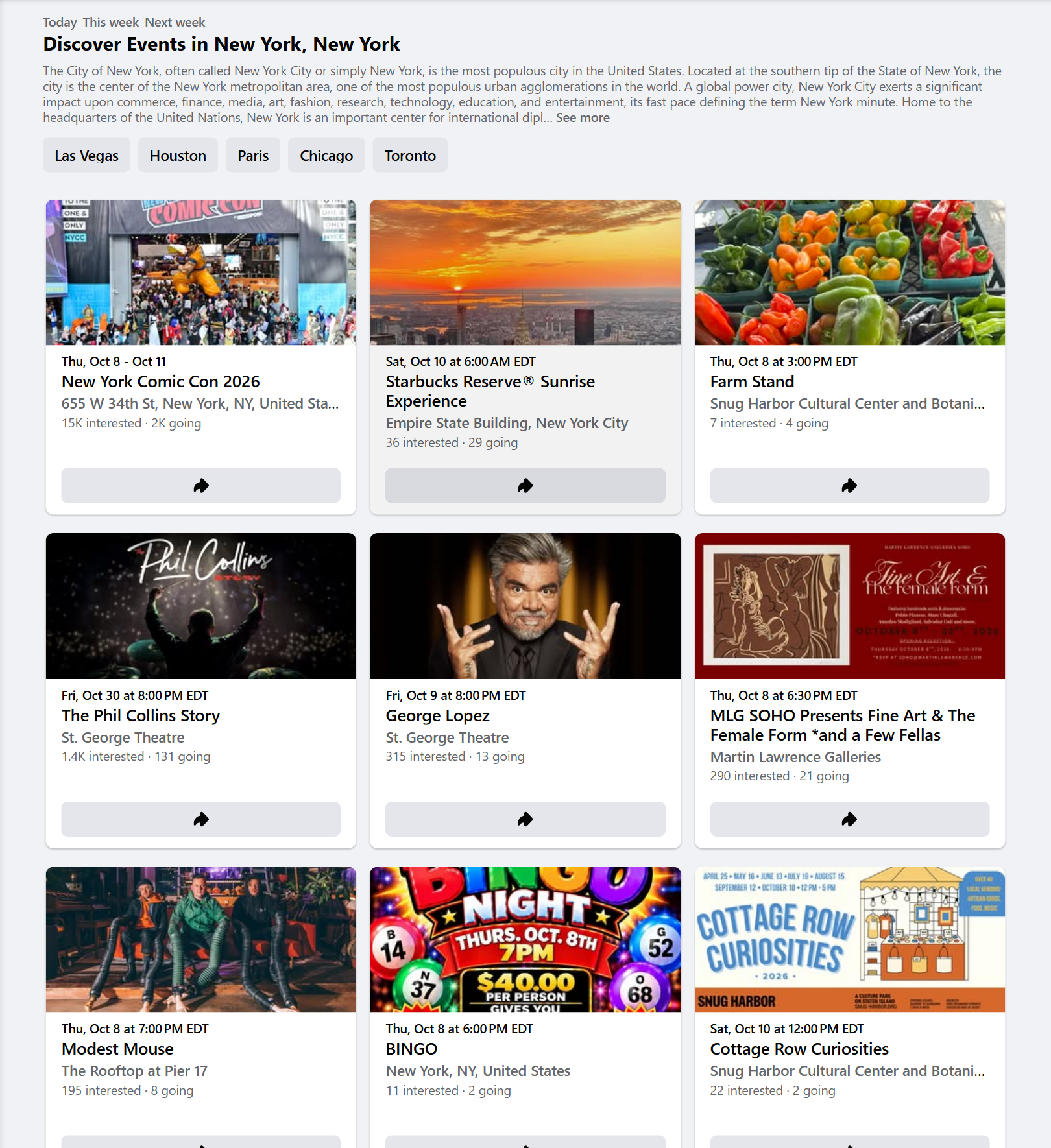
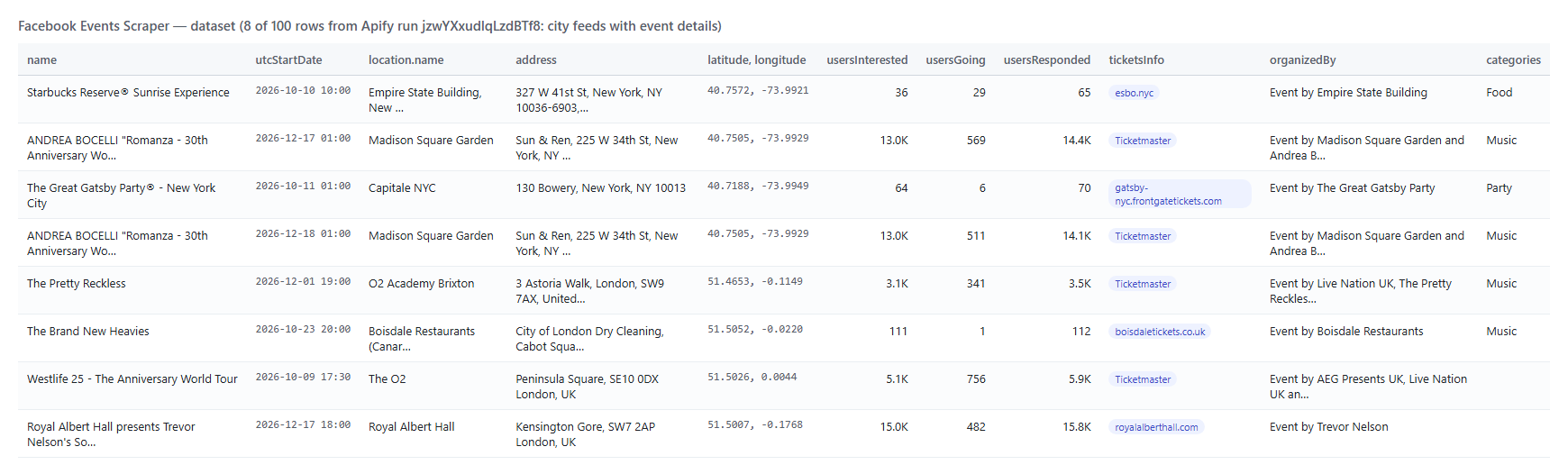
Every event becomes one dataset item. Here is the table view of a run on the New York and London city feeds with event details:
 One row as JSON (shortened):
```json
{
"id": "937082352297623",
"url": "https://www.facebook.com/events/937082352297623/",
"name": "Starbucks Reserve® Sunrise Experience",
"dateTimeSentence": "Saturday, October 10, 2026 at 6:00 AM – 9:00 AM EDT",
"utcStartDate": "2026-10-10T10:00:00.000Z",
"utcEndDate": "2026-10-10T13:00:00.000Z",
"timezone": "EDT",
"location": { "name": "Empire State Building, New York City", "latitude": 40.757160536882, "longitude": -73.992094062463, "city": "New York, New York", "cityId": "108424279189115" },
"address": "327 W 41st St, New York, NY 10036-6903, United States",
"usersInterested": 36,
"usersGoing": 29,
"usersResponded": 65,
"ticketsInfo": { "buyUrl": "https://esbo.nyc/sunrisetix-fb", "title": "Tickets", "subtitle": "esbo.nyc/sunrisetix-fb" },
"organizedBy": "Event by Empire State Building",
"organizators": [{ "id": "100044314093645", "name": "Empire State Building", "url": "https://www.facebook.com/empirestatebuilding", "isVerified": true }],
"discoveryCategories": [{ "label": "Food" }],
"organizerContact": { "category": "Landmark & Historical Place", "phone": "(212) 736-3100", "website": "http://esbo.nyc/socials-fb", "address": "20 West 34th Street, New York, NY, United States, 10118", "followers": 1917435 },
"detailsLevel": "full",
"inputUrl": "https://www.facebook.com/events/explore/us-new-york/108424279189115/"
}
```
#### Facebook event fields
| Field | What it is |
|---|---|
| `id`, `url`, `name` | Facebook's event id, the event URL and its name |
| `dateTimeSentence`, `startTime`, `timezone` | Facebook's date line, the short start line and the time zone label |
| `startTimestamp`, `utcStartDate`, `endTimestamp`, `utcEndDate`, `duration` | Start and end as Unix seconds and ISO 8601 UTC; duration text |
| `daysUntilEvent`, `isHappeningNow`, `isPast`, `isCanceled` | Timing flags computed at run time or printed by Facebook |
| `isOnline`, `onlineSetup`, `onlineUrl` | Online event, its type (Facebook Live, third party) and link when public |
| `location`, `address` | Venue name, place type, Page URL, coordinates, city and city id; the one-line street address from the event page (list rows, and events whose host typed only a place name, repeat the venue name) |
| `usersInterested`, `usersGoing`, `usersResponded`, `countsApproximate` | Counts; `countsApproximate` is `true` when Facebook printed them rounded (15K) |
| `ticketsInfo`, `priceRangeText` | Ticket link, provider and label; the price range city lists show |
| `organizedBy`, `organizators` | The host line and each host's id, name, URL and verified badge |
| `discoveryCategories`, `description`, `externalLinks` | Categories, the full description and the links in it |
| `eventFrequency`, `hasChildEvents`, `childEventsCount`, `childEvents`, `parentEvent` | Recurring events: frequency, number of dates, the nearest dates, the series |
| `imageUrl`, `imageCaption`, `coverVideo` | Cover image, its alt text and a cover video |
| `organizerContact`, `organizerEmail` | Organizer contacts add-on |
| `detailsLevel`, `source`, `inputUrl`, `scrapedAt` | `full` or `list`, the input the event came from (`source.listedId` = the series id that input listed, when the row is its next date), the run time |
City and Page lists without event details return the list fields (`detailsLevel: "list"`): name, start time and date line, venue (repeated in `address`), interested / going counts on city feeds, cover and flags. Keyword-search results and event URLs are read from each event's page and always come with the full details. When an event page is read (keyword search, event URLs, event details), a recurring event listed by its series id is returned as its next dated occurrence (`id`) with the series in `parentEvent`; inputs that list both the series and that date give one row.
### How can I use Facebook events data?
- 🎟️ **Ticketing and promoters** — track competing events, ticket providers and price ranges in your cities.
- 🏟️ **Venues and bookers** — see which acts and organizers fill rooms nearby, with interested and going counts.
- 🤝 **Sponsors and vendors** — find upcoming events in your category and city to sponsor, exhibit at or supply.
- 🗺️ **City guides and apps** — feed a "this weekend" calendar with dates, coordinates and cover images.
- 📊 **Market research** — compare event volume and categories between cities week over week.
- 🤖 **AI and research teams** — use `compact` rows as clean context for agents and RAG pipelines.
### How much does it cost to scrape Facebook events?
Facebook Events Scraper is pay-per-event: **$2.40 per 1,000 events**, no start fee.
| Events | Events only | With event details (city / Page lists) |
|---:|---:|---:|
| 10 | $0.024 | $0.042 |
| 100 | $0.24 | $0.42 |
| 1,000 | $2.40 | $4.20 |
| 10,000 | $24.00 | $42.00 |
Event URLs and keyword-search results include the full details at the base price. Organizer contacts add $0.0047 per event that receives an email, phone or website. There is nothing else to pay: Apify platform usage is included in these prices. A test run delivered 20 New York events with event details in 7.9 s on the default 512 MB.
### Facebook events in your tools: integrations, API, scheduling & MCP
- **Schedules:** run Facebook Events Scraper daily or weekly from the **Schedules** tab; with **monitor mode** each run returns only new events.
- **Webhooks:** fire a URL when a run finishes — push events to your CRM, Slack or a sheet.
- **No-code:** Make, Zapier, n8n, Google Sheets, Airtable, Slack via [Apify integrations](https://docs.apify.com/integrations).
- **API:** call it from Node.js or Python with `apify-client` — code on the [API tab](https://apify.com/TopApi/facebook-events-scraper/api/python) and the [Apify API reference](https://docs.apify.com/api/v2).
- **MCP / AI agents:** connect Claude, Cursor or any MCP client through the [MCP tab](https://apify.com/TopApi/facebook-events-scraper/api/mcp) and ask for Facebook events in plain language.
### More Facebook and social media scrapers by TopApi
One row as JSON (shortened):
```json
{
"id": "937082352297623",
"url": "https://www.facebook.com/events/937082352297623/",
"name": "Starbucks Reserve® Sunrise Experience",
"dateTimeSentence": "Saturday, October 10, 2026 at 6:00 AM – 9:00 AM EDT",
"utcStartDate": "2026-10-10T10:00:00.000Z",
"utcEndDate": "2026-10-10T13:00:00.000Z",
"timezone": "EDT",
"location": { "name": "Empire State Building, New York City", "latitude": 40.757160536882, "longitude": -73.992094062463, "city": "New York, New York", "cityId": "108424279189115" },
"address": "327 W 41st St, New York, NY 10036-6903, United States",
"usersInterested": 36,
"usersGoing": 29,
"usersResponded": 65,
"ticketsInfo": { "buyUrl": "https://esbo.nyc/sunrisetix-fb", "title": "Tickets", "subtitle": "esbo.nyc/sunrisetix-fb" },
"organizedBy": "Event by Empire State Building",
"organizators": [{ "id": "100044314093645", "name": "Empire State Building", "url": "https://www.facebook.com/empirestatebuilding", "isVerified": true }],
"discoveryCategories": [{ "label": "Food" }],
"organizerContact": { "category": "Landmark & Historical Place", "phone": "(212) 736-3100", "website": "http://esbo.nyc/socials-fb", "address": "20 West 34th Street, New York, NY, United States, 10118", "followers": 1917435 },
"detailsLevel": "full",
"inputUrl": "https://www.facebook.com/events/explore/us-new-york/108424279189115/"
}
```
#### Facebook event fields
| Field | What it is |
|---|---|
| `id`, `url`, `name` | Facebook's event id, the event URL and its name |
| `dateTimeSentence`, `startTime`, `timezone` | Facebook's date line, the short start line and the time zone label |
| `startTimestamp`, `utcStartDate`, `endTimestamp`, `utcEndDate`, `duration` | Start and end as Unix seconds and ISO 8601 UTC; duration text |
| `daysUntilEvent`, `isHappeningNow`, `isPast`, `isCanceled` | Timing flags computed at run time or printed by Facebook |
| `isOnline`, `onlineSetup`, `onlineUrl` | Online event, its type (Facebook Live, third party) and link when public |
| `location`, `address` | Venue name, place type, Page URL, coordinates, city and city id; the one-line street address from the event page (list rows, and events whose host typed only a place name, repeat the venue name) |
| `usersInterested`, `usersGoing`, `usersResponded`, `countsApproximate` | Counts; `countsApproximate` is `true` when Facebook printed them rounded (15K) |
| `ticketsInfo`, `priceRangeText` | Ticket link, provider and label; the price range city lists show |
| `organizedBy`, `organizators` | The host line and each host's id, name, URL and verified badge |
| `discoveryCategories`, `description`, `externalLinks` | Categories, the full description and the links in it |
| `eventFrequency`, `hasChildEvents`, `childEventsCount`, `childEvents`, `parentEvent` | Recurring events: frequency, number of dates, the nearest dates, the series |
| `imageUrl`, `imageCaption`, `coverVideo` | Cover image, its alt text and a cover video |
| `organizerContact`, `organizerEmail` | Organizer contacts add-on |
| `detailsLevel`, `source`, `inputUrl`, `scrapedAt` | `full` or `list`, the input the event came from (`source.listedId` = the series id that input listed, when the row is its next date), the run time |
City and Page lists without event details return the list fields (`detailsLevel: "list"`): name, start time and date line, venue (repeated in `address`), interested / going counts on city feeds, cover and flags. Keyword-search results and event URLs are read from each event's page and always come with the full details. When an event page is read (keyword search, event URLs, event details), a recurring event listed by its series id is returned as its next dated occurrence (`id`) with the series in `parentEvent`; inputs that list both the series and that date give one row.
### How can I use Facebook events data?
- 🎟️ **Ticketing and promoters** — track competing events, ticket providers and price ranges in your cities.
- 🏟️ **Venues and bookers** — see which acts and organizers fill rooms nearby, with interested and going counts.
- 🤝 **Sponsors and vendors** — find upcoming events in your category and city to sponsor, exhibit at or supply.
- 🗺️ **City guides and apps** — feed a "this weekend" calendar with dates, coordinates and cover images.
- 📊 **Market research** — compare event volume and categories between cities week over week.
- 🤖 **AI and research teams** — use `compact` rows as clean context for agents and RAG pipelines.
### How much does it cost to scrape Facebook events?
Facebook Events Scraper is pay-per-event: **$2.40 per 1,000 events**, no start fee.
| Events | Events only | With event details (city / Page lists) |
|---:|---:|---:|
| 10 | $0.024 | $0.042 |
| 100 | $0.24 | $0.42 |
| 1,000 | $2.40 | $4.20 |
| 10,000 | $24.00 | $42.00 |
Event URLs and keyword-search results include the full details at the base price. Organizer contacts add $0.0047 per event that receives an email, phone or website. There is nothing else to pay: Apify platform usage is included in these prices. A test run delivered 20 New York events with event details in 7.9 s on the default 512 MB.
### Facebook events in your tools: integrations, API, scheduling & MCP
- **Schedules:** run Facebook Events Scraper daily or weekly from the **Schedules** tab; with **monitor mode** each run returns only new events.
- **Webhooks:** fire a URL when a run finishes — push events to your CRM, Slack or a sheet.
- **No-code:** Make, Zapier, n8n, Google Sheets, Airtable, Slack via [Apify integrations](https://docs.apify.com/integrations).
- **API:** call it from Node.js or Python with `apify-client` — code on the [API tab](https://apify.com/TopApi/facebook-events-scraper/api/python) and the [Apify API reference](https://docs.apify.com/api/v2).
- **MCP / AI agents:** connect Claude, Cursor or any MCP client through the [MCP tab](https://apify.com/TopApi/facebook-events-scraper/api/mcp) and ask for Facebook events in plain language.
### More Facebook and social media scrapers by TopApi